


[ARCHIVED THREAD] - Talk to me about Linux (Page 1 of 3)
Posted: 4/21/2012 9:59:59 PM EDT
|
I don't really know jack about it, but I'm studying networking and I'll be required to take a class on it in the next semester or two. Legitimate productive uses? Fun recreational uses?
|
|
Quoted:
I don't really know jack about it, but I'm studying networking and I'll be required to take a class on it in the next semester or two. Legitimate productive uses? Fun recreational uses? Free... as in speech, and as in beer (most distributions). Best way to learn/explore it? Go download an Iso image, burn it to CD/DVD, and install it on an old PC. Alternatively, get a "Live CD" version (Knoppix or similar) and use it on your existing computer (it won't touch your hard drive unless you tell it to). If you wish, you can get a "Linux for Dummies" book to get you started. Virtually all of my "mission critical" systems (firewalls, PBX, network storage, etc) run some flavor of Linux. Desktops are either Windows or Linux. Forensic, network analysis, penetration testing, data recovery, etc... I do all of that under Linux. |
|
As the poster above said. If you want to learn Linux, download an ISO, burn it to a DVD, and install it on an old PC. Or set up your current PC to dual boot (back up everything FIRST).
If you want to learn A LOT, Slackware is a good one and it is very fun. Most companies use RedHat or some Redhat variant though. CentOS is a free RedHat variant. It has a heavy hold in the linux server market. |
|
Quoted: Quoted: I don't really know jack about it, but I'm studying networking and I'll be required to take a class on it in the next semester or two. Legitimate productive uses? Fun recreational uses? Just don't. Windows 7 or go home. 1) Did I mention I'm an IT student? 2) I like variety, and I sometimes like to fix stuff until it's broken. I'm typing this on a Mac with OS 10.7. There's a Toshiba laptop with Windows 7 sitting next to it. I can totally re-arrange my desk for a third computer.
|
It costs what its worth. Good OS to run if you're studying networking and want to learn Cisco IOS, since Linux is fucking weird and Cisco IOS is fucking weird, so if you're used to Linux and need to do something in IOS you say "Oh, its fucking weird, I'm used to this!" and no problem. |

|
Quoted: Quoted: Quoted: I don't really know jack about it, but I'm studying networking and I'll be required to take a class on it in the next semester or two. Legitimate productive uses? Fun recreational uses? Just don't. Windows 7 or go home. 1) Did I mention I'm an IT student? 2) I like variety, and I sometimes like to fix stuff until it's broken. I'm typing this on a Mac with OS 10.7. There's a Toshiba laptop with Windows 7 sitting next to it. I can totally re-arrange my desk for a third computer. That's different. If you enjoy the challenge go ahead. Edit. You caught me not reading the OP thoroughly.
|
|
Quoted: It costs what its worth. Good OS to run if you're studying networking and want to learn Cisco IOS, since Linux is fucking weird and Cisco IOS is fucking weird, so if you're used to Linux and need to do something in IOS you say "Oh, its fucking weird, I'm used to this!" and no problem. I've been playing with the Cisco IOS CLI for a couple months now, and I actually find it to be pretty simple. I don't think I could have figured it out on my own, but I've been able to run with it pretty well. |
|
Quoted:
[/div]
1) Did I mention I'm an IT student? 2) I like variety, and I sometimes like to fix stuff until it's broken. I'm typing this on a Mac with OS 10.7. There's a Toshiba laptop with Windows 7 sitting next to it. I can totally re-arrange my desk for a third computer. Then I'd recommend learning some basic *nix. Linux is big in the server market... in fact, the bulk of the WWW runs on Apache (which runs on Linux and *nix variants). It's always good to run a heterogenous network anyway. |
|
Pros: It's easier to setup than ever. Generally as easy as installing windows at this point. There's all kinds of programs available for it. Most are fairly easy to get going. Cons: If something goes wrong, I hope you enjoy reading books and trying to edit text files, and figure things out. Compatibility. There's lots of stuff out there for linux, but we live in a windows world. You are going to have problems, one way or another. I generally keep linux on one of my laptops. I hardly ever use it. If I were setting up a PC for a family member, especially on the cheap, I might consider installing linux for them. Especially if all they did was browse the web and use email. That sort of thing is basically trivial to get running these days. Playing games? Running actual copies of Microsoft Office and a million other programs? Not having to deal with all kinds of shit from everything that everyone uses? Spend the $100 and buy a copy of windows. It's a bargain compared to the learning curve and hours you'll be spending attempting to crest it on your own with linux. |
|
Quoted:
Quoted:
Quoted:
I don't really know jack about it, but I'm studying networking and I'll be required to take a class on it in the next semester or two. Legitimate productive uses? Fun recreational uses? Just don't. Windows 7 or go home. 1) Did I mention I'm an IT student? 2) I like variety, and I sometimes like to fix stuff until it's broken. I'm typing this on a Mac with OS 10.7. There's a Toshiba laptop with Windows 7 sitting next to it. I can totally re-arrange my desk for a third computer. Well then he's exactly right! Good luck! For a slightly more serious answer, Linux is kind of the AR-15 of operating systems. You can do *anything* with it, from turning it into a bolt action .50BMG, to bolting a glass breaker to the front. 
It's free, and people will freely give you better support than the shit you pay microsoft for, but you have to work at it a bit. (I don't have a problem with this, some people do) Almost all of the configuration information is in machine readable (and usually human readable) text files, easy to parse and process. |
|
Quoted: As the poster above said. If you want to learn Linux, download an ISO, burn it to a DVD, and install it on an old PC. Or set up your current PC to dual boot (back up everything FIRST). If you want to learn A LOT, Slackware is a good one and it is very fun. Most companies use RedHat or some Redhat variant though. CentOS is a free RedHat variant. It has a heavy hold in the linux server market. What kind of traits are desirable for a Linux based system? About the best I can do with what I have laying around is an old PowerPC based Mac. Even then, I have to wait until it is fully replaced before I can play with it. Otherwise, I'd be at the mercy of Craigslist or Micro Center. (No Fry's near me.
 ) ) |
|
You don't have to look hard to find legitimate productive uses. As one example, I'm using Debian as a Customer Relations Management server. The CRM app is Vtiger. It does everything we need it to, it has never crashed, and the OS and the app were free. A great many large companies rely on Linux. Very briefly, I would say that the pros are unbeatable stability (for most distributions, anyway), a lot of choices in distribution philosophies, and the FOSS (Free Open Source Software) model. The major cons IMO are reduced availability of applications (although there is still a lot out there) and a fairly steep learning curve if you want to dig beneath the surface or something goes awry. Fun recreational uses is another matter. There are some games available for Linux, and some Windows games can be run on Linux with translation software, but when it comes to recreation, Windows pretty much blows away everything else. |
|
Quoted:
Quoted:
As the poster above said. If you want to learn Linux, download an ISO, burn it to a DVD, and install it on an old PC. Or set up your current PC to dual boot (back up everything FIRST). If you want to learn A LOT, Slackware is a good one and it is very fun. Most companies use RedHat or some Redhat variant though. CentOS is a free RedHat variant. It has a heavy hold in the linux server market. What kind of traits are desirable for a Linux based system? About the best I can do with what I have laying around is an old PowerPC based Mac. Even then, I have to wait until it is fully replaced before I can play with it. Otherwise, I'd be at the mercy of Craigslist or Micro Center. (No Fry's near me. )Linux can run on minimal hardware. There are distributions made for PowerPC CPUs. It might be an older version though. Google CentOS PowerPC and see what comes up. |
|
Quoted:
Quoted:
And learn Vi. That EMACS stuff is for savages.  I don't know what any of that means. At least not yet, anyways. Text editors... you'll get to know them well. You will need them to edit config files. Vi (pronounced Vee-aye) is the most commonly used editor, and is included with virtually all of the Unices. Emacs is a little prettier, and has some additional features, but isn't always found on the system in question. It can be installed, but why go through that hassle? Just learn vi. ETA: and another poster already said it, but Linux will run on ridiculously wimpy hardware (by modern standards). I built a firewall for a network that I administrate (multiple subnets, wireless APs, etc)... and it runs on a plain-Jane first-gen Pentium 75. Yes... that's a 75Mhz processor... state-of-the-art circa 1995. That firewall has been running for almost ten years (off a PC I scavenged out of a trash bin) without a hiccup. Try getting that kind of uptime from windows (the system I mentioned above has only been taken down/rebooted for critical security updates... and it's still running today. I can ping it from my desktop) |
|
aside from the older times (1997-2003) when I always had a linux box running to specifically run torrents and file conversions... I pretty much got bored with most of everything and pretty much used a PC for web and the occasional office app. last year I crashed 3 times in about 2 months of surfing, then got pissed and put FC14 on this laptop.. It is all I have used since.. sure it is not as easy as windoze to get apps, but the little extra effort is well worth it to have something I know will be working tomorrow am when I wake up.. There is my personal assessment of linux in a nutshell  |
|
Quoted: You can install Ubuntu as a "program" under windows. Allows you to boot into it and try out all the features and if you dont like it, simply uninstall it. Very slick how they have it working now. its one option, or you can boot off a zip drive and run it that way.. only downfall if you have to reinstall any apps you had before. ( ie, if you use flash apps, every time you boot, you need to install flash) |
|
Quoted:
It costs what its worth.
Good OS to run if you're studying networking and want to learn Cisco IOS, since Linux is fucking weird and Cisco IOS is fucking weird, so if you're used to Linux and need to do something in IOS you say "Oh, its fucking weird, I'm used to this!" and no problem. Linux and ios have virtually nothing in common. |
|
You're an IT student and you don't know anything about linux? Why not? You really need to have a lot of passion for the field to work in IT and if you haven't already played with linux that is not a good sign.
Anyway its a fine desktop for some, to me its a server os with a track record of stability and security. And you certainly don't need another box to play with it, if you're going into IT you might as well get used to virtualization now. Grab something like virtual box and install it, no gui. Add a user, change their password, move some directories around, setup apache to serve a domain and go from there. |
|
I've been tinkering with Linux for a few years, just as a hobbyist. I get old computers from Goodwill for $25 and put Linux on them. People sometimes come over and want to use a computer, and since I didn't want everyone using my desktop, I would get old Thinkpads and iBooks, put Mint on them and hand 'em out. No issues for standard internet application and productivity software (LibreOffice). Runs fast on old hardware. Works the way it's supposed to, once you get all the drivers installed. I installed half-life on one of them for the kids, using Wine. So other games may work, don't know, haven't tried. I put Mythbuntu on an old Dell and put an old analog Hauppauge video card in it, and now I have a DVR, for something like $60. That did take some time configuring things as I wanted the computer to shutdown and startup to record TV shows and I had to diddle around with the BIOS and write some configuration files. In that case the Ubuntu forums were a big, big help. There are lots of knowledgeable Linux users out there and everyone seems very willing to help. I would put Ubuntu PPC on that old Powermac and take it for a spin. |
|
Quoted: Quoted: I don't really know jack about it, but I'm studying networking and I'll be required to take a class on it in the next semester or two. Legitimate productive uses? Fun recreational uses? Free... as in speech, and as in beer (most distributions). Best way to learn/explore it? Go download an Iso image, burn it to CD/DVD, and install it on an old PC. Alternatively, get a "Live CD" version (Knoppix or similar) and use it on your existing computer (it won't touch your hard drive unless you tell it to). If you wish, you can get a "Linux for Dummies" book to get you started. Virtually all of my "mission critical" systems (firewalls, PBX, network storage, etc) run some flavor of Linux. Desktops are either Windows or Linux. Forensic, network analysis, penetration testing, data recovery, etc... I do all of that under Linux. Free, if you don't want support; doing your own home build A business will purchase Red Hat for need OS support and upgrades, which makes it as expensive as Windows |
|
http://www.ubuntu.com/ I've been running ubuntu LINUX for years. It's virus and mal-ware free I use it everyday I'm no IT geek, just a regular user The only thing I use Windows for is itunes and some ham radio stuff. Everything else, ARFCOM, email, PDF, open office, etc. UBUNTU Both my laptop and desktop are setup dual-boot with windows and ubuntu. Both machines run MUCH faster in LINUX download and burn to a CDROM, set your BIOS to boot to CD first, and you can try it out without messing with your harddrve. the whole OS runs off the CDROM If you like it, you can install it. |

|
Quoted: And learn Vi. That EMACS stuff is for savages. (ETA: and RMS)This man speaks the truth. |
|
I'm not in a field where I'll need to know this stuff, but plan on learning more this summer. Tag for replies. I usually try and play around with a linux distro once a year, get discouraged and slink back to a windows environment. My current discouragement is trying to get wine to run office, as libreoffice wont even do something as simple as play videos in powerpoints, or open password protected spreadsheets. |
|
Good way to go to breathe life into an obsolete machine?
I have one of the tiny Sony Vaio laptops (netbook sized but a full fledged machine). It is bogged down with a bunch of crap that the previous owner had on it. As luck would have it I don't have an XP disc nor do I think it has the horsepower to run 7. Would like to press it into service for navigation and playing music in my truck |
|
Quoted:
You're an IT student and you don't know anything about linux? Why not? You really need to have a lot of passion for the field to work in IT and if you haven't already played with linux that is not a good sign. Anyway its a fine desktop for some, to me its a server os with a track record of stability and security. And you certainly don't need another box to play with it, if you're going into IT you might as well get used to virtualization now. Grab something like virtual box and install it, no gui. Add a user, change their password, move some directories around, setup apache to serve a domain and go from there. Why did it take this long for someone to mention virtualbox? Don't dualboot or get a new PC, just make virtual one. |
|
This.
Quoted:
Quoted:
I don't really know jack about it, but I'm studying networking and I'll be required to take a class on it in the next semester or two. Legitimate productive uses? Fun recreational uses? Free... as in speech, and as in beer (most distributions). Best way to learn/explore it? Go download an Iso image, burn it to CD/DVD, and install it on an old PC. Alternatively, get a "Live CD" version (Knoppix or similar) and use it on your existing computer (it won't touch your hard drive unless you tell it to). If you wish, you can get a "Linux for Dummies" book to get you started. Virtually all of my "mission critical" systems (firewalls, PBX, network storage, etc) run some flavor of Linux. Desktops are either Windows or Linux. Forensic, network analysis, penetration testing, data recovery, etc... I do all of that under Linux. Posted Via AR15.Com Mobile |
|
Quoted: Quoted: Quoted: Quoted: Good way to go to breathe life into an obsolete machine? YES ubuntu runs great on older slower machines. What's the catch? Are we talking about a smaller less capable "lite" version? No catch... *nix just isn't as resource-hungry. The catch with Ubuntu is that it gets updated a whole lot more often than some other distributions. If you develop software and expect it to keep running when packages like Apache, Java, etc. are updated, Ubuntu can produce headaches. If you just want a system that's stable and useable enough for casual computing, Ubuntu is just fine. |
|
Umm, no.
Quoted:
Quoted:
Quoted:
I don't really know jack about it, but I'm studying networking and I'll be required to take a class on it in the next semester or two. Legitimate productive uses? Fun recreational uses? Free... as in speech, and as in beer (most distributions). Best way to learn/explore it? Go download an Iso image, burn it to CD/DVD, and install it on an old PC. Alternatively, get a "Live CD" version (Knoppix or similar) and use it on your existing computer (it won't touch your hard drive unless you tell it to). If you wish, you can get a "Linux for Dummies" book to get you started. Virtually all of my "mission critical" systems (firewalls, PBX, network storage, etc) run some flavor of Linux. Desktops are either Windows or Linux. Forensic, network analysis, penetration testing, data recovery, etc... I do all of that under Linux. Free, if you don't want support; doing your own home build A business will purchase Red Hat for need OS support and upgrades, which makes it as expensive as Windows Posted Via AR15.Com Mobile |
|
Quoted:
limited virus vulnerability VS. no gaming I can run ( windows based ) IL-2 Sturmovik in WINE http://www.amazon.com/IL-2-Sturmovik-1946-Old-Version-Pc/dp/B000N4JENW/ref=sr_1_2?ie=UTF8&qid=1335120153&sr=8-2 no decent DVD burner SW K9COPY no decent media players. VLC But it seems to run efficiently and is pretty stable. I'm not much of a gamer, ,...but this ran good last time I tried it. 
|
|
Quoted:
Quoted:
I don't really know jack about it, but I'm studying networking and I'll be required to take a class on it in the next semester or two. Legitimate productive uses? Fun recreational uses? Just don't. Windows 7 or go home. 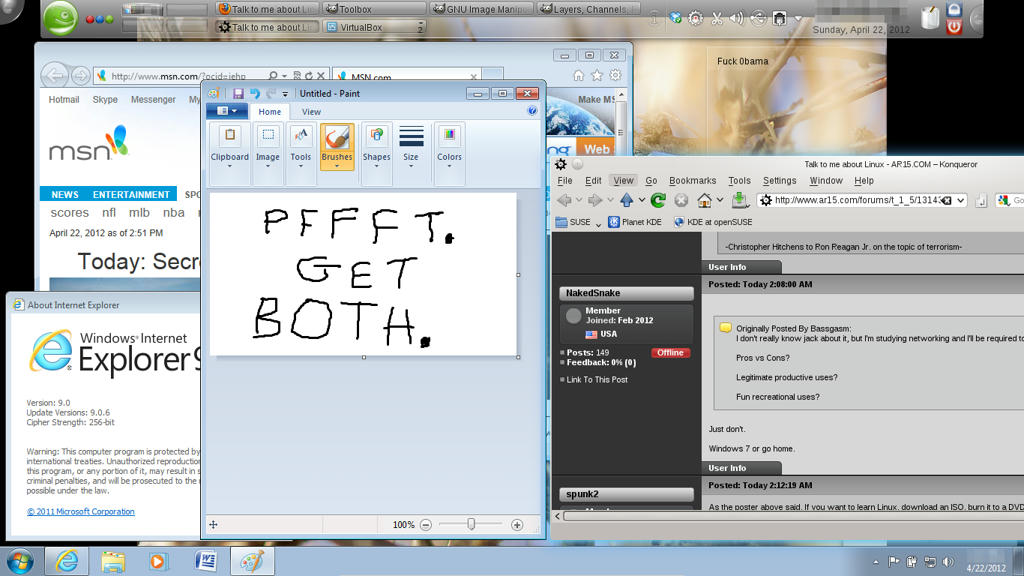
ETA: To the OP. I use Linux because pretty much everything is free, and I can tweak it to how I like. I'm not in IT. If you're in IT, you should definitely give it a run, if for no other reason than to expand your skill set. As you can see by my screen shot, I use both Windows and Linux (openSUSE). I used to dual boot, but that was a nuisance, so now I just run Windows 7 as a virtual machine for those rare occasions when I actually need it. Since I've discarded Netflix, though, I don't have any real reason to use Windows except for the occasional web site (usually that has some proprietary media feed) or if I need to use Office 2007. __________________________________________________________________ Cross-platform gun database/electronic bound book (v1.3.2) (and the original thread). «nolite confidere in principibus, in filiis hominum quibus non est salus» |
|
Quoted:
Quoted:
Quoted:
I don't really know jack about it, but I'm studying networking and I'll be required to take a class on it in the next semester or two. Legitimate productive uses? Fun recreational uses? Free... as in speech, and as in beer (most distributions). Best way to learn/explore it? Go download an Iso image, burn it to CD/DVD, and install it on an old PC. Alternatively, get a "Live CD" version (Knoppix or similar) and use it on your existing computer (it won't touch your hard drive unless you tell it to). If you wish, you can get a "Linux for Dummies" book to get you started. Virtually all of my "mission critical" systems (firewalls, PBX, network storage, etc) run some flavor of Linux. Desktops are either Windows or Linux. Forensic, network analysis, penetration testing, data recovery, etc... I do all of that under Linux. Free, if you don't want support; doing your own home build A business will purchase Red Hat for need OS support and upgrades, which makes it as expensive as Windows I see you've never paid for Windows support.
|