


Armory Sponsor


Posted: 4/28/2014 5:55:46 PM EDT
| Just wondering what the general opinion on keeping in depth records on reloads is. I currently only load in 100 round batches at most since I only have a single stage press. So far I have been keeping a notebook of my loads but I see pictures of guys benches with containers full of loaded rounds. I can't imagine that is recorded. I would much rather load a bunch and put them in an ammo can and call it good. I would then make sure to thoroughly inspect before the next reload. Is this an acceptable practice or a big no-no. Just curious of everyone's thoughts on the matter. |
|
If you work up a load that you like, go ahead and load a bunch.
I'm new to loading, so I experiment with a bunch of powders and bullets. I label everything, and put them in those MTM plastic cases. As for a notebook, I've been treating it like a journal. Writing down the full information (brass length for rifle, primer, powder charge, bullet type, COAL, crimp, etc..) for loads I made, with range results and comments once I test them. |
|
I keep a notebook with load info. This includes brass used, trim length, COAL, powder, bullet and primer. I also record load work ups. I also make notes.
I use quart freezer bags to store loaded ammo (except for my match .308). The bags have a label that includes that above, plus the date and quantity. I try to rotate my plinking stuff out. Posted Via AR15.Com Mobile |
|
Quoted:
I keep a notebook with load info. This includes brass used, trim length, COAL, powder, bullet and primer. I also record load work ups. I also make notes. I use quart freezer bags to store loaded ammo (except for my match .308). The bags have a label that includes that above, plus the date and quantity. I try to rotate my plinking stuff out. Posted Via AR15.Com Mobile This is pretty much what I do. Remember many (not all) but many reloaders do this. I do keep more detailed on my firearms how and which load worked well and I can cross check it in my reloading notebook. Extensive but specially right now kinda hard to get your favorite powders if none are available. |
|
You should make notes on every batch you load. After shooting the ammo, update your notes. What was accurate, what wasn't, ect. Why make the same mistake twice? Also you will want to duplicate a load that shoots well. I use the sheets that come in a Sierra reloading manual. Copy off more as needed. eta, I have about 20 pages of notes on 223. Single shot pistol, bolt rifle, couple of AR's. |
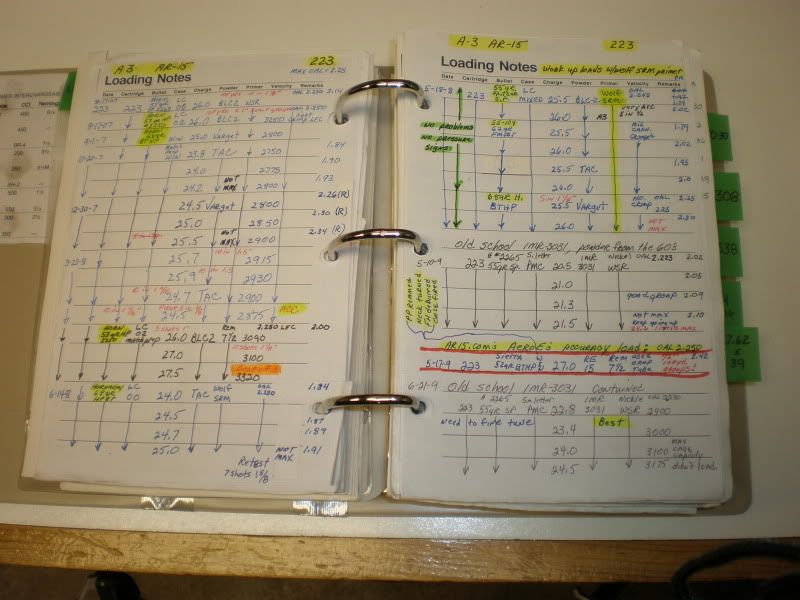
|
Well at the moment i assign an ID number to each load I am making. For example I may do 3 loads of the same load but done at different times. I currently keep them separated. Is their any reason to do this or should I combine them. I'm very new to reloading and it's difficult to get powder in my area so I'm really just making ammo to make holes on paper. I haven't gotten to a stage yet where I'm working up multiple loads to try to figure out what's best. I guess I should be but I haven't yet. Thanks for all the info so far.
Edit: I guess my real question is should I keep reloading data logs to keep track of items such as amount of reloads for said brass and amount of times it has been trimmed, etc? I completly agree with the aspect of keeping reloading data to see what works well and what doesn't work at all. |
|
A dull pencil is better than the sharpest mind - or something like that.
I track all of my loads, but not necessarily components. I do it for several reasons. As dryflash said, why make the same mistake twice. If I grab a powder and a bullet I can go back and reference load data that I tried instead of just picking a number out of the book. I use a printer for labels and cards. So if I load up a 50 round box, I enter the load data in the Excel log and print the load cards and label from there. I have several boxes of ammo for testing on my bench, but it is all marked because I'll forget what it was. If I am going to load a couple hundred of the same round, I enter one load, quantity 100, then print and toss a load card in the box and label it. I just wrote a program that will figure out the OCW loads from the load log. I just enter the three sources and max and the rest of the data is pulled from the log. This one even prints the targets with six squares, each marked for the appropriate load. So, I enter the load description in the log, open up the OCW log and pull the data using the referenced load number. The program calculates the worksheet, number/weights of fowlers, and seven load wieghts. The COAL, brass, primer, powder, trim length, etc., is auto populated into the targets, load cards and labels. Here are some photos of what i use.    
|
|
Quoted:
Well at the moment i assign an ID number to each load I am making. For example I may do 3 loads of the same load but done at different times. I currently keep them separated. Is their any reason to do this or should I combine them. I'm very new to reloading and it's difficult to get powder in my area so I'm really just making ammo to make holes on paper. I haven't gotten to a stage yet where I'm working up multiple loads to try to figure out what's best. I guess I should be but I haven't yet. Thanks for all the info so far. Edit: I guess my real question is should I keep reloading data logs to keep track of items such as amount of reloads for said brass and amount of times it has been trimmed, etc? I completly agree with the aspect of keeping reloading data to see what works well and what doesn't work at all. Yes - keep records of almost everything. Even junk data can be useful. Dump it into Excel, it's easy, as copy/paste and you just change the one or two parameters that changed with each new lot. 
|
|
Quoted:
Yes - keep records of almost everything. Even junk data can be useful. Dump it into Excel, it's easy, as copy/paste and you just change the one or two parameters that changed with each new lot. http://i25.tinypic.com/24vi3i8.jpg Quoted:
Quoted:
Well at the moment i assign an ID number to each load I am making. For example I may do 3 loads of the same load but done at different times. I currently keep them separated. Is their any reason to do this or should I combine them. I'm very new to reloading and it's difficult to get powder in my area so I'm really just making ammo to make holes on paper. I haven't gotten to a stage yet where I'm working up multiple loads to try to figure out what's best. I guess I should be but I haven't yet. Thanks for all the info so far. Edit: I guess my real question is should I keep reloading data logs to keep track of items such as amount of reloads for said brass and amount of times it has been trimmed, etc? I completly agree with the aspect of keeping reloading data to see what works well and what doesn't work at all. Yes - keep records of almost everything. Even junk data can be useful. Dump it into Excel, it's easy, as copy/paste and you just change the one or two parameters that changed with each new lot. http://i25.tinypic.com/24vi3i8.jpg What does RORG mean in your brass column? |
|
Quoted:
Could someone also explain to me the reason to know all this velocity and MOA stuff? Is this for competition reasons or am I missing the point? Velocity is another way to know what is going on with your rounds pressure without getting them pressure tested. MOA is important to know what type of accuracy you are getting out of your rifle. |


|
I keep records of both factory and my reloads as to performance, powders, bullets and so on as many here have described. I've been doing it for decades and as dryflash said, why go over bad ground twice if you don't have to. I don't fire that much anymore, or nearly what I used to (eyeballs and arthritis helped make that decision) but I do like to take others out, first timers, kids, spot, teach or go with friends and pop a few off. The records let me know which firearms like what the most. Be careful though if you divulge it. I made the mistake of saying I keep records in the revolver forum and the reasons why when someone made an off-hand comment of round counts. Its still on page one about problems with a 617. I didn't want the guys thread to get locked so I let it ride.
|
|
I use Reloading Log from the google play store on my android device... it generates a nice report, and you can update results add target data etc. at any time....
|
|
Quoted:
Yes - keep records of almost everything. Even junk data can be useful. Dump it into Excel, it's easy, as copy/paste and you just change the one or two parameters that changed with each new lot. http://i25.tinypic.com/24vi3i8.jpg Quoted:
Quoted:
Well at the moment i assign an ID number to each load I am making. For example I may do 3 loads of the same load but done at different times. I currently keep them separated. Is their any reason to do this or should I combine them. I'm very new to reloading and it's difficult to get powder in my area so I'm really just making ammo to make holes on paper. I haven't gotten to a stage yet where I'm working up multiple loads to try to figure out what's best. I guess I should be but I haven't yet. Thanks for all the info so far. Edit: I guess my real question is should I keep reloading data logs to keep track of items such as amount of reloads for said brass and amount of times it has been trimmed, etc? I completly agree with the aspect of keeping reloading data to see what works well and what doesn't work at all. Yes - keep records of almost everything. Even junk data can be useful. Dump it into Excel, it's easy, as copy/paste and you just change the one or two parameters that changed with each new lot. http://i25.tinypic.com/24vi3i8.jpg Your log is almost exactly like mine including the lot number format. Have you tried making it a table? The advantage is that you will have a header (your titles) that can be easily narrowed down. It helps when you have a lot of data. With a table there will be an drop down list by the column identifier, say Bullet Weight for example. Hit the drop down and it will give you every weight listed in the log. Select one or two or all, then the list will show only that weight. Then you can narrow down further with another column, say Powder Type. Hit that column drop down and you'll see all the powders you have used. Select the powder then you have a list of just. If you picked H335 and 55 for bullet weight you would only see loads with those two parameters. To get back to the full list, go into the dro downs (the ones you used will have the little funnel instead of the down arrow) and select all. To do it on your list: Save a copy under a different name to try this. Open your copy. Make each header one cell. For example you have "Lot" and "Number" in two different cells. Remove "Lot." Put your cursor in front of "Number," type "Lot" and hit Alt/Enter. It will look the same as you had, but both words will be in one narrow cell. Do the above to all of your headers. Highlight the entire table, including the header row. Select the "Insert" tab. Select "Table." Click the box that says "My table table has headers?" Select OK. Now you will have the drop down arrows and a more functional/searchable data base. You can use the "format table" button on the "Home" tab to change the appearance. Highlight the table, select "Format table" then select the color/appearance you want. To convert it back if you desire, highlight the entire table. From the "Design" tab select "convert to range." It'll ask if your are sure, select yes. (Not trying to change what you are doing if it works for you and you already knew this. Thought it might help others a little, too) |
|
Quoted:
I use Reloading Log from the google play store on my android device... it generates a nice report, and you can update results add target data etc. at any time.... I forgot to say, I keep my Excel file on my dropbox account, so I can look at it and update it from my phone or any computer if I want to. |
When I find 'recipes' I like, that's exactly how I store them:

Thus, for loading up bulk ammo, I simply look up the recipe and use it. I log the dates that I use a given recipe on the back of the card. I also make a copy of the card for each ammo can I fill, or if there are different loads in a can, one card for each bag inside the can. I keep a chronological book to detail what I did when and to track components separately. This helps track component cost and cost/round over time, and helps me keep track of whether I'm overstocked/understocked on a specific type of component. When doing load development for my bolt guns, I document the entire experiment in deep detail. Usually, I do this digitally (since I'm processing data and making graphs anyways), then put a printed copy in my chronological reloading book. I've never thought to myself, 'Man, I wish I would have put less data in there!' 
|
|
Quoted:
I love tinkering with Microsoft Excel. <a href="http://s1153.photobucket.com/user/arfcomaje/media/Guns/9mmWSTdata42114g19_zps70d00c26.png.html" target="_blank">http://i1153.photobucket.com/albums/p505/arfcomaje/Guns/9mmWSTdata42114g19_zps70d00c26.png</a> <a href="http://s1153.photobucket.com/user/arfcomaje/media/Guns/9mmWSTdata42114_zps8efd74cc.png.html" target="_blank">http://i1153.photobucket.com/albums/p505/arfcomaje/Guns/9mmWSTdata42114_zps8efd74cc.png</a> <a href="http://s1153.photobucket.com/user/arfcomaje/media/Guns/9mmchrono42114_zps7c6ff9ee.png.html" target="_blank">http://i1153.photobucket.com/albums/p505/arfcomaje/Guns/9mmchrono42114_zps7c6ff9ee.png</a> <a href="http://s1153.photobucket.com/user/arfcomaje/media/Guns/powerpistoldata_zps42aedb72.png.html" target="_blank">http://i1153.photobucket.com/albums/p505/arfcomaje/Guns/powerpistoldata_zps42aedb72.png</a> Very nice man.....I know enough about excel to be dangerous....would you want to share those? 
|
|
I designed business cards that have all of the load data spots on it.
Once I finish reloading a batch I record it in my binder, fill out the business card and slide it in with the load I made. That way I always know what each load is and never forget after they sit for a month. |
| I write my favorable known loads in a smaller paper note pad. I also have my go to loads highlighted in my reloading manuals. I saw a PDF you could download and print so you could write all of your info down and keep it in a 3-ring binder. I can't seem to find it online now. |
|
Quoted:
Very nice man.....I know enough about excel to be dangerous....would you want to share those?
Quoted:
Quoted:
I love tinkering with Microsoft Excel. <a href="http://s1153.photobucket.com/user/arfcomaje/media/Guns/9mmWSTdata42114g19_zps70d00c26.png.html" target="_blank">http://i1153.photobucket.com/albums/p505/arfcomaje/Guns/9mmWSTdata42114g19_zps70d00c26.png</a> <a href="http://s1153.photobucket.com/user/arfcomaje/media/Guns/9mmWSTdata42114_zps8efd74cc.png.html" target="_blank">http://i1153.photobucket.com/albums/p505/arfcomaje/Guns/9mmWSTdata42114_zps8efd74cc.png</a> <a href="http://s1153.photobucket.com/user/arfcomaje/media/Guns/9mmchrono42114_zps7c6ff9ee.png.html" target="_blank">http://i1153.photobucket.com/albums/p505/arfcomaje/Guns/9mmchrono42114_zps7c6ff9ee.png</a> <a href="http://s1153.photobucket.com/user/arfcomaje/media/Guns/powerpistoldata_zps42aedb72.png.html" target="_blank">http://i1153.photobucket.com/albums/p505/arfcomaje/Guns/powerpistoldata_zps42aedb72.png</a> Very nice man.....I know enough about excel to be dangerous....would you want to share those?
I'll blank one out for your use. If you want something else other than Power Factor calculated, let me know. I used to caculate the energy in ft lbs before I did power factor. Send me an email through the site and I'll send you the file. |
|
OK I have a blank Excel file for anyone that wants it.... just to point out a couple of things, the tabs along the bottom are how I keep different dates. (circled in red) Take a blank box, copy and paste it before you fill one in (that way you never have to sit there and erase anything you put in before.
You can keep track of the cartridge, gun, whatever you want in the top portion (outlined by the blue and yellow box at the bottom) The sky is really the limit of what you can do. Once the velocities are entered any formula that exists can be put in to calculate them. I have also taken pictures of groups on paper and pasted them right in Excel next to the chart of velocities. 
|
|
I use a 3 ring binder. I printed up a form in word with blanks for caliber, powder type used, bullet weight, etc. My 3 ring binder is sectioned off into 9, .40, .45, etc, with those thicker cardboard like tabbed partitions.
I 3 hole punch this form. Then I use scotch tape to reinforce the holes, then I punch the holes again. At the bottom of this form are 3 vertical columns of blanks, 10 blanks to be exact. I will fire a string of 10 shots over the chrono and record each shot's velocity. Then there are a few blanks in the middle between each column, for average velocity, average power factor, standard deviation, and extreme spread. I normally just shoot 2 strings of 10 shots each and record all the data on the form. If the results look good after those two strings, then I don't bother shooting the third. I could swear I had uploaded pics of this form and my Binder to photobucket, but DANG! I can't find the pics now. Arrgghh... I reinforce the holes with the tape because it always seems like it is windy when I am chrono'ing and an unreinforced sheet would get ripped right out of the binder. I don't want to look like "that guy" running across the hot range grabbing papers. |
|
Quoted:
Could someone also explain to me the reason to know all this velocity and MOA stuff? Is this for competition reasons or am I missing the point? Not sure if you're serious on that. but if so, velocity is a safety measure and quantification of power. Even more useful: it's a necessary input into ballistic calculators to get your firing solution. Sometimes I shoot 600 yards, but will only have 100 yard zero's. Knowing the bullet (ballistic coefficient) and velocity, your iPhone will tell you exactly how many clicks you need to come up. Used this a few months ago hit a 3" circle first shot, followed by 2 more hits doing that at 300 yards, based on a 100 yard zero. Did it in a rarely used gun. Kind of proud of that, as such is not a matter of course. MOA is the accuracy of the ammo. If you don't care, Wolf has fabulous products for you. The whole point of this is get some quantification and familiarization with different performance from different combinations in different guns. That way, for example if there is a 3 year span where your gun powder of choice is no longer available - (which would be now), then you have some decent data to get by on combinations of random stuff. I find most reloading manuals aren't very good. They'll indicate safe combinations, but rarely indicate which ones are the more accurate. Sierra mentions a favorite load in their manual, but just one - with specific components that you are unlikely to get the combination of today. They also tend to be overly conservative. As a high-power shooter, my loads are pretty much always over book "MAX" and shoot just fine, with no safety concerns. |
|
Quoted:
Your log is almost exactly like mine including the lot number format. Have you tried making it a table? The advantage is that you will have a header (your titles) that can be easily narrowed down. It helps when you have a lot of data. With a table there will be an drop down list by the column identifier, say Bullet Weight for example. Hit the drop down and it will give you every weight listed in the log. Select one or two or all, then the list will show only that weight. Then you can narrow down further with another column, say Powder Type. Hit that column drop down and you'll see all the powders you have used. Select the powder then you have a list of just. If you picked H335 and 55 for bullet weight you would only see loads with those two parameters. To get back to the full list, go into the dro downs (the ones you used will have the little funnel instead of the down arrow) and select all. To do it on your list: Save a copy under a different name to try this. Open your copy. Make each header one cell. For example you have "Lot" and "Number" in two different cells. Remove "Lot." Put your cursor in front of "Number," type "Lot" and hit Alt/Enter. It will look the same as you had, but both words will be in one narrow cell. Do the above to all of your headers. Highlight the entire table, including the header row. Select the "Insert" tab. Select "Table." Click the box that says "My table table has headers?" Select OK. Now you will have the drop down arrows and a more functional/searchable data base. You can use the "format table" button on the "Home" tab to change the appearance. Highlight the table, select "Format table" then select the color/appearance you want. To convert it back if you desire, highlight the entire table. From the "Design" tab select "convert to range." It'll ask if your are sure, select yes. (Not trying to change what you are doing if it works for you and you already knew this. Thought it might help others a little, too) Quoted:
Quoted:
Quoted:
Well at the moment i assign an ID number to each load I am making. For example I may do 3 loads of the same load but done at different times. I currently keep them separated. Is their any reason to do this or should I combine them. I'm very new to reloading and it's difficult to get powder in my area so I'm really just making ammo to make holes on paper. I haven't gotten to a stage yet where I'm working up multiple loads to try to figure out what's best. I guess I should be but I haven't yet. Thanks for all the info so far. Edit: I guess my real question is should I keep reloading data logs to keep track of items such as amount of reloads for said brass and amount of times it has been trimmed, etc? I completly agree with the aspect of keeping reloading data to see what works well and what doesn't work at all. Yes - keep records of almost everything. Even junk data can be useful. Dump it into Excel, it's easy, as copy/paste and you just change the one or two parameters that changed with each new lot. http://i25.tinypic.com/24vi3i8.jpg Your log is almost exactly like mine including the lot number format. Have you tried making it a table? The advantage is that you will have a header (your titles) that can be easily narrowed down. It helps when you have a lot of data. With a table there will be an drop down list by the column identifier, say Bullet Weight for example. Hit the drop down and it will give you every weight listed in the log. Select one or two or all, then the list will show only that weight. Then you can narrow down further with another column, say Powder Type. Hit that column drop down and you'll see all the powders you have used. Select the powder then you have a list of just. If you picked H335 and 55 for bullet weight you would only see loads with those two parameters. To get back to the full list, go into the dro downs (the ones you used will have the little funnel instead of the down arrow) and select all. To do it on your list: Save a copy under a different name to try this. Open your copy. Make each header one cell. For example you have "Lot" and "Number" in two different cells. Remove "Lot." Put your cursor in front of "Number," type "Lot" and hit Alt/Enter. It will look the same as you had, but both words will be in one narrow cell. Do the above to all of your headers. Highlight the entire table, including the header row. Select the "Insert" tab. Select "Table." Click the box that says "My table table has headers?" Select OK. Now you will have the drop down arrows and a more functional/searchable data base. You can use the "format table" button on the "Home" tab to change the appearance. Highlight the table, select "Format table" then select the color/appearance you want. To convert it back if you desire, highlight the entire table. From the "Design" tab select "convert to range." It'll ask if your are sure, select yes. (Not trying to change what you are doing if it works for you and you already knew this. Thought it might help others a little, too) Thanks. Great minds think alike - they say. I've been meaning to get around to setting it up for better tables - just haven't bothered. Everyone has their own systems of records. The fact that people have any at all is a good start (most re-loaders basically don't - at all. It's a bit spooky). I find the Excel system of keeping all data on 1 row for each lot works best for me. I like it because you can compare loads, combinations, and performance at a glance far quicker in that format that any other, and it is infinitely expandable. Putting in the sort features as you've indicated above, makes that even easier. FYI though, Excel 2003 has no Insert/Table navigation. There's a way to do what you are saying, I just don't remember how, and in particular don't remember in Excel 2003. I think it's Data/List.. |
|
I was using a notebook, then finally got off my butt to make up something in Excel.
I went one step further, and made up a 'range sheet' w/tables in Word, so I can copy 9 columns from the loads I want to make in my master Excel doc, and paste them into the Word doc. If I'm working up a bunch of different loads, I start with Excel, then fill in 'range sheets' for each load via copy/paste, then print them out as a 'work order' and check off each one as I load them up and label them. I bring the Word load workup sheets printed out with me to the range, add in any notes, short form chrono results (avg, ES, SD, hi, lo), then plug it back into my master once back home. It would be nice to have the Excel auto-generate my range sheets and labels, but I just don't like the idea of Visual Basic for Applications all that much. Could be improved yet, but works pretty well. |
|
Quoted:
I was using a notebook, then finally got off my butt to make up something in Excel. I went one step further, and made up a 'range sheet' w/tables in Word, so I can copy 9 columns from the loads I want to make in my master Excel doc, and paste them into the Word doc. If I'm working up a bunch of different loads, I start with Excel, then fill in 'range sheets' for each load via copy/paste, then print them out as a 'work order' and check off each one as I load them up and label them. I bring the Word load workup sheets printed out with me to the range, add in any notes, short form chrono results (avg, ES, SD, hi, lo), then plug it back into my master once back home. It would be nice to have the Excel auto-generate my range sheets and labels, but I just don't like the idea of Visual Basic for Applications all that much. Could be improved yet, but works pretty well. That sounds interesting. I didn't know you could copy tables from Excel into Word documents. |
|
Quoted:
That sounds interesting. I didn't know you could copy tables from Excel into Word documents. Quoted:
Quoted:
I was using a notebook, then finally got off my butt to make up something in Excel. I went one step further, and made up a 'range sheet' w/tables in Word, so I can copy 9 columns from the loads I want to make in my master Excel doc, and paste them into the Word doc. If I'm working up a bunch of different loads, I start with Excel, then fill in 'range sheets' for each load via copy/paste, then print them out as a 'work order' and check off each one as I load them up and label them. I bring the Word load workup sheets printed out with me to the range, add in any notes, short form chrono results (avg, ES, SD, hi, lo), then plug it back into my master once back home. It would be nice to have the Excel auto-generate my range sheets and labels, but I just don't like the idea of Visual Basic for Applications all that much. Could be improved yet, but works pretty well. That sounds interesting. I didn't know you could copy tables from Excel into Word documents. There may be a better way (as in, I'd love to multi-select in Excel, and just press a button, to populate multiple range sheets  ), but grabbing one load at a time is easy, just insert a table into Word, and it still acts like an Excel table. ), but grabbing one load at a time is easy, just insert a table into Word, and it still acts like an Excel table.
Here's an example of each...here's a part of the Excel: 
With the rows then being dumped into one of these: 
|
|
Quoted:
There may be a better way (as in, I'd love to multi-select in Excel, and just press a button, to populate multiple range sheets ), but grabbing one load at a time is easy, just insert a table into Word, and it still acts like an Excel table.
Here's an example of each...here's a part of the Excel: http://i.imgur.com/5GAWngk.png With the rows then being dumped into one of these: http://i.imgur.com/sZcIvxW.png Quoted:
Quoted:
Quoted:
I was using a notebook, then finally got off my butt to make up something in Excel. I went one step further, and made up a 'range sheet' w/tables in Word, so I can copy 9 columns from the loads I want to make in my master Excel doc, and paste them into the Word doc. If I'm working up a bunch of different loads, I start with Excel, then fill in 'range sheets' for each load via copy/paste, then print them out as a 'work order' and check off each one as I load them up and label them. I bring the Word load workup sheets printed out with me to the range, add in any notes, short form chrono results (avg, ES, SD, hi, lo), then plug it back into my master once back home. It would be nice to have the Excel auto-generate my range sheets and labels, but I just don't like the idea of Visual Basic for Applications all that much. Could be improved yet, but works pretty well. That sounds interesting. I didn't know you could copy tables from Excel into Word documents. There may be a better way (as in, I'd love to multi-select in Excel, and just press a button, to populate multiple range sheets ), but grabbing one load at a time is easy, just insert a table into Word, and it still acts like an Excel table.
Here's an example of each...here's a part of the Excel: http://i.imgur.com/5GAWngk.png With the rows then being dumped into one of these: http://i.imgur.com/sZcIvxW.png 
I don't know how I can use this since I'm so used to doing it the way I have been... but I am impressed. |
|
I always try to put at least a little slip of paper with the load details in the box of cartridges.
I used to keep a notebook for load development, and just general record keeping, but I'm bad about keeping up on it. I even picked up Lyman's notebook recently, don't think I've put a single load in it yet! 
But yeah, I do try to at least keep a note in the box. I occasionally miss one, and I hate that 'What the heck was this?' feeling. |
|
Quoted:
Why not print from excel? Or am I missing something... My Excel acts like a cheap database, more or less...when I want to work up new loads, I can select against weight, caliber, powder, mfgr and other fields, compare, and/or insert a new load. When I'm using it, I want it in 'short and sweet' mode, not lots of room for hand-written notes. The range sheet is really for adding 'what I don't know' to new loads, e.g. the chrono results, personal notes, ambient temp, etc... If I'm working up a new load, it goes from Excel to range sheet, is shot, noted, then results merged back into Excel. For standard load rounds (ones I'm happy with and want to mass-produce at will), it just goes onto a label for the ammo box. At some point I'll probably see if I can find a pre-existing app to import/export from Excel directly, or possibly write one. |
|
I save old Altoid Mint tins, make up MS Word label sheet, and print labels to a page. Archive all the old work-up cases for future reference in the labeled Altoid tins.
Also, keep a notebook for each caliber that I experiment and load for, with dated handwritten notes and pasted up print outs such as Excel Sheets. 
|
|
Quoted: I save old Altoid Mint tins, make up MS Word label sheet, and print labels to a page. Archive all the old work-up cases for future reference in the labeled Altoid tins. Also, keep a notebook for each caliber that I experiment and load for, with dated handwritten notes and pasted up print outs such as Excel Sheets. http://i255.photobucket.com/albums/hh133/counterclockwisester/box_label_2.jpg That's a pretty good idea... I like that.
|
|
Quoted:
I use a 3 ring binder. I printed up a form in word with blanks for caliber, powder type used, bullet weight, etc. My 3 ring binder is sectioned off into 9, .40, .45, etc, with those thicker cardboard like tabbed partitions. I 3 hole punch this form. Then I use scotch tape to reinforce the holes, then I punch the holes again. At the bottom of this form are 3 vertical columns of blanks, 10 blanks to be exact. I will fire a string of 10 shots over the chrono and record each shot's velocity. Then there are a few blanks in the middle between each column, for average velocity, average power factor, standard deviation, and extreme spread. I normally just shoot 2 strings of 10 shots each and record all the data on the form. If the results look good after those two strings, then I don't bother shooting the third. I could swear I had uploaded pics of this form and my Binder to photobucket, but DANG! I can't find the pics now. Arrgghh... I reinforce the holes with the tape because it always seems like it is windy when I am chrono'ing and an unreinforced sheet would get ripped right out of the binder. I don't want to look like "that guy" running across the hot range grabbing papers. I snapped a few more pics: Labels for the blue plastic flip top lid boxes: 
The form, which I goofed on my earlier description. I like the Redding micrometer adjustable seating dies so much, that I added an area to draw a sketch of them. This is before I got into reading mic's for work: 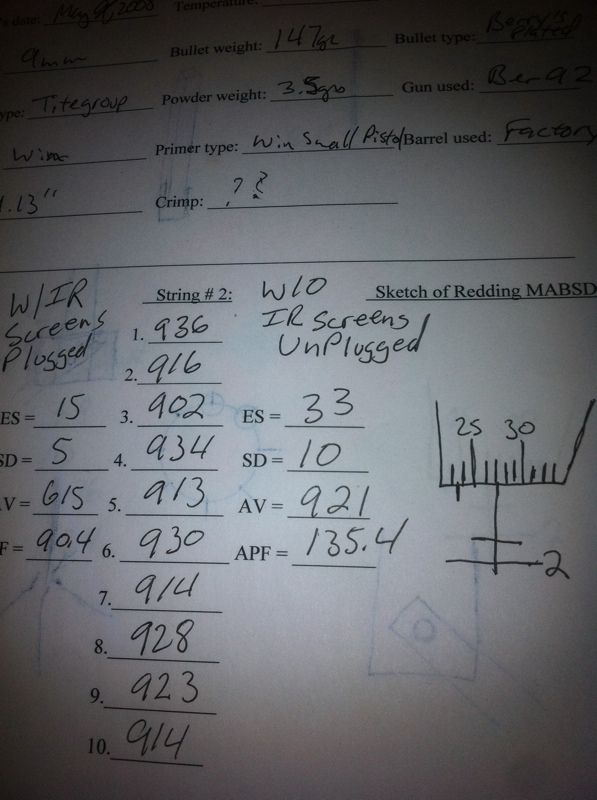
The other neat thing about having a 3 ring binder is I can stow my targets: 
Here are the tabbed partitions for each caliber: 
I had a Windows XP machine shoot craps on me a few years ago, so I would never trust just strictly saving this data to a computer. I am assuming you more computer literate guys are saving your stuff to back ups or putting it on the cloud or emailing yourself the Excel files as an attachment. |
|
I use an excel file some guy made on another forum. You can print your reloading log data to a Avery 4X6" label, calculate reloading costs and energy.
Here's the link Reloading Log I modified it and made a section to keep all my reloading data. I made a sepparate worksheet for each of the calibers I reload for. I name each batch of ammo with a lot number system I came up with. Anyways enjoy. |
|
I incorporate the caliber and date into the load number- ex 308 01/01/2001 is a 308 load from January 01, 2001. I also label storage cans with this number, as well as a lot number that, you guessed it, is the same format, but the date I loaded it- eg 308 03/01/2014. This way is real easy to find the original recorded load data, reducing the chances of a mistake being propogated.
Also put a label on each of my presses with the load number it is set up for, and verify whenever I start a loading session. |
|
Quoted:
When I find 'recipes' I like, that's exactly how I store them: http://i927.photobucket.com/albums/ad111/RocketmanOU/IMG_20140429_074950_258_zps1e6e8b22.jpg Thus, for loading up bulk ammo, I simply look up the recipe and use it. I log the dates that I use a given recipe on the back of the card. I also make a copy of the card for each ammo can I fill, or if there are different loads in a can, one card for each bag inside the can. I keep a chronological book to detail what I did when and to track components separately. This helps track component cost and cost/round over time, and helps me keep track of whether I'm overstocked/understocked on a specific type of component. When doing load development for my bolt guns, I document the entire experiment in deep detail. Usually, I do this digitally (since I'm processing data and making graphs anyways), then put a printed copy in my chronological reloading book. I've never thought to myself, 'Man, I wish I would have put less data in there!' I use the same system with the 3x5 index cards. The load I am currently loadingis removed from the box and clipped to the wall behind the loading press. That way if I walk away mid process and come back, there is no confusion as to what components/load I am using, or what powder is in the powder measure. |
Armory Sponsor