


Posted: 8/6/2009 11:28:34 AM EDT
|
So, I got a new computer last night. Tits, right? Well, it was, until I couldn't get stuff working.
So, this 23" monitor I have has speakers built into it and sound comes out of it. Great, but I want sound to come out of the 5.1 surround sound system I have. There's an "audio" port in the back of the monitor that is suppose to connect to the computer tower. But, on the back of the computer tower there's 5 audio ports, but I only have 1 port from my 5.1 system. I don't know if it's the HDMI thingy or not, I don't know. I just got back from Iraq, I just want this damn thing to work, I don't know what HDMI does or wtf all these ports are for and Vista is an atrocity for a new user. Please, please help.......... |
| Tell us what the computer and/or sound card is, or post a picture of the ports so we can see what you are talking about. Sometimes sound cards have there own surround sound type deal built in where they have 3 ports, one is left and right front, one is left and right rear, and the other has a center/sub on it's left and right channels. Other times its just line it, line out, head phones, digital out, and microphone. |
|
there is likley 3 hookups on your monitor, HDMI, DVI and VGA. the dvi is the larger of the 3, the supplied cable more than likley has white ends on it (vga having blue and dvi probably black) this will make the speakers on the monitor stop working as HDMI transmits both audio and video over the same cable.
there could be some hokey garbage going on if the dvi is used that it disables the sound card so that is why i reccomend using the dvi cable. that and your monitor probably only has a single audio out where a 5.1 system will want to use 3 hookups for front/center - rear and sub. |
|
Quoted:
Quoted:
IBF "buy a mac" that being said, use the dvi cable connection instead of the hdmi and hook the speakers directly to the sound card/onboard audio controller. I have no idea what you just said. He's saying use DVI to connect your computer and your monitor, not HDMI. DVI passes only video, so you won't get sound coming out of your monitor's speakers. DVI looks like a square plug with lots of little holes in it. Then he's saying hook your 5.1 speakers directly to your soundcard in your computer tower. That way you get full 5.1 sound. It's hard to tell what kind of connection you have in your 5.1 speakers and your computer so you may want to post pics of your sound output area (on your computer) so we can tell if it's possible to hook it directly to your 5.1 system or not. |
|
you need 5 rca cables
edit: rca cables are usually the red/white/yellow cables you use to hook a game console or vcr to your tv, just use any 5 (color doesn't matter) and be sure you hook left to left center to center, subwoofer to subwoofer, input to output from your surround receiver to your pc tower's audio card edit2: here's an RCA cable: 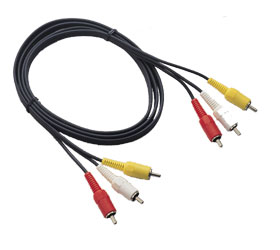
^ 2 of those will work, but you r supposed to have one of these: 
|
|
Need to know what kind of connections you have on your 5.1 system. That will determine how to get audio to it, either 2ch or 5.1ch. Also need to know what kind of computer/motherboard you have for audio out. ETA: I see that you said you have 5-6 headphone jacks on your computer. Each of those is usually 2ch (front l/r, rear l/r, center/sub, etc), but it will only work if your 5.1 system has inputs for them.
Best solution would be if you have digital optical on both 5.1 system and computer. Worst case is your 5.1 system doesn't 5.1ch RCA input, and you only get 2ch to it. |
|
Quoted:
you need 5 rca cables edit: rca cables are usually the red/white/yellow cables you use to hook a game console or vcr to your tv, just use any 5 (color doesn't matter) and be sure you hook left to left center to center, subwoofer to subwoofer, input to output from your surround receiver to your pc tower's audio card edit2: here's an RCA cable: http://www.home-theater-accessories-resource.com/Images/Pictures/composite%20cable.jpg ^ 2 of those will work, but you r supposed to have one of these: http://www.benbayliss.co.uk/other/cables/51CableSmall.jpg the RCA's are for home stereousually, computers use 1/8th'' mini din connectors |
|
Your sound card should be marked with audio in/audio out/microphone. You can go one of several ways here. 1. Hook up the speakers directly to the audio out. The computer has mini-din holes and the speakers probably have rca plugs. You can get a 4 output rca-to-mini plug and hook to rca plugs and the mini part to the computer. 2. get a cable that has a mini-din plug on one end and a plug on the other end that fits your audio input on your surround system and plug the mini into your audio out. What make and model of computer and what make and model of surround system? |
|
Don't buy Monster Cables, but this will give you an overview of the hookup situation Someone here will steer you to a good cheap cable that will work.
|