Warning


Close
Confirm Action

Are you sure you wish to do this?

Cancel Confirm
AR15.COM
Previous Page
/ 5
Next Page
6/30/2009 5:08:41 PM EDT
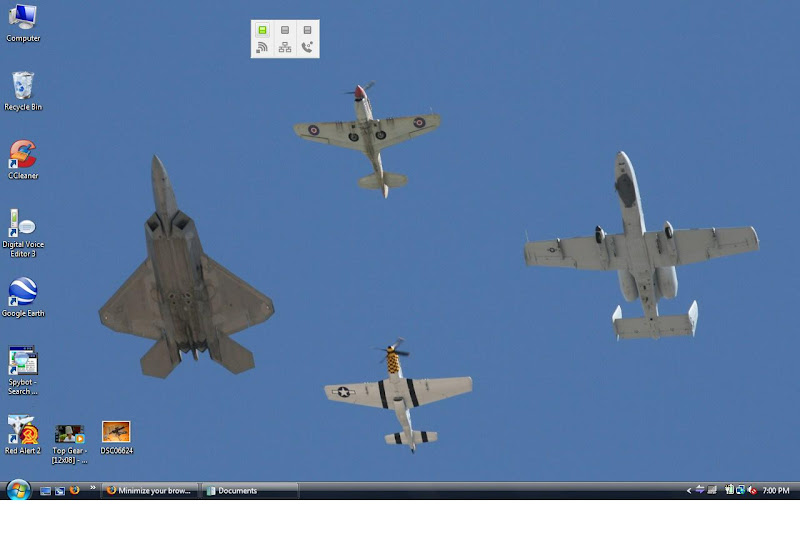
minimize/hide your browser and take a SS, no cheating!
I'll start, sorry for the huge resolution ETA: nvm it was auto-resized

Nothing special, hopefully yall have some more interesting stuff up....
6/30/2009 5:12:30 PM EDT
[#1]
6/30/2009 5:13:52 PM EDT
[#2]
i like to keep it clean


6/30/2009 5:14:36 PM EDT
[#3]
Mines just a huge wall of icons.
6/30/2009 5:17:26 PM EDT
[#4]

6/30/2009 5:18:21 PM EDT
[#5]
Had to make it arflegal.


6/30/2009 5:19:03 PM EDT
[#6]
Mine would be relegated to the BOTD forum.  So, can't post it here.
6/30/2009 5:19:19 PM EDT
[#7]
6/30/2009 5:20:26 PM EDT
[#8]
Wait which key do I press to take a screen shot again?
6/30/2009 5:20:37 PM EDT
[#9]
The labels on some of the icons are too embarrassing at the moment.
6/30/2009 5:20:50 PM EDT
[#10]
6/30/2009 5:21:54 PM EDT
[#11]
6/30/2009 5:22:12 PM EDT
[#12]
Quoted:
Wait which key do I press to take a screen shot again?


6/30/2009 5:22:12 PM EDT
[#13]


6/30/2009 5:26:48 PM EDT
[#14]
Wait which key do I press to take a screen shot again?


Print Screen button for PC users, command shift 3 for mac guys
6/30/2009 5:30:42 PM EDT
[#15]
Quoted:
Wait which key do I press to take a screen shot again?


Print Screen button for PC users, command shift 3 for mac guys


command shift 3 - Now that's intuitive
6/30/2009 5:31:08 PM EDT
[#16]
Editing out the pic because there appear to be some tig ol' bitties on your desktop. ~ JW777
6/30/2009 5:33:39 PM EDT
[#17]
Extra points for all you Firefox users +1


What a fuckin mess
6/30/2009 5:34:04 PM EDT
[#18]
Quoted:

Dude.. really?
6/30/2009 5:34:34 PM EDT
[#19]
6/30/2009 5:36:00 PM EDT
[#20]
6/30/2009 5:36:06 PM EDT
[#21]
my wife would be upset if I did...
6/30/2009 5:37:04 PM EDT
[#22]
lol

check out ST.jpg, IMG 5077.jpg and IMG 5083.jpg

I see bewbies and his drivers lic.

Thanks for the heads...err....chests...errr.....whatever...up. ~ JW777
6/30/2009 5:38:31 PM EDT
[#23]
Quoted:

I see ta-tas...

IBTL ~ JW777
6/30/2009 5:38:46 PM EDT
[#24]


Took the background photo myself somewhere in the woods.


6/30/2009 5:39:08 PM EDT
[#25]
Quoted:


I see ta-tas...


good, i'm not the only one that noticed!!!
6/30/2009 5:39:29 PM EDT
[#26]


Nice
6/30/2009 5:45:20 PM EDT
[#27]
OP, why do you have a Cali Legal AR-15 as your SS?
6/30/2009 5:45:43 PM EDT
[#28]


That's right, I was photoshopping, watching South Park, listening to Zeppelin, Arfcomming, AND looking at porn all at the same time.

6/30/2009 5:46:35 PM EDT
[#29]


6/30/2009 5:47:42 PM EDT
[#30]


Are you the one I got this from? It became my background the evening of Nov 4th.
6/30/2009 5:50:38 PM EDT
[#31]
6/30/2009 5:51:25 PM EDT
[#32]
6/30/2009 5:51:31 PM EDT
[#33]

6/30/2009 5:53:17 PM EDT
[#34]
6/30/2009 5:53:40 PM EDT
[#35]


Quoted:

Editing out the pic because there appear to be some tig ol' bitties on your desktop. ~ JW777


dick!  


6/30/2009 5:53:54 PM EDT
[#36]
6/30/2009 5:55:01 PM EDT
[#37]
How do I do a screen shot?
6/30/2009 5:56:13 PM EDT
[#38]
6/30/2009 5:56:32 PM EDT
[#39]
6/30/2009 5:56:37 PM EDT
[#40]


Quoted:


How do I do a screen shot?


Alt+F4


6/30/2009 5:57:16 PM EDT
[#41]
Quoted:
Editing out the pic because there appear to be some tig ol' bitties on your desktop. ~ JW777


6/30/2009 5:57:45 PM EDT
[#42]


Is that eeeubuntu or easypeasy?  I have the former on an Asus.  Or is what ubuntu looks like nowadays?


6/30/2009 5:59:09 PM EDT
[#43]


Quoted:


Quoted:

How do I do a screen shot?


Alt+F4


Don't listen this this guy, it's actually ctrl+w.


6/30/2009 6:00:06 PM EDT
[#44]


Quoted:


Is that eeeubuntu or easypeasy?  I have the former on an Asus.  Or is what ubuntu looks like nowadays?


Netbook Remix, sickboy kernel on an Acer Aspire One.


6/30/2009 6:01:16 PM EDT
[#45]


Quoted:


Quoted:


Quoted:

How do I do a screen shot?


Alt+F4


Don't listen this this guy, it's actually ctrl+w.


Alt+Space+C works as well.


6/30/2009 6:01:53 PM EDT
[#46]
6/30/2009 6:04:07 PM EDT
[#47]
6/30/2009 6:04:56 PM EDT
[#48]
6/30/2009 6:05:11 PM EDT
[#49]
6/30/2009 6:06:07 PM EDT
[#50]
Quoted:

Quoted:

Quoted:

Quoted:
How do I do a screen shot?

Alt+F4
 

Don't listen this this guy, it's actually ctrl+w.
 

Alt+Space+C works as well.


So what does ALT+F4 do?
Previous Page
/ 5
Next Page