Warning


Close
Confirm Action

Are you sure you wish to do this?

Cancel Confirm
AR15.COM
12/4/2007 9:01:23 PM EDT
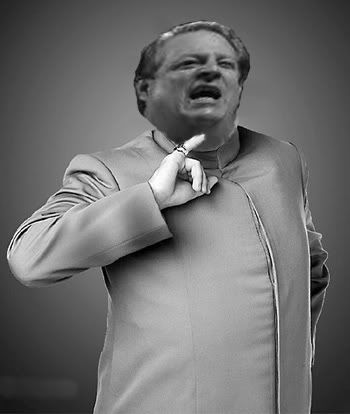
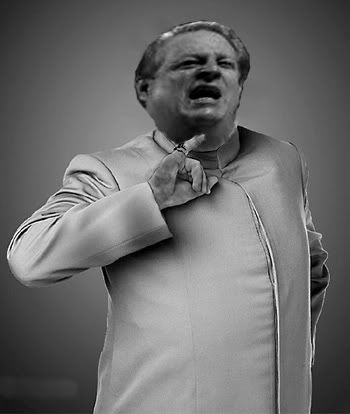
I have a speech due tomorrow and need Al Gores face put on this photo.

I can do rough photochops, but I dont know how to put his head behind his finger.

Feel free to do your worst to him.

Mostly I just need a good chop with his finger in front of his face.


Best one gets 5 minutes in front of a class of 30 people, with copious amounts of college pie.
12/4/2007 9:11:32 PM EDT
[#1]


ETA:

Same one with a little more work.


12/4/2007 9:11:45 PM EDT
[#2]
1) Put the picture of Gore on a separate layer above the Dr's. Size Gore's layer so his head is the right size for going on the Dr's body.

2) Go to the Layer window. Near the bottom will be a button for adding a "Layer Mask". Select Gore's layer and hit that button.

3) You'll see a little box appear to the right of your layer thumbnail in the layer window. If you have the new box selected, you're editing the layer mask.

4) Using the paintbrush tool while editing the layer mask, black makes stuff disappear and white makes it come back. Just zoom in on Gore's picture, and carefully cut out everything you dont want with black. If you make a mistake, switch to white and paint over the mistake to make the original image come back.


Simple.


Give a man a fish, he eats for a day. Teach a man to fish, he eats for life.
12/4/2007 9:30:23 PM EDT
[#3]

Quoted:
1) Put the picture of Gore on a separate layer above the Dr's. Size Gore's layer so his head is the right size for going on the Dr's body.

2) Go to the Layer window. Near the bottom will be a button for adding a "Layer Mask". Select Gore's layer and hit that button.

3) You'll see a little box appear to the right of your layer thumbnail in the layer window. If you have the new box selected, you're editing the layer mask.

4) Using the paintbrush tool while editing the layer mask, black makes stuff disappear and white makes it come back. Just zoom in on Gore's picture, and carefully cut out everything you dont want with black. If you make a mistake, switch to white and paint over the mistake to make the original image come back.


Simple.


Give a man a fish, he eats for a day. Teach a man to fish, he eats for life.


I have GIMP, does it work the same?
12/4/2007 9:31:04 PM EDT
[#4]

Quoted:
i141.photobucket.com/albums/r70/GBME2/Algore.jpg

ETA:

Same one with a little more work.


i141.photobucket.com/albums/r70/GBME2/Algoreupdated.jpg


Pretty good....
12/4/2007 9:32:49 PM EDT
[#5]

Quoted:

Quoted:
1) Put the picture of Gore on a separate layer above the Dr's. Size Gore's layer so his head is the right size for going on the Dr's body.

2) Go to the Layer window. Near the bottom will be a button for adding a "Layer Mask". Select Gore's layer and hit that button.

3) You'll see a little box appear to the right of your layer thumbnail in the layer window. If you have the new box selected, you're editing the layer mask.

4) Using the paintbrush tool while editing the layer mask, black makes stuff disappear and white makes it come back. Just zoom in on Gore's picture, and carefully cut out everything you dont want with black. If you make a mistake, switch to white and paint over the mistake to make the original image come back.


Simple.


Give a man a fish, he eats for a day. Teach a man to fish, he eats for life.


I have GIMP, does it work the same?


Probably, although I don't know what its layer mask function might look like.

Just hunt around and see if you can find a feature similar to what I described.
12/4/2007 9:34:31 PM EDT
[#6]

Quoted:

Quoted:

Quoted:
1) Put the picture of Gore on a separate layer above the Dr's. Size Gore's layer so his head is the right size for going on the Dr's body.

2) Go to the Layer window. Near the bottom will be a button for adding a "Layer Mask". Select Gore's layer and hit that button.

3) You'll see a little box appear to the right of your layer thumbnail in the layer window. If you have the new box selected, you're editing the layer mask.

4) Using the paintbrush tool while editing the layer mask, black makes stuff disappear and white makes it come back. Just zoom in on Gore's picture, and carefully cut out everything you dont want with black. If you make a mistake, switch to white and paint over the mistake to make the original image come back.


Simple.


Give a man a fish, he eats for a day. Teach a man to fish, he eats for life.


I have GIMP, does it work the same?


Probably, although I don't know what its layer mask function might look like.

Just hunt around and see if you can find a feature similar to what I described.


Thanks, I will try it out!
12/4/2007 9:36:23 PM EDT
[#7]
12/4/2007 9:52:12 PM EDT
[#8]

Quoted:


12/4/2007 9:58:38 PM EDT
[#9]
sorry ... 1 minute late
12/4/2007 10:00:00 PM EDT
[#10]

Quoted:
i97.photobucket.com/albums/l210/fundummy/jerk.jpg


That's a pretty good one but you need to dodge the skin a bit to lighten it up and match the lighting.
12/4/2007 10:00:08 PM EDT
[#11]

Quoted:
i97.photobucket.com/albums/l210/fundummy/jerk.jpg


Fantastic!

Thanks!
12/4/2007 10:01:27 PM EDT
[#12]
that's all I can do in 5 minutes
12/4/2007 10:04:01 PM EDT
[#13]

Quoted:
that's all I can do in 5 minutes


Then it's exceptional.  
12/4/2007 10:24:36 PM EDT
[#14]
Here ya go.

12/4/2007 10:34:58 PM EDT
[#15]
12/4/2007 10:53:23 PM EDT
[#16]

Quoted:
img453.imageshack.us/img453/9109/drgoreevilwt8.jpg


12/4/2007 10:56:43 PM EDT
[#17]

Quoted:
Here ya go.

i22.photobucket.com/albums/b350/npd233/15BDrEvil-Gore.jpg


Thanks man, i really appreciate it.
12/5/2007 1:28:44 AM EDT
[#18]

Quoted:

Quoted:


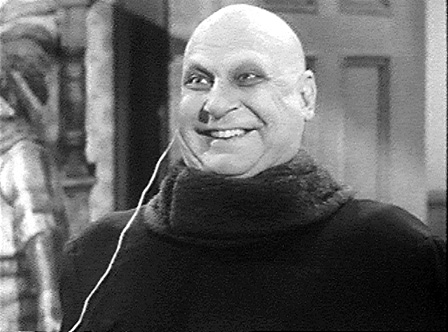
Holy shit that reminds me of this guy:


I think this is Al Gore's next brainchild... human powered lighting..


He'll take credit for it too, even though Fester's already got it patented.
12/5/2007 4:36:52 AM EDT
[#19]
Didn't spend much time on it, but heres my contribution.

12/5/2007 4:43:59 AM EDT
[#20]

Quoted:
Didn't spend much time on it, but heres my contribution.

i4.tinypic.com/6q91vo9.jpg


Why was the first thing I thought of when I saw your chop this?

12/5/2007 4:46:00 AM EDT
[#21]
Some of those are really good.