


[ARCHIVED THREAD] - Router help (Page 1 of 2)
Posted: 6/2/2017 5:44:26 PM EDT
|
Hey guys. My current router is a linksys WRT110. Its probably 6+ years old. We have been having issues streaming and I am wondering if its not the router. The internet will get slow and I will have to reset it once and a while. When I do a speed test I get good speeds on hardwired in, not so good wireless. The amazon fire box is hard wired in.
I just got a Linksys ea6100 for 3$ at a garage sale. Is this a better router than my old WRT? It said the antennas help with range, which would be nice out in the garage. Just curious if its worth my time swapping it over. Figured if it wasn't, I would only be out 3$. |
|
Quoted:
Speedtest.net. I am surprised that you can stream at all with that router. Get a Newer Router. You should be good if you get something about $150.  We stream on the fire box and experience issues. Will a new router even fix this since its hardwired in? |
|
Quoted:
If your computer savy... you can reflash the router and use dd-wrt. Has ALOT of features over the stock router settings. I did this with my old lnksys router, made a world of difference for me. https://www.dd-wrt.com/site/ |
|
Quoted:
I searched on that site and it said "not supported" Quoted:
Quoted:
If your computer savy... you can reflash the router and use dd-wrt. Has ALOT of features over the stock router settings. I did this with my old lnksys router, made a world of difference for me. https://www.dd-wrt.com/site/
|
|
Quoted:
When you say that router which one? My current WRT or the "new" one I just bought the 6100. I know the WRT is old. Quoted:
Quoted:
There are reviews for that router back to 2008. I would get something newer.
|
| This is the best non commercial one I have ever used: https://www.apple.com/airport-express/ I run my 10,000 square foot business off of it. |
|
Quoted:
This is the best non commercial one I have ever used: https://www.apple.com/airport-express/ I run my 10,000 square foot business off of it. Sorry don't mean to thred jack... |
|
Quoted:
I was looking at this little box.... How well does it run? What are you speeds on the wifi? Lan? Hows it work with android and window devices? Sorry don't mean to thred jack... |
|
The Linksys ea6100: The AC1200 features dual wireless bands (2.4 GHz and 5 GHz) with data speeds up to N300 Mbps + AC867 Mbps*, great for media-intense applications such as video streaming and online gaming.
http://www.linksys.com/us/p/P-EA6100/#product-features Better, but the only way to know for sure is to try it. |
|
In true arfcom fashion of suggesting overly complicated shit....
If you can run cable, put in a couple of dedicated dual band access points and use a pfSense dedicated firewall/router. I have two of these.  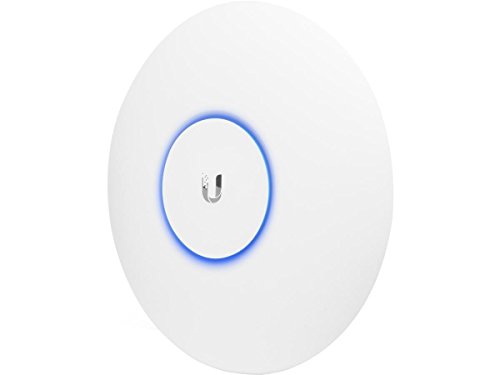
And one of these. SG-2440 pfSense can be run on most any PC with multiple NIC ports so the Netgate isn't a "must have". Have signal all over my house and yard. More expensive than a wal mart router/AP and more complex to setup for sure. But if you don't mind learning things and like to mess with radios and computer networks the performance and range is great. |
|
Quoted:
Its all good, I was gonna bump it anyway. Still trying to find out if its worth hooking up the 6100, or if I need to buy a new one to fix my streaming issues. Someone made the comment about going with 5G since it's less crowded. 5G also typically does not have the range that 2.4 has so something to consider. 5G is fast the closer you get but drops off the further you get away faster than 2.4. 2.4G can have a stronger signal at longer distances. |
|
Quoted:
Copy, thanks. When your talking faster speeds, does that pertain just to wifi? Or hardwired devices as well? |
|
Quoted:
Your internet connection is almost always the choke point. If you have 50mb/s internet connection it won't matter if you have a gigabit wired network or a 300mb/s wireless network your isp is still the bottleneck. If you have a media server or some such on your local network you might see improvements with a faster internal network. |
|
Quoted:
Ok. So what can I do at home to make it faster? What is the speed of the plan you pay for from your ISP? |
|
Quoted:
I'm old enough to remember when it was a device that delineated disparate layer 2 broadcast domains. OP is talking about some kind of radio wizardry. Back in my day, we didn't have all this fancy wi-fi. You wanted that naught photo, you had the download it over your 14,400 baud modem for hours. Wanted to share it, you had sneaker net it with floppys. 
|
|
Quoted:
In true arfcom fashion of suggesting overly complicated shit.... If you can run cable, put in a couple of dedicated dual band access points and use a pfSense dedicated firewall/router. I have two of these. www.amazon.com/dp/B015PRO512And one of these. SG-2440 pfSense can be run on most any PC with multiple NIC ports so the Netgate isn't a "must have". Have signal all over my house and yard. More expensive than a wal mart router/AP and more complex to setup for sure. But if you don't mind learning things and like to mess with radios and computer networks the performance and range is great. |
|
Quoted:
First of all your connection speed to the internet is going to be controlled by how fast your ISP is supplying your acct. Once you begin getting faster than 50 Mbit speeds your router may begin to limit your connection speeds simply because it's old enough to not have a high enough bandwidth to pass the speed/bandwidth. Both your older routers only use 100 Mbit ports on both the WAN interface and the LAN interface. Most newer routers now come with Gigabit WAN ports and Gigabit LAN ports. But to take advantage of those faster "connect' speeds your equipment must also support those higher connect speeds. i.e your desktop/laptop needs to have Gigabit ethernet ports. On the wireless side your wireless connected equipment needs to have wireless "N" or wireless "AC" technology to connect to the router. What is the speed of the plan you pay for from your ISP? Thanks for the explanation. My internet service provider is charter. I pay for the high speed internet. I think its 60mbps. When I check it its usually 50-60. |
|
Quoted:
Ok. So I go the new router installed. Man that was a PITA. It took me over 2 hrs to get it going. Guess we will see if it lags tonight during peek hours... I would also check to make sure the ea6100 has the latest firmware installed. |
|
Quoted:
What were the issues you were having? Generally adding a new router is(or can be) pretty pain free. Turn everything off. Connect new router. Power on modem followed shortly by powering on the new router. The ISP sees the new MAC address of the router and issues a new DHCP WAN IP through the modem. Of course that's the way it should go. I would also check to make sure the ea6100 has the latest firmware installed. Quoted:
Quoted:
Ok. So I go the new router installed. Man that was a PITA. It took me over 2 hrs to get it going. Guess we will see if it lags tonight during peek hours... I would also check to make sure the ea6100 has the latest firmware installed. 
|
|
Quoted:
What were the issues you were having? Generally adding a new router is(or can be) pretty pain free. Turn everything off. Connect new router. Power on modem followed shortly by powering on the new router. The ISP sees the new MAC address of the router and issues a new DHCP WAN IP through the modem. Of course that's the way it should go. I would also check to make sure the ea6100 has the latest firmware installed. |
|
Quoted:
Thats what I use to test my speeds with. I get 60mbps with a speed test though the fire box. I get 30ish via my laptop which is wireless. We stream on the fire box and experience issues. Will a new router even fix this since its hardwired in? |
|
Quoted:
So we just tried streaming a little tv and it was skipping around a little. Voice was ok. I did a speed test and it was around 60mbps. Should we fast enough. Time to get a new, new router? Run the test from this site: Sourceforge Internet Speed Test |
|
Quoted:
What else is inline with your system? Cable Modem? How old is that interface? What model? What is the speed service that you pay for? So, you are using a hard wire connection for "streaming," but are having "issues?" Modem is owned by charter. Is an arris brand model TM822G I would imagine its 4ish years old? I pay for 60 mbps. |
|
Quoted:
Before you go any further I suggest you connect your PC directly to the modem and get your internet directly through the modem bypassing the router. See if you can stream any tv shows on your PC without issues. Run the test from this site: Sourceforge Internet Speed Test |
|
Router is old and crappy, but thats already been covered, and the ubiquity posted above is great bang for buck for mid level consumer stuff.
How old are the wireless devices being used. even the latest greatest routers capable of doing both 2.4 and 5 ghz and b/g/n/ac goes to the lowest common denominator of devices on your WAP. if you have a 10 yr ear old laptop pc brick screaming along at b speeds, then lucky you, so is your brand new $2k arfcom machine :) Also consider a much shorter radius than the manufacturer claims from your Wap to be effective distance (maybe half). the further you get form your wap,speeds drop off because physics. Home construction/ line of sight obstructions play a role as well. if you just got your kid a 100 gallon fish tank, or a new file cabinet in the office and slapped it down between you and your Wap, then bye bye internet. Somebody above mentioned changing the channel, there is no way to know the best channel unless you know whats already being used. Download a cheap/free spectrum analyzer for your phone and pick the least cluttered channel. not the best answer, but its better than nothing. Good luck |
