


Posted: 12/29/2015 12:42:43 PM EDT
|
Hi Guys, hoping someone can confirm that my plan will work. I'm trying to set up two individual networks using 1 modem and two routers. I know there are a couple of ways to extend the range of one, such as setting up a second router as an access point or leaving it set up to broadcast a second signal and creating a sort of "subnetwork". Neither of those things are my goal. My current network is set up like this - Modem/Router combo creates Network 1. 2nd router (in another room) plugged directly into the modem and it broadcasts Network 2. Modem/Router combo unit has an awful router, and I would like to add a router and have it broadcast the signal for Network 1. I can use the modem router unit as a modem only at that point. Neither network needs to share files or anything like that. Maybe this image will give a better idea as to my plan. 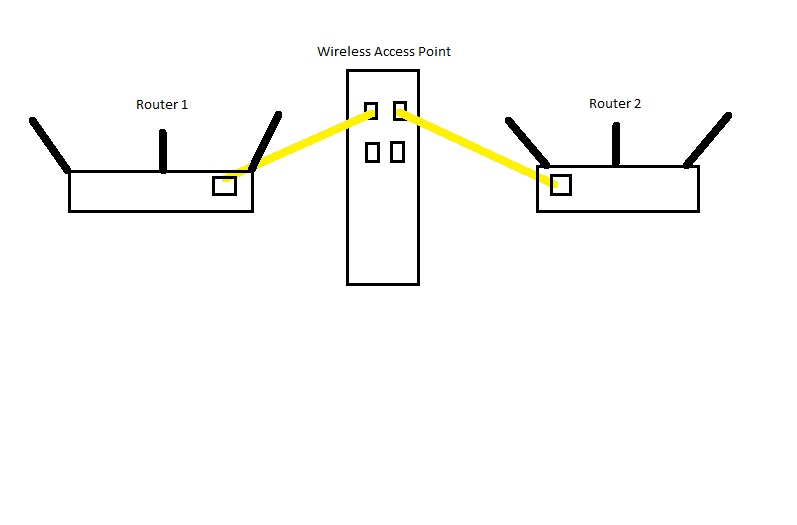 |
|
Quoted: Hi Guys, hoping someone can confirm that my plan will work. I'm trying to set up two individual networks using 1 modem and two routers. I know there are a couple of ways to extend the range of one, such as setting up a second router as an access point or leaving it set up to broadcast a second signal and creating a sort of "subnetwork". Neither of those things are my goal. My current network is set up like this - Modem/Router combo creates Network 1. 2nd router (in another room) plugged directly into the modem and it broadcasts Network 2. Modem/Router combo unit has an awful router, and I would like to add a router and have it broadcast the signal for Network 1. I can use the modem router unit as a modem only at that point. Neither network needs to share files or anything like that. Maybe this image will give a better idea as to my plan. http://www.underthewood.net/images2/twonetworks.jpg Ubiquiti Edgerouter Lite. It's what I use (I no longer need two networks, but I did). I have mine configured with one WAN port and two LAN ports. Previously one LAN port connected to my home network's router (its WAN port) and the other to my Verizon cell extender (because I used a VPN and my cell extender matches GPS location with IP address location). Since I went Project Fi I don't need the cell extender. Configuration is pretty not-simple, but there are configuration files that you can download for a 1->2 setup. This was my setup "wired router" is the Edgerouter Lite (it has no wifi). 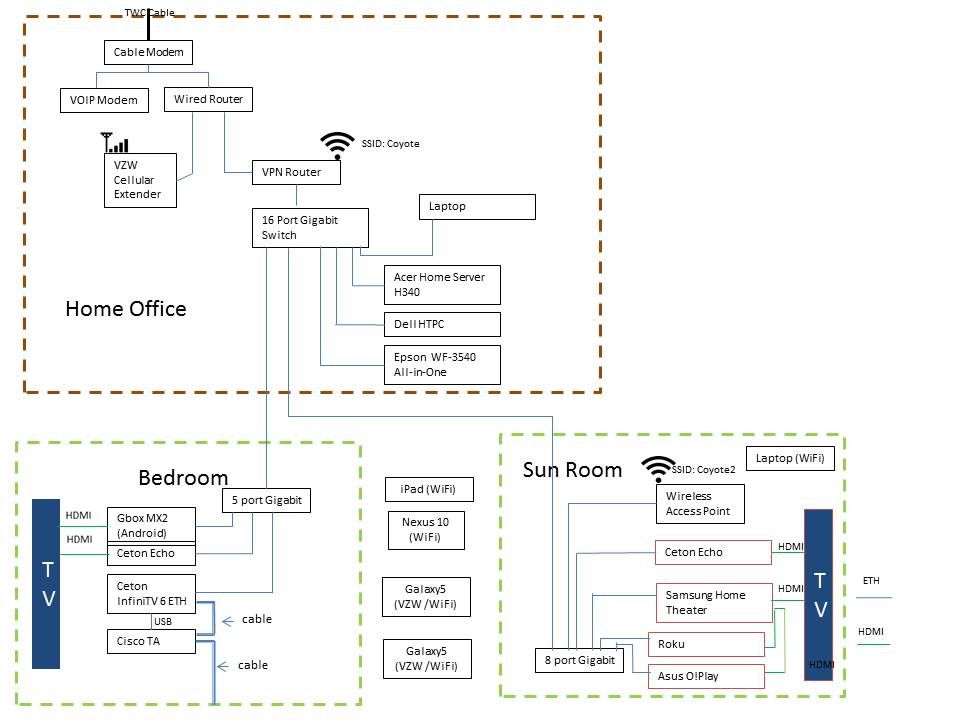 |
|
Quoted: Hey man, are you doing this for range extending purposes or to have separate networks? I ask because I know it works for range extension but not so sure about isolated networks. Purpose is to have 2 separate networks (Don't need a guest network). Additionally, they will cover 2 different areas in the house (modem in middle, and each router will be on separate ends of the house). |
|
Quoted: Purpose is to have 2 separate networks (Don't need a guest network). Additionally, they will cover 2 different areas in the house (modem in middle, and each router will be on separate ends of the house). Quoted: Quoted: Hey man, are you doing this for range extending purposes or to have separate networks? I ask because I know it works for range extension but not so sure about isolated networks. Purpose is to have 2 separate networks (Don't need a guest network). Additionally, they will cover 2 different areas in the house (modem in middle, and each router will be on separate ends of the house). Edgerouter Lite in the center - run CAT5e/6 to each router. Each network will have a separate IP address range - for example, 192.168.0.1-255 on one side and 192.168.10.1-255 on the other. Totally seperate (wifi devices will still 'see' the other network, but access could be controlled by security or MAC filtering). |
|
Quoted: Ubiquiti Edgerouter Lite. It's what I use (I no longer need two networks, but I did). I have mine configured with one WAN port and two LAN ports. Previously one LAN port connected to my home network's router (its WAN port) and the other to my Verizon cell extender (because I used a VPN and my cell extender matches GPS location with IP address location). Since I went Project Fi I don't need the cell extender. Configuration is pretty not-simple, but there are configuration files that you can download for a 1->2 setup. This was my setup "wired router" is the Edgerouter Lite (it has no wifi). http://img.photobucket.com/albums/v220/ODA564/Network_zps710d0dba.jpg Quoted: Quoted: Hi Guys, hoping someone can confirm that my plan will work. I'm trying to set up two individual networks using 1 modem and two routers. I know there are a couple of ways to extend the range of one, such as setting up a second router as an access point or leaving it set up to broadcast a second signal and creating a sort of "subnetwork". Neither of those things are my goal. My current network is set up like this - Modem/Router combo creates Network 1. 2nd router (in another room) plugged directly into the modem and it broadcasts Network 2. Modem/Router combo unit has an awful router, and I would like to add a router and have it broadcast the signal for Network 1. I can use the modem router unit as a modem only at that point. Neither network needs to share files or anything like that. Maybe this image will give a better idea as to my plan. http://www.underthewood.net/images2/twonetworks.jpg Ubiquiti Edgerouter Lite. It's what I use (I no longer need two networks, but I did). I have mine configured with one WAN port and two LAN ports. Previously one LAN port connected to my home network's router (its WAN port) and the other to my Verizon cell extender (because I used a VPN and my cell extender matches GPS location with IP address location). Since I went Project Fi I don't need the cell extender. Configuration is pretty not-simple, but there are configuration files that you can download for a 1->2 setup. This was my setup "wired router" is the Edgerouter Lite (it has no wifi). http://img.photobucket.com/albums/v220/ODA564/Network_zps710d0dba.jpg Nice. I actually have both routers I plan on using (http://www.amazon.com/gp/product/B008ABOJKS?psc=1&redirect=true&ref_=oh_aui_detailpage_o00_s00). I do like the image you gave, and will work on updating mine ot be more clear. Thanks! Here is a better graphic illustrating what my plan is. (The switch is an older switch and throttles a bit, so I bypass it with the apartment and main kitchen outlets.) 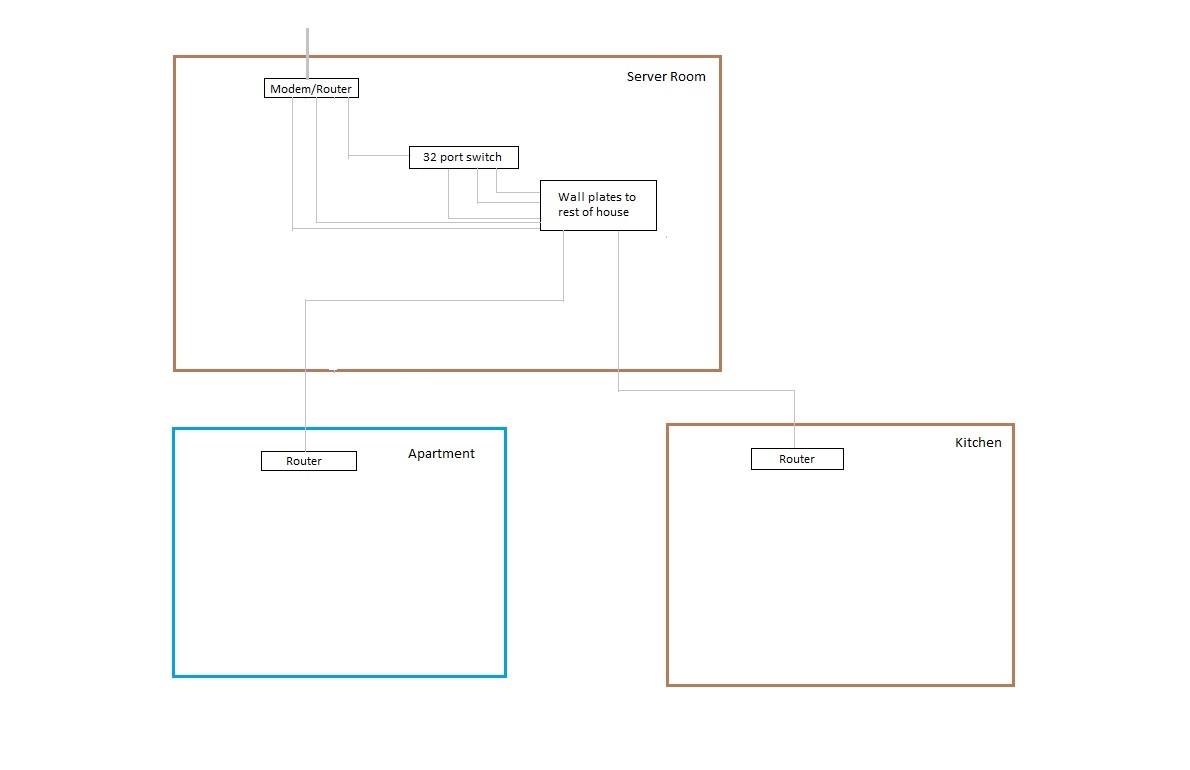 |
|
Quoted: Nice. I actually have both routers I plan on using (http://www.amazon.com/gp/product/B008ABOJKS?psc=1&redirect=true&ref_=oh_aui_detailpage_o00_s00). I do like the image you gave, and will work on updating mine ot be more clear. Thanks! Here is a better graphic illustrating what my plan is. (The switch is an older switch and throttles a bit, so I bypass it with the apartment and main kitchen outlets.) http://www.underthewood.net/images2/twonetworks2.jpg Quoted: Quoted: Quoted: Hi Guys, hoping someone can confirm that my plan will work. I'm trying to set up two individual networks using 1 modem and two routers. I know there are a couple of ways to extend the range of one, such as setting up a second router as an access point or leaving it set up to broadcast a second signal and creating a sort of "subnetwork". Neither of those things are my goal. My current network is set up like this - Modem/Router combo creates Network 1. 2nd router (in another room) plugged directly into the modem and it broadcasts Network 2. Modem/Router combo unit has an awful router, and I would like to add a router and have it broadcast the signal for Network 1. I can use the modem router unit as a modem only at that point. Neither network needs to share files or anything like that. Maybe this image will give a better idea as to my plan. http://www.underthewood.net/images2/twonetworks.jpg Ubiquiti Edgerouter Lite. It's what I use (I no longer need two networks, but I did). I have mine configured with one WAN port and two LAN ports. Previously one LAN port connected to my home network's router (its WAN port) and the other to my Verizon cell extender (because I used a VPN and my cell extender matches GPS location with IP address location). Since I went Project Fi I don't need the cell extender. Configuration is pretty not-simple, but there are configuration files that you can download for a 1->2 setup. This was my setup "wired router" is the Edgerouter Lite (it has no wifi). http://img.photobucket.com/albums/v220/ODA564/Network_zps710d0dba.jpg Nice. I actually have both routers I plan on using (http://www.amazon.com/gp/product/B008ABOJKS?psc=1&redirect=true&ref_=oh_aui_detailpage_o00_s00). I do like the image you gave, and will work on updating mine ot be more clear. Thanks! Here is a better graphic illustrating what my plan is. (The switch is an older switch and throttles a bit, so I bypass it with the apartment and main kitchen outlets.) http://www.underthewood.net/images2/twonetworks2.jpg I'm thinking that you are hung up on the word "router" in the device name "Edgerouter Lite". You want to split to your modem into two separate LANs. Which exactly what the Edgerouter Lite does in a 1 WAN, 2 LAN configuration. I understand you want to use two routers you own off one modem to create two LANs. Do do that, you need a device that splits the WAN connection coming from your modem into two LANs and then manages that . That is exactly what the Edgerouter Lite in a 1 WAN, 2 LAN configuration does. Every device at establishes an IP address range on your side of your modem is a "router". Any way you do what you want you'll need a third router that can be configured into a 1 WAN, 2 LAN configuration. After much research into doing exactly what you want to do I found the Ubiquiti Edgerouter Lite to be the simplest way - though "simple" is a relative term. So, I did what you want to do and that's how I did it. |
|
Your diagram looks like you actually want three LANs. One for your network connected to your switches and one for the kitchen and one for the apartment that you show these passing through the switch? If that's the case I would put an Edgerouter X configured for 1 WAN (input), 3 LAN (output - ETH 01 and 02 would be your 1st LAN, then ETH 03 would be LAN 2, then ETH 04 would be LAN 3) right after your modem, run CAT5e/6 to your switch / panel whatever for your house, then run a separate CAT5e/6 run for each other LAN (one for the apartment router and one for the kitchen router - which I assume are planned to be used purely in WiFi mode?). I don't know enough about managed switches to know if you can run a discrete separate LAN through one (or if your 32 port switch is a managed switch) and I don't think its worth the aggravation. If you aren't using gigabit switches you should. |
|
Quoted: Ubiquiti Edgerouter Lite. It's what I use (I no longer need two networks, but I did). I have mine configured with one WAN port and two LAN ports. Previously one LAN port connected to my home network's router (its WAN port) and the other to my Verizon cell extender (because I used a VPN and my cell extender matches GPS location with IP address location). Since I went Project Fi I don't need the cell extender. Configuration is pretty not-simple, but there are configuration files that you can download for a 1->2 setup. This was my setup "wired router" is the Edgerouter Lite (it has no wifi). http://img.photobucket.com/albums/v220/ODA564/Network_zps710d0dba.jpg Quoted: Quoted: Hi Guys, hoping someone can confirm that my plan will work. I'm trying to set up two individual networks using 1 modem and two routers. I know there are a couple of ways to extend the range of one, such as setting up a second router as an access point or leaving it set up to broadcast a second signal and creating a sort of "subnetwork". Neither of those things are my goal. My current network is set up like this - Modem/Router combo creates Network 1. 2nd router (in another room) plugged directly into the modem and it broadcasts Network 2. Modem/Router combo unit has an awful router, and I would like to add a router and have it broadcast the signal for Network 1. I can use the modem router unit as a modem only at that point. Neither network needs to share files or anything like that. Maybe this image will give a better idea as to my plan. http://www.underthewood.net/images2/twonetworks.jpg Ubiquiti Edgerouter Lite. It's what I use (I no longer need two networks, but I did). I have mine configured with one WAN port and two LAN ports. Previously one LAN port connected to my home network's router (its WAN port) and the other to my Verizon cell extender (because I used a VPN and my cell extender matches GPS location with IP address location). Since I went Project Fi I don't need the cell extender. Configuration is pretty not-simple, but there are configuration files that you can download for a 1->2 setup. This was my setup "wired router" is the Edgerouter Lite (it has no wifi). http://img.photobucket.com/albums/v220/ODA564/Network_zps710d0dba.jpg |
|
Quoted: Makes zero sense why you want things this way. Can it be done? Sure.. why anyone would is beyond me. Also the "server room" made me chuckle a bit. There's a reason lol. It's a complicated set-up. Essentially, there is a separate apartment that is rented out to someone to take care of the place when we aren't here. We have over 30 devices we need to connect, and don't want to interfere with the wireless devices of the renter also. If we have each have dedicated networks (which happen to be on opposite ends of the house) we would be happy. And server room was named that way because well... there's 2 server racks there. All our security system components, crestron system, home audio, home theater components, network switch, landscape lighting and irrigation controllers are there. ODA - You may be right. I will try to set things up my way, and if it doesn't work will follow your advice. Thank you for your thoughts and helping me figure it out. |
|
Quoted: Can you please elaborate on the Ceton setup and requirements. I'm looking to replace my tivo and want a bit more out of it. Bear in mind that everything is now "legacy", even though it was bleeding edge last year. I wanted a multiple (6) tuner Windows Media Center home theater PC / DVR with WMC extenders to replace cable boxes and give me 'whole house DVR' before Time-Warner (TWC) had it. Up until Windows 10 final release, Windows Media Center was a component of Windows Premium / Ultimate OS (XP, 7, 8 and 8.1 and Win10 prerelease) - it still is, but not in Win 10 and won't be supported after 2025 (IIRC). So my tuner / cable card box is a Ceton InfiniTV 6 Ethernet (they made / make a PCI card also). That gets my TV signal off the cable (decoded using a TWC cable card with the TWC tuning adapter for the switched digital video channels - the ones that only come hrough when you tune them). That's controlled by my home theater PC running Win 7 Home Premium WMC. That's my "cable box / DVR". It has a 2nd 1 Tb hard drive that my TV is recorded to (which I can archive to my Acer H340 home server if I need to - old, but it works). The computer autoboots into Win7 and auto starts WMC (if the power goes out), plus I run comskip to strip commercials out of recorded shows and a caller ID program that displays incoming calls on my TVs, etc. At each TV I have a Ceton Echo extender that basically is the interface to WMC on the PC. These are discontinued. They were a great concept, but Ceton failed. When they work they are awesome. When they don't Ceton refused to do RMAs or honor their warranty - they said "run a recovery" to me for 12 months and when 48 recoveries solved nothing they said "yeah that one's bad, but hey, your warranty expired". Used to be able to get them for $90, now they're $200+ on eBay. I control them with Logitech remotes. The better, nosier, more power using alternative is to use X-Boxes. They don't need big hard drives or whatever. Or you can use Linksys DMA 2100s, but that's pretty Windows XP. The network is all gigabit speed (routers, NC card, switches). Plus, like all computer shit and anything touched by the evil that is Microsoft, even if you lock everything down (no updates. etc.) it will still spontaneously shit the bed. My system will run rock steady for months and then suddenly need to be completely rebooted / massaged. But I don't pay TWC a dime for a 6 tuner DVR that can record way more HD TV than man will ever watch, plus stream my video, music and photo libraries on my server (and access Pandora and Amazon video - I can also access my Netflix account, but only at my HTPC). If I were to do it again I'd probably have two SiliconDust HomeRunHDs (3 tuners each) and use X-Boxes. That would require two cable cards and two tuning adapters (I think) - the cable company has to give you those. Ceton stuff is sexy but Ceton's execution / QC / customer support sucks dead vultures (I think the company is in the toilet anyway - Microsoft murdered the industry when they killed WMC in the final release of Win10). |