


[ARCHIVED THREAD] - Youtube .. a warning (Page 1 of 3)
Posted: 11/23/2010 12:05:28 PM EDT
|
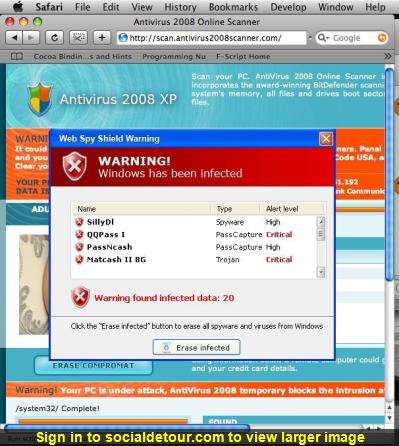
Last week, I was on youtube on my work laptop. (not violating any policies) and when I finished watching a video and clicked on part of the screen that list associated videos, I got this pop up, you know the ones that looks like it is scanning your hard drive files really fast? This thing was called "System tool" and I tried everything to shut it off. this is one bad piece of work. After a few tries to get it to stop, my desk top went blue and these big red letters telling me I'd better pay the 29.95 to get the cure and clean off my infected hard drive. Well, I booted in safe mode and ran Malware, the free one. The reason I had to go to safe mode is that this thing stops any new processes from launching! It found it and I asked it to remove/quarantine and I was prompted to re-boot well, then Windows would not launch, it damaged a critical file needed to boot Windows. So, I called my IT, told them what happened and they had me take it in. I just got a call back and since my laptop was a hand me down about 4 years old, I am getting a new one then my buddy told me of a friend of his at a conference last week was on youtube and had the exact same thing happen to him |


| Happened to me a few weeks ago. Once it booted I went to my task manager, and stopped the program from running. Then I googled the name of the process, and found the file name, and manually deleted it. It was a nasty one. Wouldn't let me open new stuff if I didn't close it on start up on time, and wouldn't let me connect to the Internet. |
|
Quoted:
Quoted:
FireFox + AdBlock Plus Plus NoScript. Oh sure, people may whine like they always fucking do about "I have to allow each thing???" but yeah, that's exactly the goddamn point! I am already running AdBlock Plus, hadn't heard of NoScript. Checking that one out now, thanks. 
|
|
Quoted: I run Firefox and my wallpaper is a depiction of Jack Bauer and Chuck Norris sodomizing Steven Seagal. I'm safe. Listen... Chuck Norris stands on his own, but Steven Seagal would eat Jack Bauer's lunch. Everyday. Jack Bauer would not be allowed to eat. He'd just wither away while Seagal meditated. |
|
Quoted: Listen... Chuck Norris stands on his own, but Steven Seagal would eat Jack Bauer's lunch. Everyday. Jack Bauer would not be allowed to eat. He'd just wither away while Seagal meditated. Blasphemous blasphemer be blaspheming. Quoted: You guys aint listening! Adobe is the debil. Google is the worlds largest marketing company. Anyone even know what a LSO cookie is????? Anyone know what a hosts file is????? I don't need to know what it is. I only need to know how to kill it. |
|
Quoted:
Quoted:
Quoted:
You guys aint listening! Adobe is the debil. Google is the worlds largest marketing company. Anyone even know what a LSO cookie is????? Anyone know what a hosts file is????? Go on... English, do you speak it??? You asked if anyone knew what a LSO cookie was... NO I dont... You asked if anyone knew what a host file is... NO I dont... Settle down Sally. |
|
I have also used this for a number of years, it's free, and it doesn't "run" at all, only when you start it up to get updates. Multi-Angle Protection
No-Nonsense Security SpywareBlaster can help keep your system secure, without interfering with the "good side" of the web. And unlike other programs, SpywareBlaster does not have to remain running in the background. It works alongside the programs you have to help secure your system. http://www.javacoolsoftware.com/spywareblaster.html Check it out, it's good stuff. |
|
Quoted:
Quoted:
Listen... Chuck Norris stands on his own, but Steven Seagal would eat Jack Bauer's lunch. Everyday. Jack Bauer would not be allowed to eat. He'd just wither away while Seagal meditated. Blasphemous blasphemer be blaspheming. Quoted:
You guys aint listening! Adobe is the debil. Google is the worlds largest marketing company. Anyone even know what a LSO cookie is????? Anyone know what a hosts file is????? I don't need to know what it is. I only need to know how to kill it. OK, I get it. First rule of war, know your enemy. How are you gonna know how to "kill it" if you don't know where it's weak? Cookies on your machine can track all kinds of things, make things happen based on your previous moves. Adobe has designed a kind of hidden cookie - read up for 3 minutes: http://www.wired.com/epicenter/2009/08/you-deleted-your-cookies-think-again/ Next, a little background of how your machine "knows" how to transform a name into an internet number/site/location.... DNS - a basic name to number transformer. All machines have to "lookup" the transformation to get to a site (another machine on the net that delivers content) The most basic form of "name to number" transformation, before DNS - the "hosts" file. Most all machines look at the hosts file first to determine this transformation, then if nothing is found, use DNS. Your machine always has an address of "localhost" or an IP address of 127.0.0.1 So, search for a file named "hosts" and open it in some flavor editor (windowz users use notepad to view/edit this file). Let's say, some fuckbrain has a link in their "page" to stuff some shit down your throat, including a cookie or some new-fangled thing like a hidden LSO cookie, 99.999% of all computer owners have no fucking clue and makes reference to some shit like "feedme.someshit.onlya.marketing.company.com" needs to keep track of and popup some shit some sad fucker will buy. Well in that hosts file (surely you've found it by now) if you make an entry on a single like like: 127.0.0.1 feedme.someshit.onlya.marketing.companywants.com When a site wants to stuff that shit down ur throat and ur machine looks it up, it finds none other than itself, which delivers absolutely nothing to your browser!!! So here's an example of a hosts file. Add what you need based on looking at the "source" of the webpage: Holy shit, too big for copy and paste w/all the shitheads on the net making u fat, grab it here: hosts.new Save the damn thing somewhere, copy and paste, nobody cares, just put that shit in your hosts file 
|
|
Quoted:
Quoted:
Quoted:
Listen... Chuck Norris stands on his own, but Steven Seagal would eat Jack Bauer's lunch. Everyday. Jack Bauer would not be allowed to eat. He'd just wither away while Seagal meditated. Blasphemous blasphemer be blaspheming. Quoted:
You guys aint listening! Adobe is the debil. Google is the worlds largest marketing company. Anyone even know what a LSO cookie is????? Anyone know what a hosts file is????? I don't need to know what it is. I only need to know how to kill it. OK, I get it. First rule of war, know your enemy. How are you gonna know how to "kill it" if you don't know where it's weak? Cookies on your machine can track all kinds of things, make things happen based on your previous moves. Adobe has designed a kind of hidden cookie - read up for 3 minutes: http://www.wired.com/epicenter/2009/08/you-deleted-your-cookies-think-again/ Next, a little background of how your machine "knows" how to transform a name into an internet number/site/location.... DNS - a basic name to number transformer. All machines have to "lookup" the transformation to get to a site (another machine on the net that delivers content) The most basic form of "name to number" transformation, before DNS - the "hosts" file. Most all machines look at the hosts file first to determine this transformation, then if nothing is found, use DNS. Your machine always has an address of "localhost" or an IP address of 127.0.0.1 So, search for a file named "hosts" and open it in some flavor editor (windowz users use notepad to view/edit this file). Let's say, some fuckbrain has a link in their "page" to stuff some shit down your throat, including a cookie or some new-fangled thing like a hidden LSO cookie, 99.999% of all computer owners have no fucking clue and makes reference to some shit like "feedme.someshit.onlya.marketing.company.com" needs to keep track of and popup some shit some sad fucker will buy. Well in that hosts file (surely you've found it by now) if you make an entry on a single like like: 127.0.0.1 feedme.someshit.onlya.marketing.companywants.com When a site wants to stuff that shit down ur throat and ur machine looks it up, it finds none other than itself, which delivers absolutely nothing to your browser!!! So here's an example of a hosts file. Add what you need based on looking at the "source" of the webpage: Holy shit, too big for copy and paste w/all the shitheads on the net making u fat, grab it here: hosts.new Save the damn thing somewhere, copy and paste, nobody cares, just put that shit in your hosts file
You clearly have a gift for teaching. Thank you. |

|
ur some kind of protected "for the kids" kind of user, apparently.
Log in as administrator, super user, king of kings, nothing can stop you kind of user and try again. If you cant do that in some kind of OS - be it windoz or ubuntfu, ask someone else, I am root everywhere I go, or I don't. |
|
Quoted:
Quoted:
Quoted:
FireFox + AdBlock Plus Plus NoScript. Oh sure, people may whine like they always fucking do about "I have to allow each thing???" but yeah, that's exactly the goddamn point! I am already running AdBlock Plus, hadn't heard of NoScript. Checking that one out now, thanks. NoScript is a PITA at first but man does it save you a lot of trouble down the road. However I cannot update my Flash or watch LiveLeak anymore but I will survive. OMG NoScript turned my laptop into an iPad WTF BBQ!!!!!!!!1111one!!
|
|
Quoted:
iMac. Amazing how Mac fanboyz think their shit is *any* different than anyone else's... Only difference is mac users have no idea what's going on under the hood and have no idea how to access/check it - as there is NO way to root/gain access and fix the jail, - just hope and prayer (ask me how I know). |
|
That's amazing! Especially how it was able to scan system32 on MacOS X! That must be some good scanning software right there. |
[ARCHIVED THREAD] - Youtube .. a warning (Page 1 of 3)

 Win a FREE Membership!
Sign up for the ARFCOM weekly newsletter and be entered to win a free ARFCOM membership. One new winner* is announced every week!
You will receive an email every Friday morning featuring the latest chatter from the hottest topics, breaking news surrounding legislation, as well as exclusive deals only available to ARFCOM email subscribers.