


Posted: 8/6/2015 1:20:45 PM EDT
| I'm running Firefox 39.0 but it happens on any version. I can't seem to find a setting that will allow securely embedded images to load. They just show a broken link. I have to right click on them and open in a new tab then go into the address bar and remove the s from the https: to get the image to show. Any ideas? |
|
Maybe start here. Not sure if it will solve it, but let me know. I have the same thing going on at home, but haven't had time to dig in to it...
https://support.mozilla.org/en-US/kb/fix-problems-images-not-show |
| I think this is your problem: http://du.screenstepslive.com/s/docs/m/7107/l/219447-allow-mixed-content-in-browsers |
|
Quoted:
I think this is your problem: http://du.screenstepslive.com/s/docs/m/7107/l/219447-allow-mixed-content-in-browsers I believe you are right! This worked for me. This problem has been following me from two different fresh windows and Firefox installs. I have spent a few hours trying to resolve it. Thanks. |
|
Quoted:
Quoted:
I think this is your problem: http://du.screenstepslive.com/s/docs/m/7107/l/219447-allow-mixed-content-in-browsers I believe you are right! This worked for me. This problem has been following me from two different fresh windows and Firefox installs. I have spent a few hours trying to resolve it. Thanks. just note that you are reducing the overall security of your browser environment for all sites by following that process. ps notes on this issue from goatboy: http://www.ar15.com/forums/t_1_2/1745939_Really_disliking_the_new_image_sizes.html&page=4#i53514305 http://www.ar15.com/forums/t_1_2/1745939_Really_disliking_the_new_image_sizes.html&page=4#i53519141 http://www.ar15.com/forums/t_1_2/1745939_Really_disliking_the_new_image_sizes.html&page=5#i53523076 |
|
Quoted: just note that you are reducing the overall security of your browser environment for all sites by following that process. ps notes on this issue from goatboy: http://www.ar15.com/forums/t_1_2/1745939_Really_disliking_the_new_image_sizes.html&page=4#i53514305 http://www.ar15.com/forums/t_1_2/1745939_Really_disliking_the_new_image_sizes.html&page=4#i53519141 http://www.ar15.com/forums/t_1_2/1745939_Really_disliking_the_new_image_sizes.html&page=5#i53523076 Quoted: Quoted: Quoted: I think this is your problem: http://du.screenstepslive.com/s/docs/m/7107/l/219447-allow-mixed-content-in-browsers I believe you are right! This worked for me. This problem has been following me from two different fresh windows and Firefox installs. I have spent a few hours trying to resolve it. Thanks. just note that you are reducing the overall security of your browser environment for all sites by following that process. ps notes on this issue from goatboy: http://www.ar15.com/forums/t_1_2/1745939_Really_disliking_the_new_image_sizes.html&page=4#i53514305 http://www.ar15.com/forums/t_1_2/1745939_Really_disliking_the_new_image_sizes.html&page=4#i53519141 http://www.ar15.com/forums/t_1_2/1745939_Really_disliking_the_new_image_sizes.html&page=5#i53523076 Which is why I continue to live with the inconvenience. Its one thing to avoid mixed content, but its a damn shame how many sites don't support SSL for all things. |
|
Quoted:
I'm confused, why should I care about SSL (besides logins) on an open forum? SSL does two primary things: 1) Encrypts all transactions between the web browser and web server, and 2) ensures trust that the web server is who it claims to be. As far as SSL benefits for a web forum, like you said, it's mainly to protect your user/pass when it's sent to the webserver. Other than that, there really isn't much else to be gained, in a practical sense for just a generic web forum. There's a huge push to get all web servers using SSL, mainly as a general security initiative to protect the web as a whole. The problem we're seeing right now as more sites switch to SSL web service is that externally dependent resources (e.g. CDN assets, partner js) are not on SSL servers (or are, but without proper certificates) resulting "mixed content" errors on SSL protected sites. I don't anticipate SSL become standard for web, simply because many high traffic servers (e.g. news sites, CDNs, advertising) don't want/need the (CPU) overhead of SSL encryption. But I would hope that any site that has user authentication, would implement SSL to protect authentications, although they can mitigate this by utilizing OAuth instead (e.g. OpenID, Facebook, Twitter, etc). |
| I have enabled it and most pics are loading fine but some still won't load. So if i access from http://www.ar15.com instead of https://www.ar15.com this will stop? I also don't understand that since I am accessing from https and most of the pictures that are showing broken links are from another source that is https then why won't they show up? Is that because a secure handoff between ar15.com and that other secure site can't be established? |
|
Quoted: I have enabled it and most pics are loading fine but some still won't load. So if i access from http://www.ar15.com instead of https://www.ar15.com this will stop? I also don't understand that since I am accessing from https and most of the pictures that are showing broken links are from another source that is https then why won't they show up? Is that because a secure handoff between ar15.com and that other secure site can't be established? The vast majority of images that don't load for me when viewing this site in HTTPS are images linked to sites with invalid SSL certificates. If you open the image that isn't showing in a new tab, you will likely get a security warning asking you if you are sure that you wish to view the URL. 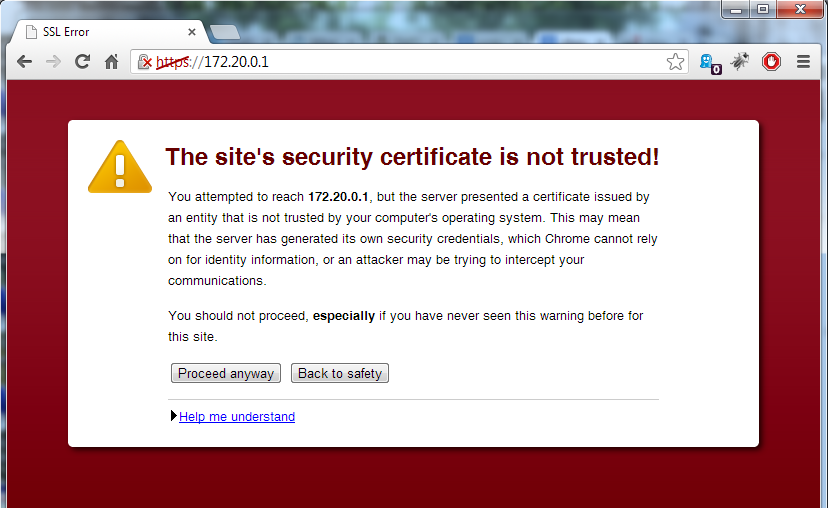 |
|
Quoted:
I have enabled it and most pics are loading fine but some still won't load. So if i access from http://www.ar15.com instead of https://www.ar15.com this will stop? I also don't understand that since I am accessing from https and most of the pictures that are showing broken links are from another source that is https then why won't they show up? Is that because a secure handoff between ar15.com and that other secure site can't be established? there is no handoff. arfcom, when surfed via https, returns pages which include external references ("URLs") to https content. your browser has to go get these pages. some of the sites you are trying to get content from via https either (a) don't support https, or (b) have one or more issues (***) with their SSL certificate to the extent that your browser does not load the content. via your browser settings, you can not fix (a) -- that is a server end feature, and therefore can not be fixed on the client (browser) end. via your browser settings, you can fix (b) by allowing sites with invalid SSL certificates but doing so basically defeats the purpose of SSL in the first place. i am part of the issue. below you may see one or two images. the first is served via http; the second via https. i use a self-signed SSL certificate on my server at home -- and depending on your browser and settings you may or may not get https content from my server. so, my server supports ssl/https, but the SSL certificate will not pass strict "trust checking" since it is self signed. i don't want to pay for a SSL certificate, and i don't need to pay for a SSL certificate. many others are in this same boat. pages with "mixed content" (some "secure", some "insecure") are going to be a problem on the web for the next 10-15 years, so get used to it. ps (***) there are 87 ways that this can fail. server name != domain name != certificate name; self-signed; expired; etc. ar-jedi 

|
|
Quoted:
there is no handoff. arfcom, when surfed via https, returns pages which include external references ("URLs") to https content. your browser has to go get these pages. some of the sites you are trying to get content from via https either (a) don't support https, or (b) have one or more issues (***) with their SSL certificate to the extent that your browser does not load the content. via your browser settings, you can not fix (a) -- that is a server end feature, and therefore can not be fixed on the client (browser) end. via your browser settings, you can fix (b) by allowing sites with invalid SSL certificates but doing so basically defeats the purpose of SSL in the first place. i am part of the issue. below you may see one or two images. the first is served via http; the second via https. i use a self-signed SSL certificate on my server at home -- and depending on your browser and settings you may or may not get https content from my server. so, my server supports ssl/https, but the SSL certificate will not pass strict "trust checking" since it is self signed. i don't want to pay for a SSL certificate, and i don't need to pay for a SSL certificate. many others are in this same boat. pages with "mixed content" (some "secure", some "insecure") are going to be a problem on the web for the next 10-15 years, so get used to it. ps (***) there are 87 ways that this can fail. server name != domain name != certificate name; self-signed; expired; etc. ar-jedi http://losdos.dyndns.org/public/misc-null/oh-no-these-bullets-hit-my-house_sm.jpg https://losdos.dyndns.org/public/misc-null/oh-no-these-bullets-hit-my-house_sm.jpg Quoted:
Quoted:
I have enabled it and most pics are loading fine but some still won't load. So if i access from http://www.ar15.com instead of https://www.ar15.com this will stop? I also don't understand that since I am accessing from https and most of the pictures that are showing broken links are from another source that is https then why won't they show up? Is that because a secure handoff between ar15.com and that other secure site can't be established? there is no handoff. arfcom, when surfed via https, returns pages which include external references ("URLs") to https content. your browser has to go get these pages. some of the sites you are trying to get content from via https either (a) don't support https, or (b) have one or more issues (***) with their SSL certificate to the extent that your browser does not load the content. via your browser settings, you can not fix (a) -- that is a server end feature, and therefore can not be fixed on the client (browser) end. via your browser settings, you can fix (b) by allowing sites with invalid SSL certificates but doing so basically defeats the purpose of SSL in the first place. i am part of the issue. below you may see one or two images. the first is served via http; the second via https. i use a self-signed SSL certificate on my server at home -- and depending on your browser and settings you may or may not get https content from my server. so, my server supports ssl/https, but the SSL certificate will not pass strict "trust checking" since it is self signed. i don't want to pay for a SSL certificate, and i don't need to pay for a SSL certificate. many others are in this same boat. pages with "mixed content" (some "secure", some "insecure") are going to be a problem on the web for the next 10-15 years, so get used to it. ps (***) there are 87 ways that this can fail. server name != domain name != certificate name; self-signed; expired; etc. ar-jedi http://losdos.dyndns.org/public/misc-null/oh-no-these-bullets-hit-my-house_sm.jpg https://losdos.dyndns.org/public/misc-null/oh-no-these-bullets-hit-my-house_sm.jpg Interesting...I did switch back to just using http and most images are loading. However your second image didn't load. |