


Posted: 3/21/2011 8:26:22 PM EDT
|
So, I am a photographer and I may have a job coming up in a part of the world that is, uh, volatile.
I currently use a MacBook Pro, and a Sony VIAO VG series desktop replacement for processing. Let's start with the VIAO. I have the entire disk encrypted with TruCrypt, and it requires a password prior to boot. On the Mac, I also did this, but with SL, I ran into problems with updates and re-boots (where the updates finish after re-boot), so I took it off. I now am only using FileVault for this (which is not that great). Here is the issue: I know there are serious issues with total disk encryption software: http://news.cnet.com/2300-1029_3-6230933.html?tag=mncol. So, the first solution is to not have anything I don't want lost on the computer to begin with. However, this is nearly impossible. Second, I know not to trust screen saver lockouts, and when I am done using a laptop, I log out and turn it off. Third, I firmly believe the best way to do this is to encrypt specific files (such as .pst files if you are worried about e-mail), and then mount only them as necessary. Other suggestions? |
|
Trucrypt is supposed to be great solution.
Lemme know what you come up with. This is an interesting topic. Besides, depending on where you're going or even here, you would likely be "encouraged" to give up your password. 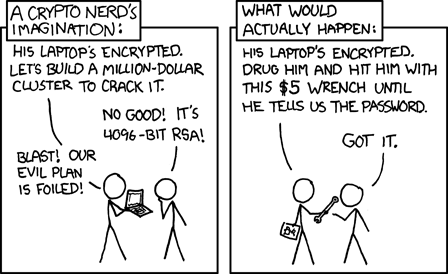
And I'm not just talking about the above. I'm talking about possibly being turned away at the boarding gates / security check. Being detained ... for how long would depend. Being denied entry into a country, thus ruining your plans / trip. All depends on the value of the contents of the laptop. I don't know, maybe someone with more info could add to the discussion, I was just pulling that stuff off the top of my head. |
|
Quoted:
So, I am a photographer and I may have a job coming up in a part of the world that is, uh, volatile. I currently use a MacBook Pro, and a Sony VIAO VG series desktop replacement for processing. Let's start with the VIAO. I have the entire disk encrypted with TruCrypt, and it requires a password prior to boot. On the Mac, I also did this, but with SL, I ran into problems with updates and re-boots (where the updates finish after re-boot), so I took it off. I now am only using FileVault for this (which is not that great). Here is the issue: I know there are serious issues with total disk encryption software: http://news.cnet.com/2300-1029_3-6230933.html?tag=mncol. So, the first solution is to not have anything I don't want lost on the computer to begin with. However, this is nearly impossible. Second, I know not to trust screen saver lockouts, and when I am done using a laptop, I log out and turn it off. Third, I firmly believe the best way to do this is to encrypt specific files (such as .pst files if you are worried about e-mail), and then mount only them as necessary. Other suggestions? Don't use a computer based email program like Outlook - use an internet one - Yahoo, gmail, etc. That way no account information is stored on your computer (unless you're silly enough to save passwords and sign-ons) To that end, you can store docs, spreadsheets, etc, on GoogleDocs - that way you always need a password to access them, and you can get them from any computer in the event yours is stolen. Get a decent case for your laptop - Pelican, Zero Haliburton, etc. and a good lock. Protection from elements and drops are as important as protecting from theft. |
|
Quoted:
And I'm not just talking about the above. I'm talking about possibly being turned away at the boarding gates / security check. Being detained ... for how long would depend. Being denied entry into a country, thus ruining your plans / trip. All depends on the value of the contents of the laptop. I don't know, maybe someone with more info could add to the discussion, I was just pulling that stuff off the top of my head. Yes, you are right. But, two solutions: One, if you don't encrypt the entire HD, and instead only encrypt specific files, the casual observer wouldn't know if you even had encrypted files on your laptop. Second, TrueCrypt offers a double encrypted option where you can set two passwords: one for the inner encryption and one for the outer. If forced to give up one, just give up the outer. It locks the inner and overwrites it. |
|
Mitigating risks requires you to list out the risks and treat each threat as a facet to your overall security plan. What are you trying to protect against? You need to know that before throwing a bunch of general "fixes" together and thinking it's done. What is it you are worried about? What is the value of the data on the laptops? What is the consequences of losing that data? How about if it falls into "enemy" hands? Do you work for a company? Or are you freelance? Yes, commercial encryption solutions all suck. (PGP is OK, but it's expensive.) Why the heck did you even consider that crap if you know how to use TrueCrypt?
|
|
Quoted:
Mitigating risks requires you to list out the risks and treat each threat as a facet to your overall security plan. What are you trying to protect against? You need to know that before throwing a bunch of general "fixes" together and thinking it's done. What is it you are worried about? What is the value of the data on the laptops? What is the consequences of losing that data? How about if it falls into "enemy" hands? Do you work for a company? Or are you freelance? Yes, commercial encryption solutions all suck. (PGP is OK, but it's expensive.) Why the heck did you even consider that crap if you know how to use TrueCrypt? truecrypy does not do full disk encryption on a mac. thats why we had to purchase pgp/symantec |

|
Most of the "serious issues" with full disk encryption I've seen described involve being able to recover the encryption key while the machine is already unlocked and booted. Afterwards a program/virus finds the encryption key in memory that can be used later to decrypt the disk. Theres no way around that. The remainder of the problems revolve around not having a sufficiently long passphrase. And I stress phrase as it should be a sentence long string of characters. Here's a decent pass phrase... The life of the wife is ended by the knife. Heres an even better one.... 2 B @ Man You Must Have H0n0r. |-|0n0r & A P3n1s. Meet or exceed the recommendations laid out in the manuals of the software you are using. Deviating from them even in insignificant ways can open you up to direct or side channel encryption attacks. Consider what needs protecting and what your goal is. Like someone else mentioned truecrypt has several modes including plausible deniability. -Foxxz |
|
Quoted: So, I am a photographer and I may have a job coming up in a part of the world that is, uh, volatile. I currently use a MacBook Pro, and a Sony VIAO VG series desktop replacement for processing. Let's start with the VIAO. I have the entire disk encrypted with TruCrypt, and it requires a password prior to boot. On the Mac, I also did this, but with SL, I ran into problems with updates and re-boots (where the updates finish after re-boot), so I took it off. I now am only using FileVault for this (which is not that great). Here is the issue: I know there are serious issues with total disk encryption software: http://news.cnet.com/2300-1029_3-6230933.html?tag=mncol. So, the first solution is to not have anything I don't want lost on the computer to begin with. However, this is nearly impossible. Second, I know not to trust screen saver lockouts, and when I am done using a laptop, I log out and turn it off. Third, I firmly believe the best way to do this is to encrypt specific files (such as .pst files if you are worried about e-mail), and then mount only them as necessary. Other suggestions? Rather than using TrueCrypt to encrypt the whole HD, just encrypt a specific folder and put all the important documents and files in there |
|
Quoted:
Rather than using TrueCrypt to encrypt the whole HD, just encrypt a specific folder and put all the important documents and files in there This right here. I don't do whole disk encryption with my MBP. I do have several Truecrypt and Apple AES volumes. The super important stuff (Firefox profile, Thunderbird profile, Chrome profiles, random data, and some code) go in a Truecrypt volume. Less important stuff (music, ebooks) go in Apple encrypted volumes. |
|
Quoted: Quoted: Rather than using TrueCrypt to encrypt the whole HD, just encrypt a specific folder and put all the important documents and files in there This right here. I don't do whole disk encryption with my MBP. I do have several Truecrypt and Apple AES volumes. The super important stuff (Firefox profile, Thunderbird profile, Chrome profiles, random data, and some code) go in a Truecrypt volume. Less important stuff (music, ebooks) go in Apple encrypted volumes. The above sounds reasonable enough. You have content that would be inappropriate where you're going? Take it off the laptop: problem solved. Seriously. Also, if you have the resources, consider configuring your laptop web browser to proxy all requests through another server with SSL protection. All anyone monitoring the network can tell is that you have an SSL connection to an IP address. No sketchy (and sketchy varies by location) content or hostname is visible to cause you trouble or to get you blocked by filters. |