


Posted: 3/24/2008 4:49:14 AM EDT
|
I finally got around to building a light box this weekend in an attempt to take some decent pics of my guns\parts etc. but I have to say it didn’t go as well as I hoped. I went the low cost\easy route to start out with just to see what I could do with it but I’m not sure if it was my choice in materials or my technique (or both)? I used a cardboard box with the sides and top cut out and then used Vellum paper for the diffuser panels. For lights I used cheap $7 construction lights (the cheapies with the aluminum reflectors) and tried a few different types of bulbs including 75w “Daylight” floods, 120w “Reveal” floods and 100w standard incandescent bulbs. The problem was that none of them seemed to produce the type of light saturation that I was hoping for. I found that with both lights on facing in on both sides, I still had to use a camera mounted flash to get enough light to avoid major shadows or dark spots. Equiptment used = Tripod mounted D40 with 18-55 kits lens, SB400 speed flash with diffuser. Most shots were taken with the camera on “Auto” but I did take some trying other settings and played with the white balance without any better results. Here are probably the best 2 shots (really, the only 2 decent shots) and even these 2 took a little correcting in PS to get what you see here…   So is the Vellum not translucent enough? Seem like that wouldn’t be the problem considering some people use white sheets which I know are even less translucent? I don’t doubt there are better choices for lights but HD and Walmart’s selection is pretty weak and I haven’t tried Lowes yet. I’m open to any suggestions |
|
looking at those pictures, i'd say your white balance is off and you need to slow your shutter speed just a touch, or open up the aperture slightly to gather a bit more light. i hope you're taking these pictures with a remote trigger or a timer  this picture was taken with a D40X on a tripod, the background was a sheet of shiny computer paper, the light was provided by a shop light i bought at home depot or lowes or some place like that.  i am by no means an expert, but i think that pic turned out alright
|
|
Try shooting in manual mode. Set a custom white balance for the yellow light cast the bulbs give off. It will be hard to get a good color balance if you are using mixed lights like your SB400 and the incandescent lights in the box. I'm not sure about the home made light box, did you line the inside with foil to get better light spread etc? My strobe soft boxes are all lined with a reflective lining. Like Zack3G said, try shooting with a slow shutter speed. Shoot in manual mode and play with the settings. Try with F8 and adjust your shutter as needed. Good luck! |

Did you use a camera mounted flash in conjunction with the worklights? I was under the impression that with a decent light box setup, I wouldn't have to use a direct flash but even with messing with the shutter speeds and aperture settings, I can't see not having to use something for fill flash with the setup I was using? Thanks |
|
In the first picture, the one of the lowers, it looks like you had the lights on the sides of the light box. You might want to try putting the lights at the front corners so that they shine on their respective sides as well as throw some light on the front of the object. Another thing that helps is taking tons of pictures. Try adjusting the positions of the lights until you are able to get some pictures that are just right. Here's a picture of a simple light box I made about a month ago.  It took me about 20 tries to get this one.  ETA - I was using 100w replacement flurousecent bulbs (rated for 23w) |
Interesting, so you didn't use any kind of diffuser panels? Your "box" is basically just a frame that holds the background material up? Can't argue with the results!  In my case, taking a lot of pictures was not a problem  . The only thing that kind of sucked is, I would like to have been able to leave my camera plugged into my laptop so I could instantly see the results on screen. On my camera (maybe all DSLR's are like this?) when I plugged in the USB cable between them, it basically turns the camera into a storage device only meaning I couldn't take pictures with it plugged in. Every time I do that, it resets any custom settings I've made which is kind of a PITA . The only thing that kind of sucked is, I would like to have been able to leave my camera plugged into my laptop so I could instantly see the results on screen. On my camera (maybe all DSLR's are like this?) when I plugged in the USB cable between them, it basically turns the camera into a storage device only meaning I couldn't take pictures with it plugged in. Every time I do that, it resets any custom settings I've made which is kind of a PITA
|
The key to a light box isn't diffusers (though they can be helpful). The key is balancing light to offset shadows and get nice even illumination. Two small spots are great, when set up properly. In a real pinch, I set up a jewelry item that I was shooting for insurance purposes with the flash on the left, and a reflector (literally a piece of printer paper) on the right. That way, the reflection off the paper killed off the shadows from the flash. I got nice even light relying only on two sheets of paper, and a book (to hold one piece of paper up), and a synch cord so I could fire my flash away from the camera. Now, I can do this wirelessly with commander mode on the SLR and a flash that has wireless synch capability. The great thing is that flashes that will work as a slave can be had on the cheap, so you don't need a $50 Nikon cord... shooter |
I forgot to add that I put a white piece of cloth over the whole thing  It also helps to have a few sheets of computer paper to bounce the light around a little. If I remember I'll post some pictures later where you can tell the difference between photos were I was and wasn't using a piece of paper. It also helps to have a few sheets of computer paper to bounce the light around a little. If I remember I'll post some pictures later where you can tell the difference between photos were I was and wasn't using a piece of paper.If you are able shoot through a laptop it is quite nice. That's what I was doing with my Canon A85 (simple point and shoot) |
Ah, OK.
Interesting, shooter220 mentions using paper in that way also? That kind of brings up something else that I was thinking may have been an issue for me. The cardboard box is obviously brown so light coming in from the right doesn't really reflect off of the left wall and visa-versa (right light\left wall). An all white box would probably allow light to bounce around and fill the space better? I'm figuring you guys are pretty much doing the same thing with white sheet and paper?
If possible, it would be great if one of those pics showed exactly how the paper was positioned so I can get a better idea on how to employ that technique?
What kind of bulbs have you guys found work the best? Thanks guys |
|
Lining the inside of your box with white paper should be a really big improvement. Personally, I use these bulbs in some desks lamps. I got them from lowes for like $5 each. Order Abbreviation: CF23EL/MINITWIST/BL/1 General Description: DULUX EL 23W mini twist spiral compact fluorescent lamp with integral 120V ballast, medium screw base, 3000K color temperature, 82 CRI, packaged 1/blister 5/cs I'll take some pictures of my setup tonight (have to take some pictures of the new M&P9 that came in today  ) and post them. ) and post them.
|
Here's my general gun photo setup...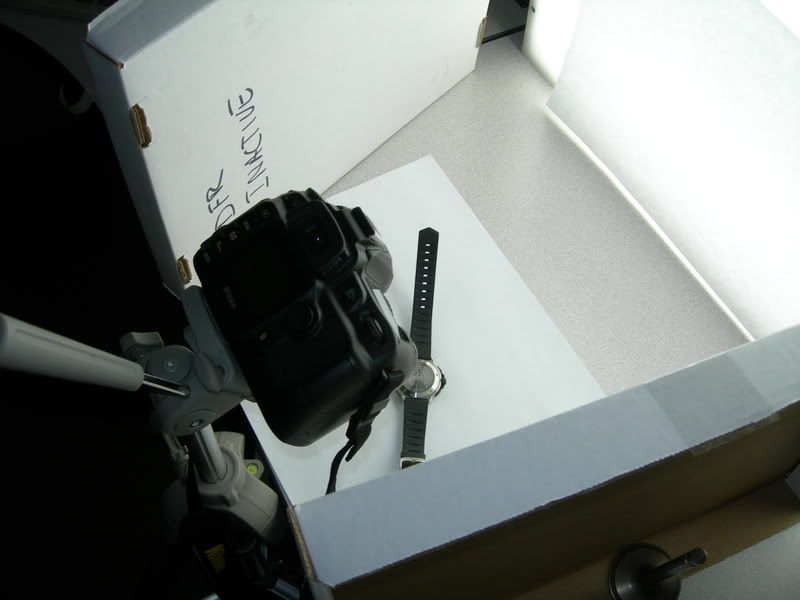 It's a flourescent light table upended with some bankers box tops for reflectors. D50 on a tripod. I like to take small aperture, long exposure pics of guns to maximize the depth of field. Here's sample pic (after cropping and PS color correction, it ain't perfect but it's pretty good).  |

