


Posted: 10/29/2013 12:33:26 PM EDT
|
9mm vs 45, beans vs no beans, 1911 vs Glock and the list goes on. Most of us can agree to disagree, but that is only because we have experience with both (or at least we think we have)
Lately I have found myself bringing up the issue of Linux. It got me to thinking, there are probably some on here that have no idea what this geekery is. The masses usually right it off as too complex or requires a lot of configuring to make work halfway decent. In the past that was true but lately it has become much more user friendly and feature packed. I am not an expert in the field but just a daily user. So what is "Linux"? Linux is an operating system. It is what you use to load programs on your computer. Most people are familiar with Windows and more lately Mac OSX but Linux has been there along the way growing and evolving. Plus 99% of Linux is free, as in cost you nothing. Linux prides itself on being open source. The best way for me to describe it here is imagine you went to the LGS and bought a box of .308 Winchester and when you opened it up there was a slip of paper in there telling you the entire load data, including the brass, powder type and weight, primer, etc etc. I am not going to get into an ethical debate like most will on the benefits of being open source. Ok so if you are still listening to my ramblings then you must be a little interested. What if I told you that you can download and try Linux for free with no changes to your computer? Live CDs are CDs that you insert in your computer then reboot. It starts a Linux environment and allows you to try it. So some lingo. A distro is like saying a Remington SPS Tactical or a Ford F150 king Ranch. They have their roots in a main project and add on top of it. The one I recommend and use myself is Linux Mint Namely Linux Mint 15 XFCE What XFCE means is that its desktop manager (the thing you use and drag icons around on/with) is XFCE. It is really light weight which means it doesn't use a lot of your computers power. System requirements:
x86 processor (Linux Mint 64-bit requires a 64-bit processor. Linux Mint 32-bit works on both 32-bit and 64-bit processors). 384 MB RAM (1GB recommended for a comfortable usage). 5 GB of disk space Graphics card capable of 800×600 resolution DVD drive or USB port Compare that to Windows 7 If you want to run Windows 7 on your PC, here's what it takes:
1 gigahertz (GHz) or faster 32-bit (x86) or 64-bit (x64) processor 1 gigabyte (GB) RAM (32-bit) or 2 GB RAM (64-bit) 16 GB available hard disk space (32-bit) or 20 GB (64-bit) DirectX 9 graphics device with WDDM 1.0 or higher driver link So whats that mean to you? You can use older/cheaper hardware. So far my favorite laptop has been the Dell D610 
They can be picked up for less than $100 all day long an sometimes $50. Its not a power house but the purpose of this is to show Linux's use with Ham radio. The D610 has a real serial port that comes in handy. But I have and do run it on everything from quad core laptops, tough books, net books, $20 desktops, my current desktop is a dual Xeon workstation which flies and cost me $75 form craigslist. As far as programs, this is where it gets more controversial. Some programs that are made for Windows work with Linux. My ARCS2000 software from Kenwood works perfect in Linux. The big one you hear is HRD. It does not work. There has been versions in the past that have worked but as of now the current versions do not. Linux offers a bunch of great alternatives such as FLDIGI, CQLOG, Xastir, CuteSDR and many more. Linux also has kernel support for just about all serial devices so the cables you use to program your radios won't need extra drivers downloaded. There is also lots of security features to mention as well as configuration that I won't bring up yet. If this thread has interest I or others here can expand on subjects. |
|
Quoted:
Last year I got JNOS running on linux, it was a project. Pretty cool when it's done though. Yep AX25 is built into the kernel so it make packet networks "easy"  I have setup a couple VHF TCP/IP networks before and it was fun. All the documentation is from 1990 era websites lol I have setup a couple VHF TCP/IP networks before and it was fun. All the documentation is from 1990 era websites lol
|
|
Quoted:
Checking in? Do you like the rolling release thing? I have been thinking of building a based debian image for my machines. Quoted:
Quoted:
Debian Checking in? Do you like the rolling release thing? I have been thinking of building a based debian image for my machines. I tend to do a fresh wipe and reload as new releases come out. Sadly since I run a Flex-Radio I tend to stay more in a MS Windows session (I run multiple boot drives) |
|
Like I said in the other thread,.....I was a big fan of UBUNTU, FLDIGI, and CQRLOG
I prefer LINUX for surfing the web and checking emails. I just installed SATA and WIN-7 on my desktop I plan on getting a swappable SATA bay, and start experimenting with UBUNTU, MINT, etc. again. ( used to do that with old spare HD's in the IDE era ) Microsoft is the fuckin' devil 
.....but it plays better with all the cool Ham radio stuff like HRD, WSJT, EASY PAL, N1MM LOGGER....etc. 
|
|
Why not just run a partition on 1 drive? Use something like BURG which is a graphical boot loader to give it a polished look.
I am experimenting with having my VMs mirror my partitions. That will be the winner when it works. Wsjt works just fine in Debian based distros. I am working on easypal now. |
|
I've done this..... for fun. I know I had APRS up and running and was moving towards a packet BBS. That's where my toying stopped as the packet software was pretty much non-existent.
Ubuntu is easy enough that anyone with a spare/old laptop could set it up and give it a shot. The biggest hurdle is getting networking up and running. After that everything either works, or you'll spend lots-o-time trying to get it to work. It's fun, but it can be a project too. |
|
I'm interested in Linux, but still new at it. My recent experience has been with Raspian on a Raspberry PI (derivative of Debian).
I tried to load UBUNTU on a couple of old laptops, but if you want the desktop GUI, it's getting to be a pig like Windows...and wants a couple of Gig of RAM. My old retired laptops can't run it. Now I just play with Ubuntu Linux on my Mac in a Virtual Machine (VirtualBox is a free VM. It's pretty good). Overall, I still don't "get" the Linux command line interface. It just seems like every command has dozens of parameters. Very arcane, and not very friendly to casual users. The Gnome GUI is pretty good, but seems clunky and slow compared to Windows and Mac. I dunno. I want to like Linux. I really do...but sometimes it's like taking the ugly girl to the dance because she's easy. |
|
Quoted:
Why not just run a partition on 1 drive? Use something like BURG which is a graphical boot loader to give it a polished look. I am experimenting with having my VMs mirror my partitions. That will be the winner when it works. Wsjt works just fine in Debian based distros. I am working on easypal now. I just power on the one I want to run from, fast and easy. The computer only thinks it has one drive in it |
|
People say I'm a Mac guy…I'm not. I'm just a Unix guy. Currently I have my MBP with OSX and Win 7 (which only gets booted when I need to program a Moto or Icom), an Asus EEE PC (which never was booted into Windows) with Ubuntu 12.04 (been wanting to try a newer version of Mint w/Cinnamon), HP N54L micro server with Ubuntu 12.04 SE (headless, no GUI, running Virtualbox with Win 7, and Mint 15), a couple of RasPi's, and my Asus Memo 7 HD. Shouldn't have to mention my iPhone…I also keep a Pentium 3 laptop around with Windows 98 for dealing with RSS.
In the garage I have a Pentium 4 server awaiting a installation of Ubuntu 12.04 SE, a partially setup All Star node, and a backup Win 7 desktop…just incase. I'm always playing around with APRS stuff, consoling into KPC 3's, and other little things with the Ras Pi's. I use Windows as a last resort… |
|
Quoted:
Im a big fan of linux, and use it almost exclusively. Not a big fan of mint though. Kubuntu has an awesome repository for amateur radio, so I have it for that purpose. I mostly use Fedora, Kali, and Debian though... and occasionally SlackPuppy. You do know that kubuntu and mint use the same repos for amateur radio right? If you want to add on say the Ubuntu hams repo its just sudo apt-add-repository bla bla bla I used Ubuntu from 8.04 to 10.10 then moved away from them. If the get the edge released I will have one in a second. I also use Kail, for web surfing.... |
|
Quoted:
I bet I'm the only Slackware user here. Since 3.0 
It's been my primary OS for over a decade. I'm really good at compiling things now, lol. I am starting to get into the big boy distros. I tried gentoo a few times but never could get it configured just right. |
|
Quoted:
I bet I'm the only Slackware user here. Since 3.0
It's been my primary OS for over a decade. I'm really good at compiling things now, lol. Don't be so sure  . Ah Slackware that brings back some memories. I used it in college, but haven't run it since 12 came out. I think I should work on that. . Ah Slackware that brings back some memories. I used it in college, but haven't run it since 12 came out. I think I should work on that.
|
|
Quoted:
I bet I'm the only Slackware user here. Since 3.0
It's been my primary OS for over a decade. I'm really good at compiling things now, lol. Slackware is my favorite distro. I don't have a Slackware box running at home right now, but that will change. I have multiple slackware machines at work and I do all my development there on slackware. |
| Has no one mentioned Arch yet? I don't use it on my daily box (yet), but it's by far my favorite distro. In the same vein as Slackware, Crunchbang, and Gentoo, it doesn't install ANYTHING you don't tell it to and you have to bootstrap it from the kernel up. I like it better than the aforementioned three because Arch's documentation and community support is unparalleled. It's hard to find an Arch problem that someone has not already had, solved, and documented. |
|
Quoted:
I'm interested in Linux, but still new at it. My recent experience has been with Raspian on a Raspberry PI (derivative of Debian). I tried to load UBUNTU on a couple of old laptops, but if you want the desktop GUI, it's getting to be a pig like Windows...and wants a couple of Gig of RAM. My old retired laptops can't run it. Now I just play with Ubuntu Linux on my Mac in a Virtual Machine (VirtualBox is a free VM. It's pretty good). Overall, I still don't "get" the Linux command line interface. It just seems like every command has dozens of parameters. Very arcane, and not very friendly to casual users. The Gnome GUI is pretty good, but seems clunky and slow compared to Windows and Mac. I dunno. I want to like Linux. I really do...but sometimes it's like taking the ugly girl to the dance because she's easy. Try switching to XFCE / Xubuntu runs better on crap laptops... It's smoother and snappier on more capable machine too. |
|
Quoted:
Try switching to XFCE / Xubuntu runs better on crap laptops... It's smoother and snappier on more capable machine too. Quoted:
Quoted:
I'm interested in Linux, but still new at it. My recent experience has been with Raspian on a Raspberry PI (derivative of Debian). I tried to load UBUNTU on a couple of old laptops, but if you want the desktop GUI, it's getting to be a pig like Windows...and wants a couple of Gig of RAM. My old retired laptops can't run it. Now I just play with Ubuntu Linux on my Mac in a Virtual Machine (VirtualBox is a free VM. It's pretty good). Overall, I still don't "get" the Linux command line interface. It just seems like every command has dozens of parameters. Very arcane, and not very friendly to casual users. The Gnome GUI is pretty good, but seems clunky and slow compared to Windows and Mac. I dunno. I want to like Linux. I really do...but sometimes it's like taking the ugly girl to the dance because she's easy. Try switching to XFCE / Xubuntu runs better on crap laptops... It's smoother and snappier on more capable machine too. Yup I use XFCE on everything, even my faster stuff. I really like the new whisper menu with 4.10 |
|
Quoted:
Has no one mentioned Arch yet? I don't use it on my daily box (yet), but it's by far my favorite distro. In the same vein as Slackware, Crunchbang, and Gentoo, it doesn't install ANYTHING you don't tell it to and you have to bootstrap it from the kernel up. I like it better than the aforementioned three because Arch's documentation and community support is unparalleled. It's hard to find an Arch problem that someone has not already had, solved, and documented. Between the Arch and Gentoo manuals there is just about everything. I played with Arch a little bit but found that Gentoo has an image for the Sparc64 processor so I have been learning it. Mr. Harry, was it you and I that had the Linux QSO? |
|
I have been looking at ARM based Linux to blow away a cheap Chromebook to have as a dedicated Ham device, but I think we're going to need another generation or two of chrome books. The recent Acer Iconia W4 (Intel Atom based) looks interesting though, and is in the same price range.
2 gigs of ram goes a lot further for Linux than it does for Windows, but unfortunately, most of the good ham software is windows only. 
|
|
Quoted:
I have been looking at ARM based Linux to blow away a cheap Chromebook to have as a dedicated Ham device, but I think we're going to need another generation or two of chrome books. The recent Acer Iconia W4 (Intel Atom based) looks interesting though, and is in the same price range. 2 gigs of ram goes a lot further for Linux than it does for Windows, but unfortunately, most of the good ham software is windows only. I have an Acer C7 chromeboom with xubuntu on it. I mainly use it for IRC
There is plenty of good software on Linux. It may not be as glittery as windows but function is there. Let me know if you need any help. |
|
In my case, the problem was finding stuff already compiled for ARM.
I'm good with Xastir, FLDIGI and Chirp. It really was logging that I wanted to know about. CQRLOG looks good, but to my knowledge, there isn't an ARM version, and it has a million dependencies. |
|
I bought this
http://www.amazon.com/gp/product/B000KS8S9W/ref=shptrk_scth 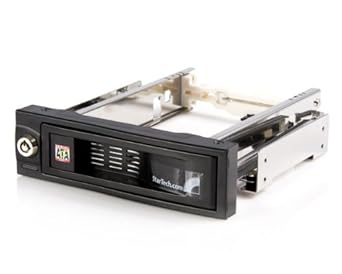
and a few cheap SATA hard drives Installed and updated MINT 64bit Nice.
thinking about trying UBUNTU again next. What's the preferred distro for ham radio ??? I used to run UBUNTU CQRLOG and FLDIGI on my TS480 |
|
Quoted:
I bought this http://www.amazon.com/gp/product/B000KS8S9W/ref=shptrk_scth http://ecx.images-amazon.com/images/I/41sCknu8WRL._SX342_.jpg and a few cheap SATA hard drives Installed and updated MINT 64bit Nice.
thinking about trying UBUNTU again next. What's the preferred distro for ham radio ??? I used to run UBUNTU CQRLOG and FLDIGI on my TS480 Mint has the exact same repositories as Ubuntu. Mint actually runs on the Ubuntu base. The Ubuntu based distributions usually have the most easy to install applications for ham. Any Linux app can be compiled and installed on any Linux distro...just isn't as easy as clicking a few places or running an apt-get script. |
|
Quoted:
I have netbook that needs a reload. Maybe I should make the attempt. I'm not sure if I can deal with the small screen though. I forget if it has a video out. just download and burn UNUNTU or MINT to a disc you can run the OS off the DVD drive to try it out.....without making any changes to the existing harddrive If you like it, click the INSTALL shortcut. |
|
Quoted:
just download and burn UNUNTU or MINT to a disc you can run the OS off the DVD drive to try it out.....without making any changes to the existing harddrive If you like it, click the INSTALL shortcut. Quoted:
Quoted:
I have netbook that needs a reload. Maybe I should make the attempt. I'm not sure if I can deal with the small screen though. I forget if it has a video out. just download and burn UNUNTU or MINT to a disc you can run the OS off the DVD drive to try it out.....without making any changes to the existing harddrive If you like it, click the INSTALL shortcut. Ahh.... there's the rub. It's a netbook. Nothing like a fancy optical drive in it. It came with XP, and I know I've had some distro on it in the past. You want to try something hard? Try installing Win7 from a flash drive. Actually I can't remember f it was Win7 or XP that gave me so much trouble. I'm slowly searching for an empty flash drive or sd card to load the image too. |
|
Quoted:
Ahh.... there's the rub. It's a netbook. Nothing like a fancy optical drive in it. It came with XP, and I know I've had some distro on it in the past. You want to try something hard? Try installing Win7 from a flash drive. Actually I can't remember f it was Win7 or XP that gave me so much trouble. I'm slowly searching for an empty flash drive or sd card to load the image too. Quoted:
Quoted:
Quoted:
I have netbook that needs a reload. Maybe I should make the attempt. I'm not sure if I can deal with the small screen though. I forget if it has a video out. just download and burn UNUNTU or MINT to a disc you can run the OS off the DVD drive to try it out.....without making any changes to the existing harddrive If you like it, click the INSTALL shortcut. Ahh.... there's the rub. It's a netbook. Nothing like a fancy optical drive in it. It came with XP, and I know I've had some distro on it in the past. You want to try something hard? Try installing Win7 from a flash drive. Actually I can't remember f it was Win7 or XP that gave me so much trouble. I'm slowly searching for an empty flash drive or sd card to load the image too. XP. Microsoft has an installer for creating the USB stick for Win 7. Personally, I have an Asus Eee PC running Ubuntu 12.04 with XDFE installed after the main install. The newer distro's don't support my graphics driver. Personally I prefer Mint's Cinnamon desktop but for an underpowered netbook, I do like the XDFE desktop. I run that netbook on a 60GB SSD…use mainly for use on a network with file servers and other fun little toys. Lot's of SSH… |
|
Quoted:
XP. Microsoft has an installer for creating the USB stick for Win 7. Personally, I have an Asus Eee PC running Ubuntu 12.04 with XDFE installed after the main install. The newer distro's don't support my graphics driver. Personally I prefer Mint's Cinnamon desktop but for an underpowered netbook, I do like the XDFE desktop. I run that netbook on a 60GB SSD…use mainly for use on a network with file servers and other fun little toys. Lot's of SSH… Quoted:
Quoted:
Quoted:
Quoted:
I have netbook that needs a reload. Maybe I should make the attempt. I'm not sure if I can deal with the small screen though. I forget if it has a video out. just download and burn UNUNTU or MINT to a disc you can run the OS off the DVD drive to try it out.....without making any changes to the existing harddrive If you like it, click the INSTALL shortcut. Ahh.... there's the rub. It's a netbook. Nothing like a fancy optical drive in it. It came with XP, and I know I've had some distro on it in the past. You want to try something hard? Try installing Win7 from a flash drive. Actually I can't remember f it was Win7 or XP that gave me so much trouble. I'm slowly searching for an empty flash drive or sd card to load the image too. XP. Microsoft has an installer for creating the USB stick for Win 7. Personally, I have an Asus Eee PC running Ubuntu 12.04 with XDFE installed after the main install. The newer distro's don't support my graphics driver. Personally I prefer Mint's Cinnamon desktop but for an underpowered netbook, I do like the XDFE desktop. I run that netbook on a 60GB SSD…use mainly for use on a network with file servers and other fun little toys. Lot's of SSH… Hiren's Boot CD/DVD/USB has a bunch of great apps/distros and can be booted from a window in windows/linux or solo. Even boots a BartPE version of XP. XP on a stick. Good way to try out linux ( i think there are at least two distros on there). A few of the old distros I messed around with years ago had an option to install to a USB. Knoppix, STP, PHLAK, and I believe there are a few others. I need to get back into this. Thanks for the reminder, guys! 
|