


|
I got my camera today! The ACTi ACM-8211 Megapixel PTZ.
I've installed the software and am trying to open it for the first time. I know the default login and password, but am having trouble with the IP setting. The instructions say: "For the Server IP address, you need to add the port number after the IP address. If your workstation and server are located on the same computer, you may either use 127.0.0.1 or the actual network address of your Network card. The port to use is the HTTP port. If your HTTP port used is the default port 80, you can just enter the IP address and omit the port number. If you are logging in to NVR server from a workstation located on a separate PC, please make sure the IP and the HTTP port are correct, and that the router or firewall allows traffic at this port." I tried using 127.0.0.1:80 as they show with the screenshot included, but I get a "Login Failed" . How do I find the actual address of my Network card and the HTTP port #? I think my problem is that I need to use my network card address not the 127.0.0.1. Is that correct? |

|
Originally Posted By JPL: I got my camera today! The ACTi ACM-8211 Megapixel PTZ. I've installed the software and am trying to open it for the first time. I know the default login and password, but am having trouble with the IP setting. The instructions say: "For the Server IP address, you need to add the port number after the IP address. If your workstation and server are located on the same computer, you may either use 127.0.0.1 or the actual network address of your Network card. The port to use is the HTTP port. If your HTTP port used is the default port 80, you can just enter the IP address and omit the port number. If you are logging in to NVR server from a workstation located on a separate PC, please make sure the IP and the HTTP port are correct, and that the router or firewall allows traffic at this port." I tried using 127.0.0.1:80 as they show with the screenshot included, but I get a "Login Failed" . How do I find the actual address of my Network card and the HTTP port #? I think my problem is that I need to use my network card address not the 127.0.0.1. Is that correct? 127.0.01 is the "loopback" address. In other words, entering that address in your browser tries to connect to the machine itself. Assuming you're running Windows, to see what address your PC has, go to Start > Run and type "cmd.exe" (without the quotes) and click OK. A command prompt (DOS) box will open. At the C:\ prompt, type in "ipconfig" (again no quotes) and hit Enter. You should see your IP which will probably be 192.168.1.x or something similar. If the Windows firewall is running either disable it or allow incoming traffic on port 80. |
http://blogostuff.blogspot.com/
http://www.theshootersbar.org/ -- Pro-gun attorneys
RKBA = FREEDOM
http://www.theshootersbar.org/ -- Pro-gun attorneys
RKBA = FREEDOM
|
Originally Posted By Dave_Markowitz:
Originally Posted By JPL:
I got my camera today! The ACTi ACM-8211 Megapixel PTZ. I've installed the software and am trying to open it for the first time. I know the default login and password, but am having trouble with the IP setting. The instructions say: "For the Server IP address, you need to add the port number after the IP address. If your workstation and server are located on the same computer, you may either use 127.0.0.1 or the actual network address of your Network card. The port to use is the HTTP port. If your HTTP port used is the default port 80, you can just enter the IP address and omit the port number. If you are logging in to NVR server from a workstation located on a separate PC, please make sure the IP and the HTTP port are correct, and that the router or firewall allows traffic at this port." I tried using 127.0.0.1:80 as they show with the screenshot included, but I get a "Login Failed" . How do I find the actual address of my Network card and the HTTP port #? I think my problem is that I need to use my network card address not the 127.0.0.1. Is that correct? 127.0.01 is the "loopback" address. In other words, entering that address in your browser tries to connect to the machine itself. Assuming you're running Windows, to see what address your PC has, go to Start > Run and type "cmd.exe" (without the quotes) and click OK. A command prompt (DOS) box will open. At the C:\ prompt, type in "ipconfig" (again no quotes) and hit Enter. You should see your IP which will probably be 192.168.1.x or something similar. If the Windows firewall is running either disable it or allow incoming traffic on port 80. Hmmm.....no go. I found my IP address and put it along with the default login and password and still "connection failed." I went to internet options and set it to internet. Is that what is meant by turning the firewall off? Sorry for the stupid questions. |

|
Originally Posted By JPL:
I got my camera today! The ACTi ACM-8211 Megapixel PTZ. I've installed the software and am trying to open it for the first time. I know the default login and password, but am having trouble with the IP setting. The instructions say: "For the Server IP address, you need to add the port number after the IP address. If your workstation and server are located on the same computer, you may either use 127.0.0.1 or the actual network address of your Network card. The port to use is the HTTP port. If your HTTP port used is the default port 80, you can just enter the IP address and omit the port number. If you are logging in to NVR server from a workstation located on a separate PC, please make sure the IP and the HTTP port are correct, and that the router or firewall allows traffic at this port." I tried using 127.0.0.1:80 as they show with the screenshot included, but I get a "Login Failed" . How do I find the actual address of my Network card and the HTTP port #? I think my problem is that I need to use my network card address not the 127.0.0.1. Is that correct? Go to the Acti website, and download their IP tool. It should allow you to find the device on your network. At that point, enter that address in your IE browser, and do the config. |
"Look wise, say nothing, and grunt. Speech was given to conceal thought."
- Sir William Osler -
- Sir William Osler -
|
Originally Posted By TheGrayMan:
Originally Posted By JPL:
I got my camera today! The ACTi ACM-8211 Megapixel PTZ. I've installed the software and am trying to open it for the first time. I know the default login and password, but am having trouble with the IP setting. The instructions say: "For the Server IP address, you need to add the port number after the IP address. If your workstation and server are located on the same computer, you may either use 127.0.0.1 or the actual network address of your Network card. The port to use is the HTTP port. If your HTTP port used is the default port 80, you can just enter the IP address and omit the port number. If you are logging in to NVR server from a workstation located on a separate PC, please make sure the IP and the HTTP port are correct, and that the router or firewall allows traffic at this port." I tried using 127.0.0.1:80 as they show with the screenshot included, but I get a "Login Failed" . How do I find the actual address of my Network card and the HTTP port #? I think my problem is that I need to use my network card address not the 127.0.0.1. Is that correct? Go to the Acti website, and download their IP tool. It should allow you to find the device on your network. At that point, enter that address in your IE browser, and do the config. I'll see if I can find it. Understand, I haven't received the Nanostations yet. I was just gonna plug the camera into the back of the computer and play with it here in the living room. |
|
Originally Posted By JPL:
Originally Posted By TheGrayMan:
Originally Posted By JPL:
I got my camera today! The ACTi ACM-8211 Megapixel PTZ. I've installed the software and am trying to open it for the first time. I know the default login and password, but am having trouble with the IP setting. The instructions say: "For the Server IP address, you need to add the port number after the IP address. If your workstation and server are located on the same computer, you may either use 127.0.0.1 or the actual network address of your Network card. The port to use is the HTTP port. If your HTTP port used is the default port 80, you can just enter the IP address and omit the port number. If you are logging in to NVR server from a workstation located on a separate PC, please make sure the IP and the HTTP port are correct, and that the router or firewall allows traffic at this port." I tried using 127.0.0.1:80 as they show with the screenshot included, but I get a "Login Failed" . How do I find the actual address of my Network card and the HTTP port #? I think my problem is that I need to use my network card address not the 127.0.0.1. Is that correct? Go to the Acti website, and download their IP tool. It should allow you to find the device on your network. At that point, enter that address in your IE browser, and do the config. I'll see if I can find it. Understand, I haven't received the Nanostations yet. I was just gonna plug the camera into the back of the computer and play with it here in the living room. Plug the camera into your router... not your computer. It should pick up a VERY similar IP address to your computer (use the "ipconfig" command at the DOS prompt to find out your computer's IP address). In fact, if your computer is 192.168.0.100, try incrementing that last digit by one, and putting that address into Internet Explorer. So if your computer is 192.168.0.100, enter 192.168.0.101 into IE, and see if it's the camera. If it's not, try 192.168.0.102... if you don't hit the camera within a few tries, get the IP tool. |
"Look wise, say nothing, and grunt. Speech was given to conceal thought."
- Sir William Osler -
- Sir William Osler -
|
Plug the camera into your router... not your computer. It should pick up a VERY similar IP address to your computer (use the "ipconfig" command at the DOS prompt to find out your computer's IP address). In fact, if your computer is 192.168.0.100, try incrementing that last digit by one, and putting that address into Internet Explorer.
So if your computer is 192.168.0.100, enter 192.168.0.101 into IE, and see if it's the camera. If it's not, try 192.168.0.102... if you don't hit the camera within a few tries, get the IP tool. Well that presents a problem, I'm on my couch at home and the router is at the office about 100 yds away. Can it not be plugged into the computer? I'm receiving internet access via an access point on the side of the office pointed my direction. |
|
Originally Posted By JPL:
Plug the camera into your router... not your computer. It should pick up a VERY similar IP address to your computer (use the "ipconfig" command at the DOS prompt to find out your computer's IP address). In fact, if your computer is 192.168.0.100, try incrementing that last digit by one, and putting that address into Internet Explorer. So if your computer is 192.168.0.100, enter 192.168.0.101 into IE, and see if it's the camera. If it's not, try 192.168.0.102... if you don't hit the camera within a few tries, get the IP tool. Well that presents a problem, I'm on my couch at home and the router is at the office about 100 yds away. Can it not be plugged into the computer? I'm receiving internet access via an access point on the side of the office pointed my direction. Plugging it into the computer (I assume you have an open ethernet port) is probably going to be more configuration than you want to fool with... you'll have to set up internet connection sharing on your computer, and set it to provide an IP address from your wired Ethernet port, to the wireless network. It's doable... but a pain-in-the-neck... and if you're not a networking geek, you can screw up your network settings. I wouldn't do it... just plug it into the router... you're going to save yourself a bunch of hassle. |
"Look wise, say nothing, and grunt. Speech was given to conceal thought."
- Sir William Osler -
- Sir William Osler -
|
Originally Posted By TheGrayMan:
Originally Posted By JPL:
Plug the camera into your router... not your computer. It should pick up a VERY similar IP address to your computer (use the "ipconfig" command at the DOS prompt to find out your computer's IP address). In fact, if your computer is 192.168.0.100, try incrementing that last digit by one, and putting that address into Internet Explorer. So if your computer is 192.168.0.100, enter 192.168.0.101 into IE, and see if it's the camera. If it's not, try 192.168.0.102... if you don't hit the camera within a few tries, get the IP tool. Well that presents a problem, I'm on my couch at home and the router is at the office about 100 yds away. Can it not be plugged into the computer? I'm receiving internet access via an access point on the side of the office pointed my direction. Plugging it into the computer (I assume you have an open ethernet port) is probably going to be more configuration than you want to fool with... you'll have to set up internet connection sharing on your computer, and set it to provide an IP address from your wired Ethernet port, to the wireless network. It's doable... but a pain-in-the-neck... and if you're not a networking geek, you can screw up your network settings. I wouldn't do it... just plug it into the router... you're going to save yourself a bunch of hassle. Gotcha!  I'll take it to work tomorrow and play with it. I'll take it to work tomorrow and play with it.
|
Alright, I downloaded the IP utility and it instantly found my camera connected to the router. I was able to "see through" the camera, pan, tilt, zoom. However, I still cannot figure out what IP address (I assume that's the incorrect field, as I am using the default login and password) I need to login into the actual software. Here is a screenshot of the login page. What am I doing wrong?

ETA: I entered the IP address that IP Utility has for the camera and it says "connection failed". |
|
Originally Posted By JPL:
Alright, I downloaded the IP utility and it instantly found my camera connected to the router. I was able to "see through" the camera, pan, tilt, zoom. However, I still cannot figure out what IP address (I assume that's the incorrect field, as I am using the default login and password) I need to login into the actual software. Here is a screenshot of the login page. What am I doing wrong? http://i1237.photobucket.com/albums/ff477/jplky/Loginscreen.jpg ETA: I entered the IP address that IP Utility has for the camera and it says "connection failed". If you're talking about the software that Acti includes with their cameras, that software has to be installed on a PC on the same network, and the camera added to the software. Unfortunately, the Acti-included NVR software ain't the most user-friendly thing in the world... and the setup/config will probably make your head spin. The last member here who tried that software ended up punting to a local security-camera guy. This is why I recommend Milestone or Luxriot as your NVR software... it's much easier to use. If you're trying to log in to the camera itself, simply enter the IP address that the IP-tool found. Use Internet Explorer, and enter "http://camera.ip.address.here" That should take you to the camera... put it as a bookmark in your browser, and have IE remember the login/password. That way, you can check it pretty much any time you want (I'd suggest changing the password to something other than the default "12345"). We may have miscommunicated here in regards to "software." The camera has its own internal "software" or "firmware," that allows you to connect to it with a web browser. There is other "software" that Acti throws into the box... but it has to be installed on a separate PC. That software does work... but it's far from polished or user-friendly. |
"Look wise, say nothing, and grunt. Speech was given to conceal thought."
- Sir William Osler -
- Sir William Osler -
|
Originally Posted By TheGrayMan:
Originally Posted By JPL:
Alright, I downloaded the IP utility and it instantly found my camera connected to the router. I was able to "see through" the camera, pan, tilt, zoom. However, I still cannot figure out what IP address (I assume that's the incorrect field, as I am using the default login and password) I need to login into the actual software. Here is a screenshot of the login page. What am I doing wrong? http://i1237.photobucket.com/albums/ff477/jplky/Loginscreen.jpg ETA: I entered the IP address that IP Utility has for the camera and it says "connection failed". If you're talking about the software that Acti includes with their cameras, that software has to be installed on a PC on the same network, and the camera added to the software. Unfortunately, the Acti-included NVR software ain't the most user-friendly thing in the world... and the setup/config will probably make your head spin. The last member here who tried that software ended up punting to a local security-camera guy. This is why I recommend Milestone or Luxriot as your NVR software... it's much easier to use. If you're trying to log in to the camera itself, simply enter the IP address that the IP-tool found. Use Internet Explorer, and enter "http://camera.ip.address.here" That should take you to the camera... put it as a bookmark in your browser, and have IE remember the login/password. That way, you can check it pretty much any time you want (I'd suggest changing the password to something other than the default "12345"). We may have miscommunicated here in regards to "software." The camera has its own internal "software" or "firmware," that allows you to connect to it with a web browser. There is other "software" that Acti throws into the box... but it has to be installed on a separate PC. That software does work... but it's far from polished or user-friendly. I completely understand now! Thanks for the help. I'm gonna leave it over here in my office and be amazed tonight that I can sit at my house and see what's going on in my pitch black office. I need about 10 more camera's now! |

|
Can the NUUO 2040 or (more likely) 4080 be used as a NAS in addition to its NVR duties?
i.e. Can the disks be mapped like other network disks and accessed via Windows? Or is it a dedicated NVR box? THX |
I am free, no matter what rules surround me.
If I find them tolerable, I tolerate them; if I find them too obnoxious, I break them.
I am free because I know that I alone am morally responsible for everything I do.
- Robert A. Heinlein
If I find them tolerable, I tolerate them; if I find them too obnoxious, I break them.
I am free because I know that I alone am morally responsible for everything I do.
- Robert A. Heinlein
|
Originally Posted By Desert_AIP:
Can the NUUO 2040 or (more likely) 4080 be used as a NAS in addition to its NVR duties? i.e. Can the disks be mapped like other network disks and accessed via Windows? Or is it a dedicated NVR box? THX Pretty sure it's a dedicated NVR box... but it does run embedded Linux under the hood. This opens up the possibility of running other services on that box, including a SAMBA server (which could serve network shares to windows boxen). You'd have to figure out a way to alter the boot imag to include SAMBA, and put it in the startup scripts. It would be an interesting hack, but is probably more trouble than it's worth. |
"Look wise, say nothing, and grunt. Speech was given to conceal thought."
- Sir William Osler -
- Sir William Osler -


"Look wise, say nothing, and grunt. Speech was given to conceal thought."
- Sir William Osler -
- Sir William Osler -

|
Originally Posted By TheGrayMan:
Snip... Now... look closely at that camera and notice the depth-of-field (how much of the picture is in-focus, and how much isn't). This is the only strike against this camera, and could be better... but everything has a downside. This also is NOT an outdoor camera... so plan accordingly. What exactly are we looking at? Can you show a more recognizable picture without the PTZ controls on top? |
|
Originally Posted By Eight:
Originally Posted By TheGrayMan:
Snip... Now... look closely at that camera and notice the depth-of-field (how much of the picture is in-focus, and how much isn't). This is the only strike against this camera, and could be better... but everything has a downside. This also is NOT an outdoor camera... so plan accordingly. What exactly are we looking at? Can you show a more recognizable picture without the PTZ controls on top? Yes... but let me get my second one here before I do (yes, I ordered another one). That one you're looking through is mounted on my garage ceiling, looking down into my recycling bin. The focus of the camera is such that it's clearly designed for an interior room, where everything would be within its ideal focal length. It starts to get blurry as you get more distant... so past 12-15 feet, the picture quailty will decline... so think of it as a shorter-range near-focus, shallower-depth-of-field camera... particularly if you want high detail. Forget reading a license plate at the end of your 30-foot driveway... At 15 feet, details start to blur, so one-inch-high letters aren't readable at that distance (but still better than an analog camera). Even with that degradation, you can still very clearly see what's going on. |
"Look wise, say nothing, and grunt. Speech was given to conceal thought."
- Sir William Osler -
- Sir William Osler -
| If I ever get my Nanostations in and my system setup, I'll post some day and night pics of this same PTZ camera from inside my barn. I set it up to look at the front door of our business last night and you couldn't read a poster by the door, but I believe you would have easily been able to recognize a face. |
|
Originally Posted By JPL:
If I ever get my Nanostations in and my system setup, I'll post some day and night pics of this same PTZ camera from inside my barn. I set it up to look at the front door of our business last night and you couldn't read a poster by the door, but I believe you would have easily been able to recognize a face. How far away were you? If you were <10 feet, it might have been more legible. ETA: strangely, I've noticed that the 1-inch-letters at 15 feet CAN BE legible, depending on which part of the frame/FOV you have them in... making me wonder if Acti didn't save money on this camera by using lower-quality glass. ETA2: or maybe I smudged the lens putting it up... I'll go check. |
"Look wise, say nothing, and grunt. Speech was given to conceal thought."
- Sir William Osler -
- Sir William Osler -
|
Originally Posted By TheGrayMan:
Originally Posted By JPL:
If I ever get my Nanostations in and my system setup, I'll post some day and night pics of this same PTZ camera from inside my barn. I set it up to look at the front door of our business last night and you couldn't read a poster by the door, but I believe you would have easily been able to recognize a face. How far away were you? If you were <10 feet, it might have been more legible. ETA: strangely, I've noticed that the 1-inch-letters at 15 feet CAN BE legible, depending on which part of the frame/FOV you have them in... making me wonder if Acti didn't save money on this camera by using lower-quality glass. ETA2: or maybe I smudged the lens putting it up... I'll go check. It's about 25' away. However, I could barely make out the hands on a clock at about 15' away. This was at night. I believe during the day, it would work better. |
|
Place-holder post:
Let's talk about Zoneminder. It's been mentioned several times in this thread, so it deserves a few posts of its own. Zoneminder is a free-as-in-beer, Linux-based (or "GNU/Linux" if you're RMS. I doubt he has an account here, but ESR might... so hat-tip to both of them) software suite that talks to surveillance cameras, records, and stores the images/events. I had a chance to wrestle with it just before Christmas, and I'll detail some of the experience here. Allow me to make a recommendation right up-front: If you have never used Linux before, this probably isn't for you. Seriously. I've been a personal Linux user for >10 years, and while far from a grey-beard, and despite the fact that I don't make my living in the IT world, I'm comfortable working through the Command-Line, have hacked a few kernels, and can troubleshoot with reasonable skill... But I had trouble with this one. A more-elite *nix user could probably avoid the trouble I had (I know there are a few on ARF), but the time investment was more than I had available to me over the holiday... so I punted (I'll get to that later). Will add more after I get back from my morning run. ETA: OK... 5 miles later... I started with a 10.10 install of Ubuntu Linux: 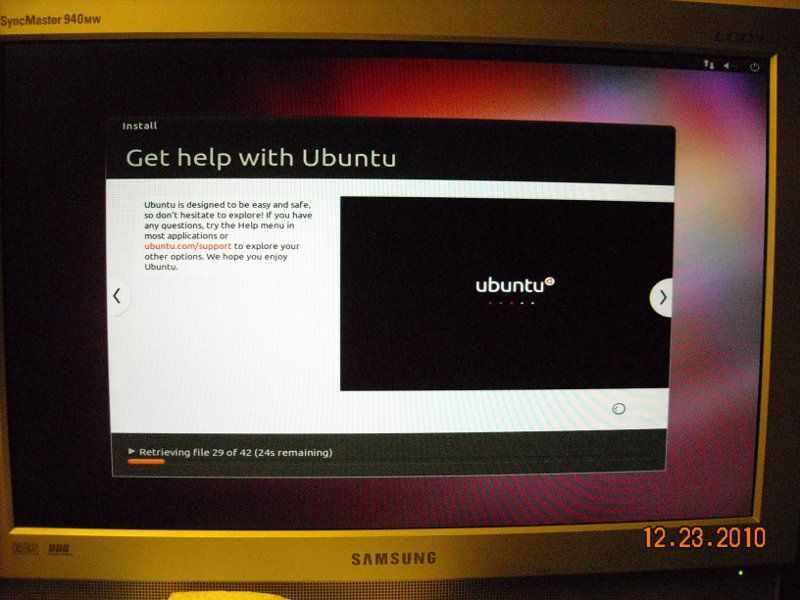
The install was pretty much automatic, and GUI-based. Just follow the prompts. At the end, restart the machine. 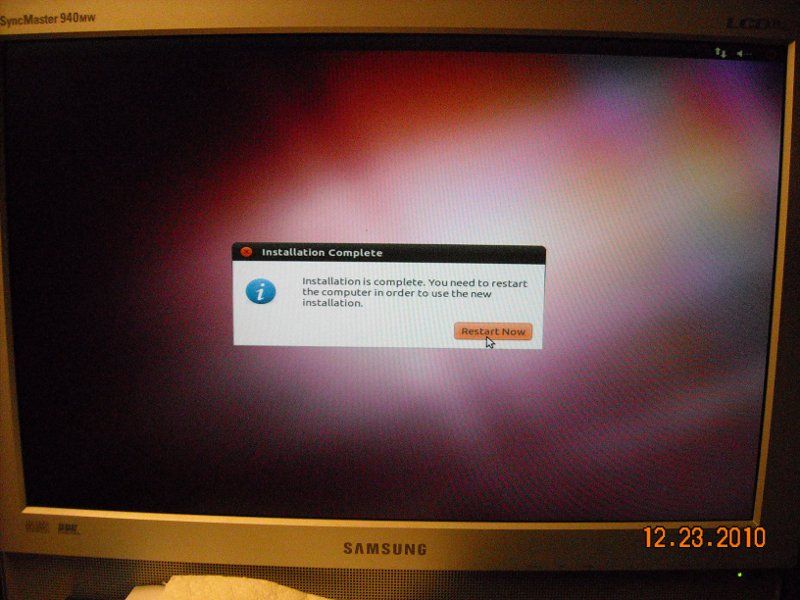
After the install, I used Synaptic Package Manager to update the OS. 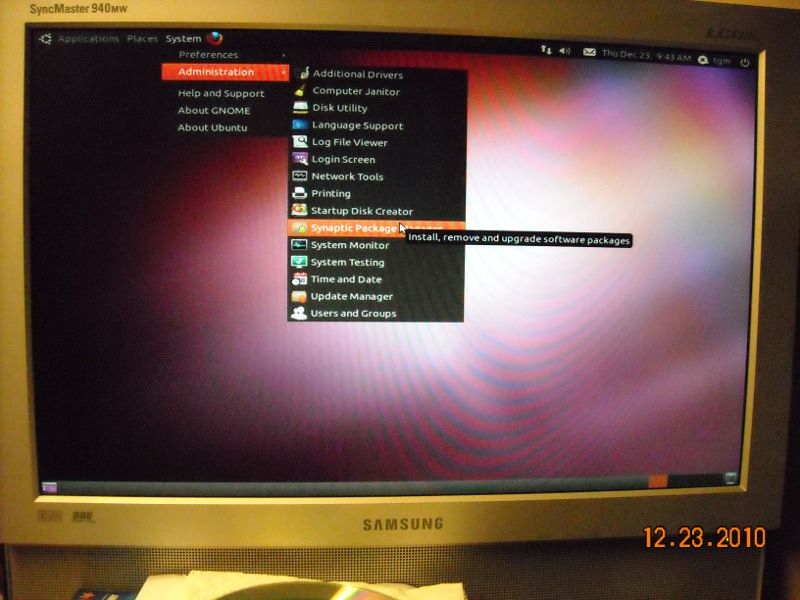
And what did I find under the packages? Zoneminder! 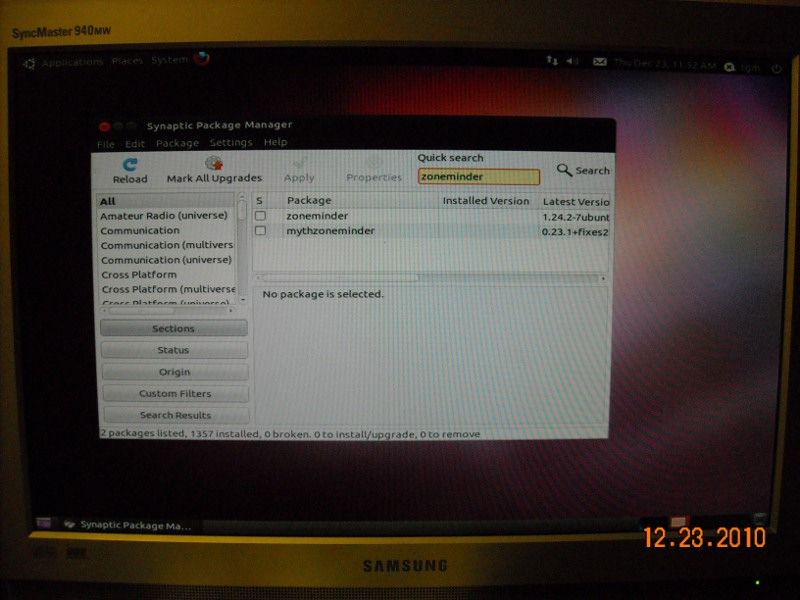
There are a bunch of dependencies... 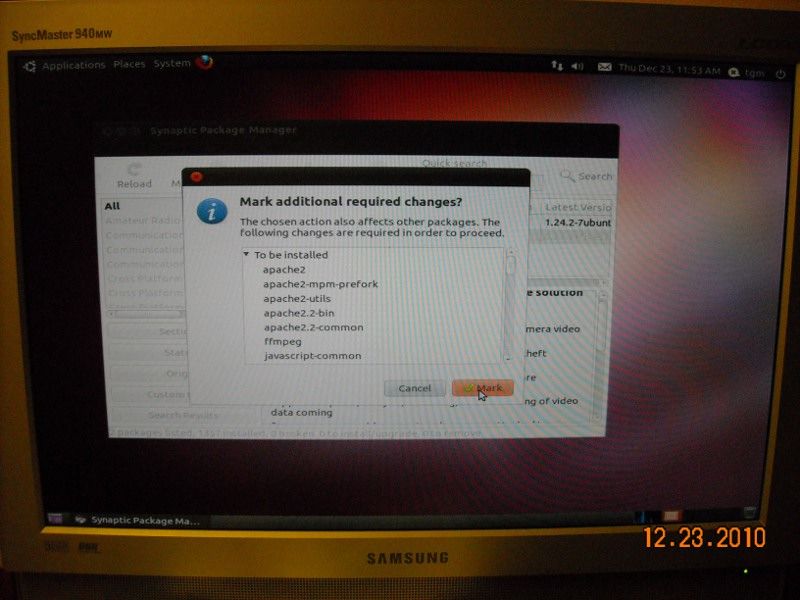
Downloading the additional packages... 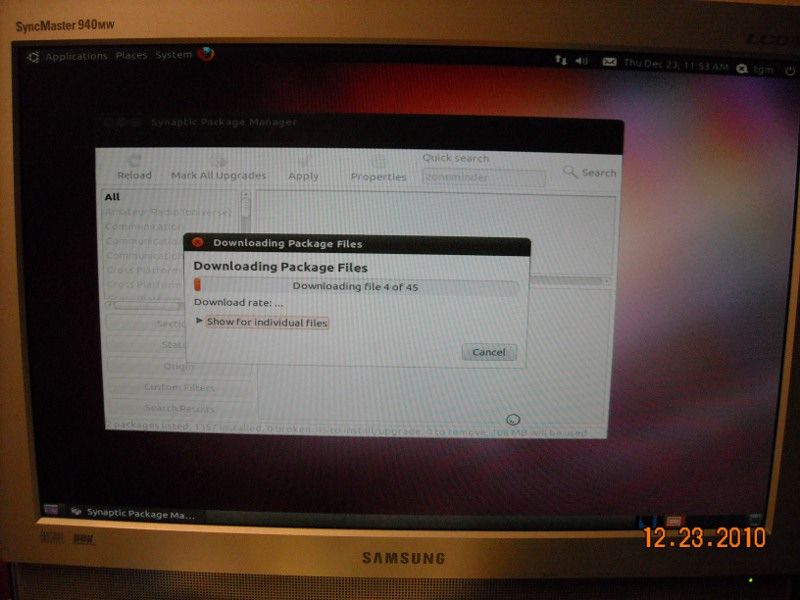
Reboot... and it fails. 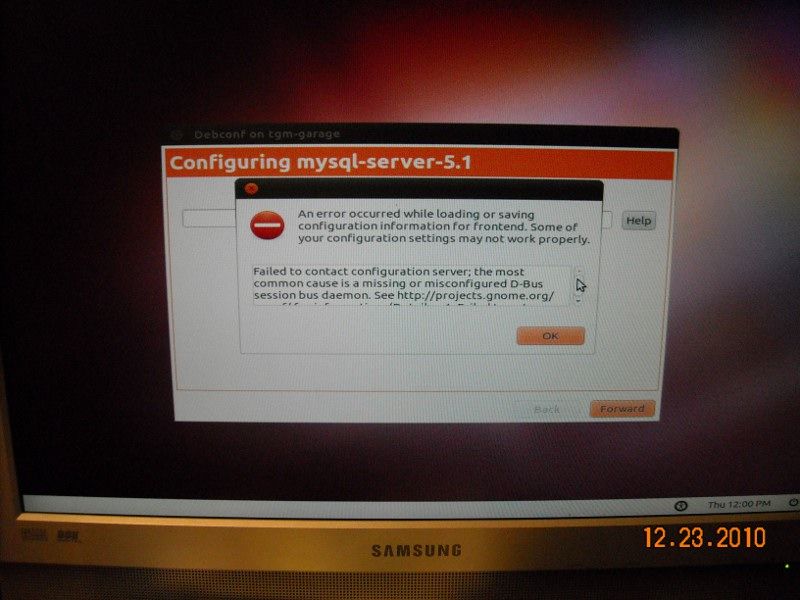
To be continued... |
"Look wise, say nothing, and grunt. Speech was given to conceal thought."
- Sir William Osler -
- Sir William Osler -
|
Originally Posted By TheGrayMan:
Originally Posted By Desert_AIP:
Can the NUUO 2040 or (more likely) 4080 be used as a NAS in addition to its NVR duties? i.e. Can the disks be mapped like other network disks and accessed via Windows? Or is it a dedicated NVR box? THX Pretty sure it's a dedicated NVR box... but it does run embedded Linux under the hood. This opens up the possibility of running other services on that box, including a SAMBA server (which could serve network shares to windows boxen). You'd have to figure out a way to alter the boot imag to include SAMBA, and put it in the startup scripts. It would be an interesting hack, but is probably more trouble than it's worth. Hmmm... In the manual under the menu item "Protocol Control", it lists Windows file sharing. The first item states: "Services: Whether users can access this unit through Windows Explorer or not." Have you played with that setting? |
I am free, no matter what rules surround me.
If I find them tolerable, I tolerate them; if I find them too obnoxious, I break them.
I am free because I know that I alone am morally responsible for everything I do.
- Robert A. Heinlein
If I find them tolerable, I tolerate them; if I find them too obnoxious, I break them.
I am free because I know that I alone am morally responsible for everything I do.
- Robert A. Heinlein
|
And with that failure (and crashing two different Ubuntu boxen during this process), I looked for an easier way... and found it.
Surf on over to this page, and read... or if you want skip the reading part and get right down to business, simply click here to download the .iso image. Burn it to the appropriate optical media with your preferred CD-burning program, and follow along. to be continued... ETA: OK... back from the Gifford thread. Insert the Live CD you just created above, and go through the install. After you reboot, you'll see a link on the Ubuntu desktop that says "Install Zoneminder install." Double-Click on the icon, and go through the install. Note that I deliberately chose NOT to download updates during the install... just because I didn't want them to break anything. You laugh, but it happens... 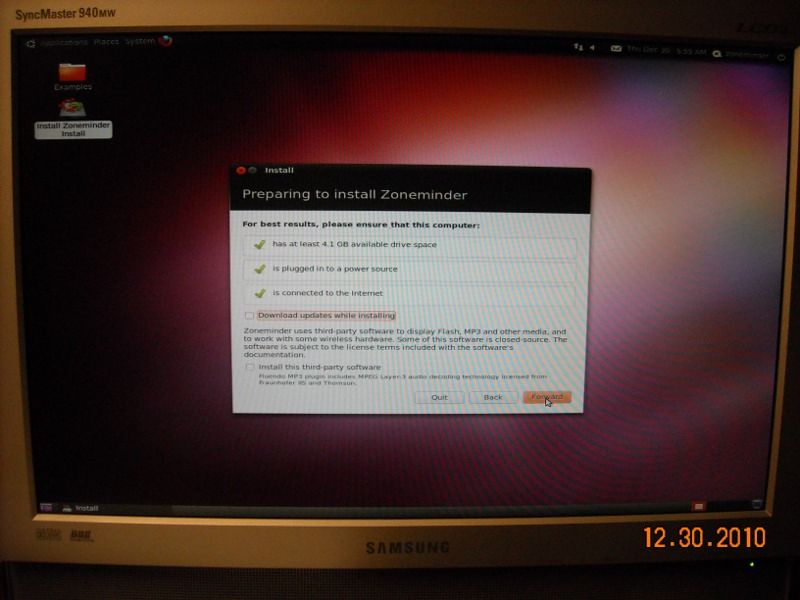
The install process goes on: 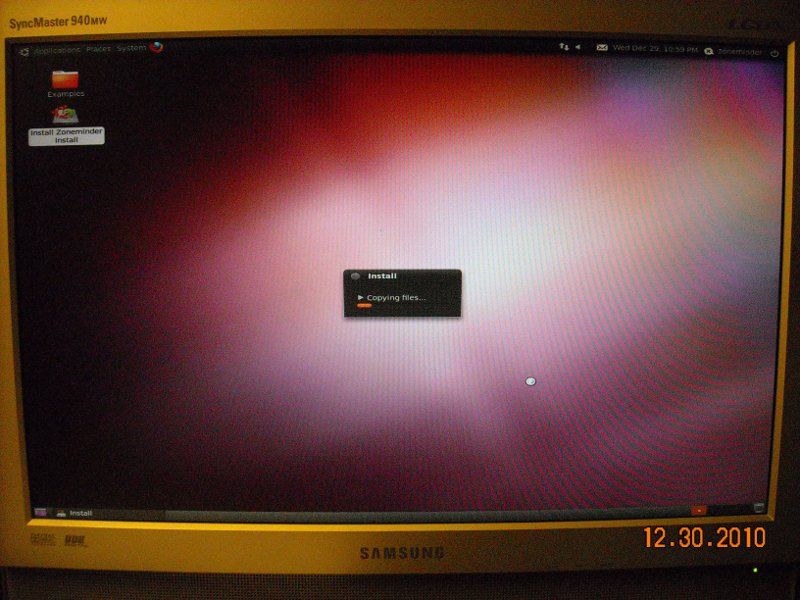
You have to enter your time zone: 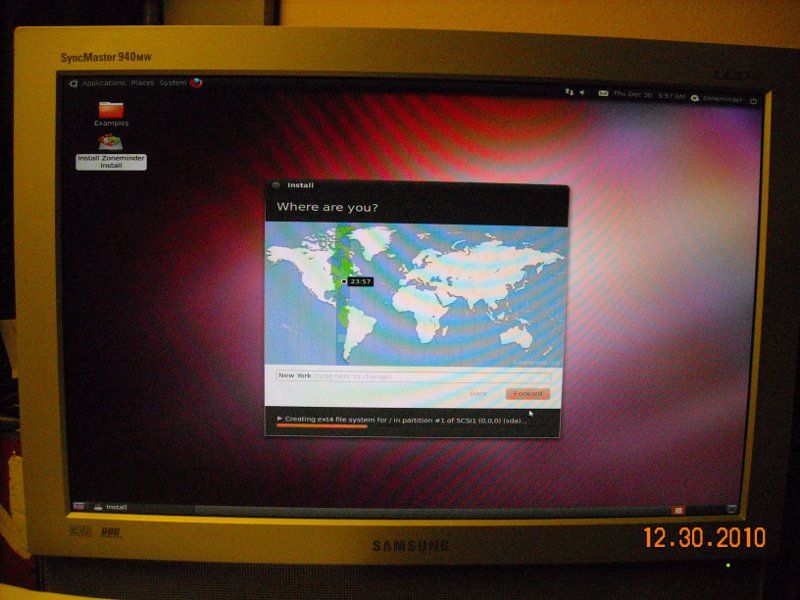
After the install finishes, connect to the Zoneminder machine via your web browser from another computer. Simply enter "http://zoneminder.IP.address.here" (obviously, you substitute your actual IP address for the "zoneminder.IP.address.here"). In the case of this machine, it's http://192.168.0.106/ 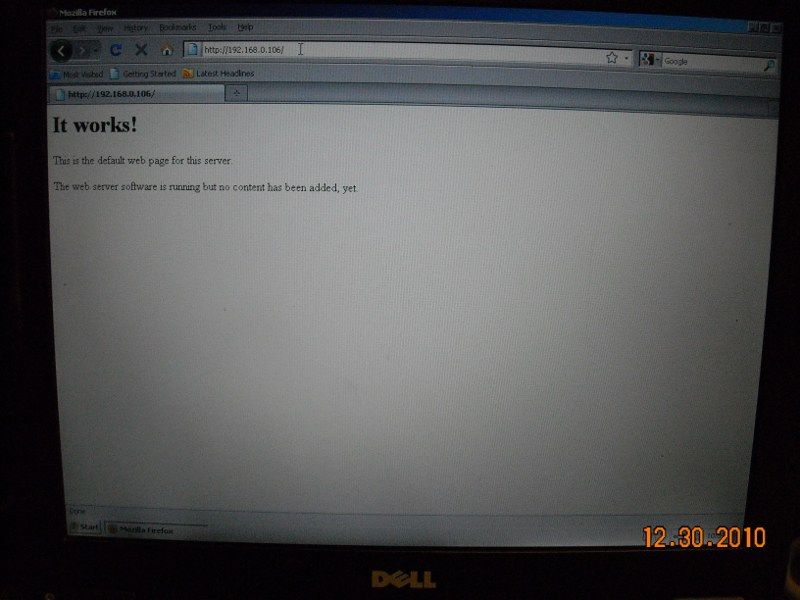
Good... webserver running. Now that we've verified the functionality of the apache webserver, we can check out the ZM webpage. The ZM web interface allows you to administrate the Zoneminder install. It's "http://zoneminder.IP.address.here/zm/" (in this system it's http://192.168.0.106/zm/) The default login/password is "admin"/"admin" 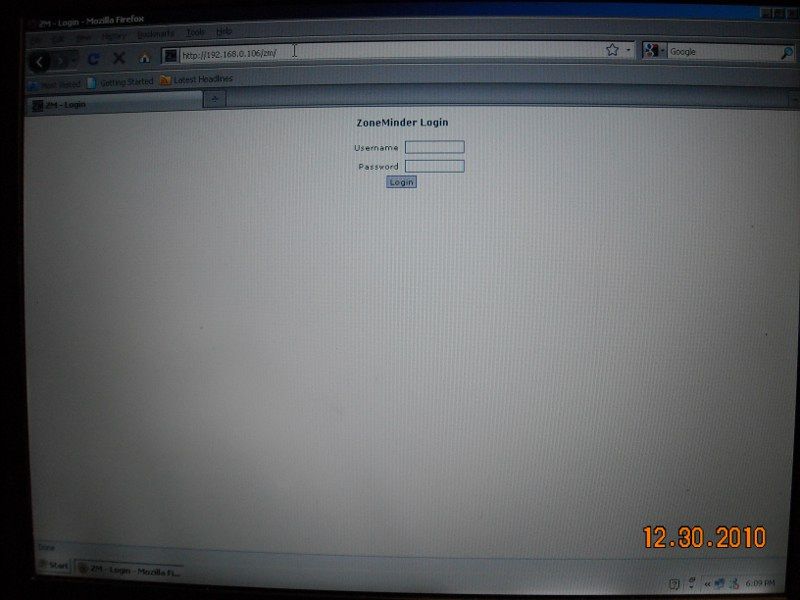
When you log in to the administration webpage, you're hit with a donation popup. If you find this program useful, please consider donating... guys spend a lot of time writing software like this, and they could probably use a few bucks. 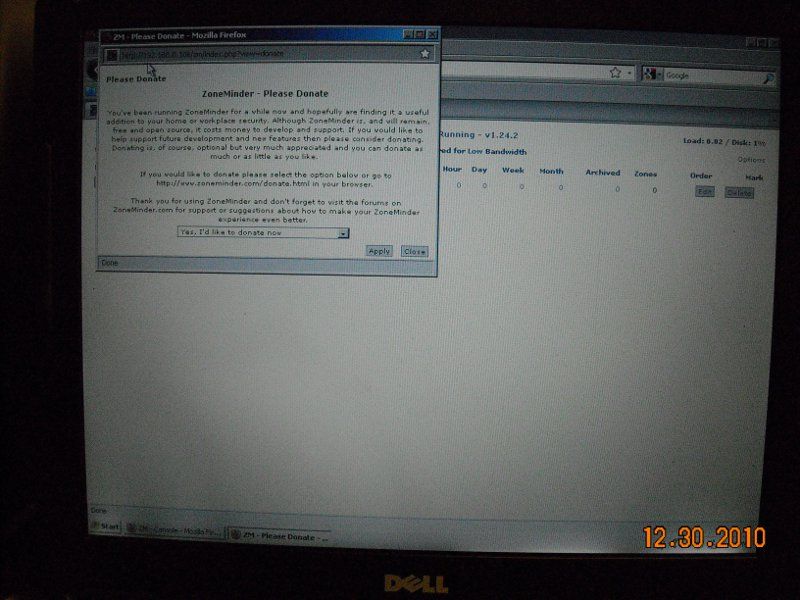
Here is the main screen, without any cameras added yet: 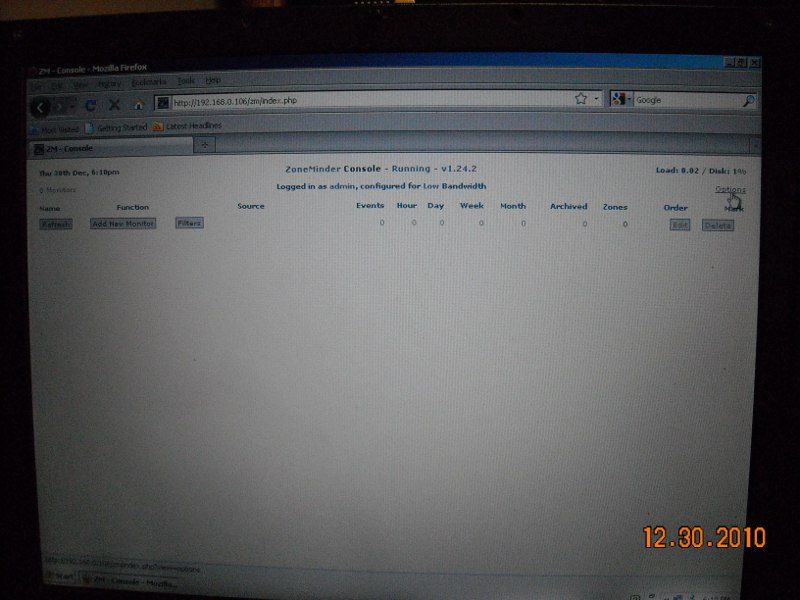
Here is the view through an Acti ACM-1231 megapixel camera. For some reason, I cannot get the megapixel resolution to work... so this is 640x480: 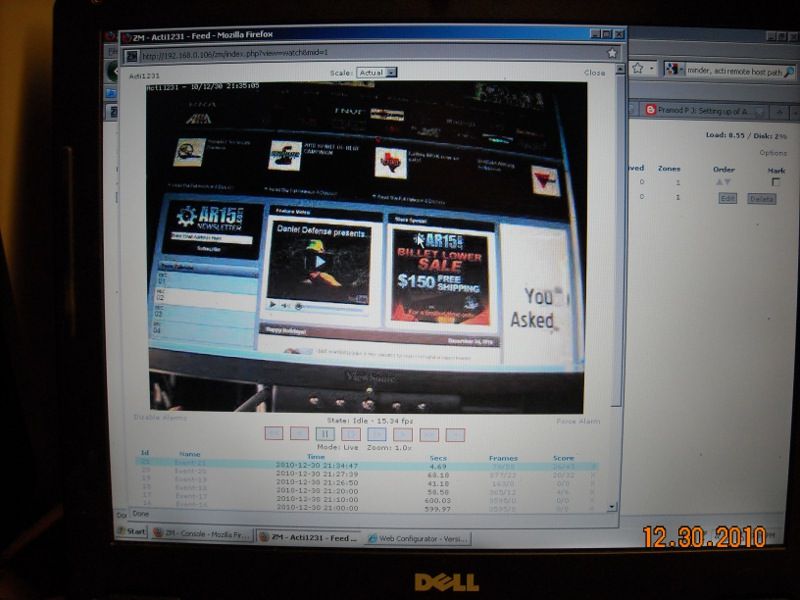
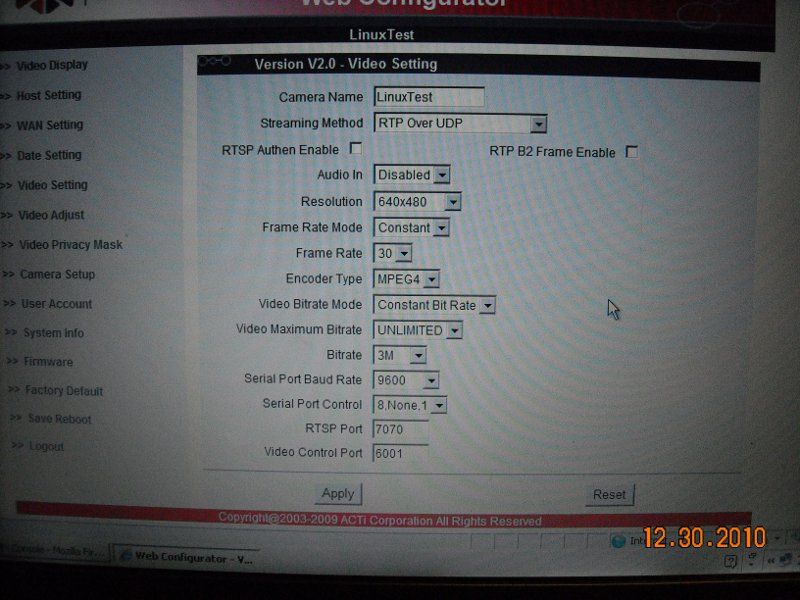
Here is the camera looking at a picture of itself, of itself, of itself... 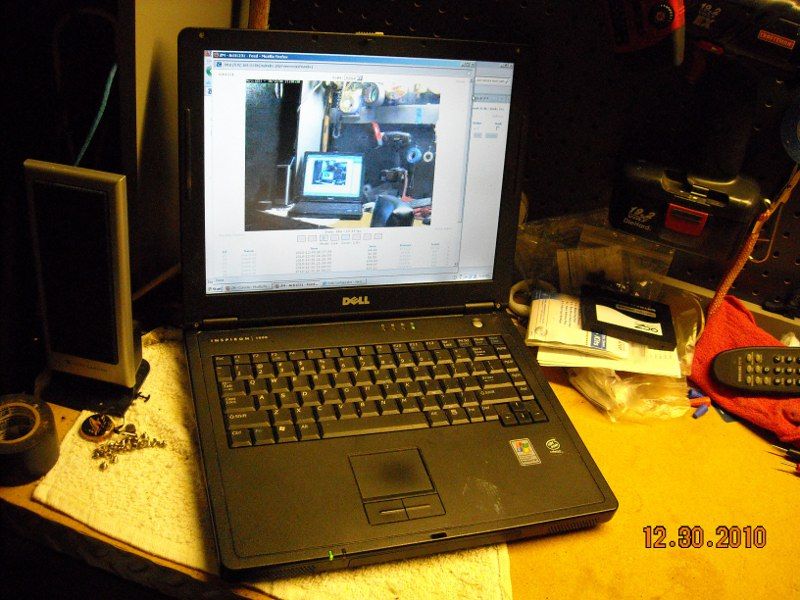
Here's the admin screen with two cameras added (getting the Pano to work was not easy) 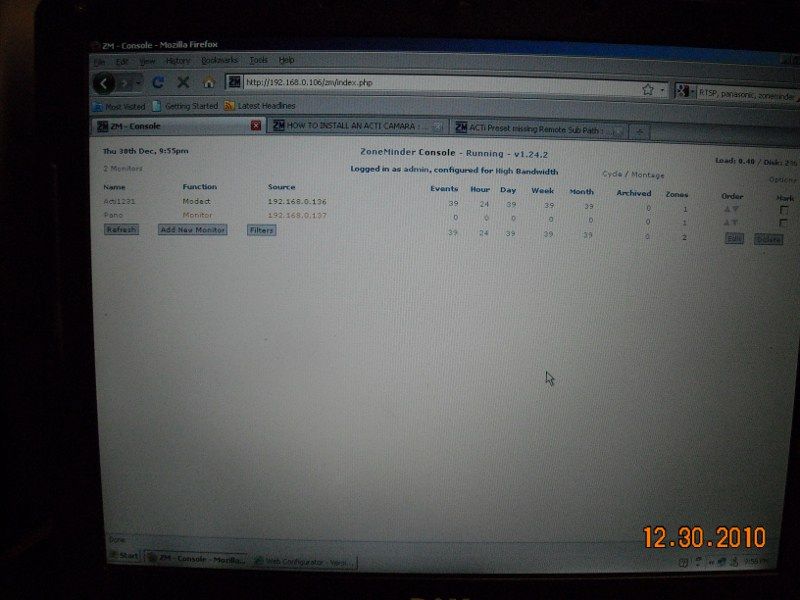
The bottom line with this software is that you'd better be ready to tinker. This took me a couple of days, a few hours a day, to get this config to work (this is running off one of those frequently-mentioned, cheap-as-dirt-on-Ebay IBM Thinkcentres). Note the other browser tabs I have open... I strongly recommend the zoneminder forums if you run into trouble... somebody has probably already had the same problem you're experiencing. Zoneminder IS free-as-in-beer... but how "free" it actually is depends on how much you value your time. If you've got the time, then you can save yourself some money... just choose your cameras carefully... and realize that megapixel might not be functional (as in the case of my ACM-1231). |
"Look wise, say nothing, and grunt. Speech was given to conceal thought."
- Sir William Osler -
- Sir William Osler -
|
Originally Posted By Desert_AIP:
Originally Posted By TheGrayMan:
Originally Posted By Desert_AIP:
Can the NUUO 2040 or (more likely) 4080 be used as a NAS in addition to its NVR duties? i.e. Can the disks be mapped like other network disks and accessed via Windows? Or is it a dedicated NVR box? THX Pretty sure it's a dedicated NVR box... but it does run embedded Linux under the hood. This opens up the possibility of running other services on that box, including a SAMBA server (which could serve network shares to windows boxen). You'd have to figure out a way to alter the boot imag to include SAMBA, and put it in the startup scripts. It would be an interesting hack, but is probably more trouble than it's worth. Hmmm... In the manual under the menu item "Protocol Control", it lists Windows file sharing. The first item states: "Services: Whether users can access this unit through Windows Explorer or not." Have you played with that setting? Missed that... and no, haven't played with that setting. |
"Look wise, say nothing, and grunt. Speech was given to conceal thought."
- Sir William Osler -
- Sir William Osler -
|
Some additional Zoneminder screen shots. These are from the Zoneminder box itself, using the "top" command (details here if you're interested)
Here is the server load with one camera (the Acti ACM-1231 @640x480), and no remote clients: 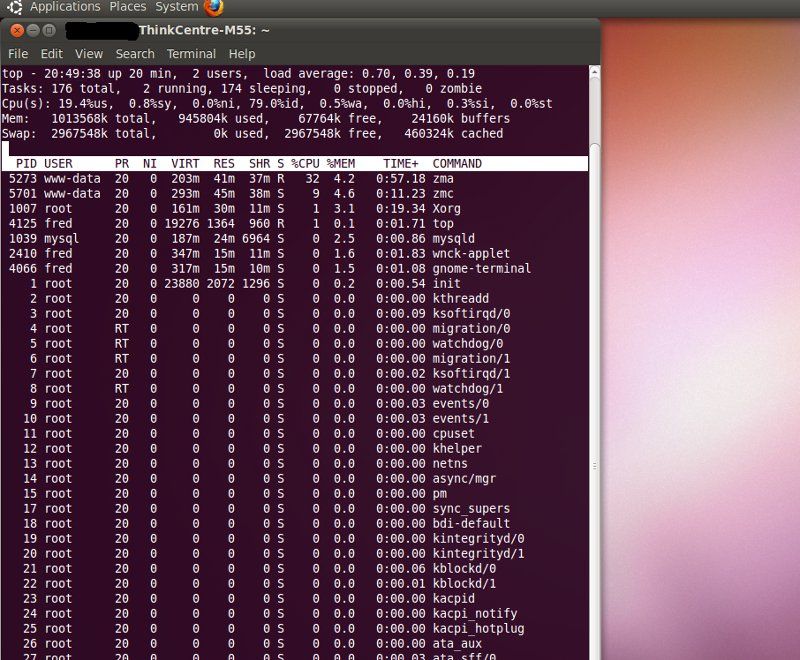
Here is the server load with one remote web client streaming that same Acti camera (at 15FPS) to another computer. Note the difference in the server load: 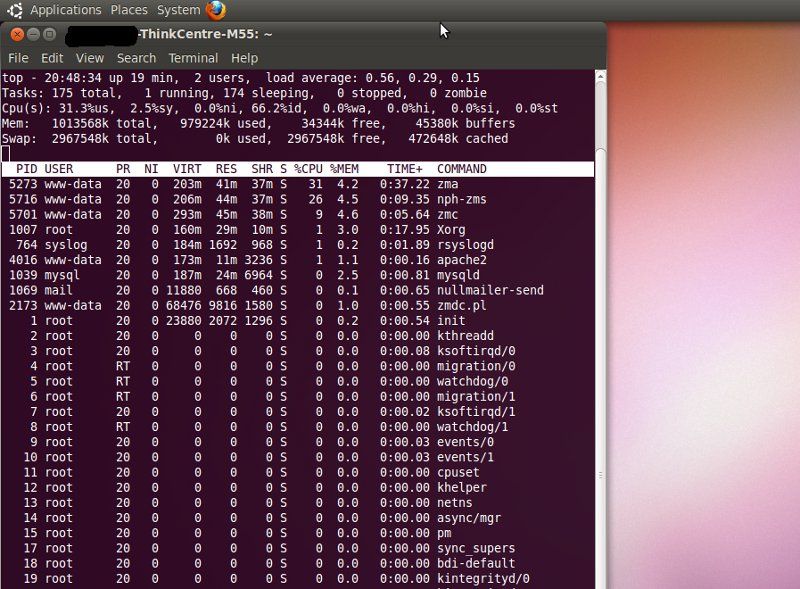
That's one camera. That tells me that if you're going to use Zoneminder with any significant number of cameras/clients, you might want to go generous on the specs of your host machine. Just a suggestion. |
"Look wise, say nothing, and grunt. Speech was given to conceal thought."
- Sir William Osler -
- Sir William Osler -
| There are analog encoder cards out there for Zoneminder. My next mission is to attempt to get one of those working. I have ordered one, and will update this space once it arrives. |
"Look wise, say nothing, and grunt. Speech was given to conceal thought."
- Sir William Osler -
- Sir William Osler -
|
I jus ran across this review of the D-Link DCS-930L 802.11n IP camera. Possibly of interest to those with limited budgets and/or needs. |
http://blogostuff.blogspot.com/
http://www.theshootersbar.org/ -- Pro-gun attorneys
RKBA = FREEDOM
http://www.theshootersbar.org/ -- Pro-gun attorneys
RKBA = FREEDOM
|
OK... more Acti goodness
NIB! 
Another 8211... a PTdZ at that price was too good to pass up: 
They sure pack them well: 
All the stuff in the box... 
Right now, I'm looking at my kids, sleeping snugly in their beds. The IR visibility is excellent, as is the resolution. Within a normal 10-12'x10-12' room, this thing is pretty good. |
"Look wise, say nothing, and grunt. Speech was given to conceal thought."
- Sir William Osler -
- Sir William Osler -
|
Originally Posted By kapthook:
Is the AXIS 2400+ a good solution for using analog cameras over a network? Those are older/discontinued; I've never used them. If you look closely at the specs, and it does what you want, I don't see why it might not be a viable option for you. ETA: and you can probably get those cheap-as-dirt (TM)
ETA2: Here is a PDF that gives you the specs. At the highest resolution, you're only getting 10FPS, divided among the four channels, compared to 30FPS (divided by four channels) with the next-generation unit (the 241Q series). |
"Look wise, say nothing, and grunt. Speech was given to conceal thought."
- Sir William Osler -
- Sir William Osler -
|
Originally Posted By Eight:
What is the focus like in a room that size? Is everything in focus? I got the impression from your last post with pictures that the depth of field was shallow. Here it is within a regular-sized room. There's an alarm clock just out of the frame on the right, and you can almost read it. That far corner is where things start to get fuzzy... and that's probably 14-15 feet away. 
|
"Look wise, say nothing, and grunt. Speech was given to conceal thought."
- Sir William Osler -
- Sir William Osler -
|
OK.... to expand on our Zoneminder section:
Here is the analog Zoneminder-compatible (theoretically anyway) encoder card. 
Included are a software CD (for windows... we shan't be needing it), and the requisite dongle: 
Here's the card. There are four chips to pay attention to on that card, and those are the frame-grabber chips. They're Conexant 878A Fusion chips... a later generation of the venerable BT848 grame-grabber chips that have been so popular with linux users over the years. These are supported in Linux (again, theoretically...), so Zoneminder shouldn't have a problem using them. Note: These are frame-grabber chips... encoding will have to be done in software, which means greater CPU overhead. This is unfortunate, but many companies who produce MPEG hardware encoders don't produce drivers for anything but the windows market. 
Installing this bugger in one of those thinkcentre SFF computers is easy-peasy. 


Next, we get to the hard part... the linux config. Stay tuned... |
"Look wise, say nothing, and grunt. Speech was given to conceal thought."
- Sir William Osler -
- Sir William Osler -
|
Originally Posted By TheGrayMan:
Originally Posted By Eight:
What is the focus like in a room that size? Is everything in focus? I got the impression from your last post with pictures that the depth of field was shallow. Here it is within a regular-sized room. There's an alarm clock just out of the frame on the right, and you can almost read it. That far corner is where things start to get fuzzy... and that's probably 14-15 feet away. http://i251.photobucket.com/albums/gg286/TGrayman/Acti%208211/acrossroom.jpg Is this mounted to the ceiling, or on top of a piece of furniture? All the photos I've seen of this camera suggest that the normal orientation puts the base below the lens. Don't think it really matters if the image can be flipped. |
|
Originally Posted By Eight:
Originally Posted By TheGrayMan:
Originally Posted By Eight:
What is the focus like in a room that size? Is everything in focus? I got the impression from your last post with pictures that the depth of field was shallow. Here it is within a regular-sized room. There's an alarm clock just out of the frame on the right, and you can almost read it. That far corner is where things start to get fuzzy... and that's probably 14-15 feet away. http://i251.photobucket.com/albums/gg286/TGrayman/Acti%208211/acrossroom.jpg Is this mounted to the ceiling, or on top of a piece of furniture? All the photos I've seen of this camera suggest that the normal orientation puts the base below the lens. Don't think it really matters if the image can be flipped. That's up on a armoire. There is a video-flipping function, as well as mirroring... it's in the camera config. |
"Look wise, say nothing, and grunt. Speech was given to conceal thought."
- Sir William Osler -
- Sir William Osler -
|
OK... have partial functionality with the Conexant 878 card (Provideo 150). Not 100%, but working on it... will put up what I have later today.
ETA: OK... here we go. Linux has pretty fair hardware detection. In fact, if you dig into Linux's logfiles, you can find out a great deal about what kind of hardware you actually have... Knoppix "Live CDs" are great for determining exactly what kind of computer hardware you have. Anyway... Rebooting the machine after installing the card went uneventfully. Once we were up-and-running, bringing up a Terminal (Command-Line Interface), and entering the command "cat /var/log/messages" will cause a whole lot of cryptic-appearing stuff to scroll past your screen. Move the cursor back up, and look for anything that says "bttv,' like so: 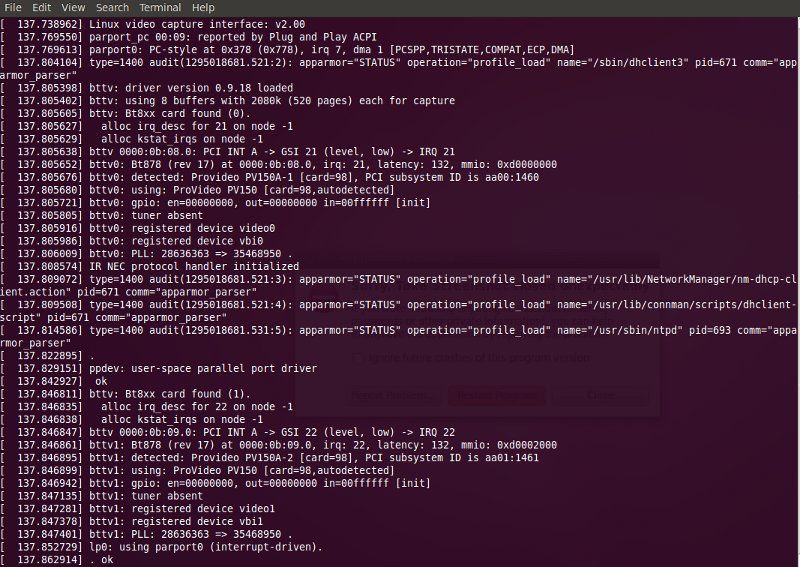
Looks like it detected the card just fine. There's an additional tool called "XAWTV" that allows you to watch TV under Linux (it's actually a set of applications). It can be downloaded to check the status of your BTTV card: 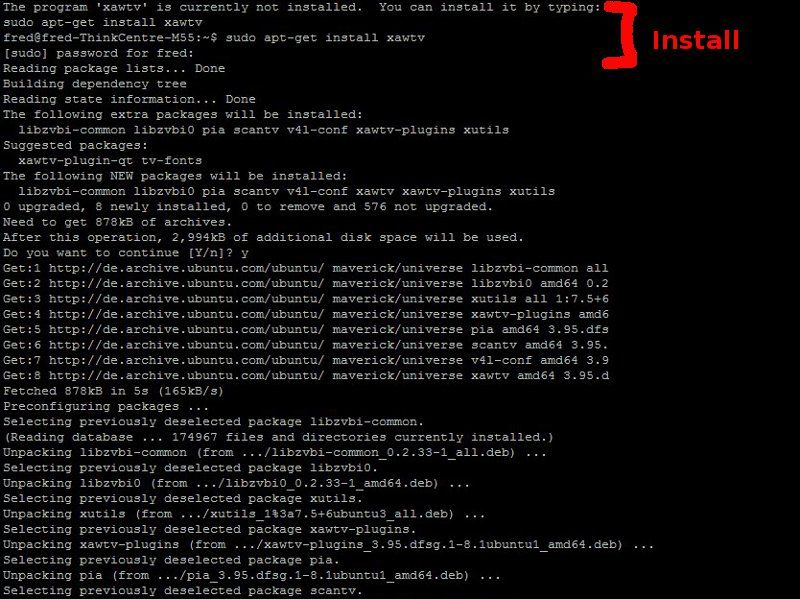
Once installed, you can check its output with the "xawtv -hwscan" command: 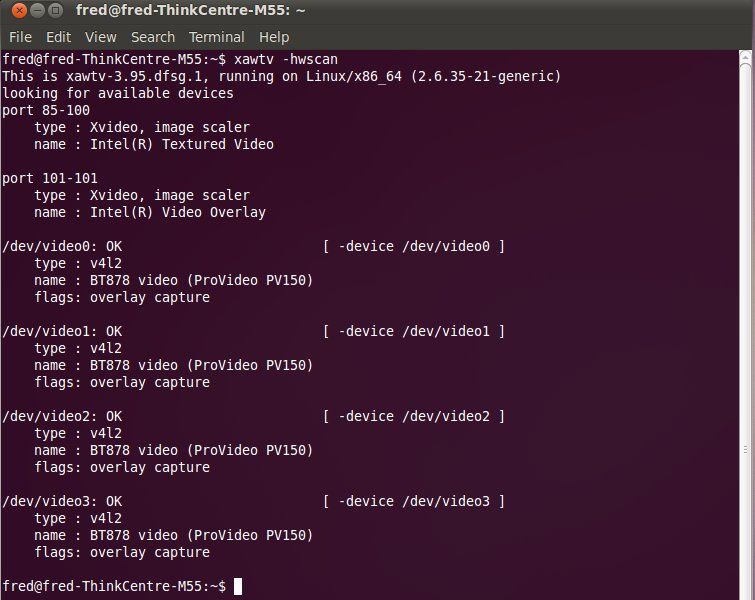
Looks like everything is working... and now we know how to access the video streams from each of the four channels: /dev/video0 /dev/video1 /dev/video2 /dev/video3 We have a Panasonic dome hooked up to the first video channel (/dev/video0): 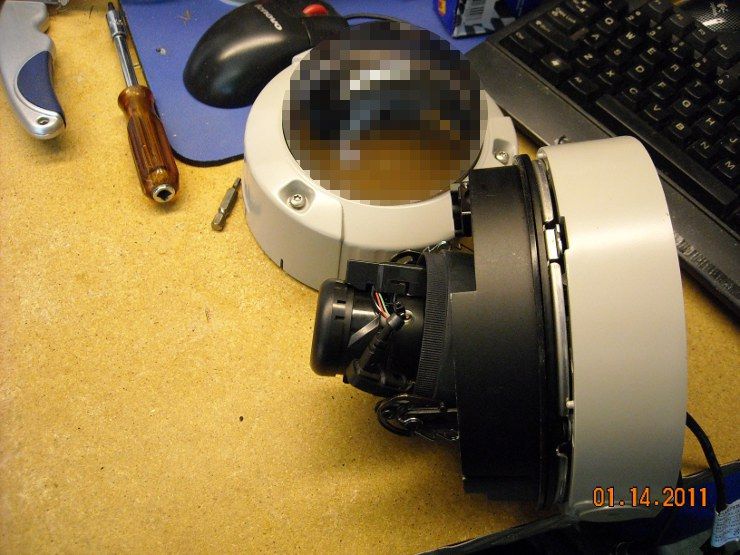
Going to the web interface via "http://192.168.0.110/zm" (obviously, you'd enter your own Zoneminder box's IP address), we start configuring the application to talk to the card: 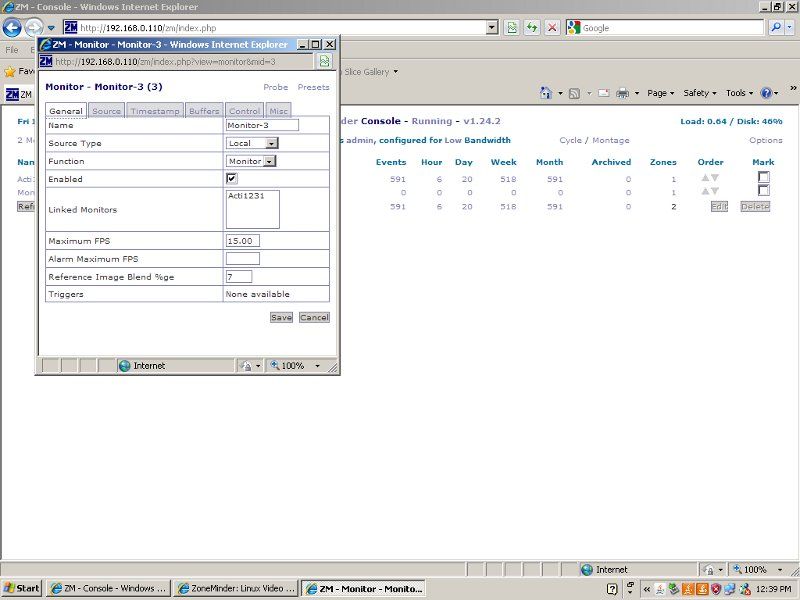
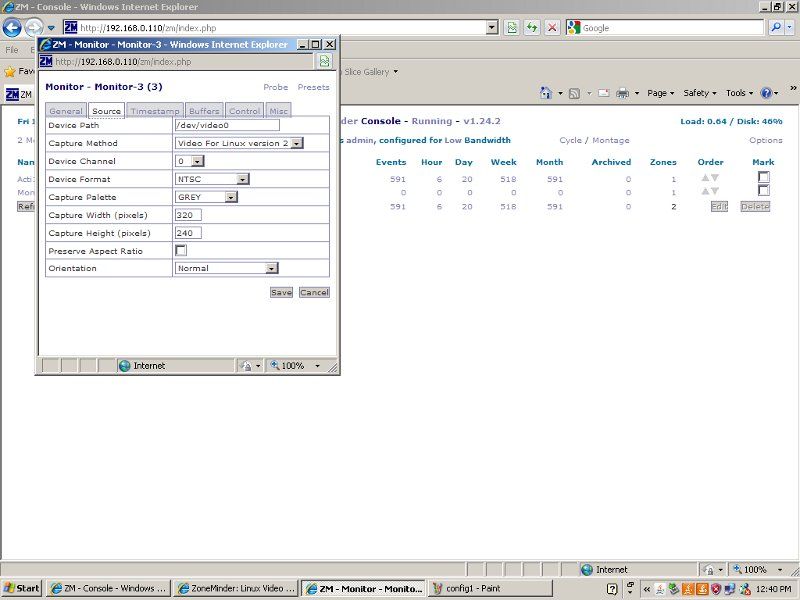
And clicking on the link from the management homepage, we actually get the picture. Thumbs up! 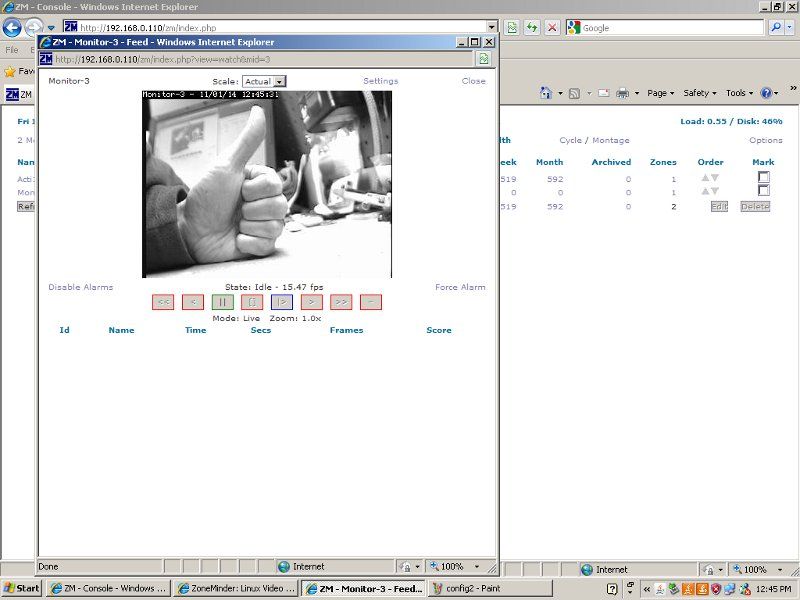
We can repeat that config, but change the resolution, and get a bigger picture: 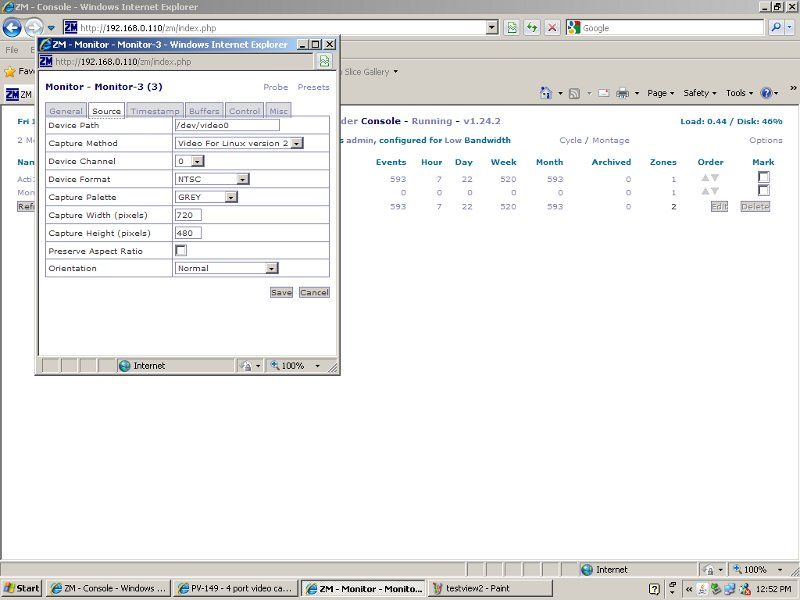
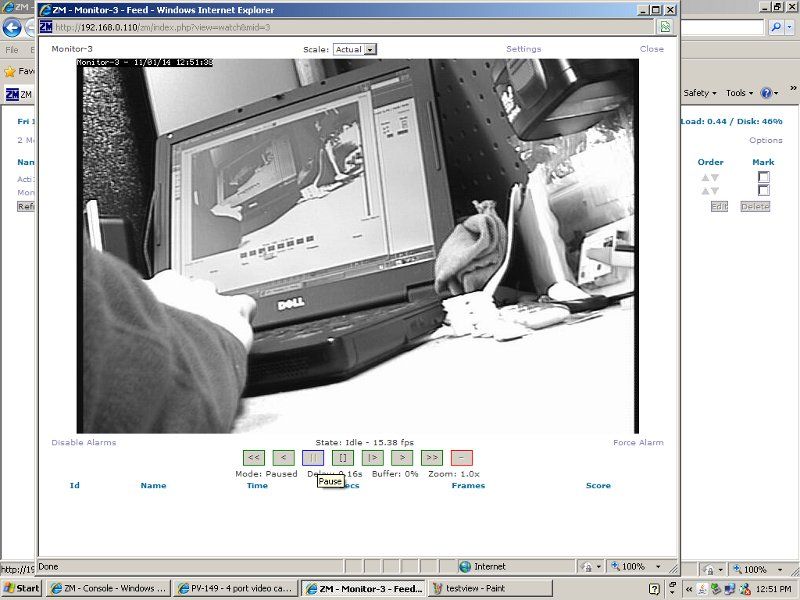
Here's the problem... I can only get black-and-white out of it... no color yet. I'm going to try some further hacking and see if I can get color to work. ETA2: and only some of the channels are functional on the card. Don't know whether this is a card problem, or a configuration problem. I'll have to hack on it some more and see. ETA3: the fourth video channel doesn't seem to be functional at all. Still can't get video out of the second channel either. Either a bad card, or Zoneminder can't talk to it... nothing I've found in the logs has been helpful yet... so only the first and the third video channels work... and only in Black-and-White. ETA4: Lost video on channel 3, though a reboot fixed that. This setup is really finicky. ETA5: Confirmed even a reboot would not fix the non-functional video on channels 2 and 4. May be a config problem... I'll have to dig some more ETA6: System logs seem to indicate good detection and identical configs on all channels. It also reports capture on all active channels... but Zoneminder won't display channels 2 and 4. ETA7: And when you have two cameras attached, the resolution of each can only be 320x240... at 720x480 it chokes. So much for 720x480 at 120FPS  This sucks. This sucks.
|
"Look wise, say nothing, and grunt. Speech was given to conceal thought."
- Sir William Osler -
- Sir William Osler -

|
I was slow at work today and had a chance to build a bracket to mount the Nanostation on the side of the barn. Hopefully I will get a chance one night this week to mount it and the camera.
I used an old Exmark seat bracket and an old spindle out of an Exmark deck to build it: 
|
|
Originally Posted By JPL:
I was slow at work today and had a chance to build a bracket to mount the Nanostation on the side of the barn. Hopefully I will get a chance one night this week to mount it and the camera. I used an old Exmark seat bracket and an old spindle out of an Exmark deck to build it: http://i1237.photobucket.com/albums/ff477/jplky/NanoStationBrckt.jpg Holy smokes... that's one heavy-duty mounting bracket 
|
"Look wise, say nothing, and grunt. Speech was given to conceal thought."
- Sir William Osler -
- Sir William Osler -
|
Originally Posted By TheGrayMan:
Originally Posted By JPL:
I was slow at work today and had a chance to build a bracket to mount the Nanostation on the side of the barn. Hopefully I will get a chance one night this week to mount it and the camera. I used an old Exmark seat bracket and an old spindle out of an Exmark deck to build it: http://i1237.photobucket.com/albums/ff477/jplky/NanoStationBrckt.jpg Holy smokes... that's one heavy-duty mounting bracket Well at least the wind won't blow it around! 
I told the parts lady I might have overdone it a little, but in all honestly it just happened to be what was laying around. |
|
Originally Posted By JPL:
I was slow at work today and had a chance to build a bracket to mount the Nanostation on the side of the barn. Hopefully I will get a chance one night this week to mount it and the camera. I used an old Exmark seat bracket and an old spindle out of an Exmark deck to build it:]
I––- don't––- know––- Are you sure that will hold it??? 
|
|
Originally Posted By JPL:
Originally Posted By TheGrayMan:
Originally Posted By JPL:
I was slow at work today and had a chance to build a bracket to mount the Nanostation on the side of the barn. Hopefully I will get a chance one night this week to mount it and the camera. I used an old Exmark seat bracket and an old spindle out of an Exmark deck to build it: http://i1237.photobucket.com/albums/ff477/jplky/NanoStationBrckt.jpg Holy smokes... that's one heavy-duty mounting bracket Well at least the wind won't blow it around!
I told the parts lady I might have overdone it a little, but in all honestly it just happened to be what was laying around. Yeah... I think you're F-4 tornado-rated with that one. |
"Look wise, say nothing, and grunt. Speech was given to conceal thought."
- Sir William Osler -
- Sir William Osler -

|
Originally Posted By EXPY37:
http://i994.photobucket.com/albums/af66/expy37/20101221_11-50-25.jpg?t=1295114264 That looks pretty robust... but I think JPL takes the prize on this one. 
|
"Look wise, say nothing, and grunt. Speech was given to conceal thought."
- Sir William Osler -
- Sir William Osler -
|
Originally Posted By TheGrayMan:
Originally Posted By EXPY37:
http://i994.photobucket.com/albums/af66/expy37/20101221_11-50-25.jpg?t=1295114264 That looks pretty robust... but I think JPL takes the prize on this one. Yep!!!!! Now I'm anxious to see how it works. |

|
Originally Posted By JPL:
Alrighty, everything is hooked up so I'll commence with the stupid questions! How do I find the camera? I have assumed that I open network connections and the nanostation will be listed there as long as the signal is reaching up here. Is that correct? The Nanostation will act as a transparent bridge... it takes up IP address 192.168.0.30 (IIRC)... but if your computer is on the 192.168.0.x subnet, and your camera on the other end is as well, they should be able to talk to one another. Just make sure everybody has an IP address of 192.168.0.x |
"Look wise, say nothing, and grunt. Speech was given to conceal thought."
- Sir William Osler -
- Sir William Osler -