


Posted: 9/10/2015 10:29:30 AM EDT
|
After sio much frustration with using three remotes just to watch TV, one of which you had to tap on something to get it to work (Logitech Z-5500 surround system), and another being almost microscopic (Fire Stick) and getting lost all the time, I finally splurged and got Logitech's Harmony Home Control.
It can control Bluetooth devices like the Fire Stick and PS4. Did you hear that?? It can control Bluetooth devices like the Fire Stick and PS4. Took a while to get setup, because it's a totally different way of using a remote. It uses "Activities". So you want to watch TV, you hit the button you set for that activity, it changes the TV input to the right one (and even to your favorite channel if you want) and changes the input source on your amp to the correct one, and you watch TV. Same goes for if you want to use the Fire Stick. You hit the button for that activity and it changes the TV and amp inputs to the correct one, and then the other buttons start working on the fire stick. PS4 is the same, but Sony, in all of their genius, decided that only the PS4 controllers can turn on the PS4, so you still have to manually turn it on with a controller or walking over to it. But it can do everything else. And when you turn it off, it's smart enough to go through the menus and turn it to Power Saving Mode. Oh, you can also use it to turn on lights and other home automation, but I don't have any of that stuff. I love this remote. It's $130 but damn, you will love it too. http://amzn.com/B00N3RFC4G 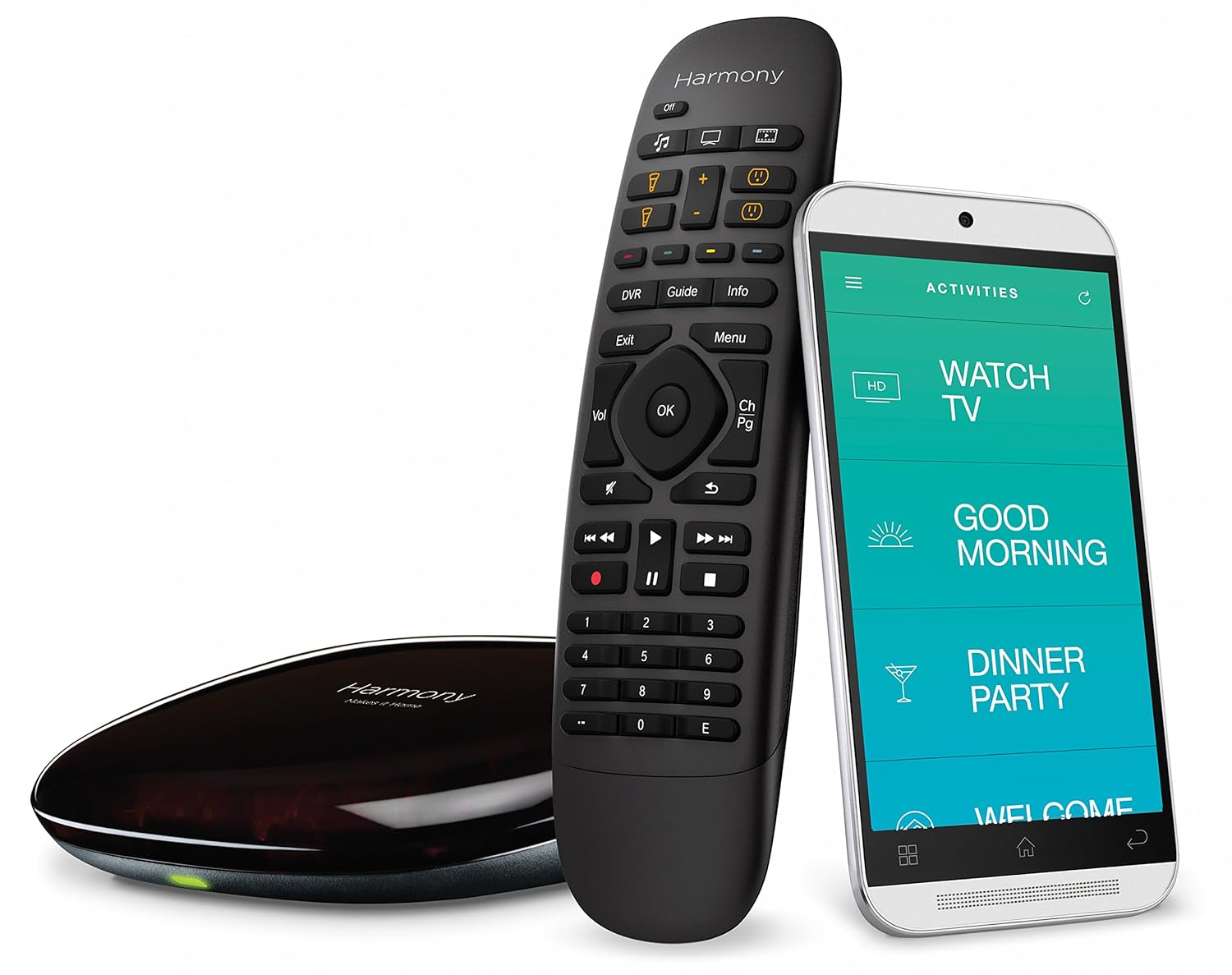
|
|
Timely post. Our 3rd child who just turned 1 year has decimated our TV remote so I've been looking at a universal. All I really need it to do is run the TV and surround sound, but I guess having it work with the PS4 and Fire Stick would be cool as well. I bought a $10 deal from Walmart and while it works, it can't run the Smart TV apps with the TV.
Do you know if this remote can be programmed to run Smart apps? We have a Netflix and Amazon button on our TV controller which is the bulk of our TV use, but that controller also has a "Vizio" button that brings up a smart app menu for everything, Hulu, Vudu, etc., including Netflix and Amazon, so even I could just get that Vizio button programmed it would be usable. ETA - The generic universal I bought does have a cool volume override feature, which allows the volume to only control the surround sound even if the device selected is something else. I'd assume a fancy remote such as this would have something similar. The amazon link and Q&A said nothing about smart TV apps. |
|
Quoted:
Timely post. Our 3rd child who just turned 1 year has decimated our TV remote so I've been looking at a universal. All I really need it to do is run the TV and surround sound, but I guess having it work with the PS4 and Fire Stick would be cool as well. I bought a $10 deal from Walmart and while it works, it can't run the Smart TV apps with the TV. Do you know if this remote can be programmed to run Smart apps? We have a Netflix and Amazon button on our TV controller which is the bulk of our TV use, but that controller also has a "Vizio" button that brings up a smart app menu for everything, Hulu, Vudu, etc., including Netflix and Amazon, so even I could just get that Vizio button programmed it would be usable. ETA - The generic universal I bought does have a cool volume override feature, which allows the volume to only control the surround sound even if the device selected is something else. I'd assume a fancy remote such as this would have something similar. The amazon link and Q&A said nothing about smart TV apps. I don't have a Smart TV to test it on. Yes, the volume only changes the surround volume and not the TV as long as that activity is setup to use the surround. You could add another activity and not include the surround, then the volume on the remote will control the TV volume. Also, each activity button can distinguish a short press and a long press, so you can program it to have 2 different activities according to how long you press it. So you could program the short press to just use surround sound and the TV sound for the long press. So you turn it on with a short press and it kicks on the TV and surround sound. Then if you press it again and hold it down, it will turn off your surround sound and activate the TV volume control. |
|
Quoted:
I don't have a Smart TV to test it on. Yes, the volume only changes the surround volume and not the TV as long as that activity is setup to use the surround. You could add another activity and not include the surround, then the volume on the remote will control the TV volume. Also, each activity button can distinguish a short press and a long press, so you can program it to have 2 different activities according to how long you press it. So you could program the short press to just use surround sound and the TV sound for the long press. So you turn it on with a short press and it kicks on the TV and surround sound. Then if you press it again and hold it down, it will turn off your surround sound and activate the TV volume control. Quoted:
Quoted:
Timely post. Our 3rd child who just turned 1 year has decimated our TV remote so I've been looking at a universal. All I really need it to do is run the TV and surround sound, but I guess having it work with the PS4 and Fire Stick would be cool as well. I bought a $10 deal from Walmart and while it works, it can't run the Smart TV apps with the TV. Do you know if this remote can be programmed to run Smart apps? We have a Netflix and Amazon button on our TV controller which is the bulk of our TV use, but that controller also has a "Vizio" button that brings up a smart app menu for everything, Hulu, Vudu, etc., including Netflix and Amazon, so even I could just get that Vizio button programmed it would be usable. ETA - The generic universal I bought does have a cool volume override feature, which allows the volume to only control the surround sound even if the device selected is something else. I'd assume a fancy remote such as this would have something similar. The amazon link and Q&A said nothing about smart TV apps. I don't have a Smart TV to test it on. Yes, the volume only changes the surround volume and not the TV as long as that activity is setup to use the surround. You could add another activity and not include the surround, then the volume on the remote will control the TV volume. Also, each activity button can distinguish a short press and a long press, so you can program it to have 2 different activities according to how long you press it. So you could program the short press to just use surround sound and the TV sound for the long press. So you turn it on with a short press and it kicks on the TV and surround sound. Then if you press it again and hold it down, it will turn off your surround sound and activate the TV volume control. This may be a stupid question, but does it have the ability to "mirror" a function from another remote? Meaning you set it up and press a specific button on a different remote that does a specific thing and maps that function to the specified button? ETA - Now that I've rethought my question, going to assume no as that ability would probably allow you to mirror the PS4 on functionality. |
|
Quoted: This may be a stupid question, but does it have the ability to "mirror" a function from another remote? Meaning you set it up and press a specific button on a different remote that does a specific thing and maps that function to the specified button? ETA - Now that I've rethought my question, going to assume no as that ability would probably allow you to mirror the PS4 on functionality. Quoted: Quoted: Quoted: Timely post. Our 3rd child who just turned 1 year has decimated our TV remote so I've been looking at a universal. All I really need it to do is run the TV and surround sound, but I guess having it work with the PS4 and Fire Stick would be cool as well. I bought a $10 deal from Walmart and while it works, it can't run the Smart TV apps with the TV. Do you know if this remote can be programmed to run Smart apps? We have a Netflix and Amazon button on our TV controller which is the bulk of our TV use, but that controller also has a "Vizio" button that brings up a smart app menu for everything, Hulu, Vudu, etc., including Netflix and Amazon, so even I could just get that Vizio button programmed it would be usable. ETA - The generic universal I bought does have a cool volume override feature, which allows the volume to only control the surround sound even if the device selected is something else. I'd assume a fancy remote such as this would have something similar. The amazon link and Q&A said nothing about smart TV apps. I don't have a Smart TV to test it on. Yes, the volume only changes the surround volume and not the TV as long as that activity is setup to use the surround. You could add another activity and not include the surround, then the volume on the remote will control the TV volume. Also, each activity button can distinguish a short press and a long press, so you can program it to have 2 different activities according to how long you press it. So you could program the short press to just use surround sound and the TV sound for the long press. So you turn it on with a short press and it kicks on the TV and surround sound. Then if you press it again and hold it down, it will turn off your surround sound and activate the TV volume control. This may be a stupid question, but does it have the ability to "mirror" a function from another remote? Meaning you set it up and press a specific button on a different remote that does a specific thing and maps that function to the specified button? ETA - Now that I've rethought my question, going to assume no as that ability would probably allow you to mirror the PS4 on functionality. With all of the universal remotes I've programmed - and I've programmed plenty - the programmable remotes can learn IR commands from other remotes. I think that's what you are talking about - you point the factory remote at the universal remote, initiate the learning mode (usually for a specific button), press the button on the factory remote to "teach" the universal the command. You can also then assign that command to any button you'd like. I'd be shocked if this unit does not have that function. |


|
I have a Logitech Harmony One, and it's fantastic. Same activity-based setup. It also connects to your PC for programming and the setup software has pre-built templates for tons of AV equipment. It had templates for everything in my setup, including an older, specialized pre-amp. It is a very comprehensive list. Makes setup a snap. Just load the template, and tweak anything you want to adjust, but the template should get you at least 95% of the way there. My wife thought I was crazy for spending over $150 on a remote. But she can use our AV system easily now, whereas before she wouldn't even turn it on and just used the TV speakers because she thought it was too complicated. Now it's a one-button operation. Even my in-laws could do it easily once I gave them a one-minute demo. |

|
Quoted: This may be a stupid question, but does it have the ability to "mirror" a function from another remote? Meaning you set it up and press a specific button on a different remote that does a specific thing and maps that function to the specified button? ETA - Now that I've rethought my question, going to assume no as that ability would probably allow you to mirror the PS4 on functionality. The Harmony One does, so I assume this one does too. It can listen to and record signals from other remotes. Some devices use signals that the Harmoney remote can't duplicate, though. I remember mine came with a free repeater that would allow it to control a PS3. I didn't have one, so I never used it. |
|
Quoted:
With all of the universal remotes I've programmed - and I've programmed plenty - the programmable remotes can learn IR commands from other remotes. I think that's what you are talking about - you point the factory remote at the universal remote, initiate the learning mode (usually for a specific button), press the button on the factory remote to "teach" the universal the command. You can also then assign that command to any button you'd like. I'd be shocked if this unit does not have that function. Yeah that's exactly what I'd hope for, the $10 one I got from Walmart doesn't have that ability, which doesn't really surprise me. Thanks for the confirmation fellas, now to rationalize a $100+ TV remote to the wife. 
|
|
Quoted:
This may be a stupid question, but does it have the ability to "mirror" a function from another remote? Meaning you set it up and press a specific button on a different remote that does a specific thing and maps that function to the specified button? ETA - Now that I've rethought my question, going to assume no as that ability would probably allow you to mirror the PS4 on functionality. Quoted:
Quoted:
Quoted:
Timely post. Our 3rd child who just turned 1 year has decimated our TV remote so I've been looking at a universal. All I really need it to do is run the TV and surround sound, but I guess having it work with the PS4 and Fire Stick would be cool as well. I bought a $10 deal from Walmart and while it works, it can't run the Smart TV apps with the TV. Do you know if this remote can be programmed to run Smart apps? We have a Netflix and Amazon button on our TV controller which is the bulk of our TV use, but that controller also has a "Vizio" button that brings up a smart app menu for everything, Hulu, Vudu, etc., including Netflix and Amazon, so even I could just get that Vizio button programmed it would be usable. ETA - The generic universal I bought does have a cool volume override feature, which allows the volume to only control the surround sound even if the device selected is something else. I'd assume a fancy remote such as this would have something similar. The amazon link and Q&A said nothing about smart TV apps. I don't have a Smart TV to test it on. Yes, the volume only changes the surround volume and not the TV as long as that activity is setup to use the surround. You could add another activity and not include the surround, then the volume on the remote will control the TV volume. Also, each activity button can distinguish a short press and a long press, so you can program it to have 2 different activities according to how long you press it. So you could program the short press to just use surround sound and the TV sound for the long press. So you turn it on with a short press and it kicks on the TV and surround sound. Then if you press it again and hold it down, it will turn off your surround sound and activate the TV volume control. This may be a stupid question, but does it have the ability to "mirror" a function from another remote? Meaning you set it up and press a specific button on a different remote that does a specific thing and maps that function to the specified button? ETA - Now that I've rethought my question, going to assume no as that ability would probably allow you to mirror the PS4 on functionality. Not that I know of but don't take my word for it. It knows the programming for almost everything already built in though. EDIT: Looks like it can learn IR commands.... http://www.amazon.com/custom-programmed-something-supported-devices/forum/Fx6F8OCHVJTDCG/TxG4RBV2TGB98C/1/ref=cm_cd_naredir?_encoding=UTF8&asin=B00N3RFC4G&ref_=ask_dp_lsw_al_hza |
|
Quoted: After sio much frustration with using three remotes just to watch TV, one of which you had to tap on something to get it to work (Logitech Z-5500 surround system), and another being almost microscopic (Fire Stick) and getting lost all the time, I finally splurged and got Logitech's Harmony Home Control. It can control Bluetooth devices like the Fire Stick and PS4. Did you hear that?? It can control Bluetooth devices like the Fire Stick and PS4. Took a while to get setup, because it's a totally different way of using a remote. It uses "Activities". So you want to watch TV, you hit the button you set for that activity, it changes the TV input to the right one (and even to your favorite channel if you want) and changes the input source on your amp to the correct one, and you watch TV. Same goes for if you want to use the Fire Stick. You hit the button for that activity and it changes the TV and amp inputs to the correct one, and then the other buttons start working on the fire stick. PS4 is the same, but Sony, in all of their genius, decided that only the PS4 controllers can turn on the PS4, so you still have to manually turn it on with a controller or walking over to it. But it can do everything else. And when you turn it off, it's smart enough to go through the menus and turn it to Power Saving Mode. Oh, you can also use it to turn on lights and other home automation, but I don't have any of that stuff. I love this remote. It's $130 but damn, you will love it too. http://amzn.com/B00N3RFC4G http://ecx.images-amazon.com/images/I/81OeA1mBRIL._SL1500_.jpg Just an FYI, but you can use an iphone or ipad to control amazon firesticks too, via wifi: Amazon Fire TV Remote by AMZN Mobile LLC https://appsto.re/us/XGrG4.i This gives your ability to use the keyboard for searches |
|
Quoted:
Just an FYI, but you can use an iphone or ipad to control amazon firesticks too, via wifi: Amazon Fire TV Remote by AMZN Mobile LLC https://appsto.re/us/XGrG4.i Quoted:
Quoted:
After sio much frustration with using three remotes just to watch TV, one of which you had to tap on something to get it to work (Logitech Z-5500 surround system), and another being almost microscopic (Fire Stick) and getting lost all the time, I finally splurged and got Logitech's Harmony Home Control. It can control Bluetooth devices like the Fire Stick and PS4. Did you hear that?? It can control Bluetooth devices like the Fire Stick and PS4. Took a while to get setup, because it's a totally different way of using a remote. It uses "Activities". So you want to watch TV, you hit the button you set for that activity, it changes the TV input to the right one (and even to your favorite channel if you want) and changes the input source on your amp to the correct one, and you watch TV. Same goes for if you want to use the Fire Stick. You hit the button for that activity and it changes the TV and amp inputs to the correct one, and then the other buttons start working on the fire stick. PS4 is the same, but Sony, in all of their genius, decided that only the PS4 controllers can turn on the PS4, so you still have to manually turn it on with a controller or walking over to it. But it can do everything else. And when you turn it off, it's smart enough to go through the menus and turn it to Power Saving Mode. Oh, you can also use it to turn on lights and other home automation, but I don't have any of that stuff. I love this remote. It's $130 but damn, you will love it too. http://amzn.com/B00N3RFC4G http://ecx.images-amazon.com/images/I/81OeA1mBRIL._SL1500_.jpg Just an FYI, but you can use an iphone or ipad to control amazon firesticks too, via wifi: Amazon Fire TV Remote by AMZN Mobile LLC https://appsto.re/us/XGrG4.i Yeah I have that app. It sucks to use though and doesn't replace all my remotes. |
|
I've been using Harmony remotes for 12 years and don't see how anyone does the remote juggle. I've been through three model 880's (one died in glass of tea, one in a mug of beer and one just wore out). My new/old stock 890 turned out to be heavily used and not working 100%. While I look for one at a good price, I picked up a 650 from Sam's Club. The new programming interface is great and I'm back to controlling all of my equipment again.
I control: 1 model HR22 DirecTV DVR 1 model HR20 DirecTV DVR 1 Samsung Blu-ray player 1 Roku 2 1 XM Radio 1 Pioneer receiver 1 Epson projector 1 Monoprice HDMI matrix switch |
|
Quoted: Yeah I have that app. It sucks to use though and doesn't replace all my remotes. Quoted: Quoted: Quoted: After sio much frustration with using three remotes just to watch TV, one of which you had to tap on something to get it to work (Logitech Z-5500 surround system), and another being almost microscopic (Fire Stick) and getting lost all the time, I finally splurged and got Logitech's Harmony Home Control. It can control Bluetooth devices like the Fire Stick and PS4. Did you hear that?? It can control Bluetooth devices like the Fire Stick and PS4. Took a while to get setup, because it's a totally different way of using a remote. It uses "Activities". So you want to watch TV, you hit the button you set for that activity, it changes the TV input to the right one (and even to your favorite channel if you want) and changes the input source on your amp to the correct one, and you watch TV. Same goes for if you want to use the Fire Stick. You hit the button for that activity and it changes the TV and amp inputs to the correct one, and then the other buttons start working on the fire stick. PS4 is the same, but Sony, in all of their genius, decided that only the PS4 controllers can turn on the PS4, so you still have to manually turn it on with a controller or walking over to it. But it can do everything else. And when you turn it off, it's smart enough to go through the menus and turn it to Power Saving Mode. Oh, you can also use it to turn on lights and other home automation, but I don't have any of that stuff. I love this remote. It's $130 but damn, you will love it too. http://amzn.com/B00N3RFC4G http://ecx.images-amazon.com/images/I/81OeA1mBRIL._SL1500_.jpg Just an FYI, but you can use an iphone or ipad to control amazon firesticks too, via wifi: Amazon Fire TV Remote by AMZN Mobile LLC https://appsto.re/us/XGrG4.i Yeah I have that app. It sucks to use though and doesn't replace all my remotes. I'm getting what I paid for, out of the app, and then otherwise I'm using still using my Dad's remote control (me). |
|
Quoted: Yeah that's exactly what I'd hope for, the $10 one I got from Walmart doesn't have that ability, which doesn't really surprise me. Thanks for the confirmation fellas, now to rationalize a $100+ TV remote to the wife. Quoted: Quoted: With all of the universal remotes I've programmed - and I've programmed plenty - the programmable remotes can learn IR commands from other remotes. I think that's what you are talking about - you point the factory remote at the universal remote, initiate the learning mode (usually for a specific button), press the button on the factory remote to "teach" the universal the command. You can also then assign that command to any button you'd like. I'd be shocked if this unit does not have that function. Yeah that's exactly what I'd hope for, the $10 one I got from Walmart doesn't have that ability, which doesn't really surprise me. Thanks for the confirmation fellas, now to rationalize a $100+ TV remote to the wife. I've sold lots of remotes that sold for much, much more. Last one was $300 - before they paid me to program it. I've sold remotes that were $600 + programming. This may be a forgiveness > permission scenario. If you get the programming right, she will LOVE IT. |