



|
Originally Posted By ProfGAB101:
That may be perfect - ( off to do more reading / homework ). Thanks! Enjoy |
-----BEGIN GEEK CODE BLOCK-----
Version: 3.1.2
GMD d-- a+ C++ L++ w M e++++
PS--- PE++ Y++ t+ R- !tv b++++ D---
h---- A++ r+++ y+ z++++ k++ F+++/F4
------END GEEK CODE BLOCK------
Version: 3.1.2
GMD d-- a+ C++ L++ w M e++++
PS--- PE++ Y++ t+ R- !tv b++++ D---
h---- A++ r+++ y+ z++++ k++ F+++/F4
------END GEEK CODE BLOCK------

|
What is your overall approach regarding OPSEC and your outdoor cameras? Do you try and keep them hidden? Or do you want them to be seen?
What about your neighbors, when they ask...what do you say, and do you provide detailed info or just the bare minimum to get them to stop asking? Disclosure during neighborhood watch meetings or do you keep to yourself? Thanks ahead of time. |
|
Originally Posted By Blackoperations:
What is your overall approach regarding OPSEC and your outdoor cameras? Do you try and keep them hidden? Or do you want them to be seen? What about your neighbors, when they ask...what do you say, and do you provide detailed info or just the bare minimum to get them to stop asking? Disclosure during neighborhood watch meetings or do you keep to yourself? Thanks ahead of time. I'm sort of the "security guy" for my neighborhood... if there's a problem, they come find me. For alarm system recommendations or monitoring, they email me... same for cameras. I've used my camera footage to help out almost all of my neighbors, so they're big fans... the "zone of protection" isn't just my house, but the areas I can see around nearby houses. It's been useful for vandalism problems, traffic accidents, etc. My cameras are visible, but not obnoxiously so... but you can't miss them if you walk around my house. They're almost all domes, and visible on the soffits. I can bring up all of my cameras on my cell phone, so if somebody asks me about cameras, I pull up my phone, hand it to them, and say "here you go... these streams are all live." My neighbors are good people, and we all look out for one anothers' kids, property, vehicles, etc. ETA: and I don't know of a good license-plate reading system on-the-cheap. I'm still working on that solution myself. |
-----BEGIN GEEK CODE BLOCK-----
Version: 3.1.2
GMD d-- a+ C++ L++ w M e++++
PS--- PE++ Y++ t+ R- !tv b++++ D---
h---- A++ r+++ y+ z++++ k++ F+++/F4
------END GEEK CODE BLOCK------
Version: 3.1.2
GMD d-- a+ C++ L++ w M e++++
PS--- PE++ Y++ t+ R- !tv b++++ D---
h---- A++ r+++ y+ z++++ k++ F+++/F4
------END GEEK CODE BLOCK------
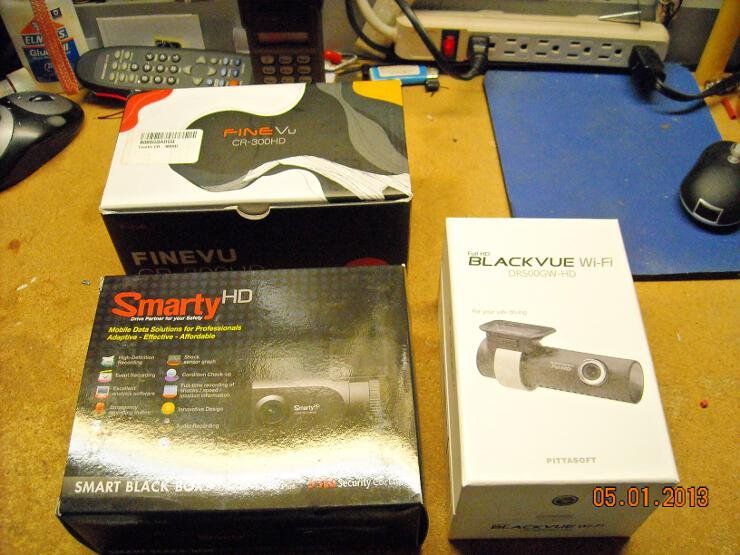
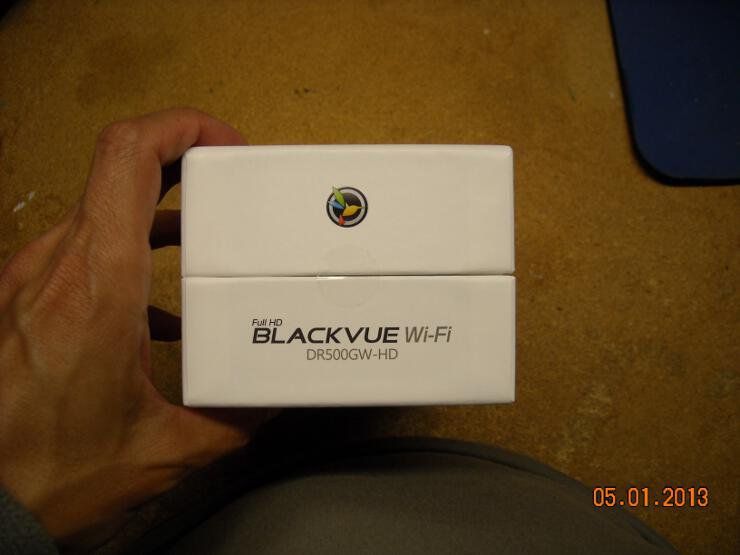
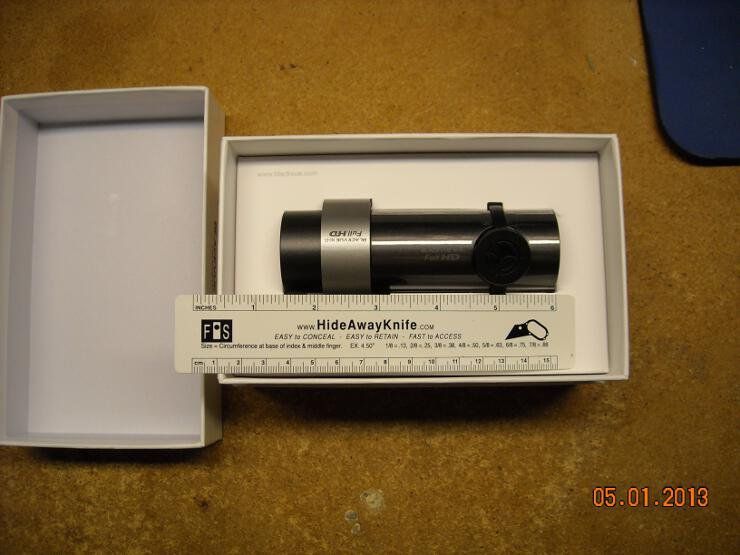
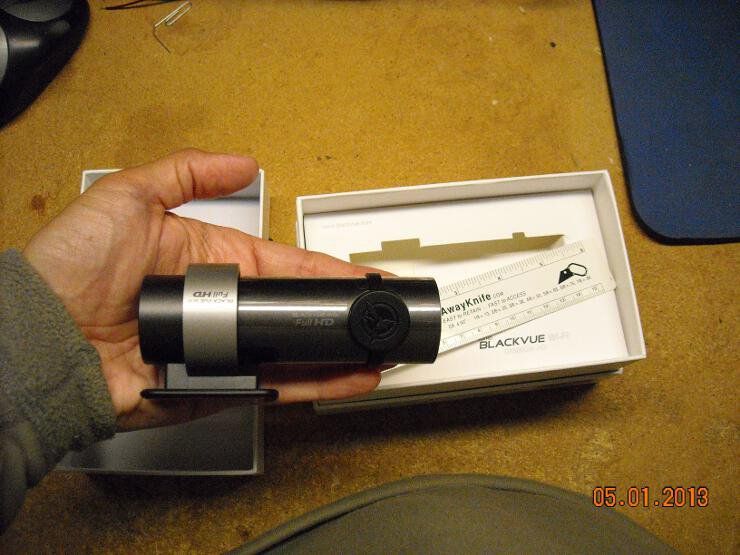

-----BEGIN GEEK CODE BLOCK-----
Version: 3.1.2
GMD d-- a+ C++ L++ w M e++++
PS--- PE++ Y++ t+ R- !tv b++++ D---
h---- A++ r+++ y+ z++++ k++ F+++/F4
------END GEEK CODE BLOCK------
Version: 3.1.2
GMD d-- a+ C++ L++ w M e++++
PS--- PE++ Y++ t+ R- !tv b++++ D---
h---- A++ r+++ y+ z++++ k++ F+++/F4
------END GEEK CODE BLOCK------

|
Originally Posted By bcauz3y:
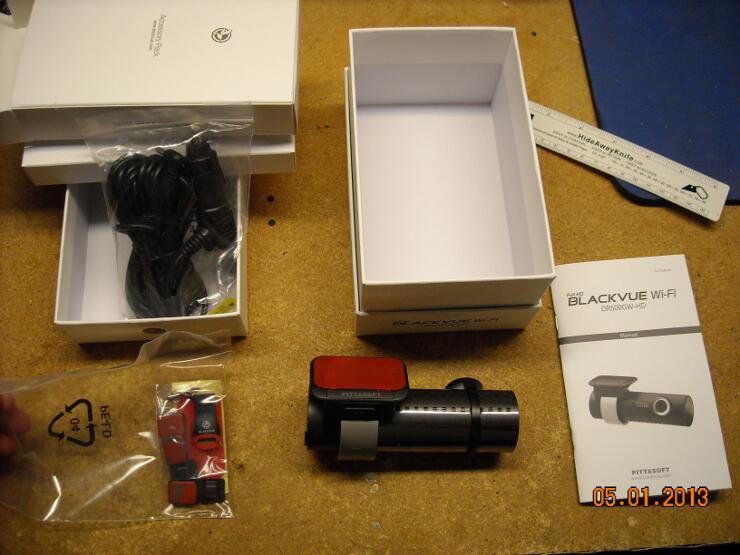
What is the cost comparison with the new one? Same ballpark... around $300 |
-----BEGIN GEEK CODE BLOCK-----
Version: 3.1.2
GMD d-- a+ C++ L++ w M e++++
PS--- PE++ Y++ t+ R- !tv b++++ D---
h---- A++ r+++ y+ z++++ k++ F+++/F4
------END GEEK CODE BLOCK------
Version: 3.1.2
GMD d-- a+ C++ L++ w M e++++
PS--- PE++ Y++ t+ R- !tv b++++ D---
h---- A++ r+++ y+ z++++ k++ F+++/F4
------END GEEK CODE BLOCK------
|
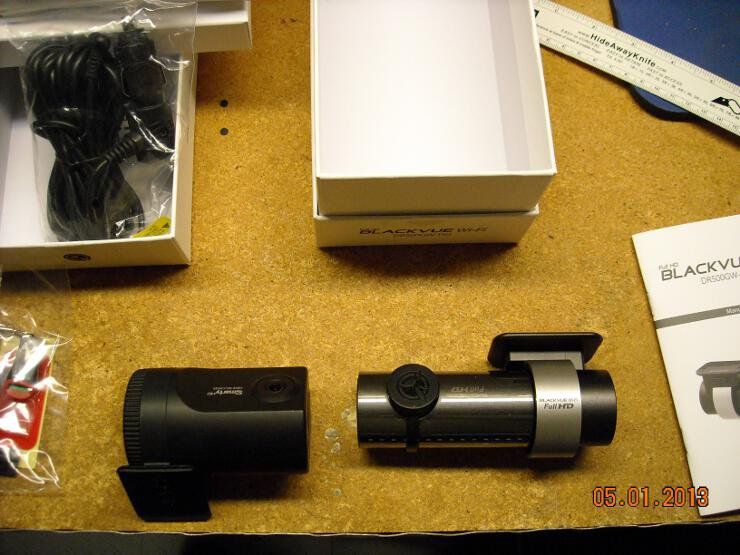
Here is my idea for a license plate camera on the cheap, in 1080p resolution:
Buy this: 
http://www.newegg.com/Product/Product.aspx?Item=N82E16826105558 and mounted it inside this: 
http://www.harborfreight.com/outdoor-dummy-security-camera-95153.html and then run it with a USB cable extension (w/active repeater in the cable) to a PC that is running webcam security software, which will snap a high resolution photo everytime motion is detected....aim it at the road, and have 1080p photos of every car during the daylight hours. Think it would work? |
|
Originally Posted By Blackoperations:
Here is my idea for a license plate camera on the cheap, in 1080p resolution: Buy this: http://images17.newegg.com/is/image/newegg/26-105-558-TS?$S300W$ http://www.newegg.com/Product/Product.aspx?Item=N82E16826105558 and mounted it inside this: http://www.harborfreight.com/media/catalog/product/cache/1/image/9df78eab33525d08d6e5fb8d27136e95/i/m/image_13387.jpg http://www.harborfreight.com/outdoor-dummy-security-camera-95153.html and then run it with a USB cable extension (w/active repeater in the cable) to a PC that is running webcam security software, which will snap a high resolution photo everytime motion is detected....aim it at the road, and have 1080p photos of every car during the daylight hours. Think it would work? Not sure how long that would last in that enclosure... how's your climate? |
-----BEGIN GEEK CODE BLOCK-----
Version: 3.1.2
GMD d-- a+ C++ L++ w M e++++
PS--- PE++ Y++ t+ R- !tv b++++ D---
h---- A++ r+++ y+ z++++ k++ F+++/F4
------END GEEK CODE BLOCK------
Version: 3.1.2
GMD d-- a+ C++ L++ w M e++++
PS--- PE++ Y++ t+ R- !tv b++++ D---
h---- A++ r+++ y+ z++++ k++ F+++/F4
------END GEEK CODE BLOCK------
|
Originally Posted By TheGrayMan:
Originally Posted By Blackoperations:
Here is my idea for a license plate camera on the cheap, in 1080p resolution: Buy this: http://images17.newegg.com/is/image/newegg/26-105-558-TS?$S300W$ http://www.newegg.com/Product/Product.aspx?Item=N82E16826105558 and mounted it inside this: http://www.harborfreight.com/media/catalog/product/cache/1/image/9df78eab33525d08d6e5fb8d27136e95/i/m/image_13387.jpg http://www.harborfreight.com/outdoor-dummy-security-camera-95153.html and then run it with a USB cable extension (w/active repeater in the cable) to a PC that is running webcam security software, which will snap a high resolution photo everytime motion is detected....aim it at the road, and have 1080p photos of every car during the daylight hours. Think it would work? Not sure how long that would last in that enclosure... how's your climate? humid and rainy. But it would be mounted under an eve... |
|
Originally Posted By Blackoperations:
humid and rainy. But it would be mounted under an eve... The challenge with license plates is several-fold. 1. Pixel density In order to read a license plate, you have to have pretty good pixel-density... usually 50-70 pixels-per-foot or more... like so: 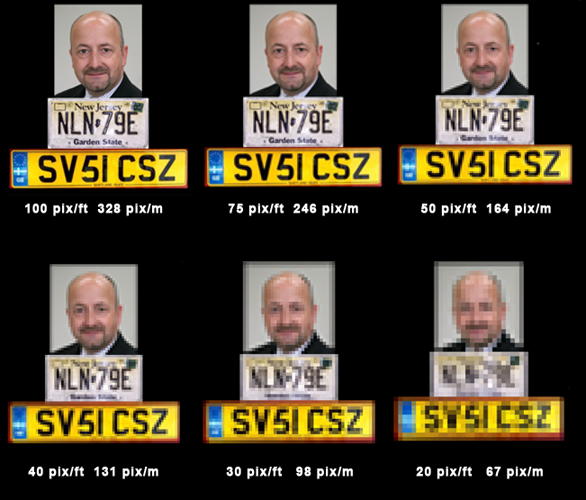
For instance, this can be demonstrated in my current thread about Car Cams and Black-Box vehicle cameras. These are 1080P HD cameras... 2.1 Megapixels in resolution, for a pixel count of 1920x1080. However, they tend to be wide-angle, and thus spread their pixels out over a broad area. Think about a 120-degree-angle lens (common in car cams), with a 2.1MP resolution. Using a little trigonometry, a car 15 meters away is going to be part of a scene that is 52 meters across (divide the 120-degree obtuse triangular field into two 30-60-90 right triangles, with a short side of 15 meters, and a hypotenuse of 30 meters... with a long side of 26 meters. Double that long side to account for both triangles, and that gives you field-of-view 52 meters across, or 156 feet). That gives you 1920 pixels to cover 156 feet... or about 13 pixels-per-foot. In other words, forget about ID'ing a plate on a vehicle that far away. Not happening. You MUST focus in on the plate/bumper area to get good plate shots... and a regular wide-angle camera (even at 1080P) isn't going to cut it. You need a lens and a tighter shot to resolve the digits. 2. Shutter speed. License plates are a moving target... and unless you have a straight-on shot of the plate, which can be tough to get, you're going to have motion artifact. This can be compensated for with a faster shutter speed, but the faster your shutter speed (and consequently, the shorter your exposure time), the more problems you have with low-light conditions. With a fast enough shutter, anything but bright daylight can make your images too dark to use.... which brings us to problem #3 3. Lighting. License plates are surrounded by other light sources, some of them quite bright (eg. headlights). Even tail-lights can present enough of a light-handling challenge as to obscure the digits on the plate. What most specialized license plate cams do is utilize a tuned infrared source, and a long-pass filter. The latter is an optically-selective bit of glass or plastic that covers the lens, blocks almost all visible light, but lets the longer-wavelengths through... allowing the IR and near-IR spectrum light to illuminate the plate. |
-----BEGIN GEEK CODE BLOCK-----
Version: 3.1.2
GMD d-- a+ C++ L++ w M e++++
PS--- PE++ Y++ t+ R- !tv b++++ D---
h---- A++ r+++ y+ z++++ k++ F+++/F4
------END GEEK CODE BLOCK------
Version: 3.1.2
GMD d-- a+ C++ L++ w M e++++
PS--- PE++ Y++ t+ R- !tv b++++ D---
h---- A++ r+++ y+ z++++ k++ F+++/F4
------END GEEK CODE BLOCK------
Here is what I was alluding to in my previous post... this is a diagram of the trigonometric calculations, so you can better see what I mean by lens angle, and field-of-view. I also included a to-scale diagram with the sides labeled.
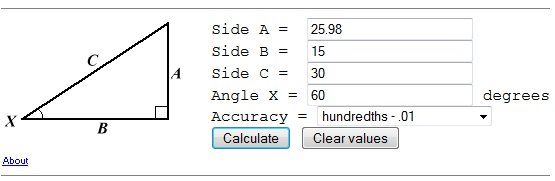
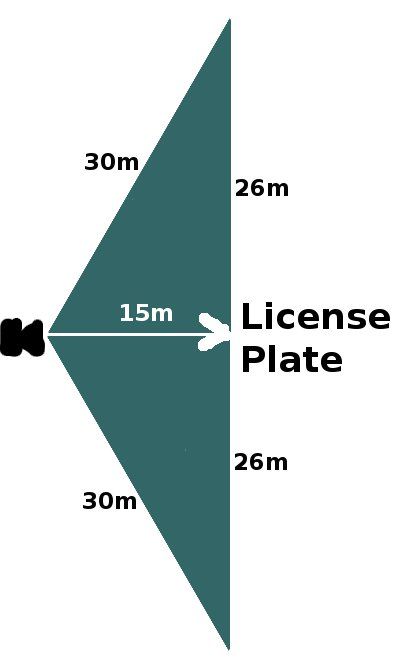
The Trig calculator page is here, should you want to try some different values. There are online lens calculators that do something similar, but this simplifies it somewhat for the sake of this particular example. |
-----BEGIN GEEK CODE BLOCK-----
Version: 3.1.2
GMD d-- a+ C++ L++ w M e++++
PS--- PE++ Y++ t+ R- !tv b++++ D---
h---- A++ r+++ y+ z++++ k++ F+++/F4
------END GEEK CODE BLOCK------
Version: 3.1.2
GMD d-- a+ C++ L++ w M e++++
PS--- PE++ Y++ t+ R- !tv b++++ D---
h---- A++ r+++ y+ z++++ k++ F+++/F4
------END GEEK CODE BLOCK------

|
Somewhat OT:
Video of a home invasion / murder. Its in a bad part of town, but interesting camera set-up. |
Dan_Gray: You're right
"The tree of liberty must be refreshed from time to time with the blood of patriots and tyrants." T. Jefferson<BR
"The tree of liberty must be refreshed from time to time with the blood of patriots and tyrants." T. Jefferson<BR
|
Originally Posted By far_right:
Somewhat OT: Video of a home invasion / murder. Its in a bad part of town, but interesting camera set-up. Good area coverage of the front-door and porch area. You could clearly see the two perps and what they were up to. It needed to be augmented with something a little closer to the door. That would have given them a much better close-up, and hopefully some identifiable images (though it looks like at least the first guy wore a mask, and the second guy a broad-brimmed hat). The perps' actions makes you wonder if they didn't know about the cameras. And kick-resistant doors might have saved the homeowners life. |
-----BEGIN GEEK CODE BLOCK-----
Version: 3.1.2
GMD d-- a+ C++ L++ w M e++++
PS--- PE++ Y++ t+ R- !tv b++++ D---
h---- A++ r+++ y+ z++++ k++ F+++/F4
------END GEEK CODE BLOCK------
Version: 3.1.2
GMD d-- a+ C++ L++ w M e++++
PS--- PE++ Y++ t+ R- !tv b++++ D---
h---- A++ r+++ y+ z++++ k++ F+++/F4
------END GEEK CODE BLOCK------
 )
)
-----BEGIN GEEK CODE BLOCK-----
Version: 3.1.2
GMD d-- a+ C++ L++ w M e++++
PS--- PE++ Y++ t+ R- !tv b++++ D---
h---- A++ r+++ y+ z++++ k++ F+++/F4
------END GEEK CODE BLOCK------
Version: 3.1.2
GMD d-- a+ C++ L++ w M e++++
PS--- PE++ Y++ t+ R- !tv b++++ D---
h---- A++ r+++ y+ z++++ k++ F+++/F4
------END GEEK CODE BLOCK------
|
I'm looking to install an outdoor camera at our boat dealership that overlooks the marina. The end idea is to stream it to our site so people can see the marina and water/weather conditions. We have great high speed internet here so I'd like to get some sort of HD camera to mount out there.
The camera will be mounted on a telephone pole about 25' off the ground to get a good view and will be completely exposed to the elements. We're in Oregon so rain is definitely going to be an issue. Problems I have: - Wired vs wireless The pole where the camera will be mounted would require an approx run of 200' of cable to get to it. If we go wired I can install a switch just inside our building and run another cable inside to our main router. It seems that there are outdoor rated cables so that seems easy enough. We have power out there too so it doesn't have to be a POE camera. I'd obviously prefer wireless but am not sure if there are any worth while cameras out there for this kind of application. If we go wireless I'll just setup another WAP where the switch would've been placed. LOS to the camera would be roughly 120', Wireless N should cover that just fine no? - Which camera Done a ton of research and still can't figure out which camera would be best for the highest res picture and weather toughness. Suggestions? - Software Seems like Blue Iris is the way to go? Thanks for any and all advice! |
|
Originally Posted By Ziess:
I'm looking to install an outdoor camera at our boat dealership that overlooks the marina. The end idea is to stream it to our site so people can see the marina and water/weather conditions. We have great high speed internet here so I'd like to get some sort of HD camera to mount out there. The camera will be mounted on a telephone pole about 25' off the ground to get a good view and will be completely exposed to the elements. We're in Oregon so rain is definitely going to be an issue. Problems I have: - Wired vs wireless The pole where the camera will be mounted would require an approx run of 200' of cable to get to it. If we go wired I can install a switch just inside our building and run another cable inside to our main router. It seems that there are outdoor rated cables so that seems easy enough. We have power out there too so it doesn't have to be a POE camera. I'd obviously prefer wireless but am not sure if there are any worth while cameras out there for this kind of application. If we go wireless I'll just setup another WAP where the switch would've been placed. LOS to the camera would be roughly 120', Wireless N should cover that just fine no? - Which camera Done a ton of research and still can't figure out which camera would be best for the highest res picture and weather toughness. Suggestions? - Software Seems like Blue Iris is the way to go? Thanks for any and all advice! I've had a hard time beating the weather-resistance of the Mobotix stuff... they mount those cameras on mountaintops, fully-exposed to the weather. The camera bodies are all composite, so they don't rust. Putting one of those on a wireless bridge might be just the thing... you could power the whole thing from a solar setup. It would pull maybe 12-15 watts. Put some sealed AGM batteries and a charge controller on the pole, and you should be all set. Making it self-contained would save you having to run all that cable, waterproof all that conduit, etc. |
-----BEGIN GEEK CODE BLOCK-----
Version: 3.1.2
GMD d-- a+ C++ L++ w M e++++
PS--- PE++ Y++ t+ R- !tv b++++ D---
h---- A++ r+++ y+ z++++ k++ F+++/F4
------END GEEK CODE BLOCK------
Version: 3.1.2
GMD d-- a+ C++ L++ w M e++++
PS--- PE++ Y++ t+ R- !tv b++++ D---
h---- A++ r+++ y+ z++++ k++ F+++/F4
------END GEEK CODE BLOCK------
|
Originally Posted By Ziess:
Which camera of theirs is the best option? I didn't see that any of their cameras were wireless, is that where the bridge comes into play? I already have power at the pole so that's easy, no need for batteries. Then this is dead easy. I'd get an M14 series... (or a used M12 if you can find one). They are weatherproof, have a built-in sunshade, usually come with 90-deg wide-angle lenses, and are dual imager (for day/night). They take PoE for power, and I'd feed that data stream to a ubiquiti bridge. There are a couple of Mobotix-on-wifi-bridge setups in this thread, powered exactly like yours would be. Try this page for an idea of what it might look like This page gives you a close-up of how the wiring is done. That's a D-12 dome... whereas you'd want the dual-imager M-12... but everything else would be exactly the same. |
-----BEGIN GEEK CODE BLOCK-----
Version: 3.1.2
GMD d-- a+ C++ L++ w M e++++
PS--- PE++ Y++ t+ R- !tv b++++ D---
h---- A++ r+++ y+ z++++ k++ F+++/F4
------END GEEK CODE BLOCK------
Version: 3.1.2
GMD d-- a+ C++ L++ w M e++++
PS--- PE++ Y++ t+ R- !tv b++++ D---
h---- A++ r+++ y+ z++++ k++ F+++/F4
------END GEEK CODE BLOCK------
|
Originally Posted By TheGrayMan:
Originally Posted By Ziess:
Which camera of theirs is the best option? I didn't see that any of their cameras were wireless, is that where the bridge comes into play? I already have power at the pole so that's easy, no need for batteries. Then this is dead easy. I'd get an M14 series... (or a used M12 if you can find one). They are weatherproof, have a built-in sunshade, usually come with 90-deg wide-angle lenses, and are dual imager (for day/night). They take PoE for power, and I'd feed that data stream to a ubiquiti bridge. There are a couple of Mobotix-on-wifi-bridge setups in this thread, powered exactly like yours would be. Try this page for an idea of what it might look like This page gives you a close-up of how the wiring is done. That's a D-12 dome... whereas you'd want the dual-imager M-12... but everything else would be exactly the same. You da man! Thank you! any good source for the power supply and box? Any reason not to go with the M24 camera? I don't really need the night vision part/cost of the M12 |
|
Originally Posted By Ziess:
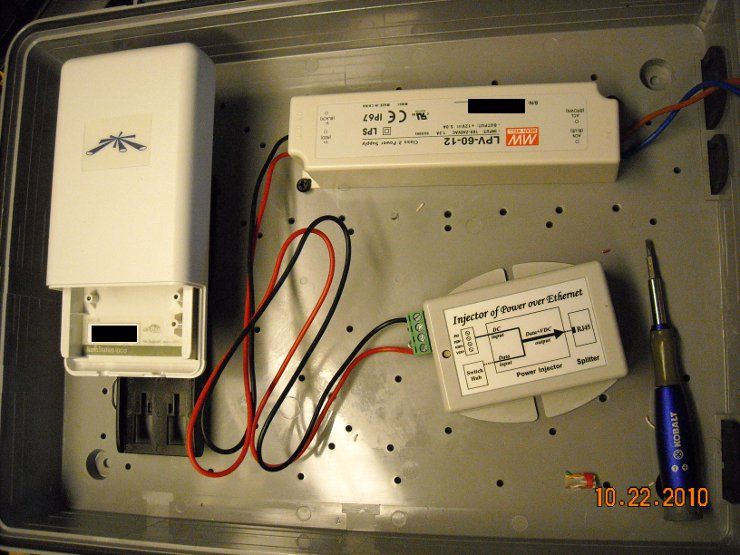
You da man! Thank you! any good source for the power supply and box? It's a basic plastic enclosure (get the plastic one... the metal ones will block your wifi)... and the power brick is meant to go into an LCD sign. Meanwell makes the power-supply... and there are a bunch of them out there... search Amazon for the PSU. A 20-30W should do you just fine... and they are also weatherproof in case any water gets into the enclosure. Here are links to the enclosure, the PoE power convertor, and the Ubiquiti bridge (wireless b/g... more than fast enough for a single camera). These links are all to Streakwave, but you could probably get them from any online wireless dealer. FAB-corp, flytec, solidsignal... wherever you like to shop. Link Link Link |
-----BEGIN GEEK CODE BLOCK-----
Version: 3.1.2
GMD d-- a+ C++ L++ w M e++++
PS--- PE++ Y++ t+ R- !tv b++++ D---
h---- A++ r+++ y+ z++++ k++ F+++/F4
------END GEEK CODE BLOCK------
Version: 3.1.2
GMD d-- a+ C++ L++ w M e++++
PS--- PE++ Y++ t+ R- !tv b++++ D---
h---- A++ r+++ y+ z++++ k++ F+++/F4
------END GEEK CODE BLOCK------
 It also has a video-brightness problem that has been documented on some of their forums (and you can see at the end of this video). Note how the video suddenly brightens up? And the lighting conditions outside (bright sunlight) didn't change? It's a known glitch, and I don't know if they have a fix out there for it yet. It's also the largest of these cameras, and not very low-profile. I could also do without the multitude of LEDs.

-----BEGIN GEEK CODE BLOCK-----
Version: 3.1.2
GMD d-- a+ C++ L++ w M e++++
PS--- PE++ Y++ t+ R- !tv b++++ D---
h---- A++ r+++ y+ z++++ k++ F+++/F4
------END GEEK CODE BLOCK------
Version: 3.1.2
GMD d-- a+ C++ L++ w M e++++
PS--- PE++ Y++ t+ R- !tv b++++ D---
h---- A++ r+++ y+ z++++ k++ F+++/F4
------END GEEK CODE BLOCK------
|
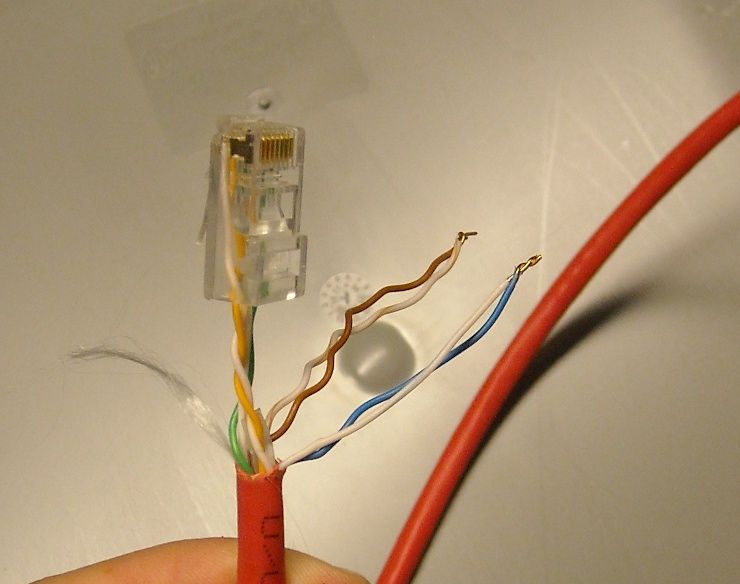
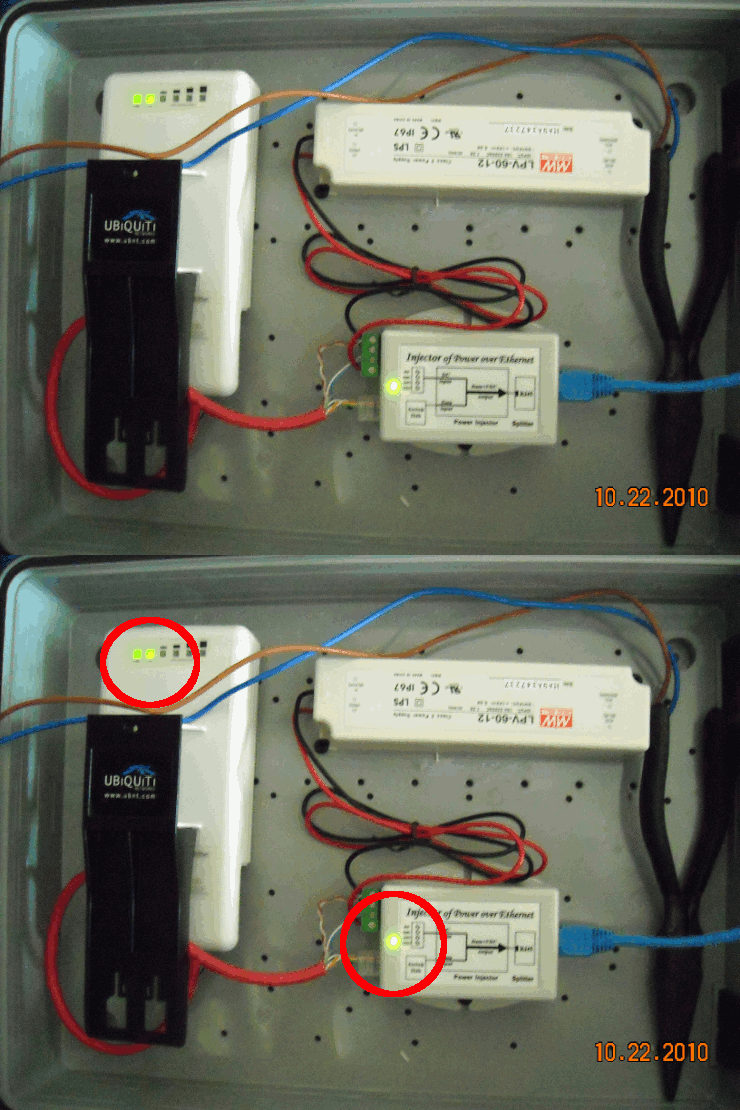
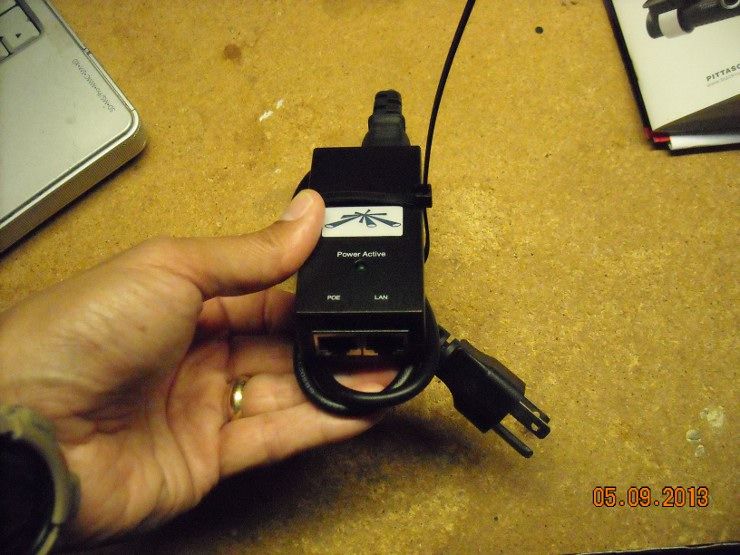
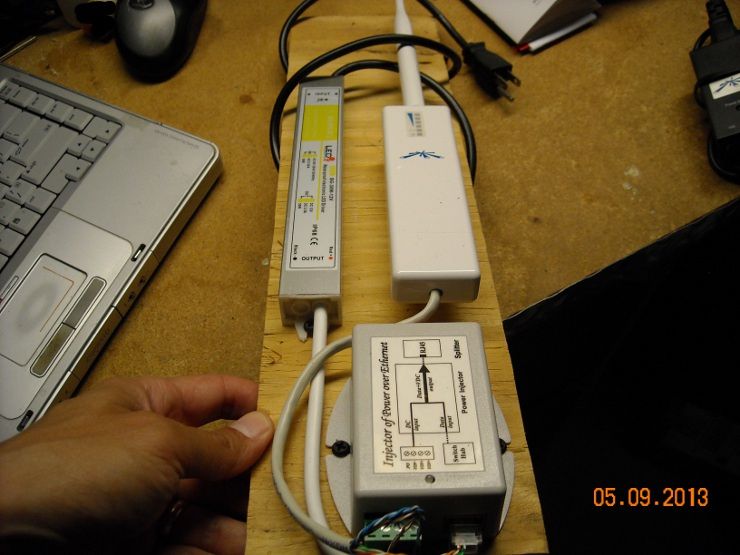
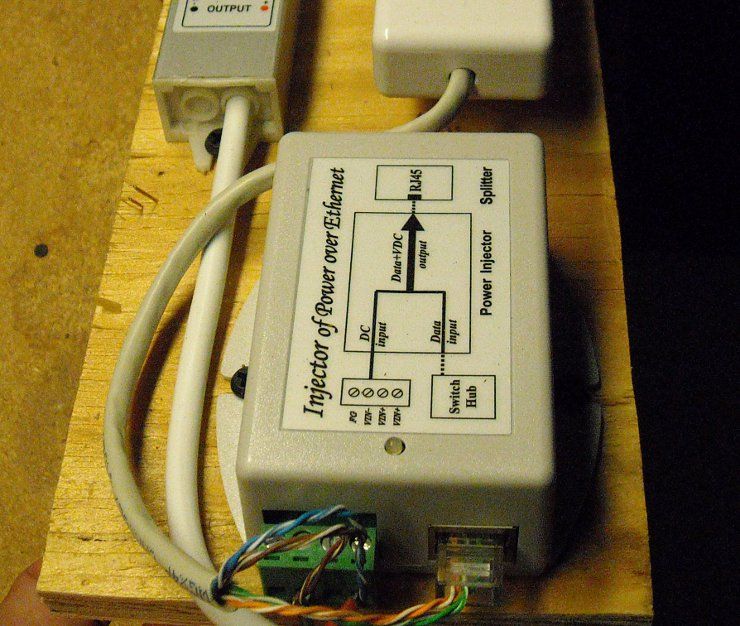
Got to looking at your wiring on the other project and it appears you don't have to make a custom cable to power the Nano Bridge, correct? Since I have plenty of power outlets I can plug in the Nano and the PSU to the plug directly.
This project gets easier and easier! Still gonna cost close to a grand though :( ETA: Ordered placed, will update when it all goes up. Now to figure out how to make this into a webcam.... |
-----BEGIN GEEK CODE BLOCK-----
Version: 3.1.2
GMD d-- a+ C++ L++ w M e++++
PS--- PE++ Y++ t+ R- !tv b++++ D---
h---- A++ r+++ y+ z++++ k++ F+++/F4
------END GEEK CODE BLOCK------
Version: 3.1.2
GMD d-- a+ C++ L++ w M e++++
PS--- PE++ Y++ t+ R- !tv b++++ D---
h---- A++ r+++ y+ z++++ k++ F+++/F4
------END GEEK CODE BLOCK------
-----BEGIN GEEK CODE BLOCK-----
Version: 3.1.2
GMD d-- a+ C++ L++ w M e++++
PS--- PE++ Y++ t+ R- !tv b++++ D---
h---- A++ r+++ y+ z++++ k++ F+++/F4
------END GEEK CODE BLOCK------
Version: 3.1.2
GMD d-- a+ C++ L++ w M e++++
PS--- PE++ Y++ t+ R- !tv b++++ D---
h---- A++ r+++ y+ z++++ k++ F+++/F4
------END GEEK CODE BLOCK------
|
Originally Posted By bcauz3y:
What plastic box is that? I have lots of uses for something along those lines. Tycon power, I think |
-----BEGIN GEEK CODE BLOCK-----
Version: 3.1.2
GMD d-- a+ C++ L++ w M e++++
PS--- PE++ Y++ t+ R- !tv b++++ D---
h---- A++ r+++ y+ z++++ k++ F+++/F4
------END GEEK CODE BLOCK------
Version: 3.1.2
GMD d-- a+ C++ L++ w M e++++
PS--- PE++ Y++ t+ R- !tv b++++ D---
h---- A++ r+++ y+ z++++ k++ F+++/F4
------END GEEK CODE BLOCK------
|
Yep... it's a Tycon Power polycarbonate enclosure.
Link to PDF |
-----BEGIN GEEK CODE BLOCK-----
Version: 3.1.2
GMD d-- a+ C++ L++ w M e++++
PS--- PE++ Y++ t+ R- !tv b++++ D---
h---- A++ r+++ y+ z++++ k++ F+++/F4
------END GEEK CODE BLOCK------
Version: 3.1.2
GMD d-- a+ C++ L++ w M e++++
PS--- PE++ Y++ t+ R- !tv b++++ D---
h---- A++ r+++ y+ z++++ k++ F+++/F4
------END GEEK CODE BLOCK------
|
I think I am in LOVE. |
μολὼν λαβέ molṑn labé
|
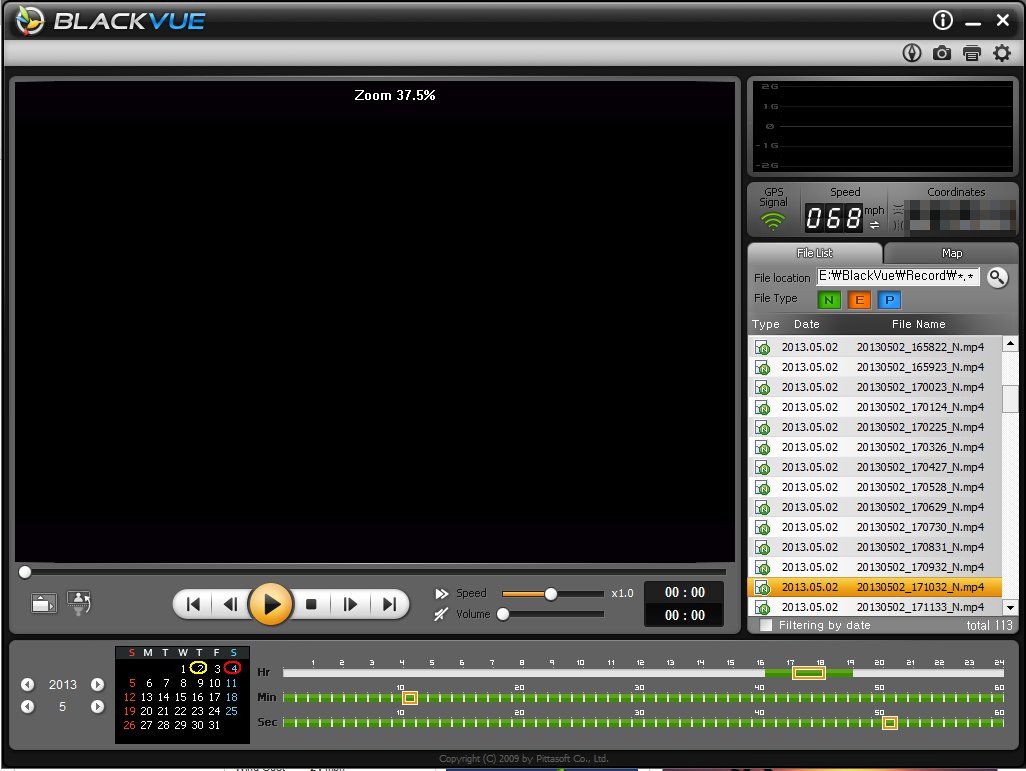
Here's an ugly shootout, caught on the drug dealer's security cameras. One officer was wounded (three rounds in the abdomen), while the perp was DRT with a round-to-the-head. He also took some other hits... you can see from the large amount of blood on his shirt as he's hiding behind the tree. He was not a big or particularly imposing guy, but he managed to absorb several hits. Even though he was barely standing, he still managed to get rounds on the officers.
The youtube version is posted below... the unedited video (complete with visible pink-mist headshot) is on liveleak here I posted this to point out the camera placement. One to the left of his door to cover the entry and one end of the circular driveway (note the outer steel security door), and one to cover the other entrance to the driveway. They are clearly analog cameras. Angles are good too... no visible sky to screw up the light-balance, or create dynamic-range problems for the shaded area under that big tree. 
|
-----BEGIN GEEK CODE BLOCK-----
Version: 3.1.2
GMD d-- a+ C++ L++ w M e++++
PS--- PE++ Y++ t+ R- !tv b++++ D---
h---- A++ r+++ y+ z++++ k++ F+++/F4
------END GEEK CODE BLOCK------
Version: 3.1.2
GMD d-- a+ C++ L++ w M e++++
PS--- PE++ Y++ t+ R- !tv b++++ D---
h---- A++ r+++ y+ z++++ k++ F+++/F4
------END GEEK CODE BLOCK------

|
For fiberglass and plastic enclosures, you might check out AutomationDirect. They sell lower cost automation equipment ... sort of a Walmart for automation engineers.
Here is a link to their non-metal enclosures. You might find they are lower cost than the other boxes you have found. AutomationDirect Non-metal enclosures They also sell a number of other things some here might be interested in such as terminal blocks, fuses, push buttons, tools, etc. |
"These are the times that try men's souls." Thomas Paine, December 23, 1776
|
Originally Posted By Ziess:
ETA: I'm a dumbass and figured it out. *nodding* I know that feeling well. 
|
-----BEGIN GEEK CODE BLOCK-----
Version: 3.1.2
GMD d-- a+ C++ L++ w M e++++
PS--- PE++ Y++ t+ R- !tv b++++ D---
h---- A++ r+++ y+ z++++ k++ F+++/F4
------END GEEK CODE BLOCK------
Version: 3.1.2
GMD d-- a+ C++ L++ w M e++++
PS--- PE++ Y++ t+ R- !tv b++++ D---
h---- A++ r+++ y+ z++++ k++ F+++/F4
------END GEEK CODE BLOCK------
|
Originally Posted By Ziess:
Got the bridge setup and working, holy hell is that cool!!! Incredibly fast on both ends, I'm extremely satisfied. Now just waiting on the camera and trying to figure out how to stream it on our website. What kind of frame-rate do you need? Here is a method to FTP an image every 30 seconds or so. |
-----BEGIN GEEK CODE BLOCK-----
Version: 3.1.2
GMD d-- a+ C++ L++ w M e++++
PS--- PE++ Y++ t+ R- !tv b++++ D---
h---- A++ r+++ y+ z++++ k++ F+++/F4
------END GEEK CODE BLOCK------
Version: 3.1.2
GMD d-- a+ C++ L++ w M e++++
PS--- PE++ Y++ t+ R- !tv b++++ D---
h---- A++ r+++ y+ z++++ k++ F+++/F4
------END GEEK CODE BLOCK------
|
Originally Posted By Ziess:
Looking to do a very high frame rate, live streaming if possible I stopped writing web code back in the static HTML days. You're probably going to have to get with your web-page geek and see if he can embed it. It shouldn't be that difficult... an iframe could probably do it. |
-----BEGIN GEEK CODE BLOCK-----
Version: 3.1.2
GMD d-- a+ C++ L++ w M e++++
PS--- PE++ Y++ t+ R- !tv b++++ D---
h---- A++ r+++ y+ z++++ k++ F+++/F4
------END GEEK CODE BLOCK------
Version: 3.1.2
GMD d-- a+ C++ L++ w M e++++
PS--- PE++ Y++ t+ R- !tv b++++ D---
h---- A++ r+++ y+ z++++ k++ F+++/F4
------END GEEK CODE BLOCK------
|
Originally Posted By TheGrayMan:
Originally Posted By Ziess:
Looking to do a very high frame rate, live streaming if possible I stopped writing web code back in the static HTML days. You're probably going to have to get with your web-page geek and see if he can embed it. It shouldn't be that difficult... an iframe could probably do it. Just found this thread. Any mention of the Bosch IP cameras running IVA? Although they cost quite a bit more than the supercircuits junk they actually perform. They can effectively see in the dark in populated areas although in remote areas you might want to couple them with illuminators. The best thing is that they run an effective analytic to detect people and eliminate false alarms, then the camera can email you on an alarm. Not like the DVR crap that will email on everything that moves, I mean email only on alarm. To boot you can store video onboard with an SD card. |
|
Originally Posted By TinHatRanch:
Originally Posted By TheGrayMan:
Originally Posted By Ziess:
Looking to do a very high frame rate, live streaming if possible I stopped writing web code back in the static HTML days. You're probably going to have to get with your web-page geek and see if he can embed it. It shouldn't be that difficult... an iframe could probably do it. Just found this thread. Any mention of the Bosch IP cameras running IVA? Although they cost quite a bit more than the supercircuits junk they actually perform. They can effectively see in the dark in populated areas although in remote areas you might want to couple them with illuminators. The best thing is that they run an effective analytic to detect people and eliminate false alarms, then the camera can email you on an alarm. Not like the DVR crap that will email on everything that moves, I mean email only on alarm. To boot you can store video onboard with an SD card. I don't have too much experience with the Bosch stuff... but I have seen it used (last time I flew out of Atlanta Hartsfield, the entire facility was bristling with Bosch cameras). Maybe some of the other guys can weigh in. |
-----BEGIN GEEK CODE BLOCK-----
Version: 3.1.2
GMD d-- a+ C++ L++ w M e++++
PS--- PE++ Y++ t+ R- !tv b++++ D---
h---- A++ r+++ y+ z++++ k++ F+++/F4
------END GEEK CODE BLOCK------
Version: 3.1.2
GMD d-- a+ C++ L++ w M e++++
PS--- PE++ Y++ t+ R- !tv b++++ D---
h---- A++ r+++ y+ z++++ k++ F+++/F4
------END GEEK CODE BLOCK------
|
Great success!!! The camera is currently running off of its wireless setup and is awaiting a nice day to be mounted outside. You can see it live aat the following link- requires something besides internet explorer: Live Webcam
Thank you Gray!!! Absolutely could not have done this without you, if you're ever in Portland then beers are on me! |
|
Originally Posted By Ziess:
Great success!!! The camera is currently running off of its wireless setup and is awaiting a nice day to be mounted outside. You can see it live aat the following link- requires something besides internet explorer: Live Webcam Thank you Gray!!! Absolutely could not have done this without you, if you're ever in Portland then beers are on me! Is that you at the desk in the plaid?
|
-----BEGIN GEEK CODE BLOCK-----
Version: 3.1.2
GMD d-- a+ C++ L++ w M e++++
PS--- PE++ Y++ t+ R- !tv b++++ D---
h---- A++ r+++ y+ z++++ k++ F+++/F4
------END GEEK CODE BLOCK------
Version: 3.1.2
GMD d-- a+ C++ L++ w M e++++
PS--- PE++ Y++ t+ R- !tv b++++ D---
h---- A++ r+++ y+ z++++ k++ F+++/F4
------END GEEK CODE BLOCK------
|
Originally Posted By Ziess:
No plaid, in blue shirt ETA: how's the quality on your end? ETA: No, that's one of shop guys in his lumberjack getup. Kids these days Quality looks pretty good. Which camera did you use? ETA: here's a screen-grab, straight off of firefox and unretouched: 
|
-----BEGIN GEEK CODE BLOCK-----
Version: 3.1.2
GMD d-- a+ C++ L++ w M e++++
PS--- PE++ Y++ t+ R- !tv b++++ D---
h---- A++ r+++ y+ z++++ k++ F+++/F4
------END GEEK CODE BLOCK------
Version: 3.1.2
GMD d-- a+ C++ L++ w M e++++
PS--- PE++ Y++ t+ R- !tv b++++ D---
h---- A++ r+++ y+ z++++ k++ F+++/F4
------END GEEK CODE BLOCK------
|
Originally Posted By Ziess:
M24 Good choice. It will require light to give you a useful image at night. |
-----BEGIN GEEK CODE BLOCK-----
Version: 3.1.2
GMD d-- a+ C++ L++ w M e++++
PS--- PE++ Y++ t+ R- !tv b++++ D---
h---- A++ r+++ y+ z++++ k++ F+++/F4
------END GEEK CODE BLOCK------
Version: 3.1.2
GMD d-- a+ C++ L++ w M e++++
PS--- PE++ Y++ t+ R- !tv b++++ D---
h---- A++ r+++ y+ z++++ k++ F+++/F4
------END GEEK CODE BLOCK------
|
Holy crap! You guys rock. Thanks everyone for their contributions here.
I'm currently researching outdoor PoE cameras on eBay. Very happy to find this thread. I have a few questions, but I need to thouroughly read through this thread first. I'm sure they have already been answered. Current plans- 4x IP cameras outside, and one indoors to keep an eye on the dawg when we are away. Not looking to break the bank on cameras, but I do need decent night time quality, so I'm going to experiment with a standalone IR floodlight. Cameras wired into a PoE switching module in Cisco 2821. Data steam recorded on a server. Currently running Ubuntu server for media storage, but I imagine Linux may make this complicated for recording and remotely viewing live feeds. I will have access to a free Windows Server license when I start school again in the fall. Will update my progress! |
|
Got the camera in its final position, you can now view my marina live 24/7 :)
Live Webcam |