


Posted: 12/1/2024 8:57:40 PM EDT
| I know a VPN changes your IP address. Does it change it to a different one every time you log onto it or is it always the same one which would be the VPN server? |
|
Quoted: Mine changes to whatever my home's address is. Which could be one of several, depending on which wan connection my router's using (usually when comcast goes down, which is a lot). Unless i'm at home, in which case it hairpins and doesn't do anything. Isn't the point of a consumer VPN to do the exact opposite of this? |
|
Quoted: Isn't the point of a consumer VPN to do the exact opposite of this? VPNs are used to securely connect to a network. Virtual Private Network. Your source internet IP will change depending on that networks NAT address. Its popular to use someones VPN service to change your source IP address to be "anonymous". Which depending on who youre using means nothing when the fbi requests data and the node you popped out of is just subletting their service to your guys service. So that also means they can be sniffing your traffic and correlating it to the identity you are using to authenticate with. |
|
Quoted: Isn't the point of a consumer VPN to do the exact opposite of this? I travel enough that I want a connection back to my house for cameras, file server, printers, etc. A VPN fulfills that need. Also tunnels all my traffic back through home - a network I trust - unlike the hotel network, free public wifi, etc. I click the connect vpn button, and it's like i'm sitting at home. Router at home VPN's out to other systems, so once I connect home, I can ctrl-P and print to my office printer, hit my cameras at home, hit cameras on radio sites my home router's connected to... I'd like to install a router in my truck configured as S2S back to my house, so my truck's just an extension of the home network. |
|
Quoted: I know a VPN changes your IP address. Does it change it to a different one every time you log onto it or is it always the same one which would be the VPN server? Depends on if the VPN's endpoint IP is static or dynamically assigned, and if you change endpoints. |
|
The VPN software creates an encrypted tunnel so that everything between you and the VPN server you connect to is encrypted. Your ISP sees traffic between you and the VPN server, but can't tell what it is. Then your traffic exits the VPN server and interacts with the internet, with the reverse routing back to you. That's why a VPN is important for sailing the high seas. Your traffic looks like it's coming from the VPN server, not your home IP that points to your ISP account. 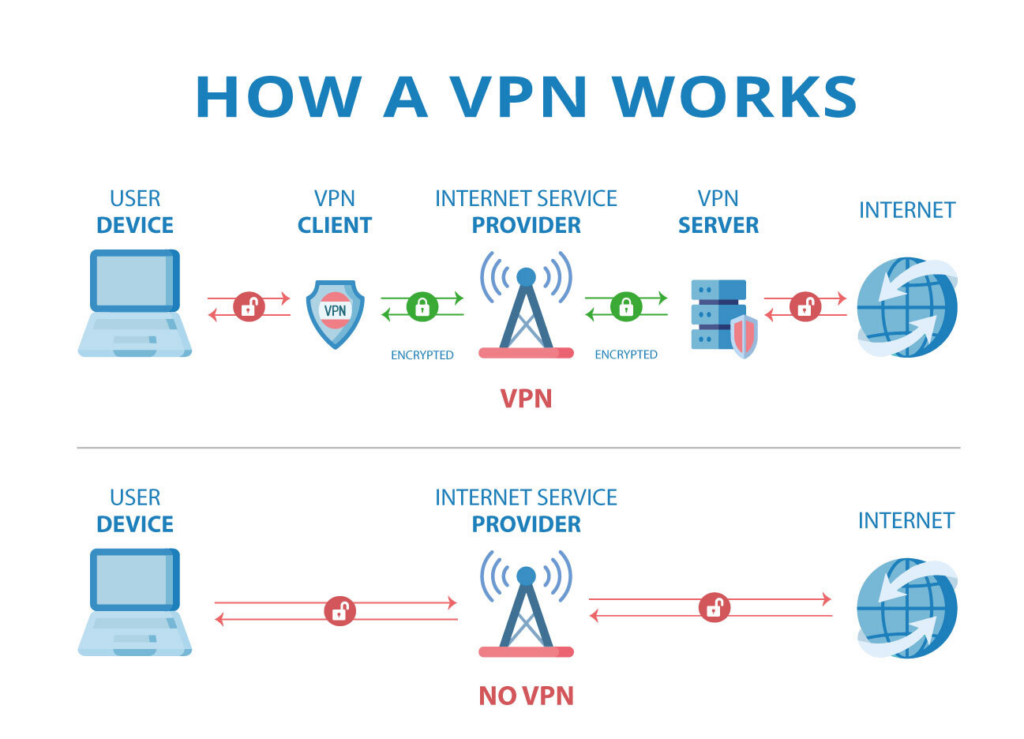
|
|
Quoted: It doesn't change your IP address. It's routes your traffic through a differ network other than through your ISP. then type ipconfig /all (then hit enter) you'll see all your various adapters IPs as assigned, Statically or DHCP. You should have an IP assigned either by your ISP or your Wireless Router, then you should also have a VPN addressed assigned to its interface that tunnels from your box, through your ISP or whoever you connect too, to the VPN concentrater at its location. Depending on how your connection (and your VPN) is set on the far ends, either could change. Far too many variables for someone here to tell you. Then, even if you are set to DHCP from your ISP, depending on their Scope Churn, you might keep the same IP for years, but it is still subject to change, depending on the pool churn and how long you remain offline during renewal of the lease. |