


[ARCHIVED THREAD] - Gun collection database (free, cross-platform) Major update! (deprecated, see newer thread) (Page 2 of 2)
|
Quoted:
If you are having trouble inputting data and getting read only errors, make sure you actually extract the DB from the zip file. If you open it inside the zip file you won't be able to use it properly. ETA: Thanks TC2 - the DB looks great. I am going to use it later today and see what I come up with. Thanks! Any suggestions are very welcome. If Open Office ever gets upgraded to include HSQL 2, I'll be able to add auditing to satisfy ATF requirements. |
|
Quoted:
This thread is very relevant to my interdasting. . I was half-assedly working on a Bento-based template for my armory collection, but i got distracted. Bento is a Mac platform Filemaker based db program designed for morans such as myself. http://oi42.tinypic.com/ncxuro.jpg I tried doing that with a trial of bento and had no luck at all.... 
|
|
Quoted:
http://www.atf.gov/regulations-rulings/rulings/atf-rulings/atf-ruling-2008-2.pdf Yep, working on it. 
Actually, it's only #1 that's proving to be less than straightforward: 1. All data entered into the computer system must be recorded into the database and
cannot be capable of being edited or modified at a later date without generating an audit trail. The software system must retain any correction of errors as an entirely new entry, without deleting or modifying the original entry. The system may allow for entries in a notes column to explain any correction. To implement this in a practical manner in OpenOffice requires an update of the database engine, which, although pretty easy to do, is going to be a nuisance for users. So, I'm not sure whether to wait until OOo is finally distributed with the updated engine, or to start giving updates assuming users will update the engine on their own. 2. The system must have a reliable daily memory backup capability to protect the data
from accidental deletion or other system failure. #2 is built into Open Office: go to Tools > Options > Load/Save > Always create backup copy. The path to the backup copy can be modified: Tools > Options > Paths > Backups. 3. The system must meet the regulatory requirements for recording pertinent
information. I think I have #3 covered. 4. The system must allow queries by serial number, acquisition date, and name of the
manufacturer or importer. Commonly recognized trade names may be used when recording the manufacturer/importer in the firearm description. Covered. I plan on putting ready-made queries into the database, but this one's easy. #5 and following have to do with printouts, and should be fairly easy to implement. Saving the data as ASCII might be an issue; I haven't looked into it yet. |
|
Update: firearms-0.1.9.zip (Uses Open Office (free for Windows, Mac, and Linux))
This is the last update before being "released" as v0.2.0. Please poke around through this version and let me know if there's anything that's broken! The screenshot probably looks exactly the same, but there might be some "bugs" that are only apparent with a little use. After "releasing" v0.2.0, further updates will probably be 1) weeks to months away, 2) designed more with use by an FFL in mind, and 3) still totally free. v0.2.0 should be perfectly suitable for maintaining a simple database of personal collections. 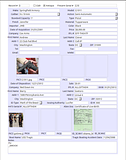
|
|
Quoted:
I downloaded your file and started using it. First thing I found was that there is no place to enter accessories. Most of my rifles have scopes that are worth as much as the rifle in addition to special triggers and other items. There is plenty of room for editing so I'll let you know what I come up with. I'm thinking about this one, but as it actually requires legitimate database design, it might take me a while. 
I'm an admitted database amateur. |
|
Update: firearms-0.2.0.zip (Uses Open Office (free for Windows, Mac, and Linux))
Here you go. Suitable for personal collections. I'm working on a version (to be released as "version 1.0") that can be used as an electronic "bound book." The way it's shaping up, you'll be able to add (practically) unlimited entries, and about as many pictures to each entry. I'm only planning to implement the audit trail for ATF-required data. I'll have more details as I make them up.
|
|
Major update:
The ATF-compliant version, a work in progress, but functional: http://www.ar15.com/forums/topic.html?b=1&f=5&t=1252871 
|
|
Quoted:
TC, I am finally getting around to finishing up recording my collection. How do I get pictures into the document? It's probably best if you put the image files in the same directory as the firearms.odb file (or in a folder called "img" in the same directory as firearms.odb). Then, double-click on one of the blank spaces. This should open up a file-selection dialog box to select the image you want. |
|
Quoted:
TC, I am finally getting around to finishing up recording my collection. How do I get pictures into the document? IM sent, in case you try out the newer, ATF-compliant version. Basically, use these instructions to export your data from firearms.odb before setting up the HSQLDB 2.2.5 engine. Instead of the GUN table, though, open the Table1 table. |