


Armory Sponsor

DIY Target Cam Project (Page 1 of 2)

Posted: 1/10/2016 2:01:14 AM EDT
[Last Edit: ChevelleDave][Edited]
I found this in a search I was doing about building a target camera, started by Gunut. It's in GD, not stickied, so I thought I would post it here in reloading if that is OK. I know a lot of Guy's in here don't go to GD, I gave up looking in there.
I believe it is relevant to reloading, very simple to build, for half the cost. And can be very useful in working up loads, especially for Anyone who shoots long distance. Here is the original thread, DIY Target Camera Build Some pic's of My build. Ready for action, 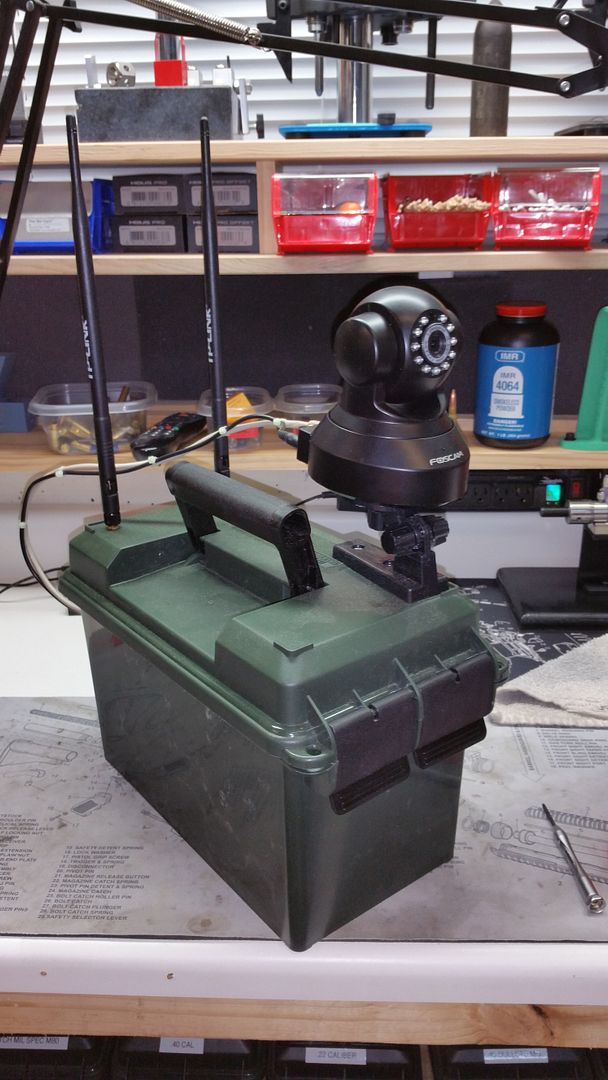
The guts of the system, 
Stored away, 

I'll post links to the latest components, so You can build the refined project. From Amazon, Foscam Camera TP Link Router Camera/Router cable Router power cable Camera Power Cable You will need 2 of these, IF, you use the Firing Line Router. Battery Upgraded Antennas Antenna Cables Firing Line Router Firing line Router Battery Ammo Can So there is all the parts People have upgraded to from the original set up Gunut listed in the beginning of His original post. The total from Amazon, as of right now, 1/9/2016 is $252.91 You can do it a little cheaper if You don't use the firing line router. I bought the stuff for it, but have not used it yet. I think My set up will work out to 200 yards, as is. I will test it out as soon as I can. For out to 500-1000 yards the OP has been using His. Gunut is also looking to use a Yagi antenna, at the Target Cam, possibly eliminating the need for the FL unit for long distance. In the original build the OP used a "smaller" router, for 10.00 more I went with a more "powerful" router, and put better antenna's on it. You could probably use a cheaper router, without the upgraded antenna's. I think that with My set up 100-200 yards will be very doable with just My phone or laptop. I'll be writing up all the instructions later Today. |

Global Warming Hoax Skeptic before it was cool
Joined:
Jun 2007
Posts:
38668
EE: 100% (1)
 WA, USA

|
So the 9 volt cable gets you power for the router, from the fast charge battery pack, is that right? And 5v goes to the camera?
I think if I cut out the battery pack and just went with a 12 volt battery I already have on hand I could save a lot of money. It would be heavier, but that's no big deal. |
Originally Posted By danbaum:
...
3. I really don't need any paranoid dickheads accusing me of being an ATF agent. You don't want to deal with me, fine. But hold off on the insults. Let's be gentlemen.
...
3. I really don't need any paranoid dickheads accusing me of being an ATF agent. You don't want to deal with me, fine. But hold off on the insults. Let's be gentlemen.
|
Originally Posted By ChevelleDave:
That is correct, You might just look for a 12v camera and router, if You wanna use a battery You already have. That's a good idea too. |
Originally Posted By danbaum:
...
3. I really don't need any paranoid dickheads accusing me of being an ATF agent. You don't want to deal with me, fine. But hold off on the insults. Let's be gentlemen.
...
3. I really don't need any paranoid dickheads accusing me of being an ATF agent. You don't want to deal with me, fine. But hold off on the insults. Let's be gentlemen.

Two thirds of the way to being fat, dumb, and lazy
Joined:
Oct 2008
Posts:
4797
EE: 100% (16)
MS, USA



|
Originally Posted By ChevelleDave:
Up at Custer Sportsmen's Club, in Custer, Wa, there is also a 300 yd range at The Plantation in south Bellingham Wa. Been thinking of doing this for a while.... have some older versions of Freewave's (Comparable to this now) Freewave here at work that have not been used in years.... that would give me a couple miles of range 
|
|
Absolutely, There has been a development in the other thread. Someone came in with some newer idea's. The more technically inclined You are, the more alternatives You have.
The basic system, like I posted above, is pretty simple, and works well enough. Way cheaper then a spotting scope that is good enough to see .22 caliber holes at distance. IMO |
|
I did this several years ago, and tested it out to 1000 yards. The biggest difference in my setup is that I located the router back at the shooting position. I did this because I wanted to avoid having a highly directional/narrow beam antenna downrange as I didn't want to mess with antenna pointing while downrange. If it needed tweaked, you'd have to go back downrange. If more gain is needed to meet range, use a more directional antenna on the router (like a dish), as it can be adjust anytime as needed. If you have a wall outlet back at the shooting position, even better.
I found that using 7 dBi panels on both sides of the link was sufficient to achieve 1000 yards (probably more). The 7 dBi panels don't have too narrow of a beam-width so they wouldn't be too fussy about pointing. You can then connect your tablet/smartphone/laptop to the router and not have to worry about the marginal wifi performance of most handheld devices. Browse to the camera's built in webpage, and Voila. The best affordable cameras I've found come from Alfa. More resolution and very good Wifi performance. Alfa stuff doesn't seem to be imported to the US for whatever reason. Downrange: Alfa AIPC222M http://www.alfa.com.tw/products_show.php?pc=55&ps=136 with their 7 dBi panel antenna http://www.alfa.com.tw/products_show.php?pc=46&ps=36 This camera needs 12 V so I just use a UPS battery. http://www.amazon.com/Sealed-Lead-Acid-Battery-Computer/dp/B005J512JO/ref=sr_1_1?ie=UTF8&qid=1452525661&sr=8-1&keywords=ups+battery+9 The camera has an Ad Hoc mode and one could directly connect to it. I prefer to put a router back at the shooting location with another 7 dBi panel antenna on it and connect the camera to the router. At the time I was using a Buffalo router. The old WRT 54Gs run off of 12 V which again means they could be run directly off a 12 V battery. Put DD WRT on them, and rock and roll. With the WRT 54G, you'll probably need an adapter for the antenna though. This one I think http://www.amazon.com/Valley-Enterprises-Reverse-Polarity-Adapter/dp/B00I1JCFM8/ref=sr_1_1?ie=UTF8&qid=1452526711&sr=8-1&keywords=reverse+TNC+to+RP+SMA A high gain omni would also work nicely on the router back at the shooting position and more or less requires no pointing. http://www.amazon.com/Alfa-Hi-Gain-Omni-Directional-Outdoor-Antenna/dp/B0046CBR3W/ref=sr_1_9?ie=UTF8&qid=1452526777&sr=8-9&keywords=2.4+ghz+omni+directional+antenna In free space, +6 dB is double the distance. |
|
Originally Posted By ChevelleDave:
Up at Custer Sportsmen's Club, in Custer, Wa, there is also a 300 yd range at The Plantation in south Bellingham Wa. Thanks, a little far north for me but if I am ever in the area I might check it out. Are ranges generally ok with putting the camera downrange near the target? I imagine every range has their own rules but the only range shooting I have done is pistol which leaves me ignorant when it comes to rifle range rules. |
|
Originally Posted By atblis: The biggest difference in my setup is that I located the router back at the shooting position. This is a good point. It made me realize that you don't really need a router at the target position with the camera. The Foscam FI9816P has wireless N capability (N150) and has a detachable antenna. Rather than buy a router for the target, just buy the upgraded antenna and plugin the antenna directly to the camera. This also allows you to use a cheaper 5v-only battery and/or not have to buy the ebay voltage booster to power the target router. ....unless there is something I'm missing. Theoretically, you could use a target cam with out any routers at all. Just the camera and a battery pack at the target...but then setup the yagi antenna (or whatever high gain antenna) connected directly to the camera (no router in between them, on the data circuit) and pointing back to the shooters position. If the camera and antenna produced enough radiation (strong enough signal) for your distance, you could use only a phone or tablet at the firing line and would not need any routers at all. All you would have to buy is: 1) the camera, 2) 5v battery pack, 3) usb power cord for the camera, and 4) high gain directional antenna. ...right? That would be a total price of $120. That's cheap. You'd use your phone or tablet (that you already own) at the firing line. I think you can use the foscom phone software or "VLC Remote" app for your phone. Section 2.3 of this manual explains how to connect using VLC (if you're inclined): http://www.foscam.es/descarga/Camaras_IP_Foscam_de_interior_User_manual.pdf But I also like the idea of the quote above, which is using the high gain antenna connected to a router at the firing line. The shooter's antenna would, of course, be hooked to a router or a laptop with a detachable antenna wifi adapter. Phones and tablets don't have detachable antenna. But if you used a shooter's router with a directional antenna pointed at the target camera, you could stream to multiple devices at the shooter's position rather than only one. Most importantly, however, this prevents having the EM radiation being blasted on the shooters position from the target position because its reversed. I prefer not being blasted with radiation, but this probably isn't that big of a concern. Also, you don't have to do your adjustments downrange (directional antenna aiming)..you do it all at the firing line. Lastly, you could just use a directional high gain antenna at both locations. One hooked to the target cam and one to the shooter's router, both pointed at each other. This should allow a pretty far range, and you only need one router. Problem is...I can't figure out what connector the Foscam FI9816P antenna uses...SMA, RP-SMA, or Type N connector. I think it is RP-SMA. |


Global Warming Hoax Skeptic before it was cool
Joined:
Jun 2007
Posts:
38704
EE: 100% (1)
WA, USA

|
Using My set up, yes. I have the router, and camera at the firing line, with upgraded antenna's. Foscam camera has an app that I downloaded to any wireless device at the firing line. Good for about 300 yards or so, any further and You may need to add a repeater at the firing line, or an upgraded Yagi, dish, whatever. But for the average Joe shooting 1-300 yards, this can be done for 150.00ish.
Now People are adding other ways to do it, You will need to sort that out for Yourself. |
|
Originally Posted By memsu:
So, you just connect your laptop to the router and then access the camera through the IP address it has. What software do you use to connect to the camera? One thing to add, by doing it the way I have, camera wired to router, one less wireless connection to make. 
I know just enough about a lot of stuff to be DANGEROUS.

|
|
Originally Posted By madwis15:
I see no protection against the inevitable moron that thinks it would be fun to try and hit the cam. Thought about that, but I have faith in My fellow shooters at the ranges I will be attending. Now out at the rock/gravel pit, it's always inevitable but, unfortunately, that's one of the risks. 
|
|
Originally Posted By Jkcoon:
Thanks for sharing.... I've been thinking of the exact same thing and love how you implemented Thank You, I'll take a little bit of credit, but the OP, Gunut, is the mastermind of the original work. I will apologize, in My second post I have been planning on posting a set of instructions for hooking it all up, and firing it up. Due to some Personal issues over the last 1 1/2 years that have finally come to a head in the last week, A resolution finally came this morning. Give Me a couple days, and I will be able to focus long enough on them to get them written out. OH well, as They say, "Onward and Upward".
|
|
Originally Posted By ChevelleDave:
That is correct, You might just look for a 12v camera and router, if You wanna use a battery You already have. I had an old router that runs off 12 volts, and I got a camera that runs off 12 volts. I could run both of them off 88 AA batteries, but I'm not sure what kind of run time I'd get from that. So far the cost to me for this project was a 35 dollar camera. I haven't tried it yet at a range, but I expect I'll still have some expense in getting some kind of high gain or directional antenna. If I had it to do over, I'd have gotten a camera that ran off 5 or 9 volts, as that would have been easier to power from a "12 volt" source. I'm a little worried that providing anywhere between 13 to 11.5 volts to the equipment may be bad for it over time. Pretty fun little project anyway. It's nice when things work on the first try. |
Originally Posted By danbaum:
...
3. I really don't need any paranoid dickheads accusing me of being an ATF agent. You don't want to deal with me, fine. But hold off on the insults. Let's be gentlemen.
...
3. I really don't need any paranoid dickheads accusing me of being an ATF agent. You don't want to deal with me, fine. But hold off on the insults. Let's be gentlemen.
| Question for the guys who are using this camera setup already....what app are you using to view the camera on your tablet or smartphone? I know the camera comes with a program (on the provided disc) that you can install on your laptop which I have. The video appears pretty decent on the laptop, but using the free "Foscam Viewer" app on my tablet and smartphone the resolution is way worse. Any ideas on how to get a clearer video image on the tablet and phone? |

Apple Certified Lazer Printer Repair since 1993
Joined:
Feb 2001
Posts:
20304
EE: 0% (0)
PA, USA
| Just wanted to give an update....found a different app called "Tiny Cam Monitor" and it works great. The resolution on my tablet and smartphone now look the same as on my laptop. Thanks for the suggestion ChevelleDave! Hope this may help someone else.... |
|
Please bear with my ignorance. I've been following this thread as well as the original. I'd like to set up a system with a range of about 300 yards. I've got a couple components and would like to use them if possible to keep the cost down. I have a 12v CCTV security camera (analog). it has a coax cable with a bnc connector and a power cable with a bare wire connector. I also have a yagi that has a coax cable with a bnc connector. And I have a laptop, tablet and phone. I don't know if the camera and yagi are usable for this and if they are, what else I will need.
I had hoped that I could simply power up the camera and connect it to the yagi, then somehow connect to that setup via the laptop. If that is possible, I certainly don't know how to do it. Can anyone help? |
Apple Certified Lazer Printer Repair since 1993
Joined:
Feb 2001
Posts:
20320
EE: 0% (0)
PA, USA
|
that 12 v camera is most likely transmitting an analog signal that would get bnc connected to a monitor it would need to be digitized with a board to make it into a signal that could be transmitted |
"None of you understand. I'm not locked up in here with YOU. You're locked up in here with ME.”,
Walter Joseph Kovacs, (w,sste), "The Watchmen"
Walter Joseph Kovacs, (w,sste), "The Watchmen"
DIY Target Cam Project (Page 1 of 2)
Armory Sponsor