


Armory Sponsor

Posted: 11/1/2013 6:41:43 PM EDT
| I saw on here (but can't find it for the life of me) a guy using a label maker to label his boxes of reloads, I think it was in the "what did you do in the world of reloading" thread. He used one he bought off the internet as I recall for around 70 or 80 bucks. I have all these ammo cans with painters tape and black magic marker on them and they look like hell not to mention sometimes difficult to find the ammo I want for the day. I would like to find a label maker that works well for this application, any sugestions? |
|
Quoted:
You can buy any of the Dymo brand ones that are stand alone units or ones that hook up to a computer. Hit up Staples to check out all the options. I was at my local Staples tonight and they didn't have a good selection, I will check out the Dymo's though |
| If you have a computer, printer, and Word or similar . . . you can buy gummed labels of various sizes on 8.5"x11" sheets. Avery brand (eg) provides matching templates you can download. Once the right template is installed, Word will show you a page of labels that makes it easy to create whatever labels you want in any color (with a color printer). |
|
I use this one to label my reloads: DMYO LetraTag
Happy with it. Nice to be able to print 2 lines on a small label. |
|
Quoted: I saw on here (but can't find it for the life of me) a guy using a label maker to label his boxes of reloads, I think it was in the "what did you do in the world of reloading" thread. He used one he bought off the internet as I recall for around 70 or 80 bucks. I have all these ammo cans with painters tape and black magic marker on them and they look like hell not to mention sometimes difficult to find the ammo I want for the day. I would like to find a label maker that works well for this application, any sugestions? Is this the thread? I remembered it myself and liked it as well. I haven't bought one yet though. I don't use adhesive labels. I have a couple different files for labels I just print on plain paper and put them in the ammo box. Ammo Labels |
|
Quoted:
If you have a computer, printer, and Word or similar . . . you can buy gummed labels of various sizes on 8.5"x11" sheets. Avery brand (eg) provides matching templates you can download. Once the right template is installed, Word will show you a page of labels that makes it easy to create whatever labels you want in any color (with a color printer). Yep, Avery 1160 labels are the best to use. |


|
I have a Dymo Rhino label maker that makes labels like above and as great as they are, the labels are kinda expensive for the amount of length you get in tape
the sheets of Avery labels are cheap but hard to print just one off labels like what are needed for reloading as you don't need a whole sheet of "223 55 grain 25 grains H335" labels I also have a Seiko Smart label printer that uses rolls of labels that are a lot cheaper and you can print just one or 2 or however many you need and is thermal so it never needs ink. and you can get all the same size labels that Avery uses I have bought printers costing many hundreds of dollars or more and this is the best, most reliable and cheapest printer I have ever bought mine is like 5 years old but they have not changed much this one is like $57 from newegg 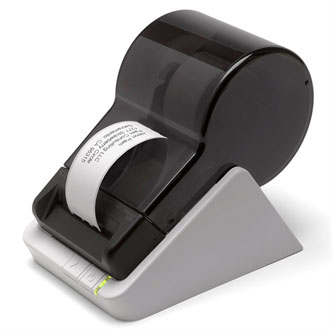
|
| Well I picked up a Brother GL-700 it retails at Staples for $99.99. I was in there for something else and had no plans on getting it because well 100 is to much. I walked by it to just look and the price tag had save $60 instantly. I looked around and they didn't have one right there but asked a guy that works there and he had one left up high. So I picked it up for 39.99 and I love it. Its a laser printer so no ink and its super fast. I am currently labeling everything in a container, super easy and real fast to change the paper. Plus I can print postage if I set up a account, I don't think I need that feature but its nice to have. Thanks for all the input guys. |
|
Quoted:
. . . the sheets of Avery labels are cheap but hard to print just one off labels like what are needed for reloading as you don't need a whole sheet of "223 55 grain 25 grains H335" labels . . . - Put the partially used sheet in your printer, noting which label is "next" to use. - Fire up the template. - Click in the label you noted. - Type one label. - Print. - Peel off your label, and put partially used sheet back in the box. |

Armory Sponsor