


AR Sponsor

Posted: 5/21/2007 12:10:10 PM EDT
|
Can you turn off and on and adjust brightness with MAG on ? The pictue I have has a up and down button thats showm but nothing else |
|
huh? The up and down arrows are for brightness, press them both to shut it down, press up to turn it on. With the 557's controls are on the left side so a user doesn't have to flip the magnifier to get to the them. With other models, ya have to flip the magnifier over, unless there's clearance for yer fingers to get in there. I think the amount of clearance between the EOTech and its magnifier depends on how the EOTech is mounted, I don't believe the magnifier has to be immediately behind it to work well, it will however save rail space. If you have an MRP or VIS, the EOTech can probably be mounted further forward, leaving enough space between the magnifier for controls access. |
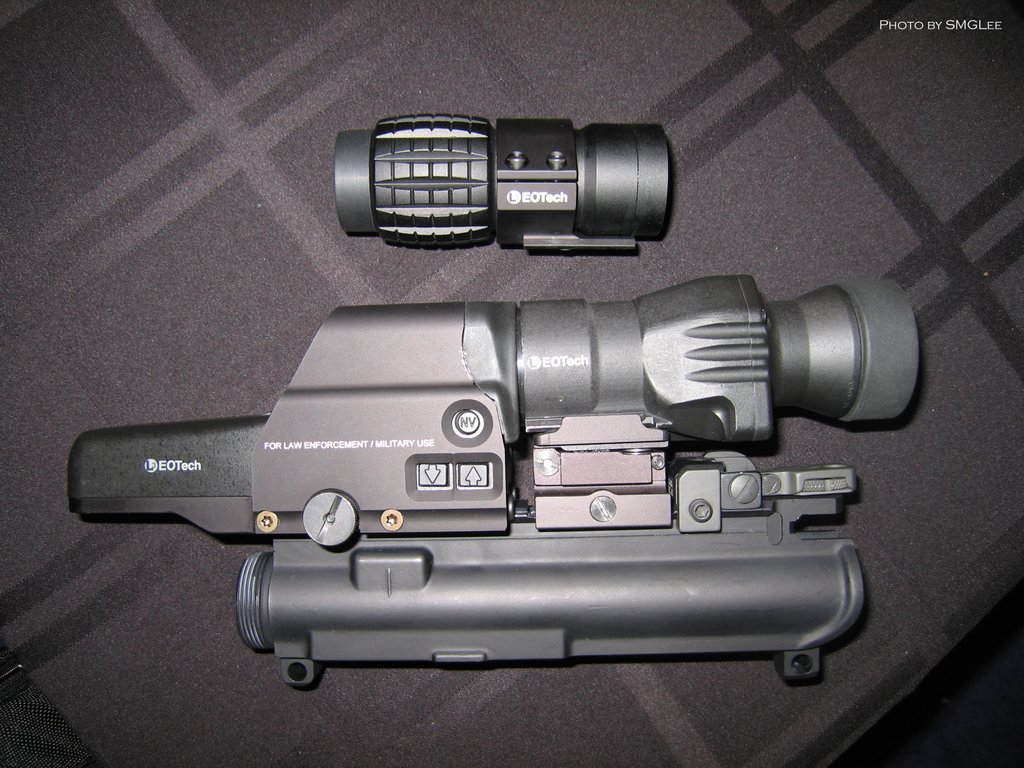

COOLNESS I like that So I have to FLIP the MAG in ORDER TO ADJUST and TURN OFF my 551 Eotech ALSO I run my 551 on a Flatop LMT M4 with arms 40 Do I have to buy a RISER The picture I have in My old SAR has the up and down buttons on the MAG itself |
|
Press the UP button, and it will turn on and run for 8 hours, then turn off automatically. Press the DOWN button, and it will turn on and run for 4 hours, then turn off automatically. After turning on, it will come on set on 12. Keep blipping the up button and it will go up to a brightness level of 20. Blipping the down button will bring it down to zero. If the reticle blinks after firing, it means the batteries are low. Pressing both UP and DOWN simultaneously will turn it off. |


My 551 eotech sits on my LMT m4 14.5 upper and a bushy/VLTOR lower Ive been shooting this set up for over a year Now !  Yes I do know how to use my 551 !! JUSt didnt know about the MAG  Im on my 3rd set of Batts and have yet to catch it blinking ??? One a Defender 2000 M4 14.5 = phantom , SOPMOD,RAS Im running My OLD AIMPOINT ML2 that I bought in 2001 or so Im still on the same battery BTW thanks guys for all your help on the MAG |
AR Sponsor