


Posted: 12/15/2009 3:45:56 PM EDT
|
Hey guys:
I picked up a spare Western Digital 1TB external hard drive today and my question to you is, is there any way I can hook up this hard drive and have it play video on my TV without a bunch of other expensive equipment/mods? Thanks in advance guys. |
|
The external hard drive is probably* just a hard drive in a box that connects to a computer via a USB cable. It does not have a processor, it does not have a graphics processor, it does not have an operating system with software capable of interpreting a file and outputting it as a signal your TV would understand. * there are some external drives that are advertised as media players but the typical external drive doesn't do that stuff. |
|
Quoted:
The external hard drive is probably* just a hard drive in a box that connects to a computer via a USB cable. It does not have a processor, it does not have a graphics processor, it does not have an operating system with software capable of interpreting a file and outputting it as a signal your TV would understand. * there are some external drives that are advertised as media players but the typical external drive doesn't do that stuff. That was what I was thinking, we'll have to see what I can do with what I've got. |

|
Yes
Get a Asus O!Play or WD TV Live hook it up to the TV and plug in the Hard Drive. My O!Play will play pretty much any video file I have put on a external HD including DVD ISOs with menu support, best $100 I have spent in years. 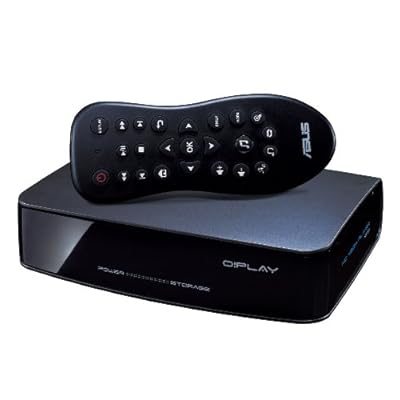
http://www.amazon.com/ASUS-Play-Media-Player-Black/dp/B002MCZJ3C/ref=sr_1_1?ie=UTF8&s=electronics&qid=1260925453&sr=8-1 These days many of us have a constantly growing media library, with our favorite music, movies, and photos in a variety of formats and locations. The ASUS O!Play is designed to easily bring your media into your living room, without sacrificing quality. Enjoy video in full HD 1080p resolution, full-fidelity audio, and photo slideshows on your HDTV or home theater setup. With impressively wide format support, a wealth of connection options, and playback over a network or directly from USB and eSATA drives, the O!Play is an elegant and modern media solution.
The Easiest Way to Enjoy HD Content in the Living Room Hassle-free multimedia playback without file conversion Full 1080p high-definition video via HDMI output Simple and fast plug-and-play connectivity (eSATA, USB 2.0) High-speed Ethernet LAN connection for easy network streaming Bitstream or decode Dolby Digital and DTS Surround audio Sleek and compact design By connecting the O!Play HD Media Player via HDMI, you can enjoy full 1080p high-definition video and digital audio using over a single cable. The HDP-R1 also features an optical digital audio output for lossless audio transfer to your receiver or TV. If you have yet to jump on the HDTV or digital audio bandwagon, no worries, the O!Play also features composite (RCA) audio and video outputs to ensure compatibility with most any setup. O!Play may be compact, but it's fully equipped to play most formats in your digital library. O!Play supports these formats: Video Compression: MPEG1/2/4, RM/RMVB, VC-1, H.264 Video File Extension: .MP4, .MOV, .XVID, .AVI, .DIVX, .ASF, .WMV, .MKV, .RM, .RMVB, .FLV, .TS, .M2TS, .DAT, .MPG, .VOB Audio: MP3, WAV, AAC, OGG, FLAC, AIFF Image: JPEG, BMP, PNG, GIF, TIFF Subtitle: SRT, SUB, SMI, SSA O!Play can also bitstream Dolby Digital and DTS Surround audio to your receiver to bring realism to the next level. If you plan on plugging the O!Play directly to your TV set, HDP-R1 can decode those formats and provide a stereo output without headache or hassle. With such a wide range of compatibility, you can enjoy your media without waiting for conversion. HD content brings full details to your High Definition TV, but it also requires huge bandwidth to render that detailed content. This is why many consumers have invested in external drives with high-speed USB or eSATA interfaces. HDP-R1 provides an onboard eSATA (external SATA) port that is 6X faster than USB 2.0 for high speed transfer from your portable hard drives. And since the unit features both an eSATA/USB 2.0 combo port and a dedicated USB 2.0 port, you can store your media on drives with either interface, and access multiple drives simultaneously. Those who have their media on network-attached-storage or a networked PC will be delighted to know that the O!Play features an on-board LAN port. With high-speed Ethernet connectivity, you can stream contents directly to the O!Play rather than moving and connecting external drives. No matter your media storage preference, the O!Play's got you covered. The O!Play features an intuitive user interface that lets you easily access the files on your storage device regardless of your technical know-how. It only takes a few clicks to begin enjoying your media. Plus, with advanced options, you can customize settings such as subtitles, aspect ratio, noise reduction and more, to optimize your viewing experience. The O!Play features a full-function remote for navigating your media, complete with a unique dedicated button for instantly shuffling your music. Just press the Music Shuffle button, and O!Play accesses all the available music files for random playback. O!Play also works great as a photo viewer to easily share your vacation photos with your family and friends. Use the remote to control the slideshow. |