


Posted: 4/21/2011 6:55:28 AM EDT
| Do any companies make a SSD for a laptop? How easy is it to transfer all the data off of one drive onto a new drive? |
|
Quoted:
Quoted:
Most all SSD devices are 2.5" for laptops. As far as transferring the data you could use a program like norton ghost and a usb->sata adapter. -Foxxz +1 I switched out the HD in my m11x for an Intel x-25m Runcore SSD. Its a pretty slick setup. Very fast and comes with kit to put your old hard drive in to use as usb drive and comes with software to clone hard drive. |

|
Pretty much every solid state drive is laptop size, 2.5". I wish there were more 3.5" options. A lot of folks I know are putting the small solid state drives in their desktops for the operating system and applications. It makes things blazing fast. They use old hard drives, often set up in some sort of RAID, for bulky files that don't need the faster read/write speed.
A bit too pricy for me right now, but my next build will have a solid state drive. |
|
They are really fast. I have one in my desktop for the boot drive with the OS on it. All these years of adding more ram and faster cpu's were ok but nothing like the vast improvement an SSD was. Built one with an SSD and windows 7 cold boots in under 9 seconds. Once the price goes down I'd like to migrate more stuff over to them like games etc...but there's no need as far as I can see to put mass storage stuff on them like videos, pictures etc... |
|
Quoted:
Wiki says 2 year, 50% reduction in cost, 100% increase in capacity. Right now it looks like (in rough numbers) 120 Gb for $200. So, I could expect to get 240 Gb for $200 in 2 years? Hmm... The 480GB SSD are $2000. 
But small drives are already at relatively decent prices. |
|
Quoted: Quoted: Wiki says 2 year, 50% reduction in cost, 100% increase in capacity. Right now it looks like (in rough numbers) 120 Gb for $200. So, I could expect to get 240 Gb for $200 in 2 years? Hmm... The 480GB SSD are $2000. But small drives are already at relatively decent prices. Yeah the 480's are a tough pill to swallow. But two 240's is only a grand, and they fucking scream like a monkey with a hot poker in the ass. http://www.ar15.com/forums/topic.html?b=1&f=5&t=1176060 |
|
Quoted:
Quoted:
Most all SSD devices are 2.5" for laptops. As far as transferring the data you could use a program like norton ghost and a usb->sata adapter. -Foxxz +1 I switched out the HD in my m11x for an Intel x-25m. Its a pretty slick setup. I've been eyeing an M11X for some time now, especially now that my room mate has one and loves it. |
|
Quoted: Quoted: Quoted: Most all SSD devices are 2.5" for laptops. As far as transferring the data you could use a program like norton ghost and a usb->sata adapter. -Foxxz +1 I switched out the HD in my m11x for an Intel x-25m. Its a pretty slick setup. I've been eyeing an M11X for some time now, especially now that my room mate has one and loves it. I got a gen1 (r1) and it is a pretty slick little deal. However, if you have the loot for the new R3 i7 build... it would be extra awesomeo. There has been the hinge issue, which is probably real. I have not been hit with it, but Dell is now saying that they will fix it no matter what. I was an ealier adopter and CULV is neat, but a real i7 would be great for other than games type of work. -G |
|
Quoted: Quoted: .Only downside is cost. and capacity. Last time I looked write times were a on the slow side as well - though they could fix that with larger buffers (I'm assuming by now they have?) Performance also has a tendency to drop off (sometimes dramatically) with use. I know they have worked out a lot of bugs, but some ssd's are still having issues with firmware and wear leveling from what I've read. Anandtech and Tomshardware always review new ssds and compare them with previous models. The performance numbers can be very interesting sometime. I looked pretty hard at getting one of those Revo PCIE drives, but after reading pretty extensively on them I decide to wait. Also, the way they advertise ssds is some times disingenuous according to an article I read on Anandtech a few weeks ago, due to the article OCZ actually made a commitment to change the way the advertise them. |
|
Quoted:
Quoted:
.Only downside is cost. and capacity. Last time I looked write times were a on the slow side as well - though they could fix that with larger buffers (I'm assuming by now they have?) Make sure you use it with Win7, it has specific support for SSD's. |
|
Quoted: Quoted: Quoted: .Only downside is cost. and capacity. Last time I looked write times were a on the slow side as well - though they could fix that with larger buffers (I'm assuming by now they have?) Performance also has a tendency to drop off (sometimes dramatically) with use. I know they have worked out a lot of bugs, but some ssd's are still having issues with firmware and wear leveling from what I've read. Anandtech and Tomshardware always review new ssds and compare them with previous models. The performance numbers can be very interesting sometime. I looked pretty hard at getting one of those Revo PCIE drives, but after reading pretty extensively on them I decide to wait. Also, the way they advertise ssds is some times disingenuous according to an article I read on Anandtech a few weeks ago, due to the article OCZ actually made a commitment to change the way the advertise them. Performance dropping off is not true with any of the modern drives. The fact is that the majority of the stuff you do on your pc consists of random-ish writes and reads, mostly reads. Since a SSD has no seek time (parts of the drive moving around to literally find the data on the platter) they will feel so much faster. 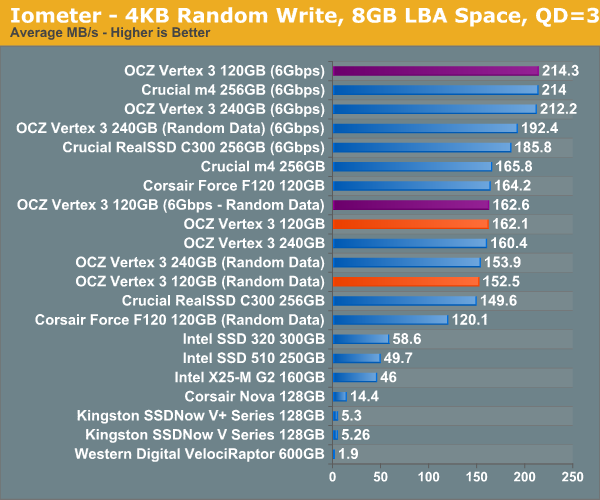 Note in the above, the 600gb raptor is one of the fastest ordinary drives available, barely rates. 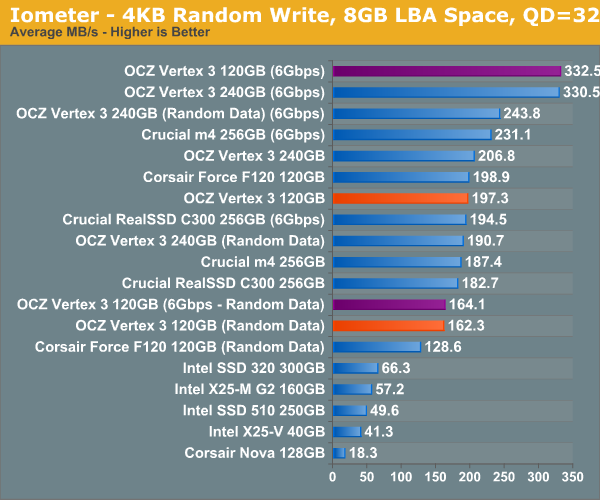 There are things you can do, artificially to slow down the drive, but it would not be stuff you would do under any kind of normal usage. I'm talking about using special utilities to litter your drive with files of particular sizes and types for the sole purpose of trying to mess with garbage collection (TRIM, etc). |
|
Quoted:
@fireputrouter
An older laptop may use the EIDE interface, so you could not upgrade with an SSD. You would need to check that first. Otherwise did everyone see the Cruicial RealSSD deal on newegg today? and make sure your laptop mobo can support the zippy SSD drives via sata2 or 3 otherwise you might just be spinning your wheels. |
|
Quoted:
@fireputrouter
An older laptop may use the EIDE interface, so you could not upgrade with an SSD. You would need to check that first. Otherwise did everyone see the Cruicial RealSSD deal on newegg today? thanks....... and how EXACTLY can I find out if my laptop is EIDE or not? .. or compatible at all? |
|
Quoted:
Quoted:
@fireputrouter
An older laptop may use the EIDE interface, so you could not upgrade with an SSD. You would need to check that first. Otherwise did everyone see the Cruicial RealSSD deal on newegg today? thanks....... and how EXACTLY can I find out if my laptop is EIDE or not? .. or compatible at all? pull the hard drive out and look at the connectors, sata is a small L shaped connector and IDE has a bunch of pins. |