


Posted: 11/15/2015 7:14:54 PM EDT
|
Cut the cord and going streaming and OTA for local HD channels.
I have 3 TVs and the strange part is that 1 TV will scan and get all the channels. The other 2 TVs will only get 1 channel on a scan. Is there a difference in QAM tuners btw different TVs to where 1 will pull more channels than another? The signal is coming from a large attic mount antenna. I've tried 3 different antennas and all with the same result. 1 TV gets all the channels and the other 2 only gets 1. Looked at antennaweb and it's pointed in the optimal direction. Tried 2 different signal boosters with no difference either including a Channel Master one which got good reviews. Trying not to roof mount or mast mount if possible. Thoughts? |
|
Use a Mclapp design 4 bay bowtie antenna.
A quality preamp at the antenna (CM-7777). Mount outside if at all possible. Use a new run of Belden RG6 with new compression connectors. 4 bay bowtie Run wire straight to primary tv. |
|
Quoted:
Use a Mclapp design 4 bay bowtie antenna. A quality preamp at the antenna (CM-7777). Mount outside if at all possible. Use a new run of Belden RG6 with new compression connectors. 4 bay bowtie Run wire straight to primary tv. so if i have 3 TVs, don't split the signal? build 3 antennas? when i tried running the existing antenna straight to other 2 TVs, no difference in the ability to scan more than the 1 channel. my attic mount right now looks like a 2 bay bowtie antenna. |
|
Most old tv antennas are not helpful because they are tuned mostly for the old vhf frequencies.
New DTV is mostly UHF. So all the long elements are useless. Only the smaller elements are for uhf. You could hacksaw off all the long elements with no loss. Worse they can pick up noise from other strong sources like fm radio. Signal loss on coax is extremely high. Long runs and multiple tv requires a really good set up. Indoor antenna looses a lot of signal as well. |
|
Quoted:
so if i have 3 TVs, don't split the signal? build 3 antennas? when i tried running the existing antenna straight to other 2 TVs, no difference in the ability to scan more than the 1 channel. my attic mount right now looks like a 2 bay bowtie antenna. Quoted:
Quoted:
Use a Mclapp design 4 bay bowtie antenna. A quality preamp at the antenna (CM-7777). Mount outside if at all possible. Use a new run of Belden RG6 with new compression connectors. 4 bay bowtie Run wire straight to primary tv. so if i have 3 TVs, don't split the signal? build 3 antennas? when i tried running the existing antenna straight to other 2 TVs, no difference in the ability to scan more than the 1 channel. my attic mount right now looks like a 2 bay bowtie antenna. No. One good antenna and a preamp. Run it to one tv first. See how that does. Then try splitting it. You will probably lose some channels when you split. A powered splitter in addition to the preamp may or may not be needed. |

|
thanks for the suggestions. i knew indoor/attic mount would result in some signal loss.
but the question is why 1 tv can pick up all the channels and the other 2 can only get 1. a coax is run from the antenna to a splitter so i don't think any 1 TV is getting a cleaner signal. at least not enough to justify the amount of loss on my other 2. |
|
Every additional foot of cable, connection and additional tv reduces your signal... A lot. Old cables and connectors can also cause problems. All new is best.
The tv's aren't getting exactly the same amount of signal. Yes, different tuners can also have better performance than others. I suggest you focus on getting the best antenna possible and getting it's signal to your primary tv first. |
|
Quoted:
Every additional foot of cable, connection and additional tv reduces your signal... A lot. Old cables and connectors can also cause problems. All new is best. The tv's aren't getting exactly the same amount of signal. Yes, different tuners can also have better performance than others. I suggest you focus on getting the best antenna possible and getting it's signal to your primary tv first. yeah there's a lotta cable being run. my primary picks up all the channels. just not sure why the big difference and drop off on the other 2. was thinking maybe since they are older TVs, maybe the QAM tuner on them may not be as good but that still doesn't make sense that i go from full strength to 1 channel all from the same antenna. when when i hook the antenna up directly to those 2, they aren't picking up any more. |
|
Quoted:
Can you manually program the TV's for the missing channels, as opposed to doing an auto-scan? Perhaps there is something wrong other than signal strength. tried that, doesn't work. i think you have to scan them in first. then you can choose to hide them. |
|
You could also have a bad connector or pinched cable effecting the signal. RF signals are very sensitive to minor problems.
A better antenna gives you more signal to begin with. A mast mounted preamp raises the signal level so it can handle longer runs of coax and additional tv's. A powered splitter to divide the signal may also be needed but be careful of over driving the second amp with the first. There is no such thing as a signal booster. |
|
This won't work with radio shack quality stuff, pinched cables, corroded connectors and passive splitters. This is what you need...
Mclapp 4 bay bowtie antenna, outside with a reflector and rotator (optional) 
Channel master Balun, the heavy one 
Mast mounted preamp, good one (Less than 5 feet from antenna) 
Quality powered splitter 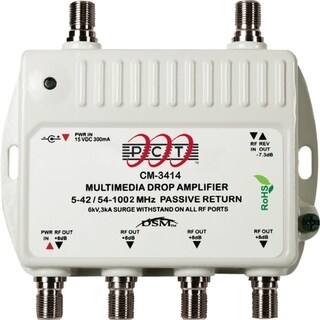
Belden RG6, keep cable length to absolute minimum 
Compression tool, F connector RG6 
RG6 prep tool 
|
|
Quoted:
This won't work with radio shack quality stuff, pinched cables, corroded connectors and passive splitters. This is what you need... Mclapp 4 bay bowtie antenna, outside with a reflector and rotator (optional) http://m4antenna.eastmasonvilleweather.com/pictures/9-5x9%20M4%20front.JPG Channel master Balun, the heavy one http://www.homedepot.com/catalog/productImages/400/83/834eef3f-b0e0-4574-9e71-e0b6c46ddef4_400.jpg Mast mounted preamp, good one (Less than 5 feet from antenna) http://www.summitsource.com/images/products/AM3041.jpg Quality powered splitter http://ak1.ostkcdn.com/images/products/6101840/Channel-Master-CM-3414-Signal-Splitter-P13769238.jpg Belden RG6, keep cable length to absolute minimum http://s3.showmecables.com/images/catalog/product/Belden-Box.jpg Compression tool, F connector RG6 http://www.idealind.com/media/img/product/medium/33-631.jpg RG6 prep tool http://www.summitsource.com/images/products/TO1312.jpg thanks for the detailed post. the coax was run while the house was built so i'm not sure how much luck i'd have running down any kinks or bends. probably not going to be easy to rerun it either. will post some pics of the current setup but it's starting to look like an attic mount may not work for all my tvs. |
|
You're welcome. I like FREE tv. I'm amazed how many people don't know that they can get free tv with just a simple antenna.
I would also try the house wiring first. Even indoors, a good antenna and the amps I posted you should get more channels to more tv's. With an outdoor set up you can hear stations much further away. |
|
Have you tried swapping the physical location of your TVs around?
I.e., move a TV that is getting only 1 channel to the place where a TV is getting all of the channels and see what happens. That would tell you if you have a TV tuner problem or a problem with the feed to the TVs that are not getting all of the channels. Just a thought. |
|
Quoted: This won't work with radio shack quality stuff, pinched cables, corroded connectors and passive splitters. This is what you need... Mclapp 4 bay bowtie antenna, outside with a reflector and rotator (optional) http://m4antenna.eastmasonvilleweather.com/pictures/9-5x9%20M4%20front.JPG Channel master Balun, the heavy one http://www.homedepot.com/catalog/productImages/400/83/834eef3f-b0e0-4574-9e71-e0b6c46ddef4_400.jpg Mast mounted preamp, good one (Less than 5 feet from antenna) http://www.summitsource.com/images/products/AM3041.jpg Quality powered splitter http://ak1.ostkcdn.com/images/products/6101840/Channel-Master-CM-3414-Signal-Splitter-P13769238.jpg Belden RG6, keep cable length to absolute minimum http://s3.showmecables.com/images/catalog/product/Belden-Box.jpg Compression tool, F connector RG6 http://www.idealind.com/media/img/product/medium/33-631.jpg RG6 prep tool http://www.summitsource.com/images/products/TO1312.jpg I remember when Radio Shack carried top quality stuff..  ..I was a Shack Rat back in the day when I was into radios and electronics. ..I was a Shack Rat back in the day when I was into radios and electronics. |
|
Quoted:
Have you tried swapping the physical location of your TVs around? I.e., move a TV that is getting only 1 channel to the place where a TV is getting all of the channels and see what happens. That would tell you if you have a TV tuner problem or a problem with the feed to the TVs that are not getting all of the channels. Just a thought. when i had cable, it was fine to all the TVs. i bought a new antenna i'm gonna try. if that doesn't improve, i'll try an outdoor mount. |