


[ARCHIVED THREAD] - New computer build (Page 1 of 2)
Posted: 2/25/2014 10:22:04 PM EDT
|
I've finally decided to go ahead and build myself a computer fron the ground up (previously I've stuck with regular desktops and upgraded RAM and vid cards myself). I've decided that since I can't spend my hard earned money on proper firearms (thank you Army, for sending me to CA, dicks) I might as well splurge and get a uber setup that'll last me for a long while, rather then a dell or HP that I tweak a bit and get a couple years of 'adequate' perfomance out of.
With alot of help and advice from InfiniteGrim and duhflushtech, I've picked out the components and am in the process of ordering them. The IRS is late with my refund, so I'm waiting for that until I can finish ordering. Here is what I've got for my build. For my case, i went with the Corsair C70 Vengeance in Militray Green. Which arrived today and it is sweet. The military style really caught my attention. 
For the guts, I've picked out the following: (blue is already on order) Intel Core i7-4770K Quad-Core Desktop Processor 3.5 GHZ 8 MB Cache BX80646I74770K Corsair Hydro Series H110 280 mm High Performance Liquid CPU Cooler ASUS Maximus VI EXTREME LGA 1150 Intel Z87 HDMI SATA 6Gb/s USB 3.0 ATX Intel Motherboard 2x EVGA GeForce GTX 780 3GB Video Card 2x G.Skill Ripjaws X Series 16GB (2 x 8GB) DDR3-2400 Memory Samsung 840 Pro Series 256GB 2.5" Solid State Disk Hitachi Ultrastar 2TB 3.5" 7200RPM Internal Hard Drive Corsair Professional 1050W 80+ Gold Certified Semi-Modular ATX Power Supply LG UH12NS30 Blu-Ray Reader, DVD/CD Writer I'm planning this in stages. Stage one is the intial build, but with only one vid card and 16GB RAM with a custom side case panel without the vents (I've been advised that leaving the vents open without a fan over them causes airflow issues). Stage 2 is an additional 16GB and 2nd vid card, plus some led fans and control panel. Stage 3 Is either a triple monitor setup or one large monitor with a 22 inch secondary. What's slowing me down is stage 3. I haven't been able to decide on anything at all, and I'm a little limited on desk space (about 5ft wide is my max). Thoughts? And any ideas towards case mods and fan controls would be appreciated. Edit: I'm getting my new side panel from http://mnpctech.com/mnpctech-clear-case-pc-panels/corsair-c70-window-replacement-clear-fan-holes-120mm/ and they look like this: 
So I would also appreciate opinions and advice about what color panel along with what color fan lights I should look at. I'm leaning towards blue, so should I get a clear panel and blue leds or a blue panel and bl;ue leds, or what? |
|
Nice looking case.
Your computer is very similar to mine. I have a 4770k, 840 pro, EVGA 780 and G.Skill RAM. I love mine. Yours, with 2x 780, should be even more awesome. Since you're on liquid, you'll probably be pretty cool. My single 780 isn't very hot and 2x shouldn't be all that much hotter. Make sure to put two 120mm fans in the side of your case and have them blowing into the case. Will shoot right at the GPUs and help a lot with temp. Fan controllers are pretty much a personal choice. Might be hard to find something to match an olive drab green case. Might just go with black. Whatever floats your boat. I think the digital ones are overkill and prefer potentiometers. As for monitors, I have some advice for you. Forget 1080p. It's crap. I bought two 27" 2560x1440 monitors off ebay directly from Korea and they are awesome. $300 each, shipped. I will never, ever go back to a lowly 1080p monitor again. You need a solid video card to push that many pixels, and that's exactly what your 780 is. Solid. Do it! For building an awesome computer, here's a free steam key for FEZ. Mind blowing game, just have an extra key. https://www.humblebundle.com/gift?key=cCPMu54HTMSWCeYd |
|
Quoted:
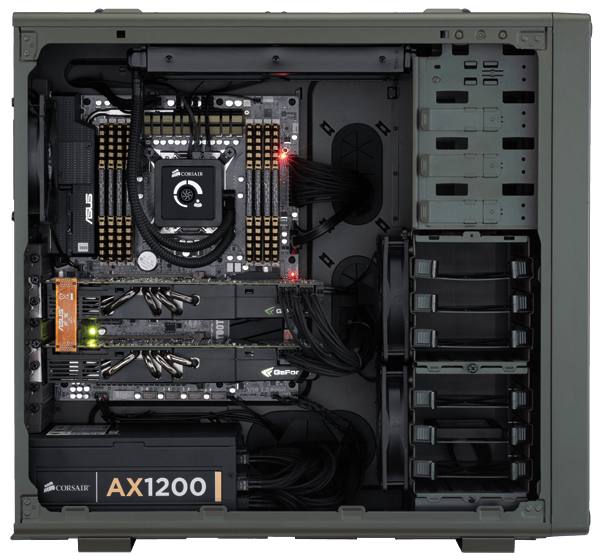
Nice looking case. Your computer is very similar to mine. I have a 4770k, 840 pro, EVGA 780 and G.Skill RAM. I love mine. Yours, with 2x 780, should be even more awesome. Since you're on liquid, you'll probably be pretty cool. My single 780 isn't very hot and 2x shouldn't be all that much hotter. Make sure to put two 120mm fans in the side of your case and have them blowing into the case. Will shoot right at the GPUs and help a lot with temp. Fan controllers are pretty much a personal choice. Might be hard to find something to match an olive drab green case. Might just go with black. Whatever floats your boat. I think the digital ones are overkill and prefer potentiometers. As for monitors, I have some advice for you. Forget 1080p. It's crap. I bought two 27" 2560x1440 monitors off ebay directly from Korea and they are awesome. $300 each, shipped. I will never, ever go back to a lowly 1080p monitor again. You need a solid video card to push that many pixels, and that's exactly what your 780 is. Solid. Do it! For building an awesome computer, here's a free steam key for FEZ. Mind blowing game, just have an extra key. https://www.humblebundle.com/gift?key=cCPMu54HTMSWCeYd The case already has 3 fans, as seen in the above pic. The front 2 suck in air and the rear upper fan blows out. My liquid coolent system is for the CPU only and sucks in the air from the top. And the power supply will have an intake through the bottom and exhaust through the back. I plan to remove the upper HDD cage (there are 2 with 3 bays apiece) and move the top front fan directly against the grill for better air intake (and the LED lights will look cool too). So I don't see a need to mount fans against the side panel, hence my desire to replace the panel with one without vents. |
|
I don't think that's enough ventilation. Need more intake. It will work but your GPU temps will be higher.
I know the liquid is for your 4770k. Just brought that up to isolate the heat issue to the two GK110s. eta: Since you haven't ordered everything yet, reconsider that Hitachi Deathstar. Better to go WD. |
|
Quoted:
I don't think that's enough ventilation. Need more intake. It will work but your GPU temps will be higher. I know the liquid is for your 4770k. Just brought that up to isolate the heat issue to the two GK110s. You don't think the front 2 fans will be enough? Since the 2nd vid card is stage 2, could I initially leave the fans as is, and add a temp gauge to monitor heat? |
|
Tell me how you like that case once its together, I might have to upgrade.
Anyway as for fan controllers this is the only ones that might fit in with the case... Lamptron Military Bay Bus 
As for fans people like the Cooler Master Sickle Flow. Not sure what color you want. There is two versions, one with smoke colored blades, the other with clear. But they dont throw a TON of light like the all clear fans. My PC lights up my entire room. I'm thinking of switching to these type. 

|
|
No, I don't think two intake fans is enough. Like I said, it will work. Your computer will just run hot. The saving grace is that your CPU is on liquid so its heat won't add as much.
No need for a temp sensor. Your 780s have built-in temperature sensors which work fine. Download EVGA Precision X or MSI Afterburner. Either will work with your 780s and tell you the temps. With one 780 and a CPU on liquid, two intake fans would be OK. I still very much prefer to have side intake fans blowing directly at the GPU though. Helps so much. |
|
Quoted:
You don't think the front 2 fans will be enough? Since the 2nd vid card is stage 2, could I initially leave the fans as is, and add a temp gauge to monitor heat? Quoted:
Quoted:
I don't think that's enough ventilation. Need more intake. It will work but your GPU temps will be higher. I know the liquid is for your 4770k. Just brought that up to isolate the heat issue to the two GK110s. You don't think the front 2 fans will be enough? Since the 2nd vid card is stage 2, could I initially leave the fans as is, and add a temp gauge to monitor heat? If you set it up like in this picture you should be good.
Two pulling through front mesh, then two behind the hard drives pushing it towards the video cards. Since you are buying reference cards they should exhaust most of their heat outside the case. Setup the CPU radiator on the top so the top left fan blows out any rising heat from the GPU's. Also for the radiator I recommend Push pull. So you've got two fans on the bottom of the radiator and two sandwiched in between the radiator and case. In that configuration you will have NINE 120mm fans moving air, which is a ton. Exc |
|
Quoted:
If air intake really becomes an issue, which I doubt, you can get some of those really beefy 120mm fans, they are like 2" thick and move a bunch of air. And some ear muffs while you're at it. 4 intake fans in the front should be OK. Temps won't be as low as with a side fan, but it won't be a huge issue. |
|
Quoted:
And some ear muffs while you're at it. 4 intake fans in the front should be OK. Temps won't be as low as with a side fan, but it won't be a huge issue. Quoted:
Quoted:
If air intake really becomes an issue, which I doubt, you can get some of those really beefy 120mm fans, they are like 2" thick and move a bunch of air. And some ear muffs while you're at it. 4 intake fans in the front should be OK. Temps won't be as low as with a side fan, but it won't be a huge issue. The really thick 120mm fans generally have a lower RPM and are quieter. I've got one sitting in the middle of my PC feeding my GPU air, its the quietest fan in my case. I will look into what brand it is tomorrow. |
|
Quoted:
If you set it up like in this picture you should be good. http://cwsmgmt.corsair.com/media/catalog/product/c/7/c70_g_sideopen_built_300.png Two pulling through front mesh, then two behind the hard drives pushing it towards the video cards. Since you are buying reference cards they should exhaust most of their heat outside the case. Setup the CPU radiator on the top so the top left fan blows out any rising heat from the GPU's. Also for the radiator I recommend Push pull. So you've got two fans on the bottom of the radiator and two sandwiched in between the radiator and case. In that configuration you will have NINE 120mm fans moving air, which is a ton. Exc Quoted:
Quoted:
Quoted:
I don't think that's enough ventilation. Need more intake. It will work but your GPU temps will be higher. I know the liquid is for your 4770k. Just brought that up to isolate the heat issue to the two GK110s. You don't think the front 2 fans will be enough? Since the 2nd vid card is stage 2, could I initially leave the fans as is, and add a temp gauge to monitor heat? If you set it up like in this picture you should be good. http://cwsmgmt.corsair.com/media/catalog/product/c/7/c70_g_sideopen_built_300.png Two pulling through front mesh, then two behind the hard drives pushing it towards the video cards. Since you are buying reference cards they should exhaust most of their heat outside the case. Setup the CPU radiator on the top so the top left fan blows out any rising heat from the GPU's. Also for the radiator I recommend Push pull. So you've got two fans on the bottom of the radiator and two sandwiched in between the radiator and case. In that configuration you will have NINE 120mm fans moving air, which is a ton. Exc My current plan will have the fans exactly like that, but it's only 5 fans (not counting the PSU). 2 in the liquid system, 2 intake in the front (behind the hdd cages, there is nothing between the hdd cages and the front grill) and 1 exhaust in the back. I don't know if the liquid system I bought is push/pull (tried to look it up, but no luck). So, if I'm understanding ya'll correctly (and I might not be), I need to either add 2 side fans, or try to put 2 fans in front of the hdd cages? Should I replace the 3 stock fans with something quieter? |
|
Quoted:
So, if I'm understanding ya'll correctly (and I might not be), I need to either add 2 side fans, or try to put 2 fans in front of the hdd cages? Quoted:
So, if I'm understanding ya'll correctly (and I might not be), I need to either add 2 side fans, or try to put 2 fans in front of the hdd cages? That's my opinion. I don't think two intake fans will be enough. Quoted:
Should I replace the 3 stock fans with something quieter? Depends on how sensitive your ears are. Stock fans are usually at least semi-crappy which means noisy, low air flow, or both. Still, try them out. If they suck, buy new ones. I didn't replace any of the stockers in my Antec case. |
|
Stock fans are generally limited to only run slow even at full voltage (plugged directly into the power supply) so they should be quiet. But I would replace them, the reason they are quiet is because they are not moving any air.
It is odd that those fans are not directly against the mesh in the front. If there was a way to do so, I would. You're going to loose all the "suction" of those fans if they dont really have any ducting or are not against the mesh. |
|
Quoted:
I don't know if the liquid system I bought is push/pull (tried to look it up, but no luck). No personal experience, but I googled a review and it's not push/pull. It's two fans side-by-side on one side only. I believe most radiators allow you to attach fans on the other side pretty easily. Again, no personal experience. I'm on air. |
|
Quoted:
No personal experience, but I googled a review and it's not push/pull. It's two fans side-by-side on one side only. I believe most radiators allow you to attach fans on the other side pretty easily. Again, no personal experience. I'm on air. Quoted:
Quoted:
I don't know if the liquid system I bought is push/pull (tried to look it up, but no luck). No personal experience, but I googled a review and it's not push/pull. It's two fans side-by-side on one side only. I believe most radiators allow you to attach fans on the other side pretty easily. Again, no personal experience. I'm on air. I have a Corsair system, they come with only enough fans to place on one side, but they are threaded for optional push/pull Honestly I would have it setup how they have it, and add two fans on bottom of the radiators later if needed. |
|
Quoted:
What I would do, is remove one of the cages and get a fan up against the mesh. As for fan noise, once those two GTX 780's spool up, its not the case fans you will be worried about. That's what I was planning to do. Remove the top cage and mount the fan directly against the grill. Looks like I need to go shopping for some fans. Well, now I don't have to worry about getting a new side panel, now I just have to find a color I like. Blue or green..... |
|
Quoted:
Only problem, is if you want lighted fans, I'm not sure they do that. But they do have white blades which could be lit up by a blue light or something. What about 2 of these? http://www.corsair.com/us/cpu-cooling-kits/air-series-led-fans/air-series-af140-led-blue-quiet-edition-high-airflow-140mm-fan.html Also, How do i find out if I've got enough power cables for these? (I'm new, I'm new!) I really don't want to get everything together, then find out I'm missing some 2 dollar part I have to order. 
|
|
Generally the motherboard will have 1-3 extra 3 pin case fan connectors, but if you want the case to look clean you are going to want to power them another way, which is where the fan controller comes into play. They generally have extensions built into how the fans plug in.
They might actually make internal only fan controllers. |

|
I recently built my PC.
Fractal Design Define XL R2 case. i7 4770K. Asus Maximus VI Hero. EVGA GTX760. Considering SLI soon. Anyway, I have an NZXT Kraken X60 cooling my processor. I wanted to do the push/pull configuration, but the bottom bank of fans wouldn't clear the motherboard and I had to stick with the two, and mine is a full sized case, like yours. Just make sure you have the clearance to do the push/pull configuration. I also removed all the stock fans and installed Noctua NF-A14's. Temperatures at min. load are around 30C on the silent setting. One thing though, it does seem like your build is a little overkill. A lot of that raw cpu and gpu power and money is going to be wasted depending on what you plan to do with your pc, though I see you've planned it in stages. I work with Solidworks, AutoCAD, Adobe, and 3D rendering so I needed a relatively powerful rig. Try phase 1, and I'll pretty much guarantee that you'll be happy with the speed and performance of your pc, and you'll be maxing out on ultra on pretty much every game. I learned that it soon becomes a game of diminishing returns, again depending on your intended use. |
|
Quoted:
One thing though, it does seem like your build is a little overkill. A lot of that raw cpu and gpu power and money is going to be wasted depending on what you plan to do with your pc, though I see you've planned it in stages. I work with Solidworks, AutoCAD, Adobe, and 3D rendering so I needed a relatively powerful rig. Try phase 1, and I'll pretty much guarantee that you'll be happy with the speed and performance of your pc, and you'll be maxing out on ultra on pretty much every game. I learned that it soon becomes a game of diminishing returns, again depending on your intended use. I thought SLI 780s might be a tad much too considering OP didn't say he wanted to game on three monitors spanned, but to each his own. Other than the dual GPU, I don't really see the build as overkill. Maybe a 4670k instead of a 4770k, but that's about it. Maybe he got the 4770k on a sale or something. I paid $199 for mine. |
|
Quoted:
I thought SLI 780s might be a tad much too considering OP didn't say he wanted to game on three monitors spanned, but to each his own. Other than the dual GPU, I don't really see the build as overkill. Maybe a 4670k instead of a 4770k, but that's about it. Maybe he got the 4770k on a sale or something. I paid $199 for mine. Quoted:
Quoted:
One thing though, it does seem like your build is a little overkill. A lot of that raw cpu and gpu power and money is going to be wasted depending on what you plan to do with your pc, though I see you've planned it in stages. I work with Solidworks, AutoCAD, Adobe, and 3D rendering so I needed a relatively powerful rig. Try phase 1, and I'll pretty much guarantee that you'll be happy with the speed and performance of your pc, and you'll be maxing out on ultra on pretty much every game. I learned that it soon becomes a game of diminishing returns, again depending on your intended use. I thought SLI 780s might be a tad much too considering OP didn't say he wanted to game on three monitors spanned, but to each his own. Other than the dual GPU, I don't really see the build as overkill. Maybe a 4670k instead of a 4770k, but that's about it. Maybe he got the 4770k on a sale or something. I paid $199 for mine. I plan on being able to game across 3 monitors, eventually. I just haven't picked out a setup I like yet. That's stage 3. |
|
Very nice build, the only difference I'd make is to substitute in a WD Black Edition hard drive, but that is personal preference.
I'd also consider going with the GTX 780ti if you're going to be building it in stages. I don't think that another 16 Gb of RAM in your second stage is necessary for gaming. |
|
Everything from stage 1 is ordered! The only thing I haven't ordered yet are the additional fans. I have more research to do on the reviews I saw about side fans disturbing airflow before I make that decision.
Now I just have to find that boltface sticker I have floating around somewhere. 
Edit: and I even remembered to add a static wristband to the shopping cart! |
|
Quoted:
My current plan will have the fans exactly like that, but it's only 5 fans (not counting the PSU). 2 in the liquid system, 2 intake in the front (behind the hdd cages, there is nothing between the hdd cages and the front grill) and 1 exhaust in the back. I don't know if the liquid system I bought is push/pull (tried to look it up, but no luck). So, if I'm understanding ya'll correctly (and I might not be), I need to either add 2 side fans, or try to put 2 fans in front of the hdd cages? Should I replace the 3 stock fans with something quieter? Quoted:
Quoted:
Quoted:
Quoted:
I don't think that's enough ventilation. Need more intake. It will work but your GPU temps will be higher. I know the liquid is for your 4770k. Just brought that up to isolate the heat issue to the two GK110s. You don't think the front 2 fans will be enough? Since the 2nd vid card is stage 2, could I initially leave the fans as is, and add a temp gauge to monitor heat? If you set it up like in this picture you should be good. http://cwsmgmt.corsair.com/media/catalog/product/c/7/c70_g_sideopen_built_300.png Two pulling through front mesh, then two behind the hard drives pushing it towards the video cards. Since you are buying reference cards they should exhaust most of their heat outside the case. Setup the CPU radiator on the top so the top left fan blows out any rising heat from the GPU's. Also for the radiator I recommend Push pull. So you've got two fans on the bottom of the radiator and two sandwiched in between the radiator and case. In that configuration you will have NINE 120mm fans moving air, which is a ton. Exc My current plan will have the fans exactly like that, but it's only 5 fans (not counting the PSU). 2 in the liquid system, 2 intake in the front (behind the hdd cages, there is nothing between the hdd cages and the front grill) and 1 exhaust in the back. I don't know if the liquid system I bought is push/pull (tried to look it up, but no luck). So, if I'm understanding ya'll correctly (and I might not be), I need to either add 2 side fans, or try to put 2 fans in front of the hdd cages? Should I replace the 3 stock fans with something quieter? Side fans are a pain in the ass with the cables - any time you want to pull off the panel, you'll have to disconnect and then reconnect them. I had a side fan on my antec 900, and found it to be more of a hassle than it was worth. I'd go either multiple fans in front in a push/pull setup (1 or 2 in their stock location behind the HDD cages depending on whether you pull one cage out, which I'd recommend, and then the other 2 in the very front), or you could add an intake fan at the bottom, forward of the PSU. If you went modular on the PSU, you should have enough space in front of it for an extra 120mm (or maybe 140?) pushing up. Though I'd say that the amount of cooling you'll get with the current number of fans should be fine. The stock fans are OK, but if you are worried about airflow I'd go with something that pushes more air. The SP120 fans from corsair are very good for air movement (not the quietest, but I use headphones so it doesn't bother me) and they are what I use for my front intake and rad fans, but other brands are good too. I use a noctua for my rear exhaust. Since you are running 2 cards, more might be better. I only have one card so 2 front intake fans are plenty for me, but you might want to add more. Alternately, you can always start with what you have, and if your temps are higher than you like you can try adding more. ETA: After reading the rest of the thread: The H-series radiators can do push/pull, but you may not have space in your case. It's going to be awfully thick, and may impinge on stuff at the top of the motherboard. The C70 is on the small size of mid-tower, so I wouldn't count on it fitting. The AF-series fans are good fans, but they don't move as much air as the SP-series do when trying to push through small spaces - the SP stands for static pressure, and they are designed to keep their airflow high when on a radiator or HDD cage. If you are worried about not having enough intake, I'd go with something that pushes more CFM. At the very least, I'd go for the regular AF fan, which is louder but is about 63 CFM, as opposed to about 38 for the quiet edition. Also, make sure whatever fans you get have hydraulic bearings. They'll be quieter. |
|
Quoted:
I'm reading some reviews from users that said when they put the side panel fans in, the heat increased due to airflow issues and when they replaced the panel with one without vents, the heat dropped. Thoughts? Slick I'm running a single intake fan, I have clear packing tape over my "window" vents. I'm running a 7970 overclocked a lot, and my quad core i5 is overclocked to 4.5 Ghz. I have no heat issues. Plus my GPU doesn't vent ANY of its heat outside of the case. Your case is bigger, has 4x the airflow, you cpu isn't going to be overclocked, so the two GPU's should be all you need to worry about. I think you will be fine. Worst case is its runs a little hot and you order more fans. Which I highly doubt is going to happen Not sure if I stated this or not, but just setup the radiator like in the picture, you are not going to overclock the CPU so you really shouldn't need push/pull |
|
You seem like you want to have fun with this. Visit The Mod Zoo when/if you want to do some customizing. It gets addictive, but I don't know if commiefornia with let you have an unregistered rotary tool? |
|
Quoted:
You seem like you want to have fun with this. Visit The Mod Zoo when/if you want to do some customizing. It gets addictive, but I don't know if commiefornia with let you have an unregistered rotary tool? I lol'd but we all know as long as it's pre-ban, he's OK. 
|
|
Quoted:
You seem like you want to have fun with this. Visit The Mod Zoo when/if you want to do some customizing. It gets addictive, but I don't know if commiefornia with let you have an unregistered rotary tool? Shhhhh 
Ok, Ill leave the fans as is for now and replace the side panel. That gives me time to shop around for some lighted fans. |
|
Quoted:
Shhhhh
Ok, Ill leave the fans as is for now and replace the side panel. That gives me time to shop around for some lighted fans. Quoted:
Quoted:
You seem like you want to have fun with this. Visit The Mod Zoo when/if you want to do some customizing. It gets addictive, but I don't know if commiefornia with let you have an unregistered rotary tool? Shhhhh
Ok, Ill leave the fans as is for now and replace the side panel. That gives me time to shop around for some lighted fans. If you really want to go hardcore, get some ropelighting (they make stuff specially for cases) and put it around the edge of the case on the window side. Bad ass. ETA: Also, the C70 is a very popular case, and there are lots of youtube vids on mods people have done to it. For example, here's a quick and simple way to make it look like your optical drive is part of the case: 
|
| I see you already ordered everything. When you are ordering anything else give http://www.microcenter.com/ a try for pricing. I just bought a motherboard and processor combo and they beat everyone by about $50. |
|
Quoted:
I see you already ordered everything. When you are ordering anything else give http://www.microcenter.com/ a try for pricing. I just bought a motherboard and processor combo and they beat everyone by about $50. I thought I had. Certain sites are giving me a hard time prosessing my order because the shipping and billing addresses are different (a problem I've never encountered before when buying online). Even amzon is acting up. Half my order from them shipped, the other half was placed on hold for address issues. 
|

| OK, everything important is ordered. Now I have to pick out a new side panel and some led fans. Color ideas? I'm leaning towards a clear panel and blue fans, but green would look pretty awesome too and a colored panel would keep the lights from being too bright, I just can't decide! |
|
Quoted:
OK, everything important is ordered. Now I have to pick out a new side panel and some led fans. Color ideas? I'm leaning towards a clear panel and blue fans, but green would look pretty awesome too and a colored panel would keep the lights from being too bright, I just can't decide! For the record slick, after you sent me that link I ended up ordering a clear panel for myself and it came today. It is quite literally just that homebrew mod link I sent you except someone industrialized it and sells it now. Still uses fan grommets as screw spacers. Still, for the price it's not bad, and I'm lazy so I'd say buying one from them is worth it if you don't want to cut and measure and all that jazz. My case isn't lit, so a clear panel works best. If you have colored lights, like blue or whatever, I think either the clear or the light smoke colored panel (if you think it might be too bright) would be best. If you go with a colored panel though, I'd stick with white LEDs. That way they will take on the color of the panel when viewed from the outside, or so I'd think. If you use colored lights with a colored panel you might find that it is either too dim or turns into a color you didn't expect or want after filtering through the window. Just my opinion, of course. |
|
Just do it. I think it's pretty rare for it to catch on fire or something. Usually, it just won't post and throws error codes if there's a problem.
eta: We have similar ASUS Z87 motherboards. They're nice because they have that LCD screen on the MB that gives you an error code that you can look up in the manual. FYI, if you watch that thing as it boots up, it will toss out tons of codes. Don't spaz out. It's supposed to do that. Give it a minute and let it settle. |
|
Quoted:
Just do it. I think it's pretty rare for it to catch on fire or something. Usually, it just won't post and throws error codes if there's a problem. eta: We have similar ASUS Z87 motherboards. They're nice because they have that LCD screen on the MB that gives you an error code that you can look up in the manual. FYI, if you watch that thing as it boots up, it will toss out tons of codes. Don't spaz out. It's supposed to do that. Give it a minute and let it settle. It's giving a 00 code (which the manual says isn't used) and won't boot. 
|
|
Do you have:
--CPU Power plugged in? --Motherboard Power Plugged in? --GPU Power Cords (all of them) plugged in? --Make sure the Memory sticks are in all the way, with ASUS boards there is usually a LED by the memory sticks. if it turns on and then off the memory is good, if it stays on there is an issue --Make sure the graphics cards are plugged in firmly --Make sure the video cards are connected to a display. I'm not sure how SLI works but one might be the master/slave which might be critical which one connects to the monitor --Make sure you have a keyboard plugged in --Motherboard might have onboard video enabled, try connecting its HDMI to the monitor. |
|
Google pulled this up, hopefully that is not the problem..
The problem was that the version of the BIOS the MOBO came with was not recognizing the processor.
Apparently the first time I thought I did the BIOS update did't went well, therefore the BIOS was the same old version. After experimenting a few more times I have managed to solve the problem and now I am typing from the above PC. I hope this will help others that might experience the same issue. |
|
Are you sure you have both motherboard power connectors on there? People forget the 8-pin one sometimes and just plug in the 24-pin one.
Did you press the MemOK button? Look in your MB manual if you don't know about it. Remove all the extra stuff (extra HDs, the optical drive, extra RAM) and try with just the bare minimum. One stick of RAM, CPU, one HD, no video card. Remove everything (including the CPU if you need to) and reinstall. Make sure the motherboard standoffs are there. Yes, if you reset the CPU, you'll have to reapply thermal paste. If you have a multmeter, you can check your PSU and make sure it's outputing the correct V on the 5 and 12 V rails. There's a paperclip trick to turn on the PSU. Google it if you need to. Reset CMOS. Yes, even for a brand new, out of the box, never used MB. It's easy to reset on the ASUS boards. eta: Look in the manual to see how to update the motherboard BIOS using a flash drive and pressing a button. As noted above, your BIOS may be old. |
|
Quoted:
Are you sure you have both motherboard power connectors on there? People forget the 8-pin one sometimes and just plug in the 24-pin one. Did you press the MemOK button? Look in your MB manual if you don't know about it. Remove all the extra stuff (extra HDs, the optical drive, extra RAM) and try with just the bare minimum. One stick of RAM, CPU, one HD, no video card. Remove everything (including the CPU if you need to) and reinstall. Make sure the motherboard standoffs are there. Yes, if you reset the CPU, you'll have to reapply thermal paste. If you have a multmeter, you can check your PSU and make sure it's outputing the correct V on the 5 and 12 V rails. There's a paperclip trick to turn on the PSU. Google it if you need to. Reset CMOS. Yes, even for a brand new, out of the box, never used MB. It's easy to reset on the ASUS boards. eta: Look in the manual to see how to update the motherboard BIOS using a flash drive and pressing a button. As noted above, your BIOS may be old. Mother fucker.... OK, there is a 8 pin and a 4 pin right next to it. My radiator hose blocks the 8 pin. can I plug in the 4 pin instead? If not, I gotta pull the radiator, plug it in, then reinstall the radiator. Edit: disregard, I got that fucker in there. Booting now |
|
Quoted:
Mother fucker.... OK, there is a 8 pin and a 4 pin right next to it. My radiator hose blocks the 8 pin. can I plug in the 4 pin instead? If not, I gotta pull the radiator, plug it in, then reinstall the radiator. Quoted:
Quoted:
Are you sure you have both motherboard power connectors on there? People forget the 8-pin one sometimes and just plug in the 24-pin one. Mother fucker.... OK, there is a 8 pin and a 4 pin right next to it. My radiator hose blocks the 8 pin. can I plug in the 4 pin instead? If not, I gotta pull the radiator, plug it in, then reinstall the radiator. I honestly don't know, but your MB manual will say. Even if it works without it, you really want that 8-pin plugged in. You bought $$ components with excellent DVMs and you want to supply the power it needs to do its job. For maximum stability, plug it in. Have fun reinstalling your radiator.
|