


Posted: 6/9/2013 7:27:07 PM EDT
|
Ok, I reran my antenna yesterday, fished it through the attic and wall this morning, then set about clearing my desk, organizing my bedroom, finding room for all my junk. Got the 281 wired up with power poles and the whole bit. I finally have a proper ham station.
I'm manually programming repeaters until I get my cable. I can program everything and bounce off the repeater. When I go to store the settings, I press [F], tune to a channel, then press the [MR] button. When I press the [MR] button, it defaults to the AL weather channel. WTH? Is this button pre-programmed for something else? I already reset the whole thing once, no joy. It doesn't store, just goes to weather. 
|
| I've had similar issues with mine and I can't remember how I remedied them besides connecting to the computer and using software to program it. I've had trouble storing tones. It wants to revert back to a different one. Hopefully someone will chime in and help solve this as I'm as curious as you are. |
|
I don't own that radio but just took at look at the online manual.
My guess would be that when you press the "F" button, your memory channel is set for one of the reserved weather station memories, and it won't let you overwrite those memory locations. After pressing the F button you have to turn the tuning knob to select an available memory channel, then press the MR to save to that location. |
|
Quoted:
Quoted:
I've got 22 pounds of coins I'm taking to the bank today Be sure to check for pre-1965 dimes, quarters and halves first. And pre-1982 pennies if you're into that.  $244 worth! That about covers what I spent this weekend! I've got a friend who'll loan me a cable, but I need to spend more time with this thing figuring it out manually. Most of it is the same as my handhelds and some of it seems bassackwards! |
|
1.press the VHO button, tune in the freq you want in memory
2.press "F"...notice in the upper right, you'll see a memory channel number, roll your tuning knob to the channel you want to program. 3.press MR that's it 
once programmed, the MR button selects memory mode, if you hold it down, it will begin memory scan ( like a bearcat scanner) if you hit the VFO button, you're in VFO, if you hold it down, it will start searching, you can grab the tuning knob, and roll it counter-clockwise to reverse the scanning or seaching. Once you get used to it, this is a SUPER EASY radio to use. prefect for mobile operation. here's the $19 programming cable I use http://www.amazon.com/Kenwood-Programming-Cable-KPG-22-KPG-4/dp/B003DBIS2A/ref=sr_1_1?ie=UTF8&qid=1370898040&sr=8-1&keywords=kenwood+271+programming+cable 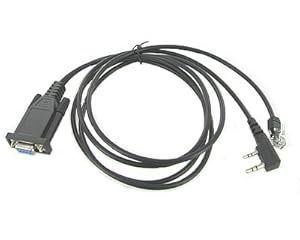
( My desktop has a DB-9 serial port, so I like the DB-9...but you can either order the cable with a USB connection, or get a USB-to-serial converter. ) free software from CHIRP or KENWOOD... http://chirp.danplanet.com/projects/chirp/wiki/Home http://www.kenwood.com/i/products/info/amateur/software_download.html |
|
I ordered this software and cable when I got my 281.
It makes programming a breeze.
https://store-d64ql7i.mybigcommerce.com/rt-systems-krs-271-programming-software-and-usb-k5d-for-the-kenwood-tm-271-tm-281/ Here's a screenshot of the programming software. Easy as Excel. 
|
|
Quoted:
I ordered this software and cable when I got my 281. It makes programming a breeze.
https://store-d64ql7i.mybigcommerce.com/rt-systems-krs-271-programming-software-and-usb-k5d-for-the-kenwood-tm-271-tm-281/ Here's a screenshot of the programming software. Easy as Excel. http://i1169.photobucket.com/albums/r504/yullose/kenwoodfreqs_zpsb2306fbb.jpg Yeah, a friend of mine bought it and it's setting on my desk right now. I did use the cable last night. The factory software is a pita! Chirp is a bit wonky too with Kenwood. |