


[ARCHIVED THREAD] - New Raspberry Pi B+ (Page 1 of 2)
Posted: 7/14/2014 2:53:41 PM EDT
|
http://www.raspberrypi.org/blog/#introducing-raspberry-pi-model-b-plus
Same bat price, more bat awesome! 
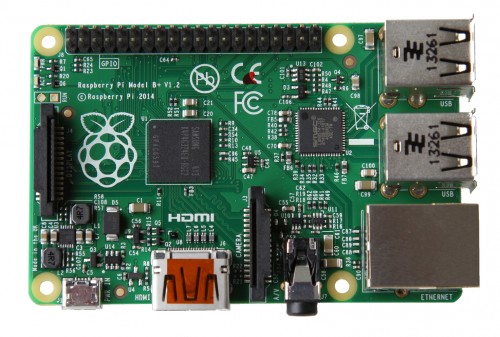
The Model B+ uses the same BCM2835 application processor as the Model B. It runs the same software, and still has 512MB RAM; but James and the team have made the following key improvements:
Going to order one on Thursday!
|
|
Okay, silly question from one who hasn't really followed these threads. Are they just little, dirt cheap computers?
I LOVE that little Enigma machine, even if it pretty much says it can be broken. What else can they do, and are they multi-use, or do you build each Pi around a single task they just do very well? |
|
I have three of them running XBMC, playing videos stored on a central server to TVs around the house. They work surprising well. Best part is they work with the TV's remote control, so you don't need a second remote. For the first time, ever, my wife will actually use one of the media center TVs.
I also have a couple of them running Volumio, so I can play music from one of our iPhones to speakers around the house. |
|
Quoted: http://www.raspberrypi.org/blog/#introducing-raspberry-pi-model-b-plus Same bat price, more bat awesome! http://www.raspberrypi.org/wp-content/uploads/2014/07/rsz_b--500x337.jpg The Model B+ uses the same BCM2835 application processor as the Model B. It runs the same software, and still has 512MB RAM; but James and the team have made the following key improvements:
Going to order one on Thursday!Gotta start looking at using this for my I/O solution for my home flight simulator I'm in the design phase of. |
|
Quoted:
The newer one's are not more powerful, they have more USB ports, and can run from a micro SD card. Micro SD is actually slower. Running an OS of an SD card is going to be slow, no matter what. The new microSD shoot is going to be much better than the old one. Also, it has better power consumption and hotswap support along with a ton more GPIOs. |
|
Quoted:
Are you using the built in networking and Debian? Quoted:
Quoted:
I just got one of the older version for some work stuff. Can't get the damn thing to talk on the network. I guess that dhcp thing is too advanced for it. Are you using the built in networking and Debian? I plugged it into a switch and powered it on. The dhcp server is a cisco router. dhcp is working fine for 6-8 other devices on the network. Nothing in dhcp binding in the router or in arp table. |
|
Quoted:
I plugged it into a switch and powered it on. The dhcp server is a cisco router. dhcp is working fine for 6-8 other devices on the network. Nothing in dhcp binding in the router or in arp table. Quoted:
Quoted:
Quoted:
I just got one of the older version for some work stuff. Can't get the damn thing to talk on the network. I guess that dhcp thing is too advanced for it. Are you using the built in networking and Debian? I plugged it into a switch and powered it on. The dhcp server is a cisco router. dhcp is working fine for 6-8 other devices on the network. Nothing in dhcp binding in the router or in arp table. Did you try different ports? Those things go bad pretty regularly. |
|
Quoted:
Gotta start looking at using this for my I/O solution for my home flight simulator I'm in the design phase of. Quoted:
Quoted:
http://www.raspberrypi.org/blog/#introducing-raspberry-pi-model-b-plus Same bat price, more bat awesome!
http://www.raspberrypi.org/wp-content/uploads/2014/07/rsz_b--500x337.jpg The Model B+ uses the same BCM2835 application processor as the Model B. It runs the same software, and still has 512MB RAM; but James and the team have made the following key improvements:
Going to order one on Thursday!Gotta start looking at using this for my I/O solution for my home flight simulator I'm in the design phase of. What are you doing with it? You might not need a full Linux PC for it... Check out the DigiStamp. I have a handful of them and love them. You get 6 IO pins on a device the size of a quarter. link 
|
|
Quoted:
Did you try different ports? Those things go bad pretty regularly. Quoted:
Quoted:
Quoted:
Quoted:
I just got one of the older version for some work stuff. Can't get the damn thing to talk on the network. I guess that dhcp thing is too advanced for it. Are you using the built in networking and Debian? I plugged it into a switch and powered it on. The dhcp server is a cisco router. dhcp is working fine for 6-8 other devices on the network. Nothing in dhcp binding in the router or in arp table. Did you try different ports? Those things go bad pretty regularly. Yup, port and cable. Went through all that with a Beagleboard. I will probably have to connect a monitor, keyboard, etc. to get networking straightened out. I love the concept of these little boards but the execution has yet to impress me. |
|
Quoted:
I plugged it into a switch and powered it on. The dhcp server is a cisco router. dhcp is working fine for 6-8 other devices on the network. Nothing in dhcp binding in the router or in arp table. Quoted:
Quoted:
Quoted:
I just got one of the older version for some work stuff. Can't get the damn thing to talk on the network. I guess that dhcp thing is too advanced for it. Are you using the built in networking and Debian? I plugged it into a switch and powered it on. The dhcp server is a cisco router. dhcp is working fine for 6-8 other devices on the network. Nothing in dhcp binding in the router or in arp table. Did you try giving it a static address instead? Is everything okay on the Ethernet layer? |


|
I have been looking at those. I want one. 
|
|
Quoted:
Yup, port and cable. Went through all that with a Beagleboard. I will probably have to connect a monitor, keyboard, etc. to get networking straightened out. I love the concept of these little boards but the execution has yet to impress me. Quoted:
Quoted:
Quoted:
Quoted:
Quoted:
I just got one of the older version for some work stuff. Can't get the damn thing to talk on the network. I guess that dhcp thing is too advanced for it. Are you using the built in networking and Debian? I plugged it into a switch and powered it on. The dhcp server is a cisco router. dhcp is working fine for 6-8 other devices on the network. Nothing in dhcp binding in the router or in arp table. Did you try different ports? Those things go bad pretty regularly. Yup, port and cable. Went through all that with a Beagleboard. I will probably have to connect a monitor, keyboard, etc. to get networking straightened out. I love the concept of these little boards but the execution has yet to impress me. If I remember correctly, SSH is not enabled by default. You have to configure first. |
|
Quoted:
+1 Mine is sitting in it's original box up on a shelf in my closet. Too slow to do anything useful. Quoted:
Quoted:
I still haven't found anything to do with my Model B. I still want one though. +1 Mine is sitting in it's original box up on a shelf in my closet. Too slow to do anything useful. Ever hear of Raspbmc? I use mine to play the 200+ DVDs ripped onto my networked filestore, to stream live BBC and many other TV channels, to play my audio collection. For $30-ish its absolutely fine as a media player. |
|
Quoted:
A minnowboard? The dual core one should make a great linux box. it's slow running linux. the hardware acceleration for display doesn't work well (or didn't when I bought it). I bought it to support capturing three or four webcams at once. It can't handle one at once. |
|
Quoted:
Has anybody got Netflix running on the Pi yet? I know it was being worked on last year. Maybe Silverlight under WINE? If it would run, it would probably be too slow. 
This is the reason I can't use one for a media server. Have you contacted Netflix? I email them fairly frequently about this, but we need to get all Linux guys hitting them hard. |
|
Quoted:
This is the reason I can't use one for a media server. Have you contacted Netflix? I email them fairly frequently about this, but we need to get all Linux guys hitting them hard. Quoted:
Quoted:
Has anybody got Netflix running on the Pi yet? I know it was being worked on last year. Maybe Silverlight under WINE? If it would run, it would probably be too slow.
This is the reason I can't use one for a media server. Have you contacted Netflix? I email them fairly frequently about this, but we need to get all Linux guys hitting them hard. I'm just going with an android TV dongle. I already have one, and will probably just pick up another for the bedroom. |
|
Quoted:
This is the reason I can't use one for a media server. Have you contacted Netflix? I email them fairly frequently about this, but we need to get all Linux guys hitting them hard. Quoted:
Quoted:
Has anybody got Netflix running on the Pi yet? I know it was being worked on last year. Maybe Silverlight under WINE? If it would run, it would probably be too slow.
This is the reason I can't use one for a media server. Have you contacted Netflix? I email them fairly frequently about this, but we need to get all Linux guys hitting them hard. Why not just run Android on the Pi and play netflix that way? |

|
Quoted:
Why not just run Android on the Pi and play netflix that way? Quoted:
Quoted:
Quoted:
Has anybody got Netflix running on the Pi yet? I know it was being worked on last year. Maybe Silverlight under WINE? If it would run, it would probably be too slow.
This is the reason I can't use one for a media server. Have you contacted Netflix? I email them fairly frequently about this, but we need to get all Linux guys hitting them hard. Why not just run Android on the Pi and play netflix that way? Android on the Pi is not that advanced yet. |