


Posted: 8/8/2010 6:42:18 AM EDT
|
For some reason, ever since I built this machine, it will shut off randomly for no reason. Sometimes it can go for days or even a week, but eventually it will shutdown. Here is my system specs.... Operating System: windows 7 64-bit Motherboard: MB ASUS M3N-HT Deluxe/HDMI 780A SLI CPU: AMD Phenom II X4 940 @ 3 GHZ Ram: 4.5 gb Hard drive: 350 Western Digital 7500rpm SATA When I originally built this computer, I had a 550 watt power supply. However, the computer would randomly shut off. When I tried to turn it back on, the green power button would come on, but none of the computer parts inside would turn on, they made no sound. So, I have to I have to get into the computer and move jumpers around to clear CMOS in order to get the computer to power back up. So, I figured it was probably a problem with my power supply. So I went to Best Buy and got a 750 watt power supply. But it just turned off again and I just got the computer back up and running by clearing CMOS. I have had this bad ass Rosewill RCX-Z5 cooling unit, I don't see how it can be randomly shutting down because the CPU temp is getting too hot. What should I do? I am outta ideas. BTW, the computer is pretty new, all the parts are only about 4 months old and it's very clean inside the tower. |
|
Me too. You did all the things I would have done.
We need some young computer geeks to chime in.......I'd be interested to know what causes this type of thing. I'm wondering if one of your motherboard chips is manfunctioning.......overheating.......... bad solder points somewhere................??? |
|
Double check your power and case connections to the motherboard.
Review the booklet that came with the mobo to be sure you have buttons connected to the correct locations on the mobo. Check the fuse and voltage reg on the back of the psu and your power strip. Be sure the outlet it is plugged into is not controlled by a wall switch. 
|
|
Quoted: Did you check the BIOS to make sure there are no power saving features enabled? Can you watch your CPU temps to make sure that you are getting adequate cooling? That would be my next step I suppose. However, this cooling unit is supposed to be really good, didn't think that would be the problem.... What is a good program for checking cpu temp? |
|
Quoted:
Quoted:
Did you check the BIOS to make sure there are no power saving features enabled? Can you watch your CPU temps to make sure that you are getting adequate cooling? That would be my next step I suppose. However, this cooling unit is supposed to be really good, didn't think that would be the problem.... What is a good program for checking cpu temp? some young guys have said they use "speedfan". http://www.almico.com/speedfan.php Then: http://hubpages.com/hub/How-to-check-CPU-temperature |
|
Quoted: Quoted: Did you check the BIOS to make sure there are no power saving features enabled? Can you watch your CPU temps to make sure that you are getting adequate cooling? That would be my next step I suppose. However, this cooling unit is supposed to be really good, didn't think that would be the problem.... What is a good program for checking cpu temp? http://www.techpowerup.com/realtemp/ Nevermind, you have AMD http://www.alcpu.com/CoreTemp/ |
|
Quoted:
I am guessing heat issues. Are you sure you got the heatsink attached well? My brothers computer did what you are describing and we got it tracked down to him not installing it correctly. Yeah, and some young guys tell me to make sure you use thermal paste also. |
|
Quoted:
Mind you, I just booted the computer back up about 20 minutes ago after it had shut down by itselfs... Here is the temperature it's saying.... low: 70C High:73C WOW, that's about 160 degrees F isn't it? I ain't no geek so maybe the younger guys can comment........that seems TOO HOT??? 
Just out of curiousity, did you put a thin coat of thermal paste on the CPU? |
|
Quoted: Mind you, I just booted the computer back up about 20 minutes ago after it had shut down by itselfs... Here is the temperature it's saying.... low: 70C High:73C Per this website...that's pushing the limit for the Phenom. http://www.pantherproducts.co.uk/Articles/CPU/CPU%20Temperatures.shtml |
|
Quoted: Quoted: Mind you, I just booted the computer back up about 20 minutes ago after it had shut down by itselfs... Here is the temperature it's saying.... low: 70C High:73C WOW, that's about 160 degrees F isn't it? I ain't no geek so maybe the younger guys can comment........that seems TOO HOT??? Just out of curiousity, did you put a thin coat of thermal paste on the CPU? yeah... 160 And this with my only having a few IE windows open, it's not really doing much computing wise atm... |
|
Quoted: Quoted: Quoted: Mind you, I just booted the computer back up about 20 minutes ago after it had shut down by itselfs... Here is the temperature it's saying.... low: 70C High:73C WOW, that's about 160 degrees F isn't it? I ain't no geek so maybe the younger guys can comment........that seems TOO HOT??? Just out of curiousity, did you put a thin coat of thermal paste on the CPU? yeah... 160 And this with my only having a few IE windows open, it's not really doing much computing wise atm... Manufacturer Max temp on your CPU is 62c before shutdown. Might want to check that fan again. http://products.amd.com/en-ca/DesktopCPUDetail.aspx?id=509 |
|
Quoted:
Quoted:
Quoted:
Quoted:
Mind you, I just booted the computer back up about 20 minutes ago after it had shut down by itselfs... Here is the temperature it's saying.... low: 70C High:73C WOW, that's about 160 degrees F isn't it? I ain't no geek so maybe the younger guys can comment........that seems TOO HOT???
Just out of curiousity, did you put a thin coat of thermal paste on the CPU? yeah... 160 And this with my only having a few IE windows open, it's not really doing much computing wise atm... Manufacturer Max temp on your CPU is 62c before shutdown. Might want to check that fan again. http://products.amd.com/en-ca/DesktopCPUDetail.aspx?id=509 There you go ArmyVet.....your CPU is probably too hot. I knew the young guys would find what you need! 
|
|
Quoted: Quoted: Quoted: Mind you, I just booted the computer back up about 20 minutes ago after it had shut down by itselfs... Here is the temperature it's saying.... low: 70C High:73C WOW, that's about 160 degrees F isn't it? I ain't no geek so maybe the younger guys can comment........that seems TOO HOT??? Just out of curiousity, did you put a thin coat of thermal paste on the CPU? yeah... 160 And this with my only having a few IE windows open, it's not really doing much computing wise atm... That's absolutely absurdly hot for what you're doing. I don't think I even push 50°C after gaming for long stretches. I'll double check next time I play some CoD. |
|
Quoted: Quoted: Quoted: Quoted: Mind you, I just booted the computer back up about 20 minutes ago after it had shut down by itselfs... Here is the temperature it's saying.... low: 70C High:73C WOW, that's about 160 degrees F isn't it? I ain't no geek so maybe the younger guys can comment........that seems TOO HOT??? Just out of curiousity, did you put a thin coat of thermal paste on the CPU? yeah... 160 And this with my only having a few IE windows open, it's not really doing much computing wise atm... Manufacturer Max temp on your CPU is 62c before shutdown. Might want to check that fan again. http://products.amd.com/en-ca/DesktopCPUDetail.aspx?id=509 damnit, that was an expensive fan. Luckily, I still have the stock fan that came with the processor laying around somewhere. I will have to find it and see if that does anything... |
|
Quoted: Quoted: Quoted: Quoted: Quoted: Mind you, I just booted the computer back up about 20 minutes ago after it had shut down by itselfs... Here is the temperature it's saying.... low: 70C High:73C WOW, that's about 160 degrees F isn't it? I ain't no geek so maybe the younger guys can comment........that seems TOO HOT??? Just out of curiousity, did you put a thin coat of thermal paste on the CPU? yeah... 160 And this with my only having a few IE windows open, it's not really doing much computing wise atm... Manufacturer Max temp on your CPU is 62c before shutdown. Might want to check that fan again. http://products.amd.com/en-ca/DesktopCPUDetail.aspx?id=509 God damnit, that was an expensive fan. Luckily, I still have the stock fan that came with the processor laying around somewhere. I will have to find it. Just make sure either one you choose is on nice and tight, with a little thermal paste, then keep checking your temps. The one you have now may just need to be reseated. You should be operating at about 50C. |
|
Quoted: Quoted: Quoted: Quoted: Quoted: Quoted: Mind you, I just booted the computer back up about 20 minutes ago after it had shut down by itselfs... Here is the temperature it's saying.... low: 70C High:73C WOW, that's about 160 degrees F isn't it? I ain't no geek so maybe the younger guys can comment........that seems TOO HOT??? Just out of curiousity, did you put a thin coat of thermal paste on the CPU? yeah... 160 And this with my only having a few IE windows open, it's not really doing much computing wise atm... Manufacturer Max temp on your CPU is 62c before shutdown. Might want to check that fan again. http://products.amd.com/en-ca/DesktopCPUDetail.aspx?id=509 God damnit, that was an expensive fan. Luckily, I still have the stock fan that came with the processor laying around somewhere. I will have to find it. Just make sure either one you choose is on nice and tight, with a little thermal paste, then keep checking your temps. The one you have now may just need to be reseated. Thermal paste needs to be applied properly, too. Remove the old thermal paste with some isopropyl alcohol and a q tip. When applying the new thermal paste (Artic Silver is my recommendation), be sure to spread it THIN and EVEN. Use a credit card or a razor blade to get a nice application. Too thick and it doesn't conduct heat to the heatsink. Too thin and it doesn't work either. |

|
Have you dusted the outside recently? Mine was shutting down and doing all kinds of graphical weirdness plus blue screen lock ups. Until I cleaned the crazy thing. Apparently dust and cat hair had gathered on some of the vents on outside of the case and this was preventing air circulation and making the video cards overheat. Edit: nvm, looks like you found the problem |
|
It doesn't matter how many fans you add, if the case is too small or has poor ventilation the hot air can't get out. Start by taking the side panel off the case and then keep an eye on temps. If they go down and stay down, you need more air movement (a new case). Also check the heat tolerance specs for your harddrives, they can't take high heats at all.
|
|
Quoted: Quoted: Watch your CPU temps. and prepare to return the motherboard or uP which might be faulty As a test, open the case and have a large fan blow on the motherboard/uP. If it doesn't shut down, it's a cooling issue. He's already tested the temps and the CPU is operating ~10C over the Max. |

|
Quoted:
Quoted:
Quoted:
Quoted:
Quoted:
Mind you, I just booted the computer back up about 20 minutes ago after it had shut down by itselfs... Here is the temperature it's saying.... low: 70C High:73C WOW, that's about 160 degrees F isn't it? I ain't no geek so maybe the younger guys can comment........that seems TOO HOT???
Just out of curiousity, did you put a thin coat of thermal paste on the CPU? yeah... 160 And this with my only having a few IE windows open, it's not really doing much computing wise atm... Manufacturer Max temp on your CPU is 62c before shutdown. Might want to check that fan again. http://products.amd.com/en-ca/DesktopCPUDetail.aspx?id=509 damnit, that was an expensive fan. Luckily, I still have the stock fan that came with the processor laying around somewhere. I will have to find it and see if that does anything... I'd just reinstall your heatsink/fan unit. Get the old paste off with the alcohol and put another thin layer on and try it again. http://www.umlan.com/reviews/hardware/h24.html |
|
Quoted:
My guess is your thermal grease wasn't applied properly. Usually it's a very very thin coat. If you put too much on the heat won't transfer. Yeah, the young guys I know tell me to put a thin layer on both the CPU and heatsink/fan unit. They have all said that improperly doing that can screw things up. (Don't know if it is crucial that you put the thermal paste on both the CPU and heatsink but that's what I was told a couple of times.) I bet ArmyVet is doing a reinstall as we speak?
|
|
Quoted: Quoted: My guess is your thermal grease wasn't applied properly. Usually it's a very very thin coat. If you put too much on the heat won't transfer. Yeah, the young guys I know tell me to put a thin layer on both the CPU and heatsink/fan unit. They have all said that improperly doing that can screw things up. (Don't know if it is crucial that you put the thermal paste on both the CPU and heatsink but that's what I was told a couple of times.) I bet ArmyVet is doing a reinstall as we speak? Just apply to the CPU. Applying to both goes back to too much applied. My i7 proce when I first installed it was running at 43C and would go to 77C and climb under max load testing. I re-applied the grease and now it idles 38C and never gets about 75C under max load. |
|
Quoted:
Quoted:
Quoted:
My guess is your thermal grease wasn't applied properly. Usually it's a very very thin coat. If you put too much on the heat won't transfer. Yeah, the young guys I know tell me to put a thin layer on both the CPU and heatsink/fan unit. They have all said that improperly doing that can screw things up. (Don't know if it is crucial that you put the thermal paste on both the CPU and heatsink but that's what I was told a couple of times.) I bet ArmyVet is doing a reinstall as we speak? Just apply to the CPU. Applying to both goes back to too much applied. My i7 proce when I first installed it was running at 43C and would go to 77C and climb under max load testing. I re-applied the grease and now it idles 38C and never gets about 75C under max load. Ok, thanks for the info. I will remember that. |
|
Quoted:
hmmm ok. Well I just replaced the one fan I had in there the whole time with the original fan that came with the CPU. Now it says CPU temp: 50c low: 49c high: 52c So it's fixed? Seems like it is to me. I guess time will tell though. Why in the world didn't your more expensive fan work better? 
|
|
Quoted: Quoted: hmmm ok. Well I just replaced the one fan I had in there the whole time with the original fan that came with the CPU. Now it says CPU temp: 50c low: 49c high: 52c So it's fixed? Seems like it is to me. I guess time will tell though. Why in the world didn't your more expensive fan work better? My only guess is this.. 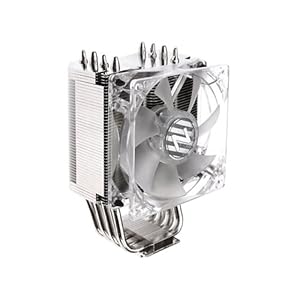 The fan was only blowing on the heat sinks attached to the cpu. Where as the stock fan is directly on top of the heat sinks and cpu, thus cooling both? Anyway, thinks for all the help guys. This SHOULD fix it. |
|
Quoted: hmmm ok. Well I just replaced the one fan I had in there the whole time with the original fan that came with the CPU. Now it says CPU temp: 50c low: 49c high: 52c So it's fixed? Possibly. Might have just been too much thermal paste, or the old heatsink no making good contract. Or it might be other components causing problems. Troubleshooting computer problems is fixing one thing at a time and waiting to see if anything changed. ETA: the purpose of the heatsink is to draw heat from the CPU into a better situation where heat can be removed with a fan. Those heatpipes take the heat from the CPU and puts it in the path of the fan. However, if components around the CPU area were getting hot, putting the stock hs/fan unit back on might help cool those down as well. All depends on the flow of air in your case. |
|
Quoted:
Quoted:
Quoted:
hmmm ok. Well I just replaced the one fan I had in there the whole time with the original fan that came with the CPU. Now it says CPU temp: 50c low: 49c high: 52c So it's fixed? Seems like it is to me. I guess time will tell though. Why in the world didn't your more expensive fan work better? My only guess is this.. http://ecx.images-amazon.com/images/I/415wMZgaT-L._SL500_AA300_.jpg The fan was only blowing on the heat sinks attached to the cpu. Where as the stock fan is directly on top of the heat sinks and cpu, thus cooling both? Anyway, thinks for all the help guys. This SHOULD fix it. Nah, I still ain't convinced. I'd be interested if you had done a reinstall if it would have worked better (i.e., maybe you put the thermal paste on wrong the first time..it ain't hard to mess up IMHO). That design looks like it should cool the CPU also. I'm stumped!! |
|
Quoted: THIN, as opposed to a THICK coat of thermal paste.Quoted: Mind you, I just booted the computer back up about 20 minutes ago after it had shut down by itselfs... Here is the temperature it's saying.... low: 70C High:73C WOW, that's about 160 degrees F isn't it? I ain't no geek so maybe the younger guys can comment........that seems TOO HOT??? Just out of curiousity, did you put a thin coat of thermal paste on the CPU? Too much insulates. You really have some cooling problems. Without looking at the case and setup I can't really tell you what's wrong. It could be improper ventilation, fan not working, the thermal past as suggested, or almost anything else. But you really do have an excess heat problem. CompTIA® A+ Certified.  Yes, I really AM Certified by CompTIA®
|
|
Quoted:
Quoted:
THIN, as opposed to a THICK coat of thermal paste.Quoted:
Mind you, I just booted the computer back up about 20 minutes ago after it had shut down by itselfs... Here is the temperature it's saying.... low: 70C High:73C WOW, that's about 160 degrees F isn't it? I ain't no geek so maybe the younger guys can comment........that seems TOO HOT???
Just out of curiousity, did you put a thin coat of thermal paste on the CPU? Too much insulates. You really have some cooling problems.
Without looking at the case and setup I can't really tell you what's wrong. It could be improper ventilation, fan not working, the thermal past as suggested, or almost anything else. But you really do have an excess heat problem. CompTIA® A+ Certified. Yes, I really AM Certified by CompTIA® GS.....please look at the picture of ArmyVet's fan set up where he and I are guessing at what caused the more expensive unit to not work as well as the stock unit that came with the CPU..............do you think that would cool the CPU properly? His picture is a few posts above this one. |