


Armory Sponsor

How-to: Wifi Security Cameras (Page 1 of 2)

Posted: 9/21/2011 11:38:29 AM EDT
[Last Edit: TheGrayMan][Edited]
|
Wifi cameras:
Whenever the subject of security cameras comes up for discussion, one poster or another will inevitably ask about wireless security cameras. From laptops, phones, tablets, and wireless desktops, wireless devices have become ubiquitous in our homes, offices, and playspaces. It seems a reasonable questions to ask "Hey... if I can have a wireless LAN in my house, couldn't I also have a bunch of those nifty IP cameras on that same wireless LAN, and save myself the time/expense/hassle of running cable??" The answer is "Yes... but..." with a number of caveats, some of which will turn out to be quite important. I'm not trying to make any of you into wireless network engineers, but some understanding of the basic technology is required to understand the fundamental limitations of Wifi networking. With that in mind, let's begin with a discussion of the types of Wifi, so we can understand which ones are best for security purposes. Types: Wireless networking exists in two bands on the EM Spectrum: 2.4 GHz, and 5 GHz. You will also find several different protocols out there ("wireless a/b/g/n," etc) They each have advantages and disadvantages, depending on your application. Most wifi cameras are going to be in the 2.4 GHz band. That may surprise some people. The 2.4 GHz band is quite crowded these days, and has lots of interference. Your cordless phone, existing wifi devices, Bluetooth, the microwave oven in your kitchen... all of these devices emit RF energy in the 2.4 GHz band. Your neighbor might even have an existing wireless LAN in his house, producing yet more interference. Despite this interference, most wifi cameras are going to be in this band for one overriding reason: RANGE. 2.4 GHz penetrates walls and conventional construction far better than the alternative devices in the 5 GHz band. While wifi devices can also be found on the 5 GHz portion of the band, which is much less crowded, has more channels, and less competition for bandspace, their signals are rapidly attenuated by wood, sheetrock, and other barriers in your home. So while 5 GHz might be decent for long-haul, point-to-point connections (from mountain-top to mountain-top, for instance) 2.4 GHz is going to be the choice for LAN cameras. Now let's talk about channel spacing. Refer first to the following diagram, which should help illustrate the point: 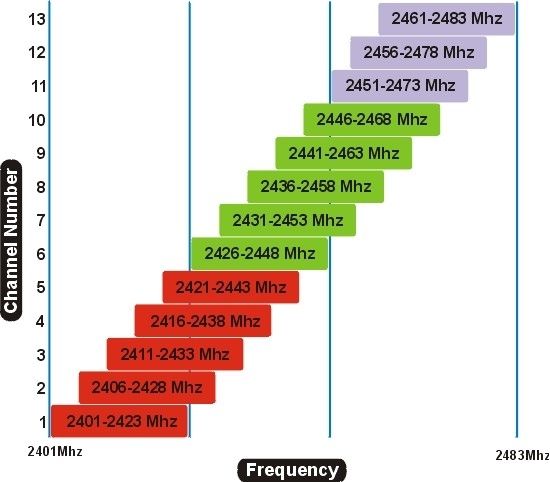
Depending on the country, there are 14 channels in the 2.4 GHz band (we only use 1-11 in the United States). If you look at the frequencies in the above table, you'll note that there is roughly a 22MHz channel spacing... but that doesn't really matter, because most wifi devices use a sort of "spread-spectrum" strategy to increase bandwidth and throughput. This means a device on channel 6 will bleed over into adjacent channels. This means that there are NOT "eleven" channels... or at least, there aren't if you want to avoid interference. For practical purposes, you should consider only three actual "channels" for wifi: Channels 1, 6, and 11: See below: 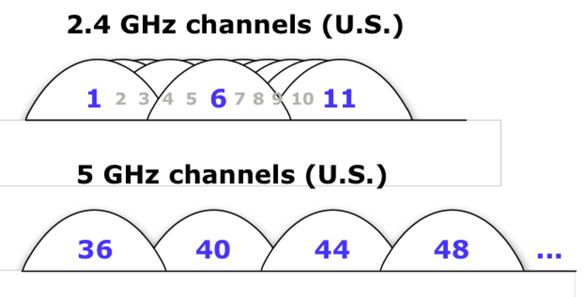
Here is an alternative diagram, that also shows Wireless-N (taken from Wikipedia) 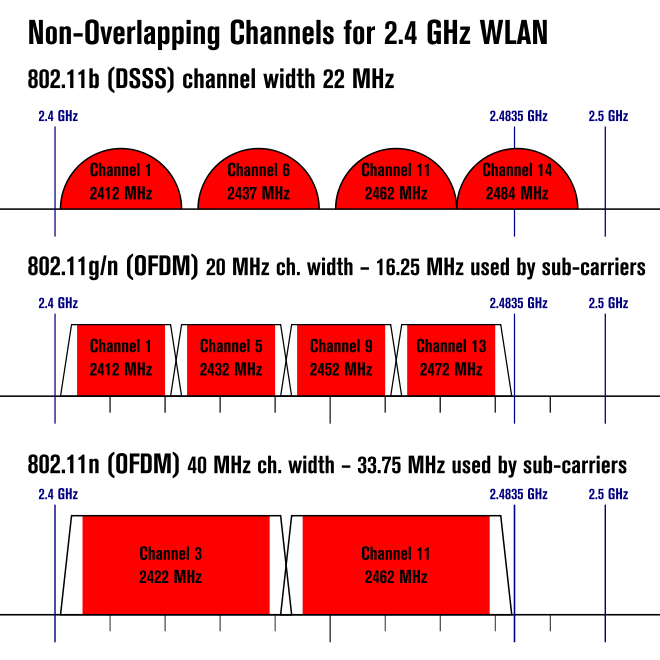
This isn't just theoretical nonsense. If your neighbor is running a busy wireless LAN on channel 1, and you decide to put all your cameras on channel 2 or 3, you may run into trouble. You're either going to jack up his network (leading to decreased throughput, drop-outs, etc), or he's going to jack up yours. In reality, you're both going to end up with sub-optimal network performance, as your devices and access points busily interfere with one another. This is why it's not a bad idea to do a wireless site survey of your home or business before considering wireless cameras. If your local wifi spectrum is already crowded with wireless traffic, you're probably not going to like the results... best to find out before you invest a bunch of money in wireless cameras. A crowded band may make wifi cameras unworkable, and you'll be forced to Ebay them later. A wireless site survey doesn't have to be expensive... got a Droid or iphone? (Apparently, there's no iphone version... sorry  ) There's a great (free) app called "wifi analyzer" that will sniff your local networks for you. ) There's a great (free) app called "wifi analyzer" that will sniff your local networks for you.
It gives you a graph that looks something like this (and if your local wifi environment looks like that, I'd probably avoid wireless cameras!): 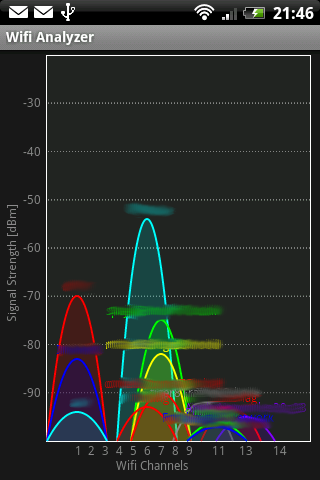
I did a local site survey from my backyard, using Ubiquiti's Airview tool (very inexpensive at roughly 40 bucks, and very informative): 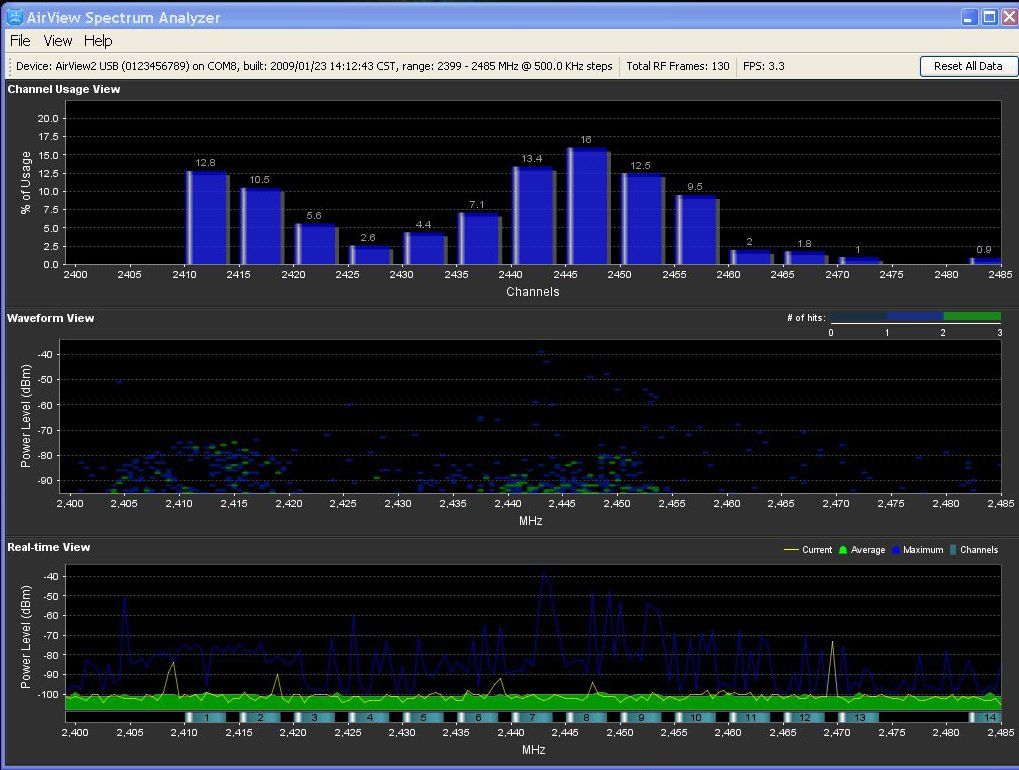
The channel numbers are visible across the very bottom of the lower graph. My neighbor runs a wireless LAN on channel 1, and I run mine on channel 8. Look at the top bar-graph, and note the peaks at those channel centers, and the lower bars on either side. That's the spread-spectrum I mentioned. It's also visible in the middle scatter-plot, as clusters of dots around the channel centers. This is why you need to know what other people are running in your local area... because if I'd put my wireless LAN on channel 1, we'd both suffer degraded performance as a result. Note: my wifi is wireless "G." Wireless "N" takes spread-spectrum to even another level, and takes up roughly half to 3/4 of the entire band. The increased bandwidth and throughput of wireless "N" comes at a price... and that price is stomping on every other wireless network within range. It's perfectly acceptable to do that if you live out in the boonies... but if you live in an apartment complex with a bunch of wifi-loving techie geeks, you're simply being a bad neighbor. To be continued: |
"Look wise, say nothing, and grunt. Speech was given to conceal thought."
- Sir William Osler -
- Sir William Osler -



|
Originally Posted By TxLewis:
Originally Posted By TheRedGoat:
Placeholder tag. TRG Placeholder Quote TXL Placeholder Overquote. |
"You can watch things happen, you can make things happen, or you can wonder what the fuck just happened." ~ Phil Harris RIP
www.shootersnorthwest.com
www.shootersnorthwest.com


|
Originally Posted By a308garand:
Red five standing by. http://ts2.mm.bing.net/images/thumbnail.aspx?q=1235430878165&id=ed0d5051e3ab785bf04c03391132ed5e&url=http%3a%2f%2fwww.starwarshelmets.com%2f2009%2fXWing-Pilot-Helmet.jpg Not noticing a pattern here eh? TXL |
The United States of America has been Mugabe'd
Whatever happened to "It's the economy, stupid"?
Whatever happened to "It's the economy, stupid"?


|
Originally Posted By TxLewis:
Originally Posted By a308garand:
Red five standing by. http://ts2.mm.bing.net/images/thumbnail.aspx?q=1235430878165&id=ed0d5051e3ab785bf04c03391132ed5e&url=http%3a%2f%2fwww.starwarshelmets.com%2f2009%2fXWing-Pilot-Helmet.jpg Not noticing a pattern here eh? TXL Placeholder for LOL-above smiley. TRG |
Uncle Ruckus is my hero.
"Just cultivate a polite detached superiority. " ~BigEasySnow
"That's the hardest I've ever laughed reading ARFCOM." ~Cincinnatus
"Just cultivate a polite detached superiority. " ~BigEasySnow
"That's the hardest I've ever laughed reading ARFCOM." ~Cincinnatus

|
Originally Posted By CanteTinza:
Originally Posted By 1GUNRUNNER:
Placeholder ladder quote.
Originally Posted By TxLewis:
Originally Posted By TheRedGoat:
Placeholder tag. TRG Placeholder Quote TXL Placeholder Overquote. Placeholder ladder overquote with clueless Red 5 Leader tag along. |
"None are more hopelessly enslaved than those who falsely believe they are free." ~ Johann Wolfgang von Goethe

|
C'mon guys, this is not GD. And this could be a very helpful thread, as is usually the case with the OP's info. Just hit the 'subscribe' button. Jesssh. |
Motor Racing, Mountain Climbing and Bullfighting are the only true sports. The others are simply children's games played by adults. - Ernest Hemingway
MoS #666
I don't like lube. I do like pain though, so YMMV. - BeS
MoS #666
I don't like lube. I do like pain though, so YMMV. - BeS
|
Originally Posted By us-kiwi:
C'mon guys, this is not GD. And this could be a very helpful thread, as is usually the case with the OP's info. Just hit the 'subscribe' button. Jesssh. QFT placeholder. TRG |
Uncle Ruckus is my hero.
"Just cultivate a polite detached superiority. " ~BigEasySnow
"That's the hardest I've ever laughed reading ARFCOM." ~Cincinnatus
"Just cultivate a polite detached superiority. " ~BigEasySnow
"That's the hardest I've ever laughed reading ARFCOM." ~Cincinnatus
|
Originally Posted By TheGrayMan:
Yikes... I leave you kids alone for five minutes and look at this place! Placeholder reminder for OP he hasn't used his placeholder. |
"You can watch things happen, you can make things happen, or you can wonder what the fuck just happened." ~ Phil Harris RIP
www.shootersnorthwest.com
www.shootersnorthwest.com
|
Originally Posted By 1GUNRUNNER:
Originally Posted By TheGrayMan:
Yikes... I leave you kids alone for five minutes and look at this place! Placeholder reminder for OP he hasn't used his placeholder. Okay... okay... I'm working on it.
|
"Look wise, say nothing, and grunt. Speech was given to conceal thought."
- Sir William Osler -
- Sir William Osler -

|
Originally Posted By BallisticTip:
Placeholder, waiting on the placeholder.  Hard to do heavy content-generation on a Droid smartphone, posting from your son's soccer game. Sheesh 
|
"Look wise, say nothing, and grunt. Speech was given to conceal thought."
- Sir William Osler -
- Sir William Osler -

|
Originally Posted By chapperjoe:
completely wireless? or will we still need power cables? Power required... but maybe not much. I'll get to that in the latter section of this thread. |
"Look wise, say nothing, and grunt. Speech was given to conceal thought."
- Sir William Osler -
- Sir William Osler -
|
Originally Posted By TheGrayMan:
I'll get to that in the latter section of this thread. Placeholder to respond to that part. |
"You can watch things happen, you can make things happen, or you can wonder what the fuck just happened." ~ Phil Harris RIP
www.shootersnorthwest.com
www.shootersnorthwest.com


|
Originally Posted By DJinGA:
Originally Posted By TheGrayMan:
Placeholder post. http://wonkette.com/wp-content/uploads/2011/04/oliver_twist_begging.jpeg Gah... you people are animals!
ETA: first post is up |
"Look wise, say nothing, and grunt. Speech was given to conceal thought."
- Sir William Osler -
- Sir William Osler -

 I like charts and graphs
|
So with the basic knowledge of wifi out of the way, let us begin with a review and test of a wifi camera from a major manufacturer.
Today's test subject is from Axis Communications, and is one of their newest M10-series network cameras. More specifically, one of their wifi models (in this model series, two models are wireless, two are wired, and one of the wired models is megapixel). Link to specific model here. 
Here it is on our test bench: 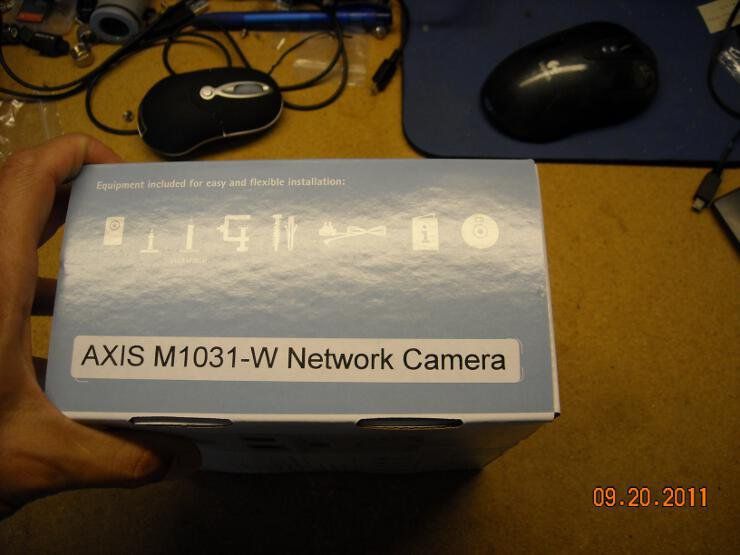
Here's the first opening of the box. This camera is quite small... note the 5.56 round placed next to it for comparison. Also note how small it is as I'm holding it... practically fits in the palm of your hand. It's also ridiculously lightweight... no way this thing will ever pull out of the wall. 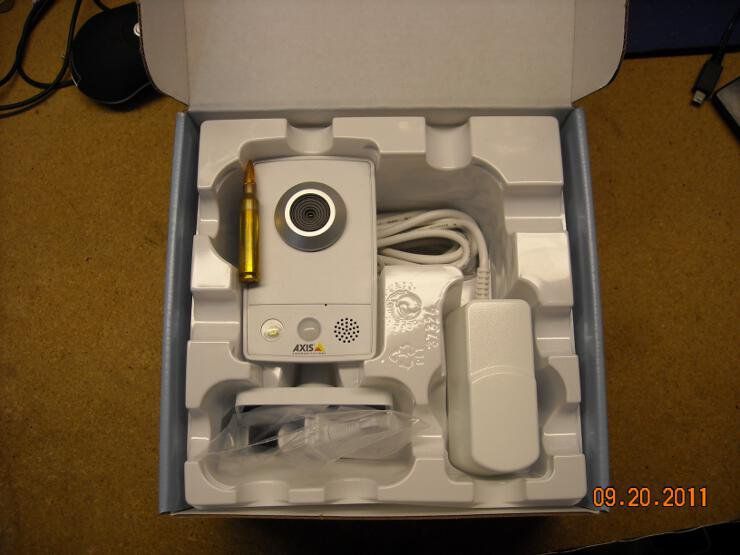
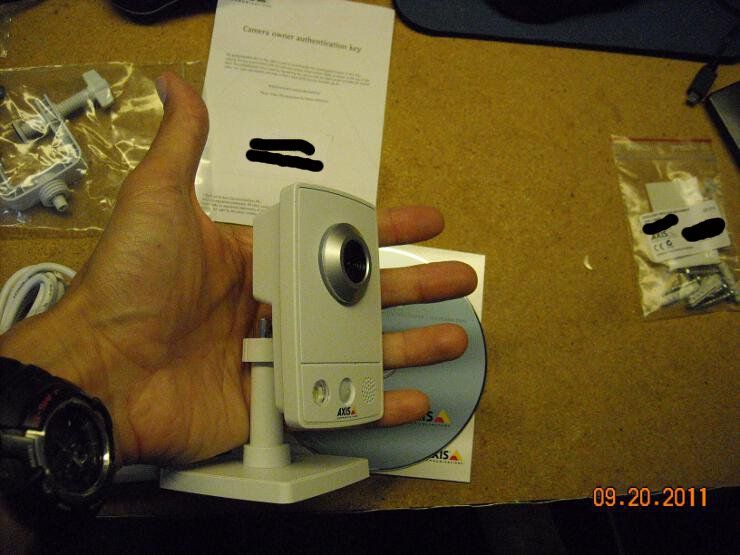
Here's the back. This model can be differentiated from some of the others by the presence of the WLAN light: 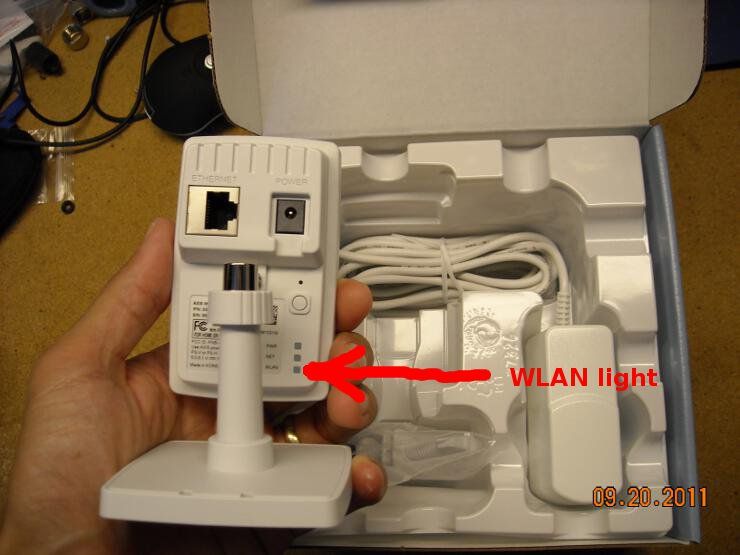
Here's everything that comes in the box. There's the camera, a manual, a software CD, wall-wart/PSU, mounting hardware (including a shelf clamp), and a license key. You also get a free sticker. 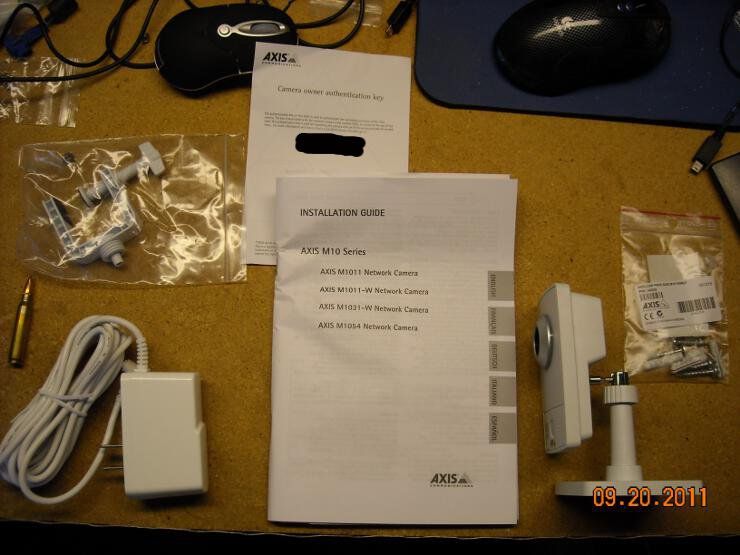
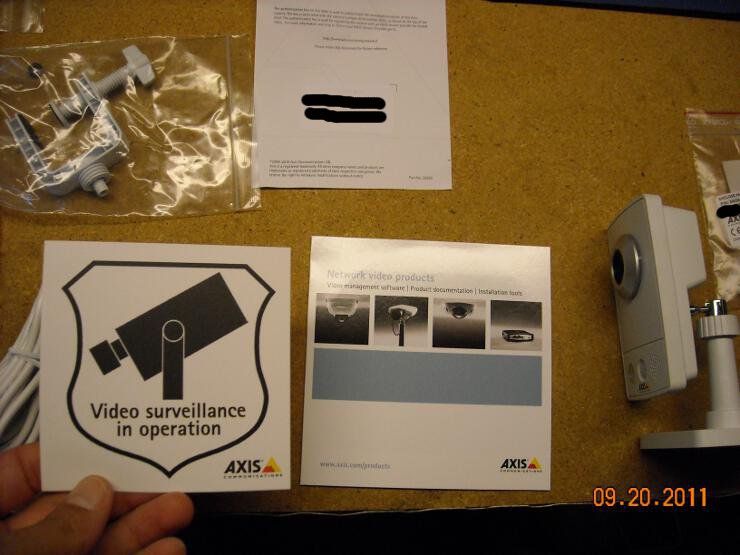
Of relevance to some later posts, here's the wall-wart, and a close-up of the specs. 5VDC, 1.5A 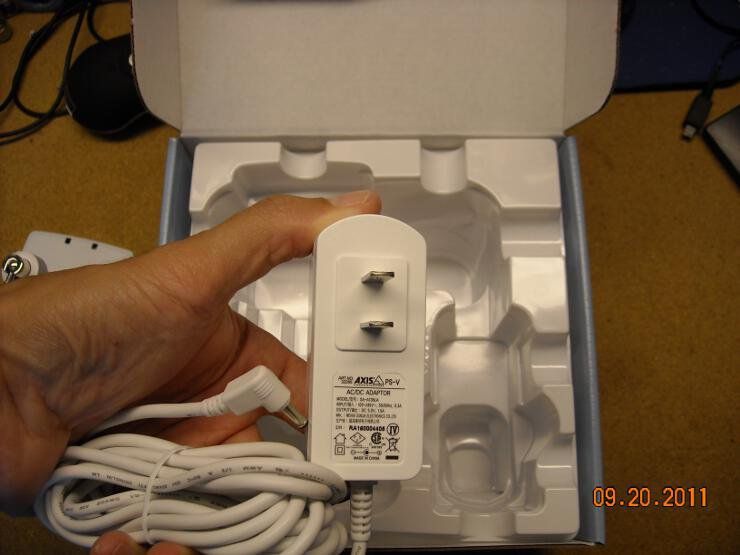
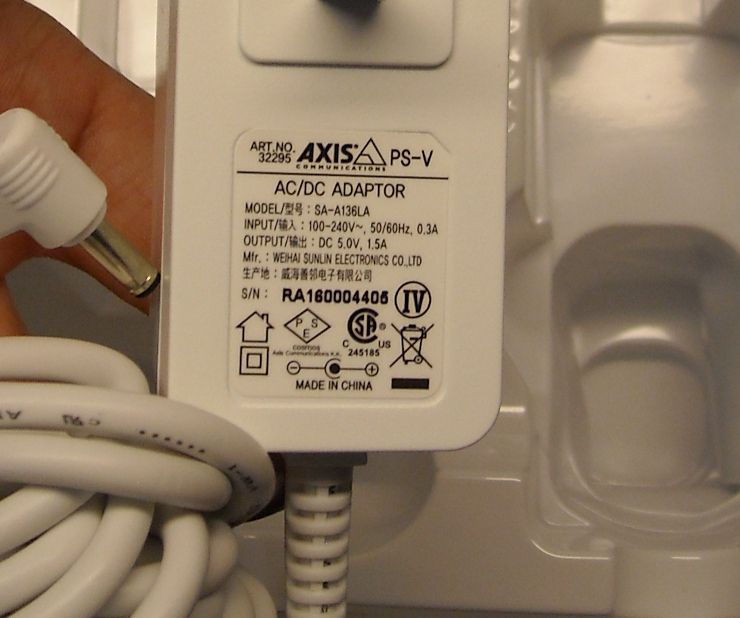
It pulls one watt on the kill-a-watt meter: 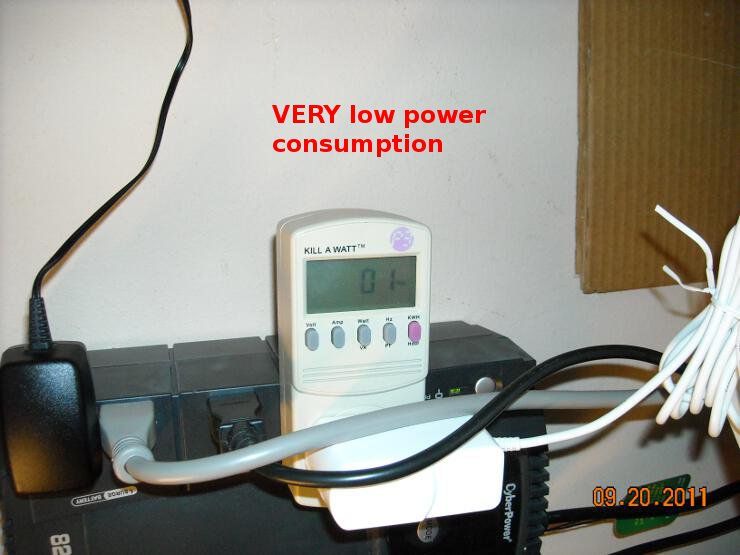
The camera itself has a passive-infrared sensor, and a built-in light. The light is particularly interesting, since it can be activated remotely. I managed to activate it a couple of different ways, and it actually provides usable illumination for the camera. Click on the following video... and I will award 10 internets to the poster who can identify the music  (my money is on TRG) (my money is on TRG)
|
"Look wise, say nothing, and grunt. Speech was given to conceal thought."
- Sir William Osler -
- Sir William Osler -
|
So to dovetail on my earlier mention of the power consumption of this device, I decided to run it off a power source that would enable me to measure its actual consumption. I have a tiny little pot-adjustable power supply that displays both voltage and amperage, and I wondered if this device might run off of a 6V battery.
As it turns out, it should work just fine.... video links below: The power consumption of the device is roughly 250mA at 6VDC, as shown below: 
When the light is turned on remotely, power consumption roughly doubles to about 550mA 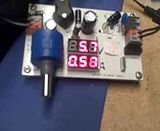
This brings up the possibility of running this camera remotely from a battery. Just one of these should run this camera (without the light) for an entire 24-hour period, while only draining the battery halfway. 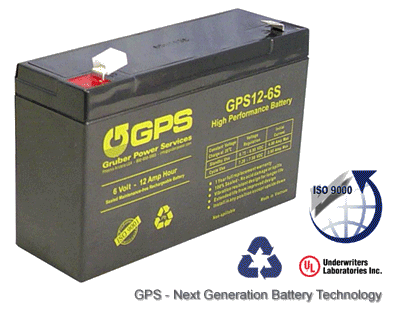
|
"Look wise, say nothing, and grunt. Speech was given to conceal thought."
- Sir William Osler -
- Sir William Osler -
|
So let us talk throughput with the average wireless LAN, and use our Axis camera as a real-world example.
Look carefully at the average WIFI device, and you'll see numbers on the box: 54Mbps! 300Mbps! W00t!!! Those numbers are crap; every one of them. The reality with wireless LAN speeds is that they tend to run less than half of the advertised data rate.... AT BEST. Sometimes it's much less, depending on range, interference, etc. In other words, you're looking at 20-25Mbps out of your soooper-fast "54Mpbs" wireless "G" network. Some of the newer access points that run the "N" standard can go faster, but that's because they use more of the spectrum, and use MIMO (multiple input, multiple output) to boost throughput. This has been known (and noted by irritated tech writers) for years. Here's one link... and another... and yet another. So what's a security-minded homeowner to do? BE REALISTIC. You're probably only going to get three or so cameras on that single access point before you saturate it, drop frames, and have authentication problems. You may even push that consumer-grade wireless router to the point that it craps out. Here's that Axis M1031-W camera on my home wireless LAN. I managed to get three different computers downloading a stream (all wireless), but adding the fourth one knocked one of the previous clients off the network. The video literally froze. 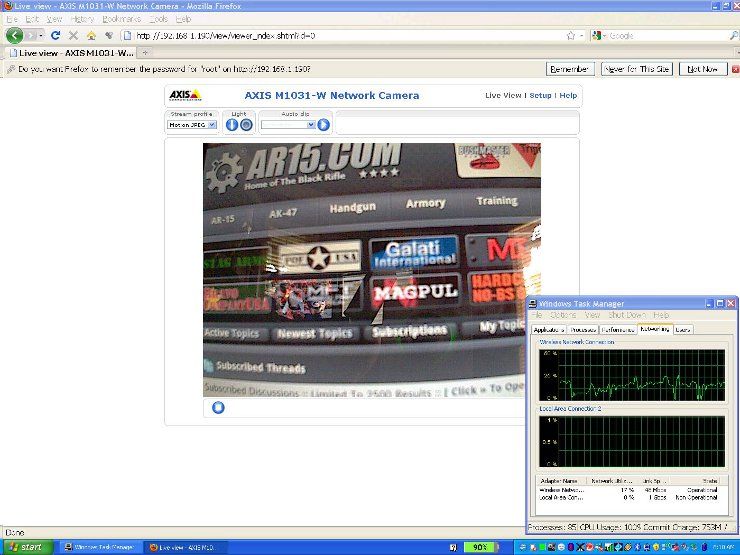
You may not be able to read it, but in that screen-grab, that camera stream, which is VGA at 30 FPS (640x480 at 30 images-per-second) was sucking down 12-17% of that "theoretical" 54Mbps wifi link. That's a 6-8Mbps slice out of that 20-25Mbps of usable bandwidth... and adding additional wifi devices doesn't cause a linear drop in that usable bandwidth... it actually drops MORE due to increased protocol overhead from handling multiple clients. That translates into about three cameras before you start having bandwidth problems... or find yourself unable to surf the 'net with your laptop or smartphone, because the network is saturated. That's not to say you can't cheat a bit if you absolutely NEED that fourth camera. Recall our channel spacing graphs from earlier? Let's say you have everything on channel 1, and none of your neighbors use wifi: 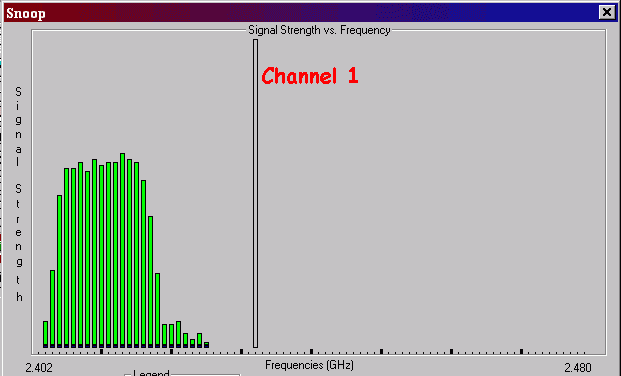
You could add a second access point. That's easy enough... put it on channel 11, and you could add a few more wireless cameras! 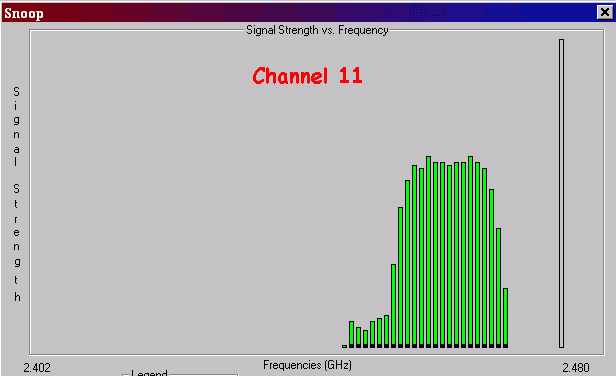
Put another access point on channel six, and you could add still more... but realistically, that's all you're going to get out of three wireless "G" access points. You're probably done at about nine cameras... but the truth is, wireless shouldn't really be necessary for that many locations. Running cable sucks, but it's doable, and the ability to push data over a wired LAN is MUCH better than wireless. Got an outside shed that you don't want to run Cat6 cable to? Sure... a single wireless camera might be perfect. A detached garage? Absolutely. A barn? A hen-house? Your mailbox? All realistic options... but otherwise, you should be thinking wired networking... particularly if your local RF environment looks like this: 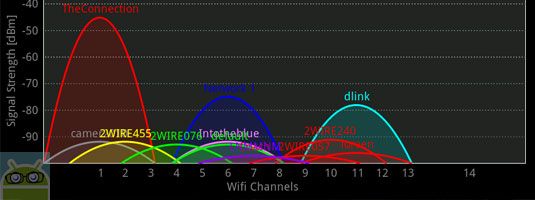
|
"Look wise, say nothing, and grunt. Speech was given to conceal thought."
- Sir William Osler -
- Sir William Osler -
|
Originally Posted By TheGrayMan:
Originally Posted By 1GUNRUNNER:
Placeholder as a reminder to read all of this in the sober morning.
Sometimes wifi makes more sense when you're drunk. Placeholder to ask for your phone number so I can drunk dial you when I am installing this later. TRG |
Uncle Ruckus is my hero.
"Just cultivate a polite detached superiority. " ~BigEasySnow
"That's the hardest I've ever laughed reading ARFCOM." ~Cincinnatus
"Just cultivate a polite detached superiority. " ~BigEasySnow
"That's the hardest I've ever laughed reading ARFCOM." ~Cincinnatus

|
Originally Posted By TheGrayMan:
So to dovetail on my earlier mention of the power consumption of this device, I decided to run it off a power source that would enable me to measure its actual consumption. I have a tiny little pot-adjustable power supply that displays both voltage and amperage, and I wondered if this device might run off of a 6V battery. As it turns out, it should work just fine.... video links below: The power consumption of the device is roughly 250mA at 6VDC, as shown below: <a href="http://s251.photobucket.com/albums/gg286/TGrayman/Axis%20Wireless/?action=view¤t=Axiswirelesslightoff.mp4" target="_blank">http://i251.photobucket.com/albums/gg286/TGrayman/Axis%20Wireless/th_Axiswirelesslightoff.jpg</a> Great info! But all videos are fail, Can't get my 10 internets for music recongnition.
When the light is turned on remotely, power consumption roughly doubles to about 550mA <a href="http://s251.photobucket.com/albums/gg286/TGrayman/Axis%20Wireless/?action=view¤t=Axislightvoltageon.mp4" target="_blank">http://i251.photobucket.com/albums/gg286/TGrayman/Axis%20Wireless/th_Axislightvoltageon.jpg</a> This brings up the possibility of running this camera remotely from a battery. Just one of these should run this camera (without the light) for an entire 24-hour period, while only draining the battery halfway. http://i251.photobucket.com/albums/gg286/TGrayman/Axis%20Wireless/gruber6V.gif Great Info! But all videos are fail. Can't get my 10 internets for music recognitoin. :( |
|
Originally Posted By FireStalker:
Great Info! But all videos are fail. Can't get my 10 internets for music recognitoin. :( The videos aren't working? They're working for me... even on my Droid. Did you try clicking on the pictures to start the videos? They're hosted on my Photobucket account. |
"Look wise, say nothing, and grunt. Speech was given to conceal thought."
- Sir William Osler -
- Sir William Osler -

|
Originally Posted By TheGrayMan:
Wifi cameras: Whenever the subject of security cameras comes up for discussion, one poster or another will inevitably ask about wireless security cameras. From laptops, phones, tablets, and wireless desktops, wireless devices have become ubiquitous in our homes, offices, and playspaces. It seems a reasonable questions to ask "Hey... if I can have a wireless LAN in my house, couldn't I also have a bunch of those nifty IP cameras on that same wireless LAN, and save myself the time/expense/hassle of running cable??" The answer is "Yes... but..." with a number of caveats, some of which will turn out to be quite important. I'm not trying to make any of you into wireless network engineers, but some understanding of the basic technology is required to understand the fundamental limitations of Wifi networking. With that in mind, let's begin with a discussion of the types of Wifi, so we can understand which ones are best for security purposes. Types: Wireless networking exists in two bands on the EM Spectrum: 2.4 GHz, and 5 GHz. You will also find several different protocols out there ("wireless a/b/g/n," etc) They each have advantages and disadvantages, depending on your application. Most wifi cameras are going to be in the 2.4 GHz band. That may surprise some people. The 2.4 GHz band is quite crowded these days, and has lots of interference. Your cordless phone, existing wifi devices, Bluetooth, the microwave oven in your kitchen... all of these devices emit RF energy in the 2.4 GHz band. Your neighbor might even have an existing wireless LAN in his house, producing yet more interference. Despite this interference, most wifi cameras are going to be in this band for one overriding reason: RANGE. 2.4 GHz penetrates walls and conventional construction far better than the alternative devices in the 5 GHz band. While wifi devices can also be found on the 5 GHz portion of the band, which is much less crowded, has more channels, and less competition for bandspace, their signals are rapidly attenuated by wood, sheetrock, and other barriers in your home. So while 5 GHz might be decent for long-haul, point-to-point connections (from mountain-top to mountain-top, for instance) 2.4 GHz is going to be the choice for LAN cameras. Now let's talk about channel spacing. Refer first to the following diagram, which should help illustrate the point: http://i251.photobucket.com/albums/gg286/TGrayman/Axis%20Wireless/kanalen.jpg Depending on the country, there are 14 channels in the 2.4 GHz band (we only use 1-11 in the United States). If you look at the frequencies in the above table, you'll note that there is roughly a 22MHz channel spacing... but that doesn't really matter, because most wifi devices use a sort of "spread-spectrum" strategy to increase bandwidth and throughput. This means a device on channel 6 will bleed over into adjacent channels. This means that there are NOT "eleven" channels... or at least, there aren't if you want to avoid interference. For practical purposes, you should consider only three actual "channels" for wifi: Channels 1, 6, and 11: See below: http://i251.photobucket.com/albums/gg286/TGrayman/Axis%20Wireless/140685-spectrumbandoverlap_original.jpg Here is an alternative diagram, that also shows Wireless-N (taken from Wikipedia) http://i251.photobucket.com/albums/gg286/TGrayman/Axis%20Wireless/660px-NonOverlappingChannels24GHzWLAN-ensvg.png This isn't just theoretical nonsense. If your neighbor is running a busy wireless LAN on channel 1, and you decide to put all your cameras on channel 2 or 3, you may run into trouble. You're either going to jack up his network (leading to decreased throughput, drop-outs, etc), or he's going to jack up yours. In reality, you're both going to end up with sub-optimal network performance, as your devices and access points busily interfere with one another. This is why it's not a bad idea to do a wireless site survey of your home or business before considering wireless cameras. If your local wifi spectrum is already crowded with wireless traffic, you're probably not going to like the results... best to find out before you invest a bunch of money in wireless cameras, only to be forced to Ebay them later after they don't work. A wireless site survey doesn't have to be expensive... got a Droid or iphone? There's a great (free) app called "wifi analyzer" that will sniff you local networks for you. It gives you a graph that looks something like this (and if your local wifi environment looks like that, I'd probably avoid wireless cameras!): http://i251.photobucket.com/albums/gg286/TGrayman/Axis%20Wireless/wifi_analyzer_graph.png I did a local site survey from my backyard, using Ubiquiti's Airview tool (very inexpensive at roughly 40 bucks, and very informative): http://i251.photobucket.com/albums/gg286/TGrayman/Axis%20Wireless/spectrum.jpg The channel numbers are visible across the very bottom of the lower graph. My neighbor runs a wireless LAN on channel 1, and I run mine on channel 8. Look at the top bar-graph, and note the peaks at those channel centers, and the lower bars on either side. That's the spread-spectrum I'm talking about. It's also visible in the middle scatter-plot, as clusters of dots around the channel centers. This is why you need to know what other people are running in your local area... because if I'd put my wireless LAN on channel 1, we'd both suffer degraded performance as a result of that. Note: my wifi is wireless "G." Wireless "N" takes spread-spectrum to even another level, and takes up roughly half to 3/4 of the entire band. The increased bandwidth and throughput that wireless "N" offers comes at a price... and that price is stomping on every other wireless network within range. It's perfectly acceptable to do that if you live out in the boonies... but if you live in an apartment complex with a bunch of wifi-loving techie geeks, you're simply being a bad neighbor. To be continued: Sorry GreyMan, no wifi analyzer for an iphone, it is android only from my search 
|
Front Sight GRADUATE 10/06/09
|
Originally Posted By walt_l:
Sorry GreyMan, no wifi analyzer for an iphone, it is android only from my search
Dang... could have sworn that one was dual-platform. Any Mac-geeks know if there's a similar tool out there for the Apple platforms? ETA: this link says it runs on IOS4, but isn't on the app-store. You have to go to the maker's website to get it. ETA2: Ah... apparently it USED to be on the app-store, but apple removed it, along with a few others... because they don't like people monkeying with their closed platform. |
"Look wise, say nothing, and grunt. Speech was given to conceal thought."
- Sir William Osler -
- Sir William Osler -
|
Originally Posted By TheGrayMan:
Originally Posted By FireStalker:
Great Info! But all videos are fail. Can't get my 10 internets for music recognitoin. :( The videos aren't working? They're working for me... even on my Droid. Did you try clicking on the pictures to start the videos? They're hosted on my Photobucket account. Yep, clicked on photo and got: "The action that you were trying to perform has failed" with a photobucket icon |
|
Originally Posted By FireStalker:
Originally Posted By TheGrayMan:
Originally Posted By FireStalker:
Great Info! But all videos are fail. Can't get my 10 internets for music recognitoin. :( The videos aren't working? They're working for me... even on my Droid. Did you try clicking on the pictures to start the videos? They're hosted on my Photobucket account. Yep, clicked on photo and got: "The action that you were trying to perform has failed" with a photobucket icon Hmm... stand by. ETA: no problem here, even on my wife's Mac. Anybody else having trouble getting those to play? |
"Look wise, say nothing, and grunt. Speech was given to conceal thought."
- Sir William Osler -
- Sir William Osler -
|
Originally Posted By DJinGA:
Originally Posted By TheGrayMan:
http://i251.photobucket.com/albums/gg286/TGrayman/Axis%20Wireless/crowded-Copy.jpg Not to derail this, but what tool is this? Wifi analyzer... for Android platforms. |
"Look wise, say nothing, and grunt. Speech was given to conceal thought."
- Sir William Osler -
- Sir William Osler -
|
Originally Posted By TheGrayMan:
Originally Posted By DJinGA:
Originally Posted By TheGrayMan:
http://i251.photobucket.com/albums/gg286/TGrayman/Axis%20Wireless/crowded-Copy.jpg Not to derail this, but what tool is this? Wifi analyzer... for Android platforms. Sorry about that - read your second post BEFORE your first one.  !?@&#% Apple. !?@&#% Apple.
|
Why are people in zombie movies ... the only people to have NEVER seen a zombie movie?
|
Originally Posted By DJinGA:
Originally Posted By TheGrayMan:
Originally Posted By DJinGA:
Originally Posted By TheGrayMan:
http://i251.photobucket.com/albums/gg286/TGrayman/Axis%20Wireless/crowded-Copy.jpg Not to derail this, but what tool is this? Wifi analyzer... for Android platforms. Sorry about that - read your second post BEFORE your first one. !?@&#% Apple.You can still get it, just not on the app-store. Check the links I posted. |
"Look wise, say nothing, and grunt. Speech was given to conceal thought."
- Sir William Osler -
- Sir William Osler -
|
Originally Posted By TheGrayMan:
Originally Posted By DJinGA:
Originally Posted By TheGrayMan:
Originally Posted By DJinGA:
Originally Posted By TheGrayMan:
http://i251.photobucket.com/albums/gg286/TGrayman/Axis%20Wireless/crowded-Copy.jpg Not to derail this, but what tool is this? Wifi analyzer... for Android platforms. Sorry about that - read your second post BEFORE your first one. !?@&#% Apple.You can still get it, just not on the app-store. Check the links I posted. I dont see any way to install it / get it. |
Why are people in zombie movies ... the only people to have NEVER seen a zombie movie?
|
Originally Posted By DJinGA:
I dont see any way to install it / get it. It's a ".DEB" package... which I would immediately assume is a Debian Linux archive, but apparently it also works on iPhones, through a package-management application called Cydia. Cydia apparently has a store link Here is the developer page... it doesn't say whether you have to Jailbreak (root) your iPhone, or not. Sorry I can't be of more help... I'm more of an Android guy. Sucks that apple doesn't permit this kind of application on the app-store... danged closed platforms. 
|
"Look wise, say nothing, and grunt. Speech was given to conceal thought."
- Sir William Osler -
- Sir William Osler -
|
Originally Posted By TheGrayMan:
Originally Posted By FireStalker:
Originally Posted By TheGrayMan:
Originally Posted By FireStalker:
Great Info! But all videos are fail. Can't get my 10 internets for music recognitoin. :( The videos aren't working? They're working for me... even on my Droid. Did you try clicking on the pictures to start the videos? They're hosted on my Photobucket account. Yep, clicked on photo and got: "The action that you were trying to perform has failed" with a photobucket icon Hmm... stand by. ETA: no problem here, even on my wife's Mac. Anybody else having trouble getting those to play? IDK, Videos don't come up for me. Just a screen from PhotoBucket. |
|
OK. Let's go through the basic setup of this particular camera. Some of this will be similar to other wireless cameras on the market, simply because all wireless devices need the same things in order to function (SSID, WPA key, and an IP address).
Everything you need to hook this up is in this picture. The power cord is obvious, but the network cable is necessary too. Think about it... it's a wireless camera, but you obviously CAN'T hook up a wireless camera without first giving it the appropriate wireless settings via wired internet... so the Cat5 cable is needed. There's a software tool on the provided CD that we'll need also. 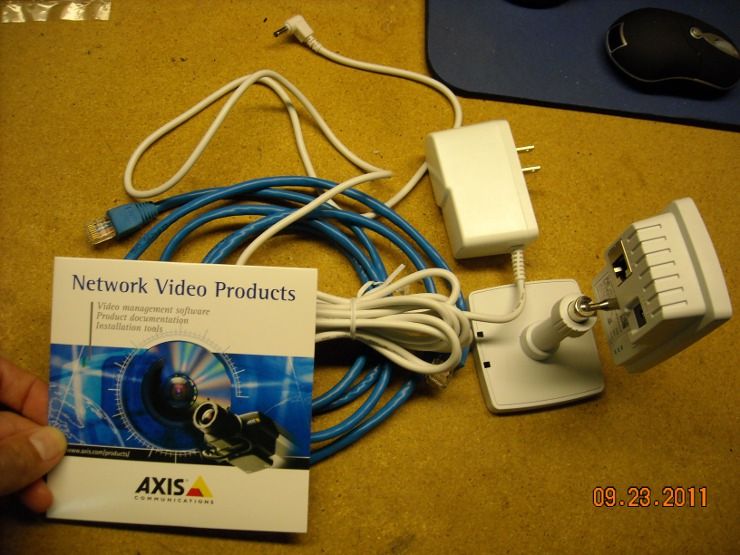
Hook up the cables in the usual places... you can't get it wrong: 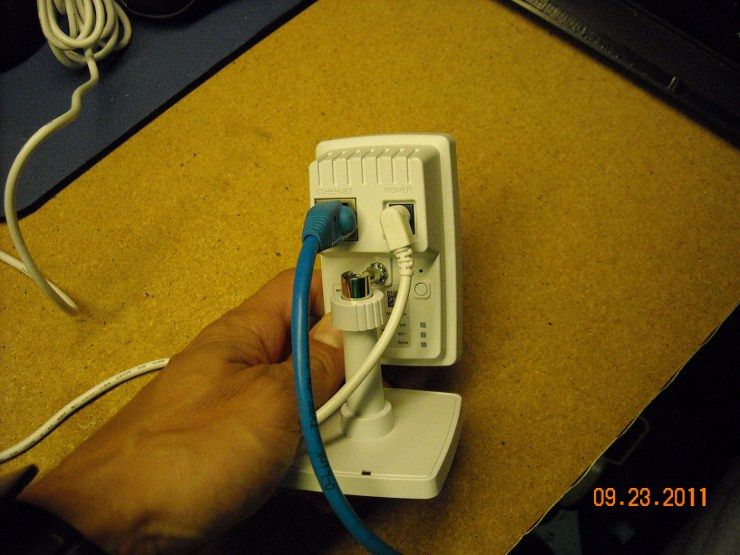
The power cord obviously goes to the wall socket, but the other end of the cat5 will need to go to a LAN port on your router (or this case, an additional switch that I've linked to the big rack-mount switch in my server room) 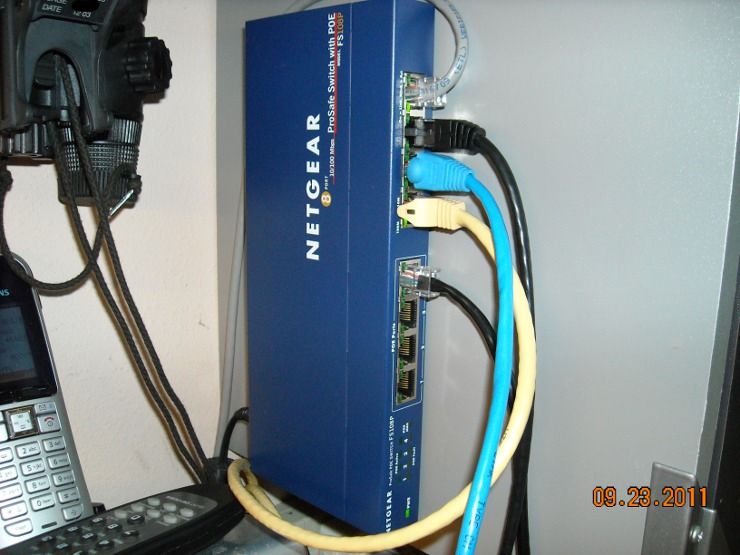
Now we need that CD... put it in your desktop or laptop, explore it, and find the "IP Utility" 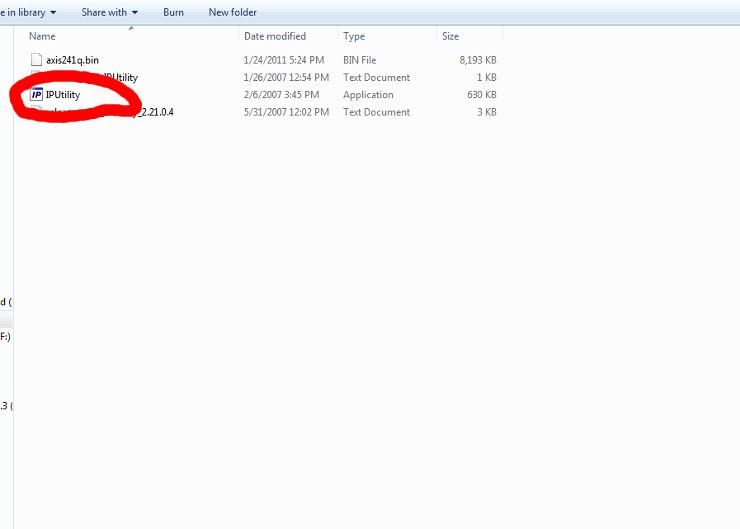
Run it, and your camera should pop up in this frame: 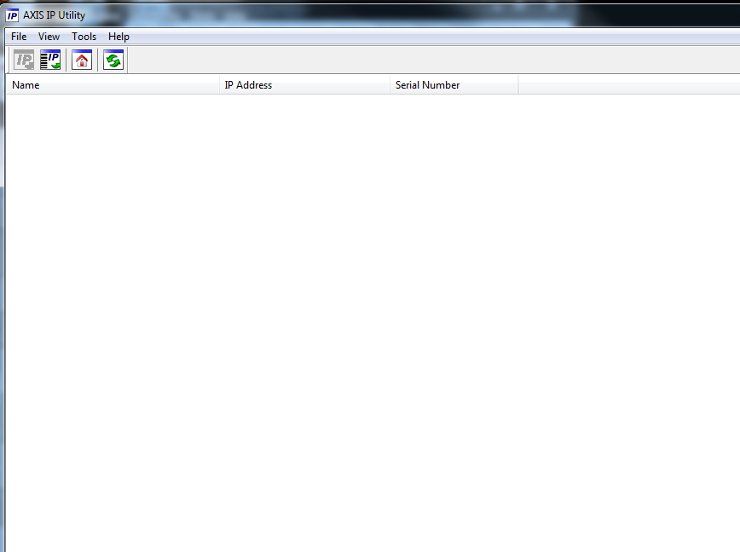
When you find the IP address, enter it into your browser, and you'll see the initial login screen. The first thing it will ask is for you to set a root password... do so. Unlike the Mobotix cameras, losing the password won't brick the camera... you have the option of resetting it... but it's still a hassle. Try to remember it. The Live View screen will come up next. 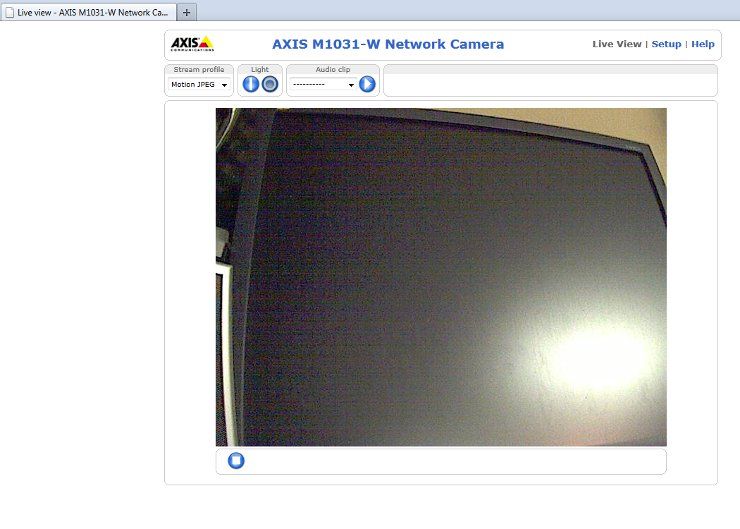
Click the "Setup" link on the top of the page to bring up this screen: 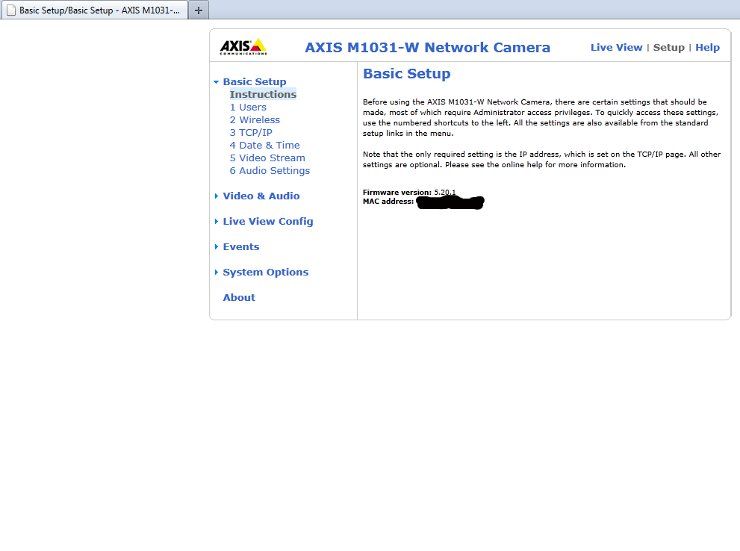
Click the "Wireless" link in the left frame to bring up the screen for your wireless settings. Enter them... make sure to click "Save" when done. 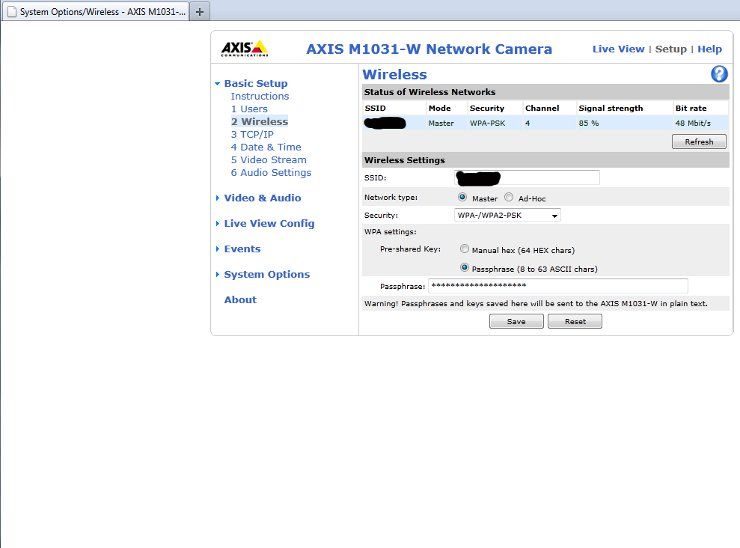
Now go to the TCP/IP link on the left, to bring up this page. The highlighted area on this page is the most important. You can either enter a static IP address, or set the DHCP server in your router to reserve an IP address for this device. Either way works... because you'll want to know the address of this device to access it later. 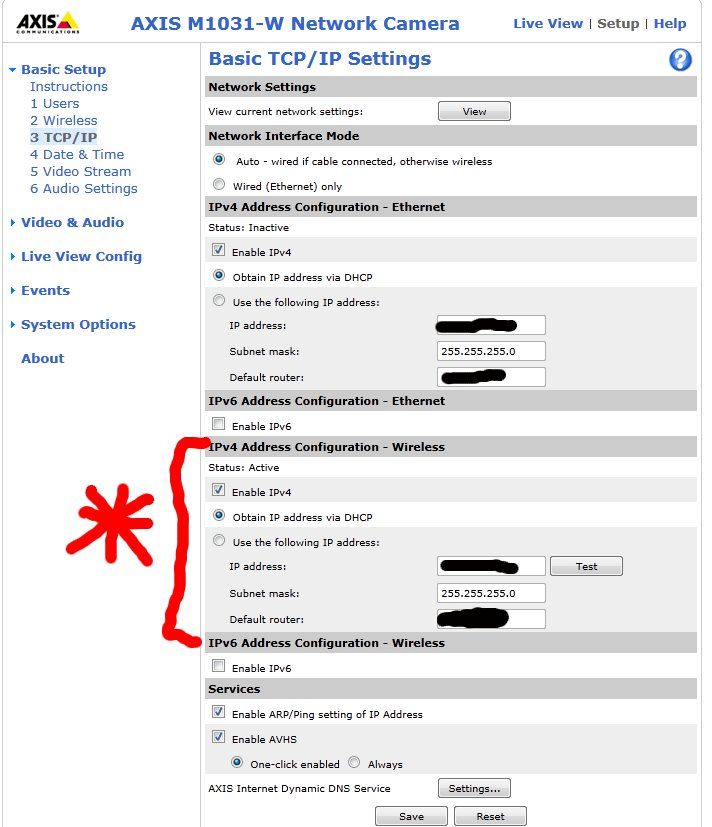
Under "Live View Config" is an important setting. You have the option of using something other than Active-X controls (YESSSS!!!!) to push images out to browsers. This is a nice option, and it's good of Axis to include it. 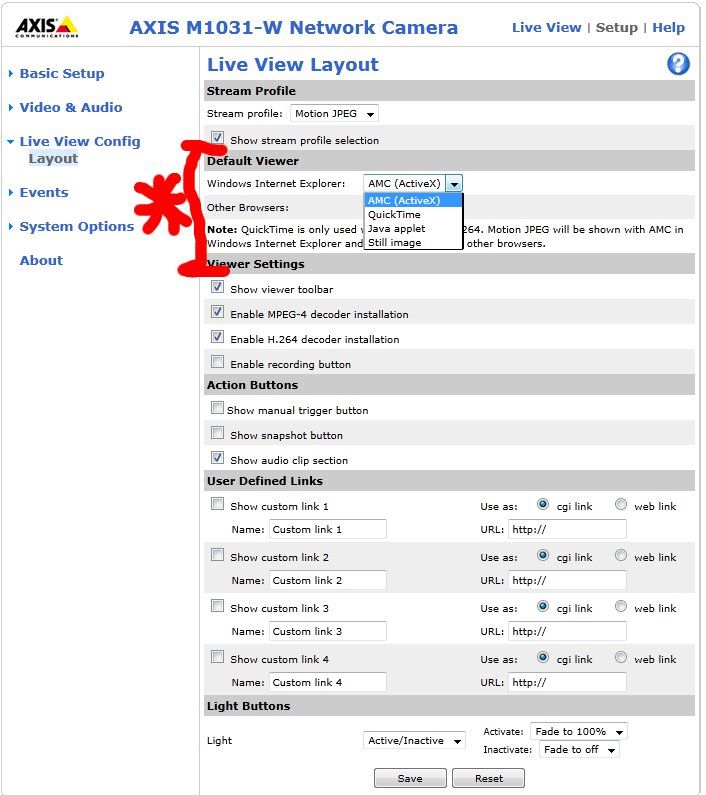
Next we can use the "Events" link to set up actions we'd like the camera to take, depending on what's happening. It can be configured to send an email, FTP an image, play an audio file, turn on the light, etc, etc. 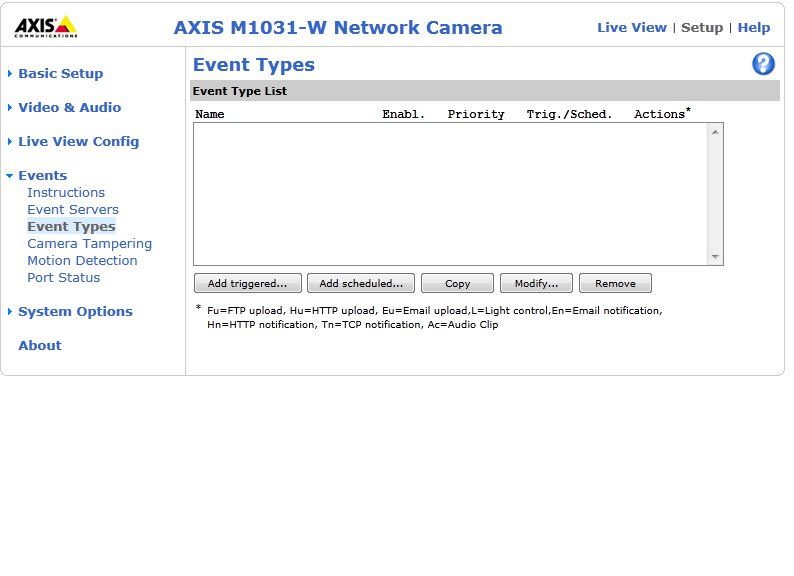
There are a bunch of potential triggers you can select by clicking the "Add Triggered" button to the lower-left of that field. PIR (passive infrared), noise, temperature, motion detection... whatever. You can then select what action you'd like the camera to take. You can also schedule the triggers to only be active during certain times of day, or certain days of the week. For instance, if your store is closed after-hours, and weekends... you'd probably want your motion detection to be active during those times. 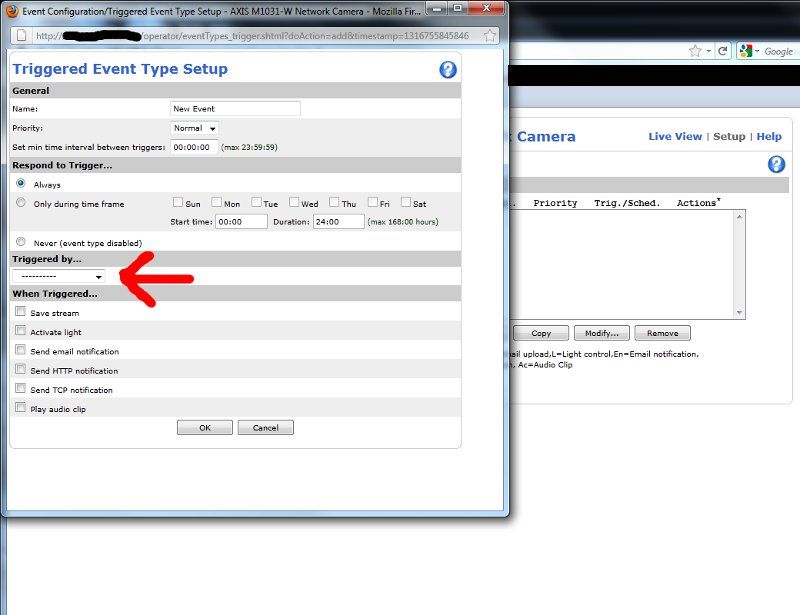
Interestingly, if you're not into the Slashdot-esque "soothing green light" of that status LED, you can shut it off: 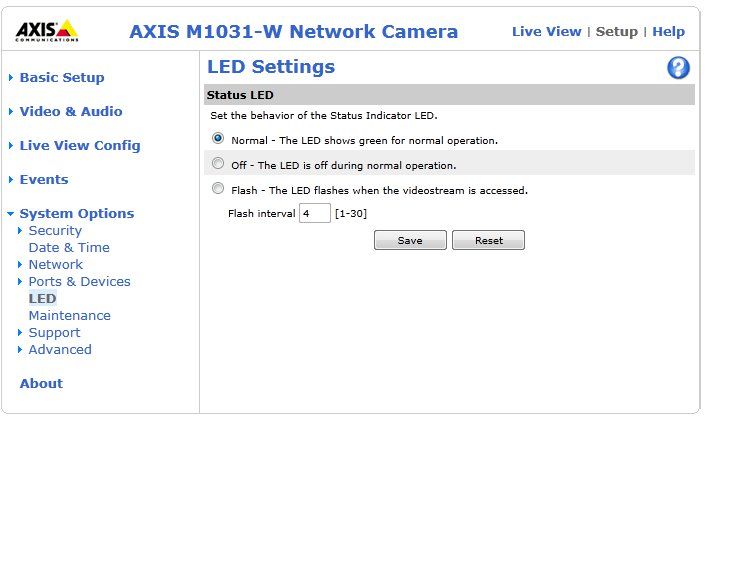
Once you've done that, the camera should be available on your network, for you to view 'till your heart's content. |
"Look wise, say nothing, and grunt. Speech was given to conceal thought."
- Sir William Osler -
- Sir William Osler -
|
So let's talk about another potential application for this camera, aside from putting it in the baby's room, or in your tool shed.
Ever had your vehicle stolen or burglarized?
Yeah... me too. In fact, that's probably the lion's share of crime in my neighborhood. It's mostly kids, but they steal GPSs, car stereos, briefcases and laptops... or they steal the whole car, go joyriding, and trash it when they're done. Wouldn't it be nice to have a picture of them to show the police? I have five discrete camera views of the front of my home, with particular attention payed to places where my wife and I park our vehicles. However, if I'm particularly unlucky, they might not turn just the right way for me to get a face-shot of them in-the-act. Why not have a camera IN THE CAR ITSELF? Here is a cigarette-lighter adapter that I found online. It has a range of voltages you can select, plus a bunch of different tips for powering devices. The Axis camera will take 5-6VDC: 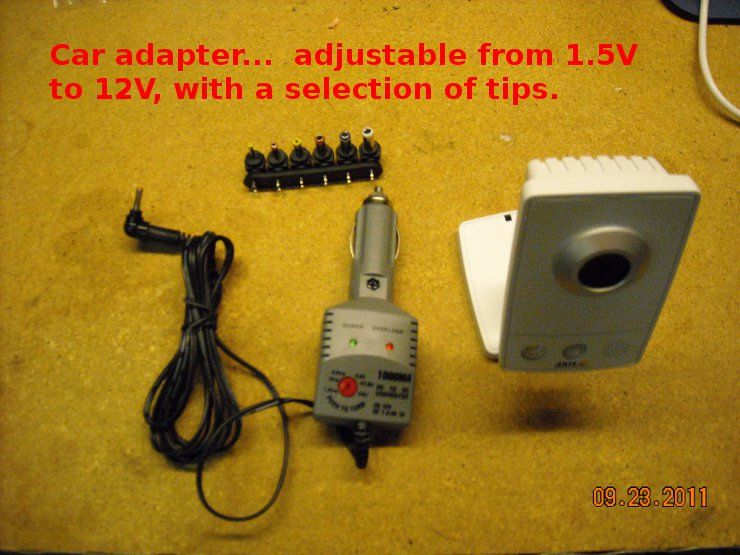
Even if you can't find that exact one (I googled and couldn't find it), do you know what else delivers 5VDC? A USB power adapter... like this one. If you're like me, you have umpteen old USB cables laying around. Hack one up, solder the appropriate tip on the end (you can get them at Radio Shack), and you're good to go. 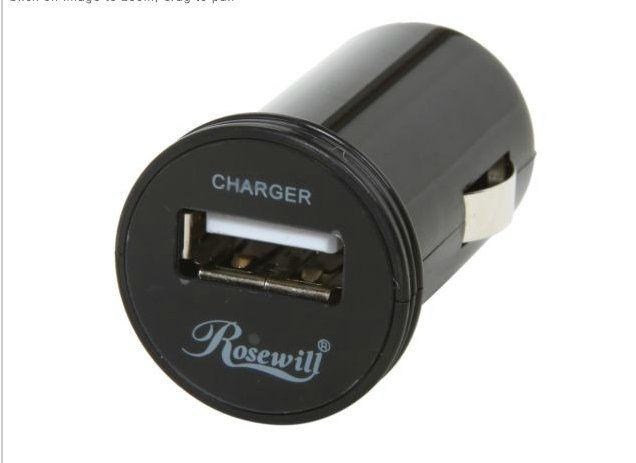
We're going to use this portable jump-starter as our 12V source: 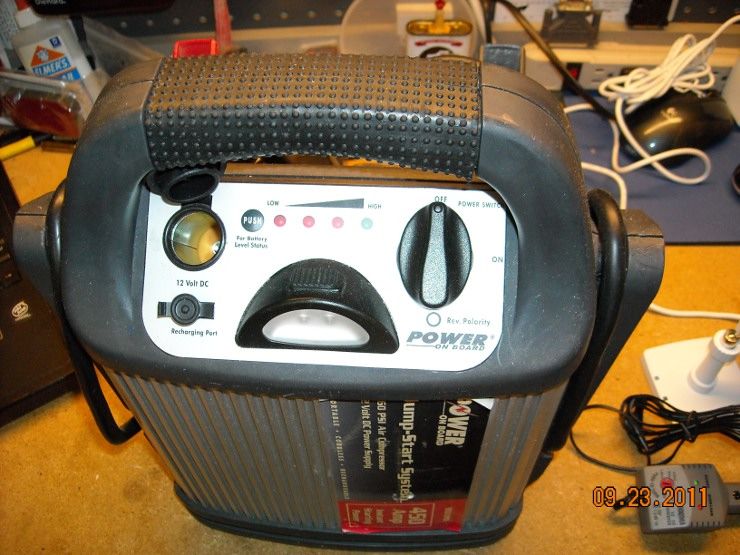
It powers the adapter easily, and that adapter is rated at 1 Amp... so we shouldn't come anywhere close to maxing out the current. 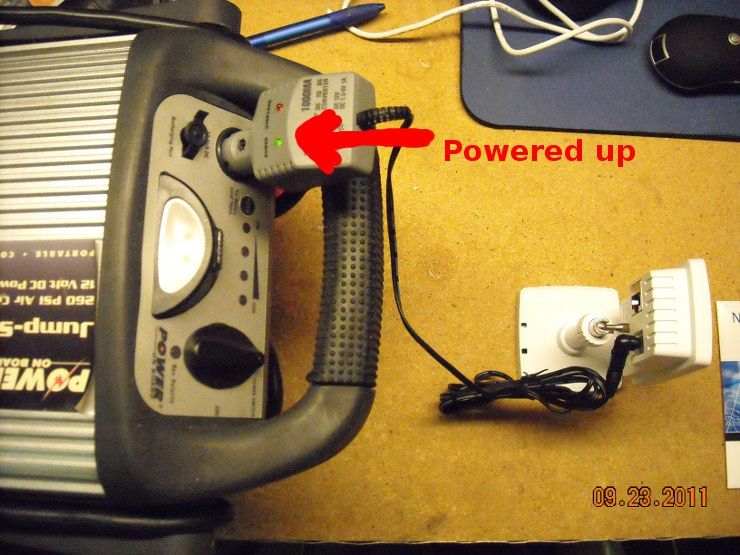
Whaddya know? It works! 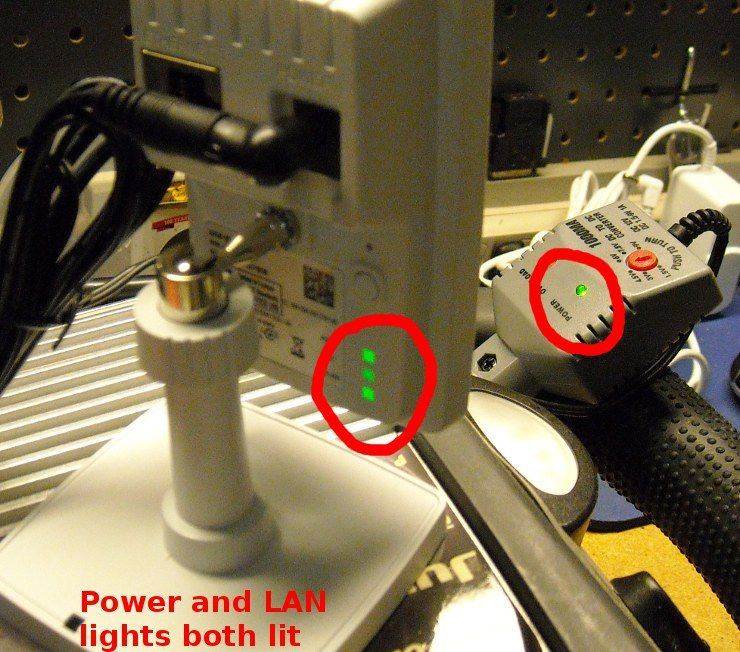
Now, let's just say you have a carport next to your home, and you've got people creeping around out there at night (or you think it's raccoons, coyotes, etc). You could put this camera in your car, plug it into the cigarette lighter adapter, and have it connect to your wireless network in the house. There's no good way to run cables to your car, and putting together a mobile system that rides in the car 24/7 is a lot more work than most people want... why not a wireless camera, with a link to your wireless AP in the house? They might try to steal the camera, but if you're recording inside the house, he's already screwed. If you have a lighter-socket in the trunk or cargo area (many newer cars come with one of these), you could even put the camera in the trunk. Set the motion sensor to activate the light, and when some dirtbag thief decides he's going to steal your BOB or Trunk Gun, you'll have a great shot of his surprised face when he opens the trunk. And in case you're worried about running your battery down, check out the power consumption of this device. It's only 180mA (without the light). 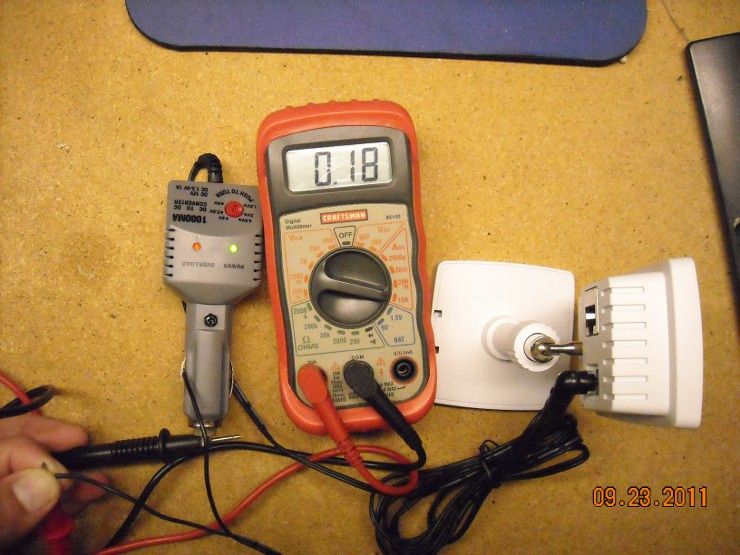
Now I don't know about anybody else, but I always put dual-battery systems in all my vehicles. One starting battery on an isolater (so I'm always able to start the vehicle), and an Optima yellow-top to power accessories (like my HAM radios, etc). I have roughly 110Ahrs of battery capacity in my current vehicle. At 180mA of consumption, my current vehicle can run that camera for about 12 days, and still have half its battery capacity left. The only potential issue I could see would be whether the camera can hit your access point. If your car is far away, or there's not enough signal, consider adding an additional antenna, or get a directional bridge/AP like any of the Ubiquiti models. They also have the ability to act as an access point. Think outside the box!
|
"Look wise, say nothing, and grunt. Speech was given to conceal thought."
- Sir William Osler -
- Sir William Osler -

|
TheGrayMan, have you ever seen this camera? AVN80X
It supposedly pushes an image instantly to your smart phone when there is motion detected, not using email. Looks like a decent camera for "inside" monitoring, but I have zero experience with it. |
Semper Fidelis
www.northeastshooters.com
www.northeastshooters.com
|
Originally Posted By sgthoskins:
TheGrayMan, have you ever seen this camera? AVN80X It supposedly pushes an image instantly to your smart phone when there is motion detected, not using email. Looks like a decent camera for "inside" monitoring, but I have zero experience with it. Never seen that one... the price is right though... I wonder about the quality. |
"Look wise, say nothing, and grunt. Speech was given to conceal thought."
- Sir William Osler -
- Sir William Osler -
|
OK... proof-of-concept time.
My vehicle is parked outside my house on the street. I have the Axis cam in the trunk, plugged into the cigarette lighter with that adapter shown a few posts up. Here's a very grainy, dark picture of my trunk (it would be darker in there, but I left one of the back seats not-quite-locked-into-place to allow a tiny bit of light into the trunk area. Without it, it would be pitch black in there. 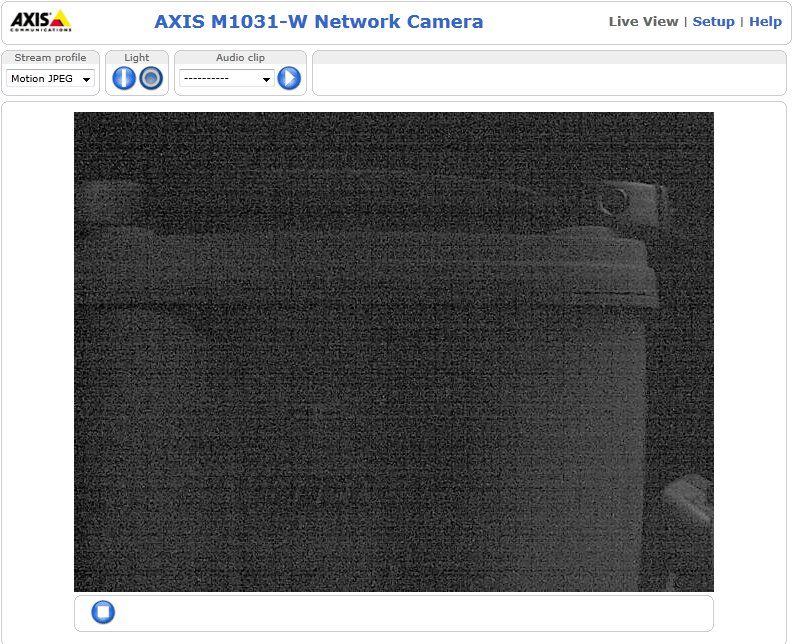
Turn on the light using the built-in webpage... and there's the auxiliary battery I mentioned, and the camera is running off of it. 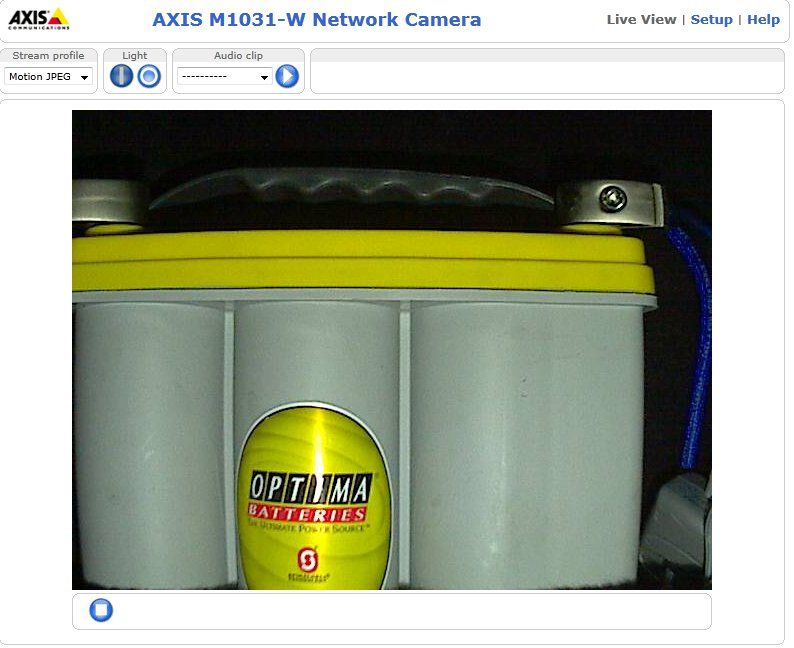
Having trouble with people burglarizing your vehicles? Just use your imagination... and a bit 'o technology. |
"Look wise, say nothing, and grunt. Speech was given to conceal thought."
- Sir William Osler -
- Sir William Osler -
|
Originally Posted By TheGrayMan:
Originally Posted By sgthoskins:
TheGrayMan, have you ever seen this camera? AVN80X It supposedly pushes an image instantly to your smart phone when there is motion detected, not using email. Looks like a decent camera for "inside" monitoring, but I have zero experience with it. Never seen that one... the price is right though... I wonder about the quality. I'm probably going to order one for internal use. I'll post results. |
Semper Fidelis
www.northeastshooters.com
www.northeastshooters.com
|
Originally Posted By sgthoskins:
Originally Posted By TheGrayMan:
Originally Posted By sgthoskins:
TheGrayMan, have you ever seen this camera? AVN80X It supposedly pushes an image instantly to your smart phone when there is motion detected, not using email. Looks like a decent camera for "inside" monitoring, but I have zero experience with it. Never seen that one... the price is right though... I wonder about the quality. I'm probably going to order one for internal use. I'll post results. Please do... I may mount that Axis camera in my trunk, set the light to come on with motion-detection, and leave it there full-time. If I'm parked at home, it will connect to my wife, and my NVR will record the images automatically. I sometimes leave gear in the trunk, and that little device will provide an additional layer of security. |
"Look wise, say nothing, and grunt. Speech was given to conceal thought."
- Sir William Osler -
- Sir William Osler -
How-to: Wifi Security Cameras (Page 1 of 2)
Armory Sponsor