



|
Originally Posted By AlaskanBushDweller: Great thread, wish I would have found it sooner. I'm hoping the brain trust can help me with an issue I'm having with my Dahua PTZ cameras (PTZ1A2M-25X model) which are ONVIF compatible (and work great with Blue Iris and other software, so I know they can be controlled). I'm trying to write a Python script to control them through HTTP Requests or ONVIF. Basically I want one camera acting as a motion spotter to direct a PTZ to zoom in on the issue and run object detection on it. The first step is simply being able to control the camera. ONVIF python libraries so far have not worked for me. But I've had very limited luck with HTTP Requests. But only to pan the camera up and down and stop it. Those are the only HTTP Requests that work despite using the API manual the company provided me. So far I can get up and down to work using this format for an HTTP Request: http://192.168.132.117/cgi-bin/ptz.cgi?action=start&channel=0&code=Up&arg1=0&arg2=1&arg3=0 which works and returns Response [200] Similarly down works with: http://192.168.132.117/cgi-bin/ptz.cgi?action=start&channel=0&code=Down&arg1=0&arg2=1&arg3=0 and returns Response [200] But despite using the Armcrest HTTP API document (and this API doc from Empire Tech which has the same commands), I can't get left, right, zoom, goto_preset or any other of the commands to work: http://192.168.132.117/cgi-bin/ptz.cgi&action=start&channel=0&code=Left&arg1=0&arg2=0&arg3=0 which returns Response [501] ** this doesn't change even if I pass a number 1-8 to arg2 http://192.168.132.117/cgi-bin/ptz.cgi&action=start&channel=0&code=GotoPreset&arg1=0&arg2=2&arg3=0 which returns Response [501] http://192.168.132.117/cgi-bin/ptz.cgi&action=start&channel=0&code=ZoomWide&arg1=0&arg2=0&arg3=0 which returns Response [501] Anybody using HTTP Requests successfully on their cameras that might shine some light on my issue? You might try IPCAMTALK.com or blueirissoftware.com either of those sites are going to have some folks that can probably answer your questions. IPCAMtalk is the ip cam or ar15.coms @AlaskanBushDweller |
"Democracy is two wolves and a lamb voting on what to have for lunch. Liberty is a well-armed lamb contesting the vote."

Member
Joined:
May 2025
Posts:
43
EE: 0% (0)
 USA
USA
|
Originally Posted By 2tired2run: You might try IPCAMTALK.com or blueirissoftware.com either of those sites are going to have some folks that can probably answer your questions. IPCAMtalk is the ip cam or ar15.coms @AlaskanBushDweller I tried IPCAMtalk and got no help there unfortunately. The guy who sold me the cameras is on that site and I messaged him and he said he'd talk to Dahua and get back to me. Several months and a couple reminders later, he just ghosted me. At this point I'm not sure if the cameras actually provide the advertised functionality or what, it's liking pulling teeth to try to get an API. Maybe they just want to provide it to DVR companies? I don't know. The functionality obviously is there because Blue Iris and other software can control the cameras, but I can't get them to assist and I'm not sure many people are actually using this functionality. Maybe it's because they have deals with DVR software providers and keep the API on the DL, I honestly don't know. I posted on the Dahua support forum and got no answer and then they hid my post for some reason. I was really hoping to get the functionality working because I was about to buy another half dozen of these cameras and then trench them throughout my property. My IPCAMtalk post. |
"Behind every successful homesteader is a woman with a good job." - an Old Timer I met

|
HTTP 501 error means the "server" you're sending the request to does have or support the ability to respond: 501 Not Implemented The server either does not recognize the request method, or it lacks the ability to fulfil the request. Usually this implies future availability (e.g., a new feature of a web-service API). I'd probably start by only adding 1 argument at a time, perhaps the thing can't or won't process more than one. |
The plane flew, admit you're wrong and get over it.
Member
Joined:
May 2025
Posts:
45
EE: 0% (0)
USA
|
Originally Posted By Jakezor: HTTP 501 error means the "server" you're sending the request to does have or support the ability to respond: I'd probably start by only adding 1 argument at a time, perhaps the thing can't or won't process more than one. Yeah, the server being the software on the Dahua camera which is advertised to support HTTP Requests and has an API guide that says those requests work. The strange thing is it works for the panning up HTTP request, panning down, and stopping. But panning left or right or any of the other commands doesn't work. So the server is there and it is able to respond to requests but it will only respond to three requests. The three HTTP Requests that do work have the same number of arguments as the requests that don't work. So this HTTP Request works fine: http://192.168.132.117/cgi-bin/ptz.cgi?action=start&channel=0&code=Up&arg1=0&arg2=1&arg3=0 But if the code argument is changed from "Up" to "Left" it doesn't work. Same number of arguments. I know the camera can respond whether through these requests or ONVIF commands because software like Blue Iris and SecuritySpy can control the camera. If it were a setting in the camera itself that I have wrong, I would expect the three working HTTP Requests to not work. It seems strange that they would implement pan up and down and stop but not pan left or right. Just very strange. So it's puzzling and I don't know what's up with this weird API and I haven't been able to get the company or the salesman to provide any support. |
"Behind every successful homesteader is a woman with a good job." - an Old Timer I met
|
Originally Posted By AlaskanBushDweller: Yeah, the server being the software on the Dahua camera which is advertised to support HTTP Requests and has an API guide that says those requests work. The strange thing is it works for the panning up HTTP request, panning down, and stopping. But panning left or right or any of the other commands doesn't work. So the server is there and it is able to respond to requests but it will only respond to three requests. The three HTTP Requests that do work have the same number of arguments as the requests that don't work. So this HTTP Request works fine: http://192.168.132.117/cgi-bin/ptz.cgi?action=start&channel=0&code=Up&arg1=0&arg2=1&arg3=0 But if the code argument is changed from "Up" to "Left" it doesn't work. Same number of arguments. I know the camera can respond whether through these requests or ONVIF commands because software like Blue Iris and SecuritySpy can control the camera. If it were a setting in the camera itself that I have wrong, I would expect the three working HTTP Requests to not work. It seems strange that they would implement pan up and down and stop but not pan left or right. Just very strange. So it's puzzling and I don't know what's up with this weird API and I haven't been able to get the company or the salesman to provide any support. Originally Posted By AlaskanBushDweller: Originally Posted By Jakezor: HTTP 501 error means the "server" you're sending the request to does have or support the ability to respond: I'd probably start by only adding 1 argument at a time, perhaps the thing can't or won't process more than one. Yeah, the server being the software on the Dahua camera which is advertised to support HTTP Requests and has an API guide that says those requests work. The strange thing is it works for the panning up HTTP request, panning down, and stopping. But panning left or right or any of the other commands doesn't work. So the server is there and it is able to respond to requests but it will only respond to three requests. The three HTTP Requests that do work have the same number of arguments as the requests that don't work. So this HTTP Request works fine: http://192.168.132.117/cgi-bin/ptz.cgi?action=start&channel=0&code=Up&arg1=0&arg2=1&arg3=0 But if the code argument is changed from "Up" to "Left" it doesn't work. Same number of arguments. I know the camera can respond whether through these requests or ONVIF commands because software like Blue Iris and SecuritySpy can control the camera. If it were a setting in the camera itself that I have wrong, I would expect the three working HTTP Requests to not work. It seems strange that they would implement pan up and down and stop but not pan left or right. Just very strange. So it's puzzling and I don't know what's up with this weird API and I haven't been able to get the company or the salesman to provide any support. If Blue Iris and Security Spy can control the camera, install Wireshark on that system and run it to capture you controlling the camera. You can filter just your PC talking to the camera by putting in a filter like "ip.addr==CAMERAIP" (by memory, might not be 100%). Then hopefully, you'd see the HTTP requests coming from BlueIris or SecuritySpy going to the camera and can learn how they do it. Otherwise do shortened requests work? working Up: http://192.168.132.117/cgi-bin/ptz.cgi?action=start&channel=0&code=Up&arg1=0&arg2=1&arg3=0 shortened: http://192.168.132.117/cgi-bin/ptz.cgi?action=start&channel=0&code=Up http://192.168.132.117/cgi-bin/ptz.cgi?action=start&channel=0&code=Down http://192.168.132.117/cgi-bin/ptz.cgi?action=start&channel=0&code=Left http://192.168.132.117/cgi-bin/ptz.cgi?action=start&channel=0&code=Right |
The plane flew, admit you're wrong and get over it.
Member
Joined:
May 2025
Posts:
46
EE: 0% (0)
USA
|
Originally Posted By Jakezor: If Blue Iris and Security Spy can control the camera, install Wireshark on that system and run it to capture you controlling the camera. You can filter just your PC talking to the camera by putting in a filter like "ip.addr==CAMERAIP" (by memory, might not be 100%). Then hopefully, you'd see the HTTP requests coming from BlueIris or SecuritySpy going to the camera and can learn how they do it. Otherwise do shortened requests work? working Up: http://192.168.132.117/cgi-bin/ptz.cgi?action=start&channel=0&code=Up&arg1=0&arg2=1&arg3=0 shortened: http://192.168.132.117/cgi-bin/ptz.cgi?action=start&channel=0&code=Up http://192.168.132.117/cgi-bin/ptz.cgi?action=start&channel=0&code=Down http://192.168.132.117/cgi-bin/ptz.cgi?action=start&channel=0&code=Left http://192.168.132.117/cgi-bin/ptz.cgi?action=start&channel=0&code=Right I will try both of those things, thank you very much for the suggestions. Wireshark is a great idea. I'll report back when I have some time. |
"Behind every successful homesteader is a woman with a good job." - an Old Timer I met
Member
Joined:
May 2025
Posts:
47
EE: 0% (0)
USA
|
Originally Posted By AlaskanBushDweller: I will try both of those things, thank you very much for the suggestions. Wireshark is a great idea. I'll report back when I have some time. So using Wireshark is saw that my DVR software that successfully allows me to move the camera left is sending this command: GET /cgi-bin/ptz.cgi?action=start&channel=0&code=Left&arg1=4&arg2=4&arg3=0&arg4=0 I'll update my code and see if this works! |
"Behind every successful homesteader is a woman with a good job." - an Old Timer I met
Member
Joined:
May 2025
Posts:
48
EE: 0% (0)
USA
|
Originally Posted By Jakezor: If Blue Iris and Security Spy can control the camera, install Wireshark on that system and run it to capture you controlling the camera. You can filter just your PC talking to the camera by putting in a filter like "ip.addr==CAMERAIP" (by memory, might not be 100%). Then hopefully, you'd see the HTTP requests coming from BlueIris or SecuritySpy going to the camera and can learn how they do it. Wow, what a ride. The reason why some of the commands were not working is because the non-working commands I was feeding it had ".cgi&action=" which should be ".cgi?action=" and now with that changed, my code can pan left and I'm sure all the other API commands will work as well. My lack of attention to detail. And thanks to you telling me about Wireshark I saw how they were doing it. And I changed the args in my code to match. And it still didn't work. It was only then that I finally looked closely at what was different and saw that it was a & and not a ? that led to all this... |
"Behind every successful homesteader is a woman with a good job." - an Old Timer I met
|
Originally Posted By AlaskanBushDweller: Wow, what a ride. The reason why some of the commands were not working is because the non-working commands I was feeding it had ".cgi&action=" which should be ".cgi?action=" and now with that changed, my code can pan left and I'm sure all the other API commands will work as well. My lack of attention to detail. And thanks to you telling me about Wireshark I saw how they were doing it. And I changed the args in my code to match. And it still didn't work. It was only then that I finally looked closely at what was different and saw that it was a & and not a ? that led to all this... Originally Posted By AlaskanBushDweller: Originally Posted By Jakezor: If Blue Iris and Security Spy can control the camera, install Wireshark on that system and run it to capture you controlling the camera. You can filter just your PC talking to the camera by putting in a filter like "ip.addr==CAMERAIP" (by memory, might not be 100%). Then hopefully, you'd see the HTTP requests coming from BlueIris or SecuritySpy going to the camera and can learn how they do it. Wow, what a ride. The reason why some of the commands were not working is because the non-working commands I was feeding it had ".cgi&action=" which should be ".cgi?action=" and now with that changed, my code can pan left and I'm sure all the other API commands will work as well. My lack of attention to detail. And thanks to you telling me about Wireshark I saw how they were doing it. And I changed the args in my code to match. And it still didn't work. It was only then that I finally looked closely at what was different and saw that it was a & and not a ? that led to all this... I didn't notice your missing ? either but glad Wireshark helped you find it! |
The plane flew, admit you're wrong and get over it.
Member
Joined:
May 2025
Posts:
49
EE: 0% (0)
USA

Member
Joined:
May 2025
Posts:
55
EE: 0% (0)
USA
|
Originally Posted By WILSON: @AlaskanBushDweller, is that a weasel?   It sure is. That's DJE our male ermine neighbor, and he has a girlfriend around here who also visits but not as regularly. He drops by pretty much everyday, comes in the cabin, sometimes naps upstairs in the loft. He gets fed well and we put a bunch of tubes around the deck to he can come and go without getting snatched by goshawks and eagles (both of which have tried to get him on the deck so far). We also have a one-eyed squirrel that we built a little house for on the deck that he lives in. But DJE ran him out of his house once, and the female ermine ran him out and then slept in his house for a couple hours. It's a zoo around here. https://www.ar15.com/forums/general/My-Remote-Alaska-Bush-Neighbors-not-pets-/154-2793257/ |
"Behind every successful homesteader is a woman with a good job." - an Old Timer I met

|
I am interested in people's feedback on this video from my property. I don't want to like the camera from the specs but it did a really good job in this instance. It also helps that I have a second camera mounted on the pole so there are double the IR leds to brighten things up. How would you rate the video, audio, and tracking ability of this $150 camera? I'm actually surprised at the audio quality as typically this brands audio is not great, cuts out, or has a lot of noise in it.  Mentally-ill Man Trespassing, Making Threats - Reolink TrackMix Camera |
Get Active or Get Disarmed! That means get involved in helping good candidates in primary and general election. That is in addition to being politically active once they are elected.
Member
Joined:
May 2025
Posts:
69
EE: 0% (0)
USA
|
Originally Posted By SWIRE: I am interested in people's feedback on this video from my property. I don't want to like the camera from the specs but it did a really good job in this instance. It also helps that I have a second camera mounted on the pole so there are double the IR leds to brighten things up. How would you rate the video, audio, and tracking ability of this $150 camera? I'm actually surprised at the audio quality as typically this brands audio is not great, cuts out, or has a lot of noise in it.  https://www.youtube.com/watch?v=bhZlAAYD8-c https://www.youtube.com/watch?v=bhZlAAYD8-cAudio is great and the tracking kept the guy in frame the whole time even while he was moving pretty briskly. Can't ask for much more than that. Good idea having those cameras. Your foreist neighbors seem more concerning than ours. If any of these bears start muttering like that guy in your video then I might change my mind though... 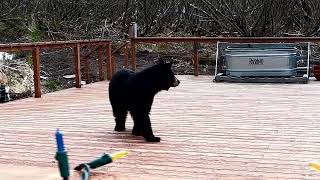 Second Bear in Thirty Minutes |
"Behind every successful homesteader is a woman with a good job." - an Old Timer I met
|
My direct neighbors aren't much of a concern. The house is on a main road along the I-75 corridor and a lot of homeless people travel through. There is also a homeless shelter about 5 blocks away. There is a very small trailer park down the road and that can cause some problems as well. I do have wildlife in the back yard. I took pictures with my cellphone of these 2 gray foxes that will often visit me.  Picture from a security of me taking the picture of the foxes. I'm about 75 feet away from the camera and the IR just doesn't work that far.  This is about the best night time picture of the foxes that I can get from that camera. The company makes color night vision camera which can do a great job but there is no zoom on it. I'll need to put in a post where I was sitting and run another line for the camera. Then I might get some decent night pictures.  |
Get Active or Get Disarmed! That means get involved in helping good candidates in primary and general election. That is in addition to being politically active once they are elected.
Member
Joined:
May 2025
Posts:
72
EE: 0% (0)
USA

| Any recent experiences with Reolink cameras? Needed a solar one that also connects to WiFi so picked one up and installed it. Quite pleased with it so far so thinking of installing a set of Reolink POE cameras with a DVR and WiFi connectivity. |
"It behooves every man to remember that the work of the critic is of altogether secondary importance, and that, in the end, progress is accomplished by the man who does things."
Theodore Roosevelt
Theodore Roosevelt
|
Originally Posted By SWIRE: How would you rate the video, audio, and tracking ability of this $150 camera? I'm actually surprised at the audio quality as typically this brands audio is not great, cuts out, or has a lot of noise in it. https://www.youtube.com/watch?v=bhZlAAYD8-c  
|
"It's a a feature, NOT A BUG! " ~ Stylz

|
Originally Posted By ColtRifle: Any recent experiences with Reolink cameras? Needed a solar one that also connects to WiFi so picked one up and installed it. Quite pleased with it so far so thinking of installing a set of Reolink POE cameras with a DVR and WiFi connectivity. Originally Posted By ColtRifle: Any recent experiences with Reolink cameras? Needed a solar one that also connects to WiFi so picked one up and installed it. Quite pleased with it so far so thinking of installing a set of Reolink POE cameras with a DVR and WiFi connectivity. Originally Posted By SWIRE: I am interested in people's feedback on this video from my property. I don't want to like the camera from the specs but it did a really good job in this instance. It also helps that I have a second camera mounted on the pole so there are double the IR leds to brighten things up. How would you rate the video, audio, and tracking ability of this $150 camera? I'm actually surprised at the audio quality as typically this brands audio is not great, cuts out, or has a lot of noise in it. https://www.youtube.com/watch?v=bhZlAAYD8-c |

|
Originally Posted By ColtRifle: Any recent experiences with Reolink cameras? Needed a solar one that also connects to WiFi so picked one up and installed it. Quite pleased with it so far so thinking of installing a set of Reolink POE cameras with a DVR and WiFi connectivity. |
I live in the country because monsters are attracted to cities.
|
Originally Posted By shooter_gregg: Does it stay on all the time? I have Reolink cameras on my place. I haven't set up an NVR yet. Don't bother with the 5mp cameras, get the 4k. So far no issues |
"It behooves every man to remember that the work of the critic is of altogether secondary importance, and that, in the end, progress is accomplished by the man who does things."
Theodore Roosevelt
Theodore Roosevelt
|
Originally Posted By ColtRifle: Any recent experiences with Reolink cameras? Needed a solar one that also connects to WiFi so picked one up and installed it. Quite pleased with it so far so thinking of installing a set of Reolink POE cameras with a DVR and WiFi connectivity. Reolink is all that I use at the moment. I have 9 at one house and 10 at a different house, with at least 10 more purchased that need to be installed. For consumer cameras they are pretty good. The best part is no monthly fee for live viewing the cameras or receiving notifications. I have the cameras setup to record to their SD the individual events and the NVR records 24x7. That way if the alert was missed by the camera I can still go back through the footage. My advice is don't buy the camera and NVR kits. They modify the camera so that they only work with a Reolink NVR. It's better to buy cameras separately and an NVR separately. They make a wifi NVR but the regular NVR can be anywhere in your house and plugged into your physical network. The wifi cameras can talk to it just fine. For warranty work they will want your order number and date of purchase. Because of that I mainly buy all my cameras directly through their website so the record is right there. Their store on Amazon will sometimes have lower prices than their website during specific promotions. They run sales all the time, 18% off or more. A really good sale will have the camera down 30%. That's about the best you can do with them as far as price. |
Get Active or Get Disarmed! That means get involved in helping good candidates in primary and general election. That is in addition to being politically active once they are elected.
|
Originally Posted By shooter_gregg: Does it stay on all the time? I have Reolink cameras on my place. I haven't set up an NVR yet. Don't bother with the 5mp cameras, get the 4k. Originally Posted By shooter_gregg: Originally Posted By ColtRifle: Any recent experiences with Reolink cameras? Needed a solar one that also connects to WiFi so picked one up and installed it. Quite pleased with it so far so thinking of installing a set of Reolink POE cameras with a DVR and WiFi connectivity. The older model of battery cameras would only turn on when motion was sensed. Some of the new battery powered cameras are supposed to have the ability to stay live and monitored. Not sure how well that works though. |
Get Active or Get Disarmed! That means get involved in helping good candidates in primary and general election. That is in addition to being politically active once they are elected.
|
Here are a couple devices that I have come across that might help people. The first is a circuit combiner and splitter, it lets your run 2 different ports down the same wire and then split it back out later. Run one cable and connect 2 cameras. The main drawback is introducing more connections which can cause interference and by splitting the wires you drop the bandwidth from 1000Mbps down to 100Mbps. That really doesn't matter with a camera as put out around 10Mbps. The second device is a "smart" connector that will split out the POE power and the data. This is useful if you have a camera that is not powered by POE and requires a 12v source. However, that 12v source has enough power to also run an IR Illuminator. Couple that with the combiner/splitter and you can now run a POE camera plus an IR Illuminator from one cable but using 2 ports on the switch.  |
Get Active or Get Disarmed! That means get involved in helping good candidates in primary and general election. That is in addition to being politically active once they are elected.
|
Originally Posted By SWIRE: Reolink is all that I use at the moment. I have 9 at one house and 10 at a different house, with at least 10 more purchased that need to be installed. For consumer cameras they are pretty good. The best part is no monthly fee for live viewing the cameras or receiving notifications. I have the cameras setup to record to their SD the individual events and the NVR records 24x7. That way if the alert was missed by the camera I can still go back through the footage. My advice is don't buy the camera and NVR kits. They modify the camera so that they only work with a Reolink NVR. It's better to buy cameras separately and an NVR separately. They make a wifi NVR but the regular NVR can be anywhere in your house and plugged into your physical network. The wifi cameras can talk to it just fine. For warranty work they will want your order number and date of purchase. Because of that I mainly buy all my cameras directly through their website so the record is right there. Their store on Amazon will sometimes have lower prices than their website during specific promotions. They run sales all the time, 18% off or more. A really good sale will have the camera down 30%. That's about the best you can do with them as far as price. Thanks for the info! Any model in particular you recommend? The part in bold….can you explain that a little more? |
"It behooves every man to remember that the work of the critic is of altogether secondary importance, and that, in the end, progress is accomplished by the man who does things."
Theodore Roosevelt
Theodore Roosevelt
|
Originally Posted By ColtRifle: Thanks for the info! Any model in particular you recommend? The part in bold .can you explain that a little more? Originally Posted By ColtRifle: Originally Posted By SWIRE: Reolink is all that I use at the moment. I have 9 at one house and 10 at a different house, with at least 10 more purchased that need to be installed. For consumer cameras they are pretty good. The best part is no monthly fee for live viewing the cameras or receiving notifications. I have the cameras setup to record to their SD the individual events and the NVR records 24x7. That way if the alert was missed by the camera I can still go back through the footage. My advice is don't buy the camera and NVR kits. They modify the camera so that they only work with a Reolink NVR. It's better to buy cameras separately and an NVR separately. They make a wifi NVR but the regular NVR can be anywhere in your house and plugged into your physical network. The wifi cameras can talk to it just fine. For warranty work they will want your order number and date of purchase. Because of that I mainly buy all my cameras directly through their website so the record is right there. Their store on Amazon will sometimes have lower prices than their website during specific promotions. They run sales all the time, 18% off or more. A really good sale will have the camera down 30%. That's about the best you can do with them as far as price. Thanks for the info! Any model in particular you recommend? The part in bold .can you explain that a little more? Reolink sells cameras and NVRs but they also sell "Security Camera Systems" which is a NVR and camera set combo. Those systems are typical cheaper and places like Costco will sell them. However, the cameras are not the regular stand alone cameras. They are cheaper version of the camera that lock you into using the Reolink NVR. Basically cheaper price for budget minded people but now your are locked into their brand. Meanwhile, like you said you already installed 1 camera and it works great. The regular cameras do not require an NVR but will work with an NVR. They are still affordable, so the slight increase in cost is worth it. That said Reolink does offer "bundles" where they bundle real cameras with an NVR. Those bundles are good to buy. They key point is to check the camera name/model number. The real cameras all start with "RLC-". Buried into the details of the page you will find this information. The security systems come wiht a "D1200" camera while the stand alone camera is "RLC-1224A".  This "security camera systems" will look like this and it seems fine but there are no camera model numbers listed which means the cameras depend on the NVR.  Just skip this whole section of their site.  They have "bundles" were they offer the stand alone cameras plus an NVR in a bundle. These are ok to buy. But that middle one looks like a "security camera system" bundled with extra stand alone cameras. Don't buy that.  |
Get Active or Get Disarmed! That means get involved in helping good candidates in primary and general election. That is in addition to being politically active once they are elected.
|
Originally Posted By ColtRifle: Any model in particular you recommend? Would all the cameras be wireless? For specific cameras you want to figure out what you want to cover and do you want overview detail, focus on a specific area, or a close view for full detail. The cameras that are the best for the widest view situational awareness is are the DUO 2 and 3 cameras. For medium range and tracking the TraxMix is hands down my favorite. For close up and detail the RLC-1212 and RLC-1224 are the best by far but they are only offered in POE. If you have to stick with wireless the RLC-811WA the next best option. It comes with a 5x optical zoom and can be adapted for close viewing or medium distance. It is a bulky camera though. As you will see in the screen shots below the price on cameras vary, some models get put on sale while others are full price or barely discounted. The general rule of thumb is around 20% off is a decent price. Just wait a couple weeks if the one you are looking at isn't on sale and it should be. I've seen 30% off during big sales and on very rare occasions 35% sometimes requires using an extra promo-code which they announce during live streams. To get those prices you have to wait for specific events, like Black Friday week. Mount this 15-20 ft high and it is almost like you can see everything in front it, a true 180 degree view.  This is a dual lens camera with a hybrid zoom and auto tracking. It is the camera that took the video I posted above. I want to hate the camera because I hate hybrid/digital zoom but results force me to like it.  The image quality is great. No zoom so where you mount it really matters.  Same as the camera above, just different form. For static cameras these two are my favorites.  If you have to stick with wireless than the 12MP cameras are not an option and this 8MP 811WA is what you have to go with. It is a 5x zoom which lets you adjust want you want to look at but beyond 50 ft and IR isn't going to reach and night time images will be grainy.  |
Get Active or Get Disarmed! That means get involved in helping good candidates in primary and general election. That is in addition to being politically active once they are elected.
|
Thanks for all the info! I’ll have to go through it and study it. While I mentioned I have a wireless camera, when I go with a total system (2 separate systems for house and shop actually) all those cameras will be wired POE system. |
"It behooves every man to remember that the work of the critic is of altogether secondary importance, and that, in the end, progress is accomplished by the man who does things."
Theodore Roosevelt
Theodore Roosevelt
| I have the dual camera without the wifi. It works well and has zoom. The only problem is I can't use the auto tracking system because of chickens. It would go nuts trying to follow them all around the driveway. |
I live in the country because monsters are attracted to cities.
|
Originally Posted By ColtRifle: Thanks for all the info! I'll have to go through it and study it. While I mentioned I have a wireless camera, when I go with a total system (2 separate systems for house and shop actually) all those cameras will be wired POE system. Ok. POE is the way to go if you have that option. The NVR needs to be on the same physical network as the cameras. The cameras don't have to plug directly into it but if you have 2 separate networks, one for each location, then you would need 2 NVRs. |
Get Active or Get Disarmed! That means get involved in helping good candidates in primary and general election. That is in addition to being politically active once they are elected.
|
Originally Posted By shooter_gregg: I have the dual camera without the wifi. It works well and has zoom. The only problem is I can't use the auto tracking system because of chickens. It would go nuts trying to follow them all around the driveway. You should be able to select which objections to track. The TrackMix has options to track people, animals, and vehicles. Just turn off animals. |
Get Active or Get Disarmed! That means get involved in helping good candidates in primary and general election. That is in addition to being politically active once they are elected.
|
Originally Posted By SWIRE: Ok. POE is the way to go if you have that option. The NVR needs to be on the same physical network as the cameras. The cameras don't have to plug directly into it but if you have 2 separate networks, one for each location, then you would need 2 NVRs. Yes I’m planning to have one NVR in the house and a separate one in the shop. Both have WiFi so I can connect them to the home network (Starlink supplied internet service) |
"It behooves every man to remember that the work of the critic is of altogether secondary importance, and that, in the end, progress is accomplished by the man who does things."
Theodore Roosevelt
Theodore Roosevelt
|
Reolink is having a big sale this week, they have been in business 16 years. They have deeply discounted prices, a second promo offering additional amounts off if buy $300, $500, or $800, a spin wheel which might get you another 3% off, and a very short term promo code that will save you another 6% if it works. People think Black Rifle disease is bad but it has nothing on security camera disease. I just bought 14 more cameras. The additional 6% code is 16reoversary One of their newer cameras is a color night vision camera. It's new and on the higher end of their prices. https://reolink.com/product/cx820/?tid=jGSmGYpPEc2a0XJc0VN&ct=60 My favorite cameras would be the TrackMix, the 1212a or 1224a, and the CX410. For getting the wideset overview the Duo 3 is dual lens camera offering a 180 degree view. It is impressive for getting the big picture especially when mounted high. Here is an example of color night vision vs IR night vision. To the naked eye it is very dark and you really can't see anything. The cameras used here are the CX410 and RLC-1212A.  This is a Duo 3, a 16mp camera, that I put on the windmill at my parents farm. It's fairly flat there and can see 1/2 mile in every direction from it. In town I can see about 2 blocks each direction.  This image above is obviously compressed. Here is the level of detail the camera captures. The barn door is about 120ft away. 
|
Get Active or Get Disarmed! That means get involved in helping good candidates in primary and general election. That is in addition to being politically active once they are elected.

|
I currently have the Reolink solar camera but it will be removed this week. I have two fixed cameras keeping any eye on my tractor and other stuff in the covered storage area at the shop all POE and hard wired into my router in the shop. I will have a WiFi Duo and the rest will be POE. One will be a Trackmix Dual Lens and the rest fixed. Already have the cameras but I had to order some materials and make a mount for the Trackmix camera. I’ll see how these do and if I like them, I’ll get more for the house. The shop looks at the house so the cameras will help keep an eye on the house till we can get the house cameras installed. I live in a very safe area but recently had some issues with a neighbor. It’s probably nothing serious but we decided to get some cameras to keep an eye on things just to be on the safe side. |
"It behooves every man to remember that the work of the critic is of altogether secondary importance, and that, in the end, progress is accomplished by the man who does things."
Theodore Roosevelt
Theodore Roosevelt

|
Does anybody make 850nm IR goggles (NOT the expensive night vision goggles with a built-in light source) that I can use to check and aim my security camera supplementary illuminators? I can see the black and white IR (night) image on my phone and laptop, but I would like to just wear some kind of (cheap) glasses that let me see what the camera sees at night. |
A liberal is someone who feels a great debt to his fellow man, which debt he proposes to pay off with your money. - G. Gordon Liddy
A gun is like a parachute. If you need one, and don't have one, you'll probably never need one again.
A gun is like a parachute. If you need one, and don't have one, you'll probably never need one again.

|
Originally Posted By NRA_guy: Does anybody make 850nm IR goggles (NOT the expensive night vision goggles with a built-in light source) that I can use to check and aim my security camera supplementary illuminators? I can see the black and white IR (night) image on my phone and laptop, but I would like to just wear some kind of (cheap) glasses that let me see what the camera sees at night. There is no substitute for looking through the camera, and seeing what it sees. The night view is often much less than what you’d expect… though sometimes supplemental IR from a second source will solve that problem. |
Everything you are doing is wrong, and it is my sworn duty to resist you.
|
Originally Posted By TheGrayMan: There is no substitute for looking through the camera, and seeing what it sees. The night view is often much less than what you’d expect… though sometimes supplemental IR from a second source will solve that problem. Thanks. Oh, yes. I have supplemental IR lights for several of my security cameras. That's actually what I would like to see as I aim the supplemental lights. One thing I would like to do is compare in real night time various supp;emental IR ligts that I have. I want to keep the camera and its IR lights aimed at the target zone. |
A liberal is someone who feels a great debt to his fellow man, which debt he proposes to pay off with your money. - G. Gordon Liddy
A gun is like a parachute. If you need one, and don't have one, you'll probably never need one again.
A gun is like a parachute. If you need one, and don't have one, you'll probably never need one again.
|
Just use the phone app and switch to night mode. Select the camera and watch what it sees as you adjust the lights. I have a couple of older cameras that I can't control the lights. I was looking through an adjacent, newer camera, at night, and wondered where all the light was coming from. It was the two cameras around the corner shining IR lights. Those two are getting moved to the chicken coop. I'm looking for a camera to read license plates, even at night. I was looking at the RLC-811a because of the optical zoom. I need optical zoom for the range. I came across a Reddit post that was lamenting this camera tries too hard, no matter what the settings, to have a bright image. The license plate was always glowing and unreadable. Unless I can put an IR pass/ visible blocking filter, I will need to find something else. My current headache is coyotes killing my chickens. I'm going to put up some cameras for perimeter watching. |
I live in the country because monsters are attracted to cities.
Ego is the anesthesia that deadens stupidity.
Ego is the anesthesia that deadens stupidity.
|
Originally Posted By shooter_gregg: Just use the phone app and switch to night mode. Select the camera and watch what it sees as you adjust the lights. I have a couple of older cameras that I can't control the lights. I was looking through an adjacent, newer camera, at night, and wondered where all the light was coming from. It was the two cameras around the corner shining IR lights. Those two are getting moved to the chicken coop. I'm looking for a camera to read license plates, even at night. I was looking at the RLC-811a because of the optical zoom. I need optical zoom for the range. I came across a Reddit post that was lamenting this camera tries too hard, no matter what the settings, to have a bright image. The license plate was always glowing and unreadable. Unless I can put an IR pass/ visible blocking filter, I will need to find something else. My current headache is coyotes killing my chickens. I'm going to put up some cameras for perimeter watching. Many thanks. I'll try that. |
A liberal is someone who feels a great debt to his fellow man, which debt he proposes to pay off with your money. - G. Gordon Liddy
A gun is like a parachute. If you need one, and don't have one, you'll probably never need one again.
A gun is like a parachute. If you need one, and don't have one, you'll probably never need one again.
|
Today is the last day of the Reolink sale. The additional 6% code is still working: 16reoversary The extra discounts they have are still in play as well. It's another 5% to 7% off depending on how much you spend and is automatically applied. Some cameras are 30% off already, add in the extra discounts you are looking at around 45% off which beats their typical Black Friday pricing. |
Get Active or Get Disarmed! That means get involved in helping good candidates in primary and general election. That is in addition to being politically active once they are elected.
|
What are the promo codes for this week? ETA: NVM. I got in on the tail end of the sale. It wouldn't accept the coupon code with the 30% off. |
I live in the country because monsters are attracted to cities.
Ego is the anesthesia that deadens stupidity.
Ego is the anesthesia that deadens stupidity.
|
Originally Posted By shooter_gregg: What are the promo codes for this week? ETA: NVM. I got in on the tail end of the sale. It wouldn't accept the coupon code with the 30% off. Which camera? I had no problem apply the 6% off code even with a 30% off camera. The Duo 3 is 30% off.  |
Get Active or Get Disarmed! That means get involved in helping good candidates in primary and general election. That is in addition to being politically active once they are elected.
|
So this event happened in my town. Drunk driver flying through town at over 70mph, most likely caught air crossing Main Street, swerved back and forth and plowed into a grocery store. My cameras capture the case with audio. You can here the tires squealing around 1:51:07 and then, for people who know, the thud of a car impact. The footage is from a Reolink Duo 3 but the audio was better from a Reolink Duo 2 that I have sitting right next to it so I used that. The accident was 5 blocks away and the audio was quiet so I increased the gain for the purpose of the video.  Police Following Speeding Drunk Driver Who Crashes a Few Seconds Later.  |
Get Active or Get Disarmed! That means get involved in helping good candidates in primary and general election. That is in addition to being politically active once they are elected.

|
Okay, I haven't posted to this thread in a while. Just got our system up and running. I made a separate thread about it. Here's the basic layout. Attached File 7 Cameras: 5x RLC 840a 2x RLC 1240a (wider angle, 12 mp) (locations 3,4) 2 TB DVR Dell 27" 4k IPS monitor Ring System: Doorbell Cam Sensors on every window Motion Sensor in Garage Future upgrades: 1500 VA UPS for DVR Upgrade hard drive to 6 or 8 TB So far not super happy with it. We have had 2 cameras fail (1 was factory defect, 1 was water damage) and half the cameras keep getting water inside the dome so the image quality suffers at night. BUT the picture quality is fantastic during the day, and it seems to work well at night when there isn't water inside the bubble. I also hate the amount of wires flopping around on the outside of my house, it seems like a poor implementation. I have a ton of money into it between the equipment and professional installation. I'll try to get some pictures of the screen, but only 5 cameras are online right now... need to install the replacements. |
Atypical Millennial
|
I don't like their cameras with the dome over them. I have a 1240a on my front porch and will never buy another one. Even clean the dome reflects light and messes up the image. Now at night the dome is so clouded it is very hard to see anything. This is well under my porch roof too and shouldn't get much water. The only point of the dome is to make it "vandal proof" but then they just spray something on the dome anyway. Replace those with a 1224a, unless you want color night vision then an 820A which I haven't used yet, and you will be a lot happier. I have 2 1224as behind my house and they are great. They are a smaller footprint and you will need to change out the base. On a pro-install you shouldn't have visible wires much less dangling wires. Hiding the wires is a pain though. |
Get Active or Get Disarmed! That means get involved in helping good candidates in primary and general election. That is in addition to being politically active once they are elected.
|
Originally Posted By SWIRE: I don't like their cameras with the dome over them. I have a 1240a on my front porch and will never buy another one. Even clean the dome reflects light and messes up the image. Now at night the dome is so clouded it is very hard to see anything. This is well under my porch roof too and shouldn't get much water. The only point of the dome is to make it "vandal proof" but then they just spray something on the dome anyway. Replace those with a 1224a, unless you want color night vision then an 820A which I haven't used yet, and you will be a lot happier. I have 2 1224as behind my house and they are great. They are a smaller footprint and you will need to change out the base. On a pro-install you shouldn't have visible wires much less dangling wires. Hiding the wires is a pain though. I was excited that the dome cameras would be "wind proof" since we live in a high-wind area, and they do seem to be good at that. But... yeah... I wonder if I can return them to swap for the non-dome cameras? Sucks I have $800 into my cameras right now. ETA: Ordered 2x RLC820-A today, attempting to return our unopened cameras if possible. They are on sale. |
Atypical Millennial
|
Originally Posted By djkest: I have a ton of money into it between the equipment and professional installation. I'll try to get some pictures of the screen, but only 5 cameras are online right now... need to install the replacements. Wait... "professional installation" and you've got a bunch of wires hanging out, and water in your cameras? My brother... that is NOT professional installation. |
Everything you are doing is wrong, and it is my sworn duty to resist you.
|
Originally Posted By djkest: I was excited that the dome cameras would be "wind proof" since we live in a high-wind area, and they do seem to be good at that. But... yeah... I wonder if I can return them to swap for the non-dome cameras? Sucks I have $800 into my cameras right now. ETA: Ordered 2x RLC820-A today, attempting to return our unopened cameras if possible. They are on sale. Originally Posted By djkest: Originally Posted By SWIRE: I don't like their cameras with the dome over them. I have a 1240a on my front porch and will never buy another one. Even clean the dome reflects light and messes up the image. Now at night the dome is so clouded it is very hard to see anything. This is well under my porch roof too and shouldn't get much water. The only point of the dome is to make it "vandal proof" but then they just spray something on the dome anyway. Replace those with a 1224a, unless you want color night vision then an 820A which I haven't used yet, and you will be a lot happier. I have 2 1224as behind my house and they are great. They are a smaller footprint and you will need to change out the base. On a pro-install you shouldn't have visible wires much less dangling wires. Hiding the wires is a pain though. I was excited that the dome cameras would be "wind proof" since we live in a high-wind area, and they do seem to be good at that. But... yeah... I wonder if I can return them to swap for the non-dome cameras? Sucks I have $800 into my cameras right now. ETA: Ordered 2x RLC820-A today, attempting to return our unopened cameras if possible. They are on sale. Have you had the cameras for more than 30 days? If not they should be willing to do an exchange or return. If it has been longer you ask them on the support chat and see what they say. Typically it will be no but if you tell them you want to replace them with a different model and get the right person it might be possible. |
Get Active or Get Disarmed! That means get involved in helping good candidates in primary and general election. That is in addition to being politically active once they are elected.