



Here are some more install pics. This is the same installation where I changed out this camera (see page 10 of this thread):
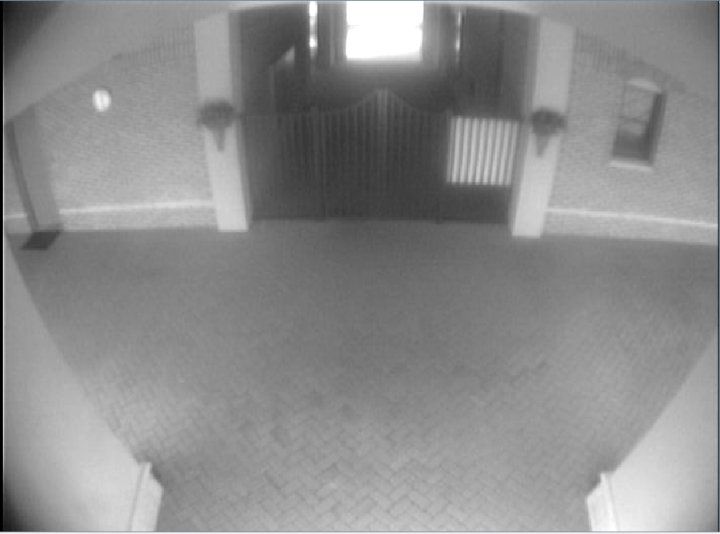
for this one: 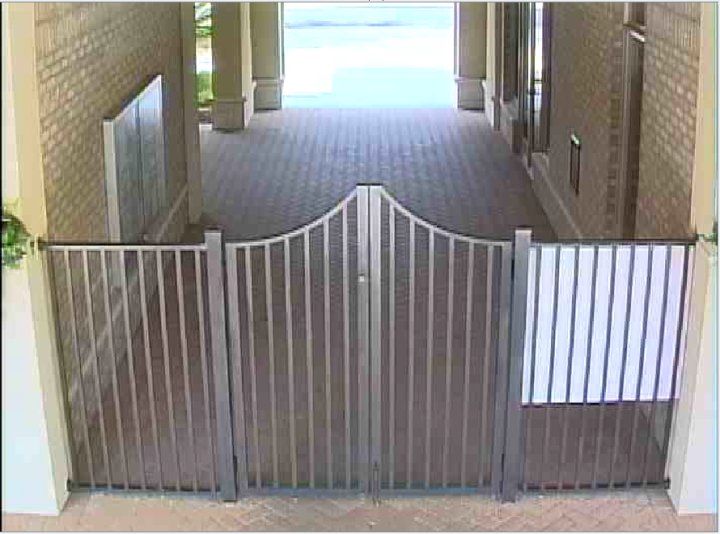
They have some restrooms there that have been the subject of frequent vandalism... mostly stupid/destructive teenage antics: smashing mirrors, tearing down towel dispensers, breaking the stall partitions... No arson or anything terribly big-bucks, but they are tired of it, and want it to stop. They were so happy with the improvement in the above picture, that they asked me if I could do anything about that. My answer? "But of course..." 
Here is the scene we're trying to cover. That picture is taken from directly beneath where I'll be mounting the camera. 
Here is a view from in front of that MEN's room door, looking back at the mounting location: 
Here is the camera mounting location from directly below. I've already taken a 3/4" hole saw and gone up through the fiber-board. The red fishing rod is extending up into the attic space above that false ceiling. 
The first obstacle was finding an attic access. I couldn't find a hatch or hole in the ceiling anywhere... but much of the area in this end of the building has a drop ceiling. Most of those tiles don't allow access... there's a ton of fiberglass up there. 
Except an area in the womens restroom: 
And now the fun REALLY begins: 
Good thing I can climb. I don't recommend this kind of thing if you're a big heavyweight guy... I'm pretty lean, and used to do rock-climbing, so this wasn't that big a deal, though it was dark as the devil's colon... and twice as hot. I had to carefully pick my way over to that block wall you can see at the far end of the attic space. 
We had pre-emptively put a penetration through that block wall into the attic space from an air-conditioned space on the other side (where we already had some wire run). The rod shows where we fed the siamese cable through: 
Now I've got to pull that cable over to our hole. That's a four or five-layer fiberboard. Fiberboard comes in several different types (a common one is Hardie-board, though that usually a lot heavier than what I'm seeing here). Don't try to step on it. It won't hold your weight... I don't care how skinny you are: 
Fed the siamese down through the hole: 
And here's what it looks like with the fishing rod removed: 
Stripped and crimped on some connectors and butt splices for power (this installation runs 24V AC... many cameras are dual-voltage, but check your specs before you hook them up). You cannot have too much electrical tape: 
Now to mount the camera. If you don't know about Wall-dog anchors, you should look into them. They're a quick-and-easy way to mount to drywall, fiberboard, brick, or concrete (the latter two need a pre-drilled hole, of course). 
Here's the camera mounted... it's a Speco Intensifier. Fortunately, this area is lit 24 hours a day, making the Intensifier a reasonable choice, as it won't have to deal with very low-lux conditions, and you avoid the slow-shutter-speed-blurring effect. 
And let me throw this in... it's handy to have a spare wireless access point handy, pre-set to your specific specs and wireless key. That way, you can plug it into the network at the location, and log into their DVR with a wireless laptop as you adjust the camera. It's like a portable service monitor, only with a bigger screen, and you actually get to see what they're going to see on their DVR. 
And it looks just like this. On the right is my laptop, logged into the DVR over my handy-dandy wireless access point. I can now precisely adjust the focus and FOV of this vari-focal camera. 
And here we have two views, juxtaposed. One is through my coolpix digital camera, and the other is through the newly-installed camera and DVR: 

Again, just to make the point. Analog isn't dead... it's still useful, provided you know what areas you want to cover, and are willing to place the camera appropriately to cover that specific zone. |
"Look wise, say nothing, and grunt. Speech was given to conceal thought."
- Sir William Osler -
- Sir William Osler -
OK... here's the promised follow-up to this picture:
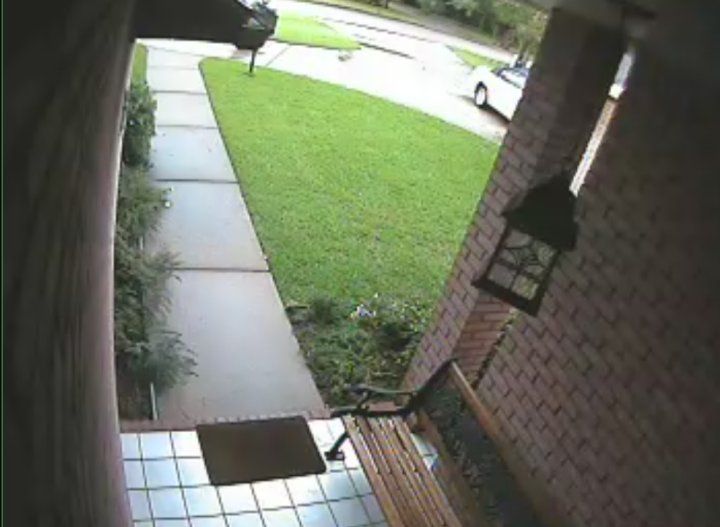
And the miserable night performance of that camera: 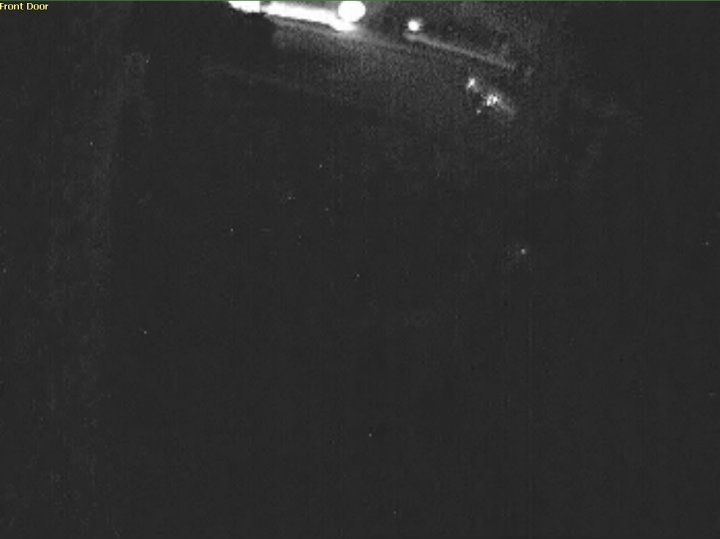
Here's the ceiling of that porch area. It's about six feet from that light fixture to the edge of the roof, so we're going to put the illuminator about midway between. 
We're going to use a 1/2" drill bit to go through the ceiling (the owner assures me there's open attic above that porch... I guess we'll see). Normally I'd use a 3/4" hole saw if we were mounting an analog camera (I've found that's the smallest hole through which you can fit the power cable and the video cable), and a 1" hole saw for a network install (provided the camera has a cat5 "flying lead," and requires a female-to-female connector to attach it to the network... those will only fit through a 1" hole). In this case, a 1/2" hole should easily pass the power cabling. 
Since this install only requires 12V DC power, we can dispense with the siamese (more expensive), and simply go with 18ga 2-conductor wire (very cheap). Like so: 
We tape it to the end of our fishing rod, and put it up through the hole (have you detected a pattern yet? Fishing rods or "Fish Sticks" are one of the most useful tools you can have to do work like this): 

Here's the illuminator we'll be mounting... I've shown pictures of this one before, and I had a few left over from my last Ebay batch (it takes 12V DC through a standard barrel connector, which I ended up having to cut off and splice, since I was apparently an idiot, and didn't put a male end in my toolbag  ) )


The clear acrylic cover comes off with four screws (they're soft-metal machine screws, and the heads are VERY easy to strip, so be careful). 
This thing has a reasonable claim to being waterproof... note the gasket that I'm hooking with my thumb... it seals against the dome, and protects the guts of the illuminator, which is actually very cool-running, and throws out a surprisingly uniform pool of IR light. I'm actually pretty pleased with these so far: 
Up into the hot attic we go... this part just sucks. And I've gotta climb over all of that ductwork without damaging it. 
I then had to work my self up through that narrow space: 
Holy sea-of-fiberglass, batman! I knew I should have worn long pants... 
There's our fishing-rod: 
Had to find out where the wiring closet was... ended up following the siamese until it disappeared under some ductwork. Moving that aside revealed the hole: 
Fresh air! 
Back outside, spliced the wires together... 
Screwed the illuminator into place: 
Quite pleased with myself, I went back inside to hook it up to the wiring closet... and... I fail. The wiring closet is deadbolted, and I don't have a key. While cursing under my breath, I have to admit that this is actually pretty smart on the homeowner's part. It would certainly slow anybody down who attempted to do a smash-and-grab, and had a mind to take the DVR with them. By the time they located the wiring closet, and broke into it, they'd be screwed; the police station is just down the street. 
I end up returning later in the afternoon (obtained a key from the homeowner). It was trivial to add it to the existing 12V power supply... it even had some unused channels: 
And here are the money photos... quite an improvement: Before:
After: 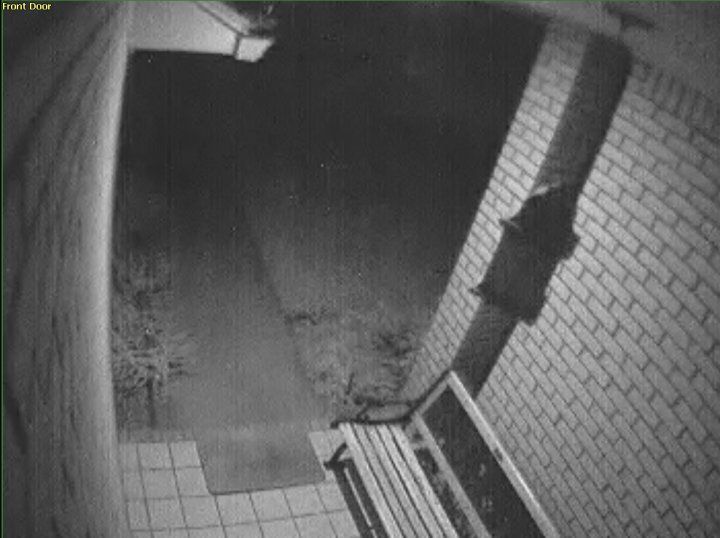
|
"Look wise, say nothing, and grunt. Speech was given to conceal thought."
- Sir William Osler -
- Sir William Osler -
Heh... remember this speed bump camera?

That pic is linked from this site. Unlike me, that guy is a real CCTV professional... he's the king of Rock, and his site is a wealth of info. If you're anywhere in his AO (I'm not... only know him online, where he's a heck of a nice guy), I'd look him up if you don't want to DIY it. Those speed-bump cams are a great way to get the plate number... but what happens when somebody drives a G-ride (eg. a low-rider) over it? 
|
"Look wise, say nothing, and grunt. Speech was given to conceal thought."
- Sir William Osler -
- Sir William Osler -

|
That moron's bumper & license plate look to me as though he's used to smacking into s#!t and bottoming out his GhettoCruiser (We call 'em Snow Plows up here in Minnesnowta)...
What an idiot! 
|
Want to meet members near you or attend local events? Check out the Hometown Board!
"An unloaded gun is about as helpful as a Wellstone supporter...Utterly useless in real life situations."-100w_Warlock
"An unloaded gun is about as helpful as a Wellstone supporter...Utterly useless in real life situations."-100w_Warlock
I have recently acquired one of these for testing.

Hopefully I can get some decent pics through it once I've had a chance to explore its options... but talk about full-featured... Holy smokes! This thing has a setting for virtually everything, can record directly to NAS, deliver any number of different resolutions up to 3MP, and so forth. So far, it's looking pretty sexy. |
"Look wise, say nothing, and grunt. Speech was given to conceal thought."
- Sir William Osler -
- Sir William Osler -
|
Sorry for the lag... been busy at my day (night?) job.
Remember this illuminator?
The homeowner liked the improvement in his front door picture so much, that he wanted one on the back porch as well. The back porch had an IR-equipped bullet camera mounted high up under a corner eave. It gave OK pictures during the day... but it was exposed to significant weather, and, like all IR-emitting cameras, attracted bugs. That combined with the water spots on the lens... well... here was the usual night view. Like the spider webs? 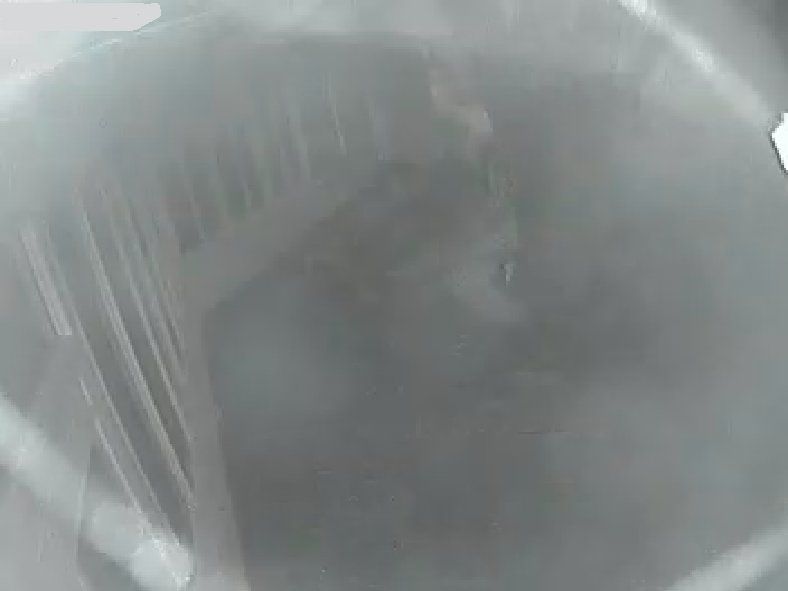
So we replaced it with a dome camera (they don't accumulate as much water on the dome, since it tends to run off), and placed one of those dome IR illuminators under the eave in the center of the porch. Here is the day view: 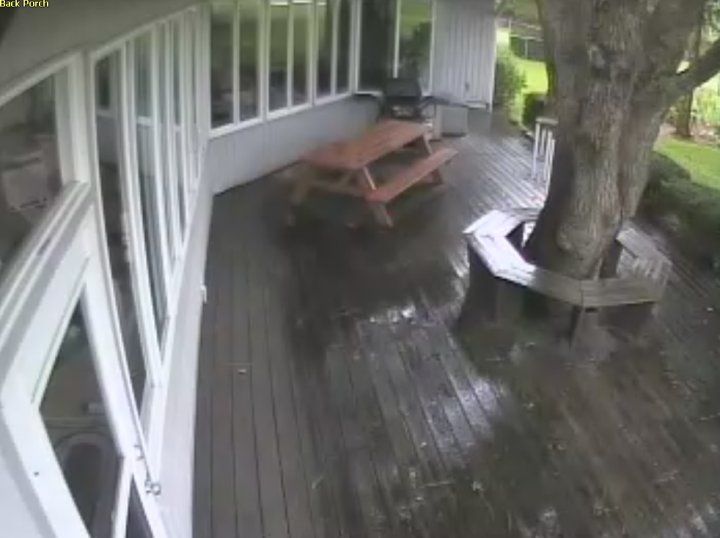
And here is the night view: 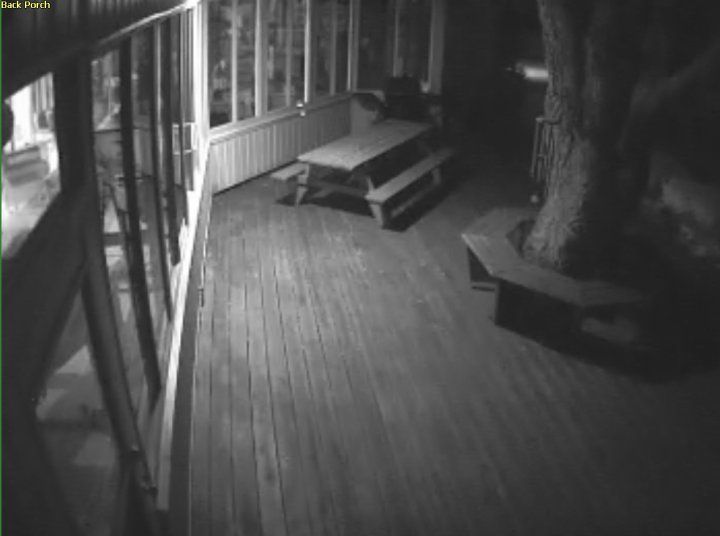
The homeowner and his wife were VERY pleased with the improvement
|
"Look wise, say nothing, and grunt. Speech was given to conceal thought."
- Sir William Osler -
- Sir William Osler -


|
Originally Posted By TheGrayMan:
So we replaced it with a dome camera (they don't accumulate as much water on the dome, since it tends to run off), and placed one of those dome IR illuminators under the eave in the center of the porch. And here is the night view: http://i251.photobucket.com/albums/gg286/TGrayman/116%20IR/porchIR.jpg The homeowner and his wife were VERY pleased with the improvement
Which new dome camera did you use? I take it that you are using a separate IR illuminator with it? |
"The only failure of Liberty is that it does not automatically bestow honor, good character, self-discipline and personal responsibility upon its owner."
|
Originally Posted By CWO:
Originally Posted By TheGrayMan:
So we replaced it with a dome camera (they don't accumulate as much water on the dome, since it tends to run off), and placed one of those dome IR illuminators under the eave in the center of the porch. And here is the night view: http://i251.photobucket.com/albums/gg286/TGrayman/116%20IR/porchIR.jpg The homeowner and his wife were VERY pleased with the improvement
Which new dome camera did you use? I take it that you are using a separate IR illuminator with it? That's a Panasonic dome (WV-CW484S)... identical model to the one shown below. When it comes to analog, all-weather, vandal-resistant, day/night WDR domes, the Panos are my hands-down favorite. 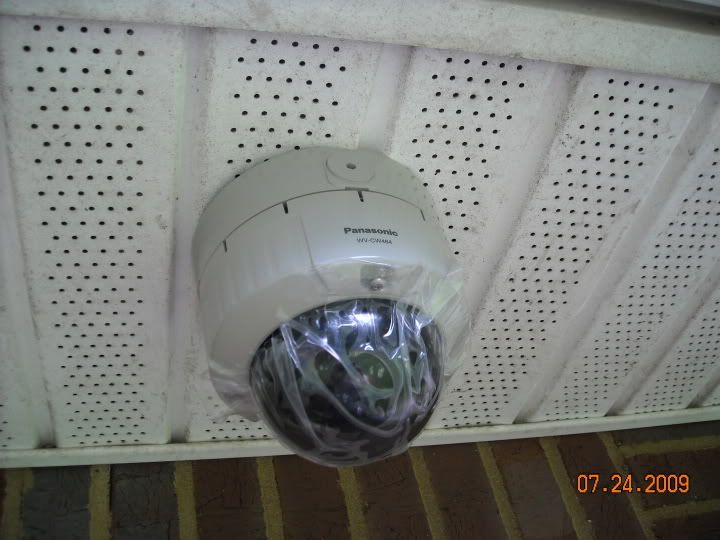
The illuminator is one of these (shown with the clear polycarbonate cover removed):
I can get some additional photos of the install to give you an idea of how I mounted and spaced them. |
"Look wise, say nothing, and grunt. Speech was given to conceal thought."
- Sir William Osler -
- Sir William Osler -
|
Originally Posted By TheGrayMan:
Originally Posted By CWO:
Originally Posted By TheGrayMan:
So we replaced it with a dome camera (they don't accumulate as much water on the dome, since it tends to run off), and placed one of those dome IR illuminators under the eave in the center of the porch. And here is the night view: http://i251.photobucket.com/albums/gg286/TGrayman/116%20IR/porchIR.jpg The homeowner and his wife were VERY pleased with the improvement
Which new dome camera did you use? I take it that you are using a separate IR illuminator with it? That's a Panasonic dome (WV-CW484S)... identical model to the one shown below. When it comes to analog, all-weather, vandal-resistant, day/night WDR domes, the Panos are my hands-down favorite. http://i251.photobucket.com/albums/gg286/TGrayman/install%20pics/done.jpg The illuminator is one of these (shown with the clear polycarbonate cover removed): http://i251.photobucket.com/albums/gg286/TGrayman/116%20IR/mounted.jpg I can get some additional photos of the install to give you an idea of how I mounted and spaced them. Thanks for the reply. At the $500 price point - the cost per camera is higher than I'd like to aim for my project. |
"The only failure of Liberty is that it does not automatically bestow honor, good character, self-discipline and personal responsibility upon its owner."
|
Originally Posted By CWO:
Thanks for the reply. At the $500 price point - the cost per camera is higher than I'd like to aim for my project. That's retail. That one I just installed? $250 on Ebay. If you're not in a hurry, and you have time to scrounge online auctions, you can get those analog Panasonic domes for much cheaper... 250-350... and that's New-in-box. The WV-CW-484S is the "older" analog model panasonic dome, with the WV-NW484S being the newer, network version. There's also an even newer version that just hit the market with "Super Dynamic V" (the newest iteration of Wide Dynamic Range... I forget the model number of the newest domes). Anyway... just like buying last year's model car, you can get the analog Pano domes for much cheaper than retail. I haven't payed retail for those things EVER. |
"Look wise, say nothing, and grunt. Speech was given to conceal thought."
- Sir William Osler -
- Sir William Osler -

|
Originally Posted By TheGrayMan:
Originally Posted By CWO:
Thanks for the reply. At the $500 price point - the cost per camera is higher than I'd like to aim for my project. That's retail. That one I just installed? $250 on Ebay. If you're not in a hurry, and you have time to scrounge online auctions, you can get those analog Panasonic domes for much cheaper... 250-350... and that's New-in-box. The WV-CW-484S is the "older" analog model panasonic dome, with the WV-NW484S being the newer, network version. There's also an even newer version that just hit the market with "Super Dynamic V" (the newest iteration of Wide Dynamic Range... I forget the model number of the newest domes). Anyway... just like buying last year's model car, you can get the analog Pano domes for much cheaper than retail. I haven't payed retail for those things EVER. Thanks for that clarification. CWO |
"The only failure of Liberty is that it does not automatically bestow honor, good character, self-discipline and personal responsibility upon its owner."
|
Originally Posted By CWO:
Originally Posted By TheGrayMan:
Originally Posted By CWO:
Thanks for the reply. At the $500 price point - the cost per camera is higher than I'd like to aim for my project. That's retail. That one I just installed? $250 on Ebay. If you're not in a hurry, and you have time to scrounge online auctions, you can get those analog Panasonic domes for much cheaper... 250-350... and that's New-in-box. The WV-CW-484S is the "older" analog model panasonic dome, with the WV-NW484S being the newer, network version. There's also an even newer version that just hit the market with "Super Dynamic V" (the newest iteration of Wide Dynamic Range... I forget the model number of the newest domes). Anyway... just like buying last year's model car, you can get the analog Pano domes for much cheaper than retail. I haven't payed retail for those things EVER. Thanks for that clarification. CWO No problem. I looked up the newest model domes, and apparently they're the WV-CW504S. Go into your ebay account and put "panasonic dome" as a regular search, and set it to email you when auctions pop up. That's how I've snagged most of mine. |
"Look wise, say nothing, and grunt. Speech was given to conceal thought."
- Sir William Osler -
- Sir William Osler -
|
Another member mentioned wanting to know a little bit more about building your own PC-based DVR... so I took some pics of one I'm currently building for a friend (I'm using one very similar to this in my home right now).
Here is the front view of an IBM (or Lenovo) Thinkcentre small-form-factor PC. These are popular corporate desktops, and can be found off-lease on Ebay all day long. Do a search for "Thinkcentre, Core 2" and you'll find a bunch of them. Don't pay more than $200-400 dollars. They should come with a Windows XP license sticker on the side (you can use that serial number to do a fresh install of XP), and a 1.8GHZ processor. You'll want about 1-2 GB of RAM as well. Make sure the one you get has gigabit ethernet. 
Here is the model number of this particular one. Going to Lenovo's website will allow you to look up the specs of that particular model (the link is here, for those interested in this particular one). 
Opening up the case is trivial. The hinge is at the back, and pushing the matching buttons on either side of the front will allow you open the case cover. 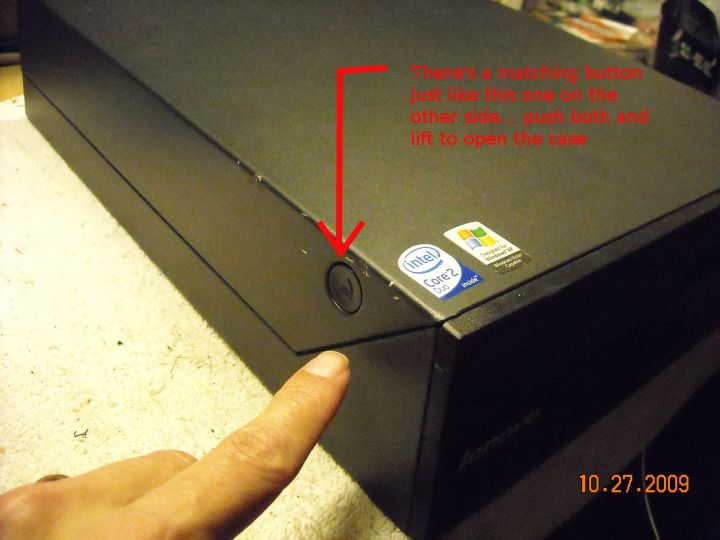
It looks like this inside... it takes some standard PC parts, with the exception of the PSU, and the Thinkcentre-specific heatsink. It is possible to swap out processors in these computers... but make sure you stick with the same series, or the BIOS may barf on you. I've upgraded one from a Core2Duo 1.8GHZ to 2.13GHZ, and it worked just fine. 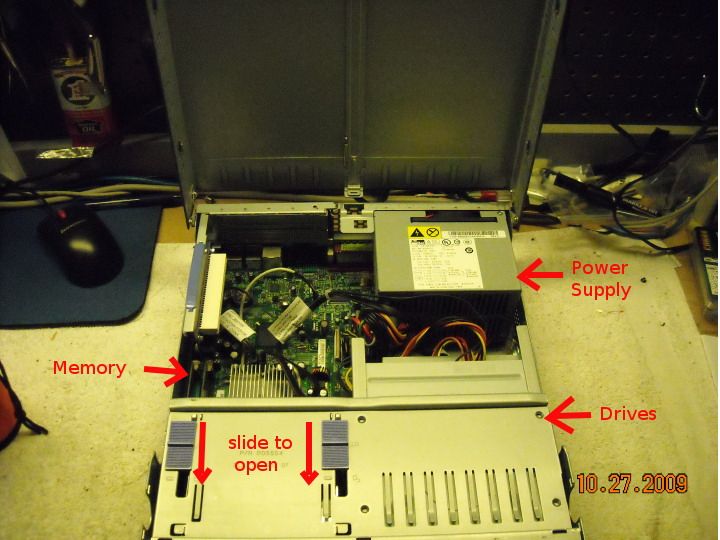
Here's a view from the side... note the cooling fans in the front (they blow across the heat sink for the processor, and the chipset). Note also the hard drive, and the CDROM drive right above it. 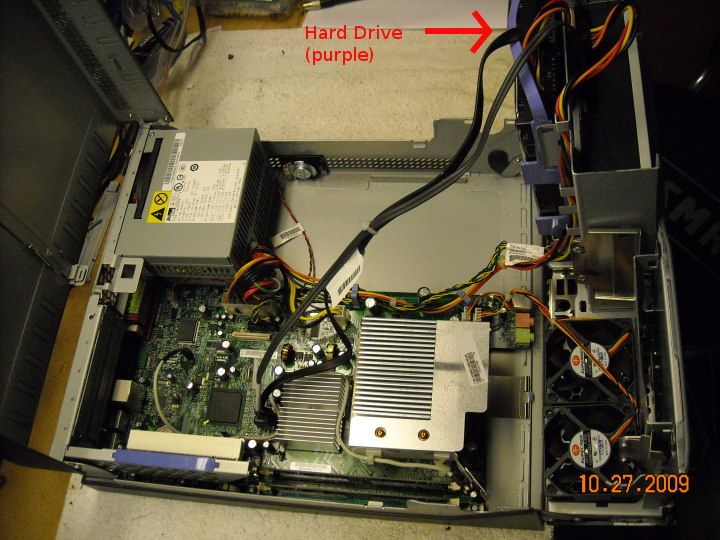
Pull that mess out and set that hard drive aside... the flexible drive caddy has a couple of pins that fit into the screw holes on the drive... removing it is toolless. 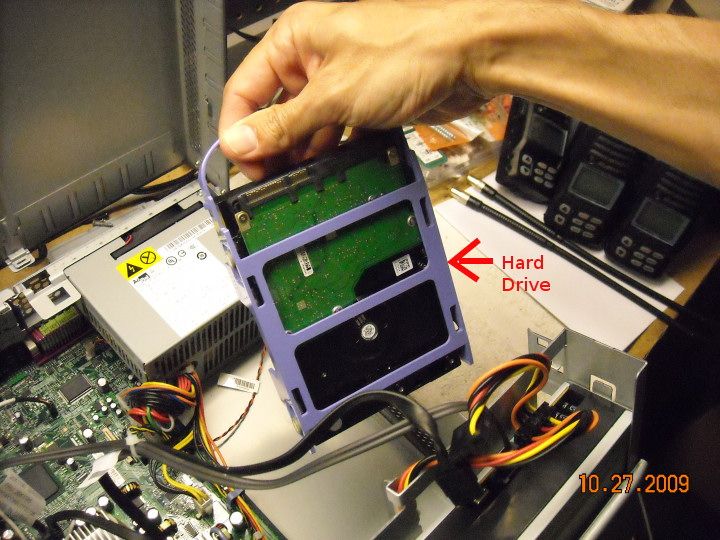
Now... swap out that shizzle with a nice, fat, 1.5TB drive from Newegg: 
If you're particularly interested in maximizing your recording space, you can likewise remove the SATA CDROM drive, and slide in one of these, allowing you to put another nice, fat 1.5TB drive from Newegg: 
Of course, if you remove the CDROM, you'll need an external CDROM drive to install windows (or you can install windows with the built-in drive, then remove it and add the second hard drive). 
Note also that you have two expansion slots in this model (always check model numbers with the Levovo website so you know what kind of expansion slots you have... some have 2 PCI slots, others have one, etc). One is PCI, and one is PCI-Ex1... so you could put a DVR card in this system, utilizing one or both of those slots. 
I'm mostly using Luxriot in these computers, and there's something you need to be aware of... Luxriot is licensed software, and it binds itself to a specific computer... more specifically, to that computer's network card (it uses the MAC address). If you trash your DVR and want to build another one, you can use the same Luxriot license, but you have to contact their tech support people and get them to assign it to your new DVR. This isn't a big deal... I've done it, and they were very nice... but just to save you some potential frustration. |
"Look wise, say nothing, and grunt. Speech was given to conceal thought."
- Sir William Osler -
- Sir William Osler -

|
Do you think you can edit your first post and put a Table of Contents?
I missed 2 updates and have to search through the pages to find what I missed, but someone reading this for the first time might just see the last update and miss the good parts in the middle. |
|
Originally Posted By sandwurm02:
Do you think you can edit your first post and put a Table of Contents? I missed 2 updates and have to search through the pages to find what I missed, but someone reading this for the first time might just see the last update and miss the good parts in the middle. Good point... I'll do that. ETA: I honestly didn't think this thread would grow large enough to require one, but there's more information (and more interest) than I'd anticipated. |
"Look wise, say nothing, and grunt. Speech was given to conceal thought."
- Sir William Osler -
- Sir William Osler -
|
Continuing with our DIY DVR tutorial...
Before you begin building your DVR, you need to download a few things. Go to the Lenovo website, and enter the model number of the Thinkcentre computer you have in front of you. Click where it says "downloads and drivers" 
Start by downloading drivers for the key components. Get chipset drivers, video drivers, Network drivers (shown below), sound drivers, and so forth. 
Once you have all of that, put it on a USB thumb drive, and set it aside; you're going to need it later. Now get out that XP Professional CD, put it in the drive, and fire up the computer. XP should auto-boot from that CD (if it doesn't, hit F12 during the boot sequence for a list of potential boot-up devices. Select the CDROM and you should get the following screen: 
Work your way through the various install screens, and have XP format the entire 1.5TB disk as NTFS (do a full format, not the quick one) 
It'll look something like this. Go do something else while it's working, because it will take a very long time to finish formatting such a large disk: 
It will work its way through the windows install (it will also prompt you for an Windows XP License Key... use the one off the sticker on the side of the case): 
You eventually will end up with a virgin XP installation. This is when you plug in that USB thumb drive and install the video/network/sound/chipset drivers (it will reboot several times during this process). Once the networking stuff is installed, you can connect to the internet (hopefully you're behind a router or firewall, or your box may get pwned) and go about downloading all the security updates that windows needs. This will take several hours and multiple reboots. Once this is done, you can install antivirus if you feel it's needed (you won't be reading Email or surfing the web from this DVR box, and it should be behind a router or firewall to shield it from worms and portscans... so you may not need it, considering that it will eat up some CPU cycles your camera software would rather have...). Make your own decision on that. I'll try to put some screengrabs from Luxriot in the next update. |
"Look wise, say nothing, and grunt. Speech was given to conceal thought."
- Sir William Osler -
- Sir William Osler -

|
I worked in the alarm industry for almost a decade. This is a great thread! It's cool to see all the new stuff that has come out.
The advice about not recording audio is true as well. SONITROL had live-mic capability and they did record it and I don't know how they got around the very real warning GrayMan spoke about. SONITROL microphone systems have live-mic capability, Baltimore City P.D. got into the shit big time over a K-9 incident and SONITROL recording a burglary and police response. :) |
|
Originally Posted By DRearic:
I worked in the alarm industry for almost a decade. This is a great thread! It's cool to see all the new stuff that has come out. The advice about not recording audio is true as well. SONITROL had live-mic capability and they did record it and I don't know how they got around the very real warning GrayMan spoke about. SONITROL microphone systems have live-mic capability, Baltimore City P.D. got into the shit big time over a K-9 incident and SONITROL recording a burglary and police response. :) IANAL, but I've heard that so many times that I simply follow it... and I think it mostly has to do with wiretapping statutes. Some camera manufacturers actually allow you to permanently kill the microphones that their cameras include... and I do mean "permanently." For instance, Mobotix includes a literal self-destruct switch for the audio capability of the camera. Click it, and your camera will never record audio again. Ever. Even the camera manufacturer's engineers cannot re-enable it. If the manufacturers are that concerned, I want nothing to do with it... it's video-only for me. |
"Look wise, say nothing, and grunt. Speech was given to conceal thought."
- Sir William Osler -
- Sir William Osler -

|
OST. Also, does anybody know if most of the software supports POS integration? Our POS software supports the ability to send transaction information to a specific IP and port number –– I just don't know how much of the DVR software can actually use it.
Great thread, though! |
"If you don't know what you want, you end up with a lot you don't." - Chuck Palahniuk
"Sorry, I don't have time to accomodate the muslims. I'm busy adapting to the new mexican culture." - AR-10
"Sorry, I don't have time to accomodate the muslims. I'm busy adapting to the new mexican culture." - AR-10
|
Originally Posted By Florg:
OST. Also, does anybody know if most of the software supports POS integration? Our POS software supports the ability to send transaction information to a specific IP and port number –– I just don't know how much of the DVR software can actually use it. Great thread, though! I don't think Luxriot does POS integration... you're going to have to go to a true business-oriented enterprise-level product for that. VideoInsight, Exacqvision, Vigil, DM, etc all do it. |
"Look wise, say nothing, and grunt. Speech was given to conceal thought."
- Sir William Osler -
- Sir William Osler -
|
Good information in this thread for sure. Thanks to everyone.
I purchased two of these in May: http://img408.imageshack.us/img408/2039/dcl480.jpg By July, all I seen at night was darkness. The little bit of Infrared that they featured seemed to be gone. When looking directly at the cameras at night, the IR seems to be working. I think the sensor that switches from color to b/w went out. I had a security light installed in my driveway to shed some light on the target area. Well, it basically done nothing. I now get darkness with a little speck of light at the location of the light. What kind of camera do I need to look for that will work well with a fairly lit area at night, but with a security light within view about 100ft out without washing out the entire image. My only thought was to get a new camera and once in position get one of my kids little stickers and stick on the camera where the light is. 
Thanks for all of the good info. ETA: Just so you can see, here is an example. Both cameras done this at around the same time. Multiple contacts with the "company" resulted in 0 response. Just after install (This isn't the camera mentioned above):: http://img511.imageshack.us/img511/4057/cam252509.jpg Same Camera a few months later: http://img688.imageshack.us/img688/8422/cam210109.jpg |
|
Originally Posted By 81reaper:
Good information in here for sure. I purchased two of these in May: http://img408.imageshack.us/img408/2039/dcl480.jpg By July, all I seen at night was darkness. The little bit of Infrared that they featured seemed to be gone. When looking directly at the cameras at night, the IR seems to be working. I think the sensor that switches from color to b/w went out. I had a security light installed in my driveway to shed some light on the target area. Well, it basically done nothing. I now get darkness with a little speck of light at the location of the light. What kind of camera do I need to look for that will work well with a fairly lit area at night, but with a security light within view about 100ft out without washing out the entire image. My only thought was to get a new camera and once in position get one of my kids little stickers and stick on the camera where the light is.
Thanks for all of the good info. What probably happened was your ICR (Infrared Cut-filter, Removable) is stuck. This is a common problem with cheaper cameras. The ICR is the little gadget that filters out the IR during the daytime (so that colors render correctly), but if it gets stuck over the sensor, it renders your camera totally blind to IR at night. It's nothing elaborate; it's literally a flat spectrally-selective piece of transparent plastic (like the lenses of your sunglasses) that gets placed in front of the lens during the day, and is pulled aside by a little internal mechanism at night. If you feel like living dangerously, you could always try the Arthur Fonzarelli school of camera repair: Take it down, put it in a dark room, and give it a gentle whack on the side to dislodge the stuck filter... see if it changes the image (you laugh... but I've done this myself, and it worked. Your mileage may vary, of course )
ETA: yep... judging by your pictures, that's a stuck ICR. I've tried putting strong IR sources in the view of non-day-night cameras, and all you can see is a very dim light, just like your pictures (no filter is 100% effective). |
"Look wise, say nothing, and grunt. Speech was given to conceal thought."
- Sir William Osler -
- Sir William Osler -
|
Thanks Gray,
This must have just been a bad camera model. They are indeed cheap cameras, but I have had decent luck with these little cameras for my needs until this batch. Do you have any suggestions for new cameras for the scenario I described. I know this thread is full of such suggestions, but I haven't seen security lights in the viewing area addressed directly. Is that what the WDR is useful for? Or is white balance what I am looking for? I currently have a 3 camera setup "all analog" running to a newly built computer based DVR with 1.5TB of available space. Things work pretty good in the daytime, but at night I am blind. My plans to address the "security light" issue are to just replace the two cameras mentioned with 2 Armor Dome Day/Night cameras without IR. I will probably get these one at a time to ensure this will fix me up. Does that camera type sound feasible for my application? |
|
Originally Posted By 81reaper:
Thanks Gray, This must have just been a bad camera model. They are indeed cheap cameras, but I have had decent luck with these little cameras for my needs until this batch. Do you have any suggestions for new cameras for the scenario I described. I know this thread is full of such suggestions, but I haven't seen security lights in the viewing area addressed directly. Is that what the WDR is useful for? Or is white balance what I am looking for? I currently have a 3 camera setup "all analog" running to a newly built computer based DVR with 1.5TB of available space. Things work pretty good in the daytime, but at night I am blind. My plans to address the "security light" issue are to just replace the two cameras mentioned with 2 Armor Dome Day/Night cameras without IR. I will probably get these one at a time to ensure this will fix me up. Does that camera type sound feasible for my application? Good move. Make sure your day/night cameras are proper day/night cameras, and have an ICR... that means a camera that switches to B&W at night. None of that "Intensifier" slow-shutter-speed stuff. WDR is good for areas with very light and very dark areas in the same image... like strong backlighting. It will also give you better images in a scene with strong light sources. Even so, consider masking the strong light source (can be as simple as a piece of duct tape on one side of a porch light)... you'll get better pictures, WDR or not. |
"Look wise, say nothing, and grunt. Speech was given to conceal thought."
- Sir William Osler -
- Sir William Osler -
|
I just finished taking a metric sh*t-ton of pictures through three different brands of megapixel domes. I don't have all of the pictures GIMP'd yet, but once I do, I'll put them in successive posts.
I used this scene as the test (same one from page 1 of this thread): 
I used my trusty Leupolds to get the range to our target object... about 50 feet is what I wanted. 
The target object is an old license plate (it's damned hard to take pictures through those Leupolds, so no snickering...): 
Cameras were all mounted on this tripod: 
Stay tuned. |
"Look wise, say nothing, and grunt. Speech was given to conceal thought."
- Sir William Osler -
- Sir William Osler -
|
Ok.
First set of pics is from this Panasonic (NF302). It's an IP-based, day-only, ruggedized, fixed dome camera, with a 2.8-10mm, 3.6x vari-focal, auto-iris lens. It takes either 12v, or 48v via PoE. It has the full suite of options on-board... motion detection, ability to FTP or email images, internal storage via SD card, and so forth. 
It does a couple of different resolutions... megapixel, and VGA, in either MPEG4 or MJPEG. This is the main screen when you log into the camera. Clicking on the "Setup" button in the upper left will allow you to access all the options, including baseline resolution, frame-rate, etc. Note the "zoom" settings on the left... that's digital zoom, not optical zoom, so your image will pixelate if you use that. 
Here is 640x480 with no zoom. This is as wide-angle as this camera gets: 
Here is megapixel range (1280x960)... again, wide-angle: ETA: photobucket screwed up the resolution... stand by. ETA2: Let's try this again... high-res wide-angle ETA3: OK... apparently ARF resizes images to 800x600, so I'll link directly: High-res, wide-angle 
Here is VGA (640x480) with maximum optical zoom: 
Here is megapixel (1280x960) with maximum optical zoom: ETA: photobucket screwed this one up too... grrrr.... ETA2: and the high-res zoom pic: ETA3: OK... ARF resized this one too. Direct link here: High-res, zoomed-in 
Notice that you cannot quite make out the license plate in any of those pictures. Good image quality, and lots of options... but you couldn't ID a vehicle tag 50 feet away on maximum resolution and zoom. |
"Look wise, say nothing, and grunt. Speech was given to conceal thought."
- Sir William Osler -
- Sir William Osler -

|
Originally Posted By mtechgunman:
WOW! great thread with some great info that I totally missed!!!! Thanks... hope you find it useful. I may ask one of the mods if they can sticky this thread at some point. |
"Look wise, say nothing, and grunt. Speech was given to conceal thought."
- Sir William Osler -
- Sir William Osler -
Next camera in the lineup is a Mobotix dome, model D22. Link to the manufacturer's website. It's a fixed lens, very wide-angle (covers a full 90 degrees), day-only camera.

This thing is absolutely pimptastic with options. Multi-window motion detection, ability to record to on-board SD card, built-in Lux meter, ability to record to NAS/email/FTP, comes with its own free software (good software too), audio via an external IO box, VOIP phone via that same external box (this camera is also a video-phone... so it can literally detect motion, dial your cell phone, and you can actually see/talk to the person breaking into your house. Sexy...). 
It also does a bajillion resolutions... among them 320x240 (CIF): 
640x480: 
800x600: 
(The rest of these are photobucket links... ARF will resize them if I post the actual pictures... which are HUGE): 1024x768 1280x960 2048x1536 What you'll notice... again... is that you can't quite make out the license plate. In fairness, that's probably not unexpected, since this is a camera/lens combo designed for area coverage. Fortunately, you can change that by changing out the lens (can be done by the camera owner, and doesn't require a trip back to the factory). What this shows you too is that lens and coverage area can be more important than raw pixels, since even going to a 3MEGA resolution can't compensate enough to cover a wide area AND get that license plate. There are trade-offs in everything. In terms of feature sets, this is truly one of the most full-featured domes I've ever seen... you can access it over the 'net, digitally zoom in on an area by clicking or scroll wheel... it's quite user friendly. |
"Look wise, say nothing, and grunt. Speech was given to conceal thought."
- Sir William Osler -
- Sir William Osler -
|
Originally Posted By Feral:
Great thread! I'm marking it "no archive."  Good deal... this thread has grown larger than I ever thought it would. Hard to believe we're almost six months and 20,000 page-views on this thing. |
"Look wise, say nothing, and grunt. Speech was given to conceal thought."
- Sir William Osler -
- Sir William Osler -
Here is the Acti 7411 megapixel dome. It's a weatherproof, ruggedized, day/night dome camera. The lens is 3.3~12 mm / F1.6, and is integrated with the camera, so no changing it out. It's a progressive-scan imager, and the pictures are actually pretty sharp. You can see some actual videos from it here.

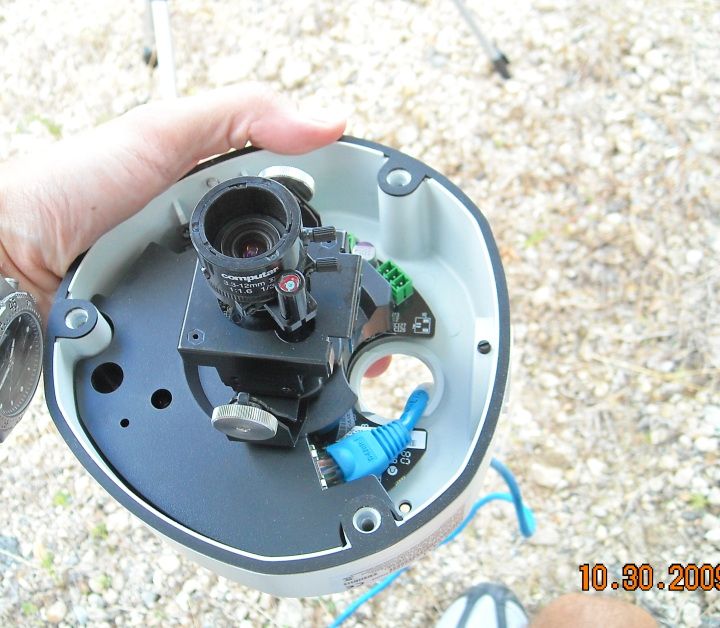
It's actually the dome version of this same camera, without the integrated IR LEDs: 
The configuration page has lots of settings, including the usual stuff you'd expect. It does motion-detection on camera, has audio (2-way), and has digital I/O (to integrate with other sensors and alarm systems). It will upload images by HTTP, FTP, or SMTP (email). It does not record directly to NAS, and doesn't have internal SD-card storage like the first two domes. It does event scripting, so you can program it to do X, Y, and Z based on motion detected in window "A." 
The drop-down menu shows that you pick all sorts of resolutions... all the way down to a lilliputian 160x112: 
Here is 640x480 with the view pulled all the way back (wide angle): 
Here is 640x480 with that lens zoomed all the way in... you can almost see the license plate: 
And here are the higher-res versions (again, in links, because ARF will automatically resize them to 800x600): Acti 1280x1024 wide-angle Acti 1280x1024 zoomed in The last image is worth posting again (resized by ARF... the original linked above is larger). Why? Because now you can read the license plate: 
The last image is instructive, because it shows some of the tweaking you need to do in order to get exactly the view you want. In order to get where you want to be, you not only need high enough resolution, you need the right lens/view. I've said elsewhere in this thread that analog isn't a dead option, provided you choose lenses and field-of-view appropriately, and this shows that's true for megapixel as well. Even with high-megapixel cameras, you can't get sloppy and just throw something up there without planning and anticipating what you will want to see. |
"Look wise, say nothing, and grunt. Speech was given to conceal thought."
- Sir William Osler -
- Sir William Osler -
|
Remember this picture?
Remember how I mentioned their prior problems with vandalism, etc? Well... the new camera is already paying some dividends. A group of teens (who didn't even live in the development where I installed that camera) decided to party there one recent night, drink, skateboard, throw one another in the pool, etc. 
Facial ID was good enough that a worker recognized several of the individuals, and their parents were contacted (no need for the Police... this was very minor stuff, and they preferred to handle it privately). One girl points right at the camera, as she suddenly realizes they're being watched (caption gratuitously added by me). 
|
"Look wise, say nothing, and grunt. Speech was given to conceal thought."
- Sir William Osler -
- Sir William Osler -
I'm going to end up doing some more night pictures, so here's a bit more detail on some of the illuminators we'll be using. We'll be looking at a few of these:

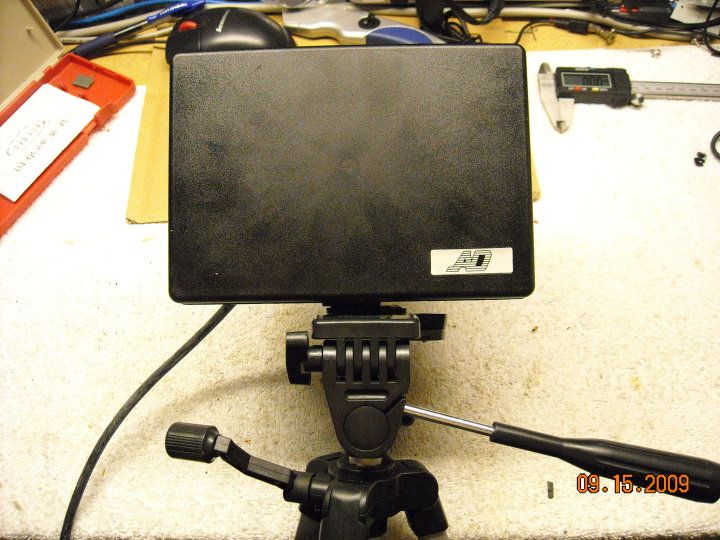
Most of these are 12v powered, via a standard barrel connector (with the exception of the large rectangular, tripod-mounted model. That one takes a dedicated power supply). These can be wired to a standard 12v CCTV power supply, and you can put multiple illuminators on a channel. Most power supplies are rated at 500mA to 1A per channel, and as you're going to see, most of these don't pull much. There's this one... from supercircuits. It pulls about 180mA: 
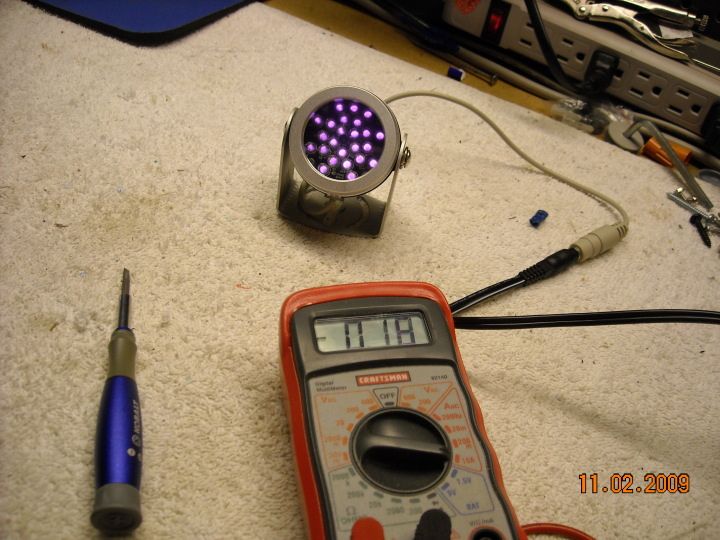
Then there's this no-brand Ebay model (48 LED, I believe). Despite the larger number of LEDs, it pulls only 160mA. 

There's my current favorite-for-the-money, this domed, surface-mount model from Ebay. It only pulls 150mA, yet seems to throw a very wide-angle and even pool of IR light. It also doesn't get at hot as some of the others. 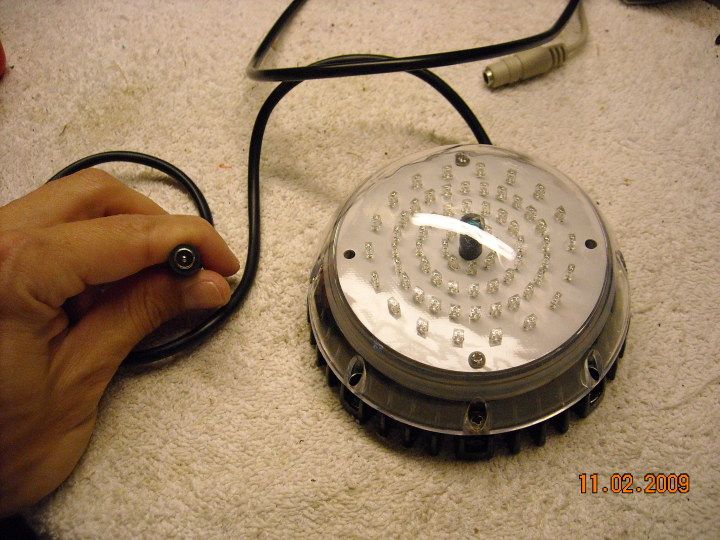
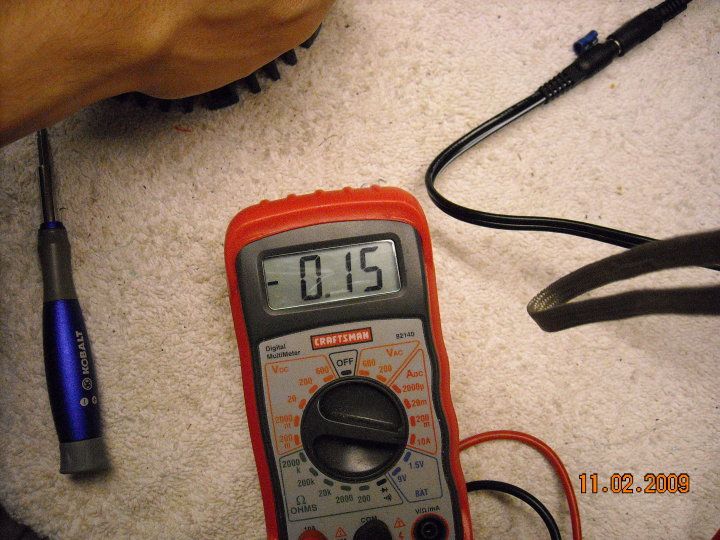
And there's this one you'll probably remember from page 6 or so... I do NOT recommend this one, due to longevity problems. It pulls 190mA, and I only included it for comparison: 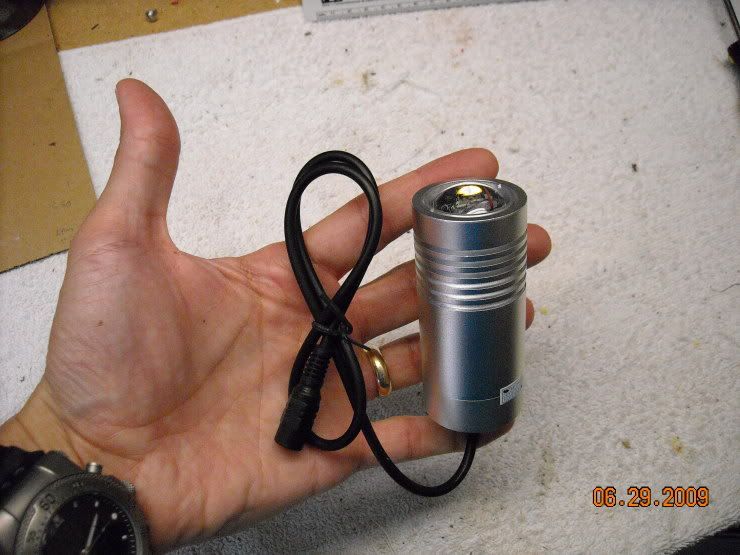
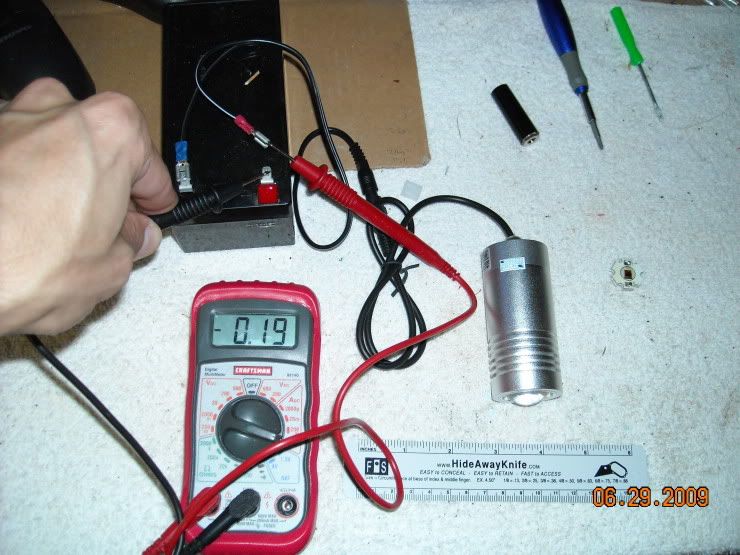
And for the Home-Improvement "More Power! Ugh! Ugh! Ugh!" guys, there's this one. The extra-big-ass-fries of IR illuminators... it pulls up to 5A from a dedicated, current-controlled power supply. I took this picture from the side, because this thing isn't eye-safe within about 4-5 feet of the emitting surface. It's only pulling 3A in this picture, but it's not warmed up yet. It starts out at 2700mA, and the amount of current steadily increases as it warms up (remember your physics... as temperature increases, electrical resistance also increases... you can see this phenomenon with any sort of resistive heater) 

If I can swing it, I'm going to try to get pictures with the day/night megapixel dome I tested further up the page. This will give you an idea of what you're getting with these illuminators and a megapixel camera, and what kind of power you're going to need to drive them. If I'm feeling particularly ambitious, I'll also try to record some video through NVGs. I've never attempted the latter, and I don't have an adapter for my MUM, so I'll have to try to rig something. Might be ugly... might not even happen... so fair warning. |
"Look wise, say nothing, and grunt. Speech was given to conceal thought."
- Sir William Osler -
- Sir William Osler -
Holy underwhelming, Batman... the IR pictures from that day/night megapixel dome are very disappointing  So much so, in fact, that I wonder if I'm not doing something wrong. So much so, in fact, that I wonder if I'm not doing something wrong.
I'll get them up later today. |
"Look wise, say nothing, and grunt. Speech was given to conceal thought."
- Sir William Osler -
- Sir William Osler -

"Look wise, say nothing, and grunt. Speech was given to conceal thought."
- Sir William Osler -
- Sir William Osler -

|
TheGrayMan,
seriously this may be the most interesting thread on Arfcom, I keep reading it and absorbing new details all the time. Thanks for taking the time to put it up. I had a question about the camera servers, I have a zone I want to monitor and it's remote from my office where all the DVR gear will be. I will need two, maybe three cameras hooked up there. I am probably going to bite the bullet and buy one of the panasonic dome camera for the main view I want to cover, and then use two smaller, cheaper bullet cams for the corners of this garage. I will hook them to one camera server that is in the garage attic, and then run one wire from there to my attic and eventually down to my office. The question is about the camera servers, how does the camera feed back to the DVR happen? I am going to probably use LuxRiot or ZoneMinder depending on if I can get zoneminder working or not, but does the camera server send all the feeds back as one stream? or does it send one camera feed back at a time and rotate through the images? I am not sure how the NVR/DVR will pick apart the multiple streams from multi cameras on the server end. And if it's sending one stream but rotating through the cameras, so on the NVR side I see the feed but i get video from Camera 1, then Camera 2 then Camera 3, I may miss stuff I want to record. does that make sense? |
|
Originally Posted By crashburnrepeat:
TheGrayMan, seriously this may be the most interesting thread on Arfcom, I keep reading it and absorbing new details all the time. Thanks for taking the time to put it up. I had a question about the camera servers, I have a zone I want to monitor and it's remote from my office where all the DVR gear will be. I will need two, maybe three cameras hooked up there. I am probably going to bite the bullet and buy one of the panasonic dome camera for the main view I want to cover, and then use two smaller, cheaper bullet cams for the corners of this garage. I will hook them to one camera server that is in the garage attic, and then run one wire from there to my attic and eventually down to my office. The question is about the camera servers, how does the camera feed back to the DVR happen? I am going to probably use LuxRiot or ZoneMinder depending on if I can get zoneminder working or not, but does the camera server send all the feeds back as one stream? or does it send one camera feed back at a time and rotate through the images? I am not sure how the NVR/DVR will pick apart the multiple streams from multi cameras on the server end. And if it's sending one stream but rotating through the cameras, so on the NVR side I see the feed but i get video from Camera 1, then Camera 2 then Camera 3, I may miss stuff I want to record. does that make sense? Modern camera servers are multi-stream capable... some can serve 10-12 streams simultaneously to multiple clients. So you can get a stream with one view on one computer, and a stream with a second view on another computer, all while it sends all the streams to the DVR for recording. If I'm off somewhere and I only want to see streams from outside my home (the interior cams are on a different server), I can log into that server and tile up those views. None of this interrupts the NVR from recording. Also, the DVR/NVR (luxriot in my case) isn't physically connected to ANY of the cameras. The cameras are attached either to servers (that attach to the home network), or the cameras are connected directly to the home network backbone, and powered via PoE delivered from that same main network switch (I use a Cisco 24-port PoE gigabit switch). In my case, it's all-network video sources... either camera servers, or stand-alone network cameras. I can log into any of them individually and get a stream (which doesn't interrupt the DVR from recording), or log into Luxriot with a remote client and get ALL of the streams at once. The multi-client capability can be useful. For Christmas last year, I web-casted Christmas morning to some relatives who couldn't travel to Casa de Grayman for the holiday, using an analog camera and an Axis server. It worked like a charm, and the multiple clients/streams were not a problem. ETA: how's your daughter? |
"Look wise, say nothing, and grunt. Speech was given to conceal thought."
- Sir William Osler -
- Sir William Osler -


|
Originally Posted By TheGrayMan:
Modern camera servers are multi-stream capable... some can serve 10-12 streams simultaneously to multiple clients. So you can get a stream with one view on one computer, and a stream with a second view on another computer, all while it sends all the streams to the DVR for recording. If I'm off somewhere and I only want to see streams from outside my home (the interior cams are on a different server), I can log into that server and tile up those views. None of this interrupts the NVR from recording. Also, the DVR/NVR (luxriot in my case) isn't physically connected to ANY of the cameras. The cameras are attached either to servers (that attach to the home network), or the cameras are connected directly to the home network backbone, and powered via PoE delivered from that same main network switch (I use a Cisco 24-port PoE gigabit switch). In my case, it's all-network video sources... either camera servers, or stand-alone network cameras. I can log into any of them individually and get a stream (which doesn't interrupt the DVR from recording), or log into Luxriot with a remote client and get ALL of the streams at once. The multi-client capability can be useful. For Christmas last year, I web-casted Christmas morning to some relatives who couldn't travel to Casa de Grayman for the holiday, using an analog camera and an Axis server. It worked like a charm, and the multiple clients/streams were not a problem. ETA: how's your daughter? Thanks for the info, sounds like camera server is the way to go above the garage, and use analogs connected to that. I am going to look for the one that does not require IE/ActiveX to get it to the browser. Rach is doing a lot better, her fever has stabilized, and is down to 100'ish now for a full day. Still eating and chipper but *Really* weak. She had a bunch of visitors today and wanted to go outside, she got a little over confident and had a major crash going down the front steps. We have to restrict her and keep her in the chair till she gets stronger. she's still getting better though, It feels like we're past re-infection and and we just gotta keep on the antibiotics for the next month or so. I hop she starts gaining weight back, she's so frail still. |
|
Originally Posted By crashburnrepeat:
Originally Posted By TheGrayMan:
Modern camera servers are multi-stream capable... some can serve 10-12 streams simultaneously to multiple clients. So you can get a stream with one view on one computer, and a stream with a second view on another computer, all while it sends all the streams to the DVR for recording. If I'm off somewhere and I only want to see streams from outside my home (the interior cams are on a different server), I can log into that server and tile up those views. None of this interrupts the NVR from recording. Also, the DVR/NVR (luxriot in my case) isn't physically connected to ANY of the cameras. The cameras are attached either to servers (that attach to the home network), or the cameras are connected directly to the home network backbone, and powered via PoE delivered from that same main network switch (I use a Cisco 24-port PoE gigabit switch). In my case, it's all-network video sources... either camera servers, or stand-alone network cameras. I can log into any of them individually and get a stream (which doesn't interrupt the DVR from recording), or log into Luxriot with a remote client and get ALL of the streams at once. The multi-client capability can be useful. For Christmas last year, I web-casted Christmas morning to some relatives who couldn't travel to Casa de Grayman for the holiday, using an analog camera and an Axis server. It worked like a charm, and the multiple clients/streams were not a problem. ETA: how's your daughter? Thanks for the info, sounds like camera server is the way to go above the garage, and use analogs connected to that. I am going to look for the one that does not require IE/ActiveX to get it to the browser. Rach is doing a lot better, her fever has stabilized, and is down to 100'ish now for a full day. Still eating and chipper but *Really* weak. She had a bunch of visitors today and wanted to go outside, she got a little over confident and had a major crash going down the front steps. We have to restrict her and keep her in the chair till she gets stronger. she's still getting better though, It feels like we're past re-infection and and we just gotta keep on the antibiotics for the next month or so. I hop she starts gaining weight back, she's so frail still. The axis models are the only ones I've seen that don't require ActiveX. The Acti servers and cameras require IE |
"Look wise, say nothing, and grunt. Speech was given to conceal thought."
- Sir William Osler -
- Sir William Osler -

|
I'm looking for video servers (AXIS) on ebay, and most of them appear to be 10/100. Is that a concern? I will probably put 4 cameras on these, or should I be looking for a 10/100/1000 model?
I am trying to stay with AXIS if I can because of the IE/ActiveX requirement for others but if 10/100 will be an issue, I can fold and use IE if necessary. I just don't like it. |
|
Originally Posted By crashburnrepeat:
I'm looking for video servers (AXIS) on ebay, and most of them appear to be 10/100. Is that a concern? I will probably put 4 cameras on these, or should I be looking for a 10/100/1000 model? I am trying to stay with AXIS if I can because of the IE/ActiveX requirement for others but if 10/100 will be an issue, I can fold and use IE if necessary. I just don't like it. The 10/100 won't be a problem. I've seen multiple Axis four-channel servers run on the same 10/100 network segment with no issues. |
"Look wise, say nothing, and grunt. Speech was given to conceal thought."
- Sir William Osler -
- Sir William Osler -
|
you need to IM me and tell me if you are ever in Utah, or where you live, I travel a lot for my job (product manager for a major software company) and I have discretion in where I travel, I am coming to you sometime and buying you dinner for all your advice, both on getting my house secure, and helping me with my daughter's hip problem as well. I really appreciate the time.
my last (I hope) question on video servers is: If I get a video server, they mostly have what look to be BNC connectors out the back of them, to go to analog cameras. Some of them have RCA jacks, do you just run power separately to the cameras? so I have to have the camera near an electrical circuit? Or can I run power over the Co-Ax cable or some other way? I'm trying to minimize the number of cables to the camera. I have to have one vandal proof camera since that area has lots of traffic and people are always breaking stuff, but the other cameras covering front and back yard can be bullet cams I think. so I'm wondering how to run power from the video server to the cameras, or if it's a separate line. In one of your older posts on about page 8 or 9, you mentioned running power from a 12 volt power supply, that had extra slots. is that something that was wired into the house? I assume I can get one of those somewhere. |
|
Originally Posted By crashburnrepeat:
you need to IM me and tell me if you are ever in Utah, or where you live, I travel a lot for my job (product manager for a major software company) and I have discretion in where I travel, I am coming to you sometime and buying you dinner for all your advice, both on getting my house secure, and helping me with my daughter's hip problem as well. I really appreciate the time. my last (I hope) question on video servers is: If I get a video server, they mostly have what look to be BNC connectors out the back of them, to go to analog cameras. Some of them have RCA jacks, do you just run power separately to the cameras? so I have to have the camera near an electrical circuit? Or can I run power over the Co-Ax cable or some other way? I'm trying to minimize the number of cables to the camera. I have to have one vandal proof camera since that area has lots of traffic and people are always breaking stuff, but the other cameras covering front and back yard can be bullet cams I think. so I'm wondering how to run power from the video server to the cameras, or if it's a separate line. In one of your older posts on about page 8 or 9, you mentioned running power from a 12 volt power supply, that had extra slots. is that something that was wired into the house? I assume I can get one of those somewhere. Yes... and I'd avoid the ones with RCA connectors. Power is sent to the camera with the same bundled cable that carries the video... so-called "Siamese" cable. You simply peel the two cable sections apart at the head end, and run the two-conductor power to your CCTV power supply. Siamese cable: 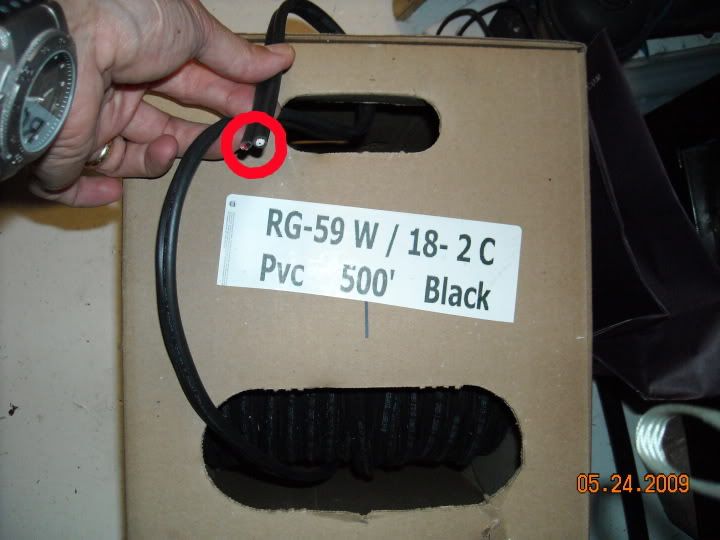

Power supply (top box, external view): 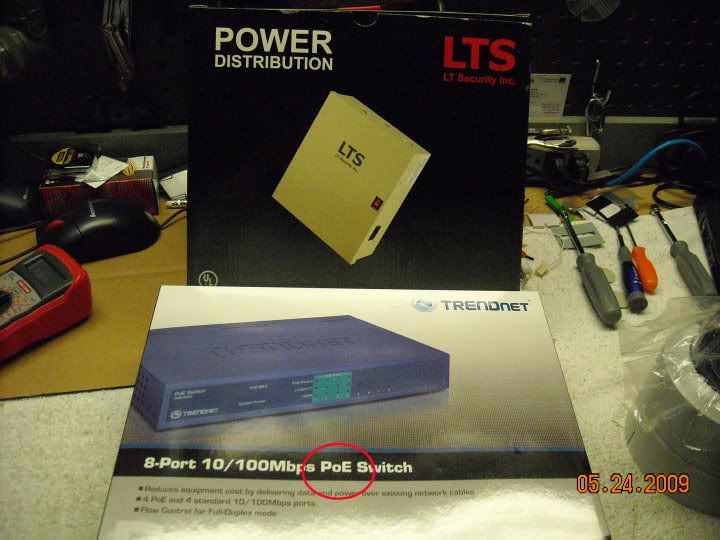
Power supply (internal view, two different supplies):

You can supply power at the camera end, but why? Centralize your power, and run it over Siamese, right along with the coax (RG-59 in the picture above). This allows you to run your cameras on a common PSU, and connect that PSU to a UPS in case of power outages. ETA: and you don't owe my anything, brother... happy to help you out. |
"Look wise, say nothing, and grunt. Speech was given to conceal thought."
- Sir William Osler -
- Sir William Osler -