



|
Originally Posted By hondaciv:
Can I get an opinion on this setup? http://www.newegg.com/Product/Product.aspx?Item=N82E16881183053 LaView LV-KN988P86A4 Premium IP Surveillance System 8 Channel NVR + 6 x Full HD 1080P Day/Night In/Outdoor Cameras (No HDD Included) I need new cameras, and I don't want to spend over 1000.00 for a good setup. I might be tempted by this setup http://www.amazon.com/Q-See-QT8616-8Z7-3-Channel-High-Definition-Cameras/dp/B00VAILCYY/ref=sr_1_1?s=photo&ie=UTF8&qid=1445302400&sr=1-1&keywords=Q-See+QT8616-8Z7-3+32 Q-See QT8616-8Z7-3 32 Channel 3 MP/1080p HD NVR System with 8 High-Definition IP 3 MP/1080p Cameras and 3 TB Hard Drive (White) Of those two, I'd do the q-see... it's a bigger name, and that system is much more expandable. |
Everything you are doing is wrong, and it is my sworn duty to resist you.
|
Originally Posted By MALT0SE:
I am the end unit of a townhouse court with a parking lot in the middle. there has been a rash of vandalism and cars getting broken into. I don't need crystal clear video, but I would like audio, some night vision capability, and onboard storage. This would be mounted outside of a 2nd floor window. I realize a dedicated system is the way to go, but I have been getting by with a gopro like camera hooked up to a 5v power cable through the window. The camera is not waterproof and the nightvision is terrible (because it is not a night vision camera). So basically anything would be a step up. The two systems look good, but if there is a better option at or above that price point im all ears I would just pick up a $150 3MP Hikvision dome, and stick it on the wall outside my window. Run the network cable back inside along with a 12VDC dongle (if you want to run it on 12V rather than POE. Get one with an SD card slot so it can record internally, and just take the whole camera with you when you move out... integrate it into your system at your next (more permanent) residence. |
Everything you are doing is wrong, and it is my sworn duty to resist you.

|
I need some help setting up some kind of remote IP camera at my cabin. All I have for internet there is an AT&T 4Glte wireless hotspot. How/what can I put there and be able to log into/view it from my home 300 miles away? Do I need to hook the hotspot and camera to a router? |
Those who ignore history are doomed to repeat it..

You will ride eternal, shiny and chrome.
Joined:
Oct 2009
Posts:
11570
EE: 100% (5)
 SOM
SOM
|
Originally Posted By Waldo:
I need some help setting up some kind of remote IP camera at my cabin. All I have for internet there is an AT&T 4Glte wireless hotspot. How/what can I put there and be able to log into/view it from my home 300 miles away? Do I need to hook the hotspot and camera to a router? You can tether it.. or use a shitty wireless foscam to the hotspot. 
|
Your tears provide the beautiful rainbow that brightens my day.
|
Originally Posted By Waldo:
I need some help setting up some kind of remote IP camera at my cabin. All I have for internet there is an AT&T 4Glte wireless hotspot. How/what can I put there and be able to log into/view it from my home 300 miles away? Do I need to hook the hotspot and camera to a router? A lot of those cellular-based hotspots will not give you an externally-accessible IP address. They will email pics to you if triggered, but you can't pick up your phone, enter an address, and get a live feed from the camera. |
Everything you are doing is wrong, and it is my sworn duty to resist you.
|
Originally Posted By TheGrayMan:
A lot of those cellular-based hotspots will not give you an externally-accessible IP address. They will email pics to you if triggered, but you can't pick up your phone, enter an address, and get a live feed from the camera. Originally Posted By TheGrayMan:
Originally Posted By Waldo:
I need some help setting up some kind of remote IP camera at my cabin. All I have for internet there is an AT&T 4Glte wireless hotspot. How/what can I put there and be able to log into/view it from my home 300 miles away? Do I need to hook the hotspot and camera to a router? A lot of those cellular-based hotspots will not give you an externally-accessible IP address. They will email pics to you if triggered, but you can't pick up your phone, enter an address, and get a live feed from the camera. It's a netgear 770s, if that helps. |
Those who ignore history are doomed to repeat it..
|
Originally Posted By Waldo:
It's a netgear 770s, if that helps. Originally Posted By Waldo:
Originally Posted By TheGrayMan:
Originally Posted By Waldo:
I need some help setting up some kind of remote IP camera at my cabin. All I have for internet there is an AT&T 4Glte wireless hotspot. How/what can I put there and be able to log into/view it from my home 300 miles away? Do I need to hook the hotspot and camera to a router? A lot of those cellular-based hotspots will not give you an externally-accessible IP address. They will email pics to you if triggered, but you can't pick up your phone, enter an address, and get a live feed from the camera. It's a netgear 770s, if that helps. What matters is what the cell service allows in terms of network traffic. A lot of them allow OUTGOING 'net access over that cellular modem, but don't provide INCOMING net access (to prevent people from running video and servers over their "unlimited" cell service). My verizon dongle doesn't allow incoming network traffic... only outgoing. |
Everything you are doing is wrong, and it is my sworn duty to resist you.
You will ride eternal, shiny and chrome.
Joined:
Oct 2009
Posts:
11571
EE: 100% (5)
SOM
|
Originally Posted By Waldo:
It's a netgear 770s, if that helps. Originally Posted By Waldo:
Originally Posted By TheGrayMan:
Originally Posted By Waldo:
I need some help setting up some kind of remote IP camera at my cabin. All I have for internet there is an AT&T 4Glte wireless hotspot. How/what can I put there and be able to log into/view it from my home 300 miles away? Do I need to hook the hotspot and camera to a router? A lot of those cellular-based hotspots will not give you an externally-accessible IP address. They will email pics to you if triggered, but you can't pick up your phone, enter an address, and get a live feed from the camera. It's a netgear 770s, if that helps. At work we have a verizon MBR 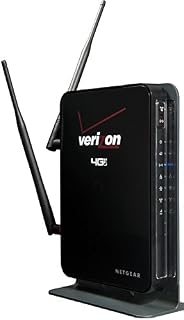
Uses cell. Acts just like regular internet. Never tried running anything off of it like that though. We did have 8 IP phones on one.
|
Your tears provide the beautiful rainbow that brightens my day.
|
Originally Posted By louisianarebel:
At work we have a verizon MBR http://ecx.images-amazon.com/images/I/41HdAAQvvDL._AC_UL320_SR184,320_.jpg Uses cell. Acts just like regular internet. Never tried running anything off of it like that though. We did have 8 IP phones on one. Originally Posted By louisianarebel:
Originally Posted By Waldo:
It's a netgear 770s, if that helps. At work we have a verizon MBR http://ecx.images-amazon.com/images/I/41HdAAQvvDL._AC_UL320_SR184,320_.jpg Uses cell. Acts just like regular internet. Never tried running anything off of it like that though. We did have 8 IP phones on one. Does it give you a routable, externally-accessible IP address? Because if it does, that might work. |
Everything you are doing is wrong, and it is my sworn duty to resist you.
You will ride eternal, shiny and chrome.
Joined:
Oct 2009
Posts:
11572
EE: 100% (5)
SOM
|
Originally Posted By TheGrayMan:
Does it give you a routable, externally-accessible IP address? Because if it does, that might work. Originally Posted By TheGrayMan:
Originally Posted By louisianarebel:
Originally Posted By Waldo:
It's a netgear 770s, if that helps. At work we have a verizon MBR http://ecx.images-amazon.com/images/I/41HdAAQvvDL._AC_UL320_SR184,320_.jpg Uses cell. Acts just like regular internet. Never tried running anything off of it like that though. We did have 8 IP phones on one. Does it give you a routable, externally-accessible IP address? Because if it does, that might work. It seems like it. PDF of manual Can't really screw around with it since its got tons of people using it all day long. |
Your tears provide the beautiful rainbow that brightens my day.

|
Originally Posted By louisianarebel:
It seems like it. PDF of manual Can't really screw around with it since its got tons of people using it all day long. Originally Posted By louisianarebel:
Originally Posted By TheGrayMan:
Originally Posted By louisianarebel:
Originally Posted By Waldo:
It's a netgear 770s, if that helps. At work we have a verizon MBR http://ecx.images-amazon.com/images/I/41HdAAQvvDL._AC_UL320_SR184,320_.jpg Uses cell. Acts just like regular internet. Never tried running anything off of it like that though. We did have 8 IP phones on one. Does it give you a routable, externally-accessible IP address? Because if it does, that might work. It seems like it. PDF of manual Can't really screw around with it since its got tons of people using it all day long. If they're receiving VOIP calls it's probably got a usable external address. Unless we're talking a VOIP service vice a locally managed solution. |
Originally Posted By HermanSnerd:
In reality, those two hot chicks that you just met that want you to come home with them for "a good time", are merely the bait for the huge guy hiding in the closet wearing a Batman suit.
In reality, those two hot chicks that you just met that want you to come home with them for "a good time", are merely the bait for the huge guy hiding in the closet wearing a Batman suit.

|
Originally Posted By TheGrayMan:
Yes. I left it running for a week with four cameras on it, and it still had 30Mb of bandwidth to spare... also seemed to be very thrifty on hard-drive space. Recorded quality was every bit as good as what comes off the live view. That last point is important... lots of cheaper DVRs will have very different "display" video quality (to the live monitor, usually through a DVI or HDMI port) versus their "recorded" video quality, and you have to read the specs very carefully to catch it. For instance, they'll *display* 1080p at a great frame-rate, but only *record* at D1 or something much crappier. You only discover this after something happens, you back up the recording to get the evidence, and find that the *recorded* video quality blows goats. This DVR didn't do that. The recorded video was just as good as the live/displayed video. I can't use it in my installation because I have too many different kinds/brands of cameras that this DVR doesn't support. If you had all Hikvsion, it's a good economical choice. I also didn't test the iPhone/iPad/Android client... the iOS version of which is supposed to be updated very soon because of problems. Originally Posted By TheGrayMan:
Originally Posted By gajeep94yj:
Any update on this? Would you consider replacing your home built with this? Anything missing you HAVE to have? I've got enough single cams I need to start consolidating... Yes. I left it running for a week with four cameras on it, and it still had 30Mb of bandwidth to spare... also seemed to be very thrifty on hard-drive space. Recorded quality was every bit as good as what comes off the live view. That last point is important... lots of cheaper DVRs will have very different "display" video quality (to the live monitor, usually through a DVI or HDMI port) versus their "recorded" video quality, and you have to read the specs very carefully to catch it. For instance, they'll *display* 1080p at a great frame-rate, but only *record* at D1 or something much crappier. You only discover this after something happens, you back up the recording to get the evidence, and find that the *recorded* video quality blows goats. This DVR didn't do that. The recorded video was just as good as the live/displayed video. I can't use it in my installation because I have too many different kinds/brands of cameras that this DVR doesn't support. If you had all Hikvsion, it's a good economical choice. I also didn't test the iPhone/iPad/Android client... the iOS version of which is supposed to be updated very soon because of problems. any update on this setup? |
|
Originally Posted By NoVaGator:
any update on this setup? Originally Posted By NoVaGator:
Originally Posted By TheGrayMan:
Originally Posted By gajeep94yj:
Any update on this? Would you consider replacing your home built with this? Anything missing you HAVE to have? I've got enough single cams I need to start consolidating... Yes. I left it running for a week with four cameras on it, and it still had 30Mb of bandwidth to spare... also seemed to be very thrifty on hard-drive space. Recorded quality was every bit as good as what comes off the live view. That last point is important... lots of cheaper DVRs will have very different "display" video quality (to the live monitor, usually through a DVI or HDMI port) versus their "recorded" video quality, and you have to read the specs very carefully to catch it. For instance, they'll *display* 1080p at a great frame-rate, but only *record* at D1 or something much crappier. You only discover this after something happens, you back up the recording to get the evidence, and find that the *recorded* video quality blows goats. This DVR didn't do that. The recorded video was just as good as the live/displayed video. I can't use it in my installation because I have too many different kinds/brands of cameras that this DVR doesn't support. If you had all Hikvsion, it's a good economical choice. I also didn't test the iPhone/iPad/Android client... the iOS version of which is supposed to be updated very soon because of problems. any update on this setup? Going to be helping a buddy install that very system pretty soon. |
Everything you are doing is wrong, and it is my sworn duty to resist you.

|
Originally Posted By coldair:
what are you using for a monitor to setup the focus and zoom? using a wifi connected ipad or iphone really does not make for an easy sharp setup I use an iPad Air. |
Everything you are doing is wrong, and it is my sworn duty to resist you.

|
Thanks OP for the post. I am not very tech savvy and would like your thoughts on what complete camera system to buy for my home. 3 cameras should be plenty. I want a high quality wireless system that records to a dvr type device. I downloaded the app you suggested in your other thread and these are the results. Do you have an opinion on what system I should buy?
Thanks, Jim 
|
If I had a hammer, there'd be no more folk singers.-sigp226
That is the truth sir. If Old_Painless calls you a douche bag you come in a paper box with Massengil written on the side.- me
That is the truth sir. If Old_Painless calls you a douche bag you come in a paper box with Massengil written on the side.- me
|
Originally Posted By buckshot_jim:
Thanks OP for the post. I am not very tech savvy and would like your thoughts on what complete camera system to buy for my home. 3 cameras should be plenty. I want a high quality wireless system that records to a dvr type device. I downloaded the app you suggested in your other thread and these are the results. Do you have an opinion on what system I should buy? Thanks, Jim http://i60.photobucket.com/albums/h12/jimanders1967/LoadOut/wifi1_zpsdvvqywcm.png I really don't recommend a complete wireless system, particularly once you get into megapixel cameras. There just isn't enough bandwidth with the average access-point to support a camera system, unless you're doing multiple access-points (max of three), on specific channels (1, 6, and 13), and even then you're looking at 6-9 cameras maximum. Plus the cameras aren't really wireless. You still have to power them, which entails running a wall-wart to them, or a cable from another power source. And once you're running cable to them from a central power-source, you might as well run cat-6 cable and do power-over-ethernet to get it all done in a single cable. One or two wireless cameras in an otherwise-wired system? Sure... but a complete wireless system? I'd avoid that. |
Everything you are doing is wrong, and it is my sworn duty to resist you.
You will ride eternal, shiny and chrome.
Joined:
Oct 2009
Posts:
11584
EE: 100% (5)
SOM
|
Originally Posted By TheGrayMan:
I really don't recommend a complete wireless system, particularly once you get into megapixel cameras. There just isn't enough bandwidth with the average access-point to support a camera system, unless you're doing multiple access-points (max of three), on specific channels (1, 6, and 13), and even then you're looking at 6-9 cameras maximum. Plus the cameras aren't really wireless. You still have to power them, which entails running a wall-wart to them, or a cable from another power source. And once you're running cable to them from a central power-source, you might as well run cat-6 cable and do power-over-ethernet to get it all done in a single cable. One or two wireless cameras in an otherwise-wired system? Sure... but a complete wireless system? I'd avoid that. Originally Posted By TheGrayMan:
Originally Posted By buckshot_jim:
Thanks OP for the post. I am not very tech savvy and would like your thoughts on what complete camera system to buy for my home. 3 cameras should be plenty. I want a high quality wireless system that records to a dvr type device. I downloaded the app you suggested in your other thread and these are the results. Do you have an opinion on what system I should buy? Thanks, Jim http://i60.photobucket.com/albums/h12/jimanders1967/LoadOut/wifi1_zpsdvvqywcm.png I really don't recommend a complete wireless system, particularly once you get into megapixel cameras. There just isn't enough bandwidth with the average access-point to support a camera system, unless you're doing multiple access-points (max of three), on specific channels (1, 6, and 13), and even then you're looking at 6-9 cameras maximum. Plus the cameras aren't really wireless. You still have to power them, which entails running a wall-wart to them, or a cable from another power source. And once you're running cable to them from a central power-source, you might as well run cat-6 cable and do power-over-ethernet to get it all done in a single cable. One or two wireless cameras in an otherwise-wired system? Sure... but a complete wireless system? I'd avoid that. Yep. Shit I have 5 cams that were running slow until I got a GB switch. Massive amount of data.
|
Your tears provide the beautiful rainbow that brightens my day.
|
Originally Posted By TheGrayMan:
I really don't recommend a complete wireless system, particularly once you get into megapixel cameras. There just isn't enough bandwidth with the average access-point to support a camera system, unless you're doing multiple access-points (max of three), on specific channels (1, 6, and 13), and even then you're looking at 6-9 cameras maximum. Plus the cameras aren't really wireless. You still have to power them, which entails running a wall-wart to them, or a cable from another power source. And once you're running cable to them from a central power-source, you might as well run cat-6 cable and do power-over-ethernet to get it all done in a single cable. One or two wireless cameras in an otherwise-wired system? Sure... but a complete wireless system? I'd avoid that. Originally Posted By TheGrayMan:
Originally Posted By buckshot_jim:
Thanks OP for the post. I am not very tech savvy and would like your thoughts on what complete camera system to buy for my home. 3 cameras should be plenty. I want a high quality wireless system that records to a dvr type device. I downloaded the app you suggested in your other thread and these are the results. Do you have an opinion on what system I should buy? Thanks, Jim http://i60.photobucket.com/albums/h12/jimanders1967/LoadOut/wifi1_zpsdvvqywcm.png I really don't recommend a complete wireless system, particularly once you get into megapixel cameras. There just isn't enough bandwidth with the average access-point to support a camera system, unless you're doing multiple access-points (max of three), on specific channels (1, 6, and 13), and even then you're looking at 6-9 cameras maximum. Plus the cameras aren't really wireless. You still have to power them, which entails running a wall-wart to them, or a cable from another power source. And once you're running cable to them from a central power-source, you might as well run cat-6 cable and do power-over-ethernet to get it all done in a single cable. One or two wireless cameras in an otherwise-wired system? Sure... but a complete wireless system? I'd avoid that. That's great info. I'd still like a recommendation for a system. Any advice for me? I just want to buy a system and install it. 3-4 cameras is plenty. I'd like quality stuff. |
If I had a hammer, there'd be no more folk singers.-sigp226
That is the truth sir. If Old_Painless calls you a douche bag you come in a paper box with Massengil written on the side.- me
That is the truth sir. If Old_Painless calls you a douche bag you come in a paper box with Massengil written on the side.- me
|
Originally Posted By buckshot_jim:
That's great info. I'd still like a recommendation for a system. Any advice for me? I just want to buy a system and install it. 3-4 cameras is plenty. I'd like quality stuff. Originally Posted By buckshot_jim:
Originally Posted By TheGrayMan:
Originally Posted By buckshot_jim:
Thanks OP for the post. I am not very tech savvy and would like your thoughts on what complete camera system to buy for my home. 3 cameras should be plenty. I want a high quality wireless system that records to a dvr type device. I downloaded the app you suggested in your other thread and these are the results. Do you have an opinion on what system I should buy? Thanks, Jim http://i60.photobucket.com/albums/h12/jimanders1967/LoadOut/wifi1_zpsdvvqywcm.png I really don't recommend a complete wireless system, particularly once you get into megapixel cameras. There just isn't enough bandwidth with the average access-point to support a camera system, unless you're doing multiple access-points (max of three), on specific channels (1, 6, and 13), and even then you're looking at 6-9 cameras maximum. Plus the cameras aren't really wireless. You still have to power them, which entails running a wall-wart to them, or a cable from another power source. And once you're running cable to them from a central power-source, you might as well run cat-6 cable and do power-over-ethernet to get it all done in a single cable. One or two wireless cameras in an otherwise-wired system? Sure... but a complete wireless system? I'd avoid that. That's great info. I'd still like a recommendation for a system. Any advice for me? I just want to buy a system and install it. 3-4 cameras is plenty. I'd like quality stuff. The Hikvision stuff is about the best price-per-performance ratio right now. |
Everything you are doing is wrong, and it is my sworn duty to resist you.
|
Originally Posted By buckshot_jim: Thanks OP for the post. I am not very tech savvy and would like your thoughts on what complete camera system to buy for my home. 3 cameras should be plenty. I want a high quality wireless system that records to a dvr type device. I downloaded the app you suggested in your other thread and these are the results. Do you have an opinion on what system I should buy? Thanks, Jim http://i60.photobucket.com/albums/h12/jimanders1967/LoadOut/wifi1_zpsdvvqywcm.png |
I wish I was half the man my dog thinks I am.
RIP SSG Marc Anthony Scialdo KIA 3-11-2013 Kandahar
RIP SSG Marc Anthony Scialdo KIA 3-11-2013 Kandahar
|
Originally Posted By coldair:
what app is that? Originally Posted By coldair:
Originally Posted By buckshot_jim:
Thanks OP for the post. I am not very tech savvy and would like your thoughts on what complete camera system to buy for my home. 3 cameras should be plenty. I want a high quality wireless system that records to a dvr type device. I downloaded the app you suggested in your other thread and these are the results. Do you have an opinion on what system I should buy? Thanks, Jim http://i60.photobucket.com/albums/h12/jimanders1967/LoadOut/wifi1_zpsdvvqywcm.png Wifi Analyzer. It's an Android app. I don't think iOS has anything equivalent on a non-rooted device. |
Everything you are doing is wrong, and it is my sworn duty to resist you.
|
Originally Posted By TheGrayMan:
The Hikvision stuff is about the best price-per-performance ratio right now. Originally Posted By TheGrayMan:
Originally Posted By buckshot_jim:
Originally Posted By TheGrayMan:
Originally Posted By buckshot_jim:
Thanks OP for the post. I am not very tech savvy and would like your thoughts on what complete camera system to buy for my home. 3 cameras should be plenty. I want a high quality wireless system that records to a dvr type device. I downloaded the app you suggested in your other thread and these are the results. Do you have an opinion on what system I should buy? Thanks, Jim http://i60.photobucket.com/albums/h12/jimanders1967/LoadOut/wifi1_zpsdvvqywcm.png I really don't recommend a complete wireless system, particularly once you get into megapixel cameras. There just isn't enough bandwidth with the average access-point to support a camera system, unless you're doing multiple access-points (max of three), on specific channels (1, 6, and 13), and even then you're looking at 6-9 cameras maximum. Plus the cameras aren't really wireless. You still have to power them, which entails running a wall-wart to them, or a cable from another power source. And once you're running cable to them from a central power-source, you might as well run cat-6 cable and do power-over-ethernet to get it all done in a single cable. One or two wireless cameras in an otherwise-wired system? Sure... but a complete wireless system? I'd avoid that. That's great info. I'd still like a recommendation for a system. Any advice for me? I just want to buy a system and install it. 3-4 cameras is plenty. I'd like quality stuff. The Hikvision stuff is about the best price-per-performance ratio right now. Thanks 
|
If I had a hammer, there'd be no more folk singers.-sigp226
That is the truth sir. If Old_Painless calls you a douche bag you come in a paper box with Massengil written on the side.- me
That is the truth sir. If Old_Painless calls you a douche bag you come in a paper box with Massengil written on the side.- me
|
Originally Posted By TheGrayMan: Wifi Analyzer. It's an Android app. I don't think iOS has anything equivalent on a non-rooted device. Originally Posted By TheGrayMan: Originally Posted By coldair: Originally Posted By buckshot_jim: Thanks OP for the post. I am not very tech savvy and would like your thoughts on what complete camera system to buy for my home. 3 cameras should be plenty. I want a high quality wireless system that records to a dvr type device. I downloaded the app you suggested in your other thread and these are the results. Do you have an opinion on what system I should buy? Thanks, Jim http://i60.photobucket.com/albums/h12/jimanders1967/LoadOut/wifi1_zpsdvvqywcm.png Wifi Analyzer. It's an Android app. I don't think iOS has anything equivalent on a non-rooted device. |
I wish I was half the man my dog thinks I am.
RIP SSG Marc Anthony Scialdo KIA 3-11-2013 Kandahar
RIP SSG Marc Anthony Scialdo KIA 3-11-2013 Kandahar
|
Originally Posted By coldair:
it would be nice to have, even for just tuning my wifi routers Originally Posted By coldair:
Originally Posted By TheGrayMan:
Originally Posted By coldair:
Originally Posted By buckshot_jim:
Thanks OP for the post. I am not very tech savvy and would like your thoughts on what complete camera system to buy for my home. 3 cameras should be plenty. I want a high quality wireless system that records to a dvr type device. I downloaded the app you suggested in your other thread and these are the results. Do you have an opinion on what system I should buy? Thanks, Jim http://i60.photobucket.com/albums/h12/jimanders1967/LoadOut/wifi1_zpsdvvqywcm.png Wifi Analyzer. It's an Android app. I don't think iOS has anything equivalent on a non-rooted device. It's why I keep an android tablet around. |
Everything you are doing is wrong, and it is my sworn duty to resist you.
|
Originally Posted By TheGrayMan:
What matters is what the cell service allows in terms of network traffic. A lot of them allow OUTGOING 'net access over that cellular modem, but don't provide INCOMING net access (to prevent people from running video and servers over their "unlimited" cell service). My verizon dongle doesn't allow incoming network traffic... only outgoing. Originally Posted By TheGrayMan:
Originally Posted By Waldo:
Originally Posted By TheGrayMan:
Originally Posted By Waldo:
I need some help setting up some kind of remote IP camera at my cabin. All I have for internet there is an AT&T 4Glte wireless hotspot. How/what can I put there and be able to log into/view it from my home 300 miles away? Do I need to hook the hotspot and camera to a router? A lot of those cellular-based hotspots will not give you an externally-accessible IP address. They will email pics to you if triggered, but you can't pick up your phone, enter an address, and get a live feed from the camera. It's a netgear 770s, if that helps. What matters is what the cell service allows in terms of network traffic. A lot of them allow OUTGOING 'net access over that cellular modem, but don't provide INCOMING net access (to prevent people from running video and servers over their "unlimited" cell service). My verizon dongle doesn't allow incoming network traffic... only outgoing. Yeah, I'm not sure. Still trying to come up with some type of workable solution. |
Those who ignore history are doomed to repeat it..

|
So my hikvision Camera used to run great. But lately it's only updating ever two seconds or so when using tiny web cam pro. Doesn't matter is I use the wan or the lan address.
I know that's vague but any ideas? I've already looked at my network, speed test shows 50m speeds. I've looked on my lan for issues and can't find any. My gig network is almost idle (I'm a Unix/Linux engineer by trade) It seems that it must be something on the hikvision. Some setting somewhere? Any suggestions? |
Originally Posted By ExKalifornian:
and you can burn the whole state down as far as Im concerned. Kalifornia aint got Shit on The Great State of Georgia.
and you can burn the whole state down as far as Im concerned. Kalifornia aint got Shit on The Great State of Georgia.
|
Originally Posted By gajeep94yj:
So my hikvision Camera used to run great. But lately it's only updating ever two seconds or so when using tiny web cam pro. Doesn't matter is I use the wan or the lan address. I know that's vague but any ideas? I've already looked at my network, speed test shows 50m speeds. I've looked on my lan for issues and can't find any. My gig network is almost idle (I'm a Unix/Linux engineer by trade) It seems that it must be something on the hikvision. Some setting somewhere? Any suggestions? My first suspicion would be the software. |
Everything you are doing is wrong, and it is my sworn duty to resist you.
|
Which software? The tiny cam? I can view other cameras with no latency.
Any suggestions got other cameras software? |
Originally Posted By ExKalifornian:
and you can burn the whole state down as far as Im concerned. Kalifornia aint got Shit on The Great State of Georgia.
and you can burn the whole state down as far as Im concerned. Kalifornia aint got Shit on The Great State of Georgia.
|
Originally Posted By gajeep94yj:
Which software? The tiny cam? I can view other cameras with no latency. Any suggestions got other cameras software? Try rebooting... or updating the firmware (ONLY if it's a US camera... updating a china cam with US firmware will brick it) |
Everything you are doing is wrong, and it is my sworn duty to resist you.
|
What do you think about this system sir? I am ready to buy and this is in my budget. it is the brand you suggested but i have no idea what I am doing...
http://www.amazon.com/Hikvision-DS-7608NI-E2-8P-DS-2CD2032-I-DS-2CD2332-I/dp/B00ZOQ2UWQ/ref=sr_1_3?s=photo&ie=UTF8&qid=1446910007&sr=1-3&keywords=hikvision+camera+system |
If I had a hammer, there'd be no more folk singers.-sigp226
That is the truth sir. If Old_Painless calls you a douche bag you come in a paper box with Massengil written on the side.- me
That is the truth sir. If Old_Painless calls you a douche bag you come in a paper box with Massengil written on the side.- me
|
Originally Posted By buckshot_jim:
What do you think about this system sir? I am ready to buy and this is in my budget. it is the brand you suggested but i have no idea what I am doing... http://www.amazon.com/Hikvision-DS-7608NI-E2-8P-DS-2CD2032-I-DS-2CD2332-I/dp/B00ZOQ2UWQ/ref=sr_1_3?s=photo&ie=UTF8&qid=1446910007&sr=1-3&keywords=hikvision+camera+system Good system... Fair price too. Only downside is no upgrade room in that DVR |
Everything you are doing is wrong, and it is my sworn duty to resist you.
|
Originally Posted By TheGrayMan:
Good system... Fair price too. Only downside is no upgrade room in that DVR Originally Posted By TheGrayMan:
Originally Posted By buckshot_jim:
What do you think about this system sir? I am ready to buy and this is in my budget. it is the brand you suggested but i have no idea what I am doing... http://www.amazon.com/Hikvision-DS-7608NI-E2-8P-DS-2CD2032-I-DS-2CD2332-I/dp/B00ZOQ2UWQ/ref=sr_1_3?s=photo&ie=UTF8&qid=1446910007&sr=1-3&keywords=hikvision+camera+system Good system... Fair price too. Only downside is no upgrade room in that DVR Thank you. I just ordered it. |
If I had a hammer, there'd be no more folk singers.-sigp226
That is the truth sir. If Old_Painless calls you a douche bag you come in a paper box with Massengil written on the side.- me
That is the truth sir. If Old_Painless calls you a douche bag you come in a paper box with Massengil written on the side.- me

|
Anyone care to comment on this system? It's a 3mp IP 16 channel with 8 cameras and 3TB drive for $1,100
http://www.costco.com/Swann-16-Channel-HD-IP-NVR-with-3TB-HDD%2c-8-3MP-Cameras-with-115'-Night-Vision.product.100144944.html I'm prepared to spend around a grand give or take. |
I non vis assentire
|
Originally Posted By Bhart89:
Anyone care to comment on this system? It's a 3mp IP 16 channel with 8 cameras and 3TB drive for $1,100 http://www.costco.com/Swann-16-Channel-HD-IP-NVR-with-3TB-HDD%2c-8-3MP-Cameras-with-115'-Night-Vision.product.100144944.html I'm prepared to spend around a grand give or take. That's a pretty good price. 3MP seems to be the current sweet-spot for resolution and cost. It's good enough resolution for most common applications, and the cameras are getting cheaper all the time. There really isn't much reason to do analog any more. |
Everything you are doing is wrong, and it is my sworn duty to resist you.
|
Originally Posted By TheGrayMan:
That's a pretty good price. 3MP seems to be the current sweet-spot for resolution and cost. It's good enough resolution for most common applications, and the cameras are getting cheaper all the time. Originally Posted By TheGrayMan:
Originally Posted By Bhart89:
Anyone care to comment on this system? It's a 3mp IP 16 channel with 8 cameras and 3TB drive for $1,100 http://www.costco.com/Swann-16-Channel-HD-IP-NVR-with-3TB-HDD%2c-8-3MP-Cameras-with-115'-Night-Vision.product.100144944.html I'm prepared to spend around a grand give or take. That's a pretty good price. 3MP seems to be the current sweet-spot for resolution and cost. It's good enough resolution for most common applications, and the cameras are getting cheaper all the time. We just sold our home which had an 8 channel 960tvr Qsee system. I think I'll be happy with the improved resolution. One question I have about the POE cameras is whether the length of cable impacts image quality? I believe these cameras each come with 100' of cat5. Can I go up to 120' without any degradation? There really isn't much reason to do analog any more. |
I non vis assentire

|
Originally Posted By Bhart89:
We just sold our home which had an 8 channel 960tvr Qsee system. I think I'll be happy with the improved resolution. One question I have about the POE cameras is whether the length of cable impacts image quality? I believe these cameras each come with 100' of cat5. Can I go up to 120' without any degradation? There really isn't much reason to do analog any more. You should be able to go up to 328' total length if all the parts are up to spec. |
Not everything that counts can be counted, and not everything that can be counted counts. - Albert Einstein
|
Originally Posted By KwaiChangCaine:
You should be able to go up to 328' total length if all the parts are up to spec. Originally Posted By KwaiChangCaine:
Originally Posted By Bhart89:
We just sold our home which had an 8 channel 960tvr Qsee system. I think I'll be happy with the improved resolution. One question I have about the POE cameras is whether the length of cable impacts image quality? I believe these cameras each come with 100' of cat5. Can I go up to 120' without any degradation? There really isn't much reason to do analog any more. You should be able to go up to 328' total length if all the parts are up to spec. Yep. You should be able to get 100 meters out of your cabling. |
Everything you are doing is wrong, and it is my sworn duty to resist you.

|
Originally Posted By tinman831:
Any recommendations for a good quality kit? Looking to spend no more than $1500. Looking for 4channels now with the ability to upgrade to 8 in the future. I tried looking on the Nelly's website, but anything worth a darn seemed like it was sold out already. Some of the stuff at Sams and Costco is rebranded Hikvision stuff. If you look at the Qsee and Lorex systems, some of them will bear a striking resemblance (the cameras, anyway) to the Hikvision stuff. The bullet cams are the most obvious clones. That's what I'd do, and it will be in your price range. |
Everything you are doing is wrong, and it is my sworn duty to resist you.
|
Originally Posted By TheGrayMan:
Some of the stuff at Sams and Costco is rebranded Hikvision stuff. If you look at the Qsee and Lorex systems, some of them will bear a striking resemblance (the cameras, anyway) to the Hikvision stuff. The bullet cams are the most obvious clones. That's what I'd do, and it will be in your price range. Originally Posted By TheGrayMan:
Originally Posted By tinman831:
Any recommendations for a good quality kit? Looking to spend no more than $1500. Looking for 4channels now with the ability to upgrade to 8 in the future. I tried looking on the Nelly's website, but anything worth a darn seemed like it was sold out already. Some of the stuff at Sams and Costco is rebranded Hikvision stuff. If you look at the Qsee and Lorex systems, some of them will bear a striking resemblance (the cameras, anyway) to the Hikvision stuff. The bullet cams are the most obvious clones. That's what I'd do, and it will be in your price range. How's this one? http://www.costco.com/Lorex-8-Channel-HD-IP-NVR-with-2TB-HDD%2c-8-1080p-Cameras-with-130'-Night-Vision.product.100217003.html |
|
Originally Posted By tinman831:
How's this one? http://www.costco.com/Lorex-8-Channel-HD-IP-NVR-with-2TB-HDD%2c-8-1080p-Cameras-with-130'-Night-Vision.product.100217003.html Originally Posted By tinman831:
Originally Posted By TheGrayMan:
Originally Posted By tinman831:
Any recommendations for a good quality kit? Looking to spend no more than $1500. Looking for 4channels now with the ability to upgrade to 8 in the future. I tried looking on the Nelly's website, but anything worth a darn seemed like it was sold out already. Some of the stuff at Sams and Costco is rebranded Hikvision stuff. If you look at the Qsee and Lorex systems, some of them will bear a striking resemblance (the cameras, anyway) to the Hikvision stuff. The bullet cams are the most obvious clones. That's what I'd do, and it will be in your price range. How's this one? http://www.costco.com/Lorex-8-Channel-HD-IP-NVR-with-2TB-HDD%2c-8-1080p-Cameras-with-130'-Night-Vision.product.100217003.html The one I linked to a few posts above is a better deal. $100 less expensive, 3TB hd, 16 channels and 100' of cable per camera instead of 60. |
I non vis assentire
| Somewhere on some forum I recently saw a good post on the installation and setup of Blue Iris software. It was a comprehensive, detailed set of instructions, but I can't find it again for anything. Anyone that might be able to point me in the right direction?? |
|
Originally Posted By Bhart89:
The one I linked to a few posts above is a better deal. $100 less expensive, 3TB hd, 16 channels and 100' of cable per camera instead of 60. Originally Posted By Bhart89:
Originally Posted By tinman831:
Originally Posted By TheGrayMan:
Originally Posted By tinman831:
Any recommendations for a good quality kit? Looking to spend no more than $1500. Looking for 4channels now with the ability to upgrade to 8 in the future. I tried looking on the Nelly's website, but anything worth a darn seemed like it was sold out already. Some of the stuff at Sams and Costco is rebranded Hikvision stuff. If you look at the Qsee and Lorex systems, some of them will bear a striking resemblance (the cameras, anyway) to the Hikvision stuff. The bullet cams are the most obvious clones. That's what I'd do, and it will be in your price range. How's this one? http://www.costco.com/Lorex-8-Channel-HD-IP-NVR-with-2TB-HDD%2c-8-1080p-Cameras-with-130'-Night-Vision.product.100217003.html The one I linked to a few posts above is a better deal. $100 less expensive, 3TB hd, 16 channels and 100' of cable per camera instead of 60. How does the Lorex compare quality wise to the Swann that you posted? |
|
Originally Posted By supercrew: Somewhere on some forum I recently saw a good post on the installation and setup of Blue Iris software. It was a comprehensive, detailed set of instructions, but I can't find it again for anything. Anyone that might be able to point me in the right direction?? |
I wish I was half the man my dog thinks I am.
RIP SSG Marc Anthony Scialdo KIA 3-11-2013 Kandahar
RIP SSG Marc Anthony Scialdo KIA 3-11-2013 Kandahar
|
Gray Man I got this email today and do not know how to answer it. Can you advise please?
"Thanks for your order. Here need to confirm you cameras lens. There are 4/6/8/12mm lens for camera DS-2CD2032-I available for option,but we have 4mm lens stock ,pls let us know 4mm lens if ok for you.If yes,it is fast to be shipped out.If need other lens,handling time is about 10-15days.Pls let us know your advice.Thanks There are 2.8/4/6/8/12mm for DS-2CD2332-I,we have 2.8mm and 4mm lens stock.Pls let us know if 2.8mm or 4mm is ok for you.If yes,it is fast to be shipped out.If need other lens,handling time is about 10-15days.Pls let us know your advice.Thanks Waiting your reply to go ahead. Amanda |
If I had a hammer, there'd be no more folk singers.-sigp226
That is the truth sir. If Old_Painless calls you a douche bag you come in a paper box with Massengil written on the side.- me
That is the truth sir. If Old_Painless calls you a douche bag you come in a paper box with Massengil written on the side.- me
|
Originally Posted By buckshot_jim:
Gray Man I got this email today and do not know how to answer it. Can you advise please? "Thanks for your order. Here need to confirm you cameras lens. There are 4/6/8/12mm lens for camera DS-2CD2032-I available for option,but we have 4mm lens stock ,pls let us know 4mm lens if ok for you.If yes,it is fast to be shipped out.If need other lens,handling time is about 10-15days.Pls let us know your advice.Thanks There are 2.8/4/6/8/12mm for DS-2CD2332-I,we have 2.8mm and 4mm lens stock.Pls let us know if 2.8mm or 4mm is ok for you.If yes,it is fast to be shipped out.If need other lens,handling time is about 10-15days.Pls let us know your advice.Thanks Waiting your reply to go ahead. Amanda It all has to do with how wide an area you hope to cover. Most of mine are 2.8mm lenses, which gives wide-angle area coverage. A 4mm gives a tighter shot (and more pixels-per-foot to the covered area, so sharper pics), a 6mm is tighter still. Here are some example pics to give you an idea And this will also give you a rough idea: 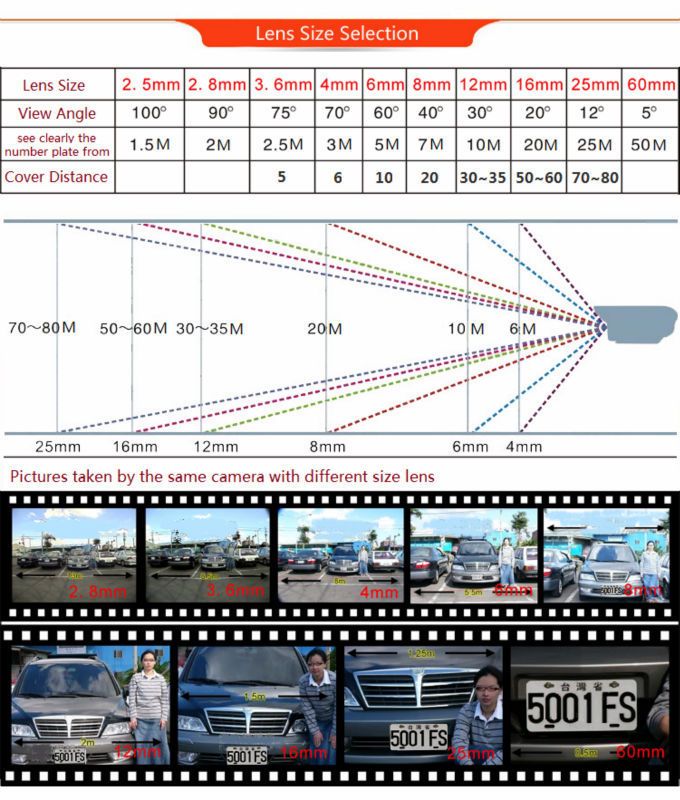
|
Everything you are doing is wrong, and it is my sworn duty to resist you.