



|
Originally Posted By Blackoperations:
TheGrayMan, I have read almost every page of this 86 page thread...good work. Still at a loss on a quality DVR unit that won't break the bank and that is not dependent on a PC? I am looking to upgrade my crappy Zmodo DVR box, and its a crap shoot with all the different DVR's on the market. Looking for at least a 8 channel (BNC) unit that can support a 1TB hard drive (preferably 2 TB) and also be able to connect to my home computer network. Trying to stay under $400 for the DVR box alone. Thanks!  There are about a zillion DVRs out there... you could just pick one. A couple of things: Make sure it can record D1 resolution on ALL channels... at a minimum of 4-5FPS per channel AT D1 RESOLUTION Make sure it's smart-phone and internet capable. Make sure you can change out the hard drives yourself ETA: under no circumstances should you pay anything even approaching $1000 for this item... 3-500 should get you something perfectly functional. |
"It's always a good idea to demonstrate to your coworkers that you are capable of withstanding a tremendous amount of pain"
-Ron Swanson-
-Ron Swanson-

|
I bought this one.
http://www.amazon.com/Q-See-QT7116-880-3-Platinium-Channel-Quality/dp/B00DGH8FQU/ref=cm_cr_pr_pb_t I just got it in yesterday. I'm not going to install it. I might get one of my guys to do it or I might get an electrician I use to do it. I have a few questions. Anybody have any feedback on this system? They each come with 100 foot cables, but a lot of the cameras won't need that much. Will it be better to cut them to the needed lengths and install new connectors? I'm going to have to use new cables anyway on 2 of them to get coverage so new connectors will be something I have to do anyway. Maybe instead of cutting short ones, I will just make new shorter ones? What do the experts think? |
ARFCOM.....Time well wasted.
|
Originally Posted By krpind:
I bought this one. http://www.amazon.com/Q-See-QT7116-880-3-Platinium-Channel-Quality/dp/B00DGH8FQU/ref=cm_cr_pr_pb_t I just got it in yesterday. I'm not going to install it. I might get one of my guys to do it or I might get an electrician I use to do it. I have a few questions. Anybody have any feedback on this system? They each come with 100 foot cables, but a lot of the cameras won't need that much. Will it be better to cut them to the needed lengths and install new connectors? I'm going to have to use new cables anyway on 2 of them to get coverage so new connectors will be something I have to do anyway. Maybe instead of cutting short ones, I will just make new shorter ones? What do the experts think? Just use the existing cables. Connectors are major point of failure, so if you have cables that work, don't shorten them unnecessarily. Robots in factories make better connectors that people doing it by hand. |
"It's always a good idea to demonstrate to your coworkers that you are capable of withstanding a tremendous amount of pain"
-Ron Swanson-
-Ron Swanson-
|
Originally Posted By krpind:
Thanks What do you think of the system? Know anything about it? No direct personal experience... but from listening to some other people talk about it, they seem to be one of the best resolution-for-your-buck systems out there right now. 
|
"It's always a good idea to demonstrate to your coworkers that you are capable of withstanding a tremendous amount of pain"
-Ron Swanson-
-Ron Swanson-
|
We hooked one of the cameras up with all of the equipment just laying out and the picture looks pretty damned good.
Of course, replay will be what matters I guess and i didn't check that. I've been dragging my feet on getting cameras up and someone tried to break in a few weeks ago. They could not get past the security film on the door this time before the alarm went off and must have scared them off. ETA. The security film is badass. It held the glass in the door and didn't allow access even though they beat on it so hard that it sheared the bolt that held the threshold down and moved the whole frame in about 3 inches at the bottom. |
ARFCOM.....Time well wasted.
|
Originally Posted By krpind:
We hooked one of the cameras up with all of the equipment just laying out and the picture looks pretty damned good. Of course, replay will be what matters I guess and i didn't check that. I've been dragging my feet on getting cameras up and someone tried to break in a few weeks ago. They could not get past the security film on the door this time before the alarm went off and must have scared them off. ETA. The security film is badass. It held the glass in the door and didn't allow access even though they beat on it so hard that it sheared the bolt that held the threshold down and moved the whole frame in about 3 inches at the bottom. *nodding* I've been favorably impressed with mine too. My boys dropped a ladder into one of my windows, and all it did was star up... I couldn't get the glass to give out of the frame at all. Provided it's bonded to the frame, that film makes a regular window into a significant barrier. Anything that takes time and a lot of noise to penetrate is exactly what you want. |
"It's always a good idea to demonstrate to your coworkers that you are capable of withstanding a tremendous amount of pain"
-Ron Swanson-
-Ron Swanson-

|
Hey TGM, Been looking to get into the DVR/Camera game for a while. Saw some strange footprints in the snow the other day around our place and its prompted me to get motivated about it. I've learned a ton about cameras from you and this thread, but I have a question. Is it better to have less cameras with higher resolution, or more cameras with a smaller resolution? For a home application, I'm looking for facial/plate recognition, motion detection, remote viewing and email alerts. It seems both of these packages have the possibility of accomplishing that, but are very different price points. I'd love to hear your thoughts? I realize both of these packages come with the DVR already full and not expandable. I'm open for suggestions, however as you noted in your thread in the Armory, I'm looking to spend $500-$1000, at least to start. Thanks again in advance! -Slick |
|
Originally Posted By Slickbaby:
Hey TGM, Been looking to get into the DVR/Camera game for a while. Saw some strange footprints in the snow the other day around our place and its prompted me to get motivated about it. I've learned a ton about cameras from you and this thread, but I have a question. Is it better to have less cameras with higher resolution, or more cameras with a smaller resolution? For a home application, I'm looking for facial/plate recognition, motion detection, remote viewing and email alerts. It seems both of these packages have the possibility of accomplishing that, but are very different price points. I'd love to hear your thoughts? http://www.amazon.com/Q-See-QT714-4C10-2-4-Channel-Surveillance-Pre-installed/dp/B00DEQM1Q8/ref=pd_sim_sbs_p_10 http://www.amazon.com/Q-See-QT5680-8E4-1-Security-Surveillance-High-Resolution/dp/B00DWFFC94/ref=pd_sim_sbs_p_7 I realize both of these packages come with the DVR already full and not expandable. I'm open for suggestions, however as you noted in your thread in the Armory, I'm looking to spend $500-$1000, at least to start. Thanks again in advance! -Slick I'd go fewer and higher-res. See if you can get a DVR that doesn't have all the slots filled. You'll want upgrade room. |
"It's always a good idea to demonstrate to your coworkers that you are capable of withstanding a tremendous amount of pain"
-Ron Swanson-
-Ron Swanson-
|
Well after a little more investigation the "event" that happened was no cause for alarm as it turns out. So I imagine I'll pick up a 1080p DVR and a camera and slowly add cameras to the system as money allows. I totally agree that once I get a camera or two I'm going to go nuts, so the bigger channel'd DVR is definitely a route I want to go. Merry Christmas! :) |

| Gray, I’m 99% sure that I’m going with the Vivotek FE8172V’s (six) for my house. My question is: Is the SF8172V really, $300 per, more camera? I can’t quite put my finger on what features the SF has over the FE. Did you figure that out when you researched? Thanks, Steve |
"I am trying to think but nothing's happening" -curly
|
Originally Posted By SteveInNC:
Gray, I’m 99% sure that I’m going with the Vivotek FE8172V’s (six) for my house. My question is: Is the SF8172V really, $300 per, more camera? I can’t quite put my finger on what features the SF has over the FE. Did you figure that out when you researched? Thanks, Steve IIRC, the SF has certification for mobile applications (extended temp range, vibration-resistant, etc) In short, certified to be a little tougher than the FE |
"It's always a good idea to demonstrate to your coworkers that you are capable of withstanding a tremendous amount of pain"
-Ron Swanson-
-Ron Swanson-
|
Here's an interesting one. A couple of thug-wanna-bes in a jacked up truck (which is stupid-enough looking that it should NOT be hard to locate) attempted to enter the town house of a police officer. The officer wasn't home... but they were caught on tape firing multiple rounds through a sliding glass door, and then attempting to kick it in... without success. They apparently got tired, then left.
I'm guessing the sliding glass door was either filmed for impact resistance, or some kind of hurricane-resistant door (this was down in Florida) 
|
"It's always a good idea to demonstrate to your coworkers that you are capable of withstanding a tremendous amount of pain"
-Ron Swanson-
-Ron Swanson-
|
I like this one too.
Note the standard MO: send homie up to the door to ring the doorbell. Once you're sure nobody is home, you break in (this once again emphasizes the value of a front-door camera) Also note the wasp nest (complete with space-mutant-sized wasp) that obscures the camera's vision. 
|
"It's always a good idea to demonstrate to your coworkers that you are capable of withstanding a tremendous amount of pain"
-Ron Swanson-
-Ron Swanson-
|
CCTV often catches current events. CCTV footage from across the street from a large railway station bombing in Volgograd.
Note how powerful the blast was... it shook the camera from quite a distance:
|
"It's always a good idea to demonstrate to your coworkers that you are capable of withstanding a tremendous amount of pain"
-Ron Swanson-
-Ron Swanson-

|
Originally Posted By TheGrayMan:
CCTV often catches current events. CCTV footage from across the street from a large railway station bombing in Volgograd. Note how powerful the blast was... it shook the camera from quite a distance:  http://www.youtube.com/watch?v=cuVSuSiKfYI http://www.youtube.com/watch?v=cuVSuSiKfYIInside CCTV view of the same bombing: http://www.liveleak.com/view?i=231_1388408796 Bastards. 
|


|
Originally Posted By TheGrayMan:
I like this one too. Note the standard MO: send homie up to the door to ring the doorbell. Once you're sure nobody is home, you break in (this once again emphasizes the value of a front-door camera) Also note the wasp nest (complete with space-mutant-sized wasp) that obscures the camera's vision.
http://www.youtube.com/watch?v=_m83pQXsDF4Makes you want to rig up an interior light that turns on when a door bell is rung. |
Dan_Gray: You're right
"The tree of liberty must be refreshed from time to time with the blood of patriots and tyrants." T. Jefferson<BR
"The tree of liberty must be refreshed from time to time with the blood of patriots and tyrants." T. Jefferson<BR

|
Grayman, a few questions if I might
I have read thru this but after awhile your head starts to swim . so here goes the questions I am currently starting to build a three story townhome in St Pete Fl. Sort of a semi retired retreat for the weekends. It is on the water at the marina anyway I AM OBLIGATED to use the builder's alarm company to PREWIRE the house. to say the least his prices are quite high. anyway I will have him prewire for 6 IP cameras using cat 5 cable, going to a central location. there will be structured wiring for the house and all tv, ethernet cables etc will be right there. I have right now decided on a Vivotek system, their NR 8301 NVR . as for cameras i still have to decide but they will be vivotek. the three outside only have to have a range of 15-20 feet. anyway , I want to have two dedicated monitors in different rooms from the NVR. what kind of wire do I have them run? how would it be hooked up. I also will have it connected to the cable modem for remote viewing, but the two internal monitors have me stumped. Hope this makes sense. Thanks. |
|
Originally Posted By Quigley:
Grayman, a few questions if I might I have read thru this but after awhile your head starts to swim . so here goes the questions I am currently starting to build a three story townhome in St Pete Fl. Sort of a semi retired retreat for the weekends. It is on the water at the marina anyway I AM OBLIGATED to use the builder's alarm company to PREWIRE the house. to say the least his prices are quite high. anyway I will have him prewire for 6 IP cameras using cat 5 cable, going to a central location. there will be structured wiring for the house and all tv, ethernet cables etc will be right there. I have right now decided on a Vivotek system, their NR 8301 NVR . as for cameras i still have to decide but they will be vivotek. the three outside only have to have a range of 15-20 feet. anyway , I want to have two dedicated monitors in different rooms from the NVR. what kind of wire do I have them run? how would it be hooked up. I also will have it connected to the cable modem for remote viewing, but the two internal monitors have me stumped. Hope this makes sense. Thanks. Before I get to the meat of your question, let me say that I'm really liking the Vivotek FE8172V camera I purchased... looking at getting a couple more. As for the distributed video problem, you could do that a couple of ways. One of the easier ways would be to simply use your iPad or Android tablet and get the camera streams directly via wifi. In all honesty, that's what I do probably 99% of the time. It saves you having to run wire, and obviates the necessity to have a full-fledged computer and/or monitor running all the time. The only disadvantage I've noticed is latency... it lags a half-second or so behind what's actually happening... and that's more pronounced the more streams you have simultaneously displayed on the tablet. That NVR you mentioned has no video output of its own... you can only access it over the network. This means that in order to have a full-time view of the camera streams, you're going to have to run a remote network client full-time on another PC somewhere in the house (no biggie... a lot of people leave their computer running all the time). You could run a dual-monitor setup on that PC to have one display dedicated to the camera streams (while you work/surf/etc on the other display). I'd then take a video splitter (VGA, HDMI, DVI... whatever you're feeding into the monitor) and attach it to the camera-monitor display: One of these: 
to feed that same monitor view to a video extender dongle. One of these: 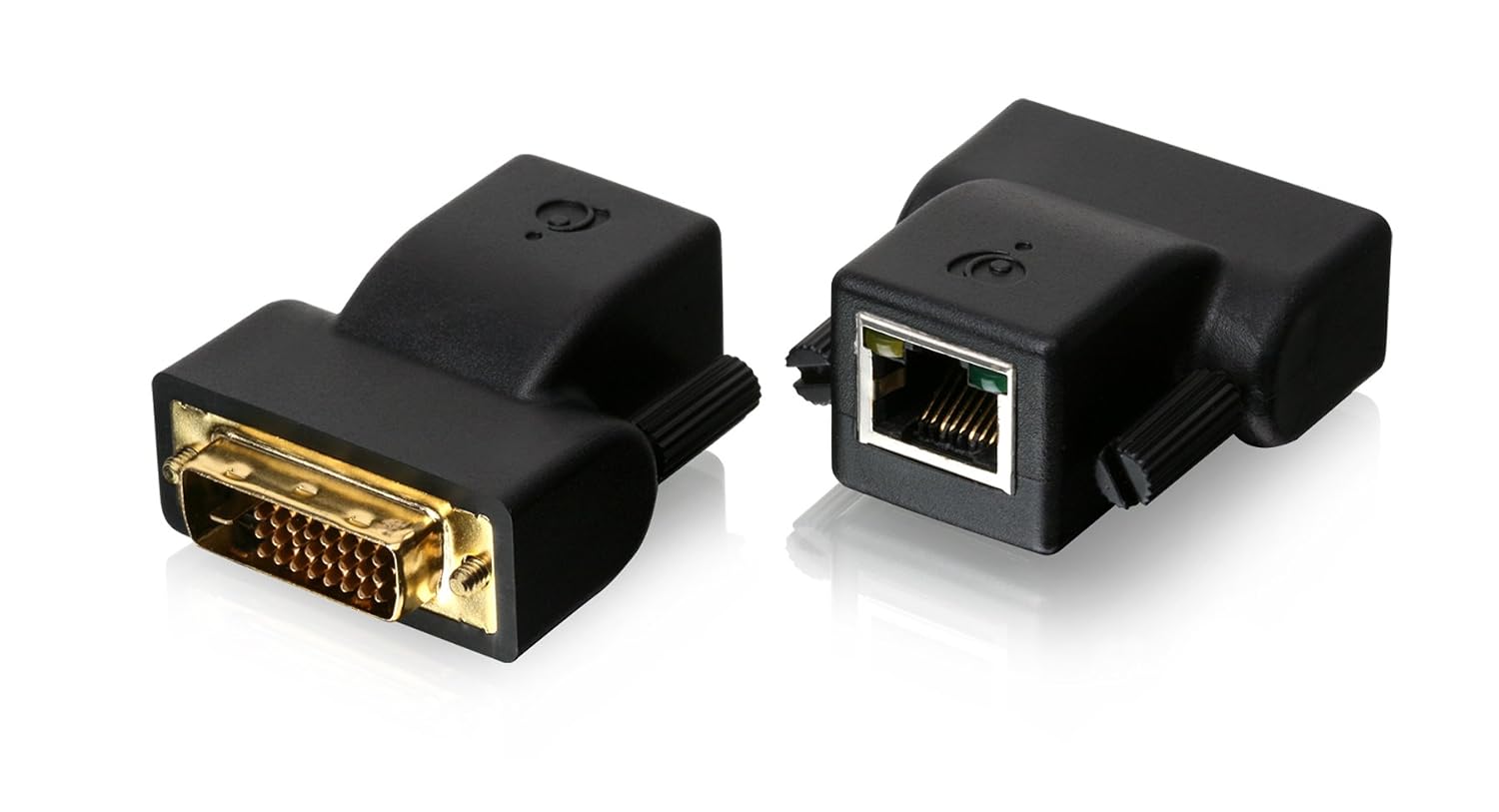
And that would enable you to send that monitor view through a cat5/6 cable to another location in the house (up to 100 feet away). It would be a real-time duplicate of the monitor attached to the splitter. |
"It's always a good idea to demonstrate to your coworkers that you are capable of withstanding a tremendous amount of pain"
-Ron Swanson-
-Ron Swanson-
|
Grayman, would this one fill the bill, and what wire would I run to the monitors?
vivotek |
|
Originally Posted By Quigley:
Grayman, would this one fill the bill, and what wire would I run to the monitors? vivotek Yes... that one does have a local display port... much better. So in hardware terms, you'd want a VGA splitter, and a VGA-over-Cat5 extender. The VGA splitter acts like any kind of splitter you've ever used for cable TV, audio, etc. It takes the single video output from the NVR, and splits/duplicates it to two different monitors (and those monitors will have the identical picture). One of the two VGA outputs from the splitter will likely go to the local monitor that sits right there at the NVR (preferably in your safe-room, or other secure location within the home). The other output goes into the VGA-over-UTP extender. 
The VGA-over-Cat5 extender then attaches to a standard Cat5 network cable... and the second monitor is attached to the other end of that Cat5 cable, through the second dongle pictured. Basically, that dongle sends the VGA monitor picture over the network cable, to the duplicate monitor on the other end. Note that this has to be a dedicated run of network cable... you can't run it through a network switch, router, or other networking device. It's strictly to be used for video. Make sense? |
"It's always a good idea to demonstrate to your coworkers that you are capable of withstanding a tremendous amount of pain"
-Ron Swanson-
-Ron Swanson-
|
starting to make sense, so FOR NOW, I tell the installer to run Cat5 cable from where my NVR is to where I want the other monitors. correct? once that is in (it will be awhile, just breaking ground) i will review again with you the set up.
A year ago we were going to go EMR in the office. we had all the hardware installed but the software company was borderline Fubar. So seeing how I have only 6 or 7 years left I decided to stay with written records and take the penalty. That is why I have so many monitors available to use.
Also, at my old house back in the 90's I had an 8 camera, PTZ IR illuminated system with a bank of monitors in my media room over the main tv as well as satalite monitors in the kitchen and bedroom. this way we could keep an eye on the kids and pool etc. I must say NO ONE ever bothered us. anyway I am used to being able to see live cctv while at home. this will be different, it is the weekend home so I will check up on it from the office do you have any photo examples of that fisheye camera? |
| Anyone have a suggestion for a stand alone NAS for (10) ten 5MP IP cameras? I think one or two TBs should do it? I have a Synology server at home now (sitting on top of a safe) with ten free TBs but, I'd like to put this somewhere that it might be overlooked if I do have a break-in. I'm a little confused about how much proccessing power it will need. |
"I am trying to think but nothing's happening" -curly
|
Here is my contribution to this great thread!
Battery backup for your Security DVR! I initially had my Zmodo DVR & cameras plugged into a 300watt APC battery backup unit. This setup worked fine, but it was terrible inefficient; as the APC unit took 110v power, maintained a battery, then powered a 12v inverter when the power failed back to 110v, only to ultimately power 12v power supply that required 110v. The solution was this (lots of others on the market!:) http://www.mcmelectronics.com/product/82-16560 

This unit has a regulated 12v power supply that allows battery backup, I had to install a 12v 7amp hour battery (w/tabs). Then I used these pig tails to connect my security DVR and cameras to the power supply: http://www.mcmelectronics.com/product/24-5361 
I estimate a 5-7 hour run time, before the battery is completely dead. This run time is based on a 4 camera system with a security DVR...I am currently running off a fully charged/brand new 7amp hour 12v battery, I will post my results once this thing dies. Here are some photos: 

I used these coupon codes, saved about 10%: GS401, AFL909, AFC909 |
|
Originally Posted By Quigley:
starting to make sense, so FOR NOW, I tell the installer to run Cat5 cable from where my NVR is to where I want the other monitors. correct? once that is in (it will be awhile, just breaking ground) i will review again with you the set up. A year ago we were going to go EMR in the office. we had all the hardware installed but the software company was borderline Fubar. So seeing how I have only 6 or 7 years left I decided to stay with written records and take the penalty. That is why I have so many monitors available to use.
Also, at my old house back in the 90's I had an 8 camera, PTZ IR illuminated system with a bank of monitors in my media room over the main tv as well as satalite monitors in the kitchen and bedroom. this way we could keep an eye on the kids and pool etc. I must say NO ONE ever bothered us. anyway I am used to being able to see live cctv while at home. this will be different, it is the weekend home so I will check up on it from the office do you have any photo examples of that fisheye camera? You mean out of the one I have mounted? PM me. |
"It's always a good idea to demonstrate to your coworkers that you are capable of withstanding a tremendous amount of pain"
-Ron Swanson-
-Ron Swanson-
|
Originally Posted By Blackoperations:
Here is my contribution to this great thread! Battery backup for your Security DVR! I initially had my Zmodo DVR & cameras plugged into a 300watt APC battery backup unit. This setup worked fine, but it was terrible inefficient; as the APC unit took 110v power, maintained a battery, then powered a 12v inverter when the power failed back to 110v, only to ultimately power 12v power supply that required 110v. The solution was this (lots of others on the market!:) http://www.mcmelectronics.com/product/82-16560 http://www.mcmelectronics.com/content/productimages/s5/82-16560.jpg http://www.mcmelectronics.com/content/productimages/s5/82-16560_2.jpg This unit has a regulated 12v power supply that allows battery backup, I had to install a 12v 7amp hour battery (w/tabs). Then I used these pig tails to connect my security DVR and cameras to the power supply: http://www.mcmelectronics.com/product/24-5361 http://www.mcmelectronics.com/content/productimages/s4/24-5361.jpg I estimate a 5-7 hour run time, before the battery is completely dead. This run time is based on a 4 camera system with a security DVR...I am currently running off a fully charged/brand new 7amp hour 12v battery, I will post my results once this thing dies. Here are some photos: http://i626.photobucket.com/albums/tt342/sellmytires/PSU1_zps3eceba31.jpg http://i626.photobucket.com/albums/tt342/sellmytires/PSU2_zps387bbee1.jpg I used these coupon codes, saved about 10%: GS401, AFL909, AFC909 Nice... backup is always good. Wonder just how big a battery that could take... 
|
"It's always a good idea to demonstrate to your coworkers that you are capable of withstanding a tremendous amount of pain"
-Ron Swanson-
-Ron Swanson-
|
Originally Posted By TheGrayMan:
Nice... backup is always good. Wonder just how big a battery that could take... Originally Posted By TheGrayMan:
Originally Posted By Blackoperations:
Nice... backup is always good. Wonder just how big a battery that could take... I wondered the same thing, even when you move the PCB board around, there is not much room. You could move the 12v distribution block PCB board (upper right hand corner) to the top of the battery, but it would be very tight. If you did that, you could add another 12v 7amp hour battery to the box wired in parallel for 14amp hour capacity...or use 7.5amp hour batteries (they are identical in size.)
The outside dimensions of this box is: 9 7/8th inch Long 7 7/8th inch Wide 3.5 inch Deep Another option would be to buy Electrical Junction box and attach it to the back. However they cost about $40 + new, but you might find a deal on Ebay for a used one. Find a 10x8x6 junction box and it should fit two 22amp hour 12v batteries. 

Watcha think? BTW, battery run time test is still underway, I had to cancel last nights test. |
|
Run time test completed.
Equipment: 1.Zmodo DVR w/ 500 gigabyte mechanical hard drive 2. Four bullet cameras with IR night vision 
http://www.newegg.com/Product/Product.aspx?Item=N82E16881523056 Battery: SigmasTek SP12-7 (12v7ah/T1) 12 Volt 7 Amp Sealed Lead Acid Battery, brand new...fully charged. http://www.batterysharks.com/12-Volt-7-Amp-Seal-Lead-Acid-Battrery-p/12v-7ah_b12-7.htm 
CCTV 9-Camera 12VDC 10A Power Supply with Battery Backup http://www.mcmelectronics.com/product/82-16560
A 3 hours 45 minute run time on the battery until the DVR shut down, I completely drained the battery (not so good!)! |
|
Originally Posted By Blackoperations:
... I completely drained the battery (not so good!)! You might consider a low voltage cutoff to protect your battery. Some cost more than the battery you're using, but there are some options out there in the $20-30 range. You can also find plans to build your own. Thanks for posting pics of your project. I'm filing the idea away for future use.
|
|
Sometimes your camera system helps out a neighbor... like in this one:
ETA: turn up the volume... you can hear the impact 
|
"It's always a good idea to demonstrate to your coworkers that you are capable of withstanding a tremendous amount of pain"
-Ron Swanson-
-Ron Swanson-

|
I've been following this thread since the beginning and wow has the hardware for a price point changed over time. I just read back over the last years' worth of posts, and while a few "complete systems" were mentioned, and even one or two were 720p, does anyone have any experience with the packaged 1080p systems? I've been looking around and stopped on this one for the time being: http://www.frys.com/product/7666167?site=sr:SEARCH:MAIN_RSLT_PG $1400 gets you a 8 channel NVR, 3TB internal HDD upgradeable to 6TB and 4 day/night IP bullet cams with 1000TVL and 1080p resolution. In my application, I believe I will need 4 cameras outside and will add two cameras inside, and possibly one more right at the front door inside. The 8 channel NVR has enough capacity to do this. So, a few questions...
|
Keith-
|
Originally Posted By WS6_Keith:
I've been following this thread since the beginning and wow has the hardware for a price point changed over time. I just read back over the last years' worth of posts, and while a few "complete systems" were mentioned, and even one or two were 720p, does anyone have any experience with the packaged 1080p systems? I've been looking around and stopped on this one for the time being: http://www.frys.com/product/7666167?site=sr:SEARCH:MAIN_RSLT_PG $1400 gets you a 8 channel NVR, 3TB internal HDD upgradeable to 6TB and 4 day/night IP bullet cams with 1000TVL and 1080p resolution. In my application, I believe I will need 4 cameras outside and will add two cameras inside, and possibly one more right at the front door inside. The 8 channel NVR has enough capacity to do this. So, a few questions...
You're not kidding. In fact, the technology has advanced so much that I'm getting to the point where I'm starting to shy away from Mobotix stuff... it's just not that much better than some other things I've seen... I'm having a hard time justifying the premium you pay (except in very specific circumstances and environments) The Swann systems are a rebranded Hikvision system (Chinese). The prices for cameras have come down significantly since this thread started... you can now get 2 and 3MP cameras for only a couple of hundred bucks. I actually have a Hikvision camera that I'm planning on testing... you can't beat the price point of some of them (assuming the picture doesn't suck, and they don't die after only six months of use). Generally speaking, you want to hard-wire your home DVR/NVR to the network. You can power your cameras off of any old PoE switch, just make sure you run it back to the DVR over a run of Cat5/6. Putting it on a wireless bridge is just asking for trouble, particularly when you're carrying multiple-megapixel streams. As you mentioned, you also open yourself up to jamming (never seen it actually done on a burglary, but it's trivially easy to do). |
"It's always a good idea to demonstrate to your coworkers that you are capable of withstanding a tremendous amount of pain"
-Ron Swanson-
-Ron Swanson-
|
Thanks for the input. So it sounds like I would want to run the ethernet cables from the cameras to the NVR directly (which would likely be in my master bedroom closet) where there will also be a monitor connected to the HDMI output. I guess I could then use a ethernet bridge to couple the output from the NVR to my wireless router for internet access to the phone app. I assume the stream to the internet would be fine across the wireless, and jamming that would not stop video recording, just my ability to view remotely. I really wish I could find a reliable, honest review of the Swann system. I have read quite a few good reviews of the Hikvision stuff, so maybe that's a good sign since that's what the Swann system uses. |
Keith-
|
Originally Posted By WS6_Keith:
Thanks for the input. So it sounds like I would want to run the ethernet cables from the cameras to the NVR directly (which would likely be in my master bedroom closet) where there will also be a monitor connected to the HDMI output. I guess I could then use a ethernet bridge to couple the output from the NVR to my wireless router for internet access to the phone app. I assume the stream to the internet would be fine across the wireless, and jamming that would not stop video recording, just my ability to view remotely. I really wish I could find a reliable, honest review of the Swann system. I have read quite a few good reviews of the Hikvision stuff, so maybe that's a good sign since that's what the Swann system uses. The Hikvision stuff gets you a 3MP (1080p) outdoor-rated bullet... for about $170. That's tough to beat. |
"It's always a good idea to demonstrate to your coworkers that you are capable of withstanding a tremendous amount of pain"
-Ron Swanson-
-Ron Swanson-
|
Since Hikvision makes the Swann stuff, I assume they also have an Android app that will query the NVR? Speaking of the NVR, Hikvision seems to make about a bajillion different ones and their compare feature on the website doesn't work. How the heck can I whittle that down to something comparable with the Swann system. I'd actually add a few more channels if I had the option...just in case. ;) |
Keith-

|
Originally Posted By TheGrayMan:
The Hikvision stuff gets you a 3MP (1080p) outdoor-rated bullet... for about $170. That's tough to beat. Originally Posted By TheGrayMan:
Originally Posted By WS6_Keith:
Thanks for the input. So it sounds like I would want to run the ethernet cables from the cameras to the NVR directly (which would likely be in my master bedroom closet) where there will also be a monitor connected to the HDMI output. I guess I could then use a ethernet bridge to couple the output from the NVR to my wireless router for internet access to the phone app. I assume the stream to the internet would be fine across the wireless, and jamming that would not stop video recording, just my ability to view remotely. I really wish I could find a reliable, honest review of the Swann system. I have read quite a few good reviews of the Hikvision stuff, so maybe that's a good sign since that's what the Swann system uses. The Hikvision stuff gets you a 3MP (1080p) outdoor-rated bullet... for about $170. That's tough to beat. Yep, and so far mine are running trouble free. |

|
Originally Posted By RRaider:
I should add that we have had some unusually cold weather here this year (It was 3 degrees here at about 9am this morning) and it hasn't bothered them a bit. We'll see how they handle the 100+ temps this summer. Wish I could say that abt my Axis cams... |
I see us collectively as a country bumpkin, sitting on a log with a rifle, having no understanding what's going on beyond a few trees away, about to be enslaved with no interest by whom or what.
|
Originally Posted By EXPY37:
Wish I could say that abt my Axis cams... Originally Posted By EXPY37:
Originally Posted By RRaider:
I should add that we have had some unusually cold weather here this year (It was 3 degrees here at about 9am this morning) and it hasn't bothered them a bit. We'll see how they handle the 100+ temps this summer. Wish I could say that abt my Axis cams... For what you pay for Axis, you'd think they'd be MORE durable. That sucks. 
|
"It's always a good idea to demonstrate to your coworkers that you are capable of withstanding a tremendous amount of pain"
-Ron Swanson-
-Ron Swanson-
|
Originally Posted By TheGrayMan:
For what you pay for Axis, you'd think they'd be MORE durable. That sucks. Originally Posted By TheGrayMan:
Originally Posted By EXPY37:
Originally Posted By RRaider:
I should add that we have had some unusually cold weather here this year (It was 3 degrees here at about 9am this morning) and it hasn't bothered them a bit. We'll see how they handle the 100+ temps this summer. Wish I could say that abt my Axis cams... For what you pay for Axis, you'd think they'd be MORE durable. That sucks. After they are turned on and off a couple times they usually start working.  I'm thinking the 213's in this case. I'm thinking the 213's in this case.
Doesn't always happen, today they were fine, but it wasn't real cold. I use them to look around the mtn property when we're not there, or even if we are. Right now to save battery with the cold and cloudy wx, I shut most everything down until I need a remote look-see. The CONTROL BY WEB sensors use such little power they stay on. Even all but one DC to AC inverter gets shut down, the repeater of the kind I described to you a year ago, uses very little power and stays on. |
I see us collectively as a country bumpkin, sitting on a log with a rifle, having no understanding what's going on beyond a few trees away, about to be enslaved with no interest by whom or what.
|
Originally Posted By WS6_Keith:
Also, is there a go-to source here in the states (web) for the Hikvision stuff? Their website kinda sucks. Lots of stuff with little info and no comparison feature. Try Nelly's |
"It's always a good idea to demonstrate to your coworkers that you are capable of withstanding a tremendous amount of pain"
-Ron Swanson-
-Ron Swanson-
|
Digging through all the models Hikvision makes, it looks like the DS-7608NI-SE/N is the closest to the Swann unit, but will support 3rd party cameras. I assume this means that you can connect any 1080p/3MP/5PM brand camera to it. Am I reading all that correctly? Is there another NVR I should be considering? |
Keith-
|
Originally Posted By WS6_Keith:
Digging through all the models Hikvision makes, it looks like the DS-7608NI-SE/N is the closest to the Swann unit, but will support 3rd party cameras. I assume this means that you can connect any 1080p/3MP/5PM brand camera to it. Am I reading all that correctly? Is there another NVR I should be considering? Read the "fine print" on that VERY carefully. Make sure it takes the cameras you're planning on using. |
"It's always a good idea to demonstrate to your coworkers that you are capable of withstanding a tremendous amount of pain"
-Ron Swanson-
-Ron Swanson-
|
I will do, if I can find it. Looks like the Hikvision 3mp cameras are pretty good though...maybe the 3rd party thing isn't such a big deal. As with most things, it seems like I can find enough information to make my head swim. Should I just buy a pre-packaged solution or piece it together myself? I don't want to end up with stuff that doesn't work together, and the pre-packaged stuff will work and has the phone app already ready to go. I like the idea of piecing it together because I could start with a NVR and one or two cameras, then add from there. I'm thinking to put the NVR in my master closet, as that will be my safest room in the house. When you enter my bedroom from the upstairs hallway, you have to come in, then turn to your right 180* and there is the door to the closet. The East wall of that closet is the West wall of the hallway...it's a common wall. In line with where you would be inside that closet is the stairway leading down to the first floor. If you could imagine a window in the closet facing East, you would see right down the stairway. Anyway, if anything goes down in my house (like the alarm goes off at night), the GF heads for the closet and keeps the door closed behind her. There will soon be some steel against that common wall between the hallway and closet, to make it bullet resistant from the floor to the 4ft mark. The plan is to put the NVR and a monitor in the closet so she/we can monitor activity from there. I want to put a camera at the top of the stairs facing down, so we can see who is coming up and when. With the right angles/view, we would know when an intruder was at the top of the stairs, before they turned to the bedrooms. I was thinking of starting with a single 3mp/1080p dome cam at the top of the stairs unless there is a less obtrusive and better option. Next would be a camera in the downstairs family room. With 90* view, it would see everything downstairs from the back wall to the front door. Most of the cameras I have seen are 75* view though. ETA: Maybe this is getting off topic for this thread. Should I start a new thread or is there a different thread I should be posting this stuff on? |
Keith-
I was messing with some camera's yesterday and found this guy and his friend (two frogs).....9 feet in the air on my cable sleeve, WEIRD!
 </a>" /> </a>" />
and here is the weirdest part.........................this is not the first time  , any thoughts on why the frogs are attracted to the camera? I am at a complete loss, I want them off my camera but don't want to kill/hurt them (they eat insects!) , any thoughts on why the frogs are attracted to the camera? I am at a complete loss, I want them off my camera but don't want to kill/hurt them (they eat insects!)
IDEAS? |
|
Originally Posted By Blackoperations:
I was messing with some camera's yesterday and found this guy and his friend (two frogs).....9 feet in the air on my cable sleeve, WEIRD! http://<a href=http://i626.photobucket.com/albums/tt342/sellmytires/camera_frog_zps8eefede7.jpg</a>" /> and here is the weirdest part.........................this is not the first time , any thoughts on why the frogs are attracted to the camera? I am at a complete loss, I want them off my camera but don't want to kill/hurt them (they eat insects!)
IDEAS? They go where the bugs are... just like the spiders. |
"It's always a good idea to demonstrate to your coworkers that you are capable of withstanding a tremendous amount of pain"
-Ron Swanson-
-Ron Swanson-
|
So is anyone out there using a Hikvision NVR? If so, what cameras are you using and what model of NVR do you have? How is the phone app and internet monitoring? ETA: I'm also looking at the EYESurv units that Nelly's sells. They seem to have a lot more of those than the HikVision units. EYESurv's are rebranded Dahua units. Looking at this one: http://nellyssecurity.com/dvr-s-nvr-s-and-hd-sdi/nvrs/8-channel/eyesurv-esdv-nvrx-8p-8-channel-nvr-with-built-in-8-port-poe-switch.html $250 more than the HikVision unit (http://nellyssecurity.com/dvr-s-nvr-s-and-hd-sdi/nvrs/8-channel/hikvision-ds-7608ni-se-8p-8-channel-poe-plug-n-play-hi-def-nvr-recorder.html) but offers 160Mbps throughput vs 40Mbps, no framerate limit vs. 120fps @ 1080p, supports up to 3 - 4TB drives vs. 2 and will work with HikVision and Dahua cams where HikVision says it only works with HikVision cams. Is this a better option? I did read something somewhere about picking a NVR that uses the camera settings instead of letting the NVR control the camera. Is this a concern? Do the HikVision or EYESurv units allow this?
|
Keith-
|
I purchased a complete system from Swann. All POE with decent cameras. Install the DVR and run cat 5 network cables to each camera. Very Simple. http://www.swann.com/us/8-channel-full-hd-1080p-nvr-with-smartphone-viewing-4-x-1080p-cameras I'm very satisfied. |
[NO TEXT]