



|
I just got the two 216FD cameras in and they seem to work fine. (One has a loose power connector, but otherwise is fine.)
Now I need a way to record the video. Is there a free/cheap NVR program out there that isn't complete junk? |
"Do or do not. There is no try." Yoda
- Pack LaRue
- Team Ranstad
- Pack LaRue
- Team Ranstad

|
Originally Posted By Speargun_:
I just got the two 216FD cameras in and they seem to work fine. (One has a loose power connector, but otherwise is fine.) Now I need a way to record the video. Is there a free/cheap NVR program out there that isn't complete junk? Honestly? No... not that I've found. If you're needing something good in a reasonable price point (eg. not $150 or $200 per channel) I'd go Luxriot... I'm using their software in my home system, and it works. |
"Look wise, say nothing, and grunt. Speech was given to conceal thought."
- Sir William Osler -
- Sir William Osler -
New project in the works.

Will post more when I've got the hardware together and have had a chance to test it. ETA: more parts... 
ETA2: and still more parts... 
|
"Look wise, say nothing, and grunt. Speech was given to conceal thought."
- Sir William Osler -
- Sir William Osler -

|
Originally Posted By SparticleBrane:
Interesting.....  Working on a stand-alone wifi cam... with a lot more range and capability than the consumer-grade stuff. Will probably cross-post it in safes-and-home-security. |
"Look wise, say nothing, and grunt. Speech was given to conceal thought."
- Sir William Osler -
- Sir William Osler -
|
So here's the situation, and the plan to rectify it.
Situation: I have a good friend and colleague. Real nice guy... Christian, true-blue American, and Patriot... works damned hard, and has his home on some acreage. He's a physician. They have a small-scale farm, with some minor livestock (chickens, pigs, etc), and plenty of game on their land. My friend likes to hunt, and has a feed plot in a wooded area up on the back of his property where it borders a power-company easement (high-tension lines). He's lived there for years, and has been having trouble with some local hilljacks. They trespass... vandalize things (including putting bullet-holes in his no-trespassing signs)... they destroy equipment (including his deer feeder)... they steal (including his game cameras)... etc, etc, etc. He's fed up... and mentioned this problem to me. My plan is to put an autonomous camera up there on the hill (he has line-of-sight to his house), to record locally, and also send the camera feed back to the main house. I've chosen Ubiquiti for the wireless link (can't beat the price/performance ratio), a meanwell PSU, and a PoE unit that runs on 12VDC. This will all serve a 2MP Vivotek dome camera. The camera hardware will be off to the side of the feedplot and back in the treeline enough that you're not going to spot it easily. We'll paint it up to blend into the vegetation. The local Sheriff is interested in finding out which bunch of ne'er-do-wells is involved, and I'm delighted to be able to assist: 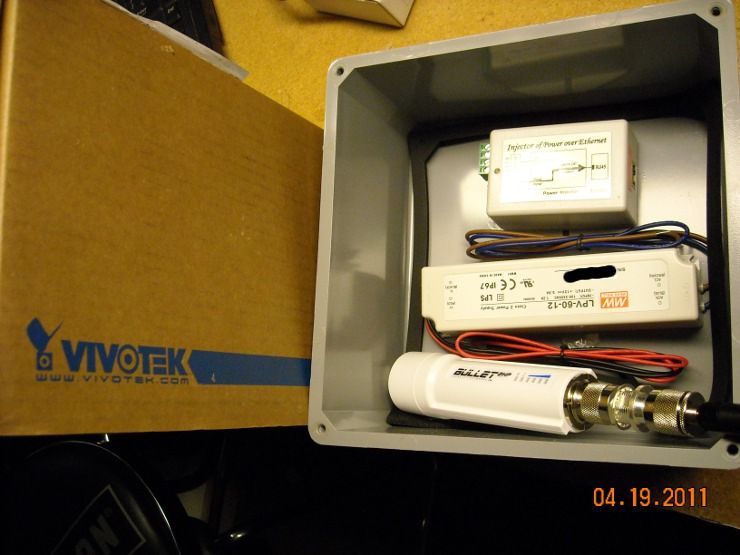
I hate vandals and thieves... and people who can't respect other peoples' property rights... and I don't give a damn how many years your family has "lived in these hills." If it's posted land, and you're not man enough to approach the owner and ASK if you can hunt it, you need to STFO... and get charged with a crime if you're enough of an a**hole to steal/damage other peoples' property. Just doing my part to help nudge the wheels of justice 
|
"Look wise, say nothing, and grunt. Speech was given to conceal thought."
- Sir William Osler -
- Sir William Osler -

|
I have a similar need. I was looking at Tranzeo EX2 series radios with integrated 8dBi antenna. However, I'm doing a 12 mile link and might need a different antenna. The Ubiquti are much smaller, may be worth a change in my plan.
Great thread by the way, I have learned much. Thanks. |
TEAM Opie USA
288
288
|
Originally Posted By CROQ:
I have a similar need. I was looking at Tranzeo EX2 series radios with integrated 8dBi antenna. However, I'm doing a 12 mile link and might need a different antenna. The Ubiquti are much smaller, may be worth a change in my plan. Great thread by the way, I have learned much. Thanks. Yep, G-M has a super-informative thread that may keep a lot of folks safe! 
I've been using Tranzeos but older ones than the EX series. Was also comparing the Ubiquti vs the EX2's just yesterday. Wonder which radio has the lower power draw? I'm also planning on making portable radio/cam systems @ 2.4 that can be quickly deployed with appropriate cams and the ability to RF/remotely shut everything on and off as needed to conserve battery power and with microprocessor smarts to recognize alarms from IR and magnetic driveway detectors, etc. |
|
Originally Posted By CROQ:
I have a similar need. I was looking at Tranzeo EX2 series radios with integrated 8dBi antenna. However, I'm doing a 12 mile link and might need a different antenna. The Ubiquti are much smaller, may be worth a change in my plan. Great thread by the way, I have learned much. Thanks. Oh, 12 mile link? There's a complete Ubiq system w/ dual polarity dishes and diversity at 5.8 on eBay for $500! If I didn't already have stuff [4 ~14 mile links] I'd be looking hard at it. |
|
Originally Posted By EXPY37:
Originally Posted By CROQ:
I have a similar need. I was looking at Tranzeo EX2 series radios with integrated 8dBi antenna. However, I'm doing a 12 mile link and might need a different antenna. The Ubiquti are much smaller, may be worth a change in my plan. Great thread by the way, I have learned much. Thanks. Yep, G-M has a super-informative thread that may keep a lot of folks safe!
I've been using Tranzeos but older ones than the EX series. Was also comparing the Ubiquti vs the EX2's just yesterday. Wonder which radio has the lower power draw? I'm also planning on making portable radio/cam systems @ 2.4 that can be quickly deployed with appropriate cams and the ability to RF/remotely shut everything on and off as needed to conserve battery power and with microprocessor smarts to recognize alarms from IR and magnetic driveway detectors, etc. I was also thinking that something autonomous like this might be useful at your BOL... not only to keep track of it while you're gone (if you had the capability to connect it to the 'net), but also to assess it when you're approaching it after SHTF (as in our recent large thread about finding your BOL already occupied by squatters). The intel provided by a wireless camera stream (or two) would prove invaluable in planning your next course of action. |
"Look wise, say nothing, and grunt. Speech was given to conceal thought."
- Sir William Osler -
- Sir William Osler -

|
Thanks for all the great info OP. I've tried reading through most of the thread to try to find an answer to my question to no avail. I currently have a Geovision GV-650-8 PCI-E card with various B&W and color cameras connected to it. Geovision is known to have issues with "ringing" with lower quality camera and chips. I'm having this issue so I am looking to start upgrading some of my cameras to nicer models. I can't afford 250 per camera but I was thinking about something along these lines. What is your opinion on these cameras.
http://www.2mcctv.com/product_info-SecurityCameras-NightVisionInfraredBullet-CNBWCL20S.html http://www.2mcctv.com/product_info-SecurityCameras-NightVisionInfraredBullet-VeiluxSVB70IR48.html http://www.2mcctv.com/product_info-SecurityCameras-NightVisionInfraredBullet-2MCCTV2MB70IR42L210.html Thanks for your help. |
A gun, like any other source of power, is a force for either good or evil, being neither in itself, but dependent upon those who possess it.
Revenge is a dish best served cold!
Revenge is a dish best served cold!
|
Originally Posted By badeffect10:
Thanks for all the great info OP. I've tried reading through most of the thread to try to find an answer to my question to no avail. I currently have a Geovision GV-650-8 PCI-E card with various B&W and color cameras connected to it. Geovision is known to have issues with "ringing" with lower quality camera and chips. I'm having this issue so I am looking to start upgrading some of my cameras to nicer models. I can't afford 250 per camera but I was thinking about something along these lines. What is your opinion on these cameras. http://www.2mcctv.com/product_info-SecurityCameras-NightVisionInfraredBullet-CNBWCL20S.html http://www.2mcctv.com/product_info-SecurityCameras-NightVisionInfraredBullet-VeiluxSVB70IR48.html http://www.2mcctv.com/product_info-SecurityCameras-NightVisionInfraredBullet-2MCCTV2MB70IR42L210.html Thanks for your help. Those look like pretty standard cameras, except for the CNB camera. That one has an important feature: Intelligent IR. The theory behind it is that the camera adjusts the gain and/or the IR power in response to how much return (brightness) it's getting from a scene. It can prevent the IR LEDs from washing out a scene or object/person as it approaches the camera (like a person walking towards a doorway or structure). That might be worth having, depending on your application. |
"Look wise, say nothing, and grunt. Speech was given to conceal thought."
- Sir William Osler -
- Sir William Osler -
|
Originally Posted By TheGrayMan:
Originally Posted By badeffect10:
Thanks for all the great info OP. I've tried reading through most of the thread to try to find an answer to my question to no avail. I currently have a Geovision GV-650-8 PCI-E card with various B&W and color cameras connected to it. Geovision is known to have issues with "ringing" with lower quality camera and chips. I'm having this issue so I am looking to start upgrading some of my cameras to nicer models. I can't afford 250 per camera but I was thinking about something along these lines. What is your opinion on these cameras. http://www.2mcctv.com/product_info-SecurityCameras-NightVisionInfraredBullet-CNBWCL20S.html http://www.2mcctv.com/product_info-SecurityCameras-NightVisionInfraredBullet-VeiluxSVB70IR48.html http://www.2mcctv.com/product_info-SecurityCameras-NightVisionInfraredBullet-2MCCTV2MB70IR42L210.html Thanks for your help. Those look like pretty standard cameras, except for the CNB camera. That one has an important feature: Intelligent IR. The theory behind it is that the camera adjusts the gain and/or the IR power in response to how much return (brightness) it's getting from a scene. It can prevent the IR LEDs from washing out a scene or object/person as it approaches the camera (like a person walking towards a doorway or structure). That might be worth having, depending on your application. Thanks for the reply. While most of my cameras are outdoors pointed at entrance ways, my biggest concern is daytime viewing when the wife and little one are at home and I'm not there. At what price point do you think I could get out of the cheap standard camera range and go up to the next level. Are TV lines more important, the CCD or something else? I appreciate you time. |
A gun, like any other source of power, is a force for either good or evil, being neither in itself, but dependent upon those who possess it.
Revenge is a dish best served cold!
Revenge is a dish best served cold!
|
Originally Posted By TheGrayMan:
Originally Posted By EXPY37:
Originally Posted By CROQ:
I have a similar need. I was looking at Tranzeo EX2 series radios with integrated 8dBi antenna. However, I'm doing a 12 mile link and might need a different antenna. The Ubiquti are much smaller, may be worth a change in my plan. Great thread by the way, I have learned much. Thanks. Yep, G-M has a super-informative thread that may keep a lot of folks safe!
I've been using Tranzeos but older ones than the EX series. Was also comparing the Ubiquti vs the EX2's just yesterday. Wonder which radio has the lower power draw? I'm also planning on making portable radio/cam systems @ 2.4 that can be quickly deployed with appropriate cams and the ability to RF/remotely shut everything on and off as needed to conserve battery power and with microprocessor smarts to recognize alarms from IR and magnetic driveway detectors, etc. I was also thinking that something autonomous like this might be useful at your BOL... not only to keep track of it while you're gone (if you had the capability to connect it to the 'net), but also to assess it when you're approaching it after SHTF (as in our recent large thread about finding your BOL already occupied by squatters). The intel provided by a wireless camera stream (or two) would prove invaluable in planning your next course of action. It's sunny there right now... 
|
|
Originally Posted By EXPY37:
Originally Posted By TheGrayMan:
Originally Posted By EXPY37:
Originally Posted By CROQ:
I have a similar need. I was looking at Tranzeo EX2 series radios with integrated 8dBi antenna. However, I'm doing a 12 mile link and might need a different antenna. The Ubiquti are much smaller, may be worth a change in my plan. Great thread by the way, I have learned much. Thanks. Yep, G-M has a super-informative thread that may keep a lot of folks safe!
I've been using Tranzeos but older ones than the EX series. Was also comparing the Ubiquti vs the EX2's just yesterday. Wonder which radio has the lower power draw? I'm also planning on making portable radio/cam systems @ 2.4 that can be quickly deployed with appropriate cams and the ability to RF/remotely shut everything on and off as needed to conserve battery power and with microprocessor smarts to recognize alarms from IR and magnetic driveway detectors, etc. I was also thinking that something autonomous like this might be useful at your BOL... not only to keep track of it while you're gone (if you had the capability to connect it to the 'net), but also to assess it when you're approaching it after SHTF (as in our recent large thread about finding your BOL already occupied by squatters). The intel provided by a wireless camera stream (or two) would prove invaluable in planning your next course of action. It's sunny there right now... 
|
"Look wise, say nothing, and grunt. Speech was given to conceal thought."
- Sir William Osler -
- Sir William Osler -
|
Originally Posted By CROQ:
Does anyone know of a POE injector that will run directly off of a 12V battery? You know,POE's confuse me. There are various kinds and with different specs. For example, Tranzeo radios [many of them] use POE and they are designed to have a wall wart plug into the POE and the wall wart runs typically at 12vdc output. I sometimes cut the plug off the wall wart and connect fused 12vdc to the POE and run the equipment directly off battery. I'm actually linking thru a radio like that right now [I think, it's gotten complicated].
If you are referring to cameras, first look what kind of power the camera requires and look at the cam's specs. Many of the ones I use run on 12vdc and if they accept POE, then chances are you can. If not there are POE adapters that hook to each end of the Cat 5 cable and effectively create a POE for you. I picked up some D-Link DWL-P200 POE adapters to do just what you want but haven't played w/ them yet to evaluate. Hope this helps. |
|
Originally Posted By TheGrayMan:
Originally Posted By EXPY37:
Originally Posted By TheGrayMan:
Originally Posted By EXPY37:
Originally Posted By CROQ:
I have a similar need. I was looking at Tranzeo EX2 series radios with integrated 8dBi antenna. However, I'm doing a 12 mile link and might need a different antenna. The Ubiquti are much smaller, may be worth a change in my plan. Great thread by the way, I have learned much. Thanks. Yep, G-M has a super-informative thread that may keep a lot of folks safe!
I've been using Tranzeos but older ones than the EX series. Was also comparing the Ubiquti vs the EX2's just yesterday. Wonder which radio has the lower power draw? I'm also planning on making portable radio/cam systems @ 2.4 that can be quickly deployed with appropriate cams and the ability to RF/remotely shut everything on and off as needed to conserve battery power and with microprocessor smarts to recognize alarms from IR and magnetic driveway detectors, etc. I was also thinking that something autonomous like this might be useful at your BOL... not only to keep track of it while you're gone (if you had the capability to connect it to the 'net), but also to assess it when you're approaching it after SHTF (as in our recent large thread about finding your BOL already occupied by squatters). The intel provided by a wireless camera stream (or two) would prove invaluable in planning your next course of action. It's sunny there right now... http://i251.photobucket.com/albums/gg286/TGrayman/Mr-Burns-Excellent.jpg We should collaborate [if that hasn't been made illegal yet...  ] ]
But I lack the understanding of how to set the cams up for alarm and recording. But in the meantime have 'redneck 'alternatives that aren't optimum for most... |
|
Originally Posted By CROQ:
Does anyone know of a POE injector that will run directly off of a 12V battery? If you mean one that take a 12VDC input and produces the 48VDC and roughly 15W required by the official PoE spec (802.3af), then try this one 
Otherwise, if you have a device (like the Ubiquiti stuff) that takes a non-standard PoE voltage, you can simply put the 12VDC down the appropriate twisted pairs, as I did with my last set of Ubiquiti bridges: 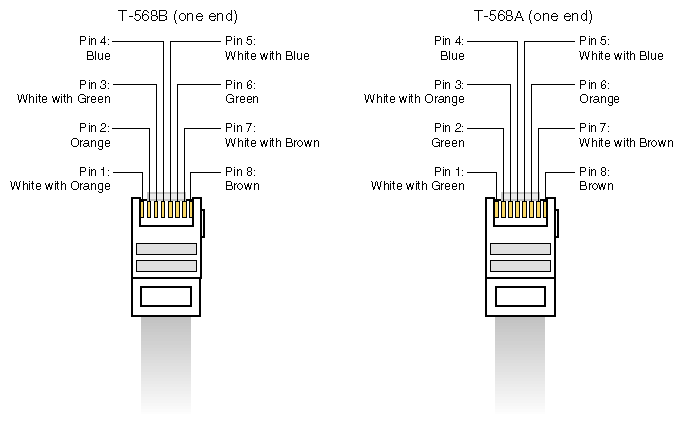
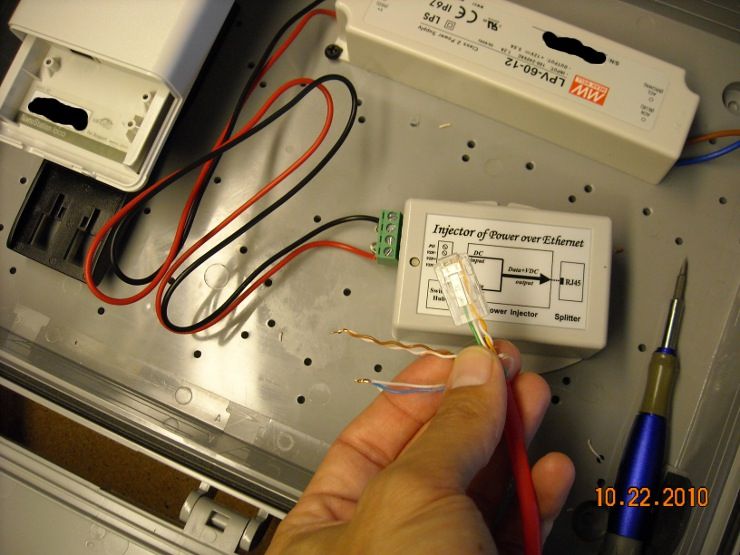
And the whole mess gets power from that single 12V power source... it delivers 12VDC to the Ubiquiti bridge (which takes "passive PoE," not 802.3af-standard PoE), and the little PoE power cube you see delivers the 802.3af-spec 48VDC to the camera (out of frame to the right). 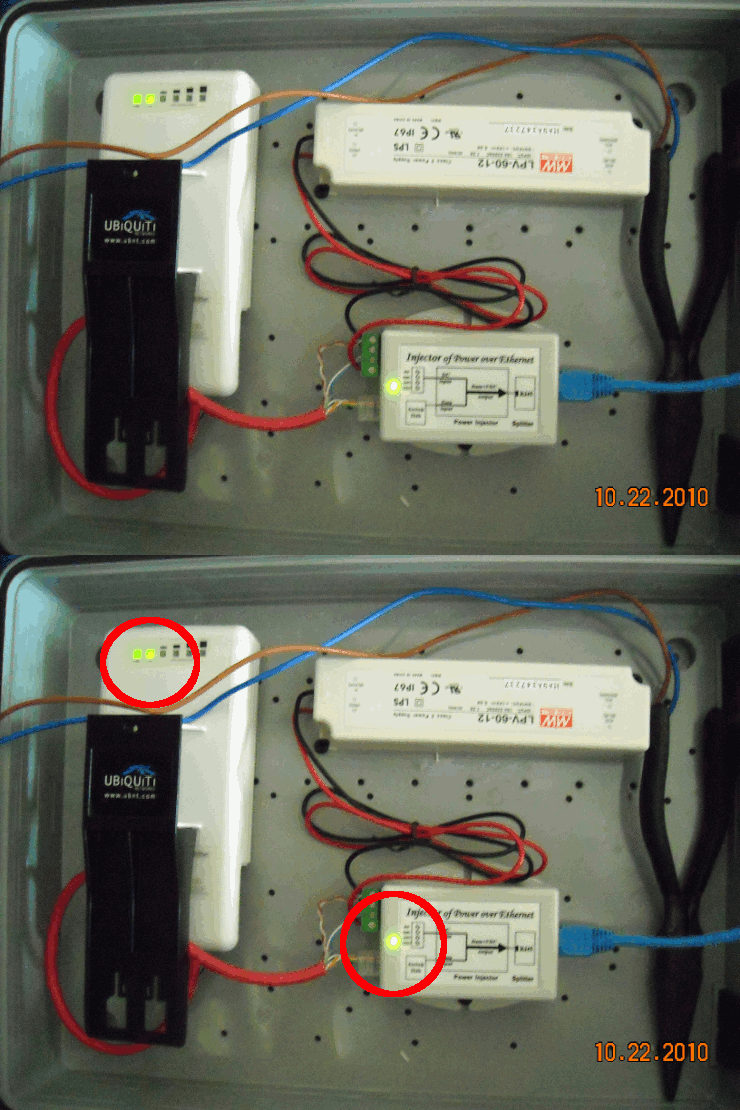
ETA: and you could easily swap out that 12VDC Power Supply for a 12V gel-cell battery attached to a solar panel and charge controller. All devices care about is the 12V, not where it comes from. |
"Look wise, say nothing, and grunt. Speech was given to conceal thought."
- Sir William Osler -
- Sir William Osler -
|
Originally Posted By TheGrayMan:
Originally Posted By CROQ:
Does anyone know of a POE injector that will run directly off of a 12V battery? If you mean one that take a 12VDC input and produces the 48VDC and roughly 15W required by the official PoE spec (802.3af), then try this one http://www.streakwave.com/mmSWAVE1/Images/TPS_DC_DC.jpg Otherwise, if you have a device (like the Ubiquiti stuff) that takes a non-standard PoE voltage, you can simply put the 12VDC down the appropriate twisted pairs, as I did with my last set of Ubiquiti bridges: http://i251.photobucket.com/albums/gg286/TGrayman/Ubiquiti%20box/pinoutRJ45-crossovercolor-codes.gif http://i251.photobucket.com/albums/gg286/TGrayman/Ubiquiti%20box/cablehookup.jpg And the whole mess gets power from that single 12V power source... it delivers 12VDC to the Ubiquiti bridge (which takes "passive PoE," not 802.3af-standard PoE), and the little PoE power cube you see delivers the 802.3af-spec 48VDC to the camera (out of frame to the right). http://i251.photobucket.com/albums/gg286/TGrayman/Ubiquiti%20box/powered.gif ETA: and you could easily swap out that 12VDC Power Supply for a 12V gel-cell battery attached to a solar panel and charge controller. All devices care about is the 12V, not where it comes from. Hi Gray-Man might I suggest getting a bag of adhesive cable tie-downs and some small zip ties so you can dress the wires in the boxes you make. It might add another level of professionalism to your work. http://www.newark.com/voltrex/2587/cable-tie-holder-nylon-6-6/dp/92N4802 |
|
Originally Posted By EXPY37:
Anyone know of a microphone/speaker module to plug into the IP cams that have line audio in and out to make a sort of intercom? Mobotix cameras do that natively (or you can use their Ext-IO module). |
"Look wise, say nothing, and grunt. Speech was given to conceal thought."
- Sir William Osler -
- Sir William Osler -
|
Originally Posted By TheGrayMan:
Originally Posted By EXPY37:
Anyone know of a microphone/speaker module to plug into the IP cams that have line audio in and out to make a sort of intercom? Mobotix cameras do that natively (or you can use their Ext-IO module). I was looking for an amplified module to drive a speaker -from a camera's 'line out' jack. Also the Axis and imported PTZs have line inputs for mike and 'line' level outputs for audio [to an amp for a speaker]. Just looking for something integrated and fast to hook up. There are mike preamp modules, w/ electret mikes built in, that draw only a few mils of current and are ready to plug into the camera's mike input jack, on ebay for only a few dollars. Took one apart yesterday and they look to be a good value. I'd like to find something to drive a speaker from a camera. I might try a cheap 12 volt bullhorn from H-F and see if it can be adapted. |
|
Here's another link with a great video shot down a long hallway:
Link |
"Look wise, say nothing, and grunt. Speech was given to conceal thought."
- Sir William Osler -
- Sir William Osler -
|
Here's some footage from a burglary of a motorcycle dealership. Note these guys got away with four bikes, and probably thousands of dollars in track suits and other riding gear.
These are clearly analog cameras, and they are NOT focused very well. They're also using IR LEDs (note the reflections off the tracksuits and the motorcycle reflectors). Better cameras might have yielded at least a license plate image (the burglars kept their hoods on and faces covered up) as they backed up their van. These guys were probably gone in a few minutes, so an alarm system MIGHT have helped, but depending on response time, they still might have gotten away clean. Sure would have been nice to have a license plate image 

|
"Look wise, say nothing, and grunt. Speech was given to conceal thought."
- Sir William Osler -
- Sir William Osler -
|
Originally Posted By CROQ:
Makes me wonder if the traffic cameras are of any use. They don't use regular analog stuff... they use higher-res, faster-shutters, and can catch your license plate. |
"Look wise, say nothing, and grunt. Speech was given to conceal thought."
- Sir William Osler -
- Sir William Osler -
|
Originally Posted By TheGrayMan:
Originally Posted By CROQ:
Does anyone know of a POE injector that will run directly off of a 12V battery? If you mean one that take a 12VDC input and produces the 48VDC and roughly 15W required by the official PoE spec (802.3af), then try this one http://www.streakwave.com/mmSWAVE1/Images/TPS_DC_DC.jpg Otherwise, if you have a device (like the Ubiquiti stuff) that takes a non-standard PoE voltage, you can simply put the 12VDC down the appropriate twisted pairs, as I did with my last set of Ubiquiti bridges: http://i251.photobucket.com/albums/gg286/TGrayman/Ubiquiti%20box/pinoutRJ45-crossovercolor-codes.gif http://i251.photobucket.com/albums/gg286/TGrayman/Ubiquiti%20box/cablehookup.jpg And the whole mess gets power from that single 12V power source... it delivers 12VDC to the Ubiquiti bridge (which takes "passive PoE," not 802.3af-standard PoE), and the little PoE power cube you see delivers the 802.3af-spec 48VDC to the camera (out of frame to the right). http://i251.photobucket.com/albums/gg286/TGrayman/Ubiquiti%20box/powered.gif ETA: and you could easily swap out that 12VDC Power Supply for a 12V gel-cell battery attached to a solar panel and charge controller. All devices care about is the 12V, not where it comes from. That's what I was looking for. My plan was a Tranzeo radio and camera but looks like the Bullets use less juice. All the components use 12V so an injector as you point out, may not be necessary. I was worried about the battery voltage dropping too much and figured I'd find an injector with variable input. 12V battery, 20watt solar panel, charge controller, Bullet, Yagi, cam and tap into a crossover ethernet cable to power everything. |
TEAM Opie USA
288
288
|
Originally Posted By CROQ:
Originally Posted By TheGrayMan:
Originally Posted By CROQ:
Does anyone know of a POE injector that will run directly off of a 12V battery? If you mean one that take a 12VDC input and produces the 48VDC and roughly 15W required by the official PoE spec (802.3af), then try this one http://www.streakwave.com/mmSWAVE1/Images/TPS_DC_DC.jpg Otherwise, if you have a device (like the Ubiquiti stuff) that takes a non-standard PoE voltage, you can simply put the 12VDC down the appropriate twisted pairs, as I did with my last set of Ubiquiti bridges: http://i251.photobucket.com/albums/gg286/TGrayman/Ubiquiti%20box/pinoutRJ45-crossovercolor-codes.gif http://i251.photobucket.com/albums/gg286/TGrayman/Ubiquiti%20box/cablehookup.jpg And the whole mess gets power from that single 12V power source... it delivers 12VDC to the Ubiquiti bridge (which takes "passive PoE," not 802.3af-standard PoE), and the little PoE power cube you see delivers the 802.3af-spec 48VDC to the camera (out of frame to the right). http://i251.photobucket.com/albums/gg286/TGrayman/Ubiquiti%20box/powered.gif ETA: and you could easily swap out that 12VDC Power Supply for a 12V gel-cell battery attached to a solar panel and charge controller. All devices care about is the 12V, not where it comes from. That's what I was looking for. My plan was a Tranzeo radio and camera but looks like the Bullets use less juice. All the components use 12V so an injector as you point out, may not be necessary. I was worried about the battery voltage dropping too much and figured I'd find an injector with variable input. 12V battery, 20watt solar panel, charge controller, Bullet, Yagi, cam and tap into a crossover ethernet cable to power everything. Probably don't need a x-over cable... |
|
Originally Posted By EXPY37:
Originally Posted By CROQ:
That's what I was looking for. My plan was a Tranzeo radio and camera but looks like the Bullets use less juice. All the components use 12V so an injector as you point out, may not be necessary. I was worried about the battery voltage dropping too much and figured I'd find an injector with variable input. 12V battery, 20watt solar panel, charge controller, Bullet, Yagi, cam and tap into a crossover ethernet cable to power everything. Probably don't need a x-over cable... Likely not. A lot of modern network devices are Auto-MDIX, which obviates the need for the x-over cable. |
"Look wise, say nothing, and grunt. Speech was given to conceal thought."
- Sir William Osler -
- Sir William Osler -
|
Originally Posted By TheGrayMan:
Originally Posted By EXPY37:
Probably don't need a x-over cable... Likely not. A lot of modern network devices are Auto-MDIX, which obviates the need for the x-over cable. Even better. Thanks guys. I am a network amateur. 
I found Tycon Power has a combined solar/POE charge controller/POE injector. I'll have onsite electricity eventualy so this will be nice to charge the battery from the POE later. |
TEAM Opie USA
288
288
|
Originally Posted By CROQ:
Originally Posted By TheGrayMan:
Originally Posted By EXPY37:
Probably don't need a x-over cable... Likely not. A lot of modern network devices are Auto-MDIX, which obviates the need for the x-over cable. Even better. Thanks guys. I am a network amateur.
I found Tycon Power has a combined solar/POE charge controller/POE injector. I'll have onsite electricity eventualy so this will be nice to charge the battery from the POE later. What model of Ibiquity 5.8 radio are you using and do you have a link to that solar controller POE device above? |
|
Originally Posted By EXPY37:
Originally Posted By CROQ:
Originally Posted By TheGrayMan:
Originally Posted By EXPY37:
Probably don't need a x-over cable... Likely not. A lot of modern network devices are Auto-MDIX, which obviates the need for the x-over cable. Even better. Thanks guys. I am a network amateur.
I found Tycon Power has a combined solar/POE charge controller/POE injector. I'll have onsite electricity eventualy so this will be nice to charge the battery from the POE later. What model of Ibiquity 5.8 radio are you using and do you have a link to that solar controller POE device above? I am going to try the2.4G BulletM2HP. I have 2.4G antennas collecting dust. Tycon Solar/POE charge controller TP-SCPOE-1212 |
TEAM Opie USA
288
288
|
Cross-posted from safes-and-home-security:
Difficulty rating: Medium Materials required: network camera (appropriately rated for environment) electrical box power supply PoE adapter brick Wireless bridge Connector N-male to RPSMA adapter Antenna miscellaneous tools basic networking know-how A common request from forum members is for a wireless camera setup. Multiple posters have asked me the best way to put a camera or three out in their barn... or their detached garage... or in their storage building... or their shed... or at the end of their driveway... or across the street. It's usually a situation where running actual network cable would be either prohibitively expensive, or beyond the skill/interest of the basic arfcommer. This presents a problem, as the entire world isn't one big LAN. There is a solution... and that is to use a wifi camera. There are pre-made wifi cameras that you can purchase... Linksys, Dlink, Panasonic, Logitech, dropcam... they come in all sorts of shapes, sizes, and configurations. Unfortunately, the consumer-grade stuff is often lacking in the picture quality dept (most are VGA or less in resolution)... they're basically glorified webcams. Their wireless implementations can also be spotty, lose connection to the Access Point and have to re-associate... etc. They often use integrated antennas, which greatly limits your ability to direct the signal where you want it to go. Fortunately, the DIY-type can do far better. Bending a prosumer-grade wireless bridge to the task, and using the camera of their choice (including vandal-resistant high-end multi-megapixel network cameras with built-in DVRs, etc).
We'll start by mounting the wireless bridge in the waterproof enclosure. We're going to want it mounted close to the bottom and out-of-the way of the rest of the hardware. The bulkhead N-female-to-N-female connector will pass the signal through to the external antenna: 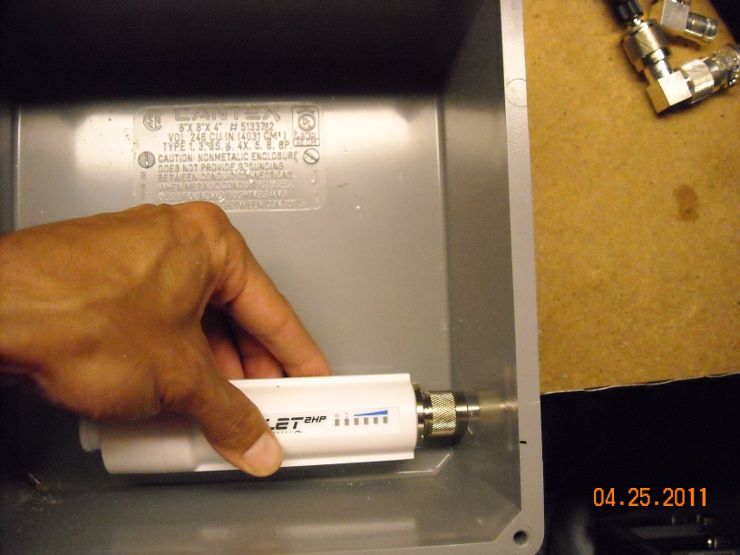
Drill the appropriate hole (slightly larger than 1/2"): 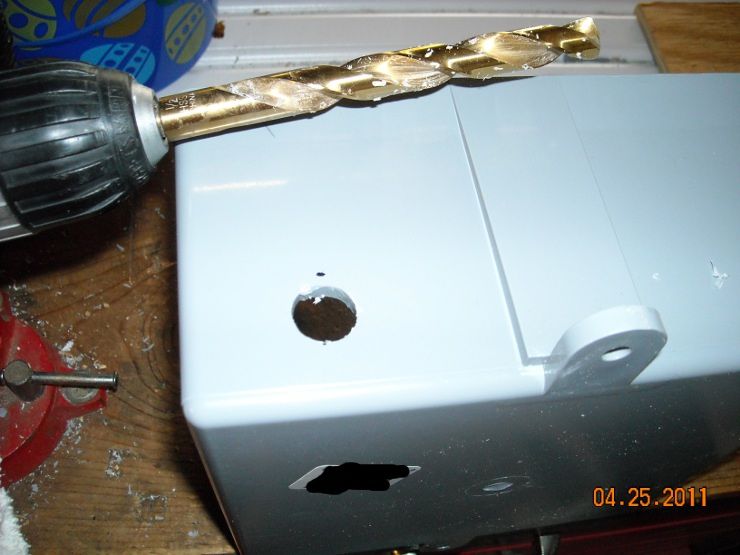
Put the bulkhead N-female-to-N-female connector through the hole, tighten the lock-nut on the inside, and hook it up: 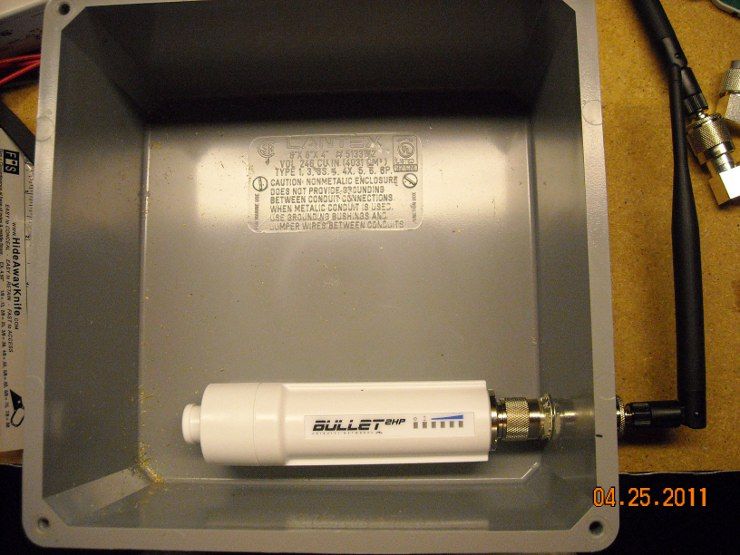
Power it up with a PoE power brick (the black one you see is made by Ubiquiti for that exact purpose... I only use it for testing/configuring. The bridge requires "passive" PoE... it does NOT follow the standard 802.3af spec, so plugging that bridge into a standard PoE switch will not work): 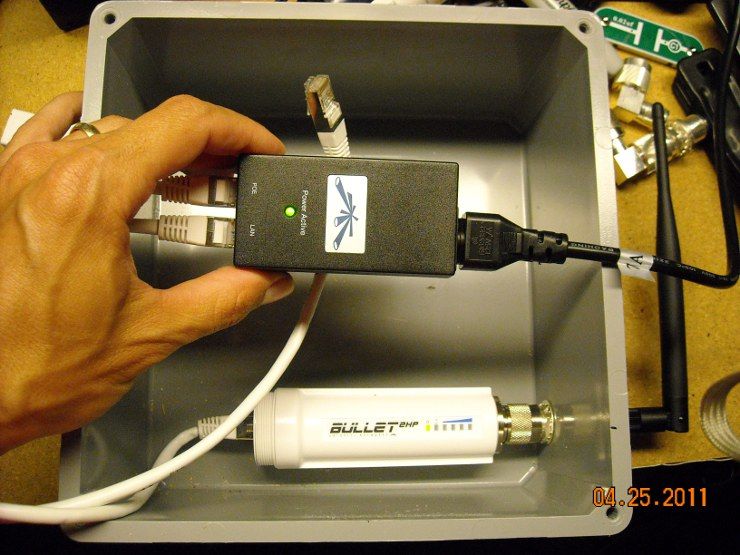
Now we attach a laptop to the other port on that black PoE power brick. This will allow us to log into the bridge and configure it for our purposes. Ubiquiti hardware comes from the factory with an IP address of 192.168.1.20, so you'll need to set your laptop's wired LAN connection to some format of 192.168.1.x (with "x" being a number between 2 and 254). Once you've done that, use your browser to connect to 192.168.1.20, and use the login/pass of ubnt/ubnt (hard-coded from the factory). 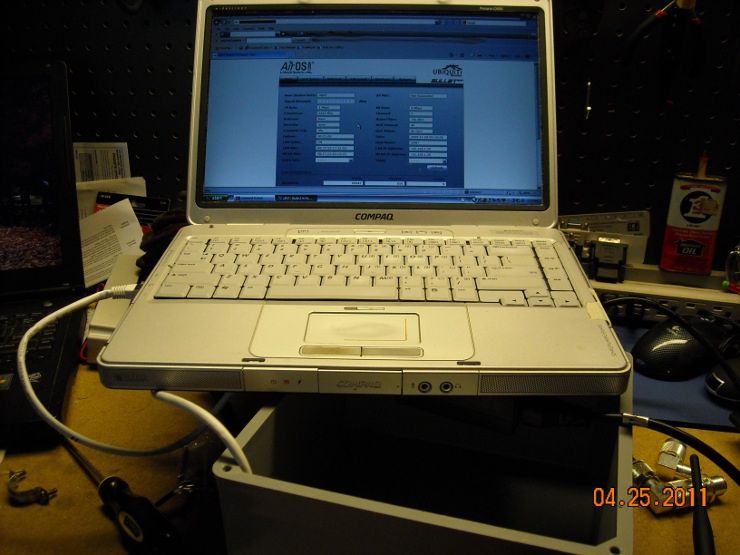
You'll know it's working if the second light on the AP/bridge lights up (the first light is the power light... the second is the LAN light... the rest are signal-strength for the WLAN) 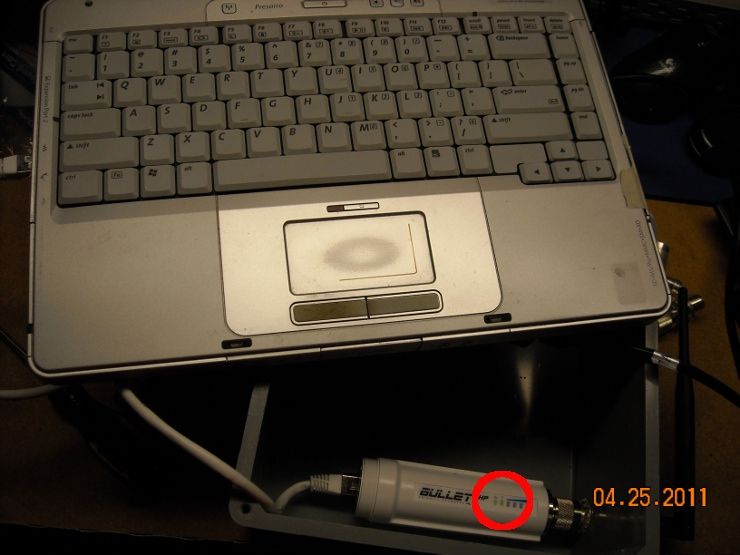
Set an appropriate IP address for your LAN... in this case, we set it to 192.168.0.10, since our camera has an IP address of 192.168.0.137. Once you do this, and apply the change, you'll have to change the IP address of your laptop to something in the 192.168.0.x format in order to access the bridge again. 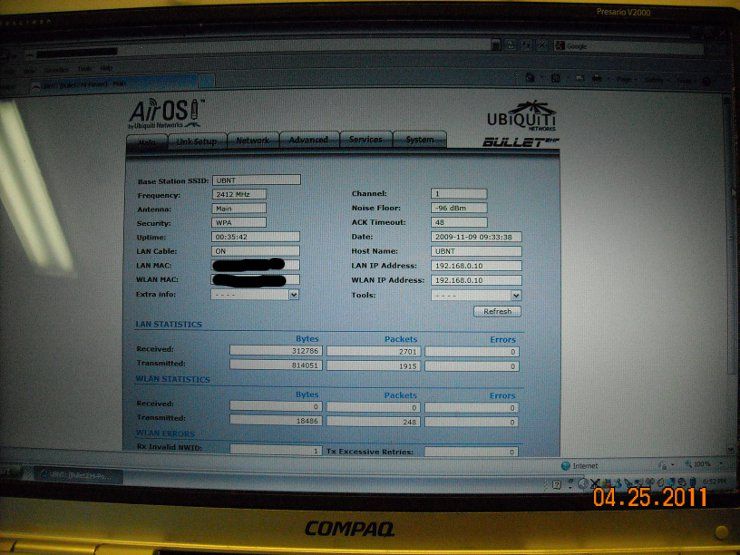
Depending on your wireless network setup, you will probably want the Ubiquiti bullet in "bridge" mode. This will allow the device to connect to your existing wireless LAN, or to any other computer with the appropriate wireless key. 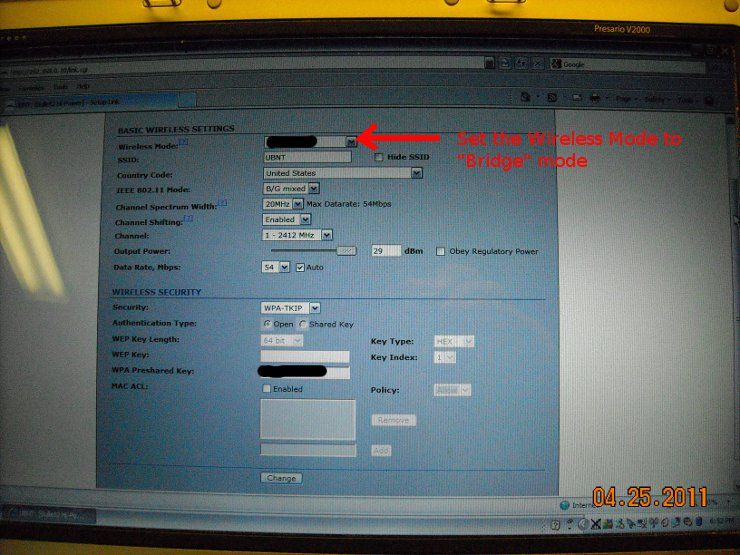
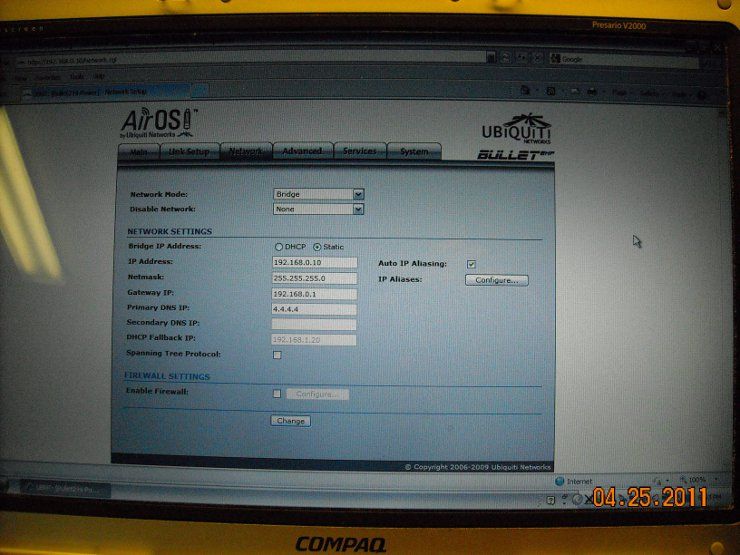
Once that's done, we'll move on to the rest of the build. |
"Look wise, say nothing, and grunt. Speech was given to conceal thought."
- Sir William Osler -
- Sir William Osler -
|
Continued from prior post:
Now that we have the network hardware configured the way we want, we can continue constructing our wireless box. The PoE power brick we chose is a DC-to-DC converter, and turns 12VDC into 48VDC. 48VDC is the precise voltage called-for in the 802.3af spec, and is what a PoE security camera will be expecting. The little white box takes 12VDC through little, green screw-down connectors: 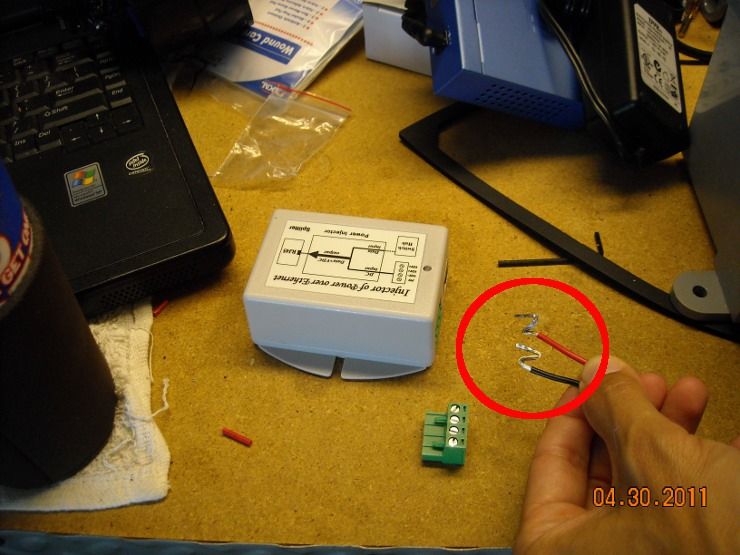
And here's a close-up: 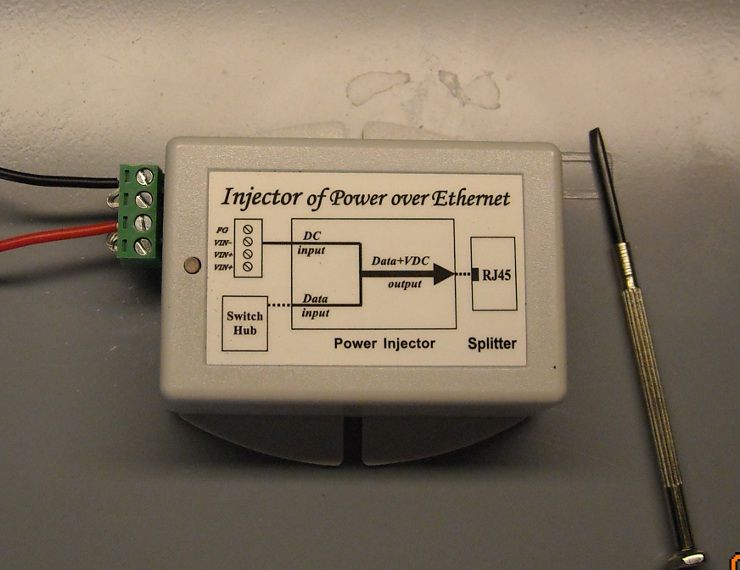
The next thing we need to do is make a power/network cable for the Ubiquiti bridge. The bridge only runs at 100MB speed, and thus two of the twisted-pairs are left unused for data. Instead, the AP uses those twisted pairs to draw power. We start by making a "shorty" network cable, of the standard B-type on one end, and a slightly different config on the other: 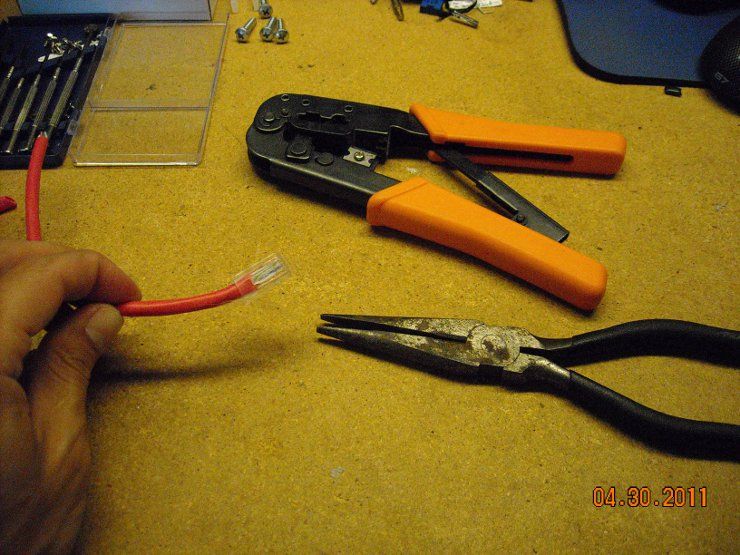
The blue and brown pairs are going to deliver power to the AP. Consequently, on the other end of that short cable, we make a regular B-type cable... except we leave the brown and blue pairs hanging out. We put the orange and green pairs in their usual places in the RJ-45 connector. You can't really tell from this picture, but the blue pair goes to the positive output from that Meanwell PSU (we just poke them into the same screw-down terminals that are connected to the PoE brick, and screw them down tight), and the brown pair goes to the negative screw-down terminals. Easy as pie. The camera is a Panasonic NF-302 (I think), and has an SD card to store its own images (circled in the picture). The camera essentially acts as its own DVR... which will be important to this camera. It will be running completely autonomously, and not connected to a LAN. The owner will be using a laptop to log into it remotely and see if anything has transpired. 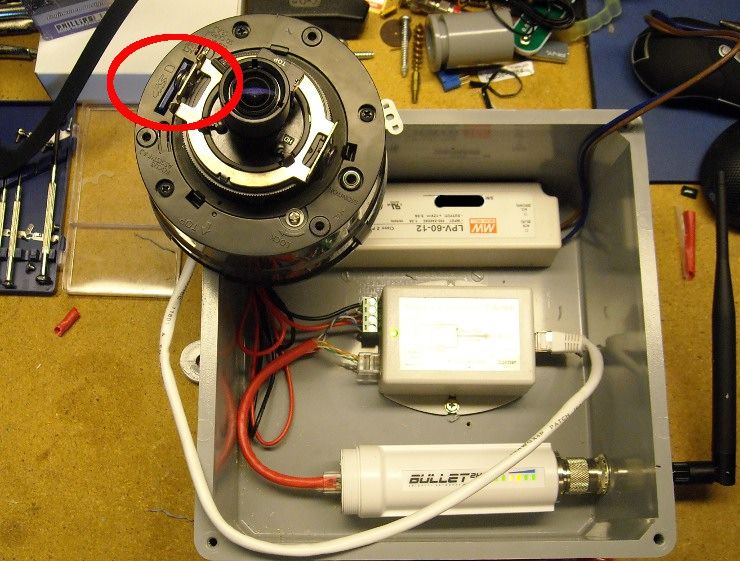
Here's the camera pointing at a random website on another laptop: 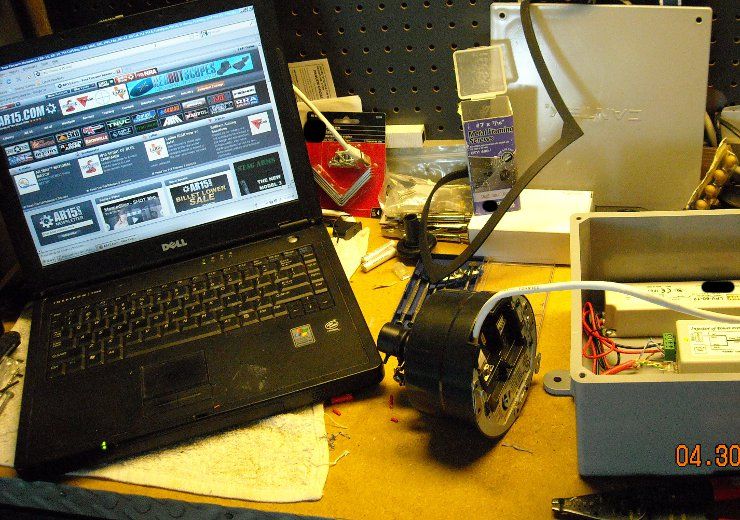
And here's the view through that camera from another laptop across the room, accessing that video stream across the wifi link. 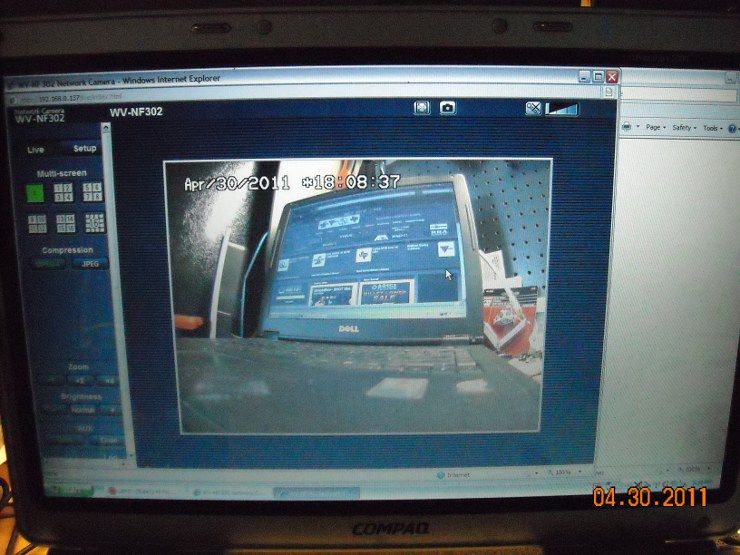
|
"Look wise, say nothing, and grunt. Speech was given to conceal thought."
- Sir William Osler -
- Sir William Osler -
|
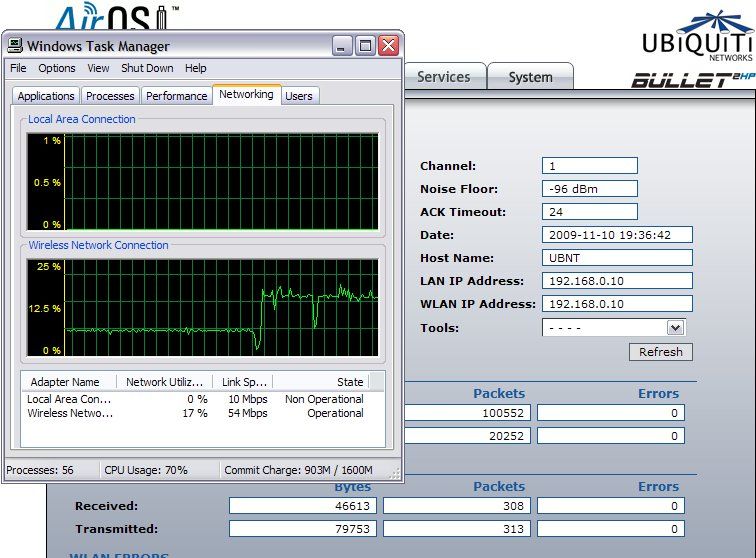
And just to give you an idea of the network utilization between different types of camera streams...
These screenshots are taken from the same Panasonic NF-302 camera. The Pano does MPEG4 and JPEG streams, and here you see listed the network utilization percentages for both. The lower network utilization is obviously the MPEG4 stream at 640x480 (VGA). Bumping the resolution up to 1280x960 and using JPEG compression uses quite a bit more network pipe... and that's something in short supply on a wireless network (more protocol overhead and interference than a hard-wired network). Just something to consider before you start putting up wireless cameras willy-nilly. 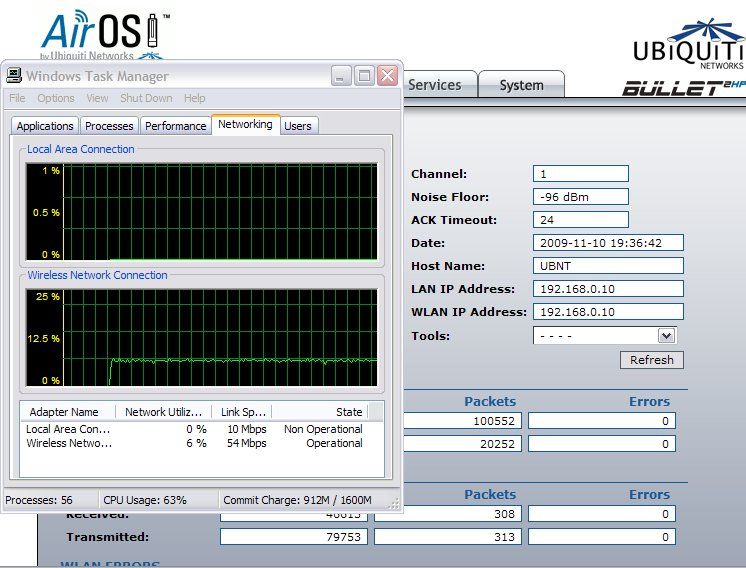
|
"Look wise, say nothing, and grunt. Speech was given to conceal thought."
- Sir William Osler -
- Sir William Osler -

|
I've been lurking in here quite a bit, but figured I'd toss out a picture and see whether I could get any ideas.
Looking to set up a complete Megapixel IP PoE system. I've tagged the photo with my primary areas of concern. I'll be starting from the ground up. Spending limit is $5000. I want to do this right. House has a history of break ins and morons hanging out in my parking lot. The blue fir tree in the front yard is being cut down in 2 weeks, so it should not be taken into consideration. It is a 1 story 1100 sqft home with 3 access doors and 13 windows. Current plan is to replace the windows with Gorell Armor Glass windows, full security system, and then a complete video surveillance system. Also replacing entrance doors with steel doors and strike plates. Any help with piecing together a system would be appreciated. 
|
Tennessee Squire
Pack Larue Founding Hound
We see you trollin, we hatin.
Pack Larue Founding Hound
We see you trollin, we hatin.

|
Originally Posted By bigshooter81:
Any chance we could get a step by step of the thinkcentre DVR builds? my cam's have been up and running for some time now and I can access them from anywhere, but unfortuneatly have not installed a DVR yet and can't really afford to drop the cash on a Nuuvo. Let me finish my other mini-howto, and I'll see what I can do. |
"Look wise, say nothing, and grunt. Speech was given to conceal thought."
- Sir William Osler -
- Sir William Osler -
|
Originally Posted By TheGrayMan:
Originally Posted By bigshooter81:
Any chance we could get a step by step of the thinkcentre DVR builds? my cam's have been up and running for some time now and I can access them from anywhere, but unfortuneatly have not installed a DVR yet and can't really afford to drop the cash on a Nuuvo. Let me finish my other mini-howto, and I'll see what I can do. 
|
|
OK... now we get to the installation phase of this project.
Our planned site is a second home owned by a friend of mine. He stays there sometimes when traveling, and hopes to rehab it at some point. The immediate neighbors are reasonable people, but some of the rest of the neighborhood isn't the greatest, and random people sometimes come up to the house and pound on the door, despite the fact that nobody has lived there for >10 years. Things have been stolen, etc. The home has no internet access, and no phone... but does have power. Working with that, an autonomous camera solution was felt to be the answer. Planned mounting site is in a carport, that also covers the home's only entrance door: 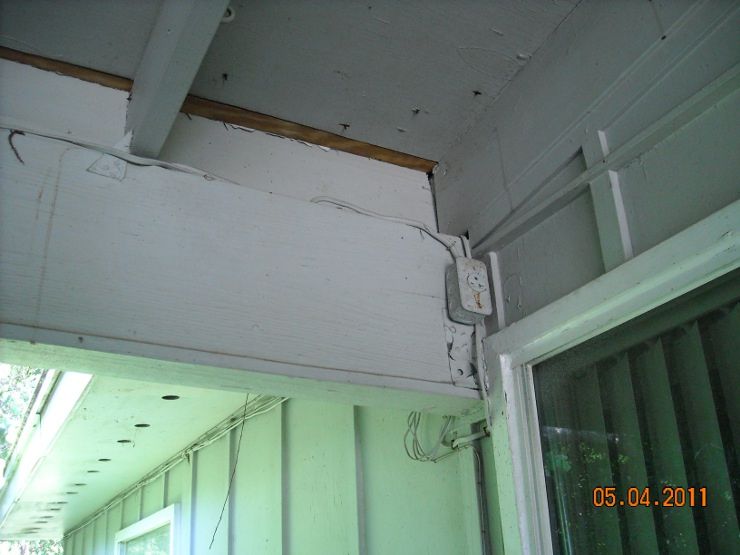
Here's a side view of that beam... the power/network box will be mounted on the other side of that beam, out of sight: 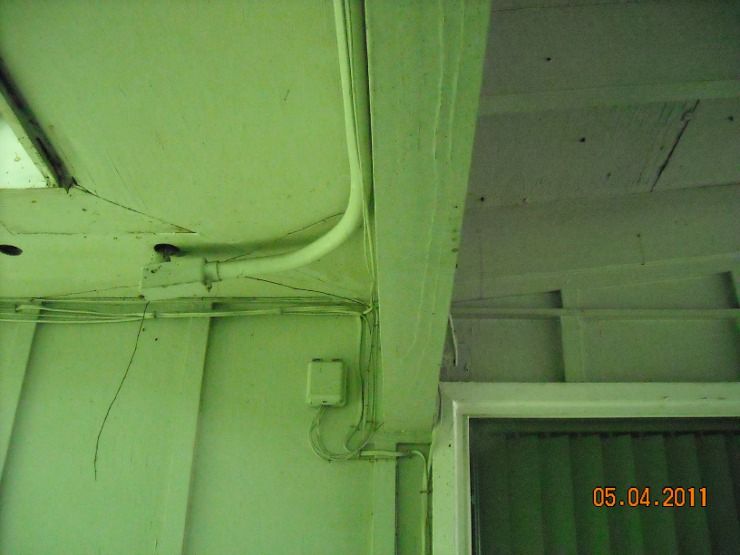
The gray box should blend in well with the gray paint, and be very inconspicuous: 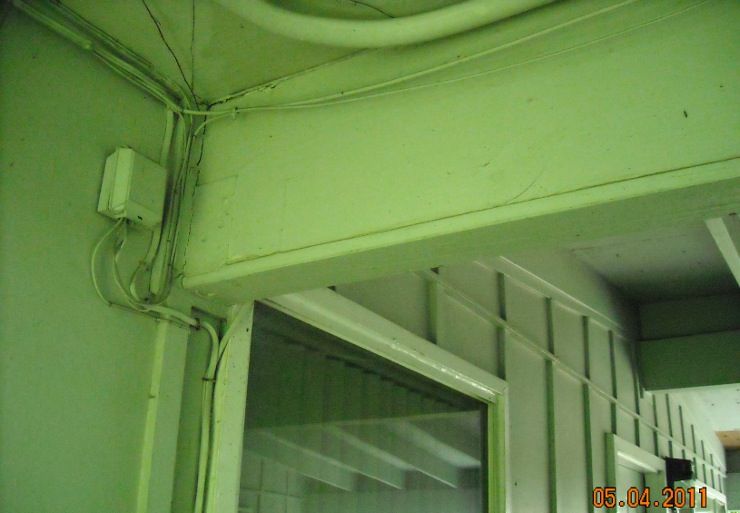
Notice that outlet in the first picture? We're going to tap into that to power our camera box. Here we're confirming it's live, and that we need to shut off the power to work on it (NEVER, EVER work on live circuits if you can help it... ALWAYS turn off the breaker first) 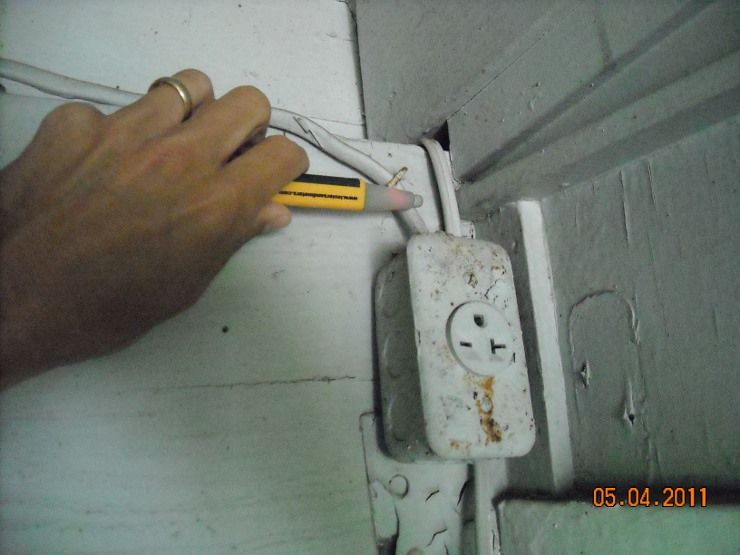
Except this place doesn't have a breaker box... this place is so old that is actually has a fuse box. You don't see this kind of thing in modern homes... and you have to be extra careful. 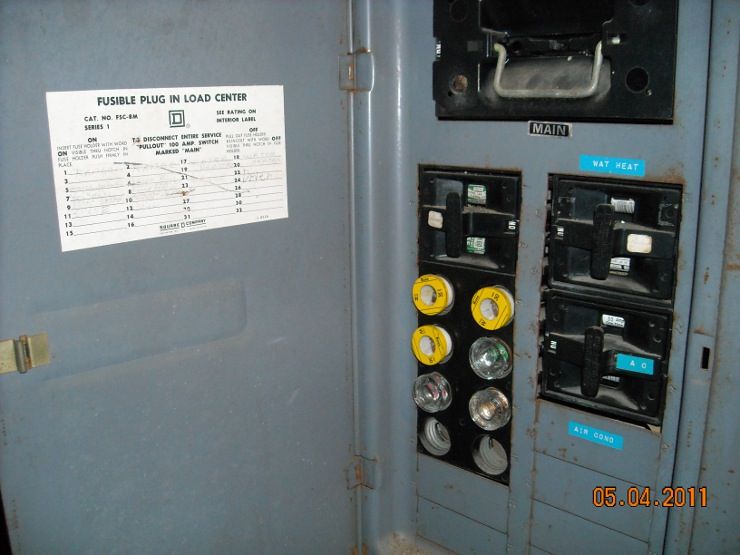
Unscrewing individual fuses didn't kill the power to that outlet, so I had to kill the mains. Killing the main power required pulling the big fuses at the top of that ... big buggers, they are... 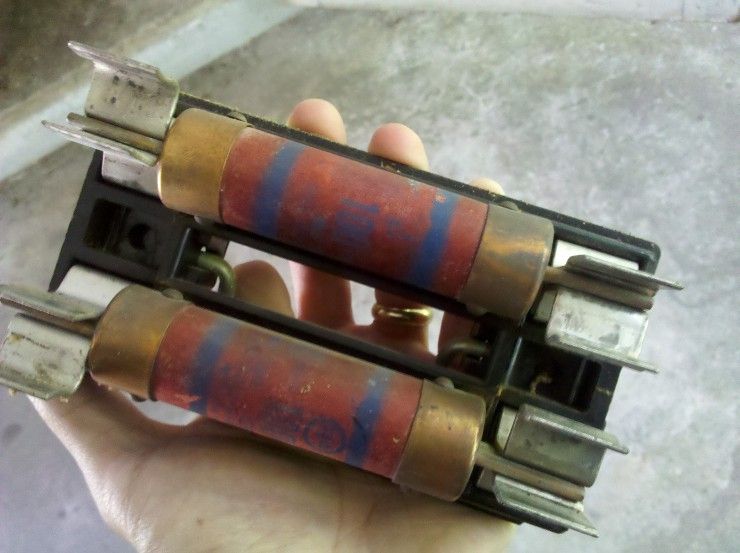
Pulling that outlet down and taking it apart took some doing... it was completely corroded (naturally, since it was not an outdoor-rated wet location outlet). It was full of spiders and debris... F*cking electrical safety... how does it work? 
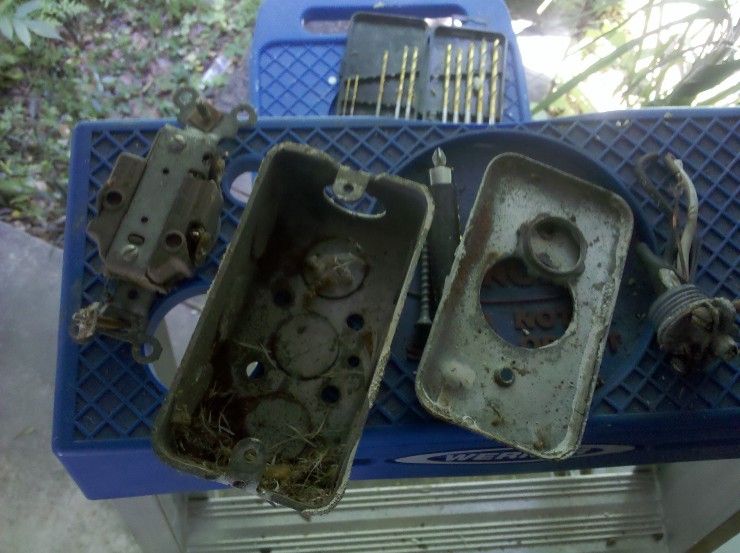
That's better... with an actual outdoor-rated box, and rubber-grommetted connectors. Neatness counts. 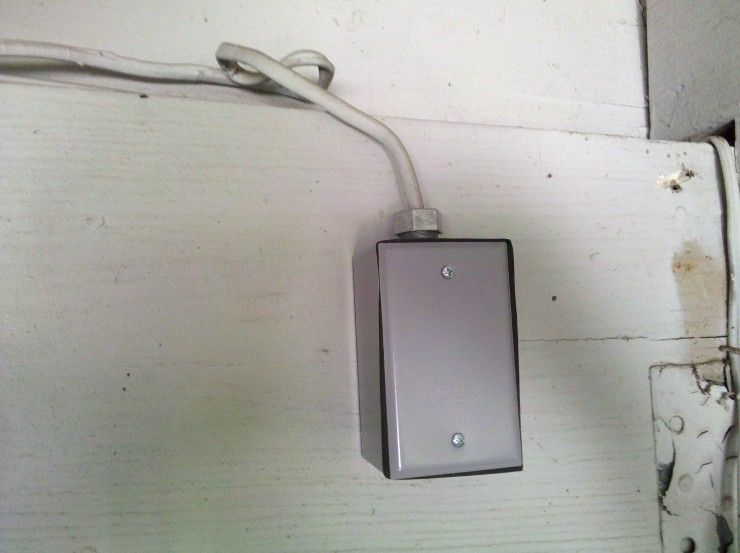
Here's power being run to that box, through the beam: 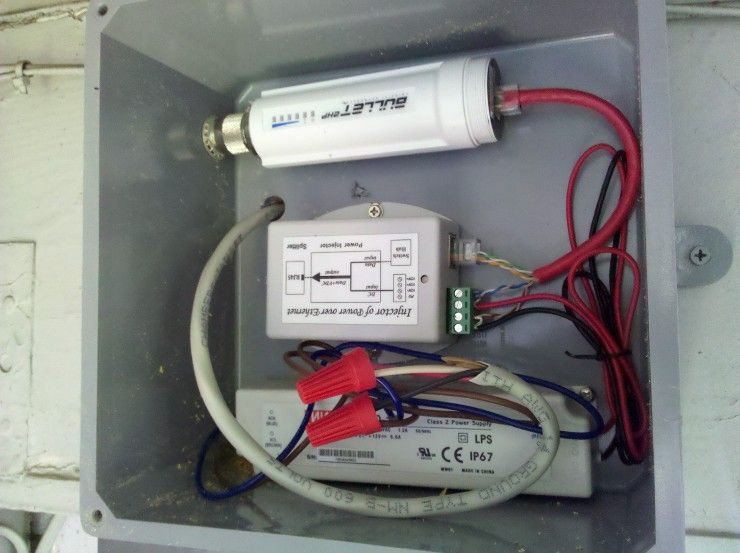
Here it is powered up, with cat5 running through the upper corner of that box to the camera on the other side/top of the beam. I'll have to seal that hole with silicone, since it took an odd angle to get the cat5 where it needed to be: 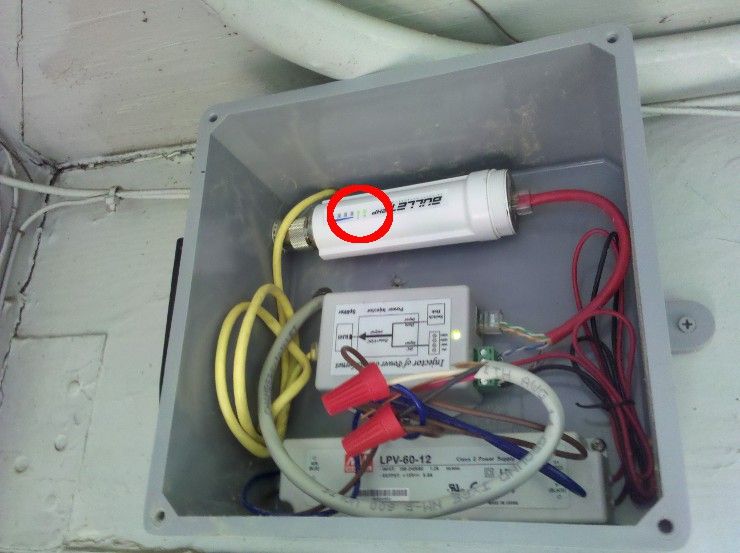
Final mounted camera... very low-profile, and only visible if you actually walk into the carport. 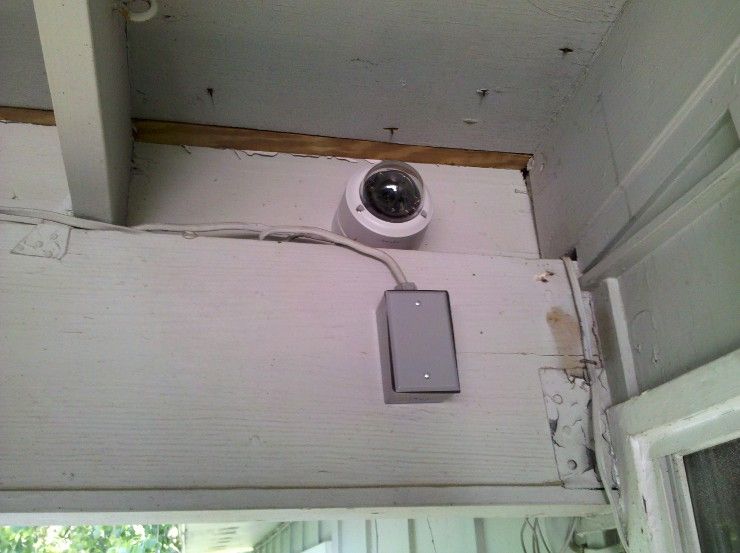
And here's what it sees during the daytime. There is a motion-activated porch light out there at night (added specifically for this project), so this day-only camera is also usable at night. That picture was pulled off my Droid phone from out in the street, via that wireless bridge... the blurred area you see is where I was sitting. 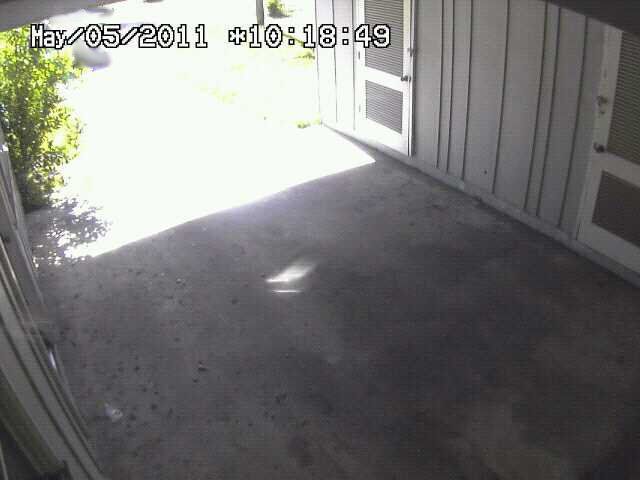
|
"Look wise, say nothing, and grunt. Speech was given to conceal thought."
- Sir William Osler -
- Sir William Osler -

|
Here's another video of a "swarm" attack, this time at 3AM in Las Vegas... pretty nice convenience store too.
Good video quality from this system, though I can't quite make out what brand of system/cameras he's using. He's only using 12/16 channels on his DVR. 
|
"Look wise, say nothing, and grunt. Speech was given to conceal thought."
- Sir William Osler -
- Sir William Osler -
|
Originally Posted By bigshooter81:
Any chance we could get a step by step of the thinkcentre DVR builds? my cam's have been up and running for some time now and I can access them from anywhere, but unfortuneatly have not installed a DVR yet and can't really afford to drop the cash on a Nuuvo. There you go: Link to Safes-and-Home-Security forum |
"Look wise, say nothing, and grunt. Speech was given to conceal thought."
- Sir William Osler -
- Sir William Osler -
|
Also did an entire separate thread on DVR software. Went step-by-step through four different software suites, including links on where to get them.
Link to tacked thread in Safes-and-Home-Security forum |
"Look wise, say nothing, and grunt. Speech was given to conceal thought."
- Sir William Osler -
- Sir William Osler -