


Bambu Lab general thread - X1, X2, P1, A1, H2 series (Page 27 of 30)


|
Welp after 800 hours i'm having my first issue with my P2S... well actually surprisingly my AMS's. I keep getting errors like I have tangled filament, but its not that, for some reason its only feeding a few inches and then getting stuck. Happened first on 1 of the slots on my newer unit with only maybe 200 hours of print time, so I took it apart and put a new feed tube in the bottom of that slot and seems to be happy now, but now im having an issue with another slot on my original AMS2 and replacing the feeder tube doesn't seemed to have helped this time. Tried many different filaments and the same issue persists and will not feed in 1 of the slots! A little annoying Edit: Taken both apart completely... blown everything out, all new feeder tubes and new PTFE for both going to the buffer with a larger radius and all seems right again and everything is feeding |
|
Got my H2D yesterday and set it up today. This dude is huge. I bought the AMS2/AMS HT combo but my HT won't be here until Friday. Honestly it seems to get the most from the H2D you need 2 AMSs. I didn't realize the nozzles needed a separate feed a piece. It makes sense but it makes it where you can be set up with two needed filaments on the same nozzle. |

|
Originally Posted By Spaceboy: Got my H2D yesterday and set it up today. This dude is huge. I bought the AMS2/AMS HT combo but my HT won't be here until Friday. Honestly it seems to get the most from the H2D you need 2 AMSs. I didn't realize the nozzles needed a separate feed a piece. It makes sense but it makes it where you can be set up with two needed filaments on the same nozzle. I started out with the same setup as you and eventually added a second HT, so I have 2 HT's on the left and an AMS2 on the right nozzle. I like the HT's because I run more engineering filaments, the second HT let's me dry a roll of filament in one while feeding from the other. Then the dried spool can be the failover when the first spool is getting low on filament....you basically eliminate the worry about whether you have enough left on a spool for a print or not. Eventually I'll probably add other HT, simply because my printers are in the basement and the more spools I can have in an AMS, the less trips I make up/down the stairs. Aka, I'm lazy lol If you don't plan on using engineering filaments as much, a second AMS2 would probably make more sense. |
EP429: Today's lesson - Don't provoke ARFCOM. People will see your butthole.


|
Originally Posted By Spaceboy: Got my H2D yesterday and set it up today. This dude is huge. I bought the AMS2/AMS HT combo but my HT won't be here until Friday. Honestly it seems to get the most from the H2D you need 2 AMSs. I didn't realize the nozzles needed a separate feed a piece. It makes sense but it makes it where you can be set up with two needed filaments on the same nozzle. I just got mine set up two days ago. I’ve never used one so I’m just printing stuff off the app for now….a tool box for the tools it came with and a phone stand. I’d like to learn to design my own things |
Behold a pale horse: and his name that sat on him was Death, and Hell followed with him.

|
Originally Posted By fox2008: I started out with the same setup as you and eventually added a second HT, so I have 2 HT's on the left and an AMS2 on the right nozzle. I like the HT's because I run more engineering filaments, the second HT let's me dry a roll of filament in one while feeding from the other. Then the dried spool can be the failover when the first spool is getting low on filament....you basically eliminate the worry about whether you have enough left on a spool for a print or not. Eventually I'll probably add other HT, simply because my printers are in the basement and the more spools I can have in an AMS, the less trips I make up/down the stairs. Aka, I'm lazy lol If you don't plan on using engineering filaments as much, a second AMS2 would probably make more sense. |
Who, What, Where? Call Sign, Snowball

|
I ordered the track crossover thing from Bambu, should be here later this week. Decided to keep the P2s, and run the X2D with it. I went ahead and ordered the slat wall that you guys used earlier in the thread, I have a work table that I built for all the filament, so I'm going to split it down the middle on the top with the wall and organize the two printers and the AMS units, already downloaded all the files for the tube clips and the shelf brackets. Right now running 2 ams2 on the x2d. But will plan to add amsHT to the primary nozzle. That's funny. A lot of videos and people have been complaining about the auxiliary nozzle on the x2d being of lower quality, I printed lots of text and stuff and it does a little more stringing, Takes some post-processing, but really hasn't been bad at all. For me it's worked just fine. Printing a second color in both pla and petg. Eliminating the need to switch. I finally got my stash of ASA and ABS various colors, so I'm going to work on some hangers and brackets and stuff for the garage. Also have a bunch of pa6 and pa12, I'll probably give a printed can a run for its money. I found a box of titanium tube cutoffs, they're not threaded and they're somewhat thin, but I think they'll work as an outer sleeve for a can or two. We used to do some machining work for offshore pumps, I think I have about a dozen scrap pieces left over I'll throw some pictures up when I can get a chance to upload them |
"If you think its expensive hiring a professional, try hiring an amateur first."
-A. Einstein
-A. Einstein
|
Originally Posted By Saker13: I have an AMS2 and AMS HT on the left nozzle along with an AMS1 on the right nozzle. I am planning on adding an HT to the right nozzle but may reconsider, I hadn't considered the failure thing. Originally Posted By Saker13: Originally Posted By fox2008: I started out with the same setup as you and eventually added a second HT, so I have 2 HT's on the left and an AMS2 on the right nozzle. I like the HT's because I run more engineering filaments, the second HT let's me dry a roll of filament in one while feeding from the other. Then the dried spool can be the failover when the first spool is getting low on filament....you basically eliminate the worry about whether you have enough left on a spool for a print or not. Eventually I'll probably add other HT, simply because my printers are in the basement and the more spools I can have in an AMS, the less trips I make up/down the stairs. Aka, I'm lazy lol If you don't plan on using engineering filaments as much, a second AMS2 would probably make more sense. I've never had an HT & AMS on the same nozzle, but I'd assume if you had the same spool in both, it would automatically switch if the first spool ran out. Unless I misunderstood what your saying. |
EP429: Today's lesson - Don't provoke ARFCOM. People will see your butthole.
|
Originally Posted By H4ppyB34r: I ordered the track crossover thing from Bambu, should be here later this week. Decided to keep the P2s, and run the X2D with it. I went ahead and ordered the slat wall that you guys used earlier in the thread, I have a work table that I built for all the filament, so I'm going to split it down the middle on the top with the wall and organize the two printers and the AMS units, already downloaded all the files for the tube clips and the shelf brackets. Right now running 2 ams2 on the x2d. But will plan to add amsHT to the primary nozzle. That's funny. A lot of videos and people have been complaining about the auxiliary nozzle on the x2d being of lower quality, I printed lots of text and stuff and it does a little more stringing, Takes some post-processing, but really hasn't been bad at all. For me it's worked just fine. Printing a second color in both pla and petg. Eliminating the need to switch. I finally got my stash of ASA and ABS various colors, so I'm going to work on some hangers and brackets and stuff for the garage. Also have a bunch of pa6 and pa12, I'll probably give a printed can a run for its money. I found a box of titanium tube cutoffs, they're not threaded and they're somewhat thin, but I think they'll work as an outer sleeve for a can or two. We used to do some machining work for offshore pumps, I think I have about a dozen scrap pieces left over I'll throw some pictures up when I can get a chance to upload them I'm curious how you like it. It's not clear to me that it would be a benefit with my setup, 2 HT's on one nozzle and AMS2 on the other, but I've done virtually zero research on it either. |
EP429: Today's lesson - Don't provoke ARFCOM. People will see your butthole.

|
Originally Posted By fox2008: I'm curious how you like it. It's not clear to me that it would be a benefit with my setup, 2 HT's on one nozzle and AMS2 on the other, but I've done virtually zero research on it either. I don't have a ton of use for it personally, but is what I will say is I just appreciate the CONSTANT innovation from Bambu. TPU feeding modules, crossover hubs to allow one AMS to feed both nozzles, etc etc. On top of releasing 4 new printers (X2D, H2C, P2S, H2S) since Prusa has released a new printer. Pretty impressive the rate at which they are innovating. Just happy to see a company making a strong effort to advance the community. |
|
Originally Posted By -Obsessed-: I don't have a ton of use for it personally, but is what I will say is I just appreciate the CONSTANT innovation from Bambu. TPU feeding modules, crossover hubs to allow one AMS to feed both nozzles, etc etc. On top of releasing 4 new printers (X2D, H2C, P2S, H2S) since Prusa has released a new printer. Pretty impressive the rate at which they are innovating. Just happy to see a company making a strong effort to advance the community. Originally Posted By -Obsessed-: Originally Posted By fox2008: I'm curious how you like it. It's not clear to me that it would be a benefit with my setup, 2 HT's on one nozzle and AMS2 on the other, but I've done virtually zero research on it either. I don't have a ton of use for it personally, but is what I will say is I just appreciate the CONSTANT innovation from Bambu. TPU feeding modules, crossover hubs to allow one AMS to feed both nozzles, etc etc. On top of releasing 4 new printers (X2D, H2C, P2S, H2S) since Prusa has released a new printer. Pretty impressive the rate at which they are innovating. Just happy to see a company making a strong effort to advance the community. Agreed.....I have the TPU feed assist on order, I haven't had issues printing TPU but it seems like it makes loading / unloading easier....so I thought I'd give it a try. What will be awesome is when/if they integrate the track switch in an AMS, where 1 AMS could feed 2 nozzles at the same time. They seem pretty committed to the dual nozzle idea, so it seems like logical product improvement on the AMS system. |
EP429: Today's lesson - Don't provoke ARFCOM. People will see your butthole.
|
Just in case anyone else is as slow as I am, I just figured out how to get custom filaments to show up on the printers. So when you load a non-Bambu filament in the AMS, you can select the actual filament, not just Generic....since the filament list the printers ship with is very limited. Build your custom filament profiles in Bambu Studio. Then on the printer, click to edit a spool and the below screen will popup. On that screen, in the top right the circle arrow will refresh the list and pull in any custom filaments you created. They will now be in the dropdown list on the printer screen. 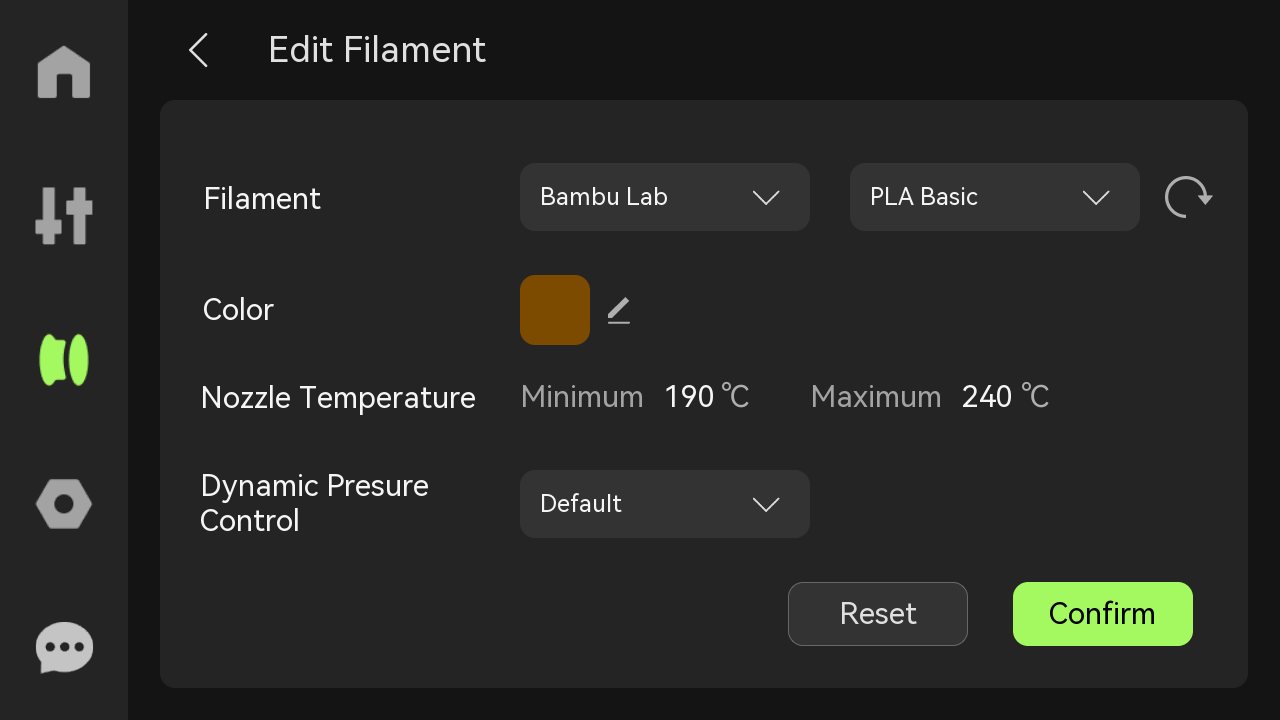 Maybe I'm the only person that didn't know this. 
|
EP429: Today's lesson - Don't provoke ARFCOM. People will see your butthole.
|
Originally Posted By fox2008: Just in case anyone else is as slow as I am, I just figured out how to get custom filaments to show up on the printers. So when you load a non-Bambu filament in the AMS, you can select the actual filament, not just Generic....since the filament list the printers ship with is very limited. Build your custom filament profiles in Bambu Studio. Then on the printer, click to edit a spool and the below screen will popup. On that screen, in the top right the circle arrow will refresh the list and pull in any custom filaments you created. They will now be in the dropdown list on the printer screen. https://wiki.bambulab.com/h2/manual/screen-operation/editen2.png Maybe I'm the only person that didn't know this. Originally Posted By fox2008: Just in case anyone else is as slow as I am, I just figured out how to get custom filaments to show up on the printers. So when you load a non-Bambu filament in the AMS, you can select the actual filament, not just Generic....since the filament list the printers ship with is very limited. Build your custom filament profiles in Bambu Studio. Then on the printer, click to edit a spool and the below screen will popup. On that screen, in the top right the circle arrow will refresh the list and pull in any custom filaments you created. They will now be in the dropdown list on the printer screen. https://wiki.bambulab.com/h2/manual/screen-operation/editen2.png Maybe I'm the only person that didn't know this. Be aware of the nuances with this menu on pressure advance. I have a blurb on this phenomenon in the filament calibration guide. Just something to be aware of.  BAMBU USERS: To my fellow Bambu bretheren, you MUST make sure you’re setting your filament profiles up correctly, otherwise your K-factor will NOT be used for your prints! There is a LOT of nuance in this area, which is annoying, but there is at least some logic behind it. Given Bambu can print directly from their Bambu Handy App, they wanted a way to ensure filament profiles properly capture K Factor. They decided to encode it at the firmware level to read from the AMS settings first (which is accessible to the printer when it receives a job regardless of whether that job came from BBS, OS, or Bambu Handy). I can go into details if anybody wants, but the general rule of thumb is the printer will use this workflow and find the first K-Factor it finds. Once it finds one, it stops, so earlier items on this list supercedes later items: Flow Dynamics Calibration @ Time of Print > AMS Flow Dynamics Setting > K-factor stored in the filament profile in OrcaSlicer (Bambu Studio no longer has this as a setting) > Generic K-factor (0.2 for everything except PETG, which is 0.4 as of mid 2025). |
|
Originally Posted By -Obsessed-: Be aware of the nuances with this menu on pressure advance. I have a blurb on this phenomenon in the filament calibration guide. Just something to be aware of. Originally Posted By -Obsessed-: Originally Posted By fox2008: Just in case anyone else is as slow as I am, I just figured out how to get custom filaments to show up on the printers. So when you load a non-Bambu filament in the AMS, you can select the actual filament, not just Generic....since the filament list the printers ship with is very limited. Build your custom filament profiles in Bambu Studio. Then on the printer, click to edit a spool and the below screen will popup. On that screen, in the top right the circle arrow will refresh the list and pull in any custom filaments you created. They will now be in the dropdown list on the printer screen. https://wiki.bambulab.com/h2/manual/screen-operation/editen2.png Maybe I'm the only person that didn't know this. Be aware of the nuances with this menu on pressure advance. I have a blurb on this phenomenon in the filament calibration guide. Just something to be aware of. BAMBU USERS: To my fellow Bambu bretheren, you MUST make sure you’re setting your filament profiles up correctly, otherwise your K-factor will NOT be used for your prints! There is a LOT of nuance in this area, which is annoying, but there is at least some logic behind it. Given Bambu can print directly from their Bambu Handy App, they wanted a way to ensure filament profiles properly capture K Factor. They decided to encode it at the firmware level to read from the AMS settings first (which is accessible to the printer when it receives a job regardless of whether that job came from BBS, OS, or Bambu Handy). I can go into details if anybody wants, but the general rule of thumb is the printer will use this workflow and find the first K-Factor it finds. Once it finds one, it stops, so earlier items on this list supercedes later items: Flow Dynamics Calibration @ Time of Print > AMS Flow Dynamics Setting > K-factor stored in the filament profile in OrcaSlicer (Bambu Studio no longer has this as a setting) > Generic K-factor (0.2 for everything except PETG, which is 0.4 as of mid 2025). Appreciate the heads up, I'll have to look into it more.....now I'm not sure if syncing the filaments back to the printer is good or bad thing.
|
EP429: Today's lesson - Don't provoke ARFCOM. People will see your butthole.

|
Originally Posted By fox2008: I've never had an HT & AMS on the same nozzle, but I'd assume if you had the same spool in both, it would automatically switch if the first spool ran out. Unless I misunderstood what your saying. Originally Posted By fox2008: Originally Posted By Saker13: Originally Posted By fox2008: I started out with the same setup as you and eventually added a second HT, so I have 2 HT's on the left and an AMS2 on the right nozzle. I like the HT's because I run more engineering filaments, the second HT let's me dry a roll of filament in one while feeding from the other. Then the dried spool can be the failover when the first spool is getting low on filament....you basically eliminate the worry about whether you have enough left on a spool for a print or not. Eventually I'll probably add other HT, simply because my printers are in the basement and the more spools I can have in an AMS, the less trips I make up/down the stairs. Aka, I'm lazy lol If you don't plan on using engineering filaments as much, a second AMS2 would probably make more sense. I've never had an HT & AMS on the same nozzle, but I'd assume if you had the same spool in both, it would automatically switch if the first spool ran out. Unless I misunderstood what your saying. I keep dry/full rolls in my HTs while short rolls are in the AMS1, my X1C draws from the HTs without intervention when the AMS1 runs out. |
|
Originally Posted By fox2008: I've never had an HT & AMS on the same nozzle, but I'd assume if you had the same spool in both, it would automatically switch if the first spool ran out. Unless I misunderstood what your saying.
|
Who, What, Where? Call Sign, Snowball
|
Does anyone have the Vision Encoder plate for the H series printers? Wondering if it actually makes a difference. Also, I have only used the textured plate with my H2D, should I get the smooth plate? For some prints I would prefer a smooth surface but the textured plate just "works" for PLA, PETG, ABS, etc. I also use PA, PC, PET,and TPU on occasion. |
Who, What, Where? Call Sign, Snowball
|
Originally Posted By Saker13: Does anyone have the Vision Encoder plate for the H series printers? Wondering if it actually makes a difference. Also, I have only used the textured plate with my H2D, should I get the smooth plate? For some prints I would prefer a smooth surface but the textured plate just "works" for PLA, PETG, ABS, etc. I also use PA, PC, PET,and TPU on occasion. I use the engineering plate for smooth and anything TPU. |
EP429: Today's lesson - Don't provoke ARFCOM. People will see your butthole.

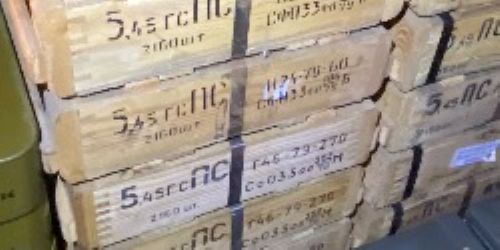
Randomly seen on X, no additional info in post
Attached File |
"And I never did get my lawnmower back!" - Bandit 6
"On the bright side, the money we saved by not going to Mars in the 1970s, we spent on welfare and public schools." - @MorlockP
"On the bright side, the money we saved by not going to Mars in the 1970s, we spent on welfare and public schools." - @MorlockP

|
Got my H2S rolling. I get why everyone loves Bambu. Coming from an Ender 5 pro to this is wild. Printed a benchy in white matte PLA, then one spool center desiccant cylinder, then 5 at once, and last night 2 of the -Obsessed- cereal box desiccant spool holder things while I slept. Basically perfect on everything. I'll print about 6 more cereal boxes things out of ABS after my work week. BTW Boosted ya @-Obsessed- thanks for the great work on your files. 
|
|
Originally Posted By Spaceboy: @Obsessed I printed your cereal box roller dudes and they don't quite make it to the bottom of the hobby lobby box. I don't know if that's something you care about but at $4.49 each I predict they will get very popular soon. .I read about the Hobby Lobby boxes earlier today and was going to stop by there and get a few on the way home this afternoon. Well, I forgot. Maybe later this week. Also read that they have reusable spools that will work with Bambu filament for less than $4 each. Not something I need, I have given away at least a dozen BBL spools this year, but others may. |
Who, What, Where? Call Sign, Snowball
|
I am going to order a vision plate in about a week or so. Will see how it goes and report back. I have run the hell out of my H2s and I do think it needs a tune up. I also plan to get a x2 about the same time. I have to make sure it will do the part size I need first, its a little small compared to what I like. For those of you wondering about getting a smooth plate for your h2s, yes get it but get the high temp engineering one. You can warp the shit out of the regular one with PET
|
|
I needed a filament color that I didn't already have the other day and didn't feel like waiting a day, so I made a quick trip to Microcenter to grab it and somehow left with an H2C to complement my P2S It was a bit more frustrating to setup than my P2S however that was my own fault. I didn't get the PTFE tubes between the AMS and machine inserted far enough. When I went to setup the AMS it couldn't feed all the way to the extruder and must have damaged the end of the filament, when it retracted it got jammed up in the feed mechanism at the back of the AMS and I had to do some disassembly to get it free.
|
|
Ordered the TPU Assist Module. Just installed it and so far have only loaded / unloaded TPU once to the nozzle to see how it works. It does simplify loading, you only have to manually push the TPU to the module instead of all the way to the nozzle. Unloading is a little bit of a trick back into the cereal box, since you need to manually spin the spool...I think after a few times it will be easy enough. I don't have a TPU print I need to do right now, so I'll have to wait to test it for a print. So far it seems worth it to me, just for loading. Designed my own mount to attach to the slat wall. 
|
EP429: Today's lesson - Don't provoke ARFCOM. People will see your butthole.
|
Originally Posted By turtle2472: Thanks for the explanation. Makes sense. Updates for Studio came out today to support X2D as well as a gem I like: H2S/H2C/P2S now support remote drying and dry-while-printing for AMS 2 PRO and AMS HT from Studio's Devices page. ⚠️ Minimum supported firmware version: 01.01.40.00 (H2S), 01.02.00.00 (H2C), 01.02.00.00 (P2S) Color mixing is a highlighted item first. It is like they are doing HueForge like things with filament now. Not sure if my H2D’s AMS HT was supposed to be able to already dry while printing with current firmware, but I couldn’t see a way to do it when I poked around, so I just told it to update and hopefully it will add that function- it is one of the reasons I got the HT. Seems dumb that it was ever not an option to use it that way. So far the only real issues I have had have all been filament loading problems when using PA6GF and PA6CF from the AMS HT, works fine for a print, when I tell it to do another it sometimes has a problem. |
a loaded gun won’t set you free, so you say…
|
Originally Posted By tac556: Not sure if my H2D’s AMS HT was supposed to be able to already dry while printing with current firmware, but I couldn’t see a way to do it when I poked around, so I just told it to update and hopefully it will add that function- it is one of the reasons I got the HT. Seems dumb that it was ever not an option to use it that way. So far the only real issues I have had have all been filament loading problems when using PA6GF and PA6CF from the AMS HT, works fine for a print, when I tell it to do another it sometimes has a problem. Originally Posted By tac556: Originally Posted By turtle2472: Thanks for the explanation. Makes sense. Updates for Studio came out today to support X2D as well as a gem I like: H2S/H2C/P2S now support remote drying and dry-while-printing for AMS 2 PRO and AMS HT from Studio's Devices page. ⚠️ Minimum supported firmware version: 01.01.40.00 (H2S), 01.02.00.00 (H2C), 01.02.00.00 (P2S) Color mixing is a highlighted item first. It is like they are doing HueForge like things with filament now. Not sure if my H2D’s AMS HT was supposed to be able to already dry while printing with current firmware, but I couldn’t see a way to do it when I poked around, so I just told it to update and hopefully it will add that function- it is one of the reasons I got the HT. Seems dumb that it was ever not an option to use it that way. So far the only real issues I have had have all been filament loading problems when using PA6GF and PA6CF from the AMS HT, works fine for a print, when I tell it to do another it sometimes has a problem. The little icon to start drying on the filament page (on the printer) doesn’t really jump out as “start drying”….at least to me. If you only have issues feeding at the start of a print, my best guess would be a PTFE tube issue. Are you using a 4 to 1 adapter? If not….I’d start pulling tubes out and reinstalling them. The insert into the buffer is a little tricky, I’ve had a few times that I thought it was right but apparently it was just little short of fully inserted. |
EP429: Today's lesson - Don't provoke ARFCOM. People will see your butthole.
|
Originally Posted By fox2008: Ordered the TPU Assist Module. Just installed it and so far have only loaded / unloaded TPU once to the nozzle to see how it works. It does simplify loading, you only have to manually push the TPU to the module instead of all the way to the nozzle. Unloading is a little bit of a trick back into the cereal box, since you need to manually spin the spool...I think after a few times it will be easy enough. I don't have a TPU print I need to do right now, so I'll have to wait to test it for a print. So far it seems worth it to me, just for loading. Designed my own mount to attach to the slat wall. https://www.ar15.com/media/mediaFiles/397309/unnamed-3755571.jpg |
Who, What, Where? Call Sign, Snowball

|
Looking for some input. I had a issue with my P2S AMES combo giving my errors about the extruder, It was making some ticking sounds and I ended up digging thru the AMES and the tool head/extruder and Finally looks like my hotend was the problem! So do I get a replacement from BL or an aftermarket? Are the generic Amazon stuff all junk? Amy recomendation? |
|
Originally Posted By DANGERRUSS: Looking for some input. I had a issue with my P2S AMES combo giving my errors about the extruder, It was making some ticking sounds and I ended up digging thru the AMES and the tool head/extruder and Finally looks like my hotend was the problem! So do I get a replacement from BL or an aftermarket? Are the generic Amazon stuff all junk? Amy recomendation? Are you talking about just the nozzle? Just double checking, since I've seen people use "hotend" to refer to a bunch of different things. Assuming it is the nozzle your talking about, did you try unclogging it? In the screen settings there is a cold pull process that it will walk you through, I've had a nozzle that took a couple cold pulls to clean out. You also should have gotten a small wire in the tool kit, you can heat the nozzle up and poke that through. The primary negative I've seen on aftermarket nozzles, is that they might not be auto detected by the camera....that may or may not be a big deal to you. |
EP429: Today's lesson - Don't provoke ARFCOM. People will see your butthole.
|
Originally Posted By fox2008: Are you talking about just the nozzle? Just double checking, since I've seen people use "hotend" to refer to a bunch of different things. Assuming it is the nozzle your talking about, did you try unclogging it? In the screen settings there is a cold pull process that it will walk you through, I've had a nozzle that took a couple cold pulls to clean out. You also should have gotten a small wire in the tool kit, you can heat the nozzle up and poke that through. The primary negative I've seen on aftermarket nozzles, is that they might not be auto detected by the camera....that may or may not be a big deal to you. Originally Posted By fox2008: Originally Posted By DANGERRUSS: Looking for some input. I had a issue with my P2S AMES combo giving my errors about the extruder, It was making some ticking sounds and I ended up digging thru the AMES and the tool head/extruder and Finally looks like my hotend was the problem! So do I get a replacement from BL or an aftermarket? Are the generic Amazon stuff all junk? Amy recomendation? Are you talking about just the nozzle? Just double checking, since I've seen people use "hotend" to refer to a bunch of different things. Assuming it is the nozzle your talking about, did you try unclogging it? In the screen settings there is a cold pull process that it will walk you through, I've had a nozzle that took a couple cold pulls to clean out. You also should have gotten a small wire in the tool kit, you can heat the nozzle up and poke that through. The primary negative I've seen on aftermarket nozzles, is that they might not be auto detected by the camera....that may or may not be a big deal to you. Yes, The nozzle. It is the 0.4, I can't get it too feed anything thru to be able to do a cold pull, or I don't know how to do it? When I switched to my 0.6 or even my 0.2 I was able to print things. I would like to have a spare 0.4 but was wondering if any less expensive options were any good? |
|
Originally Posted By DANGERRUSS: Yes, The nozzle. It is the 0.4, I can't get it too feed anything thru to be able to do a cold pull, or I don't know how to do it? When I switched to my 0.6 or even my 0.2 I was able to print things. I would like to have a spare 0.4 but was wondering if any less expensive options were any good? Originally Posted By DANGERRUSS: Originally Posted By fox2008: Originally Posted By DANGERRUSS: Looking for some input. I had a issue with my P2S AMES combo giving my errors about the extruder, It was making some ticking sounds and I ended up digging thru the AMES and the tool head/extruder and Finally looks like my hotend was the problem! So do I get a replacement from BL or an aftermarket? Are the generic Amazon stuff all junk? Amy recomendation? Are you talking about just the nozzle? Just double checking, since I've seen people use "hotend" to refer to a bunch of different things. Assuming it is the nozzle your talking about, did you try unclogging it? In the screen settings there is a cold pull process that it will walk you through, I've had a nozzle that took a couple cold pulls to clean out. You also should have gotten a small wire in the tool kit, you can heat the nozzle up and poke that through. The primary negative I've seen on aftermarket nozzles, is that they might not be auto detected by the camera....that may or may not be a big deal to you. Yes, The nozzle. It is the 0.4, I can't get it too feed anything thru to be able to do a cold pull, or I don't know how to do it? When I switched to my 0.6 or even my 0.2 I was able to print things. I would like to have a spare 0.4 but was wondering if any less expensive options were any good? Sounds like a clogged nozzle, you should be able to clear it out and keep using it. Here is the Bambu wiki that talks through using the pin and doing a cold pull. https://wiki.bambulab.com/en/p2s/maintenance/cold-pull-maintenance-hotend I've read that the Biqu nozzles are ok but the standard Bambu nozzles aren't overly expensive.....I've stuck with buying them over aftermarket because the cost savings didn't seem worth the potential of issues with aftermarket. |
EP429: Today's lesson - Don't provoke ARFCOM. People will see your butthole.
|
Just added the Toolhead Enhanced Fan to my H2D. Seems like a good upgrade so far when printing ABS. Not sure about the PETG print I have going right now. Also picked up the engineering plate based on recommendations here. Will try it out as time allows. |
Who, What, Where? Call Sign, Snowball
|
Originally Posted By Saker13: Just added the Toolhead Enhanced Fan to my H2D. Seems like a good upgrade so far when printing ABS. Not sure about the PETG print I have going right now. Also picked up the engineering plate based on recommendations here. Will try it out as time allows. I have 2 coworkers that have H2D's, both of them had to replace the stock toolhead fan, which requires disassembling the majority of the tool head. After that, I also ordered the enhanced toolhead fan.....not 100% sure it will make a difference in the lifespan of the stock fan or not but for the price, it didn't seem like a bad insurance policy. |
EP429: Today's lesson - Don't provoke ARFCOM. People will see your butthole.

|
Originally Posted By Saker13: Does anyone have the Vision Encoder plate for the H series printers? Wondering if it actually makes a difference. Also, I have only used the textured plate with my H2D, should I get the smooth plate? For some prints I would prefer a smooth surface but the textured plate just "works" for PLA, PETG, ABS, etc. I also use PA, PC, PET,and TPU on occasion. I have the calibration plate. I'm not sure how big of a difference it makes. I ran the calibration when I got the plate and after the last cleaning. I didn't notice a big difference, but I didn't have problems with print quality prior to getting the plate either. |
We're getting close, real close. And now for some more bad news... Ready?
|
Originally Posted By fox2008: I have 2 coworkers that have H2D's, both of them had to replace the stock toolhead fan, which requires disassembling the majority of the tool head. After that, I also ordered the enhanced toolhead fan.....not 100% sure it will make a difference in the lifespan of the stock fan or not but for the price, it didn't seem like a bad insurance policy. I put that upgraded toolhead fan in with my H2d order. Glad I read about those failures. I have no desire to disassemble and reassemble another toolhead. |

| Ok, apparently I misjudged, so I am going to carefully back out of this thread. It was not my intention to troll, monke saw bambu videos and posted in the bambu thread. |
You got gun law problems, I feel bad for you son. I got 99 problems but a ban ain't one. -Sylvan
|
Originally Posted By barrysuperhawk: Rut roh, I think I am glad I didn't Bambu.  https://www.youtube.com/watch?v=jIbpQtoz6hs https://www.youtube.com/watch?v=Phbaj8Xxvuk https://www.youtube.com/watch?v=jIbpQtoz6hs https://www.youtube.com/watch?v=Phbaj8XxvukYeah, I realize this is a buncha BS, but I am glad I didn't give them my $$. You're mad at Bambu for defending themselves from IP theft against OS ? That's odd. |

|
Originally Posted By -Obsessed-: You're mad at Bambu for defending themselves from IP theft against OS ? That's odd. Ok humor us, what IP is being stolen? I am only casually familiar with this latest controversy but from what I understand, an individual has created a fork of O.S. that bypasses bambus authorization service in order to be able to print things without going through bambu servers. How is that IP theft? And why is that a bad thing? |

|
Originally Posted By Blob: Ok humor us, what IP is being stolen? I am only casually familiar with this latest controversy but from what I understand, an individual has created a fork of O.S. that bypasses bambus authorization service in order to be able to print things without going through bambu servers. How is that IP theft? And why is that a bad thing? Originally Posted By Blob: Originally Posted By -Obsessed-: You're mad at Bambu for defending themselves from IP theft against OS ? That's odd. Ok humor us, what IP is being stolen? I am only casually familiar with this latest controversy but from what I understand, an individual has created a fork of O.S. that bypasses bambus authorization service in order to be able to print things without going through bambu servers. How is that IP theft? And why is that a bad thing? |
Y'all can go to hell, I'll go to Idaho.
|
Originally Posted By Blob: Ok humor us, what IP is being stolen? I am only casually familiar with this latest controversy but from what I understand, an individual has created a fork of O.S. that bypasses bambus authorization service in order to be able to print things without going through bambu servers. How is that IP theft? And why is that a bad thing? Originally Posted By DrJekell: I like Bambu products but I agree. Also it is my understanding that all of their software is forked from open source so it seems a bit hypocritical... I replied in the drama thread, but the issue is BBS actually has a separate piece of software, that installs separately from BBS, that allows connection to their cloud servers. THIS piece of software is closed source. It has "secret" authentication keys that the piece of software uses to authenticate itself to the BBL servers to show that it's a legitimate, BBL-created piece of software that is allowed on the network. The issue is the developer stole these authentication keys and then published them in an open source document, one, breaking IP rights of BBL, and two, spoofing a legitmate piece of software, and by doing so gaining unauthorized access to BBL servers, which, is actually a felony under US law. My personal feelings on the situation: 1. I understand why BBL is doing this...they are trying to protect their servers, as letting ANY third party piece of software authenticate and send commands over their servers have the opportunity for exploitation of hardware or to attack the servers directly. 2. It's shitty to use an open source fork as your own fork's base, and then layer on closed source software on top of it, BUT, this is ONLY their server connection code, so again, I go back to my first point. If they were doing this for standard features of the slicer to separate themselves as a superior piece of slicing software, that would be totally different and totally unacceptable in my book. But this seems like a legitimate attempt to simply protect their servers. 3. I could be wrong. |
|
Originally Posted By -Obsessed-: Bambu A2L coming soon. They continue the innovation train at full speed. Cant deny that. I got that email this morning.....my best guess is an A1 style printer with an H2 size bed. |
EP429: Today's lesson - Don't provoke ARFCOM. People will see your butthole.
Bambu Lab general thread - X1, X2, P1, A1, H2 series (Page 27 of 30)
Join the Community
Your next conversation starts here.
Create your free account to join discussions, share your experience, save topics, and connect with the AR15.COM community.
- Join discussions
- Follow topics and replies
- Connect with fellow enthusiasts
Already a member? Sign in
Stay informed by subscribing to our Newsletter