


Armory Sponsor

How-To: Security camera basics (Page 1 of 6)

Posted: 5/10/2011 1:23:37 AM EDT
[Last Edit: TheGrayMan][Edited]
|
Disclaimer: I'm not a CCTV professional. I'm not licensed to do this kind of work, don't make my living from it, and advise anyone reading this to make an honest assessment of their own abilities before jumping into a DIY camera system.
Intro: Safety and security are never far from the minds of most gun-owners. People who have chosen to own guns for their personal protection tend to take a far greater interest in their own personal security than the average person, and likewise take a strong interest in the security of their homes. This is mostly because the "Home = Castle" doctrine is firmly planted in the minds of most posters here, but also because home is where you live, eat, sleep, and house your family. When discussing home security, one gets into high-security deadbolts, reinforced doors, motion-sensor lights, window films, driveway sensors, alarm systems, dogs, safes... and the discussion eventually turns to security cameras. A quick Google search of the topic will literally produce hundreds of thousands of hits, many to websites that hawk the latest/greatest security camera systems, always at a GUARANTEED LOW LOW PRICE (!!!). Be wary. There is an extremely wide range of products out there, in price points ranging from $20-per-camera, to $1500-per camera... and the relationship between price and performance is decidedly non-linear. A basic security camera system-in-a-box can be had at any number of "big box stores" for as little as a few hundred dollars on-sale, with four day/night bullet cameras, and a self-contained DVR. This seems quite reasonable, and it is... if all you want is basic functionality, a rough idea of what's happening, and don't expect CSI-level detail out of the recorded video. Forget about getting a license plate number off the car the burglars were driving, and face shots may be too grainy to identify very much. You'll know that somebody was creeping around out there... but good luck identifying them unless they're practically on top of the camera. The DVR is totally proprietary, and might only last a year or two. Once it dies, getting replacement parts will be impossible. You won't be able to expand it past the original four cameras. The cameras themselves are probably 1/4" or 1/3" CMOS cameras, and this will limit their night-time performance. They may or may not be very weatherproof... But that's what you get for a few hundred bucks. Some people don't need any more than that... and those folks are served perfectly well by that type of system. Even if it only lasts for two years, they've probably gotten their moneys worth. Then there are the folks who want an NSA-type uber-system, where they can bring up 20 different megapixel camera views from anywhere in the world and spring traps on intruders with a touch-of-a-button on their cellphone. These folks should consult a professional... I can't help you with something that elaborate. Incidentally, the consult-a-professional advice is never a bad idea for anyone who doesn't feel up to the task. CCTV isn't rocket science, but there is definitely a professional body-of-knowledge, a significant learning curve, and a certain amount of expertise involved in system design, camera selection, DVR construction, installation, and so forth. A guy who has been doing this stuff for ten years has a head full of hard-won experience, and can help you avoid some pitfalls that you might otherwise encounter. That expertise is worth something... so consider a professional if you get stuck, and be prepared to pay him/her. It will probably be worth it. Even if you don't end up DIYing it, after reading this thread, you should have a much better idea of what questions to ask a potential installer. Camera types: Cameras come in two main flavors: analog and IP-based (also called network cameras). Analog cameras have been around since Methuselah, and still make up the bulk of cameras sold today, particularly the bargain-level systems. They typically operate on 12VDC (dual-voltage models will also take 24VAC), and output an analog video signal on the NTSC standard (PAL if you're in Europe). You can literally plug the video cable of these camera into the "Video In" RCA jack on your TV, and get a picture. These cameras are typically connected via "Siamese" cable, which is usually RG-59 coaxial cable, and 18-gauge two-conductor power wiring (for either AC or DC power). The connectors most commonly used are BNC-connectors for video (RCA occasionally), and barrel-connectors for power. See pictures below: Analog cameras with BNC and power jacks circled: 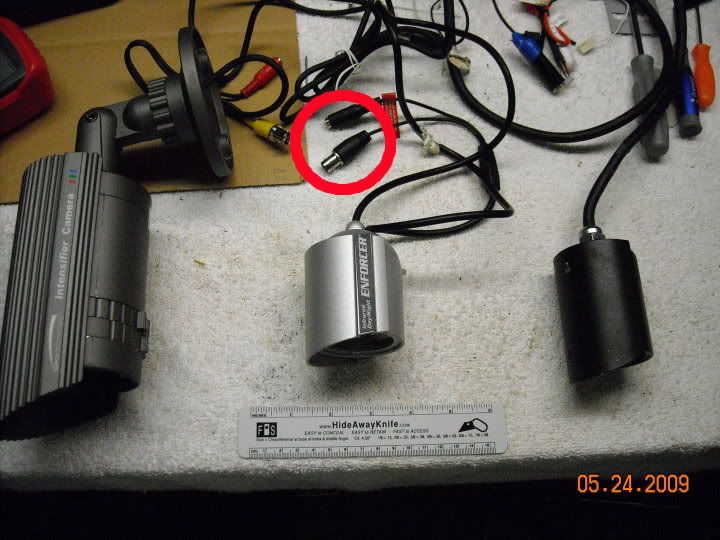
Siamese cable: 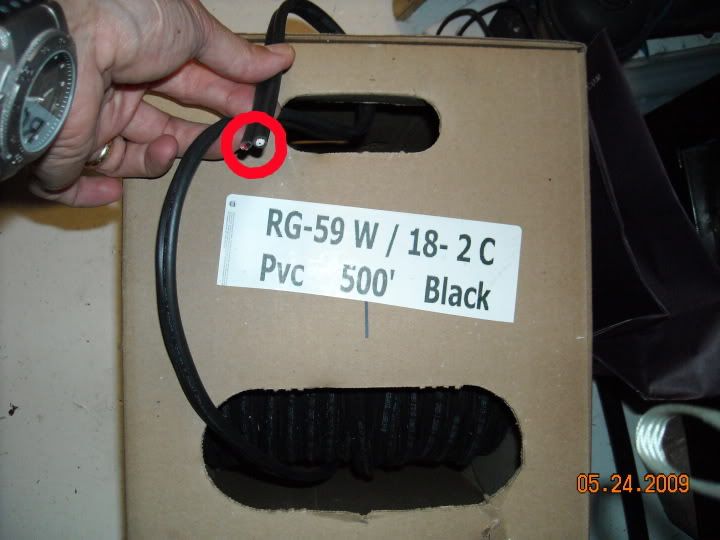
Two different analog cables. Pre-made on left, stripped-but-unterminated Siamese on right. Crimper highlighted with arrow: 
Some connectors. Those are barrel connectors on the right (2), and a BNC-to-BNC connector in the middle: 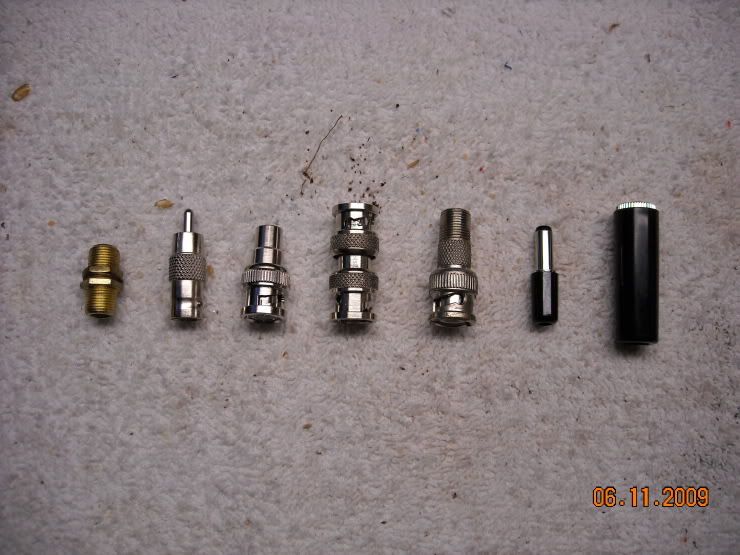
There is another category of cameras, and those are the IP-based network cameras. These are a more interesting lot, and more expensive. These cameras can be almost entirely autonomous, and are like their own mini-computer. They run their own internal webserver, process their own image data, do their own motion detection, and can send you pictures, alerts or emails. You can open up your web browser, type in the camera's web address, and have an image in seconds. Some will record image data to internal storage in addition to sending it to a central DVR. They also tend to have MUCH higher resolution than a regular analog camera. Ever compared regular old analog TV side-by-side with HDTV? It's like that. To give you an idea of the difference in megapixel IP cameras to the older analog cameras: Look at the first picture carefully. Note the inset images on the right-hand side. See how the license plate gets clearer in the megapixel image, compared to the CIF/2CIF image? That's because the pixel density of the megapixel image is much higher. If you take the same scene, and photograph it with more pixels, there is more image data contained in the picture, so enlarging it will show clearer details. If you take a low-resolution or low-pixel-density image and enlarge it, everything quickly becomes boxy or pixelated... the image data just isn't there. 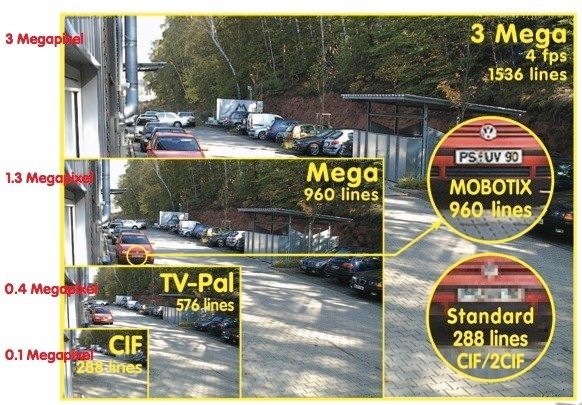

Here is an interesting link that demonstrates the phenomenon. Go over and click on it... I'll grab a couple of the images here to save you some time (and their bandwidth). Here is a CIF image: 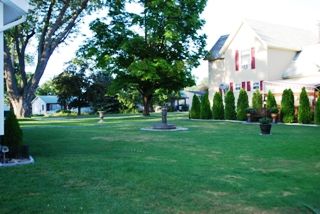
Here is a 1MP image. Notice how in the second image you can not only make out the satellite dish on the side of the house, but see that it's a DirecTV dish? That's because that image contains a lot more "data" than the CIF image. 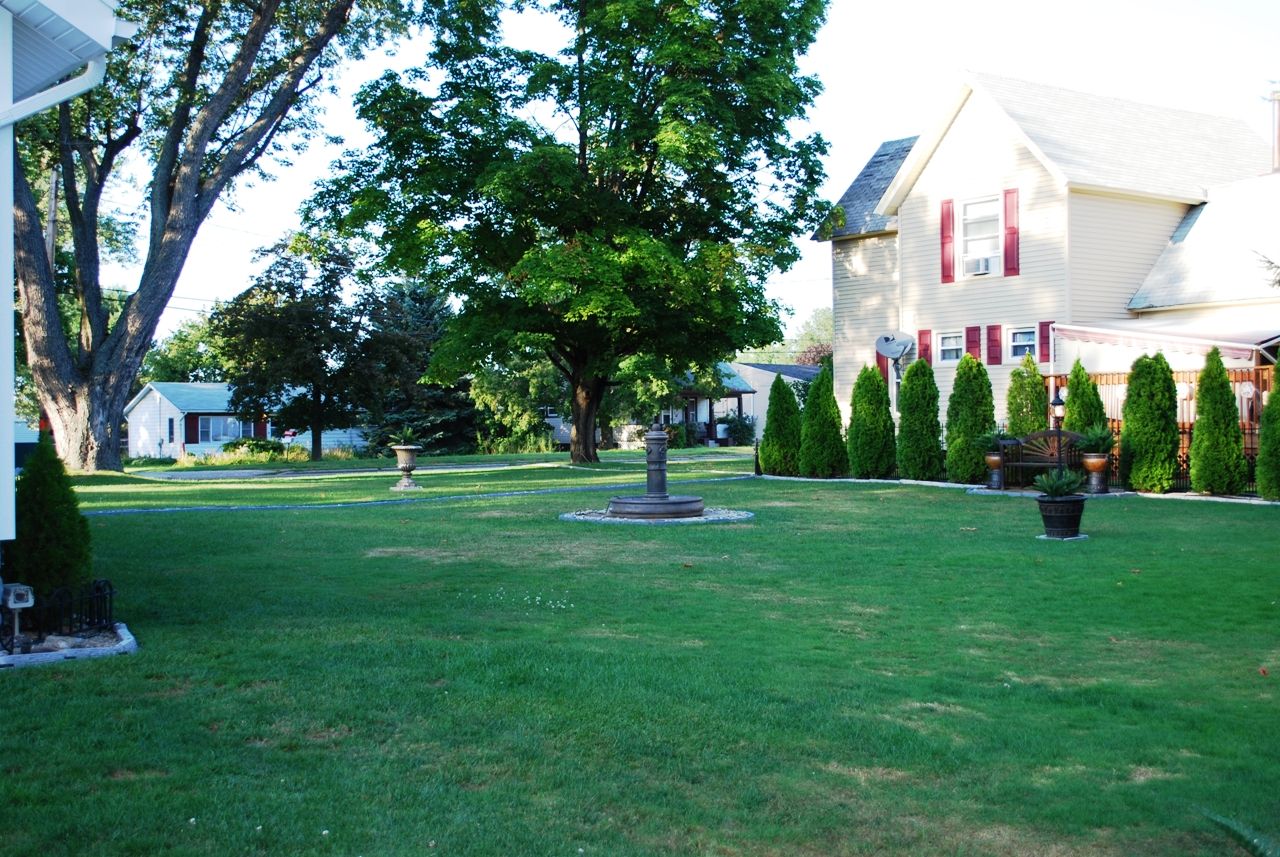
Now let's blow up that CIF image to the same size as the 1MP image. See how blurry/blocky/pixelated the image is? That's what happens when you attempt to enlarge a low-res image... unlike Hollywood or CSI, you can't make data appear where there isn't any data. 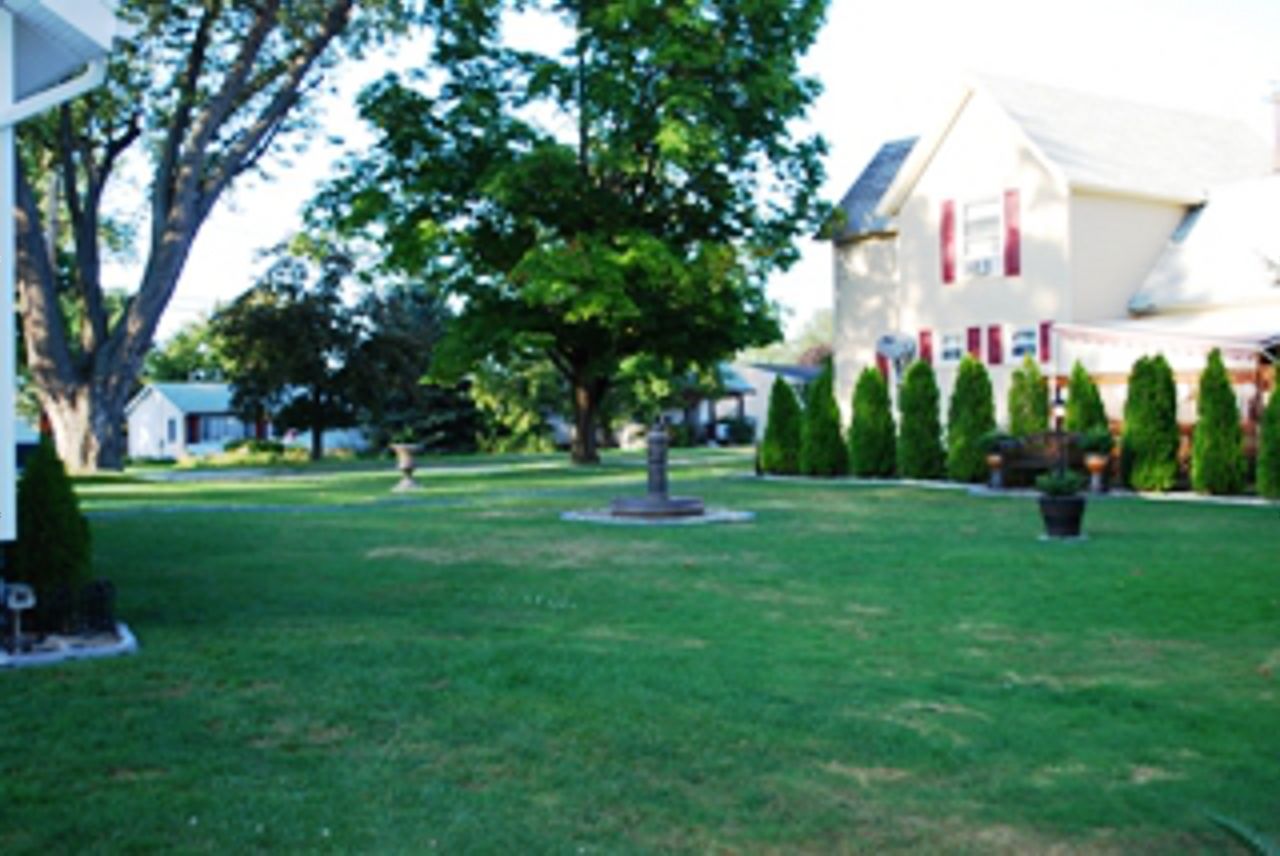
Here's another image to give you a sense of pixel density, and what it does to your chances to ID a face, or a license plate: 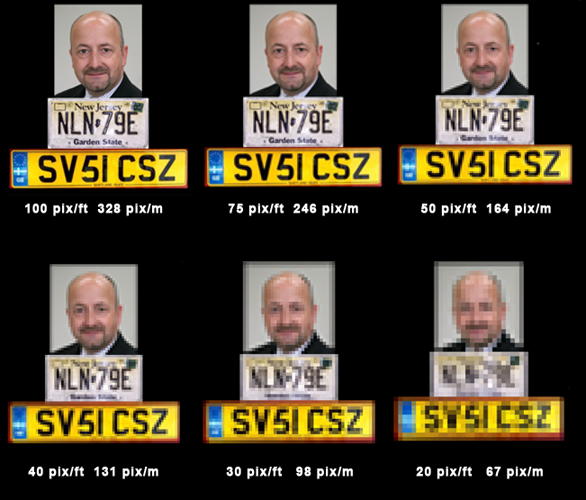
IP cameras really shine in the pixel-density department, since they're capable of much higher resolution pictures than the older analog standard. To drive that point home, here's a straight-up, same time-of-day, same scene comparison between an analog Speco intensifier, and a 1.3MP Acti ACM-1231: 
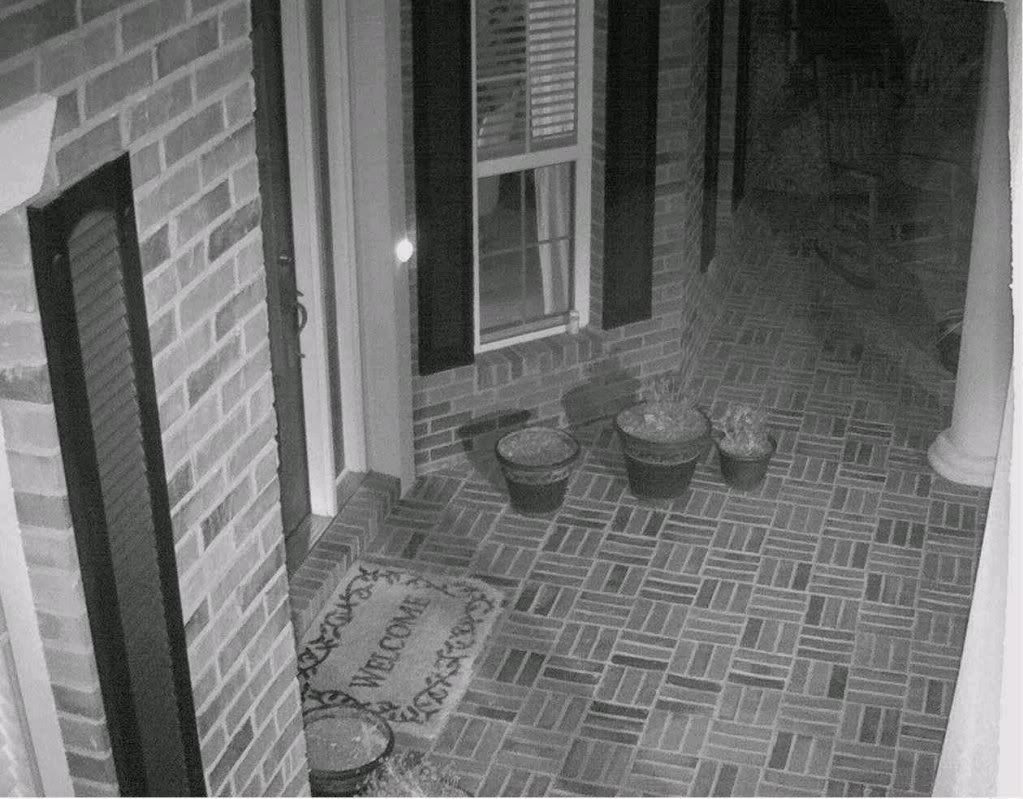
IP cameras also connect differently than an analog camera does. Network cameras, as the name might imply, require a network connection; they use the very same Cat5 or Cat6 cable that you're using to connect your desktop computer to your router or home network. They also have the capability to draw their power through the same cable, via "Power over Ethernet" (the spec is 802.3af. Here's a link if you want to read about it on wikipedia). Power-over-Ethernet (abbreviated hereafter as PoE) saves you a lot of time and hassle when it comes to install your system... you can run a single cable for power AND video. Here is a network camera, with the Cat5/6 jack circled (top). This one can also take 12VDC directly, through the second circled jack (bottom) 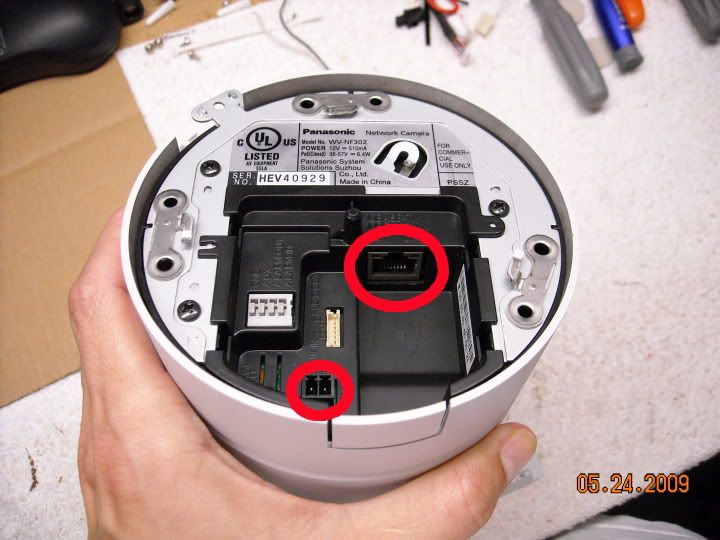
They plug into a switch just like this one. The top four ports are regular network ports, like you might find on any home's wireless or wired Linksys/Dlink/Netgear/Belkin/etc router. The bottom set of ports supplies PoE in addition to network connectivity. 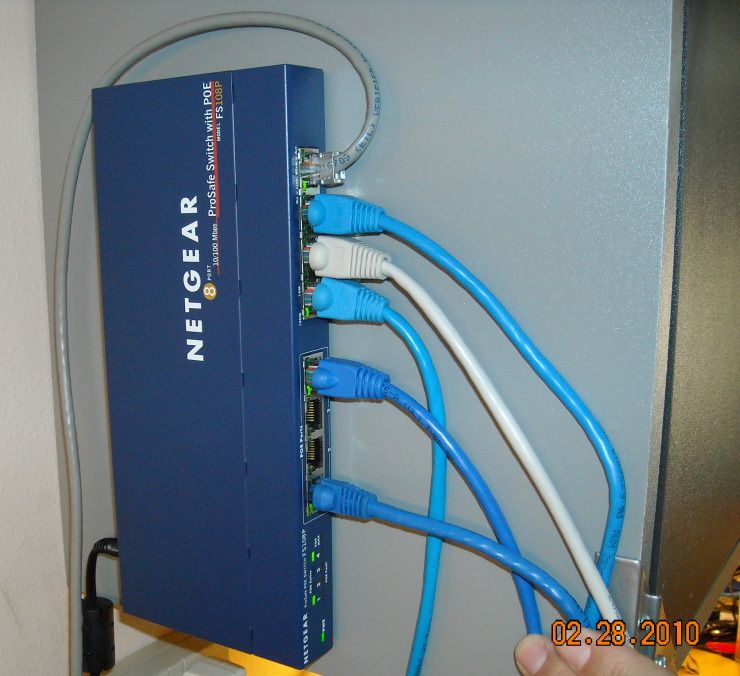
Naturally, since the two camera types are powered differently, you'll need one of two different types of power supplies. The top one in this picture serves 12VDC to analog cameras, and the bottom one is a PoE network switch. The PoE network switches also come in rack-mount versions, as in the second picture: 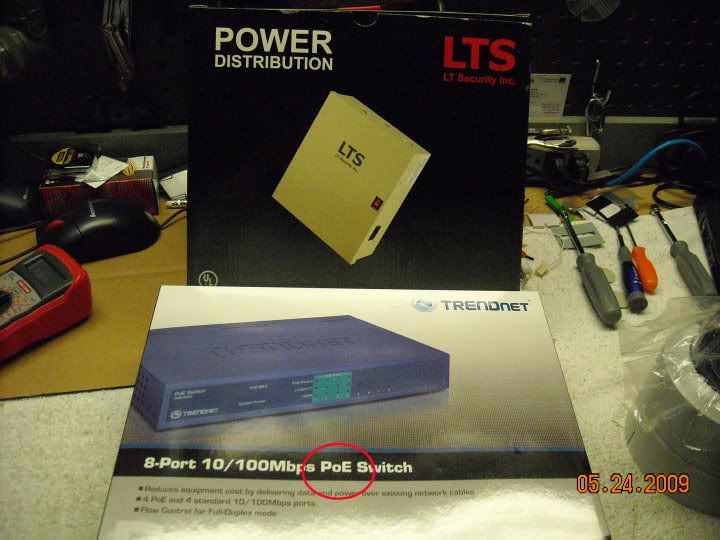
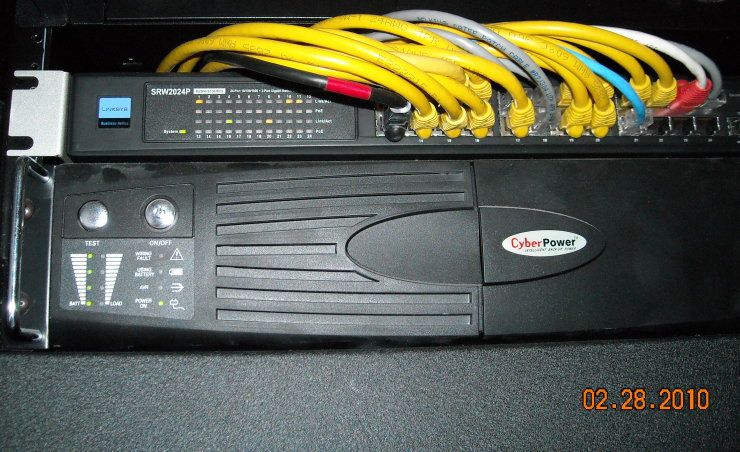
Since the two camera types create and send their data differently, they often connect to two different types of DVRs. Analog systems most commonly use an "embedded" DVR, which is a generic box-looking device with some buttons on the front, and a bunch of BNC jacks on the back. This device digitizes the video streams it receives (eg. turns them into storable digital data), and puts them on an internal hard drive. Depending on the size of the drive and number of cameras, it will record for a variable length of time... often a week or two. 
A network DVR receives video streams just like the analog DVR does, but the pictures have already been digitized at the camera-end, so it's simply a matter of collecting the images and storing them. There's no need for the network DVR to dedicate CPU cycles to creating the picture from an analog signal, since that work has already been done. The network DVR also connects to the network with a single cable (assuming your system isn't overly large... if it is, you'd better be using a separate gigabit network... or consult a professional to help you design it). Network DVRs can be of the same box-looking form-factor as an embedded analog DVR, but a regular PC can be used, as shown here. When doing so, one should consider beefing up certain components, like the network card, and the hard drive (an enterprise-class drive will hold up to the constant data-writing better than a regular consumer-grade hard drive). You can also add an analog encoder or "DVR card" to an existing PC-based network DVR, and use it to digitize analog streams... just make sure it's supported by the software you plan on using. This would be called a "hybrid" system (network and analog cameras on the same system). Thinkcentre former "cube farm" desktop computer being used as a DVR: 
A dedicated rack-mount PC-based DVR: 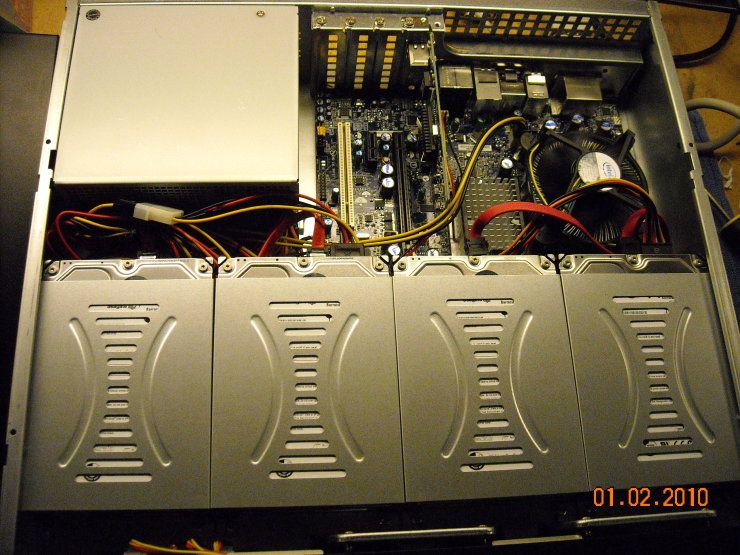
As for the cameras themselves, they come in all sorts of shapes, sizes, colors, and form-factors. You can get either analog or IP in almost any form factor, with the exception of very small covert cameras. Those are almost entirely analog. Bullets (these are all analog) 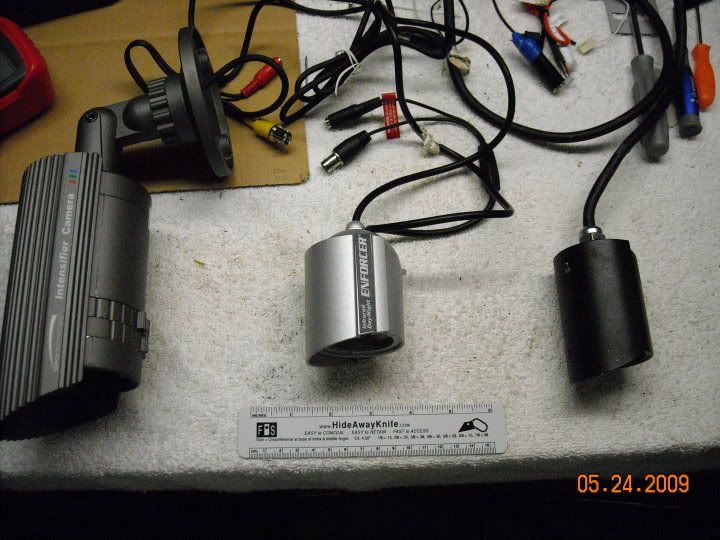
Bullet: (this one is IP-based) 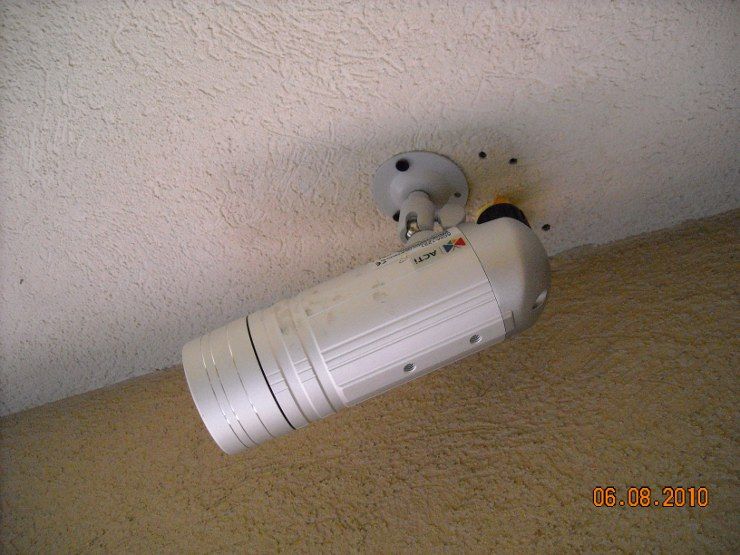
Covert "board" camera (analog... virtually anything this small will be analog): 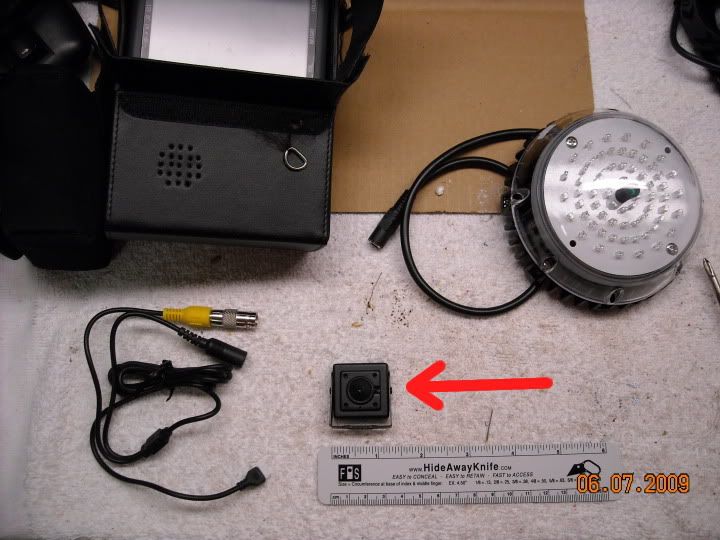
Dome (this one is IP-based) 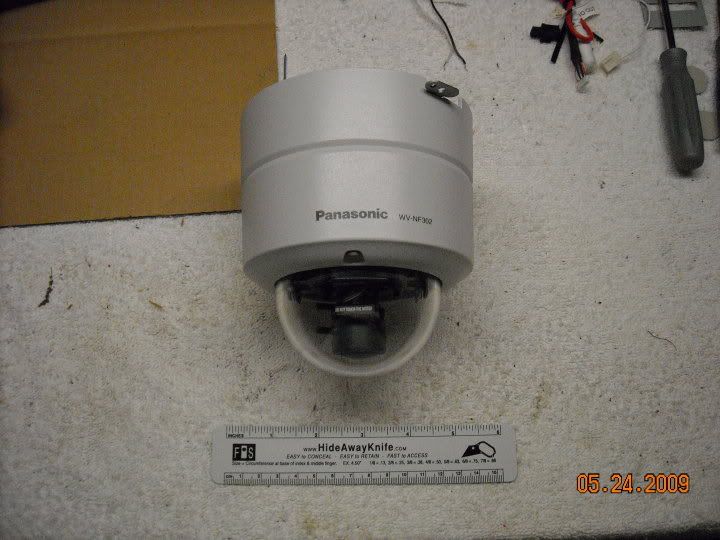
Another dome (this one is analog): 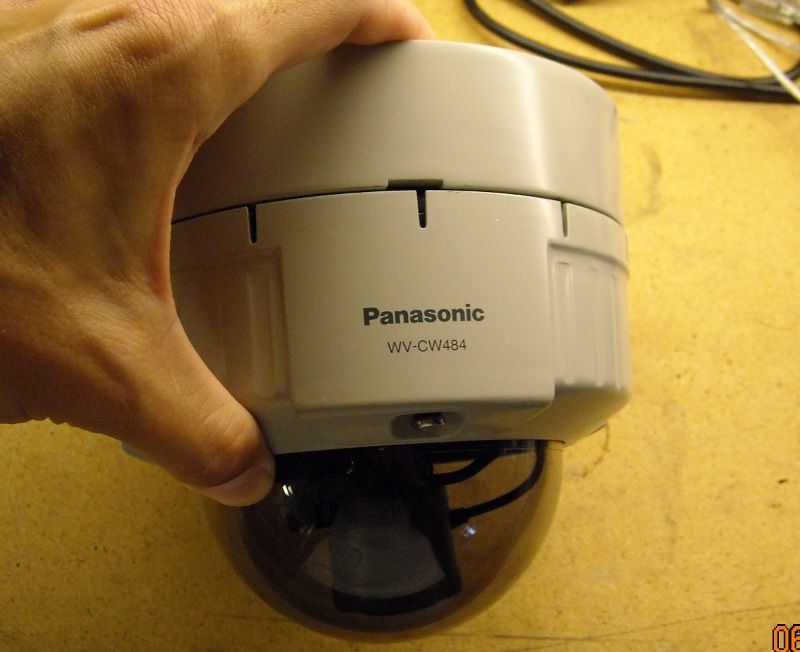
Dome with cover off (this one is IP): 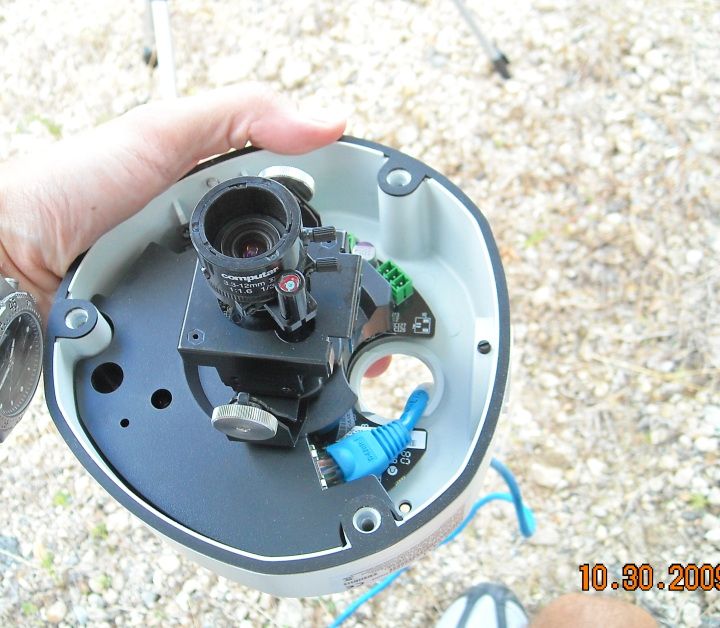
Domes and Bullet cameras each have a certain set of advantages. Feature __________________________Bullet___________________________Dome cost ....................................................cheaper...............................................more expensive mounting...............................................easier.................................................. harder Visibility.............................................more-visible............................................. less visible Wiring concealed.................................not usually......................................................yes Vandal-resistance..................................worse.....................................................better weather resistance.................................same.....................................................same integrated IR.......................................common................................................less common PTZ..................................................no.................................................... possible (more $$$) coverage area obvious?..........................yes........................................................no can be redirected easily?..........................yes......................................................no |
"Look wise, say nothing, and grunt. Speech was given to conceal thought."
- Sir William Osler -
- Sir William Osler -

|
TGM,
I've been putting the CCTV thing on the back burner but our street just got hit with a string of car break-ins and, well, I shouldn't put if off any longer. I'm thinking of a couple megapixel IP cameras to start #1 monitoring the front porch under an awning and #2 mounted on a detached garage monitoring a driveway lit with motion sensing flood lights. Maybe a sealed bullet style vs vertical surface mount dome on the garage and a dome under the awning... The detached garage camera would be exposed to the elements but the porch one somewhat protected - would it be overkill to use IP66 rated enclosures for both? Any good retailers or good places to find deals on camera? How do you have time to do all this AND have a day (sometimes night) job  ? ?
|
|
Originally Posted By labchimp:
TGM, I've been putting the CCTV thing on the back burner but our street just got hit with a string of car break-ins and, well, I shouldn't put if off any longer. I'm thinking of a couple megapixel IP cameras to start #1 monitoring the front porch under an awning and #2 mounted on a detached garage monitoring a driveway lit with motion sensing flood lights. Maybe a sealed bullet style vs vertical surface mount dome on the garage and a dome under the awning... The detached garage camera would be exposed to the elements but the porch one somewhat protected - would it be overkill to use IP66 rated enclosures for both? Any good retailers or good places to find deals on camera? How do you have time to do all this AND have a day (sometimes night) job ?
You might check out some of the Vivotek offerings... specifically the IP7361 bullet or FD8361 vandal dome. They run about $5-600 each (about a hundred bucks more than a comparable Acti camera), but are higher-res, give a better night-time picture, and do on-board recording to an SD card... saving you the trouble of building a DVR if you choose not to. I have one of the 8361 domes deployed right now, and am pretty happy with it. |
"Look wise, say nothing, and grunt. Speech was given to conceal thought."
- Sir William Osler -
- Sir William Osler -
|
Glossary and explanation of terms placeholder
Day/Night cameras: As you read through camera specs, or look at options to cover your home/property, you will be confronted by cameras that claim to be day/night cameras... or have extremely low Lux ratings... or have "night vision." This isn't as simple as it sounds at first glance, and we'll use this space to attempt to explains some of the mechanisms, and why you might not want certain routes to "night vision." All cameras have an image sensor inside of them (CCD, CMOS, etc) that is sensitive to light. They are frequently sensitive to a broad range of wavelengths. Many camera sensors are not only sensitive to visible light, but to wavelengths of light well into the near-infrared range. This brings up the possibility of using those near-infrared wavelengths to produce an image in areas that are completely dark to the human eye. Black-and-white cameras are naturally sensitive to IR light, but some color security camera will automatically switch to black-and-white mode at night, enabling IR light to be used. But there's a problem. If you don't block out infrared wavelengths during the daylight hours, it screws up the camera's ability to correctly render colors. Things look quite weird... and so an infrared filter is often used over the imager to block those infrared wavelengths. "But wait," you say... "Doesn't that render the camera blind at night?" Yes... it does... but wouldn't it be great if that IR filter could automatically be removed once it gets dark? Well... that's what some cameras do, via an ICR (IR-Cut filter, Removable). The IR filter stays in place over the lens during the day, and is automatically retracted at night. This allows the "best of both worlds" when you have a single imager. But the camera still requires some light... IR or otherwise. Even full-on GenIII Night Vision Goggles require light. To show what we're talking about, here's an image sequence from a camera with an ICR. Here's daytime: 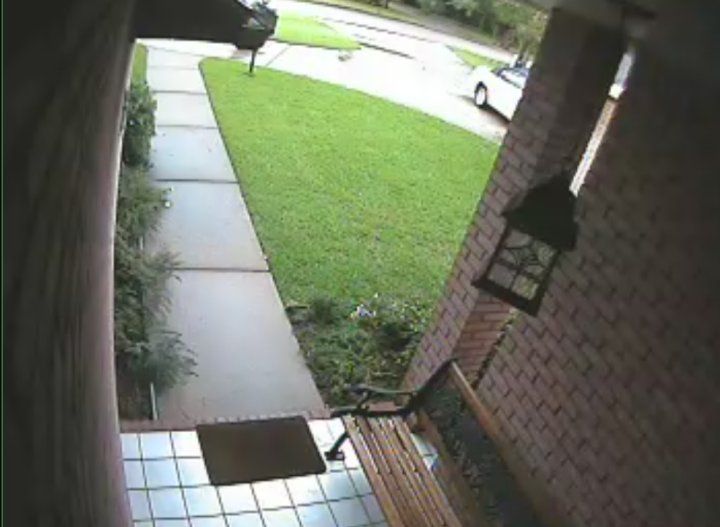
And here's nighttime... with no light (IR or otherwise). The camera has obviously switched to black-and-white mode, but gives a fairly miserable picture. 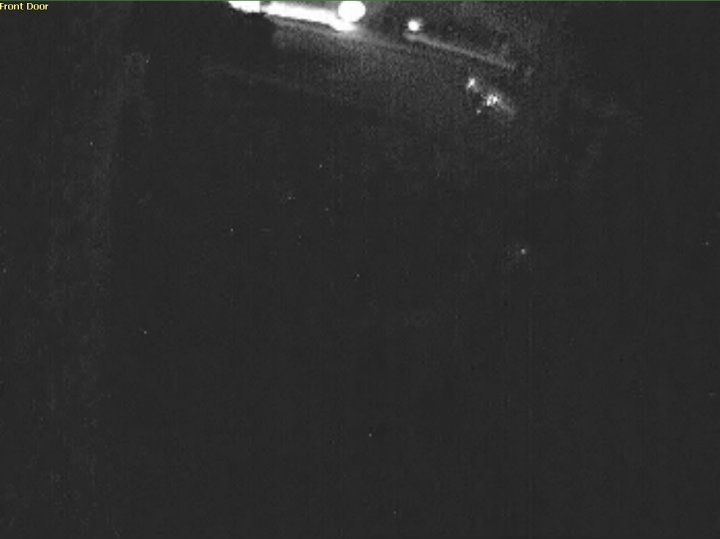
And here it is with an IR illuminator in place (still pitch-black to the naked eye): 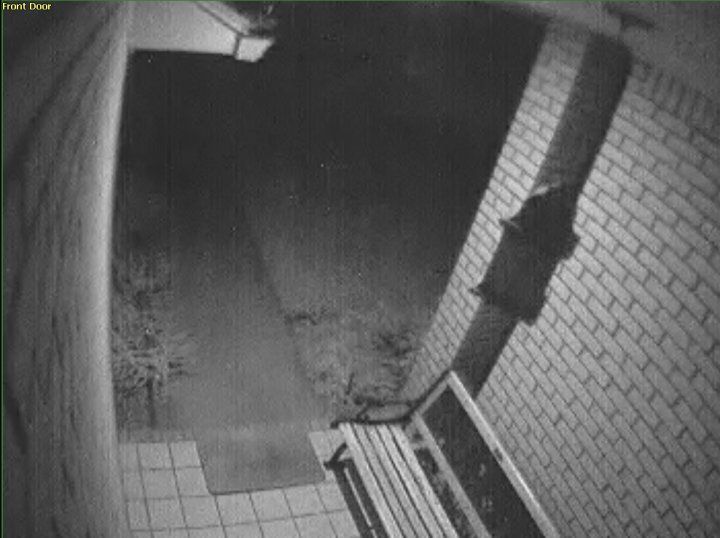
Here's another example. Here's a day image from an ICR-equipped camera: 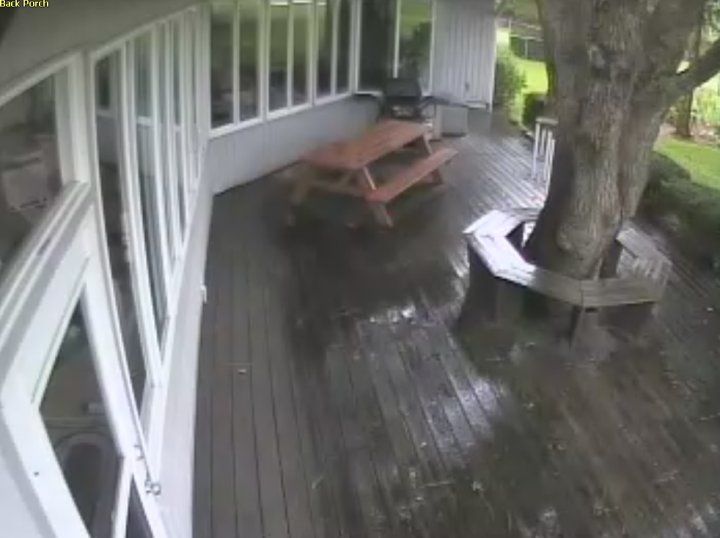
And here's a night image, with IR illumination supplied by a separate illuminator (again, pitch-black to the naked eye): 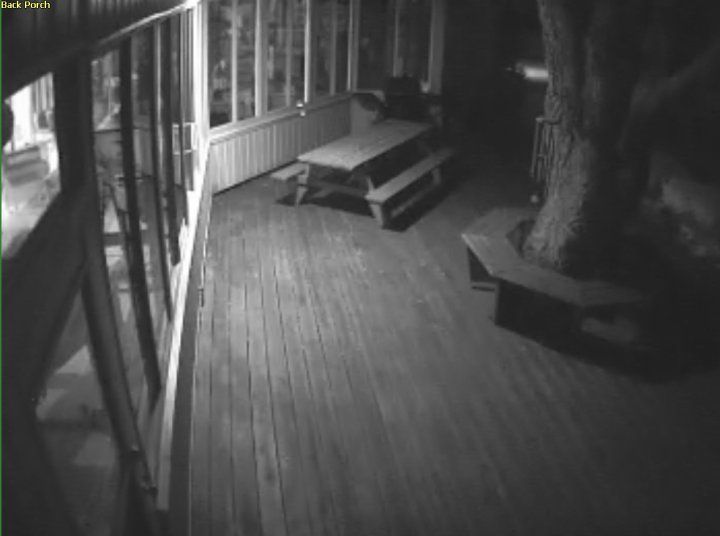
When looking for a day/night camera, one should ALWAYS get one with an ICR, or removable IR filter. Such cameras are more mechanically complex, and thus a bit more expensive, but it's well worth the few extra dollars. Avoid "slow shutter" solutions... which brings us to... DSS (digital slow shutter): Another method of "night vision" is for the camera to slow down the shutter speed. Slowing down the shutter speed leads to longer exposure times, and thus the camera's imager has more time to gather light, and can produce a much brighter picture. This actually works... and if you want to see a real-life example of this phenomenon, look at any of those astronomy pictures of the night sky where they leave the shutter open for prolonged periods of time... or those "nighttime freeway" pictures. Like so: Here's the night sky, with a 26-minute exposure time: 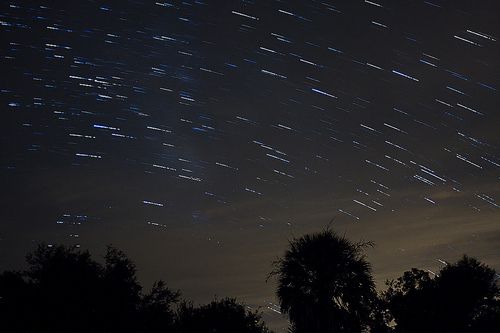
Here's the German Autoban, with a long exposure time: 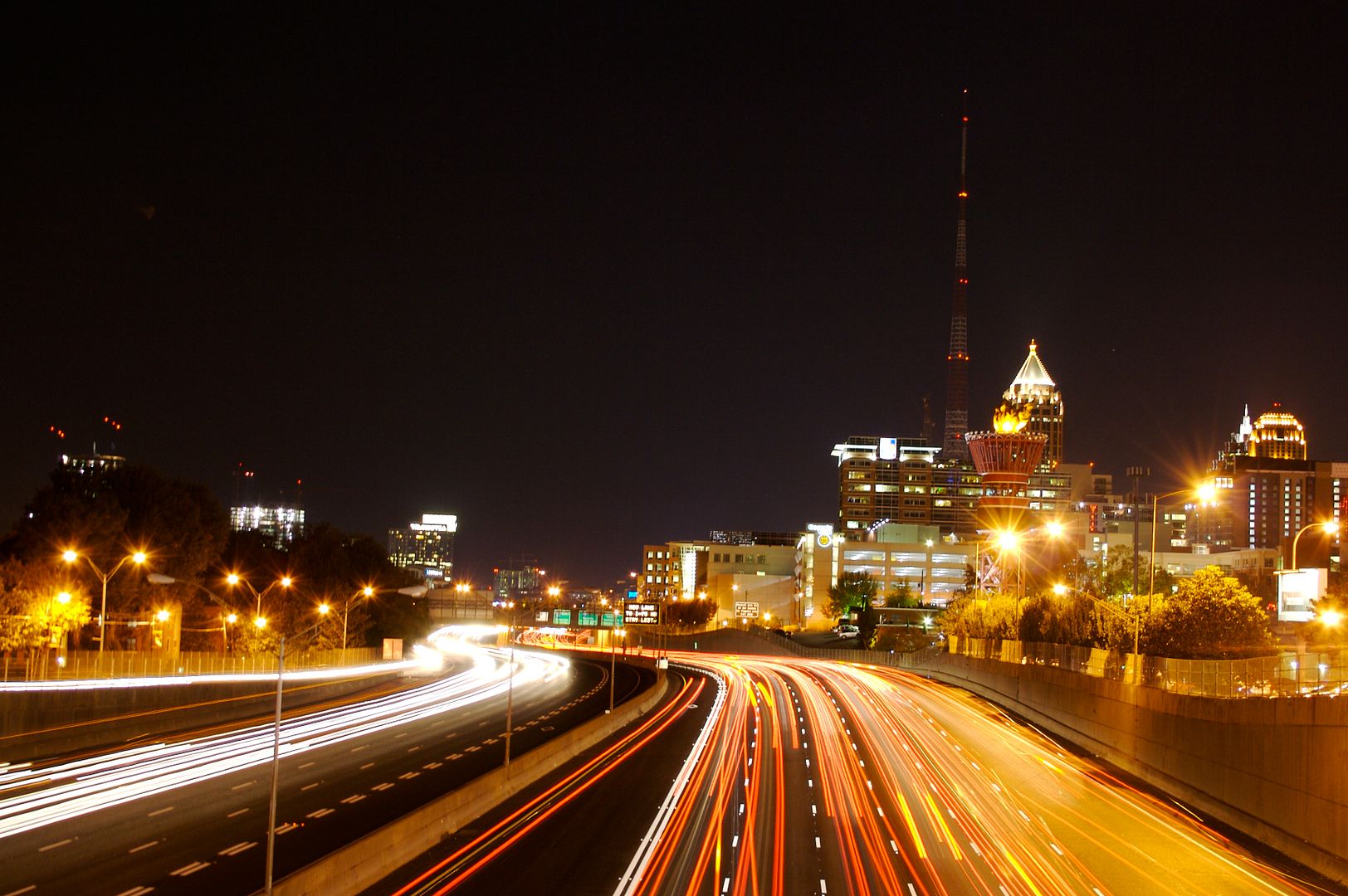
Notice how the stars have turned into bright lines as seen from the rotating earth, and the moving cars have turned into red-and-white streaks on the picture? This is what happens when you slow down the shutter speed, and are looking at a moving object. Now let's apply this to a security camera scenario. A camera that uses a very long exposure time (some use an exposure time of 1 second or longer, rather than the 1/30 second exposure time you might naturally expect in a 30 Frame-per-second stream) will produce a brighter image of a static scene... but that's where the benefit ends. The second you introduce something moving (like a vehicle passing, or a person creeping around), that moving object becomes a blur, and will be completely unrecognizable. Most people put in cameras to catch intruders, look at suspicious vehicles, etc... they don't just want a black-and-white picture of their backyard... so Digital Slow Shutter (DSS) sucks. Avoid cameras that use this route to boost their night performance. A popular line of cameras that did this was the Speco "Intensifier" series of cameras. They do have decent night performance... but ONLY for a static scene. I had several in my system, and replaced every single one of them. Good day time cameras... but inadequate for night use if you don't have a lot of ambient light. They're also completely insensitive to IR, and that was a deal-killer for me. Remember... slow shutter speed is not what you want, unless you like blurry: 
Dual Imagers: Another route to "night vision" is to use a dual-imager camera. Such a camera uses one imager exclusively for daytime pictures, and a second Black-and-white-only imager for night use. Using dedicated imagers for each time of day allows the camera manufacturer to avoid some of the trade-offs of using one imager for everything. As one might expect, cost goes up significantly with these, as you're essentially buying two-cameras-in-one. Arecont does it this way, as does Mobotix. Arecont: 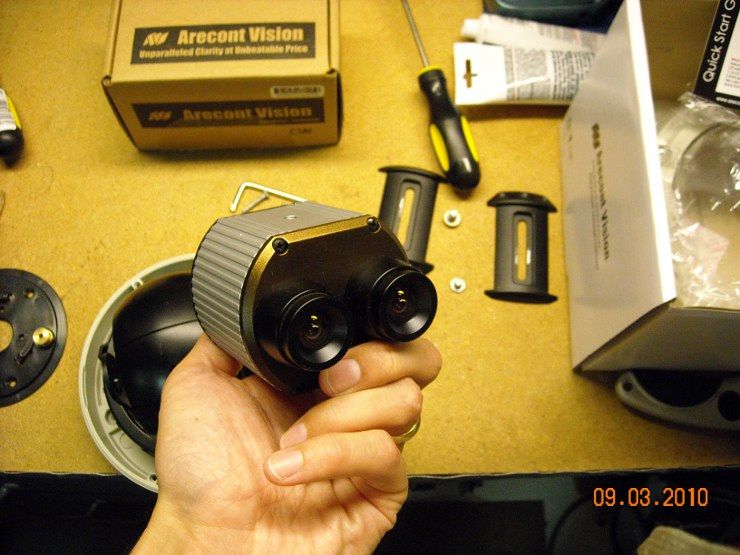
Mobotix: 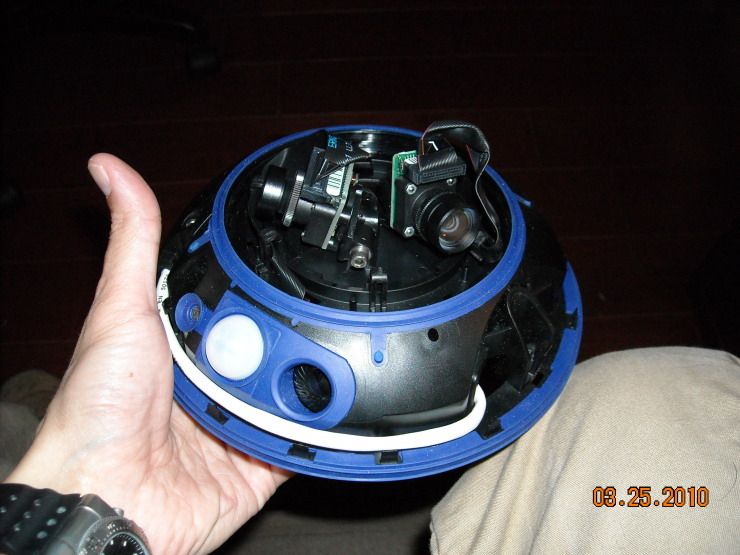
Mobotix even enables you to change out the modules, depending on what kind/lens you want: 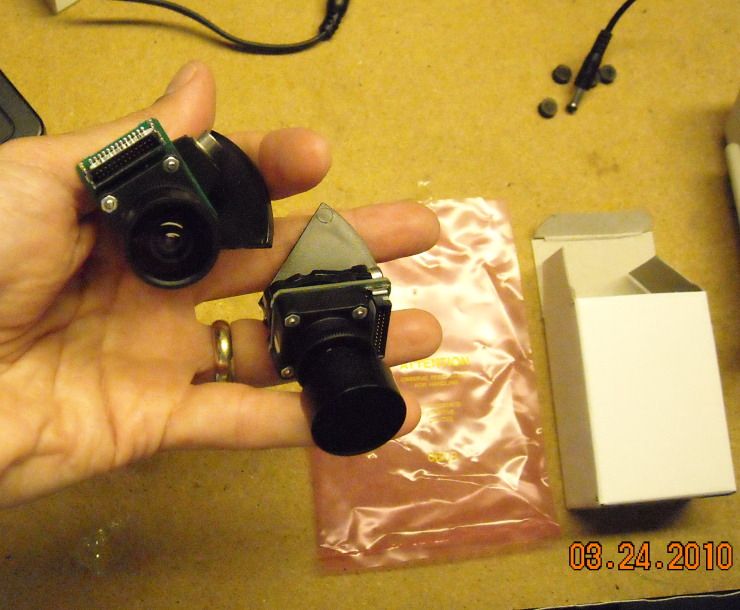
Wide Dynamic Range: Wide Dynamic Range refers to a type of advanced light-handling that some cameras are equipped to perform. The average CCD or CMOS only has a dynamic range of about 60dB... and some have even less, due to the nature of how they digitize the image data. Wide Dynamic Range cameras (hereafter referred to as "WDR") greatly expand this to 120dB or more, and this is used to solve a particular set of problems with certain applications. Whenever you have a scene with VERY bright areas and VERY dark areas in the same picture ('High Contrast"), the camera tries to split the difference, and take the average brightness of the scene. This often leaves the bright areas oversaturated (completely whited out), and the dark areas under-exposed (black). A camera with WDR has a much broader range of light levels that it can handle, and will be able to bring out details in both the bright AND the dark areas. It does this by taking two scans/pictures of the same scene, one with a long exposure time (to highlight the dark areas), and one with a short exposure time (to keep the bright areas from washing out). It then combines the two images to create a single high-quality image. Sometimes it's better to show you an image than explain it, so here are several examples: 
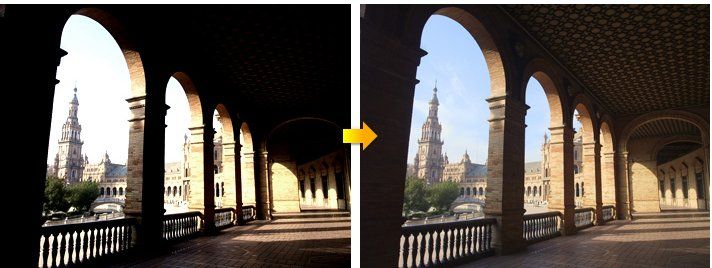
Note the difference in the WDR and non-WDR images? These kinds of cameras are VERY useful for certain types of applications... like for catching somebody coming through an exterior doorway into a darker interior room (where they will be badly backlit by light from the outside)... or for businesses with large glass windows in the front. Here's what happens when you don't have WDR... good luck IDing this burglar. To further complicate this situation, he's African American, which is a a particular challenge, as bringing out details in that skin type is more difficult, due to contrast issues. 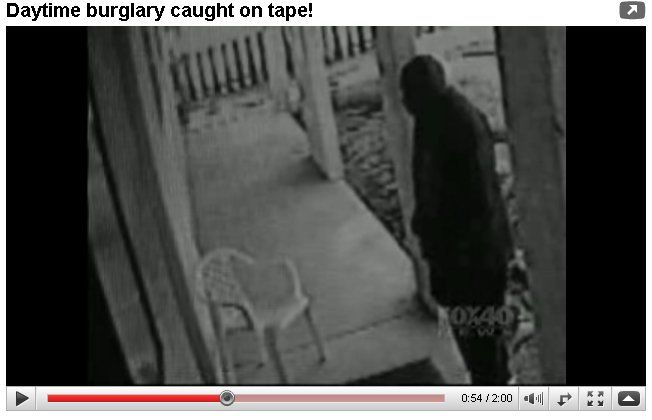
|
"Look wise, say nothing, and grunt. Speech was given to conceal thought."
- Sir William Osler -
- Sir William Osler -

|
It's time to talk about lighting.
Sufficient light is critical to the ability of most cameras to see/function. Just like your eyes, a camera cannot see if it's too dark. Fortunately, cameras have a significant advantage; their sensitivity to light extends well into the infrared portion of the spectrum. This opens up the possibility of having a camera that can see literally "in the dark." Infrared illuminators assist in this effort, and some cameras come equipped with infrared LEDs for this very purpose, usually in a ring assembly around the lens, like so: 
Illuminators also come in other form-factors... Ebay is full to-the-brim with various types (and some of them are junk), including wide-area-coverage domes, spot-lights, and so forth. As a general rule, I've found that the wider-angle the illumination, the better it actually works to illuminate a scene. Tight-angle Spot-light illuminators (like the 15 and 30-degree models) are basically worthless. They are overly-bright in the center, wash-out the rest of the scene, would only be useful for lighting up a very specific area, and would need to be paired with a suitable zoom camera. A spot-light illuminator gives you this: 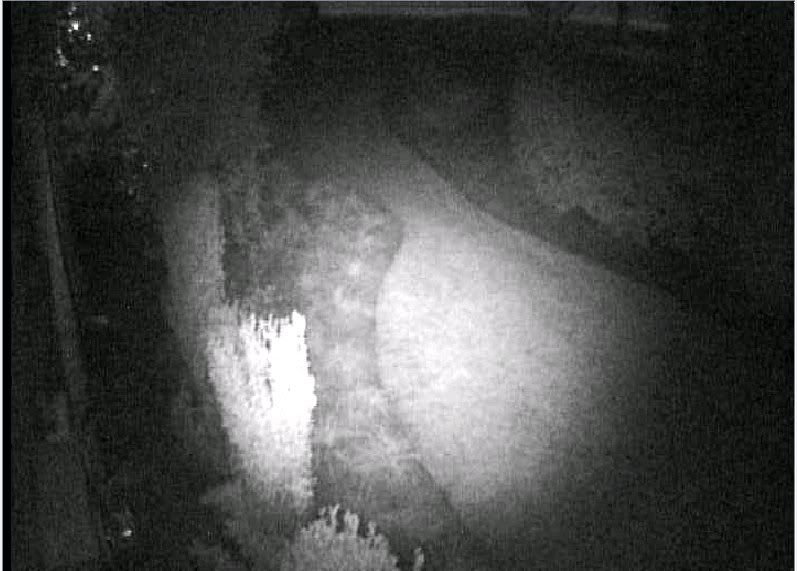
A wide-angle illuminator gives you this: 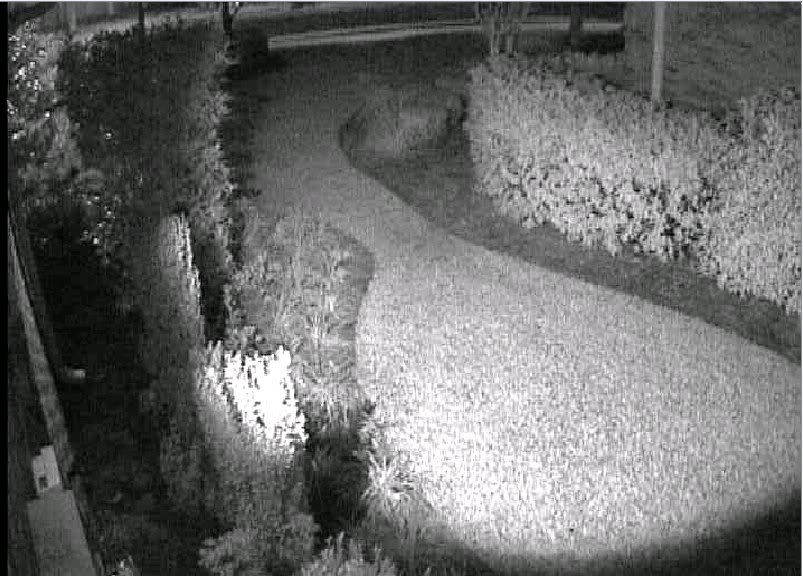
Or this: 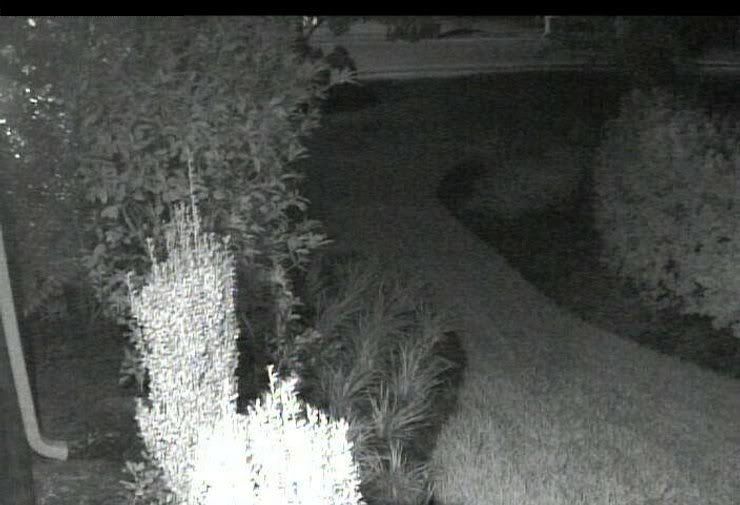
No illuminator gives you this: 
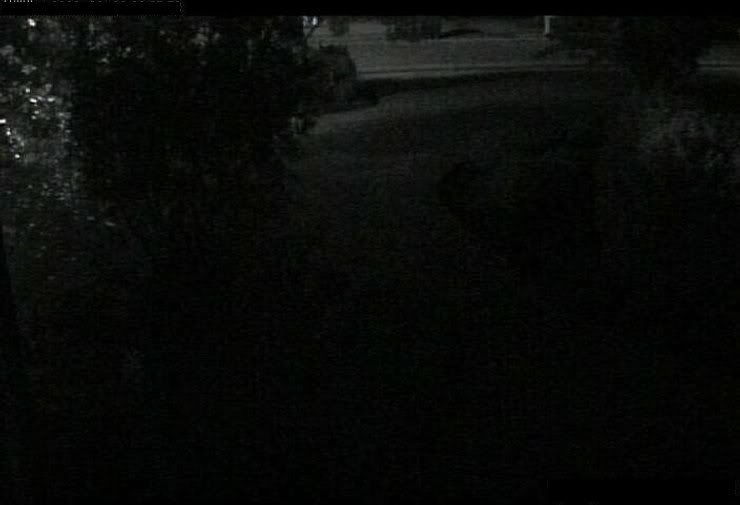
It's helpful to think of IR lighting in the same way you would visible lighting. Spot-lights are spot-lights... good for lighting up a single guy at center-stage, but not useful at all for evenly illuminating the theatre. For the latter application, you'd be better off with some standard tube-fluorescent lights with diffuser covers (like every office building in the entire country). As another example, this ceiling-mounted illuminator: 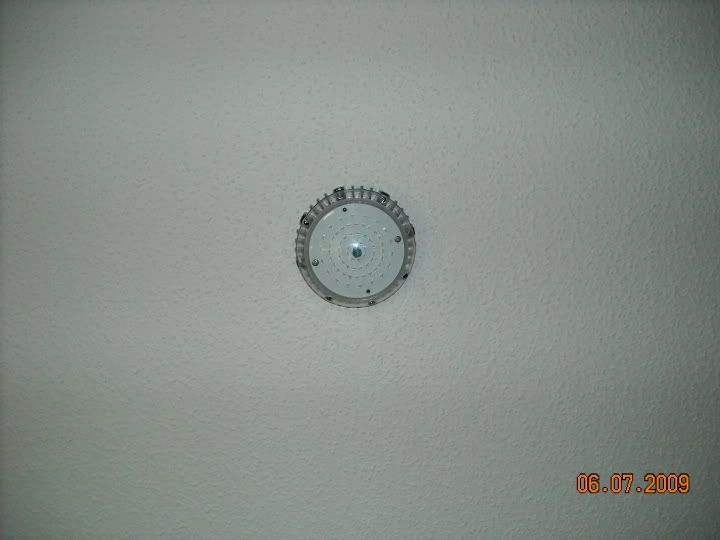
Turns this: 
Into this (pitch-black to the naked eye): 
Separate illuminators are generally preferred, particularly when compared against camera-integrated IR. The reason for this is that IR attracts bugs. Insects often see further beyond the visual spectrum than we do, as in this example of the Silverweed flower. On the left is the flower when viewed in the visible spectrum. On the right is the flower when viewed in the UV spectrum (and the darker area colored red... UV has no "color" to speak of). 
In the same way, insects can see the IR, and are attracted to it. Infrared is basically heat, and plenty of bugs go looking for heat sources. This, in turn, attracts spiders... Here's a "spidered" IR-integrated camera: 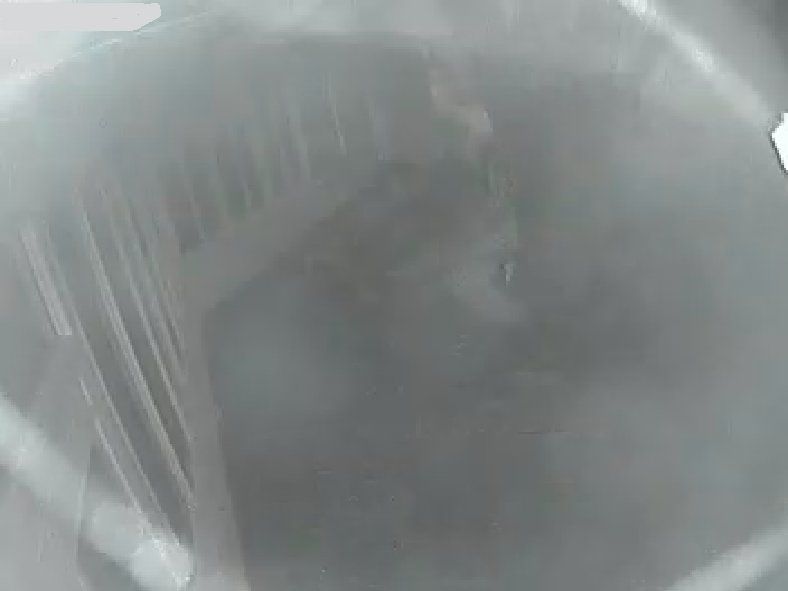
Replacing it with a different camera with a separate illuminator brought us this picture (also shown above). Note the absence of spider webs?
Not convinced yet? Watch the following time-lapse video, and note how quickly (about 2 hours) one industrious little spider screws up the view. Even without spider webs, bugs will continually fly into the lens... which triggers your motion detection and gives you false alerts. 
|
"Look wise, say nothing, and grunt. Speech was given to conceal thought."
- Sir William Osler -
- Sir William Osler -

|
Greyman;
Thanks for your effort in putting this togeather. I wanted a system from a "spy"/security store and can get one istalled for about $2k but wanted to wait for a better IP system. Can I put togeather a decent 6 camera IP system for $3k realistically ? Or should I do an expandable 4 camera (now) system for that ? Are the prices about fixed or are they still coming down as with most technology stuff ? I'm pretty computer inept as well. Someone would have to set it up for me. I can do the wiring and install. |
|
Originally Posted By lightguy:
Greyman; Thanks for your effort in putting this togeather. I wanted a system from a "spy"/security store and can get one istalled for about $2k but wanted to wait for a better IP system. Can I put togeather a decent 6 camera IP system for $3k realistically ? Or should I do an expandable 4 camera (now) system for that ? Are the prices about fixed or are they still coming down as with most technology stuff ? I'm pretty computer inept as well. Someone would have to set it up for me. I can do the wiring and install. Yes, you can. Location and type-of-camera-required will largely determine the price point you'll encounter. Outdoor/megapixel/day-night/weatherproof/internal-storage/vandal-resistant cameras will cost the most: $500-600 each (or more, depending on extra features). Some of the indoor megapixel cubes from Axis and Acti will only run you $250-400... you save money because they're not waterproof, don't require a housing, aren't vandal-hardened, etc. You sometimes can even skimp on using day/night cameras indoors, since burglars and intruders require light to work, and will turn on the lights if they're ransacking your place. If you can, I'd still get a camera with day/night capability for indoors, since illumination levels inside are frequently lower than outdoors, even during the daytime. |
"Look wise, say nothing, and grunt. Speech was given to conceal thought."
- Sir William Osler -
- Sir William Osler -
|
I wanted to thank you so much for your post here and your other series of posts on surveillance.
I am moving to a new city and state to start a fellowship, and will be living in a town and part-of-town which has higher crime than where I live now. I will absolutely be setting up some cameras based on your helpful series. |
|
Originally Posted By Mr_Psmith:
I wanted to thank you so much for your post here and your other series of posts on surveillance. I am moving to a new city and state to start a fellowship, and will be living in a town and part-of-town which has higher crime than where I live now. I will absolutely be setting up some cameras based on your helpful series. Drop me an IM if I can help you. |
"Look wise, say nothing, and grunt. Speech was given to conceal thought."
- Sir William Osler -
- Sir William Osler -
|
Grayman,
You recommended the Vivotek cameras earlier. With one of those two cameras you recommended I would just need to plug the camera into a power source and put a SD card in the camera to record onto and I'm good to go. I'm guessing to view the video I would occasionally have to pull out the SD card and plug it into my computer? I was considering this setup until I can get a dedicated computer to record to. Lots of cable I would not have to run for awhile. Thanks |
|
Originally Posted By gatorfan:
Grayman, You recommended the Vivotek cameras earlier. With one of those two cameras you recommended I would just need to plug the camera into a power source and put a SD card in the camera to record onto and I'm good to go. I'm guessing to view the video I would occasionally have to pull out the SD card and plug it into my computer? I was considering this setup until I can get a dedicated computer to record to. Lots of cable I would not have to run for awhile. Thanks I don't see any reason why you'd have to remove the SD card... just access the camera remotely and grab the images that way. Every camera I've ever seen with internal storage allows you to do that. ETA: for instance, the camera I set up in this thread records to an SD card, and the movie clips are accessible and downloadable simply by accessing the camera over wifi (using IE). |
"Look wise, say nothing, and grunt. Speech was given to conceal thought."
- Sir William Osler -
- Sir William Osler -

|
Originally Posted By perry73779:
Thanks for the info. A ton of good stuff. One little thing though, that picture of the timelapse is of downtown Atlanta, not the autobahn. I work down the street from where it was taken. Heh... I guess that's what I get for going by the caption 
|
"Look wise, say nothing, and grunt. Speech was given to conceal thought."
- Sir William Osler -
- Sir William Osler -

Stop whining, run for office & change it yourself!
Joined:
Aug 2002
Posts:
23955
EE: 100% (69)
 USA
USA

|
Great thread TheGrayMan!
I'm contemplating putting one of these inexpensive PTZ IP cameras in my home for use while I'm away. http://www.amazon.com/gp/product/B00466X9SY/ref=s9_simh_gw_p23_d0_i3?pf_rd_m=ATVPDKIKX0DER&pf_rd_s=center-2&pf_rd_r=15N4CDEZY8WFMK35NHMR&pf_rd_t=101&pf_rd_p=470938631&pf_rd_i=507846 I realize the image quality 'limitations' but my main question is what is the simplest (and cheap/free) way to record video constantly using this type of camera utilizing an existing PC or online service? Basically, I want it to record everything while I'm gone but don't want to invest in a separate DVR system or expenisve software. Am I asking for too much? 
|
The Original Range Report ®
The Original Bathroom Pic ®
The Original Bathroom Pic ®
|
Originally Posted By niceguymr:
Great thread TheGrayMan! I'm contemplating putting one of these inexpensive PTZ IP cameras in my home for use while I'm away. http://www.amazon.com/gp/product/B00466X9SY/ref=s9_simh_gw_p23_d0_i3?pf_rd_m=ATVPDKIKX0DER&pf_rd_s=center-2&pf_rd_r=15N4CDEZY8WFMK35NHMR&pf_rd_t=101&pf_rd_p=470938631&pf_rd_i=507846 I realize the image quality 'limitations' but my main question is what is the simplest (and cheap/free) way to record video constantly using this type of camera utilizing an existing PC or online service? Basically, I want it to record everything while I'm gone but don't want to invest in a separate DVR system or expenisve software. Am I asking for too much? As long as your software can talk to that camera, you run that software in the background on your home PC, and record all you want. I would set up a second hard-drive as the recording drive, so it doesn't fill up your system drive and lock-up your system. |
"Look wise, say nothing, and grunt. Speech was given to conceal thought."
- Sir William Osler -
- Sir William Osler -
|
GrayMan I've been living with a Swann 4-camera DVR system for a month now and it works fine but of course I desire more resolution and more cameras. I would like to have two high resolution cameras one to watch the front walkway up to the front door and another to watch an intersection about 50' away. Can you recommend two cameras that will improve upon my current ones and deal with the issues below?
My current bullet camera can only get grainy pictures of faces approaching the front door. This is under the best conditions, during the day and sunshine on a subject's face. At night forget about it, I can just tell there is someone out there. The front entrance is under a brick arch structure about 5' deep, 6' wide, and 14' high. The camera does struggle with dark areas during the day, you've mentioned this as dynamic range. The bullet camera watching the intersection does not resolve any details (license plates, number of occupants) and at night the brake lights, headlights, and to a lesser extent taillights really bloom up in the video and make it near impossible to capture any useful information. There is a street light at the corner of the intersection that illuminates the area below it. In addition I notice an artifact in the image that occurs at night it is a small white spot that tracks across the screen in opposite motion to the cars direction of travel. One spot goes across and then another spot goes across. I believe it is a reflections of the IR illuminators. Do you know what this is and how to eliminate or reduce the effects? I would like higher resolution cameras that will capture license plate numbers, facial features of people approaching the front door, and deal with the shadowy spots during the day. I'm in the process of building a dedicated Ubuntu Zoneminder PC so IP based cameras will probably be the way to go. Also can you recommend a 4-ch Analog capture card that will work with Zoneminder so I can reuse my existing Swann analog cameras. Thanks for the help. |
|
Originally Posted By AR15Texan:
GrayMan I've been living with a Swann 4-camera DVR system for a month now and it works fine but of course I desire more resolution and more cameras. I would like to have two high resolution cameras one to watch the front walkway up to the front door and another to watch an intersection about 50' away. Can you recommend two cameras that will improve upon my current ones and deal with the issues below? My current bullet camera can only get grainy pictures of faces approaching the front door. This is under the best conditions, during the day and sunshine on a subject's face. At night forget about it, I can just tell there is someone out there. The front entrance is under a brick arch structure about 5' deep, 6' wide, and 14' high. The camera does struggle with dark areas during the day, you've mentioned this as dynamic range. The bullet camera watching the intersection does not resolve any details (license plates, number of occupants) and at night the brake lights, headlights, and to a lesser extent taillights really bloom up in the video and make it near impossible to capture any useful information. There is a street light at the corner of the intersection that illuminates the area below it. In addition I notice an artifact in the image that occurs at night it is a small white spot that tracks across the screen in opposite motion to the cars direction of travel. One spot goes across and then another spot goes across. I believe it is a reflections of the IR illuminators. Do you know what this is and how to eliminate or reduce the effects? I would like higher resolution cameras that will capture license plate numbers, facial features of people approaching the front door, and deal with the shadowy spots during the day. I'm in the process of building a dedicated Ubuntu Zoneminder PC so IP based cameras will probably be the way to go. Also can you recommend a 4-ch Analog capture card that will work with Zoneminder so I can reuse my existing Swann analog cameras. Thanks for the help. A couple of thoughts: There seems to be a dearth of WDR-equipped IP cameras on the market. I find far more analog cameras have that feature... can't explain why, but it may be a technical challenge to integrate that feature into an IP-cam. It certainly can be done (Acti has done it), but it may be more difficult to find a good selection of IP cams for that application. Even so, an analog camera should be adequate for a front-door camera, particularly if you place it appropriately. For analog WDR cameras, you'd be hard-pressed to beat the Panasonics... and while they're $5-600 new, those can be found on Ebay for very reasonable money. Here is one NIB for about $300 (and you could probably get it for less). Covering an intersection from 50 feet away, with sufficient resolution to capture a license plate (and enough low-light performance, including fast shutter-speed, to work at night) is going to be a very expensive proposition. That will be a real challenge, and you're looking at a multi-megapixel >$1000 camera. I haven't attempted to cover a scene like that, but a regular intersection is going to be at least 30 feet wide, and having enough pixel density (as well as the correct lighting and angle) to catch plates is probably beyond my ability to do over-the-internet. In fact, I'm still attempting to find the right camera/setup for the entrance to my neighborhood, and it's not as challenging a scene as you're describing. You're also going to have trouble getting that camera in a dome form-factor... you'll probably be restricted to a box camera with a longer-lens, inside an enclosure... and that just looks butt-ugly on a house. Your wife would probably come hunt me down over the internet if I talked you into putting up something like that
|
"Look wise, say nothing, and grunt. Speech was given to conceal thought."
- Sir William Osler -
- Sir William Osler -
|
Originally Posted By TheGrayMan:
So would the Mobotix M12 fit the bill? The Mobotix stuff is pretty high-end, but my concern would be with you getting the exact FOV you want. The nice thing about Mobotix is that you can use a 35mm SLR camera to approximate the view you're going to get with the respective lenses. IIRC, the M12 comes with a specific set of unchangeable lenses... you order it from the factory, and the lenses are glued into place. This is a major disadvantage compared to the D12, where lens modules are easily changeable in the field. With that in mind, I'd make extra-sure you're getting the field-of-view (FOV) you really want. Also make sure you have enough illumination and the correct angle of that illumination to catch license plates (I assume you're using this camera to cover the intersection). Mobotix cameras allow you to adjust the shutter-speed in the camera's software, through a VERY wide range. This will help you fine-tune the camera settings to catch the details you want, and prevent blurring during motion events (BUT a fast shutter-speed setting ABSOLUTELY NEEDS ENOUGH LIGHT TO WORK). You can also adjust "exposure windows" to a certain area if you want to catch something very specific (like a plate). |
|
GrayMan what do you think of these Monoprice WDR analog cameras? I might try one out in place of my 480TVL bullet camera. Can also get an enclosure and mount for about $20.00
$110.00 WDR 600TVL Sony HAD Here is the Sony Datasheet for the CCD device Sony ICX408AK CCD HAD Datasheet $17.85 3-9mm VariFocus Lense with IR Correction and Auto Iris $14.22 Camera Enclosure $4.56 8" Camera Mount |
|
Never used that one, but at that price, it couldn't hurt to try it out. You can probably Ebay it if you don't like it, and not be out much money. Originally Posted By AR15Texan:
GrayMan what do you think of these Monoprice WDR analog cameras? I might try one out in place of my 480TVL bullet camera. Can also get an enclosure and mount for about $20.00 $110.00 WDR 600TVL Sony HAD Here is the Sony Datasheet for the CCD device Sony ICX408AK CCD HAD Datasheet $17.85 3-9mm VariFocus Lense with IR Correction and Auto Iris $14.22 Camera Enclosure $4.56 8" Camera Mount |
"Look wise, say nothing, and grunt. Speech was given to conceal thought."
- Sir William Osler -
- Sir William Osler -
|
Originally Posted By danman0:
Nice post, I have been installing and servicing security and CCTV systems for over 31 years. Although the company I work for is a GE(UTC) dealer I am partial to the Honeywell line of Cameras and DVR.s. Very affordable. Glad you enjoyed it. I am but a rookie in this field. I know just enough to make it work.
|
"Look wise, say nothing, and grunt. Speech was given to conceal thought."
- Sir William Osler -
- Sir William Osler -
|
GrayMan I have a few more questions for you, any experience with the a joystick PTZ controller like this listed eBay item and what do you think of this listed eBay UTP 4-in-1 range extender (to save on wiring costs)? Do you know if the joystick controller be plugged directly to the PTZ camera? Do you know what type of cabling is necessary, maybe a RS-232 cable?
ARM Electronics PTZ Joystick Controller Another PTZ Joystick Controller eBay item UTP 4-in-1 Passive Hub |
|
Originally Posted By AR15Texan:
GrayMan I have a few more questions for you, any experience with the a joystick PTZ controller like this listed eBay item and what do you think of this listed eBay UTP 4-in-1 range extender (to save on wiring costs)? Do you know if the joystick controller be plugged directly to the PTZ camera? Do you know what type of cabling is necessary, maybe a RS-232 cable? ARM Electronics PTZ Joystick Controller Another PTZ Joystick Controller eBay item UTP 4-in-1 Passive Hub No experience with the joysticks, but most of those work on Pelco P/D protocol, through a two-wire interface to your DVR. The video range-extenders are used to send video down cat5/6 cable. it's basically four-baluns-in-one. Those do work, and can be a handy way to make a single run of UTP cable provide multiple camera views (you have to power the cameras locally, of course). |
"Look wise, say nothing, and grunt. Speech was given to conceal thought."
- Sir William Osler -
- Sir William Osler -
|
Originally Posted By Cameronswmp9:
GrayMan, What do you think about these cameras? I took a quick peak at the spec sheet and it made my brain mad. Im not a tech guy about these things, more car stuff really. http://www.vivint.com/products/catalog/pan-and-tilt-video-camera Thanks I'd be concerned about compatibility with monitoring software, since that seems to be a no-name brand. If it breaks/sucks/whatever, do they have anything even remotely resembling english-speaking tech support? For the same or a little bit more, you can get an actual proper security camera, like an Axis M-series or an Acti cube... and I'd probably advise going that route instead of the nameless-camera. |
"How can you know so little about this and be occupying a chair at the time that you do?"
-Christopher Hitchens to Michael Reagan on the topic of terrorism-
-Christopher Hitchens to Michael Reagan on the topic of terrorism-
|
I've got a couple of questions on this subject.
First, I'm looking at a system that will use a few basic analog box cameras. No PTZ, no zooming, no need to view camera images in real time. Do these cameras use a common communication protocol? One source says I can even take a camera like this and connect it directly to my TV. IOW, can I take any decent DVR and connect any analog box camera and have it work, or are there proprietary elements that prevent this from working? Second question. If the DVR has RJ45 connectors and the analog camera has BNC connectors, can I just connect a balun to the back of the camera and run Cat5 all the way to the DVR? Thanks. Steve |
|
Originally Posted By Stevef27:
I've got a couple of questions on this subject. First, I'm looking at a system that will use a few basic analog box cameras. No PTZ, no zooming, no need to view camera images in real time. Do these cameras use a common communication protocol? One source says I can even take a camera like this and connect it directly to my TV. IOW, can I take any decent DVR and connect any analog box camera and have it work, or are there proprietary elements that prevent this from working? Second question. If the DVR has RJ45 connectors and the analog camera has BNC connectors, can I just connect a balun to the back of the camera and run Cat5 all the way to the DVR? Thanks. Steve First question: Yes, any standard analog security camera that follows the NTSC standard should work with any standards-compliant analog DVR (NTSC is the American video standard... PAL is the European video standard). Second question: This one is more involved. Some DVR manufacturers use a non-standard cabling/plug set to either deliver power to their cameras, or get video back from them. If you power the camera at the camera-end, you need basically two wires to get video back to the DVR: one wire for the video signal, and one for ground. If your DVR is like some out there that use a non-BNC connector (some of the Samsungs use an RJ-11 connector, while other brands use RJ-45), you'd need to determine the pinout of their plug. In other words, if the DVR has RJ-45 plugs on the back for "video in," you'd need to determine which pair it was expecting video/ground to come in on, and then wire your Balun at the camera end to deliver video on the appropriate wire. You'd have to experiment a bit, but it's probably doable. Alternatively, go with a DVR that uses standard BNC connectors... I've yet to see an analog DVR deliver quality/features so good that it would make me want to hack up a bunch of cables to make it work. |
"How can you know so little about this and be occupying a chair at the time that you do?"
-Christopher Hitchens to Ron Reagan Jr. on the topic of terrorism-
-Christopher Hitchens to Ron Reagan Jr. on the topic of terrorism-

Wait.... What?
Dying aint no kind of livin.. BOY!
Dying aint no kind of livin.. BOY!
Stop whining, run for office & change it yourself!
Joined:
Aug 2002
Posts:
24360
EE: 100% (69)
USA
|
Originally Posted By southernrebel: http://www.costco.com/Browse/Product.aspx?prodid=11737059&whse=BC&topnav=&cm_sp=RichRelevance-_-itempageVerticalRight-_-PopularProductsInCategory&cm_vc=itempageVerticalRight|PopularProductsInCategory What do you think about these? Or this? http://www.costco.com/Browse/Product.aspx?Prodid=11602522 I dont like any system that isnt HD, if the camera cant identify a face or license plate its use is limited. also, lol at the swann...16 cameras but only a 500gb hard drive. Would only give you maybe a day of footage before overwrite. Also, that is a lot of wiring to run...a major pain in the ass. Better to get HD cams that are clearer so you dont need as many cams to cover a sector. Qsee makes good stuff, but this one isnt HD. Look for an IP cam system, they are usually HD. |
<div align=right>(© Gaspain 2002 - ∞)</div id=right>

|
Originally Posted By beavo451:
There are lots of IR illuminator products out there. Which ones do you use/recommend? I tend to use the wide-angle dome-type illuminators. Think about it... you probably want your IR to illuminate an AREA rather than one specific spot. I have been using the dome illuminators you see in these threads for a couple of years, with good results... and they're about $50 each. I have another type inbound that I'm going to test... I'll post results when I have pics. |
"How can you know so little about this and be occupying a chair at the time that you do?"
-Christopher Hitchens to Ron Reagan Jr. on the topic of terrorism-
-Christopher Hitchens to Ron Reagan Jr. on the topic of terrorism-
|
Originally Posted By TheGrayMan:
Originally Posted By beavo451:
There are lots of IR illuminator products out there. Which ones do you use/recommend? I tend to use the wide-angle dome-type illuminators. Think about it... you probably want your IR to illuminate an AREA rather than one specific spot. I have been using the dome illuminators you see in these threads for a couple of years, with good results... and they're about $50 each. I have another type inbound that I'm going to test... I'll post results when I have pics. I've searched with no luck. Link or store to buy those? |

|
Originally Posted By searchin4shacks:
I'm currently building a new home and all this security camera stuff is making my head spin  , I want to pre wire to have the flexibility to use any camera, network, DVR etc. What type(s) of cable should I pull. CAT6, RG ??? , I want to pre wire to have the flexibility to use any camera, network, DVR etc. What type(s) of cable should I pull. CAT6, RG ???I'd do Cat6, and lots of it. Seriously... don't skimp. Spend the money. At least one run to every location you'd EVER conceivably want a camera. That's every corner of the house, right above your garage, above your front door, above your back door, above your side door, on each side of the house, and in every room you might want a camera (entryway, foyer, kitchen, garage, baby's room, etc). Terminate all of those runs in a central closet in the house (that will become your wiring closet). I'd also want a few runs of regular 120vAC to junction boxes under the eaves, for placement of either floodlights, or IR illuminators. Ensure that the aforementioned closet has a solid door/frame, and has a vent in the top of the door (I might even recommend a fan with that vent), and either make the frame an inch or two too tall, or plane off an inch or so off the bottom of the door (if it's wood), just so air can flow underneath. You don't want all the switching equipment and CCTV storage to die from heat. Keep that door locked, so any smash-and-grab burglars will have to literally pry/chop their way into it if they want to steal your DVR. The hard part is pulling the cable... and it's damned hard if you wait until after the house is built. Have them run the cable WHILE YOU"RE BUILDING. You'll thank me later. |
-----BEGIN GEEK CODE BLOCK-----
Version: 3.1.2
GMD d-- a+ C++ L++ w M e++++
PS--- PE++ Y++ t+ R- !tv b++++ D---
h---- A++ r+++ y+ z++++ k++ F+++/F4
------END GEEK CODE BLOCK------
Version: 3.1.2
GMD d-- a+ C++ L++ w M e++++
PS--- PE++ Y++ t+ R- !tv b++++ D---
h---- A++ r+++ y+ z++++ k++ F+++/F4
------END GEEK CODE BLOCK------

|
Originally Posted By TheGrayMan:
Here's another example. Here's a day image from an ICR-equipped camera: http://i251.photobucket.com/albums/gg286/TGrayman/116%20IR/backporchday.jpg And here's a night image, with IR illumination supplied by a separate illuminator (again, pitch-black to the naked eye): http://i251.photobucket.com/albums/gg286/TGrayman/116%20IR/porchIR.jpg In the second picture is the bright spot the IR illuminator? The camera & illuminator are mounted away from each other then? If I were to get separates the camera would not have to be the ICR type? Sorry for the trivial questions, but even after reading the thread my head is still spinning. I'm still in the looking process for a system but get confused by all the technical terms. I want a set up that will give me quality video day & night, but don't really know where to start. Do all systems have a DVR style center or is there other ways? |
<font color=red><font size=2>You can get further with kind words and a gun then kind words alone.</font id=s2></font id=red>
|
Originally Posted By hk45shooter:
Originally Posted By TheGrayMan:
Here's another example. Here's a day image from an ICR-equipped camera: http://i251.photobucket.com/albums/gg286/TGrayman/116%20IR/backporchday.jpg And here's a night image, with IR illumination supplied by a separate illuminator (again, pitch-black to the naked eye): http://i251.photobucket.com/albums/gg286/TGrayman/116%20IR/porchIR.jpg In the second picture is the bright spot the IR illuminator? The camera & illuminator are mounted away from each other then? If I were to get separates the camera would not have to be the ICR type? Sorry for the trivial questions, but even after reading the thread my head is still spinning. I'm still in the looking process for a system but get confused by all the technical terms. I want a set up that will give me quality video day & night, but don't really know where to start. Do all systems have a DVR style center or is there other ways? Correct. The illuminator is mounted in the center of the porch, and the camera at one end. And ANY day/night camera should have an ICR (unless you're using a dual-imager camera like an Arecont, or Mobotix). If it's a "day/night" camera and it does NOT have an ICR, I wouldn't buy it. It's likely giving you "night vision" by slowing down the camera's shutter speed, which sucks for anything but a static scene. |
-----BEGIN GEEK CODE BLOCK-----
Version: 3.1.2
GMD d-- a+ C++ L++ w M e++++
PS--- PE++ Y++ t+ R- !tv b++++ D---
h---- A++ r+++ y+ z++++ k++ F+++/F4
------END GEEK CODE BLOCK------
Version: 3.1.2
GMD d-- a+ C++ L++ w M e++++
PS--- PE++ Y++ t+ R- !tv b++++ D---
h---- A++ r+++ y+ z++++ k++ F+++/F4
------END GEEK CODE BLOCK------
| OK, I'm finishing up my new home and I need several security cameras. First off, I prewired both Cat6 and RG59Siamese cable to every possible location so I have the option of any type of camera. I'm looking for high resolution, exterior cameras that must be able to hold up in a harsh, salty, humid environment. I need a couple of long range cameras, a few closer up porch cameras and would like good night vision. My cameras mostly face east west so they will experience direct sun to extreme shadows. DVR and any other devises required are also needed. I would like to keep camera costs to about $200 each and need approximately 15. I could use some unbiased recommendations as there are hundreds of cameras on the market and I know nothing about them. What advise does the hive have? |
|
Originally Posted By searchin4shacks:
OK, I'm finishing up my new home and I need several security cameras. First off, I prewired both Cat5e and RG59Siamese cable to every possible location so I have the option of any type of camera. I'm looking for high resolution, exterior cameras that must be able to hold up in a harsh, salty, humid environment. I need a couple of long range cameras, a few closer up porch cameras and would like good night vision. My cameras mostly face east west so they will experience direct sun to extreme shadows. DVR and any other devises required are also needed. I would like to keep camera costs to about $200 each and need approximately 15. I could use some unbiased recommendations as there are hundreds of cameras on the market and I know nothing about them. What advise does the hive have? I doubt it can be done for that price-point. Here's why I say that. Network cameras run at least in the $300+ range... and a good deal more for anything decent... especially weather-proof outdoor cameras. The most weatherproof cameras I've ever seen are the Mobotix line. The housings are almost entirely composite, all the screws are stainless, and they have no moving parts. They have those things mounted on mountaintops... here is a mobotix camera mounted on a 16,000-foot peak in Nepal, viewing Mt. Everest. It's run off a solar panel, and the temps there hit minus-30 Celsius... it's the highest webcam in the world. The Acti cameras are also pretty weatherproof... but you're looking at $5-600 each for their outdoor domes, and you have to seal them. Your location says Florida; I don't see too many cheaper cameras holding up to a moist, salty, corrosive environment for any great length of time. You also mentioned long-range... which means lenses. Cheaper cameras aren't going to have sufficient zoom, and most of them probably won't even have the option of changing lenses. The good news is that you can probably cut down your number of cameras by using some higher-megapixel models, and placing them strategically.
|
-----BEGIN GEEK CODE BLOCK-----
Version: 3.1.2
GMD d-- a+ C++ L++ w M e++++
PS--- PE++ Y++ t+ R- !tv b++++ D---
h---- A++ r+++ y+ z++++ k++ F+++/F4
------END GEEK CODE BLOCK------
Version: 3.1.2
GMD d-- a+ C++ L++ w M e++++
PS--- PE++ Y++ t+ R- !tv b++++ D---
h---- A++ r+++ y+ z++++ k++ F+++/F4
------END GEEK CODE BLOCK------
|
Originally Posted By searchin4shacks:
Do I really need network cameras? Will analog cameras do the job? Depends. Analog cameras will give you video... but the question is whether they will give you USABLE video. If you choose your mounting locations well, and use the appropriate cameras and lenses, you might do fine with analog. Focus on choke-points, entry doors, driveway entrances, etc. Broad area coverage with analog cameras is rarely good enough to ID anything, beyond "yeah, there was a guy walking around... and he drove a blue sedan. Can't tell you what make/model/etc... and the guy was probably blonde" Megapixel stuff simply puts more pixels on the problem, and give you a higher-res image. Analog is limited by the NTSC video standard.... it will never get better/sharper. In short, you will have no upgrade room. Then again, you're probably limited by your budget... so the sky is clearly not the limit. |
-----BEGIN GEEK CODE BLOCK-----
Version: 3.1.2
GMD d-- a+ C++ L++ w M e++++
PS--- PE++ Y++ t+ R- !tv b++++ D---
h---- A++ r+++ y+ z++++ k++ F+++/F4
------END GEEK CODE BLOCK------
Version: 3.1.2
GMD d-- a+ C++ L++ w M e++++
PS--- PE++ Y++ t+ R- !tv b++++ D---
h---- A++ r+++ y+ z++++ k++ F+++/F4
------END GEEK CODE BLOCK------
|
I currently run 2 Acti TCM1231 cameras. One is as perfect as ou can get. The other has a lot of false activations. IThey are both used indoor now. I'm on the hunt for software to take full advantage of the images.
As far as anybody wiring their house during construction...run conduit. I rane 1 1/2" conduit to each room. I have repulled wires to to areas because of upgrades in the cable and for expansion. Label each conduit and leave them empty until you need to use them. Mike |
|
Originally Posted By searchin4shacks:
Is there a good unbiased resource for selecting exterior cameras given known requirements such as distance, area of view, image quality? None that I've ever seen.... but every scene and view is different... so that would be a tough thing to guesstimate ETA: I start with distance-to-area, and how wide an area needs to be covered. Using that, I figure out the angle of the lens, then do a pixels-per-foot calculation. I usually shoot for a minimum of 40-50 pixels-per-foot. I just dd this for a friend. He has had some theft at his house, and there's about 50-feet of a pedestrian walkway/path that runs behind his house. It's about 70-feet away from the house. So a walkway that is 50 feet across, and 70 feet away is going to require roughly a 40-45-degree FOV. Covering that with a 5MP camera gives you roughly 50 pixels-per-foot. We went with an Acti E83, which has a varifocal/adjustable lens to zoom in on just the 50-foot-area we're interested in. It has roughly 2500 horizontal pixels at max resolution (5MP), which gives about 50 pixels-per-foot. More would be better, but that's the pixel density where you start being able to ID people. |
-----BEGIN GEEK CODE BLOCK-----
Version: 3.1.2
GMD d-- a+ C++ L++ w M e++++
PS--- PE++ Y++ t+ R- !tv b++++ D---
h---- A++ r+++ y+ z++++ k++ F+++/F4
------END GEEK CODE BLOCK------
Version: 3.1.2
GMD d-- a+ C++ L++ w M e++++
PS--- PE++ Y++ t+ R- !tv b++++ D---
h---- A++ r+++ y+ z++++ k++ F+++/F4
------END GEEK CODE BLOCK------
|
Here is a decent networking-oriented primer for setting up IP cameras.
Discusses IP addresses, bandwidth concerns, codecs, etc. Link |
-----BEGIN GEEK CODE BLOCK-----
Version: 3.1.2
GMD d-- a+ C++ L++ w M e++++
PS--- PE++ Y++ t+ R- !tv b++++ D---
h---- A++ r+++ y+ z++++ k++ F+++/F4
------END GEEK CODE BLOCK------
Version: 3.1.2
GMD d-- a+ C++ L++ w M e++++
PS--- PE++ Y++ t+ R- !tv b++++ D---
h---- A++ r+++ y+ z++++ k++ F+++/F4
------END GEEK CODE BLOCK------
|
Originally Posted By TheGrayMan:
Here is a decent networking-oriented primer for setting up IP cameras. Discusses IP addresses, bandwidth concerns, codecs, etc. Link GrayMan, awesome thread, thanks for taking the time to post this information! I am looking at opening up a hostel in Colombia, and would like to have adequate security camera coverage. I was thinking 1mp dome cameras, with one outside (vandal resistant) covering the front door (front door will have a buzzer entrance) one dome inside (WDR?) covering the entryway inside, one dome covering the front desk, and one covering the locker and luggage storage area. Can you recommend some good IP dome cameras for this application, and reputable vendors? I would be buying the gear in the states, testing it out and then taking it down south with me, so good reliable, dependable quality is more important than cost (although cost is kind of important too lol). I adhere to the buy once, cry once adage, but like having to cry less
Also, can you recommend a good DVR for this set up? I am thinking along the lines of 6-8 channels, in case I decide to add more cameras later. More storage would be better I think, although if nothing of note has happened within two weeks I would think overwrite at that point would be ok. I was also thinking of putting a cheap sacrificial DVR in more or less plain sight behind the front desk, and having the real (more expensive, more storage) DVR hidden someplace, in a more secure location. With these IP cameras can I store to both DVR's without a problem? ETA: I would like to be able to access live security camera feeds from remote locations, via the interwebs. That capability would be dependent on the DVR and software? |
|
Originally Posted By Blackheart_Actual:
Originally Posted By TheGrayMan:
Here is a decent networking-oriented primer for setting up IP cameras. Discusses IP addresses, bandwidth concerns, codecs, etc. Link GrayMan, awesome thread, thanks for taking the time to post this information! I am looking at opening up a hostel in Colombia, and would like to have adequate security camera coverage. I was thinking 1mp dome cameras, with one outside (vandal resistant) covering the front door (front door will have a buzzer entrance) one dome inside (WDR?) covering the entryway inside, one dome covering the front desk, and one covering the locker and luggage storage area. Can you recommend some good IP dome cameras for this application, and reputable vendors? I would be buying the gear in the states, testing it out and then taking it down south with me, so good reliable, dependable quality is more important than cost (although cost is kind of important too lol). I adhere to the buy once, cry once adage, but like having to cry less
Also, can you recommend a good DVR for this set up? I am thinking along the lines of 6-8 channels, in case I decide to add more cameras later. More storage would be better I think, although if nothing of note has happened within two weeks I would think overwrite at that point would be ok. I was also thinking of putting a cheap sacrificial DVR in more or less plain sight behind the front desk, and having the real (more expensive, more storage) DVR hidden someplace, in a more secure location. With these IP cameras can I store to both DVR's without a problem? ETA: I would like to be able to access live security camera feeds from remote locations, via the interwebs. That capability would be dependent on the DVR and software? You could go Axis, Acti, Vivotek.... Axis probably has the most aesthetically-pleasing cameras in that lineup. Their M30-series cameras are a decent value for the money, though Acti has a good selection of budget 1MP domes that would likewise do the job. Acti also includes free NVR software with their cameras, whereas Axis does not. You're also confusing DVR with NVR. Network cameras are capable of acting completely independent of any central recording device. You can literally install a single network cameras, insert an SD or micro-SD card (if the camera can accept one), and have that camera record internally, or email you alerts (or both). It literally needs nothing but a network connection and power (PoE supplies both through a standard network cable). Analog cameras are "dumb," and their networking capabilities (and recording ability) are dependent on the DVR. NVR=Network Video Recorder DVR=Digital Video Recorder Let's take the example of viewing your hostel in Columbia from the US. In an analog system, you are only connecting to the DVR, not the individual camera; the DVR is the "brains" of any analog system. In an IP-based system, each camera has its own brain, and is an independent network device... so instead of connecting to a DVR in an analog system, an IP-based setup allow one to connect either to the NVR or the camera itself... or both. You can connect directly to an individual camera with a web browser for that specific camera's view, or you can connect to an NVR (recording streams from all your network cameras) and get multiple camera views at once. In other words, if you have a system of network cameras, and they are each recording internally to an SD-card, you may not need an NVR at all. That's not to say it's a bad idea to have a central repository for all your video data... but it's not necessarily required. I recommend setting up both... so if a group of dirtbags steals your NVR, the cameras will still have their internal recordings as a backup. An NVR Is just a PC or desktop computer that has software to gather/record the camera streams. Any computer (assuming it's powerful enough, and not a 15-year-old first-gen Pentium 75) can act as an NVR anywhere in your network. It could be your desktop computer in your office, an extra PC stuck in a back room, or a purpose-built rack-mount server in your wiring closet or server room. Understand the difference?
|
-----BEGIN GEEK CODE BLOCK-----
Version: 3.1.2
GMD d-- a+ C++ L++ w M e++++
PS--- PE++ Y++ t+ R- !tv b++++ D---
h---- A++ r+++ y+ z++++ k++ F+++/F4
------END GEEK CODE BLOCK------
Version: 3.1.2
GMD d-- a+ C++ L++ w M e++++
PS--- PE++ Y++ t+ R- !tv b++++ D---
h---- A++ r+++ y+ z++++ k++ F+++/F4
------END GEEK CODE BLOCK------
|
Originally Posted By TheGrayMan:
You could go Axis, Acti, Vivotek.... Axis probably has the most aesthetically-pleasing cameras in that lineup. Their M30-series cameras are a decent value for the money, though Acti has a good selection of budget 1MP domes that would likewise do the job. Acti also includes free NVR software with their cameras, whereas Axis does not. You're also confusing DVR with NVR. Network cameras are capable of acting completely independent of any central recording device. You can literally install a single network cameras, insert an SD or micro-SD card (if the camera can accept one), and have that camera record internally, or email you alerts (or both). It literally needs nothing but a network connection and power (PoE supplies both through a standard network cable). Analog cameras are "dumb," and their networking capabilities (and recording ability) are dependent on the DVR. NVR=Network Video Recorder DVR=Digital Video Recorder Let's take the example of viewing your hostel in Columbia from the US. In an analog system, you are only connecting to the DVR, not the individual camera; the DVR is the "brains" of any analog system. In an IP-based system, each camera has its own brain, and is an independent network device... so instead of connecting to a DVR in an analog system, an IP-based setup allow one to connect either to the NVR or the camera itself... or both. You can connect directly to an individual camera with a web browser for that specific camera's view, or you can connect to an NVR (recording streams from all your network cameras) and get multiple camera views at once. In other words, if you have a system of network cameras, and they are each recording internally to an SD-card, you may not need an NVR at all. That's not to say it's a bad idea to have a central repository for all your video data... but it's not necessarily required. I recommend setting up both... so if a group of dirtbags steals your NVR, the cameras will still have their internal recordings as a backup. An NVR Is just a PC or desktop computer that has software to gather/record the camera streams. Any computer (assuming it's powerful enough, and not a 15-year-old first-gen Pentium 75) can act as an NVR anywhere in your network. It could be your desktop computer in your office, an extra PC stuck in a back room, or a purpose-built rack-mount server in your wiring closet or server room. Understand the difference? NVR, got it. Thanks for explaining the difference. I need to do some more research but I like the idea of the cameras recording to an SD card or hard drive, or both. Will check out the brands you mentioned. Also looking at Mobotix. Thanks again!
|
| Thank you for the informative thread. I have one question. Could I put an off the shelf day/night camera into a weather-proof box designed for cameras?...anything to look out for? We are near the Gulf Coast so the weather is a concern of mine, it can be storming one minute and 95* the next minute. Thanks. |
How-To: Security camera basics (Page 1 of 6)
Armory Sponsor